Offensive Pcap - Stuart McMurray
Show transcript [en]
thank you for coming back at hub time after break I appreciate it I'm Stewart McMurray I'm a red teamer over a tire net really for us that means I'm a general UNIX nerd Swiss Army knife type twitter handle Twitter QR code makes it a bit easier and before I talk about pcap I'd like to point out I'm not at all affiliated with nmap Wireshark TCP dump group anybody else I very much enjoy the projects they have but I'm not a developer or contribute or anything of that sort standard disclaimer that this is anything I say is not necessarily the use of my company also please don't sue me or anybody if you do things that you
oughtn't and if you do please don't tell them you know me right so the genesis of this talk was a cyber defense competition that some college kids did where they have a college kids defending the network and local professionals on defending the network and they they we had a team that found that any network comms we're bad yeah it's a range right a test range a competition range so pretty much any any tcp comes that we're not their services they were meant to keep up or bad so it's like like a fine i'll use UDP and they figured out that hey anything UDP it all is bad I was like okay fine I'll use a raw socket and
I figured out anything a raw socket is bad still show up in net tat net stuff and they just netstat a loop right so I got me a tepee cap and it turns out you can do a lot of cool stuff at the pcap so it's a Limpy cap it's just a library that wraps on Linux it wraps packet sockets it has a whole bunch of different underlying technologies on 140 ish different targets you can build it for it's a sea library quick question how many no see oh wow okay awesome we'll see some C code for those who don't there's FM 5 for a lot of languages so a lot of rappers Python is
pretty good once KP it's a few few URLs there TCP dump org TCP dump uses pcap heavily and writes the peek at their documentation is excellent and map of course is we all know nmap but they write the windows driver and pcap sort of the successor to wind pcap there's a go library for the go programmers that is quite good it's a it will require C go so if you don't like C go please write and C and finally escape E is very helpful for doing anything pcap related it's it's a Python shell plus it's a Python shell but a lot of syntax sugar for anything injection so this is a general generalized very notional layout of what pcap is in
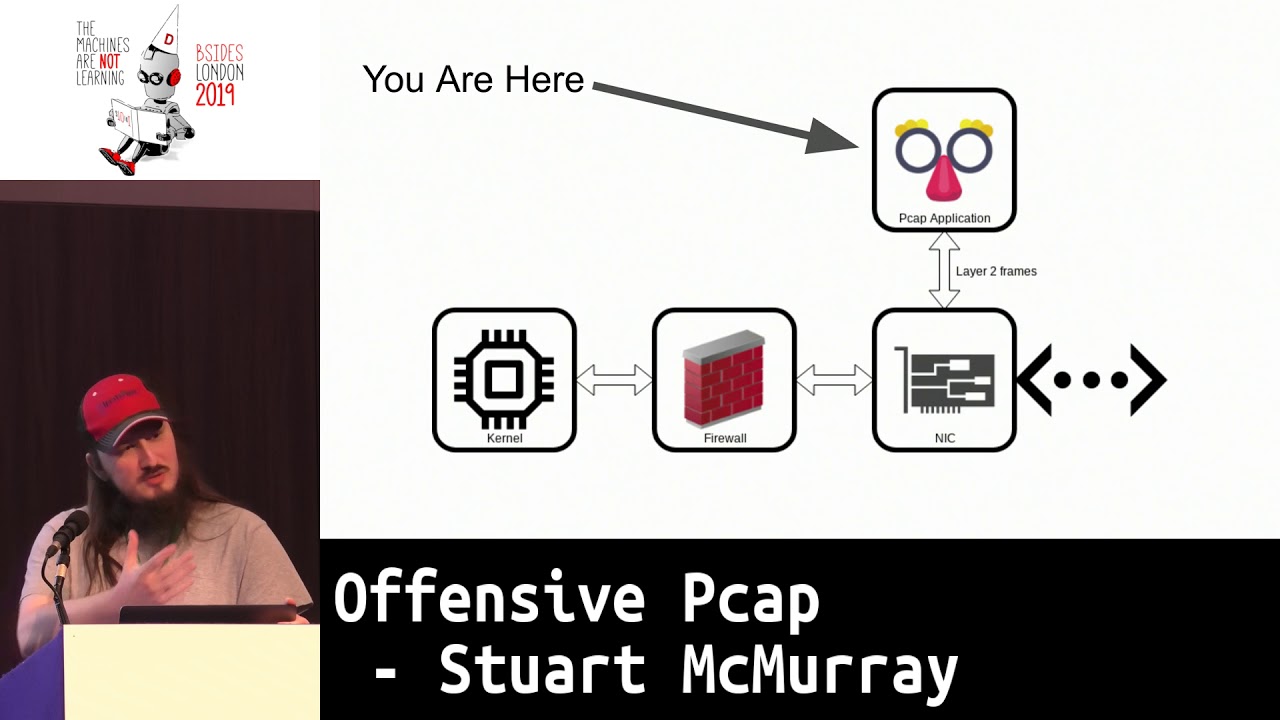
relation to a notional UNIX box cursor awesome so you are here you we have a NIC we have a connection to the network and we have some application using lid pcap that essentially does the read and write or send and receive on layer 2 frames so it'll notionally and this is of course not how it works under the hood but it'll send frames from your application to the necking out to the network and then you get frames from the network you get it into the NIC and you receive in your application filtered a bit talked about later notice the firewall is over here so one of the nifty things is even if somebody firewalls in the box ok then do us any
good so this is not on window windows works the other way around we'll see it in a bit later but you know for a general you are here right here talking more or less ish directly to the Nick that's cool and kind of painful because now we have to roll our own Ethernet frames so why would you do this um it's not exactly the easiest thing to do well from a seafood perspective HTTP is it's a well-known thing and if you can use HTTP and that works for you if you can just throw up cobalt strike and you got out your awesome that's good that's not always how it works anymore an HTTP is well known we all know it
defenders also know it and there's lots and lots and lots of tooling for HDB's okay so maybe we use HTTP ask mean it's just another letter for most of us right and there's getting to be more and more tooling around HTTP okay so we'll domain front domain fronting has the problem that you're relying on some third party some third party to help you and they typically don't like helping you ask to ask Amazon dude hey like so you know music did amazon.com cloud front he's like don't do that so I stopped it's okay so maybe domain fronting is not necessarily the answer and if it is it's awesome use it okay so we use DMS tunneling DNS tunneling is
not fast and it's not not necessarily trivial to get to work just right and not get caught and it's actually not in a lot of cases not hard to catch we're kin spongy dudes and they're like hey we need some tunneling we're testing a thing right as a DNS thing I was like use iodine I like um we just got our DNS server blacklisted because it was running iodine so uh do you know something maybe doesn't work for you so and then just okay it's fine I'll just make a TCP socket out I'll use some high port nobody even notice well then I'll still leave a little bit of a trail pointing to the box you
victimized for the nice things about pcap is we can have source addresses source MAC address source IP address source whatever layer to address that just don't point to anything and at that point you have to start like you have to go to switches and be like hey switch okay what port is this address on please hey switch report is broadcast coming from please that doesn't get very easy okay so it's like the c2 side the fun like we got a shell side we're not sniffing it's kind of like yeah we all run TCP dump right well turns out like there's a lot of cool things that you find on networks so I'm a banks network
at one point it was like well I have a box what do I do and I so I just like i was watching traffic turns out the held app running alright turns out LDAP was passing Unix hashes all right not great hashes but all right sure and then it you know ssh was using it so like anytime anybody tried to as his agent of the box the box reached back to the LDAP server grab the hash all in plaintext it's like okay so now I have every UNIX users hash hey you should have more than eight characters in UNIX password by the way so uh so as far as sniffing goes it's really cool to put TCP dump on a
box I got lucky it was on there um when you put T speed up on a box usually you have to bring a lippy cap with you and that may be it's not what you want to do maybe like you don't want TCP dump syntax in a process listing so rolling your own is actually like a really good way to go we'll see that and one of the demos we'll have so you can do you know things that most tools do but just an ad-hoc bespoke way and it's it'll work a little better sometimes if tools of canned tools work use them it's quite a bit easier so and also you can you know you can have comment that
normal network sockets don't want to spoil demo later but there's no if you're getting frames straight from the Nick there's no real need to actually open a socket I mean you'll have a packet socket on Linux or a BPF device or whatever but you know you can you have data into user land from the network without actually opening a socket so I looted two frames from non-existent sources I don't have a demo for that but it it works and then non-existent protocols so you take say TCP you switch the IP prototype II proto TCP to like some random number 100 or something and no route all right so the good news is about half the audience it
looked like which half the audience it looked like speak see so we'll go through the C API very quickly briefly just to a little you know whirlwind tour of how to pcap out of the pcap each of them will present the present what if the function call is an a brief demo briefs like will not text highlighted with the important bit highlighted of note there's a lot of error handling I myself and guilty of just like finding hey slides I do what I want copy paste that doesn't usually mean copy paste checking errors so the error checking is nice and built-in before we do that it's not necessarily obvious the first time you do this what order to do things in
how many if we read BJ's guide to network sockets okay so if everybody else if you don't write network sockets beach has this really great guide to network sockets like yes and you socket socket by and except so on and so forth listen except so TCP not man pages are a great place to start for pcap and then seeing it in practice OpenBSD source for a lot of things especially open BSD used implementation of TCP dump is really very clean and easy to read code filling all that to search github search for whatever function somebody hey I do use pickup open live so speaking of pcap open live first we have to attach to a device we take you
know your Nick on the UNIX side it's something like 8 0 and say I would like to capture on it please I would like frames from this device into my program you give it a few other parameters some I am going to be pressed for time not going to go through them each one but you give them a few other parameters and it will return you a handle sort of an opaque pointer as he often does this is what it looks like in real life so we'll open we'll start capturing em0 set a fairly large capture buffer it so it's too small you risk run the risk of missing chunks of packet or that miss maybe okay maybe
you do actually you only really care about the header of note you need to pass it in an air buffer too if you know you want to see what there that you get is then you have to you have an option you can either pcap open live which allows you to set some parameters you can pcap create which is more or less the same sort of the modern way of doing it and you give it your source device m0 and last example air buffer then you can set some options you can say hey I want to this timeout one buffering packets or I want this timestamp type or what have you and then you activate it pcap open
live does not all in one in one go that's about what it looks like you call the three check for Arizona's use P sort of as a read and write so before that typically you compile a BPF filter and this is this is like you see in TCP dump I want TCP port 80 all right watch TCP port 443 and push header or the push flag set and the syn flag not set or something along those lines you can get very granular BPF is actually a complete language it doesn't loop but it's like a four word language it runs in a little vm so you can do some interesting things with it anyways you got to compile it to
vm bytecode that's how you do it and then you have to set it on your pcap handle when you're done free the memory is allocated so that's what it looks like so in this case i'm i'm intending to dump on TCP port 80 i will compile that to a struct BPF program and i'll pass that and set it on the filter and i'll free it before we actually do anything interesting you're not especially in linux you're not guaranteed that your layer 2 header is going to be what you expect it to be even if it's an ethernet device you're dumping on it might not actually be an Ethernet header it might not be the 12
bytes ish forget the design number of new through there so you fast say hey if you cap how big is this header and it will say not how big the header it is let's say this is the data link type and then you have this big old switch statement it's like if it's Ethernet this if it's raw it's this if it's whatever else whatever else and this actually comes in handy if you don't really know what the devices Linux device names are not necessarily accurate especially when you get into the kubernetes docker side of things so just kinda important to know how to how far to go if you care if you're actually going to
start parsing packets this is what it looks like so we have some some magic initialization of P which we'll use in the future slides as well grab the data link type and then you'll have some sort of switch well had it somewhere in the code anyways you'll have some sort of switch no two functions pick up tattling Val the name description which I total skeptic on the last slide give a nice human readable name for your type and a brief description so if we want to receive packets there are equivalents to the receive or read system calls it's sometimes I often easier you're just going to keep doing it to loop it and it contains a looping function built-in so
you pass in that opaque pcap handle you pass in a callback function and you also get this nice little user pointed you can put in there whatever you'd like it's an unsigned character pointer but you can cast it to anything is just a pointer so assuming you're on a system where you can cast players to anything which is most of them nowadays I'm your handle that looks like this there's that same user pointer it's passed in straight this is all single threaded by the way so that is immutable so notice it's not a Const it's just a pointer it's that little thing you're showing up it is that's cool that's not what I wanted um anyways you
get a peek at packet header apologies for the quirk there you get a peek at packet header it'll tell you the amount of data you got off the wire and the amount was out of the packet originally was if your capture buffer is too small because maybe you only care about the headers or something then you'll know how big the packet wedge is originally I find that you get the buffer for the packet it's what it looks like you loop it you give it your call back and it just it goes error handling you can break out of the loop with pcap break loop I believe in which case you'll get a negative two as a return value so
about what a handler looks like obviously you know in real life they're a bit more interesting than this taking this the you know the user run some character casting each manager and will just take it as a contrived example to count the somewhere in there count the packets but notice we get the length of the packet on the wire the length of the packet we captured and just you can index into it just as any other point early so I mean any other unsigned character I use byte pointer pick up inject is they send or right side of this you send you just like any other right you give it instead of a file descriptor a pointer but other than
that you give it a buffer and how many bytes and just goes puts it on the wire which means you have to actually get your layer two right if you mess up your layer - it's not gonna go anywhere so unlike a raw socket you actually have to take care of the entire stack you don't need an ethernet trailer and the ethernet checksum though the device driver will handle that so what it looks like it looks no pretty much like any other right we've initialized our pcap we've you know it found some way to generate a packet and we've stuck it on the wire um you can get partial sense especially in go I know but I think see
as well you know you're you know TCP use normally get parcel sends UDP it's like here did something wrong pcap it's the same as any other thing that stateless your connection list it's like oops goofed few other handy things net on that end on H is a header file that you include just about every peek at program has a whole bunch of constants in there that are defined there's a handful of functions P can't look up to final divs and clothes that will find a device for you on the UNIX ID it's easy you you know it's a short name it's bridge 0 or tap 0 or wreath 1 or whatever on the windows side it gets very complicated
because they like to use you you IDs for everything and device names are no different so um it's sometimes easier just to say hey user here's a list of devices please give me like you know a menu list give me a number or something those will handle that as far as calculating check sums I got sick of doing it by hand so I wrote a library to do it so if you're free to use it just nice and is elicenser BSD license every which permissively licensed um it has a single function in it package up some calculate and it calculates and inserts your check sums so roll your packet add that you know package checksum calculate
and then send your pcap inject worth mentioning escapee again it's a it's very fast to write and see we're very fast to run so you not so fast to write and see and it tends to work forever once you get it right but if you really just need to send a packet scape ease generally the way to go so few handy structs that mostly provide headers here so when you receive packets on the pcap loop side of things it's you know painful to calculate offset by hand it if you're doing one or two whatever but oh no it's often easier just to point a struck ether header at the beginning of your packet figure out how big that goes
point a struct IP at the next you know layer and so on and so forth mix writing quite a bit simpler for these you'll often need net uh net in dot H included so that's cool C is fun how do we actually run it compiling is almost like compiling anything else this is just a wrapper around packet sockets and setting a beefy F filter so it's not that much different except you have to link in lippy cap lippy cap is not necessarily always on target so you might need to bring it with you which works so statically building it in solves a lot of problems you get the latest source there I find myself typically I just
bring down the source build it works so you can on Debian boxes of course install Lippe captive L or something like that in the P octave or whatever um which works you're not necessarily guaranteed that lib pcap is the same as the Lib pcap and target so so I typically statically link it in things I found interesting or useful for writing pkp programs macros for config we'll see you in a bit we're gonna inject program straight into system D so you don't really have the option to give it a config file um as a report came out a couple weeks ago about a group that just they like took their binary they added a config
file to the end encrypted it and like hey just read the binary it'll be there that's cool and tell somebody like decode your config file and writes a blog post about it also find it's quite handy to instead of putting things in main if it's just a single use program you're always gonna run it that way cool but instead of putting things in main putting making it a constructor function which will run as a standalone binary or if it's injected I was talking to the fellows this time about a square yesterday and I was like alright TLDR don't run programs so constructor functions as threads that you shove into things is probably a good thing to start
doing that's about what it would look like compiling so in this case you can assume that pcap hello world is going to ask what device are going to need to know what device to capture on suite 0 or at least what device to attach to and for this case we'll just link in pcap as you link in any other normal library those we could pilot flags I was used they worked pretty good everybody has their own other than that you just give it a source and go so then how to run it as a standalone binary it's like any other standalone binary the exception that you either need root on most unix-like systems capmetro if you're running on Linux on
Windows you don't necessarily need admin if you install the pcap driver and system right service right scuse me you don't actually need capmetro I would hazard to guess most of time if you find peak app installed it's because somebody's running Wireshark to debug something or forensics something or what-have-you so it probably won't need admin it's not a bad thing to drop privileges because at this point you're you know do all sorts of strange things and buffer overflows happen and so on and I found it's it's you know just I've dropped TCP dump on a target to drop my map or whatever and just say hey SDC is peaking up there ldd I'll tell you an objective
library it's no different than any other shared object you build except that the process you inject into needs to have some access to underlying pcaps underlying mechanism so this is not you think oh yeah any route process works it's not actually how it works it turns out I have yet to figure out why so feel free to tell me but systemd works it's not stablest thing ever syslog tends to work and TP descends to work so yeah containers cost trouble as they often do but the cool thing is then you attach to a bridge device and you're like hey I own all the boxes so pker that create and then a double fork can often solve
your problems so you just you inject into a process u4q fork your decadent process you spawn a thread u4q fork now you have another process that has like no binary on disk if you're going the LD PSO preload route to inject and it's not necessarily not necessarily a pcap thing but there's no impotency with pcap if you have everything and it's been from experience you injected everything and everything's listening for a trigger packet or something and it gets it then you have like a thousand shells calling you back it's not not always what you want LD preload is a good way to take care of that if you can sneak that into an init file or I think the group I was
reading about put it in a T profile all right so first of the demos this will be a little program it'll just tend holo world as the layer 3 payload to the broadcast address so I've either net hello world like we saw a couple slides back we'll select the interface we inject on via of a preprocessor macro so D device it's worth noting I did not point out the backslash quotes are important because otherwise it we'll go straight to the source and that is a string and then we will write this so that it happens in a constructor not in Maine saw somebody taking pictures I'll put these slides on Twitter right after the talk so yeah well we'll run this in the
constructor not in Maine for the sake of injection and mixed verdict demo or source and ASCII cast all these demos are recorded as ASCII casts by the way so if you look me up using the same Twitter handle and ask innama they're all they're nice and copy-paste well so that is about the demo that is the demo Wow gods with gods of apologize this is gonna be every one of them I think so uh my apologies there you go so on the demo box we're gonna grab pcap source code we're gonna compile it just like you compiled almost anything think back like the old Slackware days of everything configure make make install - the make
install because we don't really need to install the system-wide also I'm not route but we just we need to compile library since it don't need the reenter special this happens PK app is a well-used tested bit of software it's not likely that the compiler warnings are a bad thing necessarily so grab a source have a look at the source real quick there there is a the layer 3 payload here notice that on an end I H in the cell you include pcap older versions of pcap if you're on a really ancient box it might be pcap /p k @h there we go so here's here is the actual not main but the function that'll run before main it's real simple
grab a make a buffer know it out we'll put a point in either header at it copy in the source desk dresser and ethertype so we use the chaos ethertype because it's a demo and it makes it really easy to find on the wire it's also kind of neat if you're showing like hey look i'm on your box and i could in theory inject whatever i want into the network but it's something safe that i know nothing's gonna pick up use whatever ethan type you'd like unless you have old Lisp machines on your network chaos is probably pretty safe so copy the buffer in and then it's almost just like opening a socket open the
device inject the inject the frame clean up and we're done notice main just returns there you go so this is how we would compile it as a binary it's pretty much the same we set the include path because we're gonna need to figure out where P Kapton H is so the include path so we can find it and we'll compile in pcap statically the rest of the library will be dynamically linked just just lib TCAP will be in there statically there we go let me see it's just it's you know looks like any other binary if you're doing super deep forensics if somebody if you're at the point where somebody is looking at your malware and they're like looking at link
libraries you probably should not be on that box anymore but there we go it's also kind of big that happens it's you know static linking static dynamic linking then we'll compile it as a shared object as well just like you compile any other shared object another nifty way just compile in one thing statically is say hey linker static eyes this one thing and not the rest and notice we have to point it at where the P capture P kept archives are so looks pretty much the same except this is a shared object file also by default debug info not stripped that might not be a great thing if you suspect somebody's gonna find your mother on target
so we'll just TCP dump real quick and we'll look for anything that IP casts is not IP there might be ARP frames it's okay and I'll print it out print out the hex and ASCII I'm back rounding it so we'll have like combined output all right cool well run it like we run anything else there we go so we have our next frame it has an Ethernet header and printing starts at layer 3 by the way and it prints a holo world and that's that is that's as easy as injecting is you can actually do a lot of cool things with injecting it turns out so we'll just this is this typical DL open shove
it into a process notice we'll use pin 1 which is system D be careful with it it's maybe not something you want to do just like hey I found a box but it makes for like a hey you can't do this Mike Oh watch this Laurie ever injected it we got an oval void pointer so DL open return to us a pointer as opposed to know which means it worked yep it did in fact in Jack again if somebody's like going this far that they're looking at in it for your amount where you shouldn't be on that box probably cool also notice we have our we have our hello world it did in fact work
in jumbled output and we'll close it there we go um that will sec fault system d if the library is still in use so works for injection not so much for sniffing there's no closed sniffs anything there we go that was the demo all right so that's that's nice theory so let's have four or four things four little demos of what you know you can actually do with it most of these were written based on things I've done but the source code wasn't public so the implementations of or just proof of concept of things other things that are internal so first thing we could just sniff the wire how many of us have heard like no no we don't
encrypt inside that's that's resource consumption in hard nobody can get in anyways it's like common thing yeah there's like a million hands that are like this hi so so it's working at this place and they were like yeah so we're good inside and then they use FTP to get from them to clients it was a bank by the way so um see some FTP if you're on an endpoint it goes without saying you only get endpoint coms you can get a lot of endpoint coms so talk about the LDAP creds there and if you're on a router you can get anything traversing your router if you're an environment where they're using say the freebsd firewall
the name of which just escaped me if you have sense thank you half the crown fusing pfSense compiles great and pfsense works pretty good if you have sense like everything runs as route by the way so and the GUI reflects like config files not reality so works pretty good also routers in the DevOps modern Kubb docker world are usually linux switch devices or bridge devices or something along those lines so your router is just nice and tcp dump little it's not a bad idea to filter narrowly so if you add this to anything anything you're looking at tcp and you're actually looking at the internal so the tcp little DPF filter bit that will keep you from having to deal with
headers basic layer keep you haven't excuse me keep you from having to give us in finn's resets so on and so forth means less time spent in user land less fewer copies from kernel user land and so on there's a few tools that do this already TCP dump we've I mean we used it a few seconds ago it works pretty good the output is not that great and easily possible I've done it the first iteration of the LDAP hash thing was just TCP dump in Perl worked really good d sniff is old venerable and works there's a whole suite of tools that you mostly are still relevant and they have a lot of interesting pcap stuff built in
and of course Wireshark or T shark cheese chart gives you a nice configurable output Y shark is of course easy to read so demo a little thing called telnet watcher I wrote this originally to watch a telnet honeypot many years ago you know it sends it just takes whatever ya know payload TCP UDP Pio and príncipe standard out I was watching like people tell that in live it was interesting I've I've learned the hard way not to put things on github and expect them to not be used in ways I don't expect so all of these have something that makes them not just copy paste able by people you wouldn't want to use your code on this one's written
for open BSD open BSD is quite nice for development it's not a lot of them BSD targets out there so probably is okay their source code is pretty simple feel free to use it modify it as you'd like it's you know pretty much the same as this TCP dump line here so we have a contrived scenario which is from real life so you've landed on a host involved in ftp ting off some bad financial transactions and you've got root so yes actually happened this is about what this looks like so we'll have some transaction transfer box running enough to BD a bank it's sending you know that we'll use for FTP coms to send transactions to and we'll have somebody
who SSH is into it presumably to admin it or maybe the SCP into it and then we have us delete hack stores doing our thing on route that did not switch there we go alright now did I remember to set the lang oh I didn't so we'll just go like this would not be a demo if I didn't do something wrong all right so this would tell that watcher so we're on his route and hopefully you're not actually running a you know getting help on target that's about what that looks like so we'll ask it to caption port 21 on vio 0 and Alaska to print out unprintable bytes is hex I when I was TCP dumping or whenever
excuse me actually watching telnet that what has a lot of protocol stuff that doesn't get printed so it's kind of interesting also I found out that new lines and crlf don't always translate from system to system very well so we're dumping and looky there we have banker Joe logging in and we got his creds that was some unfortunately a pretty realistic thing that in several seconds now we have credit you know maybe we can reuse who knows and we see him batching off a file so now we say hey by the way bankers I also have your data I learned the hard way not to see I got rude I was talking to any HR guy and it's like hey
dude I got rude on your system he's like no it was like so I can like see all your files he's like ok it's like so like I can read write stuff he's like yeah it's I t's problems like hey look payroll database like I found my salary I could like add a zero he's like oh my god so um oh my god we got transfers and we could change them in flight cool so um I was talking to it was a UNIX admin actually I'm Amazon the guy believed and he found himself on a target we're on a box he's admitting he's not a red guy and he only had true story the OpenBSD
installer and he needed to get if I was like the one thing that would boot this and he needed to get files off OBS the Installer is like a really small memory footprint so like you have memory that's all messed up it works and we're like how do we do this and he we came up with the idea we used the user agent field open BSD FTP does HTTP I would use the user agent field which works it gets logged so in this case well you know notionally say on this box we have SSH say we have access to this and we want to exfil the key I'll just use the password field it's not likely to be
logged anywhere you know there's a reasonable expectation that this box can be doing a lot of FTP maybe not this box so clean nobody's looking too hard and you know something along these lines will we'll get an SSH key probably just tell it watch your grab it so that is the command will run on the SSH box the internal box so yeah we'll dump on if you really really care about the user in pass specifically the password anonymous isn't up there's my little uh that's cool anonymous is anonymous they're sometimes typos get past your one sorry oh cool so lurks got our pass get our pass cool so we'll basically reverse the Pearl we used reverse the said pearl is an
awesome tool to put on target when you need something that you can't just like ride utility because you can't read that and I can't read that and I wrote that and certainly the dude triaging this isn't gonna read that and there we go we get our private key it's it's actually a lot slower this than this in real life s Kinnaman has this nice thing we're gonna like compress pauses like you watch a cooking show and it's like I put this in the oven and look it's done already that's gonna does that for us so as Mike a sniffing the wire by the way alright so next thing so that was cool so we we
have think we've watched the wire we've got comms we sort of injected in a little like how to compile a demo let's actually make some comms pardon me let's actually make some comps without a socket so um there-there is technically a packet socket on Linux there's BPF device on most of the vsts everything has some underlying mechanism they don't usually show up in that stat peanut this is what the the university that I was red teaming against did they just put this in a loop it was like anything that was not port 80 dropped and then port 80 bound and I don't remember why I didn't use it but I didn't so we'll just mooch
existing comms anything you can get from c2 to target somehow you can use because you'll be able to see it soon when you write your BP I filled it properly um you know like Buzz Lightyear it's not not flying it's falling with style this is not comes as such sniffing with style if you're going to do like box - box - box - pcap logging happens depending on how you're getting it there I will use SSH that will cause some logging the yeah you don't actually need to go direct host to host bonus points if you have something else to do it and then people are like hey so what is listening and then you you start to use
this and like hey yeah I'll just like implement some protocol or I'll keep like message numbers so I know to retransmit and then you're like I need something tell me to retransmit like well maybe I don't need every retransmit and you realize you're implementing TCP I have about six different iterations of TCP over DNS and every time I'm like I might reopen TCP so till I have out there pcap noggin this is the one I wrote for that that thing I mean it just sniffs the wired weights or something interesting so you can either give it the word command a command to run and the word command anywhere in a packet or as long as it can sense it on the wire
or you can give it the word call back an IP and a port colon port or underscore port and the word call back it'll call you back with a shell it's nice and stack bullets it's out there you're welcome to use it runs standalone its cross-platform I've put it on FreeBSD OpenBSD Solaris Linux missing one somewhere probably not Windows so much it's also don't I don't recommend it using it in an actual Red Team engagement as it does no encryption no authentication so nobody play attack protection so if you're gonna use it you probably need to add that kind of stuff in and for the scenario we will say we have a log server compromised already
we've got root on it so back to our transaction transfer box oh we have some syslog server we have root on it we don't have direct comms to it because this is the only thing internet facing over on the Internet and we would like to get a call back from syslog we'd like somehow to get a shell in there there's the asking of a link again for this so vio 0 is our local box so weird dot 42 locally and this is what we'll be calling what we'll be using to trigger our implant we can assume you have pcap knock on the syslog box already so what we'll be using to tell the implant to
call us back we'll use this as a login name obviously it's not a valid login but probably not a valid login name but what we'll do is make a syslog message that goes to the ssh server in the estate you know say yeah I'll call you back that's 43 where SS aging to 42 is us and we'll background SSH I'm all this is just to probably make it quicker and not require terminal input and we'll sketch it with neck hat [Music] all right we have it listening typical sshe stuff here we go we got a callback for 44 so the log server 44 and that this is the you know typical ssh like hey permission denied so i probably
logged somewhere let's have a look it's what it looks like okay in it is me painted is just been sh with its file descriptor 0 1 & 2 so standard incident about standard error connected to the network it is dupe 2 then a network connection over to it notice I got PS which is psi was running as a child process of K in it but a whole bunch more that's because I couldn't really control how many times it was logged was talking about impotency this isn't an amaz route it's cool too so that's that's where my code was living so it's in system DS you know it's injected into system D works pretty well that's how I
did it let's have a look at what it actually looks at on the wire notice um injecting in the lip pcap are sees me injecting a TCP dump did not work very well I'm not sure why I didn't have time to dig into that unfortunately so got a syslog message there we go this is log message looks like a syslog message except it has our nav magic little string in there so it calls us back all these by the way are on github and I'll link that as well on Twitter after the talk the W there is just so I can know TCP dump is finished I learned the hard way to specify a packet capture counting TCP dump when
doing these things but I have met Kat because ctrl C does not kill TCP dump so that's cool so we have sort of two a coms we have inbound columns we don't really have outbound coms and if there's firewalling the thing won't necessarily call us back so we have this ability to read pack read frames from the device and get them into user land we can open a tap device Linux is time tap thing your my tap device and send frames from user lands straight to the kernel and IP tables slash net filter will filter on top zero or one of your top devices but it probably is not configured to do so in a lot of circumstances as a policy is
dropped probably isn't likewise we can take that tap device read frames get into userland we can inject with pcap which means we bypass a kernel nicely so you know basically we're by past firewall nicely so no firewalls cool there's also by the way I didn't write the code for this but it makes a nifty VPN if you take the tap device put it remotely have some sort of pre-existing comms between the two and just use lippy cap on the victims side to inject frames and sniff frames there's a similar functionality and cobalt strike can't for the life of me remember the name of it SSH is w option does something similar just with extra steps um it's also was
like a first real offensive malicious pcap project I made other than pcap knock which is kind of simple um so basically we've got Network talks to pcap talks to our user lying process doctor staff is your own kernel and then back tool called bypass FW bypass firewall it does exactly what we said again to avoid copy pasting and finding it and having security researchers tweet at me it's nasty grams this will only work on open base to you right now it's um you know a minor modifications it'll work on Linux or your next engagement the one caveat is BPF filters and if config kind of do you can't necessarily just say yeah I'll just make up a MAC
address and I'll th the P and IP address and it works especially in virtual machines and like a VirtualBox or VMware the hypervisor knows what address what MAC address should be on that switch and if you get it wrong then they'll be like no someone's doing something funny or the other way happens and it's like you're sniffing sees everything it's like one supposed to see that so um take the network you've been on and we'll say FTP for whatever reason isn't working probably because the last engagement or like hey we just like did bad things with FTP please switch to something better but you know we still have the guy's creds he didn't change it it still
gets us SSH and we want to FTP for whatever Breezies there's the source for this ask you cast again it's what it will look like this is not the network this time this is the on target like architecture for lack of a better word notional is not actually how it works if you look in kernel code but now we're gonna go get a frame onto the Nick will have a BPF filter that says yes I would like that frame get into our user line process Jack didn't via the tap device into the kernel likewise the kernels say yeah I want to sum something out the tap device we read from the tap device and go out tap device by the way she
probably shoulda mentioned earlier most normal Ethernet devices or interface you have Colonel on one side and copper fiber Wi-Fi whatever in the other side tap device you have Colonel on one side and software on the other side so the colonel as far as it knows it's putting a frame on the network but the driver is your code you can do whatever you want with it like injected on to the network again or so what it looks like in practice so FTP did not work for us we can still SSH in you got his password what on earth is going on this is an open BSD box I was like do I use Linux or open
BSD and it was like you like a pilot for lytic syrup from BSD and that solved that this is pretty stock open BSD firewall this it's a last match wind thing so we'll drop in on our interface and in on our interface and only allow it on port 22 so until there's five minutes left so we're gonna go really quite quickly okay that explains why that didn't work put up our binary get on target we're gonna grab the MAC address of the existing one because this is VM and we have two you can either make the tap device before or after let's software make the tap device and set parameters up to you so I find that
easier to read anyways cool they worked I'll bypass it and FTP works again maybe there we go so that nifty little way to bypass fire with minimal effort minimal changes to the box got em something in like three months later it was big incidents but up we need every config change you made to the box was like I ran a program so there is no config changes there once you stop the program writing alright last thing in three minutes now Steve Hanks me dr so this is a little Windows programs like hey it's all UNIX stuff windows still has a very very large footprint TLDR it watches for packets if it sees a packet it grabs IP IP port pairs so the four
five tuple and ask the Windows kernel to please drop it params called EDR sniper source and I wrote a little wiper to test it with so I just put I googled like best free AV best free antivirus 2019 put it on target test VM and put a wipe around the test VM please don't actually run that in real life this is what this looks like notice inside the firewall the end of system cool there we go no s Kenema just a bunch of screen stuff so we have the wiper here and we have EDR sniper reporting what it's dropped here and anything starting with a seven will be the antivirus addresses so yeah so it
dropped some things and you know av called out was like hey is this okay and it got a since an AK and a reset and then I'd like drop some more things that probably shouldn't be gone or a blew away some more things that probably shouldn't be gone and he was like hey is that cool maybe there yeah it probably is alright yeah and then that happened and at that point thanks this is all this is all just normal Microsoft calms the system is still up that was like hey what happens if I do this so that happened so you know I've actually been asking over the past few days hey what happens if you
don't have carbon black Splunk OS query what not in the answer is well at a certain point we just got to go knock on the door and tap on somebody's shoulder so the flip side is if you drop all tcp your user like your victim will probably notice I likely don't have time for a summary so that I knew was gonna be running out of time as did my cat feel free to just look at the slides you know the TLDR here a couple ideas if anybody's looking for a quick fun peek at project any questions which I'll take afterwards which I'm told I'll take afterwards the Twitter QR code there and thank you very much
Related talks
 28:37
28:37 47:15
47:15 33:48
33:48 49:41
49:41 35:42
35:42 34:45
34:45