Demystifying the First Few Minutes After Compromising a Container

Show transcript [en]
Morning. I'm Stuart uh McMurray. I am a by day lead offensive security engineer. Uh by night I'm a Unix nerd. Ma'am. >> Okay. By day I'm somebody who doesn't know how to use a microphone. Thank you. And in the back you're audible now. Agent. All right. Uh pretend I told a really cool joke. >> If you want to increase the volume, just go in here. >> Oh, thank you. >> Yeah, you can. And that's for there. >> Oh, nice. Hopefully it shouldn't making any noise. Um, >> yes, the joke. Uh, by day I am a lead offensive security engineer. By night, I a Unix nerd. We used to just call this a red. Um, except tonight I probably will
be a Unix nerd with a cold. So, apologies. Apologies for that. I have no idea what's going on in social media these days, but that will probably work to get in contact with me. Um, and I'm not associated with container or docker or anything. I'm just some rant dude. Also, there is a sort of CTFish thing if you want to take what's in the talk and try it yourself. Um, aha, that works here and it'll be on a couple slides. So, feel free to grab that, drop it on a deon box. It will kind of take over your inbox. Use use one you can get rid of VM or something. Standard disclaimers, this is not my company. I'm talking to me.
Um, don't commit crimes, etc. And if you do, I didn't tell you how. Anyways, for the next however long, uh, we'll just talk about sort of the general idea behind container compromise. Um we'll we'll make a little dummy target. We'll talk how about that works, how that works. Uh get some initial access real quick to it. Um and then we'll spend a little more time doing sort of inside the container things like what's hacking looking like inside the container and break out and do things from outside the container eventually breaking back into a container. Uh there'll be some other things in there probably. So without further ado, um what what do we mean by compromising container? Um,
if we were to look at first question with compromised, well, take some sort of lock down something, something we're not meant to have access to, something that sounds like, hey, there's a a conference room full of hackers. I would like them to not be able to touch this. Um, and we take a conference room full of hackers and and they do something uh to to access that box, to change its state, to read something they're not supposed to, to write something, whatever whatever whoever it was stopping us. Well, didn't stop us. That is what we mean by compromise. no one sort of sort of like this is it. Um, but take it take it what it's worth, which
is cool. Now it's a container. And that's the next question. And and we'll answer this in several steps. But for now, if we just ask an application developer, the sort of person who's writing the things that we are trying to hack into, um, he'll probably tell you a container, well, it's just one of those things. It's where my application runs all nice and self-contained. A circular definition. Uh, I promise a better definition later. Um, for that, why why would we compromise a container? And and simple answer is nowadays that's where things run. Um is the cool hip buzzword. Um there's test driven development, you know, like you write your tests and then you write your code until the tests
pass. I I think it's a lot of um resumed driven development nowadays. You write your resume and then you develop your system until it passes an interview. Um and that's actually why like that's because that's where our target space is. Uh speaking of target space, we will have a single server and the server itself is not particularly important. It's Linux because gainers doesn't really matter. Um, a conference room full of hackers. Check. Uh, the server does not matter, but it does have a couple containers running. It has a an HTTP checker process. It'll let us check if a website's up. It has a password store that that sort of a front end thing where we can request passwords and
a legacy database behind it. It'll be our our target to break into. Uh, if we look use Docker PS as as one does look at what is running and it doesn't have to be Docker. This is not particularly Docker specific. We'll see. Yeah, we have a password store container. It's listing only on local host. So can't can't hit that from the network, but our HTTP checker is listing on all interfaces. Uh sort of a admin DevOps utility server, I guess you could say. Initial compromise will be uh the HTTP checker. That's what we have access to. Looks like this. Um it is a very sophisticated website. You stick in Oops. Stick in the right arrow button.
It's gonna a URL and it will tell you it worked, what the output is, what command it randicted there. Very sort of like some manager asked, hey, how do I check this websites up? And someone made him a gooey for it. Um, but of course we notice being enterprising hackers, there's a couple quotes. There's what we typed between the quotes like, ah, maybe this is injectable. So, we'll try it. Simple little payload. Um, and if it prints the working directory we're in, we win. And it does. Uh, that that is what stuck in. So you can see you kind of you know closed a string comment or closed a string next command so on and
so forth commented out we have we have our output that's like yes we ran arbitrary commands that's nice we've compromised a container pretty simple and and it does happen in real life um so at this point let's stop and ask ourselves again what what is this container thing we're talking about we'll ask a sis admin the guy running this box and the SIS admin is likely to say well it's just an application running on Linux we saw slash it's probably Linux uh plus some isolation plus like lots and lots of YAML if you do anything with containers. Yes. Uh this would be a very short talk if there were more to the story. Uh let's diverge digress talk about
command control which we'll need to do things with our container. Uh sort of idea is that we we have a we have a thing we want to do something with. We are sitting here. It's over there. We'd like to give it a command and exercise control over it. Um many ways you can do this. There's there's good ones, bad ones. Uh few few helpful tips. Number one, it actually has to work, which sounds obvious, but uh there are many things that can get in the way. Firewalls, wrong platform, um programming environments not installed, whatever have you. Uh number two, especially as an internal redteamer, um don't be a jerk. Don't don't use too many STM resources. Leave things
unencrypted. Uh you get a lot farther if if your C2 is solid. And and more importantly than all of the above, uh simplicity is sort of the answer to C2. simplicity both in the sense that it's easy to set up just like a couple commands it installs itself but also simplicity in that you can keep each layer of whatever you're using in your head um that that comes into play when you send reports to people and you're like hey I I found a vulnerability and they're like prove it and then then you have this long talk about connecting backwards and forwards and things talking to things and it's like the simpler it is the better um many you can
do this uh curl a lot in a loop sometimes not in a loop SH works pretty well or whatever management software WSSM take your pick. Um loads and loads of frameworks out there that do some pretty cool things. I find that while they do a lot, I don't always need a lot. Simpler the better. Um if you're if you're getting into programming, running a little C2 thing is kind of a cool second or third or fourth project maybe. Uh so LDR what whatever you do so that your target does what you say. um giving a similar talk in Belfast and group of people out there after the talk asking questions and there was a fellow in the
back. He just kind of looked at me like expectantly and it fell sort of closer to me. He's like, "Hey, why do you have a blue moose on your slides?" And I said, "Well, actually the a teal deer, you know, TLDDR, teal deer." And and the fell in the back just looked at me and he's like, "Oh, uh I think he probably went to bar." There's many people in here when they're doing the same. All right. So, we've asked the HTTP checker checker HTTP. It did sort of uh we saw under the that just called a shell command. Um, and we're like, "Oh, well, that's kind of cool. It's a shell. We like shells. We
could maybe use curl." Uh, and curl is a program that makes HTTP requests among many many other things. We can just have curl connect back to our our server on the internet or wherever appropriate. And we'll we'll use that as our input to our C2 thingy, input to the shell, and we can make another connection back with another curl. And we'll hook that up to the shell's output. And oops, there we go. So, we just have now birectional coms, a couple TCP streams in a shell that's already there. Easy enough. Uh, the one hacker tool we'll be using is called curl rev shell. It is a reverse shell using curl and uh very easy to set
up. It looks a bit like this. Uh, typical install. Nothing interesting there. It installs itself. Run it and it will just give you a oneliner in blue there to uh say, "Hey, you know, put this on target." And it's is um in the interests of best devops practices pipe to sh. So staying staying consistent with our target space uh what you're piping to sh is really just a if we back here a curl pipe to a shell pipe to curl. Not much to it and it works. So stick our shell injection. Um it does get injected. We're like hey you get a shell and there's a magical moment where you're like going to come back going to
call me back. And sometimes takes a couple minutes for things to spin up and you're like going to call me back. it called us back. First couple things we run uh we set our hist file environment environment variable to dev null. Um it is not likely something in a container is going to be logging history shell history to a file. It's also not likely you're going to find an SSH server in a container but that also happens so you never know. Um and then we'll just a typical situational awareness processes who are where we are etc. Um we're in a container and often things are missing. There's no ps in the container. That's kind of a problem. But we do see like
game looks very containerish running as root. It's pretty normal. Um containers are like the well it works on my computer and now it works on your computer. It worked on my computer. We'll run it as root. Uh another quick quick diversion. Okay. So as somebody group of somebody who just got a shell, what is this container thing? Well, actually it just looks like it's Linux missing some things but just Linux under the hood. That is that is sort of what it is. Um which is nice. But what does that actually mean for us? Before we answer that, let's make a quick side quest uh to proc. Proc is sort of the underlying things for all
these a lot of what we do. So we we asked for a process listing you know uh by the way this is a great way to list processes in polite company. This PS o dear um if you need a pneummonic for it but yeah so we asked for pear see what's going on. Uh, of course we didn't get we would have liked something like this nice like tree left tree formatted thing, you know, user ID, your usernames, PIDs, all that good stuff and work. Um, we'll just use proc to get that. And what proc is is among other things file system. Um, it's just a mounted file system like others. It's kind of a funny file system though. It's
not really actually files. A bunch of null bytes or a bunch of a bunch of zero by files there. Sure. It's a kind of a window in the kernel with a filelike interface. We can we just use your typical open read write whatever but ask the colonel questions. Hey Colonel, what is the command line running? Colonel is an elf binary as a command line. And we just read that from the command line file. It also will give us info about processes running. Each process has its own directory named after the pit and um exe is a sim link to the run process. Running file com is the name of the process which is not same necessarily.
Uh devices we can see the partitions you know disk partitions that are there. Network things. um often times it's not formatted in a particularly nice way but unhex it's fine uh information about the kernel has all sorts of good stuff that you need once in a blue moon and so if we were to run ps if that actually worked we would have issued ps here the shell would have broken that out run it and p would have just a bunch of reads of a bunch of different files in proc asked the colonel hey can you read this file for me the colonel would be like yeah sure this file contains bsh whatever whatever and our nice process
listing back uh which we did not we can instead said just ask for things from proc ourselves like we ask to ls proc to get the sim link uh else we'll ask the for read links read link system call kernel will go back and say yeah it's user bin whatever whatever and tell us ls tell l tell l tell l tell l tell l tell l tell l tell l tell l tell lsum and then it looks like that if there is a container hacking process listing um we will do better later but a super simple way when you're when you're there and you're not sure what is uh proc has a bunch of other interesting files these
are the ones that as I was putting slides together just came to mind first um They are handy. Uh pictures. There we go. Um CLDR this procing our side quest. It's a bunch of systems files. It gives good information. Um in case anybody else taking pictures. Yeah. This is the one everybody is like pictures. And as I'm looking like next set of the audience. Oh yeah, I should. All right. So uh side quest complete. What should we really mean is what we're actually going to answer um with Brock. We are inside a container, right? So what does this mean? Well, let's look at it from an inside the container perspective. Where are we? We ask this
uh ps of course did not work. We will ask this inside the container style ps and read all of procar. So everything procar command line. Uh we'll read that. We'll print out the file name just for ease of visibility. Uh and then a lot of things in proc are null by separated. See c see f st strings there's just string string null. String string null. So we'll just turn those into lines because it's easier to see. um and out the uname a ID that we wanted originally and it looks like this. There's the proc one command line for the echo here. And we see proc one has three arguments. Um fun fact, Windows ER gives you a string
because Windows gives you a string and and I've I've been told that Linux edr just gives you a string. Um so do some fun things with that. Exercise exercise for later. Anyways, proc one is docker init definitely in a container. There's the rest of the process. Um this is us by the way. There's the curl shell curl that is that we've been using. Um, also prox is the the the uh similar to your own process. So in this case the shell is doing things um the name ID so on and so forth. And there's sort of our first first blood I guess or first thing to steal some creds we found. Um it's entirely likely whoever was using this
actually templated the cred in the proper place and followed security procedures and so on. Um and and six layers of abstraction later it turned to command line arguments. It happens. Um, be nice to devs. They don't they don't often know what argu is, but cool for us. Got a secret password. Um, a little easier to see there. Uh, a better practice is in some people's opinion using the environment pass credentials instead of RV. Uh, which is cool except proc pit environments procid command line works almost exactly the same. We'll sort it uh graphically. It's really nice for AWS cuz all your AWS things like a top uh and it looks like this. And then we're like, well, we also
found an internal services password. It's a fairly easy way to steal things. And um one of the nice things about the container world is sometimes you don't really care what else is on box. You're like, well, I got my container. I have I have my my creds. I wanted to move laterally. Life is good. And sometimes this is this is the first few minutes and that's it. Um but that would be a very short talk. So do that. Can also pass credentials via files. Uh proc mouse has the list of mounted file systems. Saw that earlier. And often times there will be just a file method somewhere um see hosts frequently but other things resolve there we go another
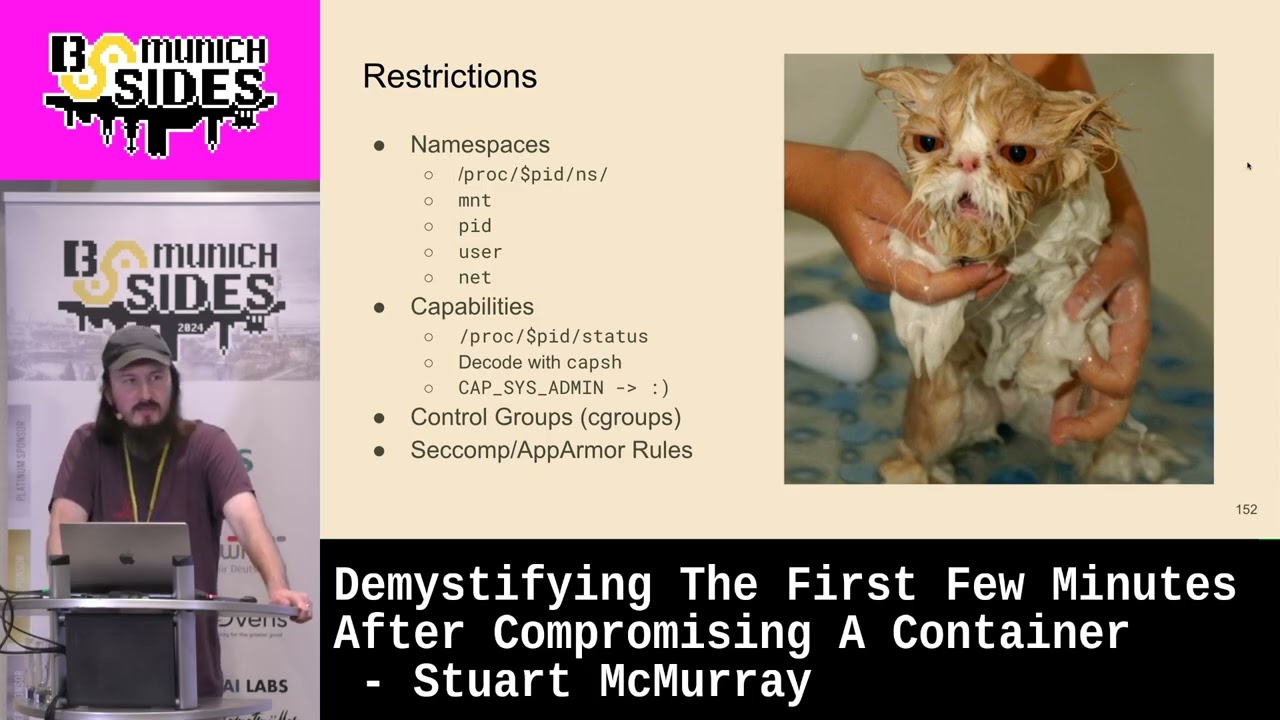
one and we can grab you run secret API key and get some sort of secret API key as well um okay so what we were actually going to ask is what inside means and really we've seen now we some value of we are just a couple processes curl shell um and we're processes that have just some other restrictions relative to the other processes on target uh these restrictions come in the form of name spaces what an space really is is sort of some metadata tag if you will that the colonel keeps for you just number there's a bunch of them that that are restrictive that the colonel uses to give you a different view of the world
um is one so if if you are in a mount name base which really means the process that is doing things like listing files has this particular tag set or this particular number you will see a different idea of what flash is um it's hierarchical by the way so your children processes sometimes your sibling processes proc pit root is the root of your namespace. You can just look in some some container namespace. It works pretty good. Uh root in there or whatever. Um proc pid or excuse me the pid name space uh we noticed that our container only has a handful of p six pids in there. Um pid name base limits the number of processes you see and
renumbers them. So there is always a one docker in it or something. Alo hierarchical user same thing. um the interest of time won't talk about it but suffice it to say two zeros is quite nice and means that what we see as root the rest of the boxes is root net is not so hierarchical and with net name space you cannot see into your parent child containers or processes network name space makes makes dumping network track kind of interesting we'll see that later um handy way to see if you're in a restricted name space is look for if link or if index and if and if they're not the same number you have a v pair so
it's something that inside the container looks a normal Ethernet device outside is um virtual pair. It's also capabilities proc self status is a great thing to look at. Um and you'll see that in the effective capabilities it's a bit mask. So if you have a bunch of fs is good you have all the capabilities uh cap groups cap will decode that for you. Um also mention for no new zero is zero is good one is not so great. uh croups echop app armor rules are not as photogenic rule croups kind of bind a process together. This is a group of processes that have this set of restrictions on CPU usage and such also they all die together. uh
psychmer rules are a very very roughly something like a firewall for system calls very roughly and then tlddr escaping container really is just a process with a normal set of all these a process that has mount pit namespace of real or you know non-container in it so on and so forth quick aside we talk you hear about privileged containers like don't use privileged containers usually in that context and docker themselves uh will be like if you if you have to. Please don't. Here's here's all the things it adds. Um, privilege container is also like maybe you shouldn't do this. You don't have to. Um, it's sort of the modern chimod 777 in pseudo. You know, you get you get
some knuckleheads like I don't know didn't work. So, I just ran I pseudo and it worked. I don't know why. Uh, so now it's like my tainer didn't work and I ran it privileged and now it works. I don't know why. And uh it's quite nice for the rest of us. Anyways, cool. So, uh the question we've been answering, what is container? Let us ask a group of a group of conference attendees who are seeming to escape this container is a container and it's okay. It's just another Linux process just give metadata but it is a Linux process like any other um how does escape then so there's two techniques and and put the slides together I just Googled how
do I escape a container and the first thing that shows up is a mounted socket um and it works sort of it usually just gives you a privilege container we have one of those it is good lateral movement uh if you have coupube socket Kubernetes socket mounted you're like I would like a privileged container over there on on a box where there's a cohabiting container that I want it's quite nice But uh it's just a privileged container. We have one of those. Uh the other half the search results on the first page of Google uh were croups release agent. It works for Croups V1. And I I have never got this work in real life. I'm sure it
did at one point, but never mind. Another thing that works pretty good mounting a partition. So um we are real root. We say, "Hey, give me all the partitions on the box." You get the major my number. You can make a device file, mount it, root into it, etc. And then you can just add to crying tab or add an SSH key outside the container, whatever. not you're not properly escaped. You don't have a new process, but I mean add an S shap and sh is good enough. Uh actually voice proxies kernel core pattern and that is uh it makes a smaller system change. It doesn't modify the system quite so much. If you modify
cron tab, it runs every minute and you have like this minute of am I going to be cut? Is this going to break things? Avoid that. Um it's also my experience anyway. It's a little easier a little easier to not break things. But really anything if you can get out, you can get out. Every CTF now has got some sort of container escape some strange contrived situation. But yeah, TLDDR we just need something inside a container that will make a process outside a process without the rest of the metadata. Uh theory behind proxy's kernel core pattern is if a program crashes just right and then that means gets some sort of signal that does this sigv is one of
them. uh it will create a core dump where really the kernel creates the core dump which is just a file with some debug information and the kernel will look in this file prox's kernel core pattern and and file it's in proc sort of like a file that lets us set a in the kernel uh for the pattern for how to write the file name if there's a percent p in the pattern it'll use the the crash processes pit so core percent p turns into core 103 something along those lines um but that means we have some level of control over what the kernels even inside the container also if the pattern starts with a pipe vector.
Instead of just writing a file, the kernel calls a program that is the rest of that. Splits it on spaces into RD um it calls it as root calls it as a child thread D which is two. It's very much not a container thing. Uh but important it you know the restrictive metadata is not so restrictive. Um and we get nice command execution. DDR we will take an outside container process or make an outside creator container process using the crashy core handler in real life it looks a bit like this um we'll just write a script in our container core handler the bash script and um we'll we'll starters we'll just set our standard out and standard error
to a file named whatever script is going to be called the core handler and with that because outside the container it's going to have a different name it's not going to be /core handler but whatever we'll write it to whatever we are out uh send standard standard error there so we can then see the output of what else is running in the script. So process listing and hopefully psodier actually works this time. If it's not in a container, it should uh make sure it works. Give it execute missions so on and so forth. Um that all work nicely. We will sleep. We'll run a sleep for a while. Uh so it's easy to search for in
a process listing. A nice grapable sleep. Looks like that's going a pattern originally was core on Debian DRO specific. Um we'll change that to pipe proc root. Remember proc pit root is the root of a processes file system. Root of processes mount name space. Um so that percent p is going to be our our crashed process. So inside our container / handler the file made that is that core handler excuse me. Uh looks good. And then we need something crashed. So we'll just run another shell and we'll have the shell send itself av dollar sign dollar sign pit of the pit of the calling process or excuse me p calling shell. It did. It crashed. Core dumped.
Core dumped. Uh, and we see we have the core handler.out container. Uh, core handler.out file is right there. The one we made. If we look at that, we g for our PSO deer. We see that, you know, we have our shell script up in the kernel thread section that you kind of scroll past when you're looking at a process tree. Uh, that is the kernel threads. And there's our script. Yes. And that is init. Well, it used to be init. Scroll down a bit. Grab grip for the sleep. And this is this is our container. It's just or Linux process. Um there's our crashed shell which will live as long as the crash cordump handler lives. That's cool. Um I would
rather shell than running commands one after another and modifying a script. We'll more or less the same thing except we will instead of exacting output standard out standard error to a file. We'll use exec to set argv0. So there is a difference between RV 0 process name process binary so forth. RB0 zero is going to show up though in a here is what he ran. Um EDR again no naming names whatever but it's like this is what the command was very very definitively incorrect. Um, and we'll just name it something that looks like a curl thread. You know, something completely benign malware. Um, and have that call our curl piped sh from curl rev shell earlier looks good. Uh, sleep
so we can find it. Everything looks happy. Um, self-sacrificial shell seg faulted so on and so forth. Uh, finally putting the core pattern file back. Um, if you do not, you might wake up the next day to several shells. Haven't done that. Uh cutter call back PS works this time nicely which is good. Um there's the thread D of which we are a child. Uh down here um no reason it had the shell pipe to shell shell child shell shell. You can you can do it much more gracefully. Um it's just easier this way. Uh and now now we have a container. So we are out. That's that's from the exact minus a there. Um
there we go. Scrolling down. This is this is the entirety of our container. So we have taterd shim runc which is child or the doll dock nit was what we saw like way the heck back when 10 minutes ago when we were likeing processes container style and there's the shell with that's the curl pipe to shell shell which then spawns another curl pipe to shell pipe to curl. So there's our container in our sleep that we were looking for. So what we did then now we just have a normal normal shell uh via a core dump handler. Nice little escape and it works pretty good when it works. All right. So back to this this question this
persistent question. What is a container? Five as a group of people who now have escaped a container. Container really is just another chunk of a process tree with slightly different answers from the kernel. Kind of the same thing as restrictive metadata but restrictive different whatever. It's just chunk of process. Okay. So we're out of a container. That's nice and all. Um what do we do with this? Cuz if the box we've just escaped on is running containers probably all the good stuff is happening in a container. And our original goal uh way back when was this this password store the front end thing with a strange legacy database. Um now that we can do things like search for it
and we see that uh for reasons which are totally obvious the password the database is written in fourth sure is the process that does the front end HTTP thing um graphically there's that fourth database. Um if we list the root directory of 25 which is our database else is just like yeah it's similar. it points to the root of file system and we're like yeah sure let's look for the files passwords whatever and the root of file system and it's not quite there um but we can cd into the sim link and then suddenly if we ask the files for the files it's there it's a weird one u as things in proc are so
if at first you don't succeed you're in proc uh could try and run it you should not usually just run random things on target like oh it's on the pro listing oh run it that can have unintended side effects um but I didn't in this case because fourth on most Linux boxes is not there in a container. Sure, we're not actually in the container. Um, we can get the file anyways. We can grab that. We have Xfilled super sensitive IP. Um, so we're back in the the process or the current work directory of our fourth process. Let's just trude there. Um, typical like yty is not working. Can run a process listing or but now we're
rooted in a container. So our root of our mount name space is now the container routeish. Um, we do see that the fourth brows are there. Sure, we try and run it. Fourth is there now because it's sort of in our path. It's where you expect it finally. Uh, of course, passwords.fs is not there. Whoops. Get out of our group. But it is a useful way to find things. And it's especially useful if you're running AWS CLI, coupe control, something like that where files are sort of expected to be in different places. Um, sometimes that that is really all you need. Um, which is cool. We actually like to sniff the traffic, you know, figure out how
these things work, grab a password live. Um, if we list the file descriptors, proc is a list of open files for any process. List the file descriptors. We'll see for our back end our um, our fourth databasey thing, we have a couple sockets, but but we also have password store fs, which is kind of neat. It's a deleted file, and you can just totally grab procit fd4 and the file is yours. It's deleted. Uh but we have these sockets standard out standard error or vector or standard in standard out protection sockets. It's a little interesting. If we look at the front end thing we're like oh there's a socket with a suspiciously similar number. If
we look at the uh TCP connections inside for this process's net name space not ours. If you just net stat it wouldn't work but yeah for this processes name space. Look at the TCP connections. We're like ah there's kind of like Unix kayasmus going on. These are probably talking to each other. It's some hex backwards, but yeah, close enough. Talking. Okay, let us look at the iode numbers. Yeah, they line up. All right, we can probably just sniff traffic and figure out how these things are talking and not have to pick apart forth. Um, entering a container theory and and I've been asked many times, why not just use Docker exec? And the answer is uh then I
have to figure out if Doc's on the box, which is not guaranteed. And um that is a known a known trick. It's a bad guy technique, so I don't want to use it. Um the theory behind what we're doing it is network namespace are not hierarchical. We can't just list files like we did proc bid routt. Um and and it gives some people a false sense security. You're like oh network inside a container that's visible right. Um and and as I mentioned there are files that uh sometimes you really do just need to be in the container it'll work. Python dependencies forgot to mention that another ter one. Um but as we talked about processes with funny name spaces
and other things namespaces are are what gives us our view of network. Um we don't want to lose our capabilities or switch croups whatever we just want the network namespace. Um so we'll just mooch it. We'll just grab one processes and um grab the network name space from that in the container whatever whatever a container is for us today. Um there is our container again. Uh if we list the network name spaces of ourselves prop self and the frontendy thing we get two different numbers as you would expect um mount name spaces similar two different numbers two different name spaces two different views of the network and the file system TCP dump we have outside this is this is installed
on the normal outside the box the host um why I don't know but it's there uh because it would be a very boring demo if it weren't and we'll use nsenter and na center net space enter. It's not specific containers. It just we'll enter a namespace and we'll enter a namespace from this fourth process and just the network name space. You can enter all of them if you want. Um but we really want the network namespace and not the mount name space cuz we kind of would like TCP dump. But we see we're running um it spawn shell. also NS center our shell spawned on a center and center exeact itself into a shell and so
on. Uh and we see now that yes our network name space is the right one and we see we still have our right now name space we'll still have TCP dump but now TCP dump can be inside the container. Uh we run it like this. Couple interesting things um listening in loop back and and loop back is I believe per network namespace loop back. So this is not the loop back that you would normally see if you just sshed in. Um, also we're only going to grab three packets. Uh, if you have a shell like this, C is not really a good idea. Oops. Not really a good idea. Uh, so limiting the number of
packets you capture means you don't have to reexloit. Anyways, we see it works. We see a packet coming to us and it's like, oh, somebody's somebody's LDAP username. That's quite nice. We see the uh password coming back. That is good. And we finally finally 31 and 1/2 minutes in have got our password. TLDDR uh entering a container then is really just having right name spaces. Last last iteration is a container. Um yes depending on what layer of abstraction you're working at. Yes, it is. Um and really do you care? Not really. Quick summary. So hacking containers it is not terribly much different from using Linux. Uh you just use proc a little more and make some strange
processes. And the container themselves, they're just groups of other Linux processes uh with some metadata. And the escaping parts, just less restricted processes. Um, by the way, the CTF thingy, if you would like to go retrace these steps, you can grab that there. So, my god, we even have time for questions. Amazing. Thank Thank you for any questions. [Applause] tool you give out. >> I I don't have an answer because a I'm not going to say yes and then what's going to happen to somebody over there that's going to be like well actually um nobody in particular is that direction. Uh, I I think you would you would be surprised that it it will get past most
DDRs, but I I don't have the breadth experience testing it on everything possible to really answer the question, but let me know the question. Also, this is my coworker and a complete jerk. Jump behind him. >> What would you suggest if you like >> where it's fun? Then you can upload your own curl if you can find something. Um some shells depending on what shell you have will just make a TCP connection for you. DevTcp which is not really dev. It's a shell thing. Uh of course then you're not encrypted. You can use open SSL if they're there to make a network connection. Pretty much anything that will make a TCP or whatever network action anything that gets bite to and
from preferably with some encryption and not using spiking the processor whatever else you know. Um it doesn't it doesn't really matter too much so long as it works. You can do you can do C2 over git like it works. Yeah. So very situationally dependent. Um good question. >> Yes crash. >> I caused a host crash. The you never really know. Boy is this a non-answer. You never really know because you know it's all remote and you shouldn't have access to the back end. Uh I've caused certain things on hosts to crash. I've caused some DOSs of larger systems. I don't know about a specific host inside, you know, from container escapes. It's a good question.
If I think of it while other questions are answering, I'll let you know. Are we even recorded? Any other questions?
Yes. Person I definitely don't know and I'm not married to.
>> So the best story to this question is I've given this talk before in Belfast and I I have 276 slides and somebody in the audience um I also definitely am not married to asked a very similar question knowing I have a lot of slides and I just kind of held the left button a lot. Yes, I can. I have a different slide deck. >> What What side did you want or does it matter? >> Oh, right. Yeah.
There I can look. It's It's actually quite I mean sort of maybe was there actually a V1, right? Just there's like tough crowds that are like your jokes. I I live in Berlin, right? And um telling jokes to Germans is not guaranteed. >> This is the opposite of that. >> Yes, we can go back to one for you. Any other good questions?
[Applause] Yes. you seems like you know [Music] question was there do I see a benefit in in a platform like as Fargate that get more restricted containers um I mean that's definitely not a benefit to me uh it is a benefit to somebody though um under the hood though they tend to if it's containers unless they're super different it's Linux you you know, there's a t-shirt like my other computer is your Xbox or the cloud is just Linux. Yeah. Um I I can say some of the stranger run times um have have been problematic for me like pattern there. There's there's one and I couldn't tell you which one it is. Like it says core
pattern is mounted and then it's actually fuse mounted and it's not really core pattern. So um so yes, the actual answer is yes, it it can be but situationally dependent, you know, also extra complexity, cost, so on and so forth. So um it was a good question.
>> I question question was what about exploiting kernel? I have not thrown a colonel exploit probably in a decade. Um I I I avoid them because they are often somewhat unstable. Um and that will that will the box sometimes. Uh >> which actually might have been the last way I I oops colonel. Yeah. No, I mean when they work when they work, they work. I I would much rather spend the extra time and effort finding creds, finding another path. Yeah. Yeah. Um >> that was something >> I I in my experience, Noah, but I have I have a very limited experience compared to the rest of the world, I think. You know, I'm just dude. Um nowadays though,
things are patched very much quick much more quickly. Oh, can warning. Yeah, things are attached a lot quicker nowadays. Um, so it's also less likely you'll find something. Yeah, that's Yeah, good question. All right, and we have two minutes worth of question. Minute and a half worth of question. >> Minute and 15. [Music]
>> The colonel have let's will the colonel tell me which container runtime it's running? >> Uh, yes. But you have to ask the colonel's executive assistant. Usually like a lieutenant say LT is running. All right. That was not a good joke. Um the yeah sort of so the colonel will processes and sometimes those will tell you. So very technically yes. Uh but I mean maybe if you looked at a colonel version it's like Amazon Linux Kubernetes maybe. But um but I mean once you hit under the hood you kind of don't care that much. Yeah. So yeah, um not that comes to mind, but it is a good question. It's a good good thought. Yeah. Right. Are we
one minute? One minute.
>> Go back to the slide. >> The you mean the one where I was like, "Okay, people take pictures." I was like, "Okay, we're going to flip slides to see." I'm like, "Oh, wait, wait, wait." Um >> I don't mean it. I just wanted to see you slip. Do we have any gentleman from South America? This really is a one question and my wife's not from South America. Sir, are you one? >> Is your name one? >> No. >> Anyways, we'll cut it for you.
>> Thank you. >> I appreciate that. What are we looking for?
Related talks
 29:01
29:01 33:46
33:46 40:34
40:34 30:04
30:04 22:40
22:40 28:59
28:59