Living Under the Land on Linux
Show original YouTube description
Show transcript [en]
Hi, I'm Stuart. It's his fault. Um, I am a principal offensive security engineer and we're getting a lot of Jesus's mic. We're getting a lot of feedback. Um, we used to call this a redteamer mostly. I just fiddle around with Unix. Uh, don't say that outside of security conference, by the way. Uh, anyway, social media things. I I don't know what's cool on social media anymore, but you probably can get get in contact with me there. These are the oh damn it uh notes and such code whatever else uh it's on GitHub. Quick disclaimer I am not speaking on behalf of a company or anybody just as myself. Also we're not going to there's there's no targeted
pooping on products here or projects or such um purely high level assumption of Unix knowledge here. Anyways, what we'll do, we'll grab a quick shell and we'll use that just as a start to um talk about how things maybe work a little bit under the hood and then we'll get into the more offensive side. So, without further ado, here's our shell. We have a little exploit script. Uh we can use this script to send just a command some target. Um there's nothing particularly interesting. This is a BSD box. It works nicely. Our target is a Debian box and we are running as vitul. We're not root. It will catch a callback with a program called curl refshell. Uh as its name
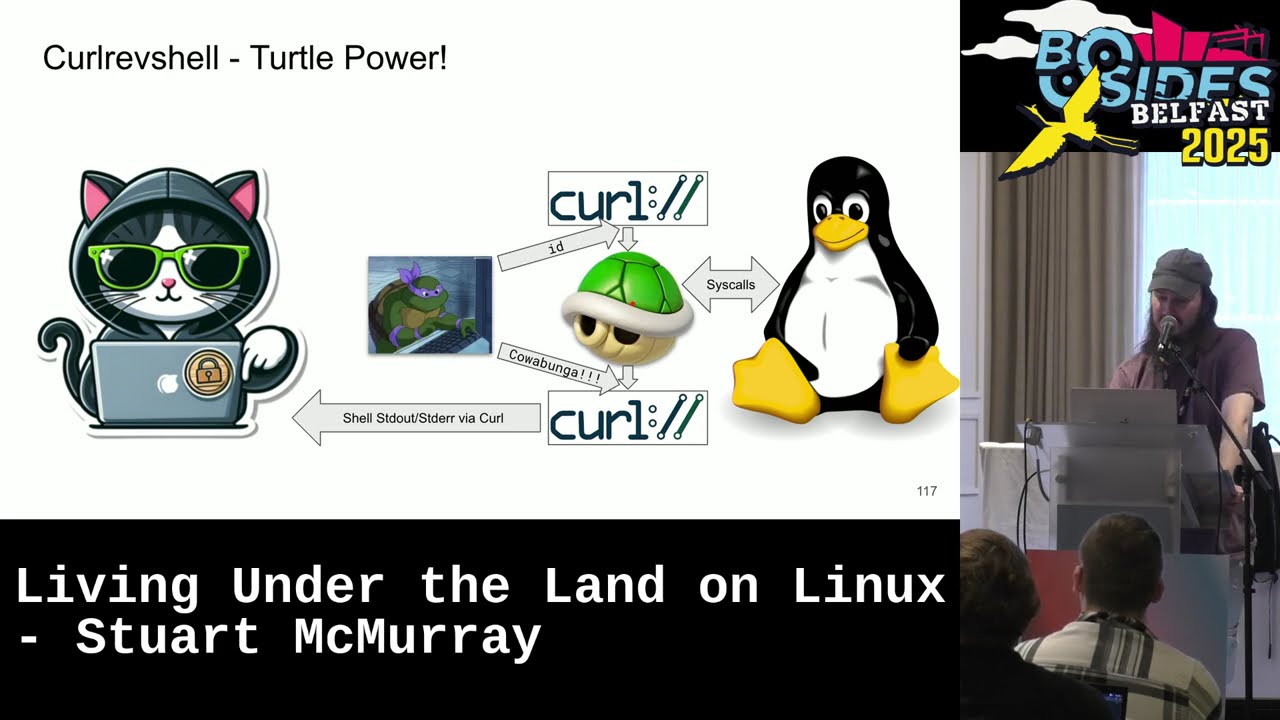
implies it is a reverse shell over curl. Gives you a nice little oneliner to um get a call back. Runs a little script on target. Pipe it to bsh. Here's the code. It is more or less done. Anyways, general idea is we will take uh us a shell. The shell will spawn a couple curl instances. One to give input, one for input, one for output. That will connect back to us over HTTPS. Um we'll send commands to the input side. get output from the output side. And really going a little later, we're just going to send standard in via curl and we will receive the shell standard out, standard error via curl. Of course, the shell
itself, all it's doing on our behalf is making system calls, the sort of thing we're talking about for the next however long. Uh this is what it looks like. This is the uh put the the callback line in a shell, hit the enter button, it will send this script that goes to binsh, and we'll get our input output and the shell is ready to go. First thing we'll do is dump a process listing. Um I'm I am every so often asked what are the malicious commands? I I knew a sock analyst who is making a list of every malicious command. This is not a malicious command. Um in fact, actually this is probably the one thing
that if you're on the blue side is a great way to figure out what malicious commands are running. Um here's what it looks like. If we scroll down a bit, we see that uh Don probably his admin is logged in. We see that we're running audit D. We have some sort of EDR going. That is just we're having feedback here. That's just watching uh audit D logs. And there is actually EDR that works this way. Um this was written at a time when somebody was supposed to be making slides. Uh we also have the server we exploited. And this is us. It's kind of goofy looking. Uh and if if somebody also dumped a process listing this way, he might be
like, "What is this?" Uh notice we're not root. We're we're on a sis what user. Um, and we noticed that we have not really run any custom code yet and we'll we'll avoid it. We'll mostly live off the land or under the land. Um, also for situational awareness, we're not in a container and none of this none of this that we're talking about really cares if you're in a container or not. It it all just kind of works. So, TLDDR, uh, we have the simple shell. We type things. Our target did some things. Um, last last year I was talking on track one and after the talk there's this group of people asking questions and a
fellow sort of at the back of the crowd was just kind of looking at me and somebody in the front was like, "Hey man, what's with the blue moose?" And I said, "Well, actually, it's a TLDDR. It's a teal deer." And and the gentleman in the the gentleman in the back um just kind of looked at me and left. [laughter] So, uh yeah, if you're if you're here, sir, this one's for you. It's a teal deer. All right. So, bit of theory here. Um, back to our shell. This is us. If we say we are on target, we are the target. We are hacking. This is we we are a shell process and we run
commands. And in this case, our command it spawned a program. Um, and most of the commands you run really are programs. Uh, the shell itself is just a program. And and let's let's shove that and and let's talk about sort of what we're doing with these programs. I'd say the bulk of what I do on a Linux box is try and access data, read files. Um, here's a file. It's not a file on disk file, but it is a file and it has environment variables for our vulnerable server. And and the general way to read a file, you cat it and you get output, which is good. We can do slightly better. Um, we cat this and we can let's
look at what's happening under the hood. So, we'll s trace it and srace just prints out a list of system calls. Um, I had a very angry bolster coming towards me for a second there because it's shell stuff right away. Anyways, we see uh argv and argv is not the command line. It is called the command line and you'll see in certain defensive tooling this is the command he ran. Well, not actually. Um, this is the dev null thing if nothing else. But actually, the bit we're interested in the bits is that curl for us opens a file. It reads the file, writes the file. These are system calls. These are these are the interface between us and
kernel. Um system calls which are somewhat hard to read. We can we can dig in for those who are less familiar with them. It we'll take the registers and a system call really is just sticking a number usually ra and some arguments the file descriptor for the directory or negative 100 for we don't care. A path name which is just a location in memory a pointer just like how far from the beginning of memory we're going. Uh maybe some flags read only. And then we hand that over to the colonel. And the colonel is like, "Ah, somebody has called a system call. It is system call 257. He would like to access this file. It'll update a state
table, a metaphorical state table, probably several of them. Allocate us a file descriptor number and return that to us in rax." And then uh we get that and we're like, "Oh, we have opened a file. We have file three." So from our end, we're like, "All right, if we want to talk to the colonel and do things with this file, we use three." The colonel's like, "Hey, if he says three, he really means this iode device pair." And that's that is kind of how system calls mostly all work. Um, read will be similar. We say, "Hey, system call number zero, which is the read system call. We want to read from file descriptor 3 whatever that is open to."
And we don't really care. It's just it is a file descriptor number. Uh, I mean, we opened it so we care, but really it's a file. We can just say, "Here, stick some bytes in that buffer. This many bytes up to this many bytes from about hereish. Um, hand it off to the colonel. It returns to us. It's like I read 454 bytes and our buffer is suddenly full and write works pretty much the same way. Um except we'll use file descriptor one standard out and where that is going if we for some metaphorical we are cat we don't care anyways returns us and it looks like that um and and turns out Linux ops is really just loads and loads
of system calls. Uh there's a whole bunch of them here is a table. Uh there are many linked to it there and and pretty much everything we do really is just a lot of these system calls. Okay, so here's our edr logs and we'll tail them. And of course tail prints the last and number of lines 10ish or whatever. Uh and just to make things interesting, we won't just tail the file. We'll actually echo the string tail procrastination edr.log to a shell and run it. We'll see that we do get shell output or excuse me tail output edr logs severities commands that were run etc. Um, we do that with S trace and see what
the shell is doing under the hood. First, we see that the shell is executed. Okay, as as you would hope. Um, and the shell all it does is another read. So, all these commands really it's just what is a command? I don't know. Standard into a shell. The shell will parse it and figure out what to do with it. In this case, the shell is like, oh, I will I will start this tail program as a result. Looks for tail, finds it, starts it, um, forks off a new child, process, and exacts tail with the file to tail, which then of course doesn't open, a read, a write, etc. that works. Um, and and then we have now mostly
we've just been reading writing file descriptors. Kernel doesn't care. It's like, okay, file one, I'll send it to you. We don't care. It's like, hey, send it to file one. And and all of these pipes, excuse me, all these pipes, all these programs are just connected by file descriptors. Our curl, our shell, whatever else. If we list some files, if we list dev fd0, fd1, fd2, those are kernel provided links to our file descriptor 012. We will use that later. Um, and we'll also list the file descriptors, the open file numbers for the input curl, the shell we're in, dollar sign, dollar sign is the pity shell. Uh, and the curl we have, oops, we'll hit the button twice. So, there's
a shell and we see that it's fd012 and ls is inherited from the shell is is these pipes we have open and these are the pipes from curl uh 0, one, and two. So, there's a nice neat thing you can use as dev fd sometimes. If we look at the relationship between the input shell and the input curl in our shell, we see that yep, input curl standard out is piped and it is the same as shell standard in. So we could maybe abuse that um or just use it to hide a bit better. Same with shells standard out standard error. That is interestingly going to file descriptor 3 not curl standard in and curl does look a little
funny. Um so we have a sis admin on the box. We saw uh he he will echo ID to the input the input file descriptor or rather the pipe going in and the shell I mean curl doesn't care. It doesn't know that somebody's writing to its pipe. The shell is like oh somebody wrote me an ID in a new line and the shell just runs it. It works. Likewise our our sneaky sort of trollish sys admin can uh write to file descriptor 3. It'll write to curl three here which seems to be where our output is going. And yeah, we see the output come up through the network and into curl revshell. So you can you
can use this when you want opens to happen in one place and reads and writes to happen in another. It's actually really handy escaping containers. You like get your shell spawned outside the container, but then you have inside container file descriptors that are hooked up to you somehow. Yeah, just use them. Um, of course, this is our our turtle in the pipes doing strange things. Uh, slightly more graphically, here's what happened is Don Nutello sent the ID to this pipe. shell did things, sent it out. Likewise, sent text straight to curl and out. Quick aside, uh I find that OpenBSD's K trace is easier to use for visualizing system calls. Give it some complexish command and it will tell
you aside from running it, it'll tell you what happened. K dump will dump the trace the output of the file. Little easier to read, I find. Um IO is definitely easier to read. And then if you're just interested in command line arguments, it uh it is slightly nicer there too to see. Cool. Uh, so here is our EDR. Let's talk about this quickly. This is not based on any real product, but all it really does is tail audit log and um you could replace the whole thing with a Pearl script if you want. An EDR largely is just reax in a trench code. It will look at command line things and be like, ah, you have matched it. Look,
somebody ran pseudo, that's priority two. Somebody ran not pseudo, that's priority five. Um, the EDR, by the way, has no response actions. it uh it is just ED. It works better than some ED. Um and for the people snickering, I meant this ED, not that ED. Anyways, I my own observation is the blue team uh speaking of SIS calls really likes execve. They like to see what we stick in execve and do reax on that. So we have we have tailed our log. We see that. Let's run this program called witch which which uh will tell us the paths to programs and it is itself a standalone program user bin witch. It didn't find type though but we stick
type in our shell and it it will tell us as a shell built in that type and echo is a shell built in. So we have two echoes one one shell builtin and one not if we use the shell builtin it will just cause the shell to make a write standard out and that will be nicely invisible. If we use bin echo which is its own program which now has an argument vector called execve that will be visible. look at our EDR logs and sure enough the visible one is visible. The invisible one was invisible. So we can do a bit of invasion evasion here. We can we can make read and write system calls and
whatever else as long as you avoid an exec fee. Um it's good enough for the theory I think. Let's start hacking things. But TLDDR we just need the right sys calls in the right order to do strange Linux ops. Cool. Mentioned we're not root. So and the reason we're not rooe is because it's just easy. If you have rooe you can stop your edr. You can say yeah I can run pseudo and kill. I can run this as root. Um, EDR is running. It sees us run pseudo does not see much else. And we can see that our EDR is in the sleeping state. This is a EDR pit. Sure. Senator stop killed does more than kill. Kill
send signals and and the stop signal does not kill. It stops. And yeah, EDR is stopped. Sure. We will echo something that should be visible and find out is not visible, but the stop was visible. Uh, if we want to undo that, send it a continue and then we can see things. So, TLDDR, there is no point in doing any of this. It's root stop EDR works pretty good. Uh there is also a shell built-in kill. So if you have if you have a standalone root shell, just use that without forking a kill process. Pardon me. All right, back to Oh, see my taskbar, my menu bar. Back to this. Um so like we are hacking a box. We would really like
to grab things. The easy way is cat. So we look at the mounted file systems. We see mounted file systems. Of course, we see that then sock sees us seeing the mounted file systems. That is not great. We can do better. we can redirect it in. Uh it's slightly sneakier and we'll look at the TCP connection table uh hexed and backwards but sure and we see that and that's less visible. We still have a cat there. If we look at what was happening there, we'll trace a shell running this cat redirection. We see that the shell before we fork an exact the shell does the open for us hooks up file descriptor 3 partnet TCP to standard in then it
forks an execs cat and cat does not care. It's kind of a theme here. Does not care. It just reads and writes from in and out. We get what we want. All our files, all our data comes to us. The SIS calls are all made in the right order. We don't really care what made it. Um, do one better without having to exec a cat. That's terrible. Uh, we can look at the ARP table, the MAC addresses the box knows about. And we'll use read and read will just read a line from standard in or whatever you tell it to. Uh, every time we read a line, we'll echo it, put it in a loop. We see our ARP table. But
we and and we can do slightly better. We can look at our network device list uh pipe that in normally dollar sign curly braces is a uh command but put a dollar left angle bracket there. It'll slurp a file and we can echo that out and that would also nicely read without any sort of fork and exec. Uh unless you're on a Debian target and you're using the Debian Elmquist shell, I think and then you don't get that. But we can just exec bash and go on life. Look at the com. Com by the way is the process name as much as you get a name and that works. So now we have nice file read write no
fork and exec. Excellent. And you can use this you can almost like implement core utils. Say you want to find out two files have the same contents. Kind of like diffing them. Um if an interface index and interface link index on the interface are different, it is a v pair. It's helpful if you're in a container. Same thing. Just read them in check it if it's the same. If it is, echo a message and yeah, we find out that's a VH pair. Um if we want to look at the mounted file system say but we want to find if there's one that's has read write and not no xsec not no execute i. i.e. somewhere we can drop some tooling
to run. Same thing we'll just reimplement core utils. We'll reimplement uh grep works but it's a fork and exe or it's an exact list GP. It's it's all the system calls from GP minus the unhappy ones. Um also a little faster. Works nicely. Cool. So mentioned a while ago we're running curl refshell. I did not mention that we have some strange flags here. This uh control I control I is tab. You can tab in a script. Um which means you don't have to type things so many times. If we were to write say cat our own xc cat extended cat. Um if we if we reimplement four util or more utils we implement core utils and write four of them we'll get
four utils. Anyways put cat there. Tab it into the shell. Now, now that is just run as shell input and all the shell commands is just the shell reading, right? Yep. Cat it out. Now we have a nice cat. Um, except shells don't particularly like null bites in your input, which is not so great. Okay. Uh, yes. Thank you. Do the same thing with read except read with a d and a uh empty string. Oops. We'll read up until null bytes. So, it's kind of a way to translate null bytes into new lines without using tr to do it. uh run that and yes we get we get the same environment nicely formatted without whining about null bittes. Likewise use
it for process listing uh minus exec. Uh also by the way the tab doc thing prints you a nice little tab list little function generated little uh creature comfort there. Anyways so we had our situational awareness. We dumped a process listing and I was like hey this is not a malicious command. There is actually a tool out there that will call the ps o dear this thing malicious. Um I disagree but nobody asked my opinion. Anyways, the XPS that we had the the loop the read in a loop that will not exec looks like that. It's pretty close. Um, and if we look at what we've been doing the whole time, we see that yeah,
no, we're not actually visible in EDR at the moment. Um, cool. So, some shell gymnastics. Quick recap. All we really wanted was the colonel to do things. Uh, and it will do whatever it gets a system call to do a system call and external programs just make more system calls. EDRC sees those. So, we make sys calls. Colonel does things. Don't make the wrong ones. H switch gears a bit talk about networking. So we can do this is what we were doing you know shell standard in a bunch of math do TLS shell standard out etc. I was like, hey, we'll look at that weirdness from curl a bit later, which we will now. Um, the top curl, the input curl is
relatively normal looking. Uh, kind of complex, some certificate pinning there, but relatively normal looking. But this bottom one is not. Um, and I don't think anybody believes it's actually connecting to something normal. But it is has this flag K. And K will take input from standard in and run that as a config. Um, original curl, we ran this to get it. Here's what it did. It printed us a script. If we format that nicely, we see the top one is just pretty nical curl. The bottom one typical curl. The bottom one is kind of where it gets interesting. And this is where our okay, we just care about file descriptors and sys calls comes into play. We took file
descriptor zero standard in and duped it to file descriptor 3. So we hooked up file descriptor zero to three. And so we can now use file descriptor 3 to read whatever came from our shell which frees up file descriptor zero standard in for a here doc which is kind of a buffer field with data to pass in a config and the config called us back did certificate checking uploaded a file so on and so forth and uh that's a total red herring. We're just like hey pretend that's a file curl. Curl's like yeah couldn't read it or whatever. Shows up in our process list though. Um so that's not bad but we still have a
minus k. We can do a little better. Say we want to use curl as a port scanner. Um, make sure the config file is not there and we'll just drop a config file to disk. So there is no no file in uh temp. So we'll make a config file in temp and shell globbing. Another sys call that the shell will do for us. It's get dense get directory entries. And we really care if the temp directory has a directory entry that's curl rc. It does now but the shell filled it in for us. Nice. There we go. There's the config. We are going to connect to this this box on all 65,000 ports uh in parallel very
quickly. Port scanner. One more thing uh the time is a shell built in time keyword and we'll use that in a second. Uh but we'll run curl set its home directory to temp so it knows where to find curl rc and then just search the output for connected minus an exec. There's a fork, not an exec. And time because it takes quite a bit of time to do this and we will want something to tell us when it's done. Hit the enter button. Uh we find that we do in fact have ports. And then two and a half minutes later it's like, "Okay, I'm done." Um, also it means that the Belfast or the Dublin to Belfast trains
Wi-Fi did not drop out on me. That was a very large relief when that thing finished. Uh, anyways, we do a little better. So that still puts curl in a in the process listing. That still means we have to exec. But really, we just care that somebody's going to call socket system call, somebody's going to do a socket of connect so on. Uh, and the shell will do that if we redirect in from devcp at least in bash and some corn shells. I think to FTCP IP port, it'll do a connect for us. Um, so I'll just read a line from that and print it out. And we see that uh yeah, some some other box says Debian open on port two
uh for keeping my logs quiet, not actually security measure. So stick that in a loop. Um the colon there is a it is a program or shell built in. I forget which. It just returns true, but it's a way to if you just want redirection happening, you just have redirection happening. Uh but it will still return like unhappy if it fails. So you'll still get the amperand echo p. Um stick that in a loop. Background it importantly because it will take a little while. Also it means if you background it you still have your shell when it's sitting there finding ports and it's a little faster. Um takes just under a minute. Look at our edr logs and
we see that nope all we had was curl and nothing else. The the curl from up here and nothing else. Um I do also besides red teaming a bit of purple teaming and sometimes it comes in handy to have like a lot a lot of EDR events or a lot of process executions. So we can run CAT and we use CAT instead. Um so not only do we get a port scan which is sometimes visible in tooling, we'll get like 65,000 executions of CAT really fast. Um it's good sometimes to check your EDR's coms, there's actually one more benefit. You can tell your sock that you did a CAT scan. Mrs. M. >> It's not too late to cancel you.
>> Man, I would have been cancelceled so long before. Actually, I've I've been watching the back door because like we're coming up on lunch and nobody has left yet. And as I was saying that, a gentleman was like, "Uh, thank you for turning around. My ego is better." Though Mrs. McMurray would say that maybe you shouldn't have helped my ego any. Anyways, networking TLDDR. Uh, we would like to connect and send data. We don't really care about much else. All right. General idea with curl was this, which is cool, but say we take a shell, say we stick our own code in the shell, and that that little bit of code we stick in there does the networking
things for us. Shell will still do the SIS calls, but we don't have the curls. Oops, we don't have the curls anymore. It's a little a little even more sneakier way to do things. Okay, so let's write it real quick. We will write a little C program, little C function, and a constructor function. All a constructor function does is when a library is loaded, it runs first. And this constructor function will will connect standard IO for us. And actually that's just going to call another function we'll write here in a second. Um, which believe it or not is connect standard IO. And that will connect to our server. Uh, taking URL and a fingerprint. And, and this is doing
quite a lot of heavy lifting. Uh, and we'll have to pass in the URL and fingerprint. That's easy. But anyways, it connects and error checking as required. And then we'll hook that up to the standard IO from within the shell. From within the shell, we'll take the file descriptor of the connection and connect that to standard in plus types because this is go plus error checking as well as standard out standard error with the idea that we only need a shell process. Um, we'll build it which is somewhat of a not that easy. Anyways, there's the files. Please ignore the ones we don't need quite yet. Build it. Pass in the URL, the fingerprint, etc.
We do in fact get a dynamically linked shared object file. Uh it's six megs because we wrote this in Go. It's quite large and we can't really just copy paste a target anyways. But we have we have shell builtins, right? We can just a little Pearl script to encode anything to a bunch of printfs. Printf has a shell builtin. It will open a file and write bytes to it. Open, right, close hopefully. Um truncate it first. So we'll just encode our entire library and a bunch of print fs and uh stick that and we'll we'll print f it to the same file we've been using because it's there. might as well hit the tab button.
Um, if you're going to do this, sending 30 meg of print f commands is not a fast thing. Um, and this was actually where on the train my Wi-Fi dropped out, by the way. So, yeah, if you're going to do this, type a echo done, hit the enter button. So, that way at some point after you've fallen asleep, you'll get a done and know it's done. Also, uh, if you're going to stick this in that control I directory, remove it later so you don't do something, hit tab, and then like two minutes later, you're still waiting for it to finish. Anyways, we'll set up a catcher. It'll catch it on 5555 this time because 444 is already in use. It's
listening and we'll run it this way. Um we'll we'll the enable program or enable shell builtin says, "Hey bash, uh there's some shell builtins in this library for you. Go load this library and bash will do it." Uh and we'll stick that in a subshell parent shell subshell and then the actual bash. The nice thing is that middle shell, the the parents here will terminate and so we'll have less relation between our two shells. It's just we called fork twice instead of once. Hit the enter button. Uh it did call us back. Bash winds that this library.curl RC in temp is not actually a proper library that contains shell built-ins, which is good. Um you can like make the
enable whining not happen, but it's nice to see that it actually did something. Run a ps. Uh scroll down to the bottom and yeah, we see that now we have bash, which if we were not running ps would just look like somebody's script broke and it's just sitting there. Of course, it also is kind of strange that we have a very large bash. Anyways, um that's us now. Dump the file descriptors for our shell. We see that's a bunch of sockets. So now we're we're doing well. We don't have pipes to anything else. Um we don't have a file that was a script we've read or whatever. We just we do actually just have bash talking to us, which is
excellent. There's one slight catch. If we look at the mapped memory and this is memory that either we've just asked the colonel with the M mapap system call hey colonel I would like few kilobytes of memory or hey colonel I would like you to take this file like this file map it into memory for me and I'll just read memory and it actually does file things um which is an even less his call way of doing reads and writes and we see that well that's not really meant to be there and we definitely don't need an executable curl config file mapped into bash's memory space um it's a little weird but we have a plan so we can get
around this nicely. If we m map ourselves a buffer and copy data from each of these mapped regions to the buffer and then very quickly map the buffer back over map remaps it and uh since the buffer is now occupying that memory space the colonel is like oh I guess the file's not times five. Um we'll do it this way. We have it it is in a library there's a link to it uh because we're almost at time. So we won't read the code but we can just load the library and all we have to do is load the library. It has a constructor function that'll do all the remapping for us. Um, that is the library. Nice
thing about Go is you can drop this somewhere and if you want it, add a build tag to add it. If you don't want it, don't do that. Also, we'll stick in a quick little unlink remove to remove our somewhat strange shared object file. Now, um, and finally, we will set the debug flag just because it looks cool. So, uh, compiling is the exact same way. Print fing, hitting the tab button, waiting, uh, works. Same sort of enable except this time uh bash loads our library. Our library says ah I found these map memory. I will unmap them for you. And it remaps them. Remaps unmaps. We are invisible. And we can then see that in this massive memory map that go
gives us uh bashes by itself is like half of this. There is at least not anything there. Uh and you can verify it. You're using the same kind of not so great GP. Um also our file to delete. And now we are somewhat hidden. The minimum of fuss. Anyways, TLDDR. Um, if we take a look at Linux ops, they are really just series of system calls plus shell output. That guy's fault. Um, and then if we look at like, okay, cool. What's stealth or noisiness? Well, that's really just the wrong system calls or the system calls that are unnoticed depending on your your look at it. And so, if we want things to be easy, just don't be fussy about the
tooling. um 90% of the toolkit I use for most of this is just curl and bash or whatever shell is on target and the other 10% is whatever's there and actually the reason I I wrote curl revshell and curl is because I was like well I would like something that does socket bind connect etc and a bunch of math and a bunch of readrs what does that and it's everywhere so that's curl uh tlddr important thing for all Linux up system calls thanks do we have time for questions yes questions Was [applause]
that a question or were you waving? >> It's a It's a vague question. >> A vague question. >> At one point you did exec bash. >> At one point I did exec bash >> instead of just bash >> instead of just bash. >> It is. There was a reason. Yes. And the reason is exec exec and bash does a few things. It'll fiddle your move your file descriptors about, but it will also replace a process with another process. And that's how fork and exec, you know, split a process, exec your new program because if you don't exec bash and you just bash, then you have this like, you know, shell spawns curl shell shell spawns shell spawns shell and you get
these like massively long process trees. Um, that is why exec bash. Yeah, good question though. Any other questions and or lunch? None. I think we can read the room. So, uh I think everyone's getting I can hear everyone's stomachs churning. So, uh let's give let's give Stuart a round of applause before we let him leave. [applause] So, final thanks for me on track two is thanks again to Rapid 7 for supporting the subtitling which hopefully helped in the the low audio. Um go for lunch. If you want wristbands for the afterparty, follow the black duck and uh enjoy the rest of your day. >> Thank you.
Related talks
 36:56
36:56 36:09
36:09 35:42
35:42 41:29
41:29 44:26
44:26 14:53
14:53