Save the Env (Variable): Hijacking Legit Apps w/ Minimal Footprint
Show original YouTube description
Show transcript [en]
cool let's make a start um hey everyone welcome to this talk in the next 45 minutes or so we will be talking about dll hijacking and how we can make that even more fun by throwing environment variables into the mix I will briefly introduce myself my name is Vita that's a Dutch name I'm originally from Amsterdam but I now live in London in the UK where I work for crowdstrike I've presented before at other conferences for example the sister conference in London as well as the one in Rome more recently and at Defcon last year but enough about me let's talk about interesting stuff dll hijacking so just the structure of this talk will first start by talking about what dll
hijacking is because not all of you may be aware and just to make sure we're all on the same page as to what it means a quick recap of what that is then we're going to move on to environment variables and again sort of a reminder what are they and why do we have them and then I'm going to bring the two together in a more attacker scenario so so bear with me dll hijacking um like I said some people use different definitions so that's why I thought it's good I give you mine so we we know what we're talking about to meet the yellow hijacking is the tricking of a legitimate or trusted executable into doing or into loading an
arbitrary dll now you may be thinking if you're new to this you haven't heard of this why why would you want that well libraries or dlls on windows are these shared pieces of executable code that programs May load into memory in order to use shared functionality now rather than compiling your own malware executable which which is one option you could also compile this dll and if you trick a legitimate dll into loading your malicious code you can leverage or piggyback on The Trusted or reputable reputation of this program and that means that very naive AV or even EDR software might not see it if you use allow listing software like Microsoft app Locker for example this
could be a way to bypass it right so you have a legitimate executable that's trusted somehow zero detections on virus total you trick it into executing your evil stuff now this is a more generic term for specific subtypes some of these you might recognize if you know dll hijacking you no doubt will have heard of dll side loading um I think that's by far the most common type of dll hijacking basically what you do is you need a vulnerable executable you move that to a folder that you control like a temp folder or you know the download folder and you move that alongside a malicious dll the vulnerable executable will just simply load the dll from the same folder
it is in and again you have this trusted application executing your malicious code another one I think these are often confused it's dll search order hijacking now um I won't really be talking about search order hijacking today but just as a reminder in Windows if you specify a dll you want to load as a program but you don't specify the full path you just say name.dll then windows will try and help you by searching in a number of set locations if we'll first try the same folder as the executable and if it's not there it will try the system32 folder system folder the windows folder and so on um social order hijacking as the name
suggests makes advantage of that by putting a dll anywhere in this order of locations before the legitimate dll so rather clever but in practice I don't see this very often there's a number of documented cases so it certainly exists but compared to dll side loading it's like dll side loading is way more popular another common one that you would almost forget is substitution you literally just take a legitimate program that loads a legitimate dll you replace or somehow proxy the militia the legitimate one with a malicious version and you will all remember stocksnap a very crucial part of that attack was replacing a dll in the system 32 folder with modified code that partially relied
on the legitimate version but also loaded malicious code which ended up changing the nuclear reactors actions now three more honorable mentions before I move on to sort of the problem statement Phantom dll hijacking um sometimes programs try to load dlls that don't even exist this sometimes is the result of a dependency that was changed typos are even common so um that's even better because if the dll doesn't exist you can place the dll anywhere in that search order including the path environment variable and uh it will load your code so um sometimes this is even cve worthy if it's really you know trusted application or it runs with higher privileges but um yeah that's that's not a good one
Windows side by side hijacking or win sxs this is really rare but I do want to mention it because the miter attack page for Windows side loading for a very long time mentioned this as like the prime use case I think the confusion comes in because it also contains the word side right Windows side by side which is a very specific technique in Windows it's a compatibility mechanism for loading all the dlls I I personally have only seen one or two documented cases I think it's really rare but I do want to mention it just to make sure you don't confuse the two and then finally um it's just sort of like a catch-all bucket input based hijacking this is
anything that involves changing like the registry or the command line and by changing that you somehow trick the vulnerable application into loading your malicious dll um some people call it dll redirection um right so we've talked about six types there's a few more but I think these are the the main ones and you might have experience with some of them now from an offensive perspective right um the problem is that these are very well documented and very well researched if you want to learn more about any of these just Google it and you will find plenty of blog posts code templates and whatnot and so you can really get started if you want to abuse this that
means from a detection point of view as well because of all this information we have generally speaking this is pretty well detected um all of these types so the question is can we come up with something new that relies on the same principle right malicious code trusted software somehow gets executed that bypasses the limitations of the existing types and you've guessed it this is where environment variables come into the mix I'll just briefly give a background on what they are and why we have them in the first place because it's actually quite an old mechanism and then we're going to move on on how we how we can use it for dll hijacking so um it's a bit I've always found it
very strangely named environment variables um but it's basically a global variable right if you've done any coding you'll you know the concept it is a um a variable that you define somewhere in your operating system typically that can be accessed by any part of the OS or programs running under it um if you've used windows or Linux you will you will know from bash scripts in particular right if you use the terminal or the command prompt you will know the pattern dollar sign variable name dollar sign on Windows or sorry percentage sign whatever and then on Unix systems you've got dollar sign and then the variable name so they're quite useful you can set these in scripts or again on operating
system level and then use them further down the script but you would almost would forget is that you can use them in programs as well so any program can access these variables and use them in the code to change the flow of the program so in C you can use get n name of the variable and you will get the value of that variable typically these are stored as strings and most often ASCII strings so you can store of course booleans or numbers but you would have to cast them yourselves they're not typed everything is a string and this is cross cross platform now I don't want to change this into a proper history lesson even though we you
know this feels like a lecture with this Auditorium anyway um but I do want to quickly remind ourselves why we have environment variables specifically in Windows because it's a bit weird um as I mentioned environment variables are old um as early as version 7 Unix it's the first time in an operating system we had a mainstream operating system we have environment variables the problem they're trying to solve is that there's lots of repetitive information that programs use and you don't want to bug your user every time asking the same questions for example what is your username or where is your home path so they came up with this system where you just Define them once and then every
program will know hey if I use dollar sign user I will know the username or dollar sign home will give me the Home Path so it's a pretty clever mechanism and for these early day programs it was it was a godsend it made stuff a lot easier and because you could Define them yourself it made for a lot of computer users life a lot easier in fact it was so popular that only four years later PC dos 2.0 which would later found um it will form the foundation for Windows would also include it there's a little excerpt from the um the release notes the documentation and it's remarkable how it's pretty much still the same in 2023 so it says
environment variable is a special case of a replaceable parameter in the command prompt use set and then name of the variable equals value so that is pretty much still how you do it um percentage signs for using it in scripts unchanged ever since so this is 82 and then exactly 10 years later we get proper Windows right where it starts looking like the windows we have today Windows 3.1 that comes with the Windows registry now if you've ever used Windows you will have you will know the registry which is this Central store of all sorts of operating system settings program settings and when you think about it it is basically trying to solve the same
problem as environment variables right it's a central place we have all these things like usernames and paths but much better because registry unlike environment variables is typed right you have different types you have hierarchy you have permission schemes so it's much much better than the old-school environment variables and the registry has evolved over time of course but when you think about it in Windows at least you wouldn't really need environment variables if you had the registry right but there was edge cases but for the problem it's trying to solve the the registry is actually pretty good for that and what we see ever since um is that the environment variables somehow always end up in cves and
causing vulnerabilities you might have heard of this path environment variable I'm not really going to talk about it today but in the past it has caused lots of trouble um this is something I found on a message board it's the oldest I could find 1997 someone complaining about how this this works and how Microsoft is unwilling to change something about it and he writes infrastration why would any other application developer bother to support secure configurations if this is what they see coming out of Redmond well we'll see later what the people in repmond did and then close to the start of the Millennium the first ever cves were issued and as part of the first batch
there was actually a privileged escalation issue um that involved environment variables so long story short it solved a very legitimate problem environment variables I would argue in Windows it's been replaced by something that's more robust and more flexible but what we see is that over time it has caused lots of issues unforeseen things so how are they implemented in Windows then because before I was just talking generically right across platform how did they work in Windows so all environment variables in Windows in out of the box you get quite a few they're all concatenated into one massive string which has an upper limit it can contain 30 well 33-ish thousand characters in total so the names of your variables and
the values they hold should not exceed that now you might wonder right so how does Windows where did you store environment variable data because they're still there they're still used but well they're stored so ironically they're stored in the registry so um this is a table that shows in order where it gets the values for the environment variables from and so when it boots your computer the first thing it does it goes to the all user Hive hqlm it will try and find all the defined variables there and it will set them for your entire operating system like even prior to logging in it will set the data there once you log in it adds or even
overwrites these variables based on your user specific variables for example your username right that's a good example that's something of user level so once you log in it's set to use it to your username there's also something called current session um again not really going to talk about that today but I do want to mention it it is something where you can set an environment variable and it will live for the duration of your login session and after you log out um it's gone now the most interesting thing and this is where the dll hijacking will come in it's the process level so interestingly enough environment variables are a global variable but every process has their own table with
environment variables so every process knows what they are but in theory they could differ process to process so if you know a bit about Windows internals every process has a process environment block the PEB this contains all sorts of metadata about the process that's running and if you look in the process parameters block lo and behold we see a number of interesting things there like the command line whether it's the standard in standard out goes but also the environment block and on the right hand side you see what it is set to in my lab so you see my username there a few times you see a couple of interesting paths like my home path you can see that my C drive is
where I installed Windows on so the interesting thing is that every process has its own list with variables and values and that means that if you start a process typically it just passes down the via the environment variables that were set by the parent process if you compute the boots you get an Explorer process if you start any new processes from that most of the time it will just take whatever the the variables of explorer.exewhere so it's just one big chain of processes that keeps passing on these variables you can overwrite it so if we look at the windows API this is one way in which you can start a process and it has an
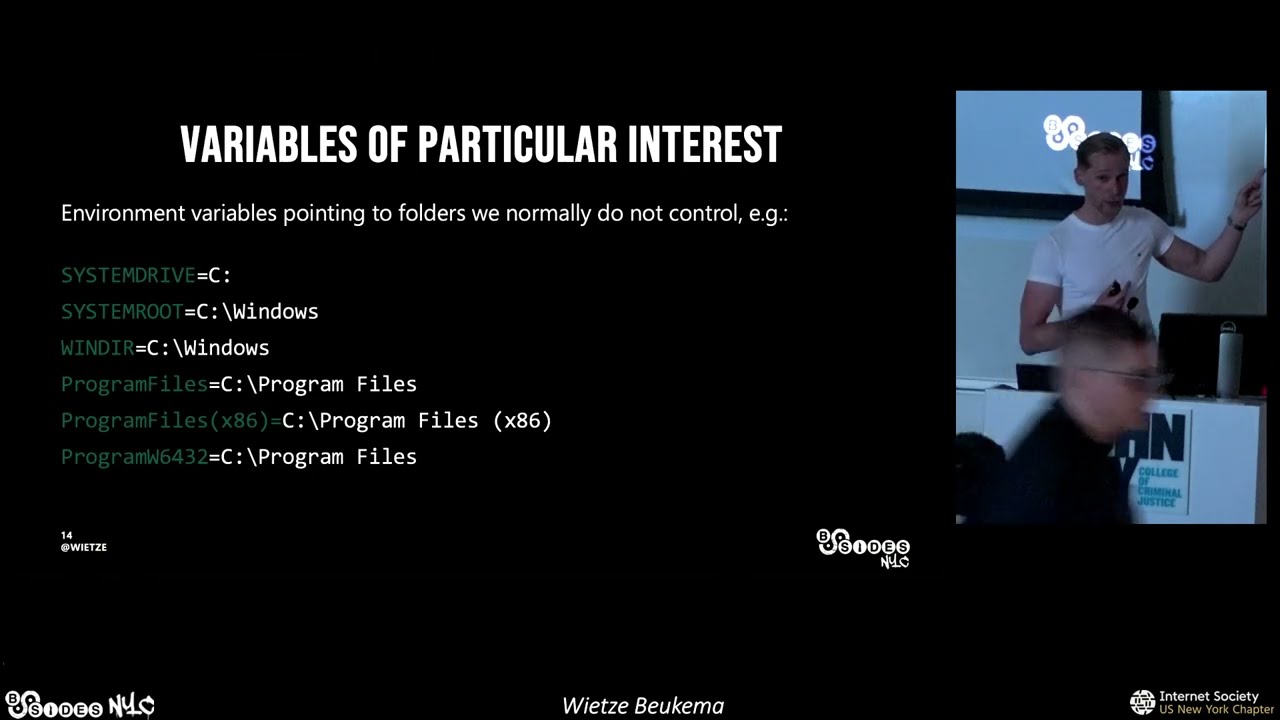
optional parameter called environment and you can actually pass your own variables there which means that if you start the process it will have different values and variables and values then it's parent right so I hope we all have a cyber security mindset right I hope your gear starts spinning how can we use this to our advantage how can you how you how can you break something with this um so when I started looking into this I thought let's look at these variables they are interesting because these are parts we normally don't control right imagine you have initial foothold you don't have any additional privileges yet um you can't really write to C windows or any subfolders like system32 or any
interesting ones anyway um so could we start a process maybe change some of these variables and then have fun so that's what I did um I chose one of these environment variables I then changed them to a different location I would then start a process with these updated variables um look in procmon see what this new manipulated run if I could see any different behavior and hopefully if it loads dlls using an environment variable I might trick it into running my variable so it's visualized on the right there normally distrust the program might use a variable to load some dll I hope you can see it it's not too dark but basically it normally goes to C
legitimate path then in a manipulated run I start the same process but I overwrite that special variable with my evil path and then if I'm lucky it now loads my version of some lib in my manipulated user writable path I found such an example this is hostname.exe you might know it it's a very boring process because literally all it does is tell you what your hostname is that's all it does and in doing so it loads a number of dlls from the system32 folder strangely enough it relies on the system root environment variable so if I now start hostname.exe but change that system root value so normally it's C slash Windows if I now change it to C time slash Evo I might be
able to trick it into loading my variable so this is how you do it in Powershell uh just a few lines just to quickly walk you through it and the first one says this is a new process block second line is where I specify hostname.exe this is important because I don't change the path right this is where hostname is normally located I don't move it I don't change it it's still signed and trusted is there I then remove the system root variable from the stack I then re-add it change it to my path and then the remainder is just making sure Powershell knows how to run it right demo time I'm not going to paste in that code
and then hopefully if I press enter it's going to give us some visual confirmation of sorts that a malicious dll was loaded we also got procmon running so hopefully we get the proof there as well so I am going to press enter we've got a nice little pop-up box message box we've got calc because how else would you know we we broke something right and then at the very top you can see the hostname.exe in its normal location we can see there that it loaded C slash template evil and it loaded my version as is also represented by calc and the message box cool so we broke something uh but why would we care right so just take a step
back what what is new about this so we got a legitimate process that is present on every Windows installation to run malicious code not really malicious in this case but as you can imagine uh you can you can let it execute anything the cool thing is is that we didn't do anything really special right we changed a variable on process level right I didn't change the registry I changed it on process level um there's nothing really observable in terms of command line or you know you don't have to suspend the process or whatever so from an EDR perspective um this is quite hard to spot um yeah and just to reiterate that right I didn't change the registry I just
started the process overwrote the process level values and uh made it made it do something bad and yeah to my knowledge most EDR software they don't look into this sort of thing right they might detect the module out from a weird location but they don't check if the variables are changed because we'll do that and as we've seen a few lines of Powershell can do this but you can also do it with other built-in script engines like VB script or jscript so if you have a macro that you can somehow run um from uh from a not updated office version you might be able to run it from there and you know if you see word
spawning some legitimate process sock analyst or an EDR or AV might think it's fine so yeah this is an example in Feb script it's just a screenshot but as you can see it's just three lines of code um you create the the shell engine you tell it to update the system route and then you say execute and then simply run cscript and then at the bottom once again we have evidence that it loaded my malicious version from the evil path sweet um so comparison right to the other ones we we called out a few issues with the other ones like dll side loading you you need to usually move the executable or bring your own it just means extra
footprint good thing with this technique is that you you don't need to move anything because the process is already there that's the whole point um social hijacking limited options as I will show you later this was just one example but I'm going to show you there's many more candidates um dll substitution input-based dll checking all have their own limitations but the good thing here is um pre-existing applications like lots of Windows applications or other common software it's vulnerable to this you don't need elevated rights um it doesn't do anything really special from a detection point of view and the real only footprint here is the planting of the dll right as a Defender how would you see
this well you might see a weird dll and a weird folder um but when you think about it like full dll hijacking that is sort of the premise right you're going to load a dll so if that is the only footprint um which you can't really work around it's not that bad in fact because of how Windows works you can even load a dll from a remote path like um you know UNC path or even a webdath path which could potentially trigger all sorts of other rings and bells but it means that even the planting of the dll doesn't have to be in events you could you could point it to a remote location through the
environment variable which is pretty cool cool I think we're right for time um I just want to quickly take you through the process right because so far I've shown you one executable so you might think well that's not really impressive they could fix that and then we're all good um no so what I'm going to do is just show you how you can take this one observation and turn it into a wider approach now we can show there is there's more there um so what I've done is I took a sample and it's a rather big sample because I took every dll that is in the system 32 folder on our vanilla Windows installation there's there's quite a few there's like
hundreds of them but what I've done is for each and every one of them I have created a fake version like a like an implant and basically what that implant does is when it is loaded the only thing it does it is writing a file to disk and that file is later on going to tell us um what dll was loaded by which process so right first step creating loads of implants then the second step is um selecting my targets so I took the same sample I looked at every executable in the windows system 32 folder and what I would then do is change one or more environment variable right I would run every process in that in that
folder pointer to the manipulated implants folder and then hopefully the last step validation as a result right these executions would load my fake files my my implants because they are loaded they would create fingerprint files and then at the end hopefully have a bunch of fingerprint files which proof um which executables and dlls are vulnerable if you've ever done dll hijacking and some of you are red teams so you might have looked into this one of the other ones um you know that is not without challenge um the main thing is is that usually you don't really know how the dll works the legitimate dll or the process that uses it right at least I don't have time to
reverse engineer all these dlls and executables to fully understand what it's doing um so if you naive like like I was um what you might do is just create one generic dll with a dll main and just rename it every time and then hope that the target process accepts it now most of the time this will fail um that's because programs execute their dlls the legitimate ones to have certain exports and ordinals um obviously it has functionality as well um so if it breaks it could be very obvious that the dll wasn't loaded user will be alerted so that doesn't work so what I then thought is you know what I'm going to create dummy functions so
I'm going to for every dll I'm gonna iterate what exports it has I'm just gonna you know Implement dummy functions so literally when you call the function nothing happens and then hopefully the dlls will be accepted but even then right if the functionality is not there it might break the process and um it basically wouldn't work so to maximize our rate of success I'm going to use dll proxying or function redirection which is rather clever technique um is again it's a weird Windows ISM um libraries have exports right which are public facing functions so it is some lib.dll has export a and Export B usually those exports refer to code inside that dll but for some reason in Windows you can
Define exports but tell that the code doesn't reside in your own file but in a different file so the great thing here is that I could compile some lib.dll I can Define export a and Export B but then whenever it's loaded I say no no I I don't have to code this version of somlib.dll over there in the original path has to code which is great because um if I overwrite the environment variable and it loads my version and it's trying to rely on code in that dll it will always work because I simply pointed to the original dll so it's rather clever and because it still loads my dll I still get to execute code inside the trusted process
so that's pretty cool and then finally even with that it might still fail because we always think of dlls as pieces of code but they often also have metadata resources right like I've seen applications having all loads of images and cursors in there so in order to again maximize the rate of success I use something called resource cloning which literally just copies all this resources to the cloned dll file and we already did that cool so um to automate that because as I said we have hundreds of dlls to go through um wrote this little script it is a bash script it runs on Linux but it is using Ming W so you can also run it on Windows
if you like but basically you pointed to a folder it goes over all the dlls and it does the thing I described it would set up this function redirection and it would copy the resources so when it compiles it what does it do other than redirecting the functions um this would literally be the the main function and it's basically saying if a threat is attached or a process attached call the function generate fingerprint and this is my fingerprint function again very simple um it takes the name of the dll itself it then uses the name of the process that loads it and then it writes it to a public folder so C uses public downloads
it's like user writable so um hopefully when an executable loads my dll I will have a file called I think I have it here I have a file called name of the exe underscore name of the dll then the function which is in our case always going to be the LL Main and then 0 or 1 indicates if it was elevated or not which again in our case will always be zero so the example I shown you earlier if it loads it would produce a file in the Publix folder called hostname underscore MSW sock underscore dllo main underscore zero so once I've run this bash script right I have hundreds of implant dll files what I now need to do is um run all the
executables in system 32 and point them to this folder so basically what this is showing you is a Powershell script that is basically just a for Loop wrapped around the code I showed earlier so go over every executable change the system root variable launch the program we're not going to do anything fancy we just run it with no command line arguments nothing no interaction and um yeah hopefully it will load the dll file and we end up with a with a bunch of txt files in my downloads folder so after all doing all this and running the Powershell code this was my downloads folder you can see there's quite a few in there um again you recognize the pattern right
so say in the middle we say third rack underscore cscui.dll meaning that I executed third rack and it loaded my version of CSC object.dll as you could tell from the scroll bar there's quite a few dll files in there so this means all these combinations are unique um patterns unique combinations that you could use with this technique so before I go to the results um if you want to do this yourself because I only did system 32 right you could run it against other software like I don't know Microsoft Office or your own software and I already did the hard work so you can literally clone it from my GitHub page and um it's already doing
the function redirection and the function or the resource cloning right the findings so I tested it on Windows 11. you might have recognized it from the screenshots um of all the executables I run I found 82 to be vulnerable and there were 91 unique dlls so there's a couple that are very popular like there's one dll I think that has like 20 executables that try and load it so combined we nearly have 300 unique combinations out of the box on Windows that you can use with this technique now um third-party software right so I tried a few things just to sort of like is it just Windows that's really bad or is there more so I tested windows or um
office 2021 and all the big the big ones like word PowerPoint Excel all of them at least tried to load one dll using the system root variable so once again starting Windward with a manipulated variable might trick it into loading malicious code I tried the big browsers like Edge Chrome Firefox again all of them at least one dll is loaded by simply changing one of those big environment variables and um the end the possibilities are endless right think about an office setting you will have something like slack or zoom on there again these they all have this um I would call it flow it's not really full Mobility right but this floor it relies on a variable you can trick it
into do something else so my point is right I I have published all these unique combinations so you can look for it but my point here today is that it's not really about the individual results ultimately it's about like this technique as you can see like this there's so many uh possibilities and this is just the stuff we we tested right what about other software that we didn't test so what we need is not the individual results but sort of a mindset from a Defender point of view or even an offensive point of view and that this is just um Beyond just a few examples this is a bigger wider pattern that's just on Windows that you will see on Windows
over and over again I think we're still good for time so um let's take it further because so far I've only talked about um execution so you need an initial foothold and then you just execute code but can we take it a bit further like persistence Maybe um the thing is we need to start a process but we need to override the environment variable right and we don't want to change the registry so how do we do that to my knowledge you can't do that with a shortcut and you can't create a lnk file and tell it to run something with a change variable you could do with a script but that's not really persistence is it
um so one thing you could do is look at Services these are once again defined in the registry this is the printer spooler service again enabled by default on Windows machines and one of the very under-documented options there is environment you won't see it in any of the pre-installed services but you can Define it yourself um and as you can imagine right or as the name suggests you can specify your own variables here so what do you think happens if I now restart the printer spooler or if I reboot my machine let's find out um we got it to load my version so I changed it to Temp windows 64. and once again it did that but if you've
um have a good eye you've seen now that it loaded a system whereas you only need admin permissions to change that part of the registry so whilst this is not proper privilege escalation it is still interesting right because we all know a normal admin can do a few things that can't do a few things that system can do and it's pretty persistent right because every time your machine reboots it will do this it still loads the normal printer spooler executable so if your EDR is not monitoring that variable you might completely miss it all right what about um better um privilege escalation right can I somehow trick a user into accepting a UAC prompt user account control and let
it run my code with extra privileges now this is where something interesting happens because you have two main ways of starting new executables in the windows API and both are slightly different um one cannot run programs that require elevation if you have lower privileges excuse me and the other one can Elevate itself with the UAC prompt but that one does not take environment variables so this is in Powershell if you try either way you'll see you get different arrows but bottom line is it won't let you do it this seems to be a very conscious decision by Microsoft um sort of like as a result of all this path environment variable drama to not let an executable that has higher
privileges than its parent to um inherit the environment variables so it kind of makes sense right if you start a new process and that is with admin and you're not admin it sort of resets the environment variables so looks like the people in Redmond did do something right when it comes to him so this this to be honest prevents a lot of trouble that would otherwise have occurred so it's quite good I will note though there are I know of one at least there's one or two processes that sort of overwrite this Behavior so they would start as with UAC and then the first thing they do is sort of like copy the environment variable
values of its parent so they sort of manually circumvent this so even with this there is still scope for some tampering but it's not as widespread as it would have been otherwise so well done counter measures right what could we do to prevent this from either a Dev point of view or if you a blue team or a Defender what can we do to stop this or detect this as a developer right because every program doesn't matter how big or small it is could be susceptible to this uh please please please if you can use absolute paths I know there's not always easy but um for things like system 32 there are beautiful Windows API calls
that means you don't have to rely on these variables which as you can see are very easily tampered with but give you something that the um the operating system the the kernel has approved if you like sometimes you really can't go around this if you have a portable application right you're always going to load something that is next to you if you do that please if you can try and validate the dlls right sign them check them before loading them there's loads of functions there that don't have to compromise on performance um it just makes it makes it look less likely that someone can abuse it for bad from a detection point of view I already
touched on this right edrs have a hard time spotting this um look for the change to process level variable I I don't know of any edada does it you could still monitor dll loads from weird locations um for the specific one we looked at today system root system root goes to C windows whereas usually the dll is in C Windows slash system 32. so that means if you abuse this trick right all the paths I've shown you today C Evo always included at the end slash system 32. so for this specific variable it's very easy to detect by just looking for system32 folders that are not under the windows folder it turns out it's rare it's not zero
it's like there are some documented cases where that happens but system32 folders not on the Windows very rare So from a defensive point of view it's a simple low hanging fruit way of doing it but it won't stop everything because I've only looked at system root and finally look at gnome dll hijacking instances again we've seen right there's too many to look at them all but if you know a certain dll hijack has taken place in a past attack I think you'd be crazy not to look at it right it's the same with law bits like you're not going to say oh there's too many of them I'm not going to monitor them no if you know
something's been abused of course you're going to look for it and if that all fails ultimately right if you load malicious code that malicious code is going to do something stupid right it's gonna reach out to the internet to some weird C2 framework it's going to spawn new processes if you see hostname.exe spawning a process that is weird if you see your printer spool or reach out to a Chinese IP that could be weird right so ultimately you might miss the dll hijacking but focus on everything that follows will be my recommendation we have a few minutes left um and I want to talk about the future so we've seen a new type of dll
hijacking today um what does that mean well I think the key message here is that dll hijacking is here to stay because even for all the other variants right if we somehow magically fix them all today attackers would still be able to use it tomorrow because you could bring in all versions and use the same tricks um so somehow we need to learn to live with the allele hijacking again that's both offensive and defensive so to help with that I last year launched this process this project called hijack lips it's a open source collaborative platform where you can document or where you document a list of observed dll hi checking instances so this platform contains all the
environment variable based hijacking that I talked about today but also known side loading instances Phantom dll side loading and search order hijacking so it records all these dlls and for hdll it tells you um what types of hijacking it is susceptible to it tells you where the dll normally is located right legitimate instances it tells you what executables we know are vulnerable to loading that dll from in a weird way and if you're a Defender it even contains some basic detection logic in the sigma language so let's take a look at look at what that looks like this is the home page so it shows you some you know new entrance entries um you can then look up a dll right
imagine you do an investigation or you're looking for a dll to hijack here it tells me it is susceptible to both sideloading and search order hijacking it then tells me some resources if I want to read more about campaigns it's been spotted in it tells me in this case it's normally located in system 32 it then tells me these three executables are vulnerable at this uh Sigma rule then helps me um detect it right Sigma you can convert to your vendor language of Choice by converting it um what else is there it's uh also categorized by vendor right so you could look up a certain vendor if you know say VLC software is running on your target
environment um here it gives me a good example of a VLC binary that has been used in the wild even gives me a hash sometimes if that is available and again here I can see it is a side loading entry so from a defensive point of view you could check if you find that dll in a weird location or offensively you could um you could use that to uh to build your own uh yeah this is a list of all of them and as you can see there's lots of them and many different combinations so does it make a difference right I've been running this for a few months now did it change anything um I've got two or three tweets here on
the left hand side a blue teamer and on the right hand side a red email the blue teamer says this is great because I load these dlls there is a there's a feed available like a CSS file or a Json file and uh Port them on tonight and then Baseline them because you know noise will happen but then it's a really easy low hanging fruit way to find bad stuff so great uh then we got the red teamer I believe in his profile he says he works for Mandy and he says you know what I basically look up a dll file on this platform and if it is there I'm not going to use it so I basically use it to
check if it is a commonly known one and if it isn't that's for me the validation that I can use it so um if you're blue team this is a wake-up call we have to add more things to the project if you're a red teamer this is a good wake-up call double check if it's on the project because then um you might be uh more easily found um so yeah that is that's my message for today I really hope that if you know about dll hijacking instances of course you do contribute we have had about a dozen contributors there from all parts of the industry um it's Community Based and open source so feel free to also recommend new
things even if you haven't discovered the dll checking yourself right if you find a report or something else um feel free to open a pull request and join the project that was it I hope that was useful and um thank you very much [Applause] I think we have a minute or two for questions yeah go for it
um it doesn't it's just on say mac and Linux environment variables work slightly different and in my experience I know that our Linux process is vulnerable to this but they usually don't rely on variables as much so they wouldn't load dlls from like your home path right but they would just do it from user slash bin so that's hard coded so then you don't really have this this issue if that makes sense but good question I like it
yeah that was a good question so just to repeat that so can you use the dll to call it something to bypass UIC um yeah yep 100 so as long as it doesn't require extra elevation which it doesn't in this case right yeah you'll be able to do that again it might do stuff that the process normally doesn't do so it might stand out but yeah there's nothing stopping you from doing that so you're right you could take it one step further cool
Related talks
 26:00
26:00 50:45
50:45 37:41
37:41 35:42
35:42 13:22
13:22 53:54
53:54