Mitigating (Radio)Active Directory
Show original YouTube description
Show transcript [en]
hello hey I'm Jeff Hogue I am a senior cyber security engineer with Echelon risk and cyber and I just wanted to take a moment to introduce myself I've been working with technology for about 19 years um and roughly about eight years ago I pivoted my previous experience was with network engineering and systems Administration and after doing that as a generalist for about 11 or 12 years I pivoted over to cyber security and helped build a cyber security program at a Healthcare company and moving from network engineering and systems Administration up to security it's it's almost like I I did things the wrong way or saw things done the wrong way whichever and I got tired of that
wanted to start fixing some of those issues and um and so I entered into the security profession about eight years ago exclusively and about a year ago I moved over to Consulting at Echelon risk in cyber Echelon is a full Services cyber security firm and I'm really happy to be there we work in defensive security offensive security and also virtual CSO um something about me I am a lover of dad jokes that's just a warning ahead of time um in fact my daughter who traveled here with me today has taken a look at some of my slides and she was appalled by the age of some of the memes that I'm using so I apologize ahead of time for the
Civil War era memes um but uh but I look forward to talking to you today also I live in North Carolina came up here today this is my first ever time in New York and I hear this side of New York is better than the other side of New York that's what I've heard so far today um so again really happy to visit here um today I'm talking about mitigating radioactive directory or how do you keep active directory from becoming radioactive um I'll say this this comes at a really good time right after Richard spoke uh this this talk is geared towards Defenders it's geared towards systems administrators or people perhaps that have inherited environments where the
door might be open on ad I work a lot with very busy sysadbins busy cios busy Risk Managers and busy security departments and a lot of this is a stream of Consciousness from that side of things that I do and and while Richard talked about sock investigations and detections and those common threats today I'm going to be talking about how organizations frequently have the door open on active directory one other thing I like to say when I when I begin speaking is this if you learn just one thing over the course of time during this talk or at least if I do if I sit through an hour-long talk or a 45 minute long talk and and Come Away
with one thing that's practical it's worth sitting there through the whole presentation so much of what I present today may be things that you knew already but hopefully you can learn one thing um last little housekeeping note there are only slides a number of links resources even command line tools at the end of the presentation there will be a link or a URL so you can go and download a PDF copy of the presentation there's also a QR code but because we don't trust those we have a no paranoia URL as well so first of all what I'm going to talk through today is the problem with active directory and I'm going to talk about
zero trust and some of these buzzwords we use and how saying the word zero trust doesn't really make things better does anyone realize that um I'm going to talk about the contributors to 80 issues and how we can start addressing that in our environments and then I'll be speaking through some common misconfigurations that that we see in ad environments and finally close out um I I first want to talk about this problem and this is this is Jeff this is a Jeff ISM but I like to say it's easier to implement new tools or new technology than to clean our own house and let me start off by saying who who's heard of zero trust
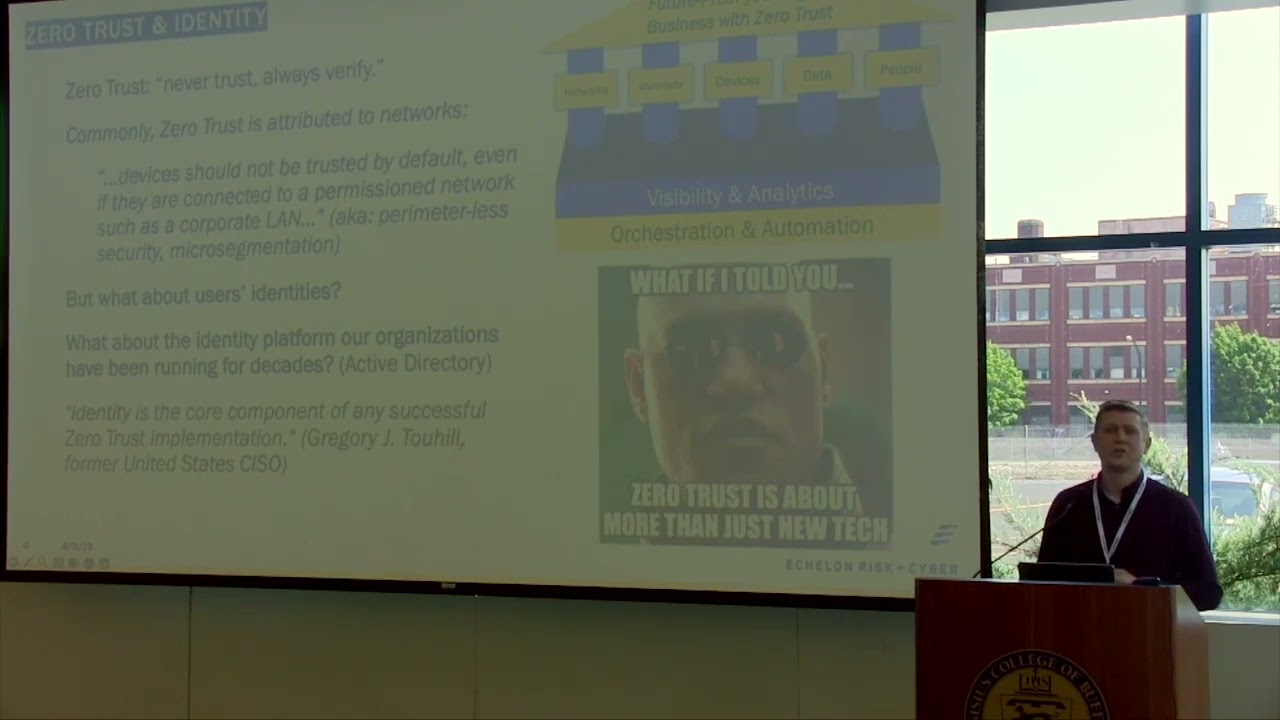
okay who's tired of hearing about zero trust okay just about the same hands went up it's a common moniker and zero trusts this this this architecture this thinking comes from a really good place it comes from a place of we can no longer say the words well we trust it just because it's inside our Network or inside our domain um zero trust comes from never trust always verify not the old thinking of trust but verify and the the thing is zero trust is usually attributed to networks and I don't understand that because most of the time when you type in zero trust into Google and you see lots of things pop up really all you see
is network-based Solutions um and and you see solutions that that help fix this issue of micro segmentation but but what drives me crazy this is just me as a Defender is seeing the words zero trust being sold as a product okay and and I've had this discussion left and right lots of vendors are out there that will sell zero trust as a product in fact I've I've heard vendors tell me we're not a VPN solution we're zero trust the unit zero trust isn't a protocol I actually tried to look you know there's not an RFC listed for zero trust or ztna ztra and it's amazing how many products have been slapped with that word zero trust
implying that if you if you just buy the right product or you just implement the right product in your environment you can check the box your zero trust you're good to go um so let me read a couple of quotes here um and and I knew there was a micro segmentation thought process of zero trust um but there's actually Five Pillars if you read about zero trust architecture there's five pillars to it and networks is just one pillar there those zero trust is marketed and boxed as a set of products that tend to be geared towards Network it's actually a lot wider of an architecture it's a it's a it's a way of thinking um and and so identity which is what I'm
going to be talking about today identity is a standalone pillar of zero trust um and uh many of us have overlooked identity in our zero trust initiatives in fact Greg tuhill who helped frame the architecture of zero trust he's the former US ciso he he said this identity is the core component of any successful zero trust implementation just a quick side note if you ever give security talks be careful who you quote when giving security talks because I I quoted Greg two Hill and I've done this in a number of different talks on on different topics regarding identity before and I happen to be speaking at an event in Pittsburgh I had no idea who Greg two Hill was other than
her former CSO usciso and he also helped frame zero trust architecture and I stepped off the stage and none other than Greg two Hill himself came up to me and said you owe me a beer I didn't know who he was and he said it again and again I didn't know who he was and he flipped his bag badge around and he said I'm Greg toohill and anyway he joked around with me for a little bit that he said thank you for saying that thank you for talking about zero trust not being a product this is this is something I've been trying to address for a very long time um but here's the deal when we think about this
architecture of zero trust many of us are in organizations where that that buzzwords being used or we have initiatives where that architecture is being built up we come many of us come from backgrounds where if we get a piece of technology we can implement it you give us a switch or a firewall we can put it in place we can rack stack and configure it you give us a server we can implement it but not so with zero trust it's an architecture and it's going to take continuous effort and again I'll just say again we get excited about new tech and new tools but we don't necessarily get excited about cleaning our house sort of the Nirvana fallacy
the Nirvana fallacy states that anything less than perfect isn't worth doing and this is a line of thinking that we subscribe to from time to time as human beings and in fact here's an example of the Nirvana fallacy seat belts are a bad idea because people are still going to die in car crashes now we can spot the legit the logic issue in this in the statement but when it comes to something like active directory where we've perhaps inherited environments where there's Decades of debt that's piled up there's this temptation that we have in looking at the mess and saying well one of these days someone's going to come up with a better system than active
directory so we just let it be our temptation is waiting for some new identity system and hoping we won't get breached in the meantime and by the way if you've looked at active directory for long you may have noticed Microsoft has tried to put new graphical user interfaces new uis for ad and they've come and gone and it's amazing every admin that I've ever seen in ad they still use aduc it's the same tool that we used in Windows 2000. um and so we don't need to subscribe to this thinking that something better is going to come along so let's just not do anything that's that's nonsense that's like getting up every morning knowing we
should brush our teeth because we haven't brushed our teeth in a year and but saying one of these days someone's going to invent a better toothbrush and then I'm going to start brushing okay almost every major data breach involved the weakness and identity somewhere in the kill chain Verizon's data breach investigations report this is from a few years ago said 80 percent of hacking related breaches are linked to Identity identities and we've got to do this better um the thing about ad that's used in the vast majority of organizational environments is there's vulnerabilities that are left behind and inherited in many cases from multiple directory migrations I've seen environments that came from even pre-windows 2000 from
systems like NT and Novell group wise and Lotus Notes and what's happened is organizations have pushed the ball forward they've upgraded the servers they've upgraded the schema they've migrated the objects to a new directory but many of the old artifacts are still left behind many of the old vulnerabilities are still left behind um also something else that we see time and time again is bad habits from previous team members people who meant well but previous team members they're left behind and our environments the the debt continues to pile up one example is bad habits all right I'm telling you I I I see it time and time again where a call will come into a
well-meaning help desk member who perhaps wasn't trained to know better that checks that box that dreaded password never expires box because well it was a VIP that called in and they're locked out because their password expired and I need to help them out or perhaps they untick the box when user must change password on the first sign-in and the the same password the help desk told them is what they're running around with we also see still even today where system means may put in place the same password for all service accounts not knowing any better um there's also test configurations that stick I can't tell you how many production environments I've seen over the last
Almost couple of decades where there's a word like test that's stuck in the application name because what they thought was a test actually became the the platform that was rolled out into production um we also see this again we continue to see service accounts that were intended to be delegated for a specific application or a specific purpose given elevated access giving given admin level access and here's what happens when this debt piles up there's fear that comes about we we know there's issues in our environment we know the specific service accounts where there's dragons behind changing something there but as Information Security Professionals much of the time we get fear around it no one wants to be
the one that broke things so we kick the can down the road no one wants to be the person who took out the business critical app that was put together 20 years ago with no great test system by the way we don't want to be that individual and this is why many of the efforts to secure or Harden A.D are short-lived usually there's one person or a couple of people that lead a crusade to help fix 80 one siled person and when this person leaves the organization or when the initiative is over eventually the company starts regressing and there's backsliding and much of the progress is lost because those habits they begin again so how do we address this issue
first of all we need to measure ad against best practices it's going to be painful there are ways to do this with a little bit of automation there's products out there that can help measure ad in a in a macro sense against best practices we need to look for common misconfigurations but you can't just stop with assessing we need to remediate those vulnerabilities and sometimes that's going to be painful sometimes that's going to be a long drawn out change management process where we stub our toe and we ask the business to be patient with us or we try to test really what we can but we have to remediate those but the third step is this we need to continuously Monitor
and continuously optimize active directory when you're when you're done with this assessment and Remediation process you're not really done and old habits will creep in occasionally and so without this continued effort of keeping ad cleaned up the directory will eventually regress back I mentioned before I live in North Carolina and I've been mowing for about two months since it's gotten warm outside and I if you look at my grass right now you wouldn't believe that I've been mowing for two months because it looks like there's a possible foreclosure at my property from the length of it but but the point is if you've gone a really long time without mowing your grass you know that that first time it's going
to take a little bit more effort s things are not going to be perfect and it's going to take a lot more time to do it but when we continuously mow that loan when we continuously keep that yard cleaned up it becomes a lot a lot easier each time and so this is a painful process that can be done manually or it can be done with the help of a little bit of automation but we've got to commit to keeping our directories clean it's not a one-time task identity platforms whether they're 80 or another one they need to be consistently monitored corrected and protect it so I'm going to talk through a few common misconfigurations and how to
resolve them that we see in active directory I'll also say I work for a company we perform a full active directory security assessment it goes into a lot of different domains I'm going to share today a lot of what we run into on a lot of engagements we run into this regardless of industry and these are just some high level uh high-level items that we see but it just scratches the surface in what an in-depth assessment may uncover the first is and this should come as no surprise poor password practices now I realize a lot of these can be extrapolated out of A.D and they hit in our policies they hit in our cyber security awareness training they hid in
even even other systems but let's face it generally poor practices are found in ad before any other application or they're easier to find there um so obviously we we all know check your password policies check your password uh requirements eight character passwords aren't going to cut it anymore length and complexity but also I think many of us know you can hit that minimum number of characters and still have an awful password has anyone seen this this the syntax of passwords that appears it's really secure it is the month the year and an exclamation point Have you run into that in the wild anybody want to admit to that okay we know who we're doing our
password spray attacks against right now don't we breached credential protection should be put in place um what you should do is audit at the very least audit or crack your passwords against common breach lists now you can do this manually you can do this with John the Ripper if you're interested I can send you a script that where you can run through it extract your hashes from ad and crack the passwords please make sure you talk to management first and it's okay before you pull hashes out of 80 I should say um but there's also a number of freeware tools no before has a free freeware tool to do this Black Hills infosec has cred
defense toolkit but going through this process helps uncover a lot of things and namely it helps uncover bad habits in the environment what these tools will generally do is we'll compare your password hash database against pra against hash lists like the rocky lists um and the uh have I been poned list once you realize how bad this issue is it's going to tell you if people are running around with commonly breached passwords it's also going to tell you if people are using duplicate passwords um it says this is going to give you a lot of Firepower to lead the organization in fixing these issues now you can take it a step further I'll tell you I recommend in Microsoft shops
turn on this feature if you run Office 365 and you have at least Azure ad P1 if you run Office 365 at all and you have aadp1 at least turn on Azure password protection you may not be all in but if you are if you are synchronizing your directory to Azure ad Azure password protection there's a single agent you deploy to your domain controllers and Microsoft will automatically every time there's a password change in your environment they'll compare that password that's being set against the breach database overnight overnight a lot of these breached passwords can go away or at least in the next password change so that's a very very in my opinion it's a
very underutilized option that most organizations already have they just need to install it um also commonly look for accounts with password never expires just query the database see if there's first of all see if there's any human being accounts that have password never expires and maybe just maybe their service accounts that have been running around for 15 years with the same password yes those service accounts everyone's afraid to touch because of critical apps um I mentioned before many of these tools these freeware tools can show you where the same password is being used across multiple users what does that tell you that tells you there's bad habits and what I found is when multiple users
are using the same password either those users are just sharing passwords or I found in many cases it's a learned habit from the company's own I.T Department I talked before about how sometimes a well-meaning help desk person can start a snowball rolling what happens if you've never worked in an environment before you have no idea how to set a strong password and the help desk gives you this password it's super secure it's the word password with a capital P and the number one and you don't have to change it what do you think happens when your password expires what do you think you're going to set your password to password 2 or maybe password three or
you come up with a more creative number and what happens is the snow bars snowball starts rolling because of one learned habit from probably a well-meaning person that didn't know better so looking for duplicate password usage can help detect some of these bad habits the other thing to really look for as I mentioned before with these bad habits many of them are learned from I.T departments I've been there I've worked in the I.T department but I'm telling you many of the and many of the times users they are they do what they're instructed and they run with a habit that they learn on their first day working for an organization one thing I encourage you to do if you
believe that this is happening that users are just being set passwords for them um and and they're running around with them compare your administrative password resets there's a specific event ID or an admin will reset the password compare that with the password last set time if it's the same time then we know that someone in the organization is unticking that user must change password on next change did I see a question there
across different accounts yes that's what I'm speaking through so if you if you use one of these tools um again Black Hills has the cred defense toolkit no before has weak password tests you can also do this manually you see the hashed version of the password the ntlm hash you're not seeing the password itself but if two hashes equal one another we can deduce that two or more users share the same password even if we didn't crack it even if it didn't show up in a breach list and so this helps us understand where bad habits are Once Upon a Time one company that I used to work for that might be north south east or west of
here but you know it's not in North Carolina because I've never in New York because I've never been in New York before I saw about a half dozen users in the organization that had the same password that was shared but we didn't crack it it was a strong password and it wasn't on any of the breach lists either and one day I'm walking around and I walk into the training room where brand new reps for this organization are trained and I see on a Post-It note that the training account that everyone shares because it's a really low level segmented account there's a very specific very secure password there you know what we did we added that to
the password filter we found out in this organization that people were going into the training room they were reusing the strong password and when they set up their own user account they said I'll just use that training password that I already had written down it's easy right so when you use a password filter like Azure password protection and there's others put those learn the habits of the users and strengthen your password filter based on that that's a great question by the way um so uh another question and I know this goes beyond ad just a little bit but if there's password reuse where people are using the same password in ad and some other app this is a really tough thing
to prevent it really is going to take great security awareness training but what I tell people across the board is SSO all the things firm up or Harden the the identity provider that you use whatever you use if it's OCTA if it's Azure ad Harden that use single sign-on wherever possible wherever you can and then where you can't use single sign-on where it doesn't make sense to do it use an Enterprise password manager I'll also tell you it's really hard to get standard users non-technical users to use a password manager has anyone else had that struggle training that's a that's a difficult thing to do um and I'll tell you you can go through the you can go through the process of
doing things like turning off chrome it's password manager and Edge and if people don't want to use whatever password manager you give them they go back to Post-it notes notepad OneNote it's going to require a lot of effort there and that leads me to believe that that users and admins need to be educated what issues are often Behavioral not technical speaking of Behavioral I'm spending a lot of time on passwords but I just want to open this up a little bit if it's helpful once upon a time I worked with a help desk person I I had to or a help desk entire help desk to help improve these issues and passwords were being set in the
format on this mean all right I just made this up couple of years ago but passwords were being set based on the same format either season or month the year followed by the exclamation point and they were still being said at the time filters weren't available in this environment it wasn't possible to put them in so here's what we did has anyone seen this Cheeto meme before okay it's commonly used and and I think the original one is admin and password well what happened was this environment these bad passwords kept being set for users and I eventually talked to the help desk manager we got training for these people it kept happening it kept happening and
so at the same time I had HR after me because HR in the environment I worked in they wanted newsletter content and I thought we've got to fix this issue so I wrote an article on setting stronger passwords and instead of titling the article here's how to set strong passwords I titled the article don't set Cheeto passwords and I used Microsoft Paint because I'm really creative like that I used Microsoft Paint to change the original name and use an actual password in the format that was being set that we were constantly auditing and forcing people to change and what happened over the course of about a month I got several calls from people in the organization I got a call
from a director-level person that said one of my employees just lectured the help desk to stop setting them Cheeto passwords okay but this is going to require Behavior change is going to require a lot of effort I want to get beyond that because we're going to get back into ad issues um but Focus especially on your privileged and your service accounts any accounts that have delegated privileges look at your password last set time please look at that is is the same password that's been used since 2002 in place that that's going to be something you want to deal with in fact I I'm only half kidding on the 2002 passwords if you find that if you find accounts that
are set up in that way and it's probably one of these service accounts that people are afraid to touch you may find that it uses Ln hashes has anyone run into Ellen hashes in the wild this is an old hashing method from Microsoft that predates Windows 2000 where passwords are hashed eight characters at a time eight characters at a time in fact it's not even case sensitive so you can go to those websites online where they have the entire rainbow table of LM hashes available you can drop a hash not that I would do this in a web form but you can drop a hash into this web form hit submit and it'll give you the
password so look for LM hashes and in fact um I can share with anyone who's interested there's a very specific GPO that many environments turned on years ago and they just left on that allows LM hashes in their environment I'll mention that shortly finally don't forget your local admin passwords lots of environments there's local admin accounts where the passwords are never changed and we recommend across the board use laps if you can use laps use some or use some kind of a technology where passwords are consistently rotated lapse is free if you run Windows environments it's probably free for you to implement it's going to take a little bit of effort um if if you're not fortunate enough I
think Taylor mentioned the Pam solution to afford a Pam solution there um quickly I'm going to mention over privileged users and endpoints look at your delegated privileges and this is a little more this is a little deeper than just looking at domain admins and Enterprise admins and schema admins all these you know really powerful groups um Microsoft's got a resource again anyone who wants a slide deck there's a download uh at the end um take a look at this Microsoft link Microsoft shows you how to dive in and see what delegate permissions are set in many cases in many environments entire groups ran across an environment once upon a time where the domain users group was
delegated permission to reset user passwords and no one touched it and it wasn't obvious either because it's domain users it's built in everyone's a part of it so look at your delegated privileges especially these that are on the screen um replicating password hashes by the way if you ever do a password I mentioned before cracking your ad passwords either through a freeware tool or through a homegrown method if you ever do that you're actually doing that very thing you're replicating your hashes edrs will catch you doing this if you have a decent EDR also look for unconstrained delegation and also do you have service accounts in these pesky protected groups again we see this a lot in critical
environments where a service account will be given domain admin privileges and then it works and then the promotion happens the code promotion happens our platform is put in place and that thing that a well-meaning engineer always meant to get back to guess what it's not prioritized because the code went into promotion the business has moved on we can't spend the time and effort to potentially break that application now so this is going to require some attention to putting least privilege in place even for those pesky service accounts in these big groups look for stale and never used accounts I found in many cases this is this comes down to lack of interoffice communication um I hate to say it this is the case but
usually it's it's people not communicating with one another it's the reason for stale accounts um users who they maybe they got hired and they never began their employment we started seeing this at the beginning or in the middle of the pandemic where people just didn't show up on day one in many Industries in a lot of cases we saw missed terminations where there was a termination a manager knew about it HR knew about it it was never notified um we've also seen by the way I didn't put this here but we've also seen certain VIPs where say another executive needs to take over a terminated executive's account so they reactivate it and they reset the password and it's
just left around because no one wants to question the current executive that's there so it's it just remains enabled even though it hasn't been used in years um we also see decommissioned services so some web service got decommissioned by the applications group but maybe the sysadmins or the infrastructure group was never notified of that and again I talked about previous directories just artifacts that are inherited from all of the migrations from the previous directories so there's a few things we recommend to do to assess this first of all you can do just a simple one-liner on Powershell to look at accounts that haven't been used I'll also tell you and Richard pointed this out earlier there are reasons why
an account might not show active use or might be disabled like a shared mailbox and it's just still there it's sitting around so again be careful with this but use this to help assess the accounts that are not in use anymore um and yeah we've got to do the dreaded Personnel audit and this is where literally we take a list of the people that work for our company and we take a list a list of our human users our users that should have an account and we compare the two because it could very well be that you've got active use on a terminated user's account and your Powershell one-liner is not going to detect that
so it's going to have to happen many organizations do this annually I've even seen organizations do this on a monthly basis but there should be an audit of personnel people who are supposed to have accounts versus the real accounts in 18. I'm going to really briefly talk through spns but look for Unnecessary accounts with spns there is a TechNet URL you can go to Microsoft has a single one-liner that can help you find any duplicate spns that may be in your environment there's also a Powershell script you can run at the same link that gives you an inventory of all of your spns um and uh this is a big Target for kerberosting remove anything that's
unnecessary especially if an SPN is tied to a human being and then for any that's left make sure you set separate strong password policies make sure you have complexity enabled I didn't put this in the presentation but if you have the option to use a gmsa instead of a standard service account use gmsas I can talk to you about that after if you're interested here's some other common findings that we see in our active directory assessments that really leaves the door open to Outsiders first of all we see organizations have gpos in place for restricted groups if you're not aware you can put a group policy in place that automatically populates the groups on a system
so what many organizations have done and this is an awful awful idea anyway but to support some kind of a legacy application or to support an application where privileges aren't documented very well they give users local administrative rights or they give specific users local administrative rights horrible idea don't do it but what I've seen organizations do is they're like you know what rather than give Kathy local admin rights on Kathy's machine and John local admin writes on John's machine what they'll do is they'll drop in a big group like domain users in a GPO that gets Auto populated on every machine and so now what you've done is to an attacker that happens to breach a single
system you've guaranteed that they can move laterally to an admin level account on every machine and by the way if this policy isn't scoped properly it also populates the admins group on a domain controller does anyone know what the admins group on a domain controller give someone domain admin privileges so we can see what what a bad idea this is be careful with restricted groups gpos these I've seen these buried deep in group policy take a look for take a look at these also with gpos I'll just quickly mention look for unnecessarily enforced policies and also default domain policy or default domain controller's policy overrides the normal processing order of group policies on the right there's a there's a picture
here of that processing order but if someone has clicked the enforce box or they have done what we've unfortunately seen in a lot of environments for decades and that is just put every setting that needs to be set in the environment in default domain policy that overrides the processing order and it can be a real mess to clean up and and by the way it's in those very policies that we've seen really big issues like SMB signing turning off turned off for an entire environment and though on the pin test last year we had a finding SMB signing wasn't required but we we enabled a GPO we turned on a GPO to require SME signing it's working
right know that default domain policy overrode it or the default domain controller's policy overrode for DC's so be careful about sprawl of default domain policy also scan for service accounts scanned for scheduled tasks there's a few tools that you can do to make that process easier and also be sure to deny log on as service for human users and that includes admins if you can disable users standard users including your human admins from logging on a service or from creating privileged scheduled tasks you've made you've you've closed the door to outside attackers and we've seen in in many cases there was a couple of years ago I saw a case study of a Russian threat actor that was able
to exfiltrate all of A.D all of A.D in this environment very slowly it was a low and slow DNS tunneling attack with a scheduled task it was just a scheduled task that fired all the time on a DC and no one noticed it and it was tied to a breached human account speaking of small and default domain controllers policy or default domain policy look at hashing settings as well I mentioned this before there were years ago there were Legacy applications and we're thinking right around 2000 Legacy applications that required required Ln hashing to be left on or Legacy systems on a domain that required LM hashing to be turned on and so someone 20 years ago
set a default domain policy to require LM hashing or to make ntlm version to ntln version one not the preferred option and guess what happened 20 years passed no one touched it so look for these settings I'll mention this and I realize this goes a little Beyond a d but we'd be remiss if we didn't mention Azure ad um I've talked to people before in different environments and I've asked the question do you use Azure ad and and they'll respond by saying no we're all premise we're premise-based systems well the follow-up question is do you do do you use Office 365 if the answer to that is yes you use Azure active directory and there's a few things to go over
um You probably have Azure ad um and so there's a few things to find these are default settings on Office 365 the last I check they were default settings one is Microsoft by default every tenant with Office 365 unless something has changed recently they allow any user in the organization to register any app this is a horrible idea here's a screenshot of the setting if you want to talk to me after I'll tell you where it's found but do not allow user consent is what we recommend in most environments and Microsoft has again with almost every version or edition of Office 365 you can turn on consent requests so even though you might not let users stand up their
own apps users can request it and as an admin you can choose whether to you know answer them or ignore them and pretend you didn't get them but admins will know about those requests that come in another really bad setting that we see is the guest user control by default especially if you work in an environment where there's a lot of sensitive data users by default in the organization can share out content with any remote guest and there's a few different places where you can go but the primary places this collaboration restriction if possible allow that only for a specific set of domains even if it's a list of no domains for partners that you might want to share
with look at the risky sign-ins report if you have Azure adp1 you can read the risky sign-ins report if you have P2 you can be alerted and it can even take action to automatically require MFA automatically even Force users to come to you effectively disabling their account for a little while but look at that risky sign-ins report I've seen organizations before where there's been risky sign-ins from months ago where there was there was a a specific account got breached they had no idea about it because they didn't look at the risky sign-ins report um I think all of us know here require MFA require MFA let's say that 10 times over um I kill Legacy authentication uh
Microsoft has done a lot of killing that for you but exceptions can still be turned on there's a lot of organizations out there that have exception policies that are way too wide they've been open way too much um and then if you have a need for a break glass account so an account that bypasses MFA and there's many organizations that want to have an account that that is tied there's a secret password somewhere too it's very complex it's very strong it's a secret password that's kept somewhere just in case MFA breaks somehow and they need to log in please follow Microsoft's guide on emergency access again the link will be here you can download the slides but Microsoft
has a guide which includes anytime those accounts are used it'll alert set the alerting to alert everyone and their mother if one of these break glass accounts is used Microsoft has recommendations on them you can have them they tell you how to harden them properly but just don't just turn on a break glass account and say okay we we put it together we have our fail safe no follow the recommendations so you make sure that account isn't breached and it's not devastating for your organization um look at the admins group report in Office 365 there are numerous admin groups in Office 365 I couldn't name them all look at that report look at delegated and application permissions
just like you would in A.D and I'm going to quickly say this and this is a little bit of controversy around this but Federation configuration lots of environments run adfs active directory Federation services and they don't need to um I've seen a lot of organizations do this instead of just running Azure ad with Azure ad connect I'll tell you really quickly if you run Azure ad any of the premium versions of it which again comes with most editions of office 365. you probably can avoid some unneeded complexity and you can probably close a major attack vector by moving away from adfs I know there's there's some extreme exceptions for having adfs but let me tell you about adfs
it has to be exposed to the internet it requires in many cases in in environments where it's it's exposed to the internet you can't allow this this not at least not very easily you can't just say well authentications just can happen from Microsoft no they come from the end user device so this is not an easy service to allow list and I'll tell you adfs is a magnet for password spray attacks see this day in and day out and I'll mention very quickly in many environments adfs is set up improperly it requires a long explanation about load balancers and Source IP preservation but the password spray protection that's built into adfs may not work just right if your network
isn't set up right and but the question I always ask is this why why do you need adfs um and there I've seen rarely have I seen good answers here so really question do you really need adfs let me know in person if you have some of those exceptions I'm really interested to hear about them but I've seen very few reasons we're holding on to it um totals really quickly I'm going to close um look at CIS benchmarks for Microsoft 365 they're a great starting point for securing Microsoft 365 they're freely available you can also use sisa has a tool called scuba it's freely available it will audit your environment against many best practices and show you where
the door may be open in 365 and then crowdstrike has a freeware tool as well when we look at cleaning up our identity management systems this is not a one-time task identity misconfigurations will routinely creep back in so we need to assess correct the problems that we found when assessing and consistently monitor again today I just talked about some of the common misconfigurations that we see in active directory and Azure active directory so so again hopefully that was helpful for you today as promised here is a download link here's a QR code which none of you probably will trust but does anyone have any questions
that was a joke about the QR Code by the way I was thinking about doing a security awareness talk and the QR code taking you to a fake phishing page just saying hey just kidding little animation after then I'll have to try that later on any questions a video of a Rickroll yes yes that gift keeps on giving after uh after all this time okay thank you all so much for your time [Applause]
Related talks
 49:30
49:30 51:35
51:35 30:07
30:07 51:46
51:46 1:12:47
 8:43:32