Hardening Containers with Seccomp: Hands-On Profiles, Pitfalls, and Real Exploits
Show original YouTube description
Show transcript [en]
Uh welcome and thank you for coming to Bside's Las Vegas uh ground floor. This talk um is called hardening containers with SECOM and it's be being given by Ben Hsburg. I have a few announcements before we begin. We'd like to thank our sponsors, especially our diamond sponsors, Adobe Aikido, and our gold sponsors, Profit and Runzone. It's their support along with other sponsors, donors, and volunteers that make this event possible. Uh these talks are being streamed live except um and as a courtesy to our speakers and audience, we ask that you check to make sure your cell phones are set to silent. Um, if you have a question, please use the audience mic so that YouTube can hear
you. Make sure to point at the mic. Oh, sorry. I'm reading what it told me to do. You may be asked to make announcements. Oops, sorry. [laughter] Uh, as a reminder, besides Las Vegas photo policy prohibits taking pictures without the explicit permission of everyone in the frame. These talks are all being recorded and will be available on YouTube in the future. Um, thank you so much and without further ado. >> Good morning. [clears throat] Sorry. Good morning everyone. Um, thank you for coming um to this talk. Um, I'm going to be I'm will try to be easy on you this morning. You know it's early morning for first talk. Uh I see that most of you still have your coffees on
which is great. Uh uh hope that uh um this will work uh smoothly. I'm going to give you uh two live demos. Uh you know let's hope that the demos will work. If not then we'll switch back to recordings. So uh those of you who don't know me, my name is Ben. Uh I'm a co-founder and CTO at a cloud uh uh security company called Armo. uh used to be um worked at different places before I'm working in the security industry for you know more time that I want to admit um but coming from uh from a white hat uh uh background and going into uh more the product and development uh um part of the industry. Uh we are going to talk
today about um open source project. I'm a maintainer at it's called Cubescape. It's part of the cloud native computing foundation which I'm an active member of. Um and yeah [snorts] let's go in. So uh among you first of all who heard before this talk about SEC comp who's using actively sec in their products. Okay great so actually this is really the talk is about. So the talk is about what is SEC comp and why it is not really widely adopted and used and how this can be how we can turn SEC comp into something that's more usable in the at least in the container and cloud uh security sphere. So I'm going to talk today about um the you know what is SEC
comp going giving an intro for those who are not you know who don't know what it is uh and then we'll go over how it can be used uh for prevention uh in uh in um in containerized environments and then I'm going to show you a way to be a to make it much more usable. uh uh using application uh uh observability and understanding how applications are behaving and then applying the right profiles for a given application and I'm going to do uh a demo uh I've come with a real uh exploit in a real application to showcase you how it works. So um so sec is actually um rather I would say old feature in Linux kernel.
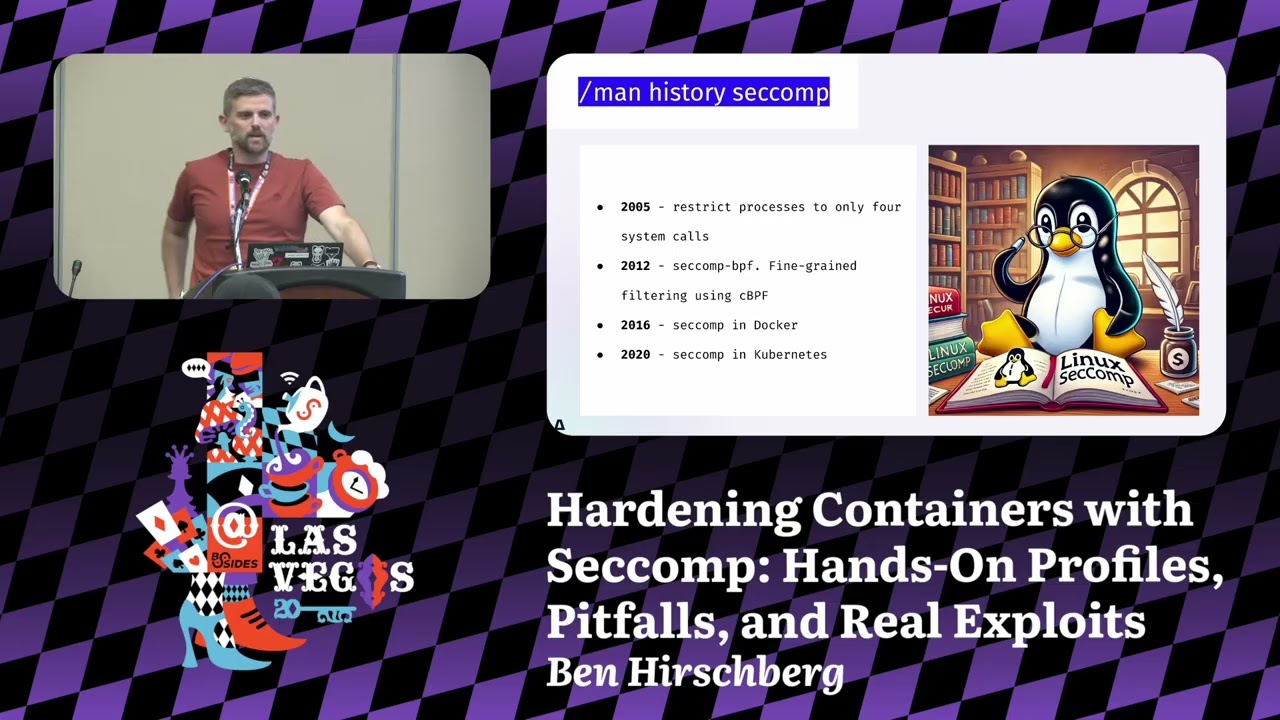
It's uh I think I haven't checked it precisely but it's been around something for nearly 20 years in the Linux kernel if I'm not wrong but even if it's less than not far less. Um it is it was born in order to be able to build sandboxes uh process sandboxes uh uh uh that are running on Linux kernel and uh um it is uh uh it was built for two purposes uh originally. One was to build sandboxes around u things like uh browsers that are you know running less trustable code and was were prone to different uh uh exploitations before and therefore there was a need to create a sandbox around uh around these applications to limit them.
So even if there is an a real uh real exploit on them then the attacker won't be able to proceed uh uh to the next step. Um and uh you know the second reason later become is to limit uh also system calls that may be problematic for the kernel uh in the sense that if there is a system call that there that has um a known exploit in a given version still the uh the defense can uh use second to limit cost to system calls if the application doesn't need them. So uh the original history was that again uh 20 years ago uh to to create uh uh um processes that are limited only to four
system calls. Um the way work is that a process that when it started up could call into different system calls and just limit itself from any further uh uh system calls like going down in the in in the privilege scale. Um these four system calls were read, write and um exit and close. Uh so in general the idea was that I can create a sandbox process which is just like you know uh talking doing some basic IO uh maybe closing some uh uh uh file descriptors and then it exits. Again think about the you know the the the the use case of of browsers uh and executing JavaScript in the browsers. Then after it come a a more
complex uh uh um version that was using uh BPF which later become you know eBPF to like define much more fine grade rules around what is allowed and what is not allowed for the process to uh to do. uh and creating you know very complex scenarios even even like just not not simple firewalling scenarios but checking into the arguments and so on. So uh SECOM became much more powerful uh in the early uh 2010s and then uh when the containerized environments started to come up, Docker came up uh the guys at Docker came up with a great idea to create a basic profile which we are going to talk about today um that limits um the system calls of a containerized
uh process uh that it can do um and um generally protect uh you know not just the application but in general the the the host machine that runs the container uh from uh attacks and uh and you know as containerization evolved Kubernetes itself uh uh which is the de facto orchestration tool today for containerized environment uh also started to support 5 years ago uh uh fine grained uh uh uh second profiles So what's the present state? So the present state in general is that uh there are like pinpoint usages of of SEC comp again uh browsers uh very specific uh uh applications where SECOM is used. Um I've seen very uh um very interesting usages as well for
secion to uh also to intercept system calls and I've seen uh great interesting things but in general uh there the security industry or parts of the security industry know seccom for uh for Linux hardening um and it's great but in general in the main you So in the most places where our Linux today is used and used Linux is used for very broadly obviously in in the cloud um it is much less used. It is like very very rarely I see companies uh are uh are taking advantage of of SECOM to to protect uh their environment. And this is the thing I I I you know we are trying to uh uh uh to change and to
uh to make SEC comp more usable. So why it is interesting why SEC comp is interesting in cloud environments. So sec is interesting in cloud environments because um because the main threat model of uh of cloud environments and especially if we are talking about containerized environment is twofold. If we're assuming that there can be some malicious code that is running inside a container, the attacker can do two things or advance to two directions. uh one is to try to exploit create an exploit on the kernel and somehow you know uh uh uh leave uh the confinement of the containers and take over uh the the VM or or or the Linux host that is running the container. This is one thing
and usually when this is done, this is done through some kind of um um system call that the attacker is able to invoke with specific parameters and then it enables it to do container escape uh because exploiting some kind of a vulnerability that there that there is in the in a kernel that wasn't patched or maybe it's a zero day and no one knows that there is an issue there. That's one thing. The second thing is that that might try to do some lateral movements maybe not trying to attack uh uh the kernel itself but still uh um the workloads are are rather you know li unlimited in what they can do in their environment. So
they can uh talk over the network. They can invoke uh uh uh different network calls in their environment if there is like no network policies around that are super limiting uh files that are written uh uh uh on the disk and so on. Maybe environments uh so on. So there are like plenty of things to do later movements too. And these two in this threat model, you know, attacker can either come from, you know, exploiting uh uh uh uh exploiting a vulnerability inside the container and coming from the outside world and it comes from the public internet or it's just like adding itself into the supply chain and you know the container is an environment starting a
container that already includes uh the malicious code and uh this is our basic threat model. So the way uh I see it is that one of the ways that SEC comp is is would be really great for um for containers is to limit the availability of of an attacker to what it can do to to you know the progress attack. Maybe not limiting the actual exploit of the initial uh attack vector but to like create this lateral movements or or trying to go over to the kernel to continue an actual attack. And I think that this is where SECOM can be super super useful. So let's talk a little bit about how uh uh SEC comp works.
So sec uh SEC for uh for containerized environment environments is uh um is very working in a very schematic way. Um as I told you before in general sec if you are programming through the Linux API you can like create very very very specific uh use cases and implementations of limitations but uh if you are you know higher level abstraction layer like a container runtime you don't want to allow all the users to all these features because it's just like super complex to do and it would require uh uh you know deep deep knowledge of of of programming. So the way the that Docker originally defined second profiles and this is like a very big difference to know that in
between the sec API of Linux kernel and the second profile of the container runtime. So the second profile of container runtime is defining this very schematic way of like there is a system call there is it's very it has very specific arguments and like just tell me what I what should I do if this happens. So if there is a I don't know um a fork system call um then you know block it. uh don't let the application call into fork or clone and you know prevent it to to to create new processes or uh if there is um close uh uh system call on file descriptor 5 um then just like block this system call and this is how
uh uh the schematic uh uh sec profiles for containers are looking like they have this like list of of of system calls but optionally arguments and and what to do with them and this is how they Look, so what are the actions? Um, second today, uh, enable you to do different responses in case of different uh, uh, uh, system calls and arguments. So, um, the most basic is just to say allow, let it go through, don't care. Uh if you are going from lowest priority to upper which is like from the the bottom to the top um you can ask secome to to log this event and then it will be written into the kernel logs. Uh I will
tell you in a minute why it is super uh unusful in in cloud environment but we'll go come back to that. Uh there is this notify option when uh you can hook into uh uh create a hook into Linux kernel and get notifications about a system call event. You can uh configure the Linux kernel that if there is such a system call then just return an error code like not allowed uh and uh and you know the application continues to run and it will just get an error on this system call and that's it. Um there is this trap signal. You can also define secum to to throw a signal on the process. Um it is again it is for applications that
are are are very uh aware of how the sec pay API uh works in the Linux kernel. Um I've used it few times but it's just like for very niche purposes. And then obviously then you can have the kernel to kill either the the caller thread or the the whole thread group the process uh uh uh in this case. So kill the application uh in general if there is this the invocation of the specific system call. So you have all these options. Now I wanted to return to uh uh the logging option. So it you're thinking it's like super nice to like define that if there is an application that is like calling a very specific system call and I just
have a log event about that. Now the problem is that most cloud environments it is like really hard to create this feedback loop because these logs are not really collected anywhere. There's no standard way to collect it. There's like a very specific implementation for each cloud environment cloud provider. they are not at the upper layers of container runtime Kubernetes it's just like these logs are you have no unified way to access it and it's like a shame but this is what it is um so again returning to the point that I had before of the difference between the uh uh system call uh uh uh uh uh API and uh uh of of sec and the sec profile
itself so the way you're working with SEC comp in case you're using directly the Linux kernel API is you know you have like two u mostly you have the sackcom system call itself uh which is like a has a man page of which is like super long uh you have including BPF instructions and everything it's it's hard complex uh uh most people you know need to invest a lot of time to learn it on the other hand in the containerized environment you know to implement it's not really a programmatic implementation but you're just defining this JSON uh configurations of like what I told you before that when this system call happens with these arguments what to do
that's it um the format is uh uh uh sorry uh um the complexity of of these two things are really really different but I'm going to return to this because I could really I really say that it's really hard to to to learn the second PPI you it's like any kernel feature you have to really learn how it works to be able to control it. Uh and the JSON file is much more simpler but having said that like it's today it's really hard for people to understand even the JSON file because uh because of other reasons so um so we'll go come back to this uh uh a little bit later. So um so how this JSON file looks uh
sorry for the small font I hope that that you can still see something here. Um but again it it is like this super thing uh list of uh you can see sys calls uh items for every item there is a string for uh for list of the system calls and then the action to take. So uh you have the uh a specific system call for example close uh you can define the action to take you can define the argument filtering of I want to apply on this uh uh this action only if there is a given argument. Um the argument uh filtering is like super complex and uh because think about the following things you would say what kind of argument
filtering I would like to implement like obviously I wouldn't like the anyone to open a file called /cd shadow because I just want to prevent it now how the kernel sees this string how the kernel sees the the string as a pointer as a pointer to username uh uh uh to user space address and like sec is not good at it. It you cannot read uh uh directly this and even maybe with ebpf you could uh uh you could read that but it's like super complex not something that this JSON file can can handle. So it's it it's uh it's you know this argument filtering is is just partially useful. So if it's so cool, why is it not used?
So the main thing is that as opposed to you know I guess you came to this talk because either you know Linux you know Linux security you heard about kernel uh uh you're interested in and you heard what is a system call is u but I it's hard for me to break you the news that most people in the world who are in this industry don't know really what a system call is uh uh and uh uh and people just don't understand developers uh uh not understand this notion like think about it. time uh and I do really trying to say this without you know uh without any hint of disrespect but think about the
Java developer uh if you ask him okay what kind of system calls you are using in your application like he's going to be like well no idea um so it's it's it's really really hard to like create an environment where people are aware of what system calls they need in their applications So think about a containerized application. I ask you today that for example you are using a super simple application called elastic search in a containerized environment like what system calls it use then the next question is okay which version of elastic search which version of of java runtime and it's it you start to think it's it's becoming super duper complex uh uh discussion and and and and
then afterwards like okay I'm as a security person. I'm creating this environment when I'm limiting system calls and for some reason I it looks like the container is running. It's not crashing. Is the application working? Do we know that the actual application is not broken like because we are limiting something that is there is that is hidden behind us? So it's it's it's really really hard to to understand as a as a security practitioner okay that we we are not breaking functionality. And now I'm I'm returning to this notion of like SEC comp has that that logging uh blocking system calls that are blocked. And the problem is that since we don't have a reliable or unified way to to
understand that we've blocked something uh in a in a containerized environment, it is really hard for us to understand that that that we broke something. So it's it's very complex. So now how is you know tapping into into the ecosystem of uh of containerized of the containerized world. So as I told you before, Docker when it came out and and all the other um container runtimes that came after uh um just inherited this property that it when you are running a container, it already attaches a a default basic profile of sack comp. So if you're and I'm going to show it to you in a demo in a minute. Um so when you're running a container with docker
just docker run or uh uh podman run or uh or whatever um it is li there is a second profile active behind the scenes uh will which is like I I do think that you know whatever you think about docker from my perspective a security person I kudos like I I I really love when when a vendor comes out or or project comes out and they are just like trying to be really strict on security uh and it's even like works uh to some extent. So it's it's great. on the other hand came Kubernetes which is like you know um I would say my home team um uh I am contributor to Kubernetes uh uh uh and
working and you know as part of CNCF it's it's our project but I have to tell you that the so the the less good part is that when Kubernetes came out you know when you're releasing the first version you just want to make everything work right so what's the first thing you're disabling SEC comp. So, Kubernetes uh uh um disabling SEC comp in the container runtime by default for every workload you're running. Uh so you're not inheriting the good things that Docker came with. Um and reintroduced in 1.2 K reintroduced the support. So you can define uh uh the basic second profile or you can bring your own. So um so you have these three version uh three ways
to work in in in Kubernetes. Either you are running in an unconfined environment which is a no sack comp uh you have the default profile which is the basic profile of of docker which is by the way a little bit changed over the time but it's not super interesting so I don't want to go in there. Um, and you have the local host profile when you are just like bringing your own second profile into Kubernetes and you're running a container with a custom second profile and praying that it works. Um, so let's talk a minute about the basic built-in profile. Uh so actually it's really cool because um it blocks only you know around 50 system calls
again and the uh it's I don't have the specific number because it changes over time um but it blocks out a lot of system calls that were usually really not used in the containerized application. uh think about you know uh mount uh pivot root and stuff like that which is usually in the normal application. It's not like uh system calls that are are used but they are like really good things for an attacker to use right they are like system calls that are also they were prone to different attacks and and also it's just like something that the attacker would love to have especially unshared to to exit the containerized environment. So it's they are working
really smoothly. There are a few uh applications that don't that are not good with those but in general uh uh uh but you know most applications like 99% of of the simple applications are working good mostly I could say same about databases there are few exceptions with that because different uh file uh system management system call related system calls that are like just making problems with few database setups but in general it's working and there are like also very very specific examples of of of well-known CVS in in the Linux kernel uh that are just like not exploitable if you have a second by an attacker if you have a second prof uh the basic second
profile in place now I'm bringing you this really really super nice screenshots about custom profiles these are super cool again no one understands really what's happening here like you just like this list of of system calls that are are are allowed and and uh and that's it. The reason why I wanted to show you this slide because it's just like I wanted to give you the feeling that it's complex. It's like you know to understand what's in here you have just like a list of system calls and that's it. Um and it's it's hard. [snorts] So I'm going to show you the first the simple demo. I just wanted to do a little showcase of uh of the of how
the basic profile in Docker works and what kind of things it prevents. So I'm going to run two NGNX uh containers uh one with the basic profile and one is unconfined. Um I'm going to try to create a child name space uh in both of them. Um and I will try to access the kernel key ring in both and I will going to show you that the server is still running. Now sorry for uh let me go over to
okay. Okay. So let's go over it. So let we are starting the two uh uh um containers. So you can see here that the first container do you see this right or should I in okay I will try to let me try to go over
is colors. Let me maybe where is the white >> is it better?
>> This is experience guys. Um so we've started one container. Uh uh this container is running without confinements. I needed to since this is not the the default setting, you know that I needed to tell docker to run it unconfined. Uh I'm running the you know the normal container which just doesn't have this option. It's running by default. Um so I'm just in installing the Qutill which is like less of and hoping that the network is working.
Wow. [snorts] Okay. This is the nice part of the live demos that even you're up with the with the step that you didn't think that it will go wrong. Um, let me try to see that works is going.
Let's give it a second and we'll see if it's able to download.
Okay, let's switch over.
I'm switching over to my phone. Restarting.
Let's restart.
Yeah, we'll come eventually we'll come over all these problems.
Okay. So what you can see here is that I'm checking that whether there are any sec filters applied. None of them uh in the unconfined container. I'm trying to create a a new Linux name space. I'm was able to create it. Uh I'm trying to access uh um you know the the key ring. I'm able to create it. So on the other part um let's see if second profile is enabled. Uh you can see that there are like second filter is installed. Uh I'm trying to uh create a name space. I'm blocked. uh I'm trying to access the key ring unable to do this. Okay. And I also showing that actually engineix is working. So that's uh that's the third
thing I wanted to show you. So now returning to our discussion with this is guys guys there there's going to be more interesting things guys. So sorry I even thought of removing this demo like I just wanted to show something uh uh uh really short. But in general um so the problem is that uh uh u um with the basic profile that there are like a still a lot of things that can be exploited with the with the basic profile and there are a lot not a lot but there are applications that are are not working simply with basic profile. So we are like you know it's a like a glove that one globe that try to fit all
like it's not working everywhere. So um so the question is like if I'm trying to go over and build better tailored uh uh second profiles what can I do? How do I know which system calls are running and and which system calls are not? So there are obviously like you know uh tools to understand and list it trace and so on but these are like very problematic to use in a containerized environment. Um it's also if I'm trying to create for a for a very specific application for example I told you elastic search uh to create a second profile that it's tailored to it it depends on the actual configuration of the of the application.
So again, I'm getting back to the same problem I was before that uh I'm trying to create a generic two generic application profile that will allow a system call that shouldn't be there. And uh what again the issue that what if I'm blocking something that that I should be blocking according to profile but in general it's used so I'm I have a problem. So the whole thing was built up to this point to bring you that okay there is a future there is a future here to uh uh uh to build upon and um this is one of the things we try to uh to solve in the cubecape open source project. So just a
little word because uh uh uh uh I we don't have time and I want to go to demo. So in cubescape, cubecape is a Kubernetes security platform uh supporting for posture things for vulnerability scanning, configuration scanning uh to supporting generating network and sec profiles uh that you will see and runtime uh detection tools if you want to uh uh uh get to our website uh scan the QR code uh and then if not it's cubescape io so you'll find it. So the way Cubescape is working, Cubscape has this node agent that is running on every Linux node and uh and um um and it just sees all the containers that are running and sees what system calls they are invoking. So
it it really learns how the uh the container behaves and since it's logging the system calls that each container uses it can like create this list o of per container of the system call usage and we are using ebpf to do that. Uh and what the the point is going to be here that that when we are have these uh um Kubernetes API objects that cubescape creates that we call application profiles that are logged per each container the application behavior. So it logs the the processes that are running the network connections the file access and all these like good things that a security engineer would need. Uh it also logs the system calls. So what
we are going to do is we are going to use these application profiles objects to turn uh uh the list of system calls into seccom profiles automatically. Uh what I'm going to show you is I'm going to showcase you the uh uh the the power of this through a CV which uh uh I I prepared for um uh for this demo. It's it's in the change detection project. uh uh uh that CV is enabled a serverside template injection attack. So actually um I can uh uh through a uh ginger template I can inject Python code into the server side and I can uh run anything uh from the client to the server and I'm getting arbitrary code execution of the
of the container itself. Um so what I'm going to show you in the second demo which again hope it will work um is I'm going to try to inject code that steals the Kubernetes service account token which is if those who don't know every Kubernetes container by default has this uh service account token mapped into the container which uh enables the container to authenticate itself against the Kubernetes API which is think about it as just an API key that is located in the Kubernetes container. It's just like a cool thing to to steal because afterwards you can talk to the Kubernetes API using that. So what I'm going to do, I'm going to show you uh uh the exploit itself uh
without in an unconfined uh container. Then we'll generate a profile based on the application behavior, apply that profile, restart uh the container and then we'll try to reexloit it. And if everything works, we are going to block uh the actual exploitation itself. So let's go over and fingers crossed. Okay. So it is uh the things are up and running here in uh in my Kubernetes cluster. So I have uh um pre-installed uh this change detection uh application which is the vulnerable application and cubecape is running here in the background which I will talk about a little bit later. Now let's do an exploit. Um so the way it works I'm going to talk with this uh service uh uh through uh uh
port forward which is just like a technicality to uh for me to talk to it. So I'm trying to exploit the actual uh uh SSTI vulnerability. I need like different I've taken the publicly available PC and turn it into this demo. So it's not the credit is not coming to me. Uh I did some just small tweaks. So I'm obtaining uh uh um the token uh uh CSF token. Let's hope that the website web hook site is work working because I wanted to show you what we are stealing. So as you can see uh I've seen two posts maybe it's from yesterday. Let me try to see. I'm exploiting now the actual payload and payload is sent
successfully. What you can see in the actual payload here is this Python code hidden inside the ginger templates. So you can see here that I'm trying to open injecting code to open the service account token file and then post it to the web hook site. Uh let's go back and you can see that the web hook uh the the actual service account token was taken from the container through uh uh through this attack. Um okay, that's it. Okay, you've been pawned as as usual. Okay, now let's go over to uh uh the protection which is the protects sh. So what I'm doing is um I'm retrieving this observability object which I told you um which is the application profile that
contains the system calls. I'm using cubectl get application profile uh saving it as a JSON file uh then running a small script to convert list of the uh of the profile to uh actual application profile CRD that cubescape knows to handle. I'm deploying it now. I need to tell the Kubernetes deployment to use this profile. So I'm going to patch it now. Um, and the actual profile is set up. Let's see that the code pod is coming up and not crashing. Okay, so it's up after the I've added uh this the new second profile. Now let's try to exploit again the CVE and now fingers crossed I'm running the same script. So
doing the all the technical parts of the exploitation itself.
Okay, let's try to see in. Okay, so we don't have any incoming data and let's hope that it's going to work again. the payload itself printing out and now I'm executing the attack. I've sent the payload and nothing came in here. So actually the exploit didn't work because it caused uh the exploit during the exploitation and I've created I've used a system call that I needed to use a system call that wasn't available in the profile and the profile blocked it. So the exploitation was stopped uh uh uh during the middle. So and then just to show you like good side effects that um if I'm coming and I would try to open a shell in this container
um for some reason I'm allowed to right now which is surprising but in general most of the cases h most of the cases I would be blocked. That's strange because I chose it yesterday. So eventually there was a fluke in the demo, but in general that's the idea. So let's go over to the next slide. So just like a few alternatives to to to second profiles. I'm not saying that second profiles are a good thing in the world like the best eventual solution that you have. Uh um but uh they are there. they are in the ecosystem of the containers. So trying to introduce any kind of other uh uh solutions and I by the way I'm one of the I love the
landlock LSM. Anyone who wants to read something interesting it's it's it's a really cool project. Um all the other are really hard uh to implement in a containeriz environment. Up armor and SC Linux are there but they are like really hard to move like they have the same problem as sackcom that only you can mostly you can only work with with predefined profiles and it's it's super hard and it's either too permissive or or killing your application. So it's not an easy world but in general sec can be a really great way to to to protect uh and harden uh containerized environment. Uh and there are tooling here and anyone's who wants to contribute to the
open source project and play around with it. You're welcome to join our uh uh the cubecape uh uh uh Slack uh come to our website uh and and you can see where you can join the community meetings and the slack channel and in general it's we are really trying to like gap the usability problem around seccom profiles um uh and uh and make it usable because it's it's really important to harden these environments. That's it. Um, thank you very much and if there are any questions I will be happy to take.
Um, I know how is the questioning working through the through phone.
Hello. Thank you for your presentation. So, I have a question. Um, how can I justify to my CISO that I'm going to have to spend several hours with developers securing my containers when there's also a possibility that some of the CVS as you mentioned they are not even covered by SECMP. Is it worth it? how can I justify that and the level of complexity that it comes with it with that. >> So it's a great question uh and thank thank you for for asking that. So uh the way I can explain to CISOs and I'm I'm on the vendor side here uh most most of the time when I'm talking to CISOs. So one of the major problems that CISOs have
today is that the overwhelming number of CVs they need to somehow manage. And uh uh and by saying that SEC comp is is like a way to uh uh to uh to prolong the time that you need to invest into updating the actual applications when you there is a CV out then you know you have 30 days of of like patching that CV. But if you have a second profile and by the way uh I I think that most compliance frameworks are also uh uh uh supporting this claim that that you can prolong this 30 days to even 90 days uh if you have these additional protections in place. So the way to to uh I I think
to convince a CISO in this case is really to say that look one of the biggest things that hurting you is the overwhelming number of of vulnerabilities that you need to patch and you need to have the so this is a a a way to to to give your much more time and limit the number of of CVS need you need to patch eventually in the environment. Again, this is uh this is not hard science, okay? because exactly because not you know you it's hard to tell which CVS can be exploited and which can't give in a given second profile but as a rule of thumb and many of these compliance frameworks that CISOs are dealing with are working with
a lot like these highle decisions which are rule of thumb you can save time for yourself in the patching and the number of patching you need to involve >> um when you're profiling all the setcom profiles as dynamically and like in the in the cluster. How do you prevent accidentally capturing something like a clone operation or some of the like the danger system calls you wouldn't want but like your container is accidentally you know making those system calls. How do you make it more secure than the default one? I I'm not really sure that I understand what do you mean by accidentally a and u and I tell you why usually when I get this question I get
in this forum please confirm if I'm right but usually I'm getting this question a way that that people are asking what if I'm capturing during the profiling a real attack there is a real attack and I'm just like capturing I don't know if you saw that I was able to open the shell on the container which is like something strange because maybe I've when I profile this container open the shell and it was just captured and therefore it went into the profile automatically. So yeah, it's it it's something that either you are creating generating these profiles in the CI/CD processes like in in staging environment and capturing and then rolling out to the production with
the profile and uh in theory you will have a uh uh if you're doing it through GitHubs then then you will have a a clear trail of paper trail of of what what was added and what was changed during the time but I will be happy to discuss it further if if uh we'll have time afterwards. That's it. Yeah. Thank you very much, guys.
Related talks
 53:00
53:00 48:35
48:35 36:03
36:03 43:52
43:52 20:25
20:25 24:29
24:29