Detect and Respond? Cool Story — or Just Don't Let the Bad Stuff Start
Show original YouTube description
Show transcript [en]
Thank you everyone for joining me so early. So I've been in the Kubernetes security space for just around a year or so. I've been working with Kubernetes for much longer than that. Uh as I've joined the sort of the security space, I've noticed kind of a I guess a lazair attitude towards focusing on detection, alerting, responding rather than sort of thinking holistically. How can I prevent the bad stuff from ever starting? So, I'm going to start with a little quick story that I think kind of shows you what I'm thinking. So, over the last few years, I've been taking my son to a daycare in a downtown building, state-of-the-art, brand new. As I get there every day around 8:30,
doors locked as expected, there's sort of a big glass facade in front where a guard desk can see me. And that guard is going to recognize me from say a few days being there. And then that guard is going to buzz me in and buzz me into the elevator I need to go to and I go straight up to the daycare. Simple secure of course, but here's also what could happen. So some days I'm able to of course piggy back in and there might not be a guard at the desk. Not a big deal, not out of the ordinary. What's also cool there is I'm able to walk around the desk and that same button the
guard presses to let me up to the elevator, I can also press it. So, it takes me straight to the floor that I'm working that I need to get to. And at this point, of course, it's all caught on camera. So, as soon as I get into the lobby, as soon as I get into the elevator, the hallway to the front door, that's all caught on camera. I found this out sort of after maybe five times or so doing this when a guard came and said you're not supposed to do that as I was exiting the building. And it's those sort of days that make me think of the attitude of Kubernetes security that you really need to focus
on having those perfect state-of-the-art cameras recording everything and then you make a response based on that. And I think of it that you have this great building, has rooftop decks, super nice, but we really can't focus on building cameras to start. We need to make sure there are guards at the desk at all times, the doors are locked, the mail room has a key, and much more. So, as we go through this, I'll follow a simple application to show from the deployment into a Kubernetes cluster and how it gets compromised and controlled. So Kubernetes itself is sometimes hard to say. The terminology within it is kind of crazy difficult to say. Uh but I'm not here to teach Kubernetes and so
I just want to highlight five basic terms that might help. The talk gets a little bit technical. So sometimes it dives into more low-level Linux capabilities. And I can't promise I won't use acronyms and forget to fully explain them. But I think if you know these five terms, it'll help you understand the talk. So the first thing we have is the container image. That's your entire app. If you're familiar with Docker, it's just a Docker image is usually what people call it. It's going to have everything wrapped up and packaged ready to go into a Kubernetes cluster. The second part would be the pod. The pod is really just a wrapper for the container. So Kubernetes doesn't manage containers
directly. It manages pods which turn on containers. So if you have an enginex web server as your container, the pod will make sure you have a single enginex web server running as a container. Kind of one more level up, we have the workload deployment is the most common type and we'll talk about that in this talk. And this is just a manager for pods. So if you want three EngineX web server instances running and you want to make sure then that you get high availability which is one of the key value propositions of Kubernetes, you would create a deployment or workload to manage that. Then you hit the nodes. The nodes are just the compute instances
that will host your workloads and pods. Could be a VM or it could be a physical server. Doesn't matter. Kubernetes doesn't care really. It just needs a Linux machine to run on. Then you have your cluster which is sort of the data center for Kubernetes. It's what controls everything. Make sure things are running properly. It is really the key driver of making sure that you have high availability for many many applications. All right. So what security do we get by default? I think in reality it's just sort of what insecurity we get by default. There are no guard rails as you set up Kubernetes. So for instance you have container images those are often running as root especially if you look
at the docker official images you look at a python image or abuntu image you would expect there be at least a little bit of hardening but almost always it's running as root has package managers installed and has third party components that are completely unnecessary for the type of work you're doing with your applications and then there's the pod the pod doesn't care unless you explicitly state it will just follow whatever the container wants to do. Container runs as root has package managers that pod will run it happily. Then the workload, the workload will also then happily run pods. So you're really getting whatever that container is running at scale based on what the deployment is. Again, unless we
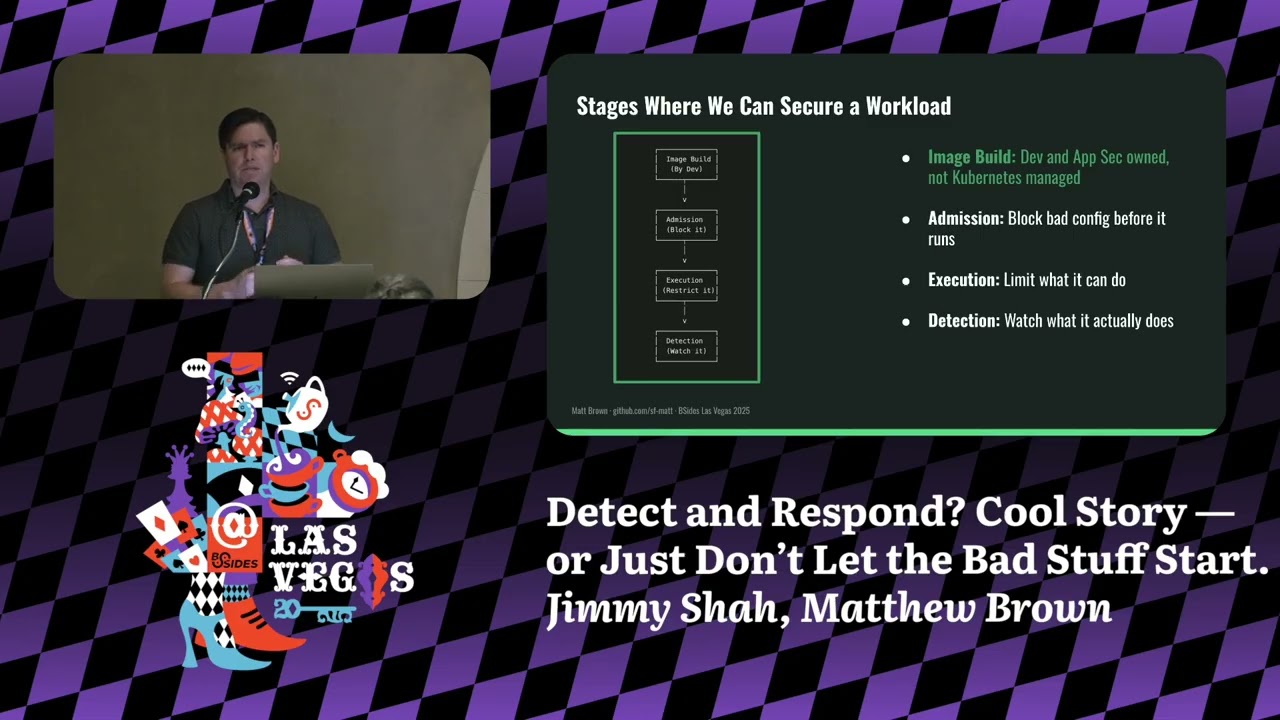
specifically say we want guard rails. Now I'm not going to get into the nodes and clusters today. uh that has to do with more pol policy posture role-based access controls. Those would be tools that fit under say cubescape or trivy. Uh so that would be for another talk. So I think the takeaway of course no security by default unless we do something. So what can we do? I think there are four key points where we can intervene and sort of impose ourselves and provide security and these are places where we can actively perform blocking or prevention of things. So this starts with a container image. I kind of green lit this thing here because I don't
control it. That's what the dev ships. That's the building that is there. I don't have a lot of control over that in the Kubernetes environment. Now devs have control over that. If anyone's in appsack, you absolutely have control over that. But in the Kubernetes side, we don't have control over that container image. And then we have admission. This is the first step where we can actually control things. We get to determine as we're managing Kubernetes what sort of what sort of pod is going to be allowed to get in based on security configurations. Then we have our execution stage. what can it actually do? So, it's in the building, it's running, and that determines whether it
can run package managers or can perform other activities. And then finally, we have the detection phase. That's where we have our cameras. And that's where we can start to look at what's happening as it's happening. I think what this has done here by looking at these two middle steps is sort of changed the script, filled it out a little bit more. I think again image build to detection is the typical attitude. This has filled it in with factoring in emission and execution controls that we can take. So here's the app we're following. Simple Python app, not production grade, more sort of a 1600 ft home versus a 20story apartment building, but it's realistic and it can show us exactly
what can happen and what controls we can apply. It's built from a Docker file. It's just a basic manifest that tells us what sort of container image we need. There are two things I want to highlight here. One is we have the base image. As I mentioned, a lot of the base images run as root and have other unnecessary functions on them. So in this case, we have the Python image. It has root capabilities and has package manager capabilities that aren't necessarily required. Pretty simple. Now the dev can't actually do anything about that, but what they can do is add a user directive into this. And the user directive tells the container image that it needs to run as a nonroot user. And
it's actually very simple to add in, but it's very typical that you wouldn't add this field in simply because it's not required to get your application up and running. It's not really a bug or security defect. It's just not adding correct configuration in. So, as I mentioned, the deployments or the pods don't really care and have security guard rails by default. So this specific workload here is a basic deployment YAML file. It shows with one replica which means it just needs one pod and it's using our Flask cap there from Docker Hub. So it's very basic. There's nothing inherently insecure about this. But again in this case we have no guard rails. There's a setting
we can put in called a security context. And we can specifically tell it we want something to block the root user. But Kubernetes doesn't care. It doesn't need that configuration by default. So it'll happily run that. So you suddenly have a root container running in prod. And it's not rare simply because any pod that you put in there, you could have put something other than my flask app would run exactly as it is. So now for the fun part. Let's go ahead and add a little bit of spice. So we're going to add a small vulnerability to this code. Uh again outside of the scope of what I'm talking about just a remote code execution bug behind the command
route very conveniently named. You send a payload and you get capabilities to perform again remote code execution. So you can run this with say a couple of lines of Python code and you would get a full shell access to the container. Just one request that's needed and it's game on. So this is how the exploit unfolds in a real cluster using the actual commands with our actual app. Initial access pretty simple. Open up a netcat listener and then send your payload there. Again, just a couple lines of Python. You could get that easily with chat GPT. Okay, now we have shell access. We run inside the container who am I in a Linux instance. This is going to tell us what
user we are. And in this case, it tells us we're root or user zero, just as we expected. From the attacker point of view, I think that would be a nice thing if I was to jump into a container and see that. Then I can begin basic recon, install a tool like end mapap and start scanning the internal services and mapping things out. And I could install other tooling. Pretty simple. Then why does this happen? There's no policy in place to block this. All right, attacker is in. What else can they actually do once they have root access? Well, we already seen they can install tooling, so install an end mapap, start scanning internal services
and mapping things out. They can read sensitive files, so they could drop into Etsy shadow and start to look for possible credential reuse. Uh they can also just fully explore the file system and see things that they shouldn't as well. It gets much worse as we get into these latter two items. So one is that if they can get into the Kubernetes mounted service account token and it has strong privileges. I won't really explain this but essentially this gives them full access over the Kubernetes cluster where they can actually deploy their own pods or they could even look for secrets which are not supposed to be actual secrets in the cluster but clearly could be as they're not even
encrypted. And then finally, if there was a host path mount, which is not in this case, they could use a tool like NSenter. They could escape the host, have full access to the node, and have the capability to deploy for true persistence. As even if the node starts up or restarts, they would still have persistent access. Key point, no guards, no blocks, no alerts for this. So, where are we right now? Well, we green lit the image. We don't have much control over that. But now we have an app running that can get popped with a single curl request and they have root access as soon as they're in. No controls, no guards. But why don't we
just block it? And that's where a tool like Kerno comes in. Kerno is a Kubernetes native admission controller and it's open source. It's well supported by the community. Has an Apache 2.0 license and it's also actually supported by the uh CNCF or cloudnative compute foundation which owns Kubernetes itself. It has easy to use YL syntax so you don't have to know sort of the inner workings of Kubernetes to start deploying it and there is a built-in admission controller. I'll talk about admission controllers in just a sec but it's not nearly as good as what you have here. It's really rigid and it's not at all production ready. The key thing though is it can sit in
between and start blocking things before they're ever executed. So before that pod hits the cluster, it can be blocked and it's fast setup. It can get up and running in literally minutes. All right. So what is an admission controller? It's a core Kubernetes capability. It's now fully in Kubernetes since maybe a couple years ago. Uh but they decide again what's allowed in the cluster before workloads actually run. It's a very simple workflow. You send your deployment to the Kubernetes API. That API is going to authenticate your request and then it's subsequently going to go through the admission controller before it persists that to the database and actually spins up a pod. So what can the admission controller do?
Well, has two main things. One is mutate, which means it can actually change our deployment file. So this is a bit um of a very powerful capability, but of course a bit of a dangerous capability. And so we could actually take that deployment file and manipulate it to add in a security context, but that's going to be problematic as we'll see. But really what we're going to focus on is validate. Very simple. Allow it, block it, or audit it. So this is your moment of control before a workload ever gets into the cluster. And it's dead simple. All right, here's how Kverno works uh through a real policy. So in this case, sorry if you're in the back and can't
see it, but this is a cluster policy which then sits at the top of the Kubernetes hierarchy and applies to every workload within that cluster. This is an enforce mode, which means it's actually going to block based on this rule. Now the core rule logic is very simple. Make sure there's a security context and make sure it has set run as nonroot true. So it very simply says if you try to submit something then you're not going to make it unless you add that security context. So we try to deploy the same app as we can see at the bottom it will fail. What's also cool is you can customize this and add in your own
air messaging. You're not getting something like exit code one, but you're actually getting something that can describe what the issue is to help someone that's deploying understand why it's not getting accepted. And I think it's a win-win. It helps anyone working with these deployment files, maybe a dev, actually fix things. And it helps us have full control over what gets admitted to the cluster. And we can add a lot more in here. Labels, disallowed capabilities, requiring setcom profiles. Again, those are more Linux low-level things, but they help us better protect our ecosystem. And the reason real quick why I mentioned that the manipulate was not as good an idea is that if there is no
non-root user, that container will crash and won't be able to run, but the pod will effectively get in. So, it's a bit confusing. Okay, this is the deployment that passes. Not really much of a change. It just has the security context added. run as nonroot true and it guarantees that the container won't run as root. I've added in a specific run as user but that wouldn't be required. So with the one key tweak here it passes validation and we prevented root containers and we've given clear feedback to anyone who's trying to deploy and it doesn't work. And the cool thing is it actually comes with a CLI. So you can run these tests in a pipeline or a dev could install it
locally on their Mac using Brew. So it's very easy to use to test before you actually see this in production. So pod run is root. That's pretty good. We've made improvements in the configuration. But is that enough? So here we are again. Quick look. Exactly as we expect to start. Same vulnerable app. So we can use that same curl request to get access. And we didn't change the image. We didn't change the app. We just added container restrictions. So what improvements did we get? Well, if we run who am I, I'm not root anymore, which is pretty good. If I try to install end mapap, it fails. If I try to read Etsy shadow, it's also going to
fail. But I do have some interesting capabilities still at hand. So for instance, I could write to temp. It's not necessarily a bad thing, but it is world ridable. I can stage payloads in that specific folder. I can also start a Python listener on a high port if I want to create more persistent access. And so these are a couple of the things that we can do. We've set a guard at the desk, but I can still access the mail room or still access the stairwell. So why not just limit it? So we've green lit the image, we've green lit emission, but now we're at the execution stage and we have bad behavior that can happen.
It's not what the pod really is, it's what the pod can do. So, enter Cube Armor. Yes, the name is a little bit dramatic, but it is a very powerful and a very clever tool. It's also open- source and it has that same CNCF backing, Apache 2.0, and actively maintained by a strong community. It works at controlling execution by hooking into Linux security modules. We'll talk about that in a minute. But in basic summary, it looks for process executions, file access, network connections, and it's also written the policies in plain YAML. So it's very easy to get started. It also works across different Linux distributions. So if you're familiar or heard of App Armor, that's generally on your Buntu or
Debian instances. If you've heard of SE Linux, that's going to be on your Red Hat variants typically. uh cube armor kind of helps abstract away the need to write different profiles or policies for those different distributions. So think of it like a behavioral firewall rule. If you want to actually just say you can't touch temp, then write a policy and they won't be able to touch temp, right? What is an LSM or Linux security module? built in a Linux kernel for 20 plus years controls what programs can do like reading a file or opening network sockets and it kicks in at execution time not admission. Here's kind of a basic flow of how it works. Say a
program tries to open a file that will trigger an open SIS call. SIS calls are very low level. The kernel checks with the LSM. It will decide to allow it, block it, or audit. Very similar to Carvero. popular LSMs again, App Armor and SE Linux. But why use Cube Armor? Well, you now get to write YAML policies, not LSM syntax. If anyone's tried to write App Armor policies or SE Linux, it's very difficult. And Cube Armor translates these in then to the real actual rules. So, pod shouldn't write to temp. What we're saying is the pod will not perform a write sis call to write to temp. All right. Again, let's see what this looks like in practice. This is a cube
armor policy. Very simple. Two rules. The first we block anything under temp. So no rights. And we're recursive true. We're also blocking subdirectories under temp. Second, we block the execution of the Python binary. And that's going to block then the listener for no listeners on high ports. So a legit tool that's required for that container because it is running a flask Python application but something that is also used for malicious purposes. And both of these again like kivera are set to block not audit. So this helps stop exploitation those sort of nonroot capabilities. All right. Now with cube armor in place, I think we're in a much better spot. Hit the command endpoint. Same set as
before, but this time everything fails. Python listener blocked. Write to temp blocked. And actually that shell was blocked as well. But what still works is our flask app. So because it spins up Python before we hit the point of trying to run it later on, then we're not blocking that actual process. So the app is not affected. And I think that's not a bad result. So now we've green lit the image. Well, we never cared. Green lit the admission, no route. Green lit execution, a Python binary. But what about everything else? So prevention is powerful, but it's not exactly perfect. Cerno and Cube Armor handle a lot, but they hit limits. Some pods need to run as root like monitoring
agents. Some behaviors look sketchy but are actually normal like installing packages on a CI container. We can scope policies to reduce risk but not completely eliminate it. Full zero trust. Yes, possible. I would probably use strict allow listing with Cube Armor. I'd use flat car as a minimal operating system and I'd use emittable nodes, but again conversation for another day. So we move from blocking to watching ebpf. uh you don't really have to know too much about it, but it lets you have observability into SIS calls without actually having to affect any of your workloads and without actually having to install a kernel module. And it can detect abnormal binaries, suspicious SIS calls etc. All right, back to our downtown building
Kubernetes edition. So, we start by blocking earlier. We evaluate if the building requirements are met before it ever opens for business. Evaluate security before the workloads enter the cluster. Deny bad configs like root. Prevent problems from starting. And we control behavior with cube armor. Now that the building is open, that doesn't mean we have to allow access to the stairwell. App is running. Let's stop from shady behaviors like rogue shells or blocking shady file rights. [snorts] And finally, watch what matters. We still need a camera system. Monitor what slips through. SIS calls, DNS binaries, etc. I think the bottom line is we have the tools to robustly secure our workloads. We can move past a detection
first attitude and start thinking holistically as we're deploying workloads into a Kubernetes cluster what we can actually do to secure them. As for the nodes and clusters, sure, maybe the building sits on a sinkhole or Bob from counting has cluster admin, but I'll save that for besides 2026. I hope this gave you some fresh ideas when thinking about Kubernetes security. If you're not familiar with Kubernetes or Kubernetes security, I would highly encourage you to look that up and start learning it. It's the foundation for modern software applications. And if you look at actually every AI model, it's running on a Kubernetes cluster with maybe a million nodes. I'll be around if you want to chat more.
Feel free to dig into the blog. I have posts on all of these. And then feel free to uh check the lab repo. It's not actually with committed code yet. So wait till the end of B sites. Thank you. >> [applause]
Related talks
 39:37
39:37 52:04
52:04 26:35
26:35 30:01
30:01 53:00
53:00 50:37
50:37