Corporations in the Middle
Show transcript [en]
good morning hi my name's lee brotherston uh this is my talk corporation in the middle um by day i'm a security advisor at leviathan security and at night i annoy my isp by doing this sort of stuff um just a quick caveat at the beginning the data i show is about rogers this isn't meant specifically as a dig at them but they're my isp so that's the data i've got this probably occurs elsewhere and for uh for you to understand if it's relevant to you as you'll see in a minute this actually occurs across a number of isps and is really similar to some techniques outlined in some of the snowden documents and in the fin fly uh spyware
that camera international use so man in the middle versus everything else is kind of different from re for researching insofar as normally you would have an ip address an application or something like that that you're specifically attacking man in the middle you don't have that luxury of a specific target you pass data between two points that you own and you just have to um observe what's happening in the middle and make inferences from what's changing in between although that's kind of legally fun too because you're not sending data to anyone but yourself you can send anything you like detection-wise well we'll come to detecting it if you're looking for it specifically in a minute but if you're
not looking specifically there are there are three broad ways in which you might detect a man in the middle attack against yourself the first is this uh everyone's probably seen that at some point you're using an ssl connection and the browser sees the crypto break so any application that's using crypto will probably pick up man in the middle because it messes with either signatures or the algorithms in some way variation on this is um just straight up protocols breaking because data they were not expecting appeared changes in data mean that unexpected consequences happen and you get weird errors the third one is the what i call spidey sense or rogers injected a great big banner at the top
of my web page this one's pretty easy to spot why it happens because i've gone over my bandwidth usage yes i've upgraded my bandwidth since and there's two things to really note about this beyond the fact that there's a banner at the top the first thing is that the url is actually still intact it hasn't changed and the second thing is that the content that i originally tried to load still loaded at the bottom they're both really important to how this works so bear them in mind as we go through on this um so when this happened my reaction was something like this and and then and then i sat down and thought about it a little and i wanted
to know how and why and and sort of learn what was happening my initial guess was maybe they were spoofing dns they put me in some kind of captive portal there was a transparent proxy something like that but there's only really one way to tell and that's to capture as many packets as you possibly can so hook up an ethertap to the back of your consumer device throw it in bridging mode and make sure all the netting firewalling wi-fi and everything is behind the user tap that way you've got uh as close to raw packets as you get without having a docsis sniffer which i'm not investing in um tool wise it's really simple tcp dump in
fact two of them because it's an ether tap and you've got an in and out which is really good because that makes use of my terrible hardware because then i can run it across two cores two discs two buffers and everything else like that you also get really useful information using an ethertap because things are saved into two files and in file in an out file so you don't have to infer direction based on things like packet headers the other thing to remember is we have two states we have being injected i.e when i've used too much bandwidth and not being injected and we can force which one we're in by how much bandwidth i've used that means i can determine
whether i'm being intercepted or man in the middle or not so i can determine what sort of oops results i'm getting so a quick quick look at the tools there's a whole bunch more but basically you're saving in pcaps and then you're replaying it multiple times through different tools you've got acquisition tools like tcp done wise wireshark and t-shark those are just for sniffing the packets off the wire or playing the back on the screen uh the middle row largely are for extracting packets from pcap files or pushing pcap files back together if you're sniffing days worth of data you're going to have gigs and gigs and gigs and you don't want to throw gigs
and gigs and gigs into wireshark trust me you want to extract just a few packets and look at a few seconds at a point in time so you use those tools to do that the others are for analysis things like drawing graphs measuring round trip times and that sort of thing so let's look at the sniffing i've tried to spare you a tcp dump output on a monitor on a projector uh this is a normal http request as sniffed when i'm not being intercepted uh you've got the three-way handshake the sins synaconac an http request then the response which has the header and the data then when we get to the point of me being intercepted ie having that banner
we sniff again on the client on the server and then compare the two results and look at what's different so first we send the sim packet and that arrives fine we get the back fine and we get the ack that means we've completed the tcp handshake so that's all gone as expected next i send an http request but that never arrives at the server what does arrive is a reset push ack that resets the connection at a tcp level from the server's point of view so it thinks the client has just dropped the connection interestingly normally the client would send a fin packet but a reset's used because the server sends no reply to that so there's no hints coming back to
the client that something funny's happened and obviously i don't know where that came from although it appeared to come from me next i get a response from the server that never got the message which obviously didn't come from the server and everything fits in it's the right sequence numbers port numbers tcp flags all that sort of thing so what did we get we got this and unsurprisingly it's just the code to throw up the uh the banner at the top of the page it's a bunch of script and frames but there are a couple of interesting points the stuff highlighted in red is to make sure it doesn't get cached that's because it's presenting itself as that
web page and if it gets cached the real content at the bottom won't be able to load because when it goes to hit it it'll pull this again from cache the other thing to notice is there's no server string uh it's completely compliant with standards but it's not normal um but i think that's to keep the size down because this all fits in a single packet which means no one has to do any complicated session management when they're intercepting they can just throw this packet at me and they're done so this is kind of secondary i don't really care about the banner a whole lot but what we can start looking at are packet headers uh you can't mess with
packer headers too much when you're injecting because if you change tcp flags ip addresses port sequence numbers you suddenly drop out of the session and you're no longer intercepting that session so there's not a lot of scope for room but there are a few things that can change ttl's are one they were sort of lazy and they use the same ttl every time they inject a packet that means that most of the time the ttl isn't going to match the packet from the legitimate synack you got earlier in the transaction so you can look for change in the ttls and spot some injection or so i thought unfortunately load balancers do that too so i flagged up
all of amazon netflix and everyone else so that kind of sucked but there were some other things they never set the do not fragment bit that's hardly unique but it is consistent with every single injected packet and the window size is always set to one which is a lot more unusual combine this with the do not fragment and you've kind of got a fairly uniqueish signature it's pretty easy to put in tcp dump so i ran a check and it seemed to work put it in wireshark 2 because who knows maybe tcp did something weird but no that that worked too so i put it in snort so my ids can tell me every time rogers throws something on
me um i ran it through a 30 million packet test it had 100 success rate as far as i could tell and no false positives which is a ratio that i'm quite happy with so so i'm gonna i'm gonna call that having an alert though i would say if you think you're subject to nation state spying don't rely on this as a method it's not good um but that's not really half of it there's a whole lot more so remember how that page loaded at the bottom you see how all the images loaded and it knew on the second time through to allow that page through well if you look you also notice that well look if you're in this situation
you'll also notice that it never intercepts xml it never touches an image it never touches css it only touches html pages that means it has a concept of injectability i guess for one of a better word but it knows pages or urls that it can inject and those that it cannot it never broke um apps that use xml and soap and that sort of thing to talk back so it means that it has some concept of the content also i observed a couple of times that some pages would load instantly with the banner and some would load with the banner on the second try the second try ones i'm guessing is because when it loaded the first time it
had no idea if it could inject it it learnt that and then injected on the second try so what about the ones that injected first try well i kind of inferred that maybe they were watching my connection a little earlier than when they were injecting the packets if you look at it back at this slide again the decision to inject is made pretty early on it's made when they block that http request but that is before they know what kind of content is going to come back that happens here in the http response now you can't rely on file extensions in the url because everyone knows you can have php return to jpeg so seeing php on
the end for example doesn't necessarily mean it's a php page it could be a jpeg it could be something else it's this the content type in the header that you're worried about that means that there is some prior knowledge of what's going on which is interesting because that means that they are not just dealing with me during the period at which i'm being intercepted they have some kind of database of what is an injectable page and what is not an injectable page so let's profile that i have a vps out on the internet and i have my machines at home i wait to the beginning of the month so i have no bandwidth against my host
and then i set this up i rewrite a whole bunch of pages or all the pages on a single site to one url that means i can make an infinite number of urls i visit that day that regularly once a day a week a minute whatever i visit each page only once and i take a note of exactly when i visited each of those pages and then i do it again uh but i'm worried that they're indexing it out of band not sniffing what i'm doing so i set up zero dns uh i put an etc hosts file in and i ht access it so i'm the new one that can go to the site so the only way for them to
index this site is to sniff my connection to that site and the spoiler is they sniff the connection to the site as far as my document it's hardly complex this is the document i stuck i put up on the first try and actually this one never got intercepted at all and then i did this and it did which brings me to another sort of thing they're not just checking ip level in fact they're not just checking http level in the protocol this is actually looking at the document contents when you think about what's happening in these surveillance age that's quite a deep level to be going to to inject a banner to buy more bandwidth
oh and by the way the retention time that they go back because i can sorry that's the bit i missed i go back and revisit each of those documents i see which one gets injected on the first try which gets injected on the second that far that way i know how far back the cash goes it's 30 days which is ridiculously long when you consider it's just to throw that banner in so if people collect personal information about you pepita says you can ask them what it is so i wrote a letter to rogers please thank you
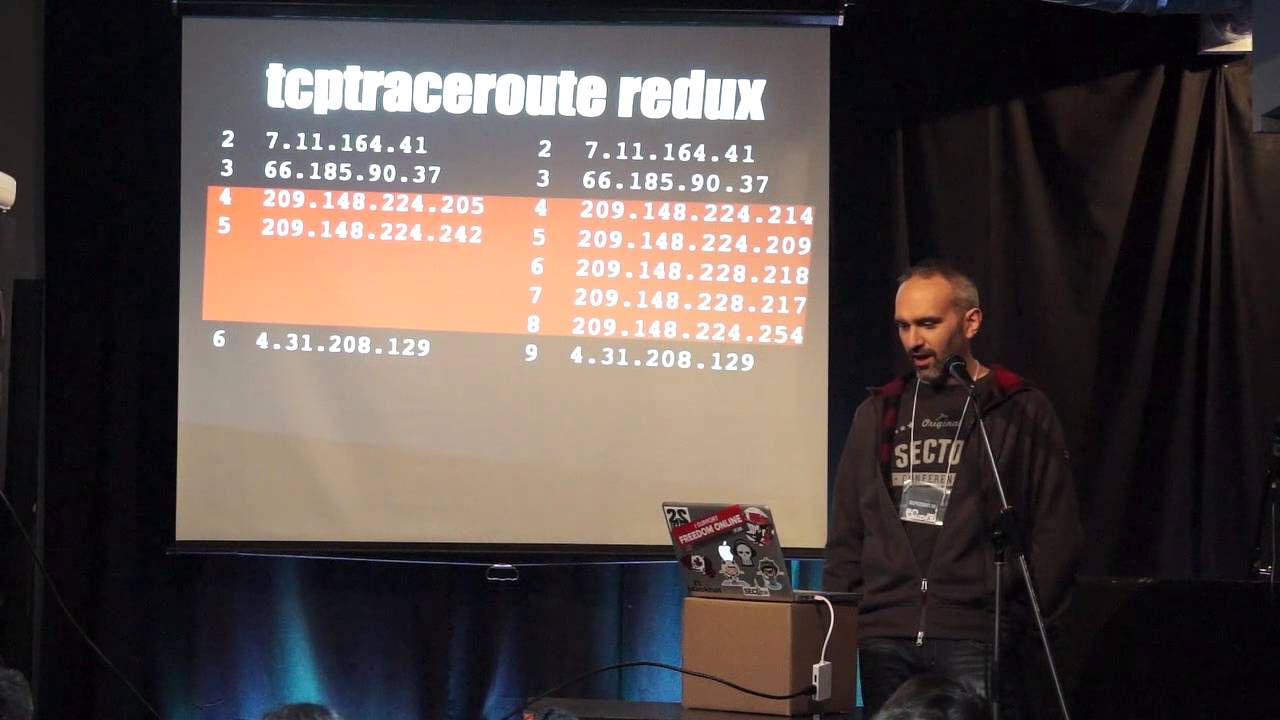
they sent a reply they sent five pages of reply about four pages of it was did you know pepita says this yes i know pepita says that the important sentence is we don't log anything so we've got nothing to tell you sorry i'm just going to leave that where it is so i thought i would map this network out just for fun so i didn't want to send any direct probes to anything i didn't want to do anything illegal so i pass stuff between myself and my vps and see what i can infer and what do we use traceroute because tracer is awesome and old um but tracer is highly underestimated everyone knows the icmp or udp trace routes
this thing with the with the reducing or increasing ttls but um it can be anything it's just an 8-bit header inside the ip header you can do it on ipsec on gre tunnels on tcp or whatever so that's great you take you trace route using everything you can and then you do it again using tcp on port 80 and find it takes a different route therefore it's going through a different network presumably for interception you can see the little timeouts presumably where an acl is messing with it or something like that this is great you can write the world's shortest and most terrible port scanner where i trace through those two hops to my host on every port possible and see
which ones time out they only intercept 80 though they do block net bias and a couple of other things too i was moving on to the next stage of profiling and then i found they changed the network but luckily for the better because not only did the timeouts not happen i have different hosts and in fact i have more hosts the best thing about this is that's more hops which means more ttl decrements which means when things appear at the other end they will have different the ttls will have a different value if it's been intercepted versus if it's not so i can write an even shorter and more terrible port scanner by using fixed ttl scans
observing the results on the other end although it is still 80 but whatever so which interface do you get when you trace routing well typically it's this one but is that because that's where the incoming packet came is it because that's where the reply was sent to from or is it some other default well the truth is that the rfcs disagree and so do the implementations of the different vendors you can get this address often by sending replies back with a source port of 80 and a destination high port from a server on the internet because it thinks that's the reverse packets coming back in again or i can send packets to a destination from me supposed to be from
my server then my server gets replies from this interface it's pretty easy you just use scappy you can craft package pretty quickly and you can enumerate all those interfaces so you can work out what network they're using and where it all sits so you trace root once you get this you trace through it again you get that you use the scappy method and you can map out the ip addresses of all those interfaces so i could build a net network map i didn't put the ips on because it would clutter this up too much um in the script say inject they really helpfully give the ip addresses of their internal and external web server so we can trace route to it and place
the server on and you can see the rfc 1918 address which is the management lan but what about that sniffing injection port well that one's sort of easy because they use that fixed ttl all the time most os use round number ttl 32 64 128. the ttls were in the low 120s so it's probably got 128 as it's ttl for the injected packets and a simple bit of maths means you can just count the hops which puts it about there which fits in with the network diagram quite nicely so i'm going to take that as as correct if i really wanted to be thorough i should have done this do the handshake http request with
increasing ttls see when the reset packet comes in but i was lazy i didn't have time so i didn't so let's get back to the topic at hand what is injecting these packets well we're lucky that server um string did not occur in the uh in the packet the initial packet that bounces you off however subsequent packets it is hooray um although it is actually just apache and they've just renamed it um so that sounds like a manufacturer then when you look in the scripts they hopefully put a copyright notice and a url so that might be a manufacturer too so we go to their site and we sell products that inject things on web pages
for isps so it sounds like we we're probably probably on the track also on their site is their page they mocked up for comcast which is nice and the interesting bit is the bit that says hey we don't just tie this to ip addresses we tie this to account numbers you know just to mess with the whole stealing your identity thing so why am i bothered in case i hadn't hinted the whole data gathering the correlation being able to modify my connection in line was kind of annoying me uh this is the eff slide that they put out when verizon was doing meta data collection it was to point out that you don't really need the contents
of a conversation to be able to infer a whole ton of things about it this is about phone calls not http but let's just look at http from a header alone not the document contents you've got the url so you know what document someone's looking at you've got their os you've got their browser you've got their cookies which we know the nsa used to track via ad networks so that could be potentially useful you've got the languages speaking and the if modified since tells you the last time they went to that page and that's just the header so that's um that's some fairly useful information so what could go wrong um my isp might not
be doing anything deliberately malicious but what if they were cursed by someone what if they had a rogue member of staff um and they used it to do something worse instead of javascript for banner what if it was javascript to drop an exploit what if it was javascript to drop a fake flash update or java update or something like that like you hear of oppressive regimes doing two arrest protesters and that sort of thing all the time but that won't happen i mean it's not like they leave management consoles just kicking around on the internet for people to break into is it well yes they do um to be fair this one isn't rogers um
but the uh the geo geoip stuff overlapped these this is actually 40 nodes 20 injection nodes and 20 management nodes uh completely open to the internet 21 in the us four in canada and a bunch all around the rest of the world um and it wasn't so hard to do this because they put that service string in so i put it in showdown it's brilliant um so i i learned i learned some stuff doing this um some stuff i didn't want to know um no i learned some stuff one thing i was shocked to learn was that the u.s patent and trademark office is awesome and i thought it was terrible um but the culture of everyone's suing each other
for intellectual property rights means everyone patents everything and google searched patents which is also amazing so i had a little look i went back to the manufacturer's site and i thought what what information could i get well i could get the information that they patent the bulletin system that's the name of the system that does the the injection so that's good so we hit google and we can go and look and we can see what sort of patents they have here's one for injecting things into consumer routers or tcp streams in consumer router networks here's one that worries me slightly more because um this is uh this is part of their ad network but this isn't just injecting ads if you
look at that does advertising content exist yes then edit webpage i think that's called stealing ads and switching ads out for uh for your own content so um the other thing i learned was i got my own razer out to this i thought i was on to some huge evil conspiracy yeah thanks to hanlon for writing the original i might have slightly plagiarized um yeah i thought i was getting onto some huge conspiracy somewhere maybe but it was actually down to legitimate business reasons though i'm not saying for a second that i think it's right because the reasons i outlined a minute ago i think it's a pretty dangerous thing to still be doing but
no but they are doing it and the other thing i would note is this isn't just here when i did that showdown search this showed up on bell and shaw's networks too i'm sure it shows up on others they're just the ones that are open to the internet not sure whether bell and store are actually using those or whether they just sat on the network in the lab or something but they were there um and um and sorry i'm losing my train of thought and yeah so i um i'm not convinced that it's it's a roger specific problem and the techniques can be reused too that trace routing i used in the uk uh where there is a
filter in place for certain sites um i could observe things being intercepted on the way to the pirate bay and then when i was in the states in a hotel um everything http permanently went via another network and i have no idea why um and i dread to think why um but yes that's really what i have uh i don't think there's time for question you'll probably all want lunch anyway but please feel free to stop me i've got time for questions okay cool if anyone would like to ask questions that'd be great if not lunch yes um no they're a little shady about that stuff yeah no um they don't put anything online um they have this site that has a
very high level we can inject stuff for you they don't have any user manuals product specs um i do have a photo of the devices on my laptop that i could maybe show but that's that's about it they don't they don't put anything up they used to it all mysteriously went down and it's not on archive.org for that says yes
yeah um the the problem you get sorry you get you get reset files when i miss the b
right yeah um there are some tools and i have no idea i haven't researched if they're using them but there are tools that do things like inject resets into networks when you're using bittorrent and stuff to try and stop people from uh file sharing and stuff i can't remember the name of them but there are there are products that do that so it's possible yeah any others no lunch thank you
Related talks
 27:38
27:38 19:32
19:32 32:02
32:02 24:45
24:45 25:11
25:11 26:03
26:03