Blackhat Python
Show transcript [en]
okay so i'm here to talk about black hat python so i was up in thunder bay working um stuck in my hotel room and one night i got a text message from my good buddy justin seitz and he was like yo yo yo yo and i was like yo because we're cool we talked that way and he was like big news man i i'm writing a new book and i was like cool because his first book was really awesome and he was like want to be a tech reviewer and i was like what the [ __ ] is that and he's like well it's where you read the book um fix all my code and don't get paid
for it and i was like yolo because sometimes i text like a 12 year old girl fast forward to about a month ago wow fast forward to about a month ago and he was like okay we're done and i'm like thanks sweet jesus because um to know starches credit they did end up paying me and the other tech reviewer but holy crap that was a lot of work so the book is at the printers right now and it's going to be available in a couple weeks but i wanted to take this opportunity to get you guys if you're not if you don't know python maybe thinking about learning it or if you know it maybe using it more
in pen testing for stuff you hadn't thought of before so these are some of the examples from the book that i thought were really cool so first the obligatory why python slide i think we've been over this but uh it is really powerful yeah i think that some of the power comes from the simplicity of the language right you're not stuck worrying about like semicolons and wrapping everything in squiggly brackets or dollar signs in front of the variables so that lends itself really well to being able to when you run into a problem quickly write up a new tool just on the spot to solve that problem okay it's cross-platform it runs on windows and everything else a
lot of people will say well it doesn't come out of the box on windows but you can get around that with stuff like pi to exe so you can take your script and make it an executable or if the machine has java on it and we all know that that's installed on three billion devices that's a sign of the apocalypse by the way then you can you can run your python script inside of the jvm so that's kind of neat and of course it's been widely adopted by the infosec community so whoa it keeps skipping you can leverage the stuff that people have already done so here's the first example um and it's a really basic one
admittedly but so netcat is great for doing a quick and dirty interactive shell on a system right but the problem is av has kind of figured that out so what if we um replicate that functionality just using pure python to avoid antivirus so to do that we'll need a server piece that's going to just sit there listening on a port and it's going to handle the cl the connections coming in so we'll it'll be able to like receive a file um run a command and return the result or just do like a full on interactive shell the client part is obviously going to want to connect to that it's going to want to send a command
receive and print the response out and if it's a shell it's going to want to do that a whole bunch of times digging into the code and i was assuming bigger monitor but whatever here's the server part you can see it's really simple we're just using the the socket module to set up our listener then we're using the threading module to spin up a new thread to handle requests coming in so we can sit there listening and handle the client requests coming in at the same time on the client side again we're using the socket module to send data and then this is how we're running uh system commands it's just the sub process module uh the check
output function will give us a string back of the output and i learned last year that i get what i call presentation fingers so i can't type where the [ __ ] in front of an audience so i pre-recorded all the demos just to avoid that so here's the demo for the netcat replacement this is an xp this is the victim machine um because i'm too cheap to pay for windows 7 on my lab and we're just running the script and we're telling it hey listen on port 5555 and we're giving it the dash c so that it's going to fire up a command shell and then the attacker machine is connecting to the target
on that same port i'm a slow typer yeah there we go and then it's going to drop us into this um black hat python shell and then from there we can just execute windows commands like we were on the box and right now i'm just spitting out the contents of boot ini just for demo and that is it so there's one use for you um the next thing that i thought was really neat and i'd never done it before is extending the burp suite so if you're not familiar burp suite is like this really great web application testing tool and it has this ability to be extended it's kind of like a plug-in architecture right
and because it's java based i didn't realize that you could write your modules or your your extensions in python but you actually can so for this example what we want to do is take all the stuff that's gone through burp take all the web con like the html content for a website and turn that into like a password list that we can use to like craft crack passwords so the idea is if you're testing an organization you just spider out their website and this will turn it into a password list of course there are other tools that will do this but if you're already working in burp it makes sense to do it here so to get this to work there's some like
boilerplate code you have to write and then there's going to be a we write a helper class that's going to strip out all the tags for us and just leave us with the like the contents of the page and then we're going to take that and kind of just do some simple um stuff that a user would do when they're making their password like you know put a a one at the end or the current year stuff like that um and then just some other points you have to tell burp where your jython jar is well that'll show i'll show you that in the demo and i got stuck on this in cali it runs
uh burp with java 6. you don't want that because jython doesn't operate that way you got to run it under java 7 but that'll be in the demo part 2. um so for the code you can see at the the top two lines we're just importing um stuff from the burp api so every extension needs to implement the burp extender interface it'll and because we want a context menu like when you right click on something in burp we want our extension to show up in that list so we're also importing the context menu factory the bottom three lines are actually we're importing java packages um so something we're importing from swing so that we can deal with the ui
and some other stuff but the reason we're able to import java packages is because we're running in jython and not python and jython is like a python implementation in java so you have access to both python modules and and java packages uh this is the boilerplate code that i was talking about so my uh we got a class here that's ex that's uh what do you call it inheriting from burp extender and context manufactory and then the second line there that's highlighted we have to define this function called register extender callbacks and that is our way of like telling burp hey we're ready to rock um yeah this is the this is the small helper
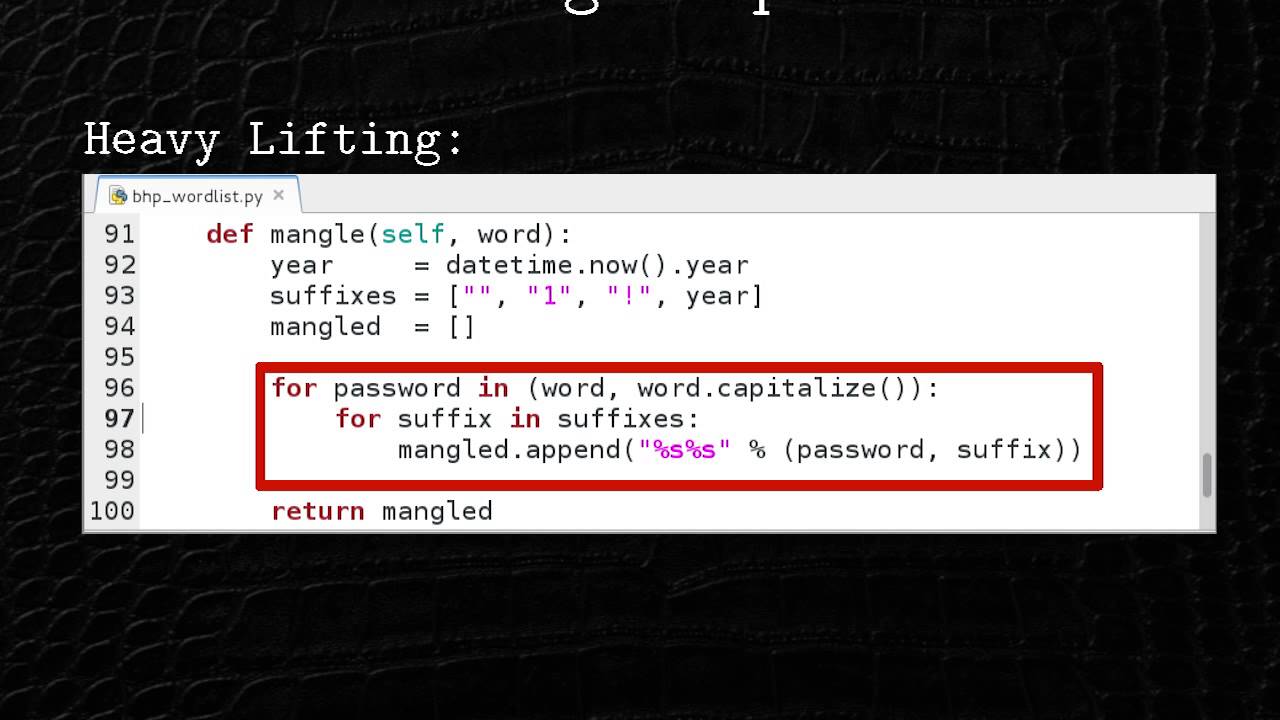
class that's going to rip out all the all the tags and leave us with just the straight up website content so it's inheriting from html parser and the way it works is you just write these functions that get called every time it's reading the html and we'll take the the comments like developer comments right or the the words on the page and we're just going to jam them into a list for later and this here is a really simple mangling function it's just going to tack some stuff on the end of the words that we find or it'll capitalize the word and then do the same thing tack more words on so here's the video of that so the first
part of this is me trying to remember the path to java 7 on my cali linux box so i'm just looking through my history hey there it is cool and if my computer is faster okay there's burp so i'm just making sure that the traffic i'm sending through my browser is actually going through the proxy nope it's not uh now it is cool there it is so first thing is we once that's happening we spider the whole website so we make it crawl everything and get all the html pages right and i'm just sitting here waiting for that to be done
okay and then after that's done now we're going to go to the extender tab very top right there
and you go to the options section and you make sure you're pointed at the jython jar and then you go to the extensions tab and we're going to add in our our python code you switch this here to python you give it your script that you've written and you have the option of putting standard out to put to a file which would help us in this case because we want a password list but just for demo i'm going to um show it up in the ui in the user interface through the magic of open source video editing we are speeding ahead but that was that gray thing i didn't know how to get rid of
all right so we go back to all the requests we highlight all of our requests then when we right click our our new extension is in this list create word list so that's cool that's gonna run and more video editing magic is gonna happen all right and we're back okay so now we're at the extensions tab again and you can see very bottom of the screen when we go to the output tab it's going to give us the output from our our extension you can see very bottom it's created this password list for us so it's kind of neat kind of cool but you can do lots with uh with burp and python if you're so
inclined okay for the third example justin had this idea for command and control using github because github like if you're well if you're writing uh trojans as he often does um one of the problems you're going to struggle with is like hey it's out there but i want to update the code right so what's really good at updating code well git gets a way to push code right so let's use github to uh as a channel for command and control pretty cool idea to make that work you're gonna have to write a trojan that can talk to github it's it needs to pull down its commands run them and then push back the the data that it's gathered from the
victim host we want it to be modular so like you can have certain commands for certain machines and even the commands for those machines it's not going to download some command that it doesn't need right so all the commands are modular and the really neat part is we we have to hack python's um import functionality so that it will be able to when it's trying to import a module we jump in and we go get it from github right so that's a really neat feature of this in terms of the code we're importing from github the github 3 module so you can google that if you want to use it the second line there we're just setting
a trojan id so it's like a unique identifier for our our victim host and then the other thing to note here is we're using json for the configuration file this mod this function is for connecting to github so you basically just give it a username and password and then you tell it what repository you want to access and the branch and that's it this is this method is for actually getting a file off of github and it's i don't know it just does it these the top one is the config file so it's pretty simple but it lists like the commands we want the trojan to run so the top one is okay a directory listing and the second
one is just give me all the environment variables and the bottom listing here is just the the one that spits out the directory stuff um and this is the the meat and potatoes of the um kind of stepping in and and getting python to um import our own code so basically the way it works is the trojan is going to want to import one of our modules like directory lister but that's not in the built-in python install so we can kind of insert ourselves in the process and get called so when the interpreter is looking for the module it'll end up asking us hey do you know where this module is and we go out to github and grab it and
then bring it down and it gets imported and the interpreter runs it so it's kind of powerful pretty cool and so this is the demo for that so this is the victim again
so it's got its config it's looking for the modules then it's running them and then it's pushing the results back up to github so that's done now i'm going to switch to the attacker machine any second now and you can see this is the repository it was pushing to so now there's a new data folder up here with abc which is my my victim machine and the results of those two commands so there's two files in here they're base64 encoded there they are there and so i'm just going to pull that stuff down from github
type faster dan
okay there it is and then just real quick hopefully quick i am going to base64 decode that stuff and just spit it out so you can see it
and i'm gonna um change the change the commas to new lines just for visibility
all right and i'm gonna skip the end like this is taking way too long so that's done cool um so yeah that's pretty much the stuff that i have but there's a lot more in the book that um i want to draw your attention to there's sniffing with scapy there's he does a really cool chapter where um he's exfiltrating data through i through internet explorer and he's got it all encrypted with uh public key cryptography and posting it on a tumblr blog so that's pretty crazy really cool chapter vmware sandbox detection so you can figure out if you're running inside of an analyst machine there's a really kind of novel privilege escalation thing in there
that's it's safe and it's easy that's neat and then the last chapter he's backdooring virtual machine memory like he's injecting shell code into snapshots of a virtual machine's memory which is pretty sick so yeah um check out the book and all the slides and the sample code so i know it's hard to see that the sample code is on my blog um or my github and you can probably get it from the b-side site as well so thanks a lot guys
Related talks
 27:38
27:38 32:02
32:02 24:45
24:45 25:11
25:11 26:03
26:03 26:51
26:51