Pwning Zee Cloud: Microsoft Edition
Show transcript [en]
all right all right we're we're near the finale of b-sides i think i'm second to last so uh pretty good stuff uh great talk if matt's still around that was awesome detection engineering methodology all right so exploiting the microsoft cloud um this is a pretty cool topic you know from from my personal vantage point because as everything starts to migrate over to the cloud i think the industry is going to see a lot more microsoft exploitation right you know aws has been around for a while i think we had a talk earlier about that so this is kind of the other flavor to that so who am i alberto rodriguez i currently work for a company
called 6gen based out of maryland and i'm a director of also an offensive operator where i do you know red team and type stuff so i'll actually talk about some of the things i've done on engagements here i'm also a lead instructor at thrive dx formerly known as hacker u if anyone's familiar with that i was in the army which is why i see some of you familiar faces here spent a few years there conducting cyberspace operations and i've spoken at other conferences there are two notable ones there so this is my first time my b-side's really excited to be here and thank you for taking the time all right so on the agenda for today
we're going to talk about why this is so important for everyone to sort of listen on the microsoft cloud as a whole give you a little bit of background of the architecture realistically speaking you know you got things like azure active direct directory and how that relates to on-premise active directory spoiler they're like not even related uh in terms of the capability there then we're to get into how attackers are conducting reconnaissance on your cloud infrastructure how they're attacking that cloud infrastructure and then for the defenders in the room you'll get some quick wins and tools that you can implement in your organization so i typically like to do my slides you know sort of like a cheat sheet for y'all so
it'll include links it'll include pictures of github repos you can go and get after uh so i think this will be up on my github towards the end as well so you guys can pull it down and be able to play around with some of these defender and offensive tools as well all right so the microsoft cloud this is actually pretty cool how they got the three screens right in front of you you know you never have to look to the side the microsoft cloud right we're talking microsoft 365 azure and office 365 right software as a service has pretty much taken up a lot of of industry you know octa different uh you know salesforce for for
those that are not really in a tech realm so to speak uh the cloud every day holds more and more sensitive data by show of hands anyone familiar with the recent exploitation uh the brute force attack by azure that was recently discovered yeah that you know microsoft has decided to quote unquote mitigate this specific technique after secureworks released uh the poc we're going to talk about that a little bit um you know we're going to talk about the differences between azure active directory and just active directory right the actual active directory component of things it's more of an identity management think of it as octa you know a lot of times you have companies like
duo anyone familiar with duo dual like the multi-factor you know they're like the nice little green icon well duo loves to charge people for mfa but did you know you can just go out get azure active directory for your enterprise for free believe it or not and you can implement multi-factor authentication using sam authentication right so this is an identity service that you can implement in your organization to deal with authentication to multiple applications across your enterprise and we're now introducing which matt actually had up uh windows 11 and how that ties into the cloud as well the actual microsoft cloud little by little is ramping up on some of this the tactics you know it's sort of the new
game in town aws has been around for a while gcp has been around for a while let's not forget what are the other guys oracle thank you uh can't forget oracle as well right so those cloud providers have been around for a while and microsoft's particularly azure is now starting to ramp up more and more every day so you can see some of the tactics that are known sort of listed here i recommend you sort of keep track of the beast as it grows over time here you take a look at office 365 and then how it differs from azure active directory right the identity service versus the software as a service component with office and onedrive and
all that good stuff we all know and love uh but these stacked tactics are starting to add up this diagram here is actually from a microsoft mvp uh you know kind of a private security consultant i i referenced them there at the bottom and he's tracking even more than meyer was right just different ways on how your configurations in the cloud can be dangerous to the enterprise and how they can bring a risk to your enterprise so reconnaissance uh you know from the beginning you can actually go to this known url and it's referenced there and you can type in a specific username and domain and verify whether that organization based on that domain name let's say my organization is
i don't know a-rod at sixgen.io you can verify whether that organization has an azure active directory enterprise all right i it's kind of small not that small but you can see it says managed which means that specific domain is tied to an azure id tenant and that means i can now interact with microsoft online i can enumerate users and further my reconnaissance all right so some of the reconnaissance there username and numeration we can do it passively right we can go out and get different usernames and emails they're all public depending on the organization my favorite are schools schools typically have like a directory right where they list every teacher every you know principal assistant
principal and pretty much everyone that works for the school district is all openly online when you go against those targets uh breaches social media i think you guys kind of understand that passive reconnaissance perspective and then you can go interact with the microsoft online service and you can check what usernames actually exist um there are many tools out there the one here o365 enum it's a python script referenced out there on github and you can actually interact with microsoft online verify whether username exists or not okay one of the defense mechanisms microsoft came out was okay hey look if we got tons of people hitting for this specific domain we actually we're going to block that ip as you'll see later
attackers can get creative to sort of you know evade that specific smart lockout right black heroes information security they created a tool called fire prox which essentially you're proxying your traffic through multiple virtual private servers and you're able to you know keep cycling your ip ever so often so that way microsoft doesn't block you or they may block you but it doesn't matter because you have a new ip so you're able to constantly enumerate users by simply interacting with the cloud service pretty cool pretty easy so now you've got yourself a big list right from like a-rod all the way down to fulanito and you can see where i'm going with this dns let's talk dns uh pretty awesome
actually when you build let's say an azure vm you can get a valid domain that azure is controlling on your behalf okay as an example uh azure web no let me pick uh man i don't have it here all right there's too many that's that's the reality so when you register for these services yes you can tie it to your own domain names but some of these services let's say the file storage service there are tied to a specific domain that is controlled by microsoft so what if as attackers we can simply grab that service cycle through different permutations let's say i don't know let's say we're looking for army can you guys see that
yeah you can so on this specific tool which is a tool written by carl fawson out of netspy he wrote a tool that's able to interact with all these dns different dnses tied to azure services and we're cycling through every different every permutation of the word army right so as you can see you know it's army.microsoft.com test army etc etc so instead of army it would be company name right or it would be you know github whatever relates to the target you're going after you can find these endpoints that are public facing and you can see what permissions they have whether right access read access i'm able to interact with some certain web page one of my
favorites is finding test git labs right where they might be open and you're able to i don't know leverage some sort of ssrf vulnerability etc uh so through dns reconnaissance interacting with microsoft services we can find assets that are tied to the organization so a tax we're gonna harvest credentials right how can we do that one of the most common strategies is password spraying where we're able to get you know one or two or three really good passwords and send them against our you know username list that we created in the beginning right and we can come up with hopefully some possible solutions in this example you got d rios right uh who had a password of miami
heat 365 uh 305 right with three exclamation points why because a lot of times organizations and people like to put passwords that are easy to remember their sports you know their favorite sports if i'm going against a team in miami i'm going to try miami heat the dolphins we have hockey in miami i don't think so the panthers right the panthers all right so i'm going to try different variations i'm going to try you know the seasons fall spring summer all of this still applies to password spraying and i'm going to get a valid set of credentials right i can also do credential stuffing in i'm gonna go out whether it's a dark web deep web
whatever web you want to believe in i'm gonna go and get some public breach creds and i'm gonna test them out the more recent the better right and not only that but i'm also going to submit permutations based on those names one of the things i like to do is you know add those people that use the one exclamation point at the end add two exclamation points at the end that's the money maker right there believe that let me know if it works all right second thing we're gonna try some fishing i think fishing is you know arguably the most popular initial entry vector i mean it's just so easy i don't say it's so easy but it's one of
the easiest uh initial entry vectors right believe it or not we can fish for internal access right we can send an email that hopefully bypasses those email security vendors out there and maybe execute an hta right and then boom code execution on a host um but one of the other things we can do is we can fish for valid set of credentials now credential let's think of it as matter right credential matter it's not just username and password so you can actually fish for authenticated tokens refresh tokens we can find ways to get an authenticated session to send us tokens and we're going to see that a little bit later let's say we entice a user you know we
send an email hey we need you to sign up for this thing go take a look as soon as they go to that specific link they could be sitting in the middle of their transaction they could be giving credits to the wrong person right so it's just another way of fishing you're not just fishing for that initial beacon you're also fishing for credentials because that can further your operations uh i think this was eight months ago now where i was able to fish credentials use them on a public-facing vpn without multi-factor authentication directly into the vpn subnet pivot over to the ad game over right it's just another way to get credentials uh so there's a great tool called evil
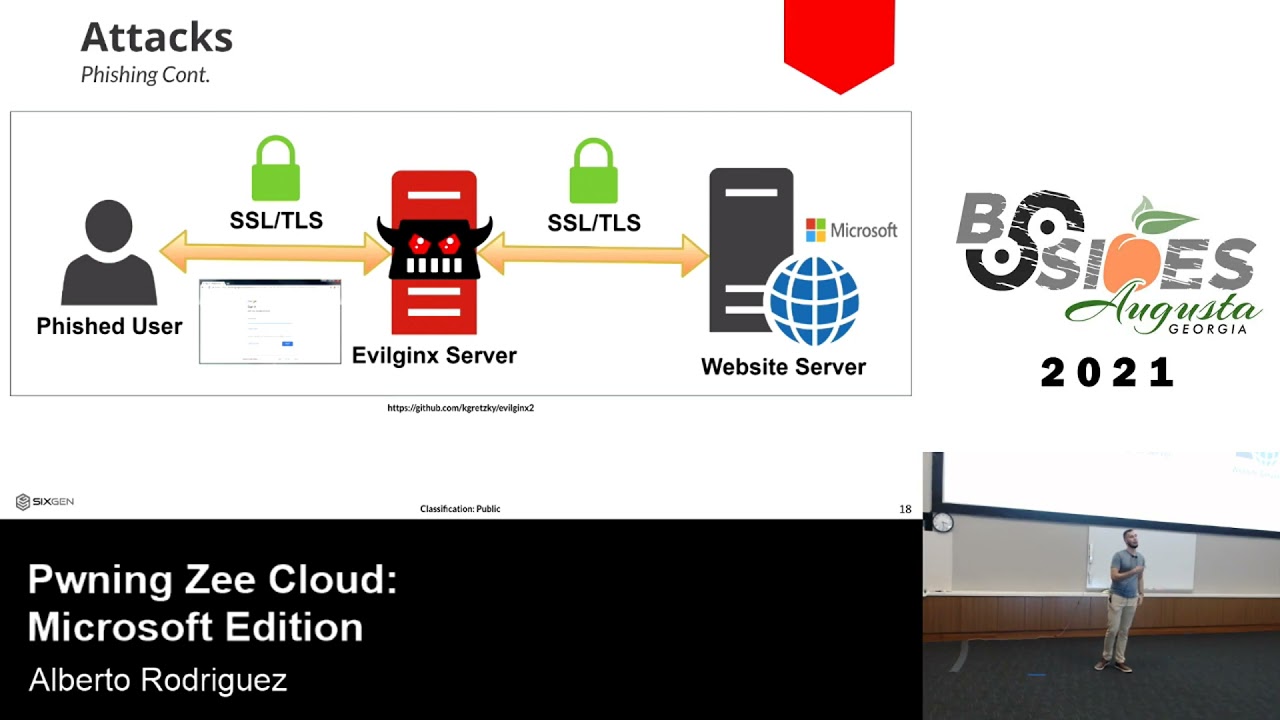
engine x2 that everyone should be aware of or at least write detection engineering rules for similar to how this works but essentially did this turn off maybe am i good all right essentially if you're able to fish a user to go through your malicious server you can sit in the middle of that transaction and capture the credentials as they are interacting with the microsoft service okay i do have a demo for this but i won't show it because it will take too long but i will show a different demo later but it's a pretty easy tactic to perform as an attacker if you're able to entice a user into surfing to where you want them to surf
which as you guys all know you know a lot of folks out there are gonna you know get curious if you will a really up-and-coming tactic is actually phishing users into accepting enterprise applications this is going to be one of the hey defenders like go fix this now but it's one of the ways that an attacker can get in is if you approve a malicious application into your enterprise and users start you know signing up for it you're going to be able to get whatever access that application may have and we're going to see this a little bit later but this is real you know something i use in engagement like you see all those check boxes there yeah i
got a little it was too much i know i could have just gone for the user email right i can give api access to that application i can say hey i want to be able to read users that accept me as an application read the user emails i want to be able to read their con you know their contacts right so i can like dump global i want to be able to maybe send emails so now i can send internal phishing emails right between parties i want to be able to write to a specific onenote et cetera so just just to get the brains going of different things you can do i mean the api coverage there is so big
that you probably just want to sit down on a weekend honestly and get everything you can do and microsoft is now this is a microsoft picture by the way microsoft's starting to crack down and educate people on these enterprise applications right if an attacker is able to just go right in uh you know via a legitimate application accepted by the company well that's a little bit difficult to sort of identify especially if you're an application that just has tons of enterprise applications within your azure tenant all right cool let's go into a quick demo here uh and this is just going to be short and sweet on the right i have a tool called o365 steeler which is a uh i
think it's like a django application written by ultra security essentially it's able to you know capture the token it's going to do everything for you on the left is going to be the victim so the victim is going to receive a link right however they receive it whether it's an open redirect vulnerability that you leverage whether you send it to their inbox whether you put it on a forum whether you send it on some public slack channel or discord be careful with those right if you're authenticated you're going to be prompted with some so let's run through this demo as i walk you through it i'm going to turn on auto refresh so as i get you know
things come in i can get get the cash and i'm going to log in as a rodriguez at deaftestcompany.com i did not have mfa enabled because i was too lazy to enable it for the test but you should definitely have mfa on your prod uh here's an example of those enterprise apps so realistic scenario fished a school district and the teachers were signing up for this really cool service that was going to get them to donate books i know a low blow but it worked so bear with me so a lot of teachers were like trying to sign up right and they wanted free books so they consent this specific application on behalf of the organization right
so once they consent and they accept you'll see on the right and this is all you know free stuff so if i had more stuff i would get more data but there you know i'm logged in i just redirect the user on the right you can see me with the access token refresh token i can now essentially grab that information and use it and log in as that user if this user had emails those emails will start coming down if they had contacts those will start coming down depending on what you gave api access to one of the things i found yesterday actually i was telling the guys last night testing was once that enterprise application is
authorized in your enterprise by one person anyone else that tries to give application access to this specific uh application does doesn't have to anymore so as you can see here i'm logging in with someone else john doe and as soon as they enter their password that information is going to come in on the right why because that enterprise application is already on the approved list so that user is not going to receive that banner the moment of truth you know what i mean so if you're able to get one everyone else would just trickle down uh as well so just something to keep in mind from the defensive and offensive side of things i thought it was pretty
cool i just figured this out last night i'm like oh that's interesting it needs to tell me i only need one person to allow this app registration to actually occur and then i'm good to go that's awesome cool so that's the phishing side of azure and all its dangers now let's talk about different attacks i mean since i received the approval uh to speak here with you guys at b-sides until shoot just last week i've been keeping track of all the different zero days that have been released at least that i've you know been made aware of uh just to name a couple the one on the top left college student i think the person is like 21 years old
remote code execution on azure tenant right zero day vulnerability they got 30 grand out of it pretty cool right chaos db who saw this one come up like every azure user could read uh you know cosmo databases from any azure you know customer they said that only the researchers that found this were able to successfully use this vulnerability don't know if that's true or not hopefully it's true but that was a zero day that was disclosed uh this person a few few weeks back as well remote code execution 40 grand just recently there was a specific port on linux unix devices on azure that if that port was exposed out to the public anyone could very easily get code
execution on your linux machines and then just recently uh security researchers out of secure works found that you can submit authentication you can essentially brute force the azure azure ad users without showing up on logs or getting locked out right so like that's another thing that could just run forever and harvest credentials on your behalf so out of these attacks these zero days are definitely you know something we need to consider as we migrate to the cloud you know a lot of people were complaining about the linux one right like oh my gosh linuxrc and i'm like okay why did you have that random 5000 and some poor exposed to the public that's not even on by default if anyone's built
an azure vm before you have to manually tell it when you build it i want ssh open i want https open et cetera so again you can mitigate some of these attacks by simply doing your good cyber security hygiene and not allowing or exposing certain ports when you don't have to not only do you have the azure firewall in place but you should have something else in front of it to sort of monitor that traffic anyways all right so some quick wins uh if you don't have mfa in 2021 as an organization that just like let's just stop the con right now go get in your car drive you know click do the clickety click i think the guy
wi-fi lingering or not lingering around because mfa is going to stop a lot of these attacks from happening it's not a bl solution but it greatly greatly you know helps your risk level conditional access policies another great feature of azure particularly when it's tied to mfa right you can actually set specific conditions that if you're on this specific environment under these subnets or you have the specific user agent et cetera you know we want you to implement mfa specially this gets dangerous when you have service accounts or access tokens and you want them to do certain things automatically but all of a sudden now you're like oh it's a service account i don't want it to you know have mfa well
they are ax you know there's enterprise applications there's service accounts service principles they're called in azure land that you can employ to sort of mitigate against this and then pim pym is great privileged identity management essentially it's like a battle buddy system if stefan and i want to do any administrative action he has to log in with mfa i gotta log in with mfa and then i have to submit to azure id i have to submit a privileged identity request saying hey i want to perform administrative actions and then that request goes to stefan stefan has to approve it and oh by the way you can also set it to like a specified time stephen can say okay dude
you can have admin time for an hour or whatever you guys decide as an organization that's not you know being too micromanaging in your enterprise that's just limiting the attack surface significantly i once compromised an azure tenant and they had pin deployed even though i had a global administrator in azure i couldn't do anything because the person i kept submitting the request to wasn't clicking and then i got caught and it was towards the end so that's okay right but hey it works uh you got security defaults security defaults are awesome all right a lot of people don't enable security defaults which are not enabled by default i don't know why uh but they don't enable security
defaults because it implements mfa across the organization and we all know execs don't like that and like oh we're bringing in azure to our enterprise you know we can't bring too much change to the users differences of opinion i think you should enable it across the board and let people mold to security not the other way around but that's cool all right uh here are those enterprise applications i don't yeah you guys can see that i couldn't see it from here but essentially you can limit these applications to as they come in your users have to accept them right this specific school district they didn't have this enabled and they actually had students in their programming class registering
azure applications as soon as i saw that i was like wow that's really cool that they're doing that in school and two you need to enable that check box because no student should be registering applications on behalf of your organization right again there's a lot of settings for these enterprise apps um you really should just go down the list and make sure that the settings that you have are secure in nature and that you know you're gonna accept that risk as your enterprise if you deploy azure if you deploy this microsoft cloud by default it's not going to come secure so instead of like repeating what we did with active directory right default configs are not
good let's just avoid it now deploy azure id not default let's go in there let's clean it up get it hardened and then utilize the technology uh one of the things you really want to do is slogging so for the longest time audit login was not enabled by default okay they fixed that went for microsoft right they did fix that but you definitely want to analyze those logs don't just have them there you have to have some sort of process even though it's small let's say you don't have the resources i get it it's expensive you don't have the people i got you do something once a week once a month something is better than nothing start
whenever you can there's a great tool called dfr osec there's the get help for that if you want to check it out you can enumerate your attack surface so who's familiar bloodhound now they have an azure hound injector right it works with the same bloodhound gui but the azure hound ingester pulls out to your tenant does all the enumeration brings that data back and just then now you're able to see what's up right they also have road tools and other great tools storm spotter created by the azure red team if you're a defensive organization get these tools in place start analyzing another one of my favorites is scout suite there on the right here's a picture of it where you're able
to run scout suite logged in to your azure tenant and it'll tell you based on its logic where it's misconfigured and where it's dangerous right so okay maybe you're not too familiar with microsoft the tactics etc but there are tools out there that can help you to enumerate this information and it'll tell you hey go check out this configuration like why do you have this default configuration set right and you can get after it before you show up on the news and then you have to call stefan all right cool so that concludes my talk short and sweet and to the point i hope you enjoy it if you have any questions i'll stick around
some of the resources are there on the right you can reach out to me on like linkedin twitter whatever thank you guys for being such a good crowd i appreciate the time
Related talks
 8:43:32
 27:32
27:32 51:17
51:17 52:17
52:17 32:16
32:16 27:15
27:15