BYOTB: Bring Your Own Trusted Binary - David Kennedy
Show transcript [en]
so um hello everyone and welcome to my um first ever conference talk um as you can see from the above slide it's all about bringing trusted binaries to a system and using them in kind of an adversarial fashion hopefully kind of thwart EDR um you may have experimented with some of these binaries before some of them aren't new um but at the end I'll hopefully show you kind of a novel way of using one in particular to get around a certain issue which which you might find interesting um with this I started off thinking I would go down to no video route and just enlarging images and things like this um but it looks like the screen probably would have
coped with videos but anyway I I've zoomed into consoles and commands to hopefully show you guys better um how I was doing this um okay so next onto the obligatory who am I slide I see at most conferences um my name is David Kennedy um apologies to anyone coming here thinking they're coming to see David Kennedy from trusted SEC I've spoke to a few of you online on Twitter who were a bit gutted so yeah I I'm I'm the pound SHO Irish version rather than rather than the highly successful Irish American version unfortunately you can leave now if you like um so um I work as a senior cyber security consultant at Jump SEC um I
specialize in purple teaming and red teaming and a bunch of Cs like ocp crtp and crto um I have a little blog over on red teing dorg you can check out and kind of similar stuff to what I would be talking about today um and the stuff I I really enjoy is kind of like building up red team infrastructure um reing to ntlm and even for the first time this week I tried reaying to Cur Russ which is kind of new um check out the krb relay X tool it's really cool um and then I like doing lateral movement from cloud or from on Prem to Cloud I I quite enjoy as well um so next up why I think this
particular topic would be useful for you guys um over the next couple of slides I will discuss how it would be useful from an offensive point of view and also Al a defensive point of view um offensive they'll hopefully give us testers um easier access to systems and defensive from a kind of a near the end a blue teamer point of view so how you can defend against these type of attacks um so let's roll on some AI generated images and I would explain a bit more so um own rousk callbacks um like me if if you ever get a client device is part of a test um the first thing you try and do
is maybe try and get a call back to your your legalo server or leolo whatever way you pronounce it or your your chisel or your C2 or whatever um when you've got sophisticated edrs like crowd strike and things of this in place it can be very difficult and some sometimes you might ask the the client oh can I add an exclusion to a certain folder to to allow my my call back to to to be triggered and and they they might say oh we wouldn't give that to a real hacker so just just plow on and see how you get on with with it for the next few hours and you could spend a few hours at it um
trying to garble your payloads or whatever and for a newcomer that's a high bar to entry like if you just passed ocp and that's all you've done you wouldn't be into kind of Avis skating C2 payloads or a bunch of that stuff so it can be very tough especially for newcomers so I felt we need a bit of simplification around this um the next reason this useful topic and very similar to to the last reason is the whole EDR whack-a-mole this is about it's more about the kind of longevity like even if we do get our legalo or chisels working or C2 implants we don't know if a week or two later the next EDR
might stop it or the same EDR might might stop it they're constantly evolving and stopping things um especially when they're open source tools these edrs don't respect the open source value of these tools and they they will just block it because they they gain nothing from keeping them them alive and so it's a constant cat and mouse as I was saying so I wanted a technique that would potentially give us as testers are just a bit more longevity and maybe we could rely on it a bit more and hopefully the techniques I will show you this talk where would maybe achieve that um next up um the next reason is advanced persistent threat usage if
you're like me and you enjoy reading the DFI reports where they they show what the ransomware guys do you can see their commands and they they're super interesting to see how these guys operate and the level they operate you see recently they started using a lot of trusted binaries such as um MSD tub tunnels or Cloud flare for example um and we need to be in a position to use them as testers to help our clients defend against them um and how to detect them um so a bit of a spoiler this guy behind said Cloud Fair binary will be used a lot on this talk so um yeah we'll see that shortly um So to avoid these
issues I wanted to come up with a technique to pass Five tests to be honest it started as six um but the sixth one was around hiding your infrastructure behind a redirector which you can read about more on my blog but it's probably too detailed for for a presentation like this um so the five tests were as follows the first technique I wanted it to be able to pass it would be to allow me to proxy my Cali tools into the remote Network um and so then I could use my goodies like net exec and impacket and all those useful tools next up I wanted it to be ignored by a sophisticated EDR in this example I just
picked crowd strike as as testers a lot of you will know that's quite a good um kind of bar to to set it at um and when I say ignored I mean that when I put the binary on dis it doesn't get deleted straight away when I it it doesn't get deleted straight away obviously if you're sending thousands of Lop queries from Blood Hound through your trusted binary it's going to get flagged B on based on Behavior or whatever um so uh it was more just that initial access to kind of lower the B entry as I discussed next up I want it to be firewall friendly I didn't want it to require we say Port 22 outbound I didn't
want it to require Port 7,000 some some funky High numbered ports outbound I wanted to be firewall friendly this technique next up a legalo or Lego alternative and we use this quite heavily such a great tool um and allows you get access to um de client networks quite easy and but we did notice that it was starting to get nuked every so often by specific edrs and because it's open source as they say these edrs they don't they don't care about these type of tools and finally um no pre-installed s client I didn't want it to be that we would rely on SSH being pre-installed on a machine um because a lot of the corporate machines they won't
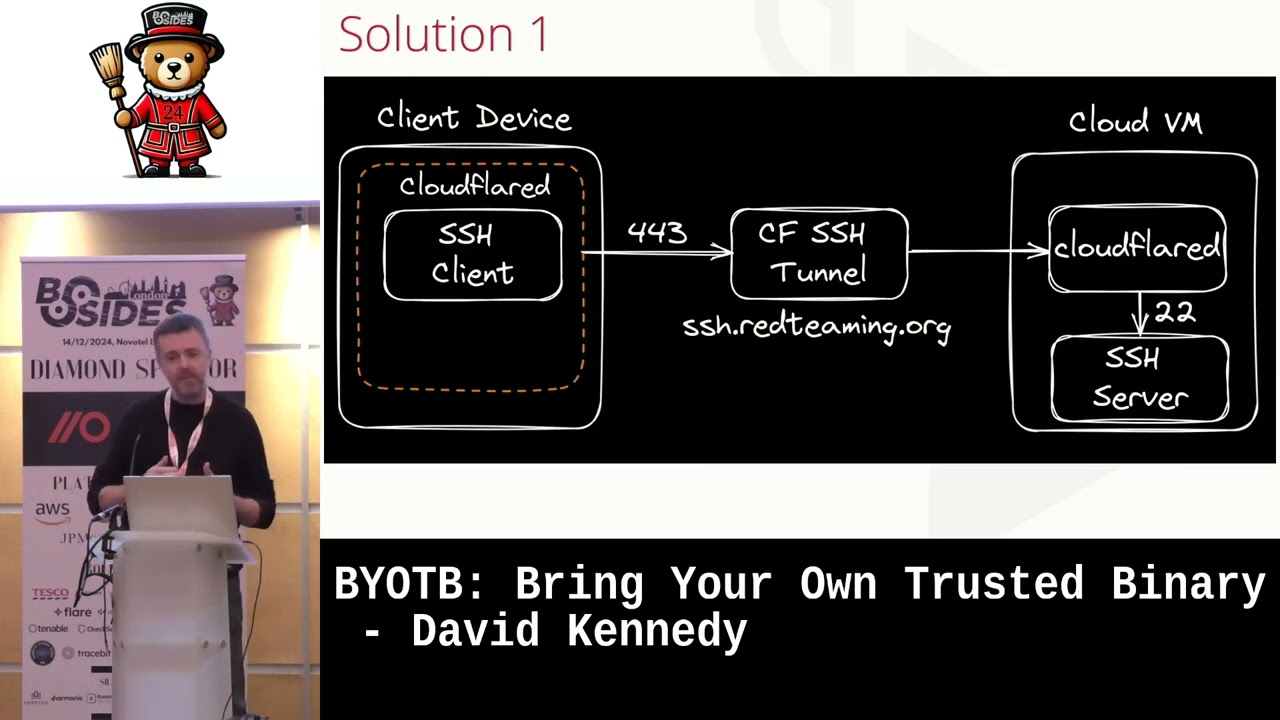
have SSH installed actually at the moment I'm at a hedge fund and it does have SSH installed which is quite interesting but most times a lot of the corporate devices will just remove SSH so I didn't want that to be a barrier for for one of my tests um next up so this is I'll just talk you through my solution one on how to achieve what I think would would pass those tests so what we have up behind me on the left is we've got a client device and we've got the the cloud flare D binary I probably refer to as Cloud flared cuz it's e here so we've got a cloud flared binary in
that orange dotted box um and as you guess it's owned by Cloud flare and with it in that box I have the SSH client and the reason I put it within the cloud flared box is that I'm using the SSH client's proxy command um and the beauty of using the the proxy command with SSH is you're essentially telling um SSH to use another tool to take the data out of your environment um and by using um the proxy command with the cloud flared binary you can and Cloud the cloud binary uses Port 443 um SSH data will then go out on Port 443 and also will be encapsulated as https data so it's not your typical SSH data that that can be
blocked um so that all of a sudden meets my firewall friendly requirements um which is quite useful um and then in the middle when when the data comes out from 443 it will hit um a hor name that we would set up on the cloudfare portal from in my example I set up S sh. R team.org which was on my blog um and what happens then is when it hits that you then start another tunnel from using Cloud flare on your Cloud VM your Cali and it allows this the tunnel to get into your your internal Network um so essentially sending SSH data to SSH r.org using the cloud flared binary on the client device it travels all the way
into my my actual Cali machine um so before I go any further it's probably worth explaining how the cloud flared binary operates in two modes and and how host names work so this is what the the cloud flare portal would look like on the left you've got my SSH R team.org and then what do I map it to so you don't have to map it to 22 but in my example I just mapped it to my internal Network um on Port 22 um and then we also have the the cloud for binary operating in Access mode um and with access mode essentially it's it's for using it for specific Services you can see behind me that I'm using for RDP
here and I'm just tunneling that into 3389 whenever you send that data to Red rp. ring. org in tunnel mode it's slightly different and it allows for multiple servic just think of a tunnel going out you can send any data through it it doesn't have to be limited to a specific services so there are just the two modes and these will become clearer as as we go on um so here's the solution with it's only two commands um so on back on Cali you just run Cloud flare tunnel run so that's your your tunnel mode you're kicking off from Cali and then you've just got your secret token that will be tagged on at the end that
that you're given for that particular tunnel when you set it up and then back on the client it's simple just use s. exe use your proxy command and then you tell it okay use cloud flare to take the data out and the percentage H there just says um take the host in from the next part of the command which is your s sh. ring. Org the key bit for those of you who notice this is the The Hyphen R 1080 at the end what that does is it opens up um a remote port for remote port forward back on cell on 1080 and when you don't specify a destination which I learned recently on a trusted SEC blog it opens
up a socks proxy back on Cali and the beauty of that then is for those of you who know and work with proxy chains when you run proxy chains from Cali and point it in at 1080 it jumps through your tunnels and into the client device um I think this might be even easier to see it on the console um so here we have the the the cloud for tunnel running on Cali in in the top image so that's just doing it with your secret um code of see I changed that code um so um then the next up we've got the S sh. exe running with proxy command and the reverse Sox proxy opening up on 1080 in this example I
haven't specified hyphen f and hyphen n with SSH which would normally run it in the background and not allow execute remote commands Etc I just showed it logging in for you guys to use this and also you could use it with a a key if you wanted to um and then back on Cell proxy chains just use CME in this example I think I've used and we have access to the client Network so essentially a lot of the the stuff is is set up for you like the the top image and the third image but the middle image is all you have to run to to get your access into the network using this Cloud
flared binary um I think maybe at this point you might be thinking oh how trusted is this binary um and as I say A picture speaks a thousand words so here's a screenshot a colleague sent me recently so here is a cloud flare binary running in tunnel mode um on the left and you can see in the the Red Dot at the bottom makes its connection out to the network and then on the right he he in that particular job had had crowd strike running and on my current job I've I think there's three edrs on my machine cuz they're testing a bunch of them and the same issue with it it was a nonissue getting the connection with
those it's just ignored um and I guess you can see why it would be this Cloud flared binary even if it sounds new to some of you it's been out since 2018 if you go on their forums there's massive Banks and people like this using this binary for completely legitimate purposes um but I'm just us using it in adversary of fashion so I think it's not going to go anywhere anytime soon or people would have to proactively start blocking it um so now let's just go back to my five tests um so as you can see it's met most of my five tests proxies of C's tools it's ignored by crowd strike for what I needed to do firewall
friendly looks to be a good legal alternative um but I put the fifth one in Amber no pre-installed SSH CLI for the eagle I amongst you you may spot it I was using the inbuilt S sh. EX um and obviously that's not good corporate devices may not have it installed so that got me thinking God can I just force a Windows client to be um have be an SSH client um and I was thinking God open SSH is what to use on Windows can I just bring it another trusted biner two windows to see if that would allow me to force it to be an SSH client and I was thinking do I need to
be admin will there be dependencies will edor flag these binaries that I bring over or how would I get on so I just decided to give it a try so here's my temp directory um and I've just renamed the one I brought over from open SSH to show it's different um it's SSH 1. exe and I tried to run it and I got that dll error and it lib crypto it turns out to be was missing I just went over back to open SSH folder looked at any chunky DLS I thought might be missing copied that over and now when I mov that into the the temp directory Bingo it seemed to be fully operational um I think at this
point I was thinking okay it pulls up the help but will it really work in in my tunneling process so I had to give it a go so exactly the same process as previously the only difference is now you can see I'm using SSH 1. exe in the very top left and I I open up reverse Sox proxy back in Cali use proxy chains and Bingo I'm getting back in into my client Network which uh which I thought was quite neat and I also it's worth saying that Crow also ignored the SSH binary and the dll being brought over which probably is expected really considering that that's what Windows uses itself um so next up I thought okay
let's try some common techniques and if if I mentioned earlier I quite enjoy NM reing I was thinking could this setup cope with something that's slightly more sophisticated than just reading some shares um so I just wanted to show you that to prove how easy it is um so the first image quite similar to the what I was previously showing but in this one and setting up a local port forward listing on quadruple 8 and I'm sending it back to a0 back on Cali um just be familiar if anyone's on any ldap reeling these numbers would look familiar to you um in the middle then I'm back on Cali and all I do is set up a listener on
Port A to test to see if someone hits quadruple 8 on Windows will I get a hit on on Cali just to just to see it kind of quite easily um so then I go to quadruple 8 in the bottom picture that's Windows you're looking at and all of a sudden you can see I'm reading from home David back on my my cloud VM on Cali and you can see the 200 in the middle image showing that the real works so quadruple 80 888 into 80 works fine so in the whole entm relaying world what you would do in reality is you would probably use Petty Pam to hit a web client to call back to you on quadruple 8 you would
relay that to 80 on your internal Cali Network where ntlm relay is listening you would pass that then off to ldap where signing might be disabled and then you've complete control over the web client um if if you've done this this is um old news but yeah that that's how you would do it for entm realing so I just wanted to show you that in kind of an easier fashion today um so another thing I thought would be quite useful is that command line access cuz when you set up these tunneling tools you're kind of just jumping through a box um and you don't you lose your connection to the user but when you have a C2 you keep
that connection which is really quite useful I'm not saying this is a rival to C2 but it's just quite a similar approach I was thinking of could I get um a command line axis working um so what I did is um keeping in the spirit of using trusted binaries although this is using Powershell internally um so just more of a living off the land rather than bringing it so I use Powershell from the internal side of things and courtesy of chat PT just started a poell bind listener and I think in this example I just started on Local Host um 8,000 um and I what I did is I make sure to do Local Host cuz if it was on all
interfaces you didn't get an annoying fire wall pop up saying are you allowed to do this you need to be admin whatever but normally on Local Host it won't complain about those things cuz nothing can get to it from externally so then back on Cali to try and connect to this little bind listener just use toxy chains again using net cat um Local Host and then hit your 8,000 and now you've got your your Powershell um call back and you can see that you can use Powershell from there I tested this against mde at the time and it didn't complain I tested at my current job at a hedge fund um they had a bunch
of MDS or a bunch of edrs no issue with this and as a another red team on Discord said to me a poell listener on a local host is not considered malware so he wouldn't expect to be deleted so yeah I just found that was quite interesting so it just gives you that little extra kind of thing coupled with with your um your tunnel um and then another command line line technique was given to me actually by Gavin Davies over at CCL which when we was discussing this um conference with him on Discord he recommended trying out the SSH um demon or the the SSH server and see if I could make that operational on on a Windows
box um so if you look again my temp directory I just have a few extra files I've got the this is hd. exe I've got a host file and I got a config file where I just tell it what port I want to start it on which I think is 7,1 um and I got an authorized Keys file um so I I kick that off and then go back to Cali again use proxy chains but this time I can just SSH into the box um and on Port 70001 and now I've got the SSH access to allow me into the command line um so yeah and the beauty of those files is you can bring a lot of them over as as
they are you don't need to prepare them on the the client device I copied them over even the host file I did notice one issue that if you copy it to C temp or something the host name the host file complains about permissions but if you copy to downloads or pictures or whatever it it has a less of an issue about that because maybe stored in a user area or something like that um so as a stands I was thinking God this this is could be quite useful and but could I improve this could I come up with a technique that doesn't need proxy chains doesn't need SSH and then in comes Cloud faires warp who says hold my beer um
don't worry this is my last AI generated image this is what you get when you put in Cloud Fair warp hold my beer and tunnel yeah I I know way a sheep there but anyway so um it's probably best to explain with the next image is a bit more techy um so think of the cloud for warp as a VPN so um when you start your VPN on your machine you don't need to be pointing it a certain way you just run your tools they go out through the VPN and they de access to Target Network which is which is great so on the left here of this your your Cloud environment is where your is and your Cloud flare
warp is running so that's just running in the background barely notices it's there and then on your client device you run your Cloud flared binary I mentioned previously this time in in tunnel mode and then you just have complete access to the Target Network as I say the beauty of this no port for port for forwarding no SSH required um or proxy chains or anything like that so it's best to show you how simple this is on on the command line as well so the first image I was debating even including is just showing that the the VPN or the Cloud Fair warp is running on on the Cali machine and then in middle one is
just your your Cloud Fair tunnel run command on the client device and just for now if you notice it it makes four Connections in the red box near the end of the presentation I'll come back to you and mention the significance of that I think it's around redundancy but just notice it makes four connections out to Cloud flare then back on Cali you can notice no proxy chains no nothing I just run net exec and I'm back onto the client Network I I can read all of all of the data on on the shares um so yeah no legal or roots or anything like that it's just a single command um so then I was thinking let's demo this to the jump
SEC guys um and then I I gave him kind of a a talk at one of our Tech Team talks that we hold and one of the jump guys started getting these errors um failed to dial to Edge um Cloud fl's Edge is just what they call the edge of their infrastructure and you need to get to the edge to form a perfectly formed tunnel um and so then at this point I started feeling like Simon cow bottom I think what kind of Witchcraft have this client device got on its client device trying to stop this technique working I just couldn't figure out so as you do I started Googling using chat GPT chpt CH
chat GPT and came across the following um to my horror posts like alternative to Cloud flare if I can't open port 7844 how do I change from Port 7844 and then kind of the similar errors that I was getting around dial context um and I was thinking what what is has a 7844 requirement and then with more searching I I came across this post this is like the well-known MVP cyber Jake one of these guys who's on the forms and answers everything and may not even work for them um but so in plain English he he just says you can't use this Cloud flared binary in tunnel mode using 7844 uh without having 7844 available to
you and then he he provides a a link to a document which I I duly accessed and this is the document um so became apparent to to run this binary in tunnel mode I needed to hit this um v2. argot tun.com domain on the left and I needed to do it on 7844 on either TCP or UDP actually the tunnel defaults to UDP so you also need to tweak it to say use TCP instead um so given cloudflare the cloud flare binary binary running in Access mode was using 443 and the exact same P binary running in tunnel mode now requires 7844 two two things came to mind never assume things without testing your Technique
well I just assumed that a binary and T mode would exactly use 443 as well and like we all like using 443 cuz it's an easy exit out environments but yeah it wasn't the case and and then secondly always read the manual like if I spent more time reading I wouldn't have wasted so much time debugging it and figure out why is this going wrong um to be honest the undocumented um workaround and hidden feature I found to get around this issue is probably why I'm here today to be honest so it isn't all that bad um so now I have a big issue it's broken one of my five tests which I'll remind you of um so it's no longer
firewall friendly that this this further technique using warp um so just to illustrate a graphically for you as well so it's quite easy so we've got a client device on the left it's trying to get the cloud flared Edge on the very right um and it's trying to do it on 7844 and your super duper strict firewall in the middle might only allowing 443 because it it only wants to get Windows updates on that port or whatever it's super strict um So to avoid these edge cases um I wanted to come up with an idea to get around it so I took a deep dive into Cloud Flair's code which is on GitHub which is great because it is open source
so you can get in there and to be honest I was kind of panicking at this point trying to get it work I said could I amend it but I knew if I start an amending it and recompiling it I would immediately break the whole trusted part of it and the the Sha 256 would would would not be relevant anymore and it would no longer be trusted so after a couple of hours I I came across this Edge command line switch um and in the description is address of the cloud flare tunnel server only works in Cloud Flare's internal testing environment and then you can see hidden true so that explains why when I run the help not
that this never appear appeared so wasn't an Avenue I was looking for so this is a bit of a light bulb moment I was thinking God if I can use this Edge feature and if it work if it does in fact work outside of the the the testing environment could I point a tunnel somewhere internally then grab the tunnel take it out in a a more convenient Port like 443 and then remap it back to 7844 when it when it's outside to to get to the place where it needs to be to form the fully functional tunnel um this is tricky to envisage in speech I get it so um graphically this this is what I was thinking about so
here we've got two tunnels on the client device or double tunnel or whatever way you want to refer to it so first we have to got Cloud faired access which we know we've been using for SSH we can use for RDP and stuff and uses 443 outbound we start that listening on we say 9,000 um and then we have the cloudfare tunnel using this new Edge feature hopefully pointing it at the cloudfare access um tunnel and then taking it out from 443 and then when it hits our CF redirect host name that I I would Now set up we could then rout it back to where it needs to go so now you've got your your
functioning tunnel in green here again and in theory I was hoping this would work um just to show you what's happening on the horse name side that bit on the right with the remapping I've showing you that as well so here we have the host them that I've set up CF redirect do so CF redirect ring. org and then I'm remapping that back to the TCP Port of the argot tun.com where it needs to to reach cloudflare's Edge um the TCP is important here as I mentioned earlier you have to force it to be TCP purely because the cloud for Access command only runs with TCP it doesn't have a UDP version so you have to force a to to use
TCP to make the connection um and if you're like me this is probably an even better screenshot to see it in commands um so here we have the cloud Fair tunnel now with our undocumented Edge feature in play you can see I'm pointing at Local Host 9,000 um protocol http2 is just forcing the tunnel to use TCP which we need um and then your toen at the end and then number one hits our Cloud forare access command using TCP um and you can see it it's listening on 9,000 and when on number two it will then hit CF redirect R team.org when it gets his data on 9,000 and then back over the host time we then make the
mapping back to where it is intending to go so essentially like the the last slide in in green this is the same thing again the tunnel and red is is how I was aiming to do it so this was just a theory to be honest so it was just a case of fingers crossed so here we are with a double tunnel so on the top of screen we've got the the access TCP and we've got the the The Listener on 9,000 waiting for the tunnel to to hit it and then in in the middle one we've also got in the client device we've got it it operating in in tunnel mode um and you can see I'm using this new undocumented
Edge feature to to point a tunnel at our axis um tunnel on 9,000 and you can see that one single connection is made because I'm just mapping to the one region I think um so excitedly then I was thinking okay do seem to have made a connection back to Cali net exec and and runs and we're we're we're back in business essentially so now I felt that this this is really useful so can be using lots of circumstances it's it's ignored by crowd strike for at least initially the Cyber Jakes of the world don't know we've got to work around it get around the 7844 with it with this double tunnel um idea so I thought it
would be felt be worth sharing publicly with you guys um a few further things maybe um at the very onset I said Remember the four connections and it was see the last slide it was just a single connection when you go to your portal and and try this on cloud flare it will come up as degraded I think it's because you're gone from four to one connection but in terms of performance and using this in your daily job it it it was a nonissue for me and it could still be used fine um and another thing I guess is this double tunnel may not always be required um one client device just allowed outbound on 7844 so it's just a
single command and you were into the client device quite simple um oh also obviously the SSH version there is no Port requirement because it uses 443 from from the GetGo um so that was it that that was my little work around um so just to recap what we've done and how we we've achieved it um so first of all we've used our native SSH and the cloud FL access command that was not strictly bring your own trusted binary given what I was relying on SSH being installed um next up we imported SSH um which was quite a new technique for me uh use cloud for Access and we we need proxy chains and ssh in in that scenario
that's not a a bar entry really that that that's very that could easily work as well it can be used and then we've got the warp plus Cloud flare tunnel um and with that we need SSH proxy chain and we need the the 7844 outbound and then finally we we to get around the 7844 limitation we we've done a double tunnel with with Cloud flared um so we needed a cloud flar tunnel warp and a cloud flared axis um I should add at this means at this point it's by no means like a a C2 replacement or anything it's just another string to a bow maybe more akin to kind of a legal o replacement um you could imagine a C2
like Havoc for example running this binary on a DC to kind of give them more access to another part of the network they can't get to I see Havoc has got an extension for um legalo for example so you could do another one for cloud flare and you might have get more mileage out of this I say Havoc cuz I think spiders in the audience who developed Havoc so yeah I he that's a good example of a great C2 um so um it may not have been named as bring your own trusted binary but the ransomware guys have use these techniques previously so you hear if you if you read the DFI reports they bring
any desk they bring team viewer so this is just similar but this is just tunnels but it's a similar type of approach that that all these fall under um okay so now on to probably one of the harder and final slides to prepare prepare for is um actually defending against this stuff um so as attackers we we focus Less on prevention normally so I need to spend some time exploring that with you now um hopefully come up with some detections to to help The Blue Team um so the first one is is around process Telemetry if you've got command line switches like tunnel axis token things like this you can alert upon them and you realize okay
maybe the cloud flar binary is being used on on our Network um that that's one thing you could try um the name maybe for strength and depth you could alert on the word cloud flared but you know what we'll do we'll change it to chrome.exe change to Ms edge with teams whatever um to get around that so the name might not be so good but yeah I would put it in there as well next up DNS logging so when you run these tunnels I noticed that there's a lot of DNS queries go out particularly to aragot tun.com which is the old name for cloud flared um they just moved on to that new name and it tries to do update
checks and things like this so um yeah that would be a good thing to monitor any call outs to argo.com and next up firewall logging as you know with 7844 outbound that is a recommendation I think I've seen to block that um that that's no good uh now but maybe the ransom guys might be lazy or something and then try that and you could flag on that but um yeah so I think that may be another thing just to stop outbound UDP and TCP um next up file monitoring so downloads from the the cloud flared binary on um GitHub would be useful um they supplied the Sha 256 hash so even if we uh move it to our own report to
get around Cloud ver one and try and download from that you can check the hash and see that it's a cloud flared binary and then block it when it when it comes into your network um so they will be the main aspects from a a defensive point of view to be honest um so finally just just just to thank you I just like to thank the organizers um I've never been to a cyber security conference before so my first one actually to be speaking is a bit strange so uh yeah thanks for being invited to such a legendary event and uh it's been fun preparing for this and a chance to to share this gu this stuff with you guys
um hopefully this makes your tests a bit easier and the entry becomes a bit lower cuz I haven't seen this blocked yet and who knows maybe people will catch on to this after this talk and start doing it but maybe not given it's it is cloud flare um so um my LinkedIn is there if you have any questions two three months from now whatever get in touch and hopefully I can help you out if you have any issues with with running any of this stuff and my blog is there I'll try and put a post up with this um over Christmas I might work on it I've been yeah super busy on site for the past
couple of weeks so I haven't had a chance um so yeah thanks very much everyone
yeah okay yeah um so we got bit time for questions if anyone's got any questions raise your hand and we around the [Music] mic okay
[Music] with the domain remap um would it be because an attacker would probably have recently register the domain unless they're thinking quite far in advance um would it be easy to pick that up so it's not going to a cloud flare official domain is going to one that's registered through clava uh so you're saying the whole red team.org domain if you yeah I guess youve yeah that that is a good one as well in terms of a new domain could be flagged up on and yeah they would have to build up a trusted domain over amount of time yeah yeah that that is a good idea as well yeah thanks anyone else okay well I think then just leave
it me to say uh thanks very much to David I think fantastic first talk and uh everyone can show their appreciation one more time thank you
Related talks
 28:37
28:37 47:15
47:15 33:48
33:48 49:41
49:41 34:45
34:45 10:48
10:48