Pwning the Micro:Bit (Edmond Locard)
Show transcript [en]
brilli okay you better clap or else I'm going to lose my job here so um yeah so I'm talking about the microbit today now I don't know how much about the microbit you guys know but it's kind of a cool story uh and it all kind of starts off with this thing oh there we go uh so who knows what this is shout out mic mic that's right it's a BBC micro very good first commissioned in 1981 by the BBC uh who in an effort to make the British public more computer savvy uh launched the the computer literacy project which was to take the form of a series of instructional books TV shows and an accompanying micro
computer uh the contract to manufacture which was won by a little IT company called acor uh whose acor proton became uh the the BBC micro it was rebranded and launched as part of the program uh now you know it's true what they say about tiny acorns and mighty eggs so Acorn and centralized involvement in the project made them exceedingly Rich growing their profits from £3,000 in 19 79 to 8.6 million in 1983 so really really good for them of that they invested 5 million in research and in 1983 working on a BBC micro they finalized their simulated design for a new low power risk architecture called The Acorn risk machine there we go this one uh a hardware prototype followed
soon afterwards in the October of that year and that was called the arm one Aon set up a new subsidiary to manage this and all subsequent version of their new architecture which turned out to be so successful that even after Acorn bit the dust in 2000 we'd continue on as arm Holdings and we go on to license their products to basically every smartphone car toaster refrigerator and Japanese talking toilet in the entire universe it's really good for them 30 years later the BBC puts the word out they want to do another crazy moonshot computer literacy project and a crack team of Industry Partners answers the call one of whom is arm whose embed platform becomes the basis for the new
Project's Hardware the new device is called the microbit and has at its heart a Nordic semiconductor NRF 5188 uh system on chip um which is based on the very same arm architecture whose first version was designed all those years ago on a BBC micro so it's kind of a nice sense of things kind of coming full circle here which I'm hoping this slide will make clear to you uh so the BBC commission Acorn to build the micro to Rebrand the micro on which has designed uh the first arm architecture which is the basis for arm Holdings who donate their embed Hardware to the microbit for the WBC so things that kind of come around it's kind of cool um but that's
all ancient history we are not historians we are hackers so we were more interested in in asking the questions of how secure is this microbit and can we make it break in any kind of interesting ways so the first thing that we looked at was the compiler chain now the BBC Migra has a really nice online browser based compiler that you can access for free from your own computers and it allows you to uh create code in a variety of different formats some of of which are code kingdoms JavaScript which if you've ever used scratch before is basically scratch uh Microsoft block editor which if you ever used scratch before is basically scratch um Microsoft
touch develop which I would encourage you to use once and probably never use again because it's um uh well there's also micropython that's the other one you can code in uh and micropython is pretty good that's a lean implementation of of Python 3 that's been developed to run on microcontrollers so the way that works is the user gives a their micropython code and out comes a very nice but quite opaque blob of hex which you then flash onto your microbit so we ask the question well what's in that that hex blob can we pull out anything interesting and it turns out we could so in that hex blob we were able to recover things like hard-coded constants string
literals and key data structures for for the uses program as well as getting Idea Idea getting an idea of what the program was trying to do um but we were quite surprised to find that we could also pull out things like userdefined variable userdefined variable class and function names which is kind of a surprise you can't always get that when you when you're trying to do this kind of task and even more surprisingly was the fact that we could also pull out user defined comments which probably shouldn't be in there so if you're like an 11-year-old programers at home you might not sort of have in your head that your comments are going to be visible to
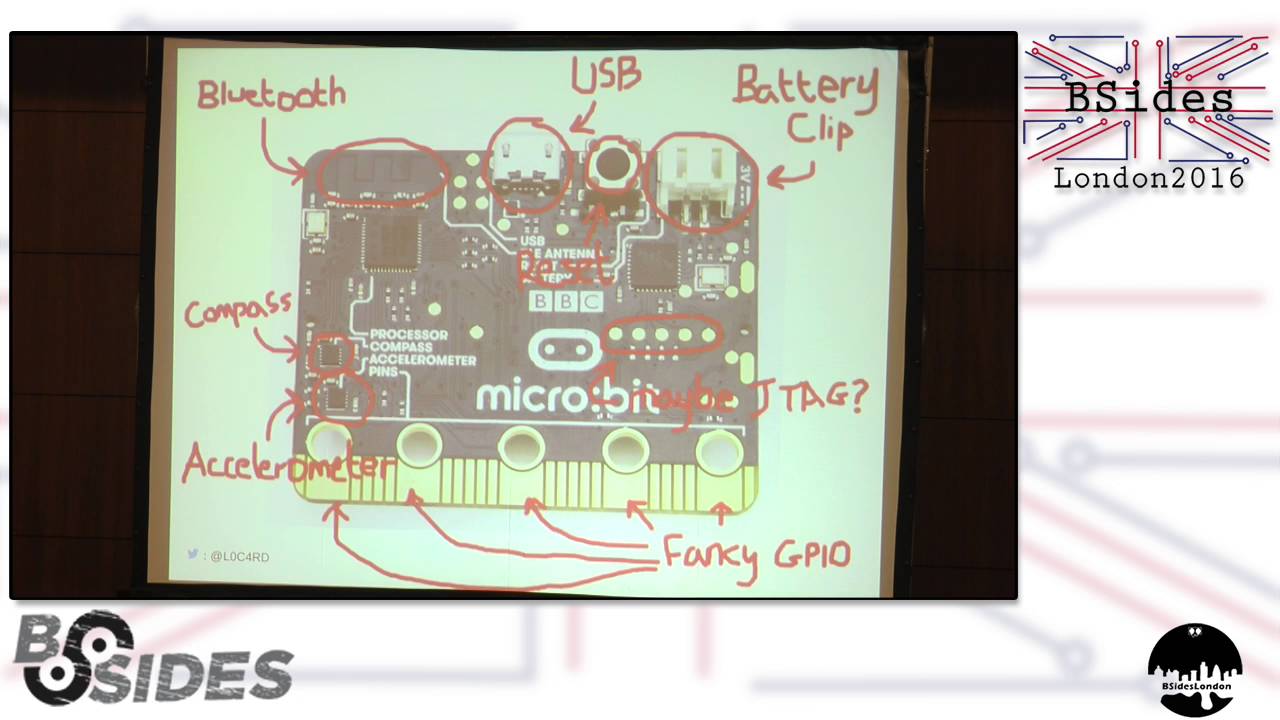
anyone who uses it so kind of interesting that we found that okay we said but that's that's a little bit too easy most of the time if we are um if if an attacker has one of these in front of them they're not going to likely have access to that original hex file more likely as it'll be the case they'll have access to the microbit itself the device so we ask the question okay can we do the same kind of thing to a microbit that's already been flashed uh now here's a microbit there's loads of cool Hardware on here including a compass battery clip Bluetooth antenna out there fancy gpio capacitive touch sensing pins an accelerator and like a
bunch of other stuff right just stuff uh and there's even more stuff on the back there's LEDs buttons you name it the whole works we don't care about any of that we're just interested in this guy that's the Nordic chip that kind of does the main heavy lifting on the microbit it's kind of the processor as far as we're concerned and this guy over here which is the nxp Chip And what that seems to do is manage things like battery management um and also serial communication over that USB clip you can see at the top there what we found that is if we plugged in a USB port over here plugged in a USB cable over here we could set up
a connection over that via this nxp chip connect to a GDB session and Via that dump the entirety of the hex from a microbit cool once we've got that we can proceed as before and pull all that wonderful information we just found the first time really nice nice result all right we said okay we're kind of on the chip at this point so we were asking the question of what else is interesting there what else can we kind of poke out and pull out um now here's a block diagram for the Nordic chip I know it's a bit yucky um don't worry I'll tell you what everything is uh we're connected up here that's the serial wire debug
peripheral so that's kind of where we're talking to the chip from and over here this thing is a memory bus so via that we can we can access all the different bits of memory and peripherals that are on the chip including this thing over here that's the code memory so that's what we've just done we VI our serial y dbo peripheral we sent a request to that code memory and it's very kindly given us all of its code wonderful thank you very much nice result okay so there's also this thing over here that guy is the ficr that's the factory information configuration register and that looked kind of interesting it look like might have some kind of interesting
information for us to pull out there so we did the same thing again from our serial ybg Port we sent a request over and tried to get that data so what you think happened well you'd hope so but actually it didn't right it's tried to stop us this guy over here that's the non-volatile memory controller that piped up and said no you can't you can't have that memory you should you know you shouldn't have access to it right now you're debugging you don't need to read that and that's kind of good security we shouldn't have access to that right now but what we found that was quite interesting was that this thing over here this is the CPU so that's kind of
there we go this guy is the CPU um and if we instead sent our request to the CPU and had it kind of ask on our our behalf what we'd find then is that the appic would dump the entire contents of all of its memory and we could quite happily read that over the the serial Port nice uh and what was in there well a bunch of cool stuff uh including the CPU ID a 32-bit unique uh device identifier and also the Chip's 128bit hardwired Bluetooth encryption route which you could use was involved in uh Bluetooth communication from the chip very nice there it is and I've got a little demo for you you probably won't
be able to see this at the back but um here we have a microbit quite happily printing out its encryption route for us so that's a cool thing um I hope you can see that that's what it's doing there okay so at this point we were kind of we're kind of breaking into our stride and we're asking what else is there on the chip that we can have a poke at now this guide down here this is a peripheral involved in uh as mode ascb mode encryption um and the way that works is a user writes their their key to a particular location of memory along with the data they'd like to be encrypted uh and the the peripheral has
a look at that does a little bit of thinking and then produces the encrypted data writes it back to a location that the user can read out from but it turns out these two locations uh are still read enabled so we can come in and read out their key along with their plain text just like that so we got around this which is pretty cool um nice one okay so at this point we can kind of read whatever we like on the chip right we can we can see the different peripherals that are there um read out data from them we're kind of we're kind of done um we've we've got the data we want Close book go home fantastic box
ped whatever but um I mean so what like we we we popped a box big deal people do that every day right I mean surely you as users are never going to worry that this particular microbit is ever going to be involved in your personal sec security or wellbeing or safety surely yeah but I'd like to remind you about this slide back here right so none of the techniques I've described to you today are specific to a microbit necessarily and I I reckon that um if we can do this to a microbit the chances are that a lot of those techniques will work on these devices too so if I can hack your microbit I can probably hack
your toilet too but arguably more important is is this point you've got to remember what the microbit is set out to accomplish it's being put out there to hopefully inspire a new generation of scientists engineers and hackers um and it's doing quite well at that it's got a really nice engaging user interface really cool compiler lots of kind of fun things to play with it's got a nice low barrier to entry that gets harder as the user gets more proficient to using it which is great um you've also got to bear in mind that the position the microbit occupies in sort of our our sphere uh comes with quite a lot of responsibility uh for
many people who use it it will be their first introduction to coding and Tech in general as such I think it kind of it almost sets the standard for what a good sound secure system should look like um but what we've shown here is that even right now as this this device is being handed out to year sens across the country there are a couple of arguably quite fundamental security problems with it so my question to you guys today is well is that acceptable okay so that's the end of my talk I really hope you enjoyed it
great so I'm definitely keeping my job then hopefully cool um a couple of quick things for you um if you'd like to get your own microbit you can do so there that's the guys who are in charge of supplying them um have a look at that I think they're about10 or so um that's my GitHub over there that you can have a look at I've got on there some code that you can use for dismantling your personal um hex files that you generate and over the next few days I'll also be putting out a little patch that you can use to stop people doing that to you if you'd like um and lastly if you're
interested in microbits and want to continue the conversation that's my Twitter at the bottom cool so lastly I just want to thank um some of the guys who helped me with this talk all the guys at ran who've been amazing it Paul Simon Tom Jamie uh Dave and everyone else who doesn't want to be named um The microbit List have been amazing as of open OCD and finally my amazing mentors thank you guys Tom and FC thanks guys cheers
Related talks
 28:37
28:37 47:15
47:15 33:48
33:48 49:41
49:41 34:45
34:45 10:48
10:48