"SSH, so hot right now. Profiling it with HASSH" - Ben Reardon & Adel Karimi
Show original YouTube description
Show transcript [en]
hello's cyber Nats let's just start by introducing ourselves my name's Ben Rhydding I work on the detection team at Salesforce I'm an engineer actually a structural engineer from from a past life but I've been in information security for about about 18 years or so my my interests are around data visualization and most recently I've been going down the machine-learning rabbit hole and anything to do with robotics and electronics I once made a robot guitar which is pictured there which is made out of an Arduino a PI 6 servos and some electronics to be able to play for war logs it's good fun in mapping robot guitars and also dad have anything to do with data visualization
interests me that's some volunteer work I've done for the koala Base Hospital in southeast Queensland to try to figure out why the the koalas are in such steep decline there so that's a summary of me hello everyone I'm audio security engineer at Salesforce interested in anything detection deception and security I'm active member of the honey nets project for about 10 years now and developed a couple open-source projects including honey lambda and honey beads and yeah that's me okay so in this talk we're going to describe what hashes go over how it works and show you some use cases in an attempt to try to illustrate what problems it solves and we'll show you some of the tools that we've
open-sourced that you can use in your own environments to to get some benefits out of hash so this slide is a quick tip of the hat to all the other technologies that have played in the network fingerprinting space most notably jar 3 some of you might know jar 3 it was born out of the out of the same team that we're in in in Salesforce and indeed it was the inspiration for hash I looked at jar 3 which does fingerprinting in TLS and said hmm I think I can do something similar with SSH along the same vein so I was inspired by my previous work which is good I mean that's you know information security space we move them
a needle we push that we push the envelope and we increase visibility so this is a tip of the hat to that um to that kind of con concept so what is hash well every encrypted protocol needs to exchange algorithms before it actually becomes encrypted and you know by necessity this is done in clear-text over the wire and it's it's a beautiful thing because we can have a look at those protocols and determine which compositions of them signify that you know using a particular app because they do tend to be app specific and you just need to figure out what that composition is in order to be able to successfully fingerprint clients and server apps now
hash does that with SSH basically there's a lot of other tools around that to it with other protocols but interestingly enough it I had you know when I first came up with the idea I looked around and then really wasn't anything else in the SSH space an SSH has been around since like 1995 I think somewhere around that time and nothing has really been done in the fingerprinting space I think a print TLS and as I mentioned before jar 3 they do pretty much the same thing in TLS and if you haven't checked them out I really strongly suggest that you do jar 3 is a is a fantastic product and a quick shout out to UM to John old house and Jeff
Jeff Atkinson who are also on our team that helped developed hash along with them Adel and myself John old house and Jeff Atkinson both were two of the the jars the Jas in ja3 the other ones josh adkins so how does it work he's a bit of a timeline between the client and the server and the way that that SSH works first of all we had the TCP three-way handshake that we know and love that occurs just like any other handshake syn syn ack ack next up the client and the server exchange identification strings you can think of these as analogous to user agents in in HTTP land they're mostly ostensible you can put in here
whatever you want the only caveat is that the protocols themselves tend to need that SSH - 2.0 to indicate what version of SSH that it that it supports but the rest of it after that is basically an open string that you can put in whatever you like the RFC suggests that you put in you know what your product is but you can put in whatever you like here this is all in clear text right now after this the the server contacts the client and it tells the client what protocols it supports for various functions in the order in which it prefers them and this becomes really important with that with hashes you'll see soon the the client
then tells the server the same thing and this is part of the negotiation piece and out of the out of the six protocols there are selected four to compose the the hash being the key exchanged protocols the encryption protocols message authentication and the compression algorithms the other two got left out for technical reasons basically the the host key changes on the first time a client connects to a server it's X and on the second time the client connected that same client connects to the server it's why the reason being is because the client now knows about the server and the server's host keys are in the known host file on the client and so now it doesn't have to have this
guessing game it actually knows what algorithms it prefers and the language field I'll get to shortly at that stage they they create a key for the for the encryption of the session itself and then after that it's encrypted and things get a little bit tougher once once it's encrypted but the green proportion portion there is where hash plays in the identification phase in one shock this is how it looks it's an example of the of the client kicks our net packet all of this comes in one packet and I've highlighted in pink they're the components of the hash you can see all of the all of the lovely algorithms there and they're in there clear text format I don't know what
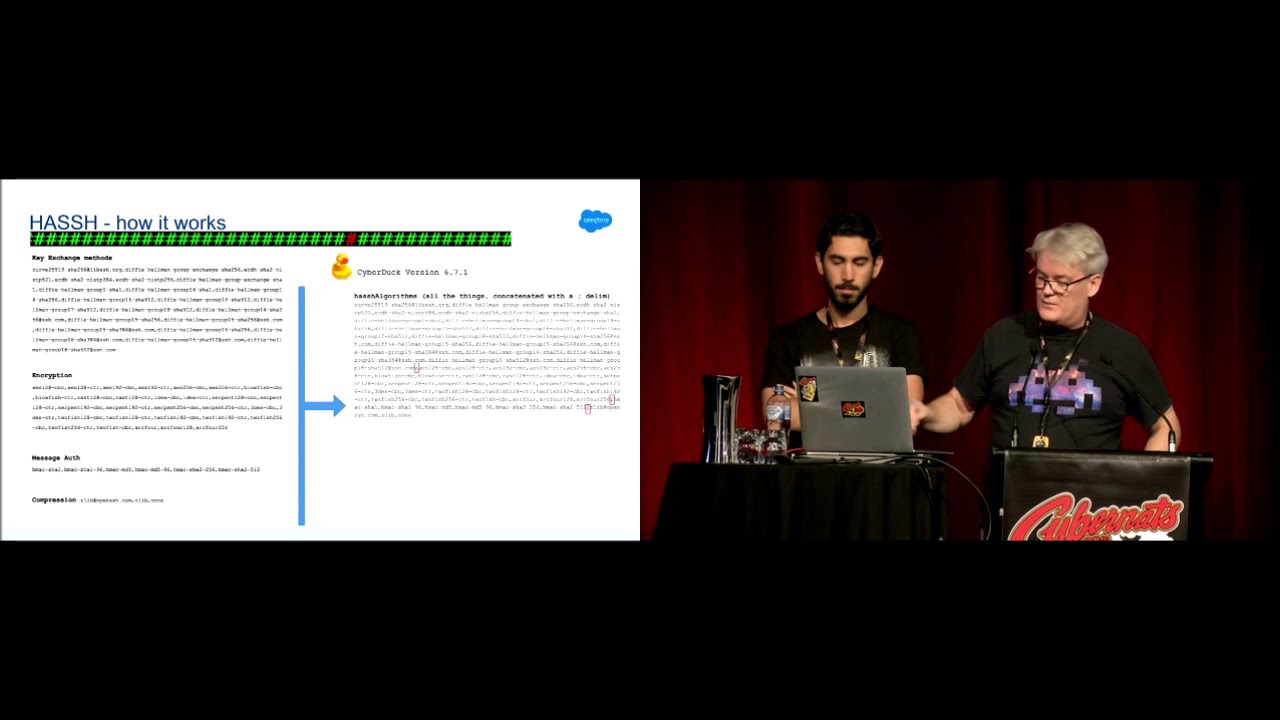
these algorithms are or how they work but the fact is that that they're all there in text and they're all kind of turn out to be unique for per client pretty much so let's have a look at an example of how it works this is a cyberduck the you know it's a I guess maybe it's a popular I like it it's got a cyber I'll buy it it's a FTP SSH all sorts of clients um it's good good for Mac when this contacts the server these are the for this particular version mind you six point seven point one it's interesting because you can actually use hash to identify different versions at times so you can use hash to see if you've got a
vulnerable version of cyberduck out there and you want to know if you're using it you can use it in this way the the four functions that are that are that compose the hash are listed here you can see all of the you know diffie-hellman there's elliptic curve stuff there there's compression measured message authentication these are all the protocols that are supported by cyberduck in the order in which they're supported which becomes important because what we do is we get these protocols and we concatenate them all together in a big long text string and just put in a semicolon in between the fields so that if we want to later on we can split these out just with a regex to
to figure out you know what compression algorithms wasn't actually so you can see there's lots of entropy in that string and that's what that's what hash lanes on and all we do now is just take an md5 hash message digest of that and we end up with the hash which is pronounced exactly the same way so that's basically what cyberduck looks like on your network it's got that hash value of eight AAA now if we go and have a look at n crack which is a brute-forcing ssh tool and these are the algorithms that it supports you can see it's a little bit more Spartan the it doesn't support as many algorithms as cyberduck does because cyberattacks you
know meant to to do much more than than n crack which is just meant to do password cracking now when we concatenate all them together a little bit less entropy but still pretty good we hashed that and now we have an identifier for our for n crack which is pretty good if you can see it and crack on your network and normally that's a bad thing so if you have a look at the source code of n crack you can see here that it's purporting to be OpenSSH 7.1 which is fine you can change that to whatever you like but unless you change unless you get right under the hood and you go and change those encryption
algorithms and start messing with them the hash of n crack remains the same so what you can do effectively is monitor over your network for the presence of this hash and and potentially identify n crack in a passive manner you know you know you're not near the endpoints you're not near the client you're not near the server you're just observing the network traffic a quick note on md5 versus sha-256 so we know that you know md5 is a you know is subject to collisions and we know as security people we should we should be looking for better and so we looked at char 256 there and we gave it a bit of a trial but in the end like yeah there were lots
of reasons why we went back to md5 but the main one was that chapter 52 56 is just too big like you can't you can't put it in a tweet for instance if you're trying to share an IOC with another group or if you're trying to paste that somewhere it's just just too large and if you're looking at dashboards the md5 the 32 character property is really nice and it lends itself to um to documentation and it's also supported by everything whereas charter 5256 probably is but I know there's definitely products out there that don't support it so it was the most interoperable hashing mechanism that we could use and it provided a net benefit
we weren't really worried about collisions here so we start with md5 there J 3 is also md5 by the way so it sort of had some some consistency there the language field was interesting we didn't know about this language field going into it it kind of just just just popped up when we were looking at it the RSC defines a language field for SSH it's I've always seen it empty I've never seen it anything other than empty I think Didier Stevens did some did some looking on some old P cups he looked at look back over three years of P caps and found nothing but empty as well so that was left out of the the
hash but we still track it because it might be it might be interesting one day so you can still use that as a tuple with hash if you have seen this this field or if you go away and have a implement this hash and you see that field anything other than empty it'd be really interesting to me and here's some hash examples of some clients so cyberduck as i've ever showed you param echo is the ssh that go to ssh client and server module for python and that's a really important one because a lot of the exploit tools you know they're developed in Python and and so it's nice to be able to fingerprint when people
are using paramiku paramiku is also like used legitimately by developers a lot which is a which is a point I wanted to make drop bear is a popular IOT library I leave it's written by an Australian guy I think he might actually be camera based but yeah it's a popular one so it's interesting to be able to fingerprint IOT traffic on your network to map out and it's a good segue into the next talk I noticed is about IOT rensi I call it Renzi that's the power shell ssh one of the power shell ssh modules would might be interesting to to you if that's on your network and ruby as well of course you know ruby is also used by developers but
it's um used by Metasploit also hash server examples once again drop bear has a has a showing there it has a server component AWS and an interesting one that goes to the topic of deception that we'll be covering shortly is Carrie the SSH honey net a honeypot is identical identifiable via hash so before we go through some interesting use cases I'm going to show you some implementation options we have we actually used blue or Zika script as our main implementation method we actually did the same for Joe tree as well because you know brew is one of the most common NSM or network security monitoring tools out there it's a scalable it's passive you can easily
deploy it you just need a tab to forward your traffic so that's why we implemented hash in Rose Creek you can just get it using a brew package manager so just use that for installing hash you don't need to manually download it from our repo and we also developed a Python script and the reason was we actually needed a way to capture pcaps as well or if someone doesn't use brew can still use the Python script to read from pcap file or capture the live traffic and it also helped us debug our brew escaped as well cause brew had some bugs in the SSH module e test and that was reversing the client and SSH it couldn't accurately
determine the direction of the connection so that's how debug that and found that even you can also use this partner script on your servers and capture the fingerprints in JSON or CSV format and for what your logs there were actually that's how I get the logs from my SSH honey pots we also implemented a dark roast version of this Python script just to make it easier for you guys to try and see how it works you can build a container using the code we have in the repo or you can pull the version from docker hub and something called thought it might be interesting is hash gem so I thought it would be good if we can create our own
fingerprint database so one problem with jatri I noticed the many companies and people out there had this problem with draw tree they want they were looking for a fingerprint database or they wanted to create their own database but there wasn't any automated way of doing this so this actually is a dynamic docker file and a simple Python script which populates that docker file with different SSH client versions and it builds a container tries to initiate SSH connection and then captures the hash value for that specific SSH client version so as an example we created a sample fingerprint database including drop pair OpenSSH and paramiku but you can create your own fingerprint database using this simple tool and the last
between implementation side is a n mapper script we created to scan SSH servers and find the fingerprint of those SSH servers so as an example you can use it to find for example a specific version of like vulnerable SSH servers like Lib SSH which I'm going to cover in the next slide so let's move on to some use cases I'm sure you all heard about the ssh authentication bypass bug this actually happened a couple days after we released the hash and it was interesting so we downloaded a census ssh data set and they generated hash for all those state servers on the internet and estimated the number of vulnerable live SSH servers which you can see it's about
two thousand five hundred at that time so the vulnerability was the attacker could present SSH user out success instead of a user out request and login to the servers you see that so let's see how we can detect that if we have the hash value of the exploit tools which are mostly based on paramiku or Ruby so they were module which was developed for Metasploit obviously was the Ruby one and there was heaps of python-based exploits out there which actually uses premiere Co and if we have the hash of vulnerable live SSH servers combining these two together we can find exploit atoms what if we have the authentication logs as well if we add that we can find
the successful exploit atoms and that would be interesting so just a couple of other ideas about how hash can be used potentially if you have your production service and you know you you've got a relatively controlled environment then you could potentially you know what hash client that your best that your Bastion server users might use the specific version of open-air OpenSSH or maybe you've got an orchestration setup where you're using ansible or something like that which reaches out to the servers to do to do maintenance and that's you know also fingerprint of all via hash so that's cool you can say hash hashes from these our clients are okay but anything else including in crack or um or maybe you
can you can set up some logic where it's the first time I've ever seen this hash in this environment maybe that warrants some research or you know a c-cert remember to have a look at or any anything anything else any other bad tools that you can think of but that that hash first scene idea is really interesting because if you've got an OT network and it's really tired down and you definitely shouldn't see anything in there other than your orchestration server then this has kind of like a pretty cheap and passive way of overloading this kind of activity you can also go the other way around and from your from your servers or your clients you can say okay well our
supported version of SSH client is this here is the hash server for it the sorry the hashed value for it and we're going to allow that but anything else at all including no PowerShell or param echo Ruby or anything else in fact we're going to bump that up the alert chain because it might be it might be that you know that the client is numb is compromised and they've got they've got a PowerShell of obfuscated PowerShell script running and we're not expecting to see that so you can use it you can use it like that this requires like a lot of understanding you know of your environment obviously and requires a yeah a big understanding
of what sort of clients that are that are usual so normally you have to do a lot of profiling of your environment which hash lets you do you can easily dashboard your environment another idea that I came up with was within GCP when when you SSH using the TCP console into one of your VM instances a lot of stuff happens in the background the TCP infrastructure goes and puts an ephemeral client key on your SSH client key on your in your known house I'm sorry not known how its authorized keys file and that allows them to connect to that server with their with their back-end systems and deliver the SSH session in a in the web browser and
this is one way of contacting your GCE instances without an actual clients on your machine you do it all in the browser so that's good I had a look at the at the network traffic by installing hash on the server's themselves and noted that that that connection made by Google is is very fingerprint very finger printable and I'll just make a note I hope you can see that it's a bit small but those four a lot for black lines they're indicate the the protocols that GCP are using you can see that it's very very Spartan now this time we've only got one single protocol for each one of those functions so because GCP can google google you can do that I
guess because they know exactly what is supported on that box they don't have to have this big line of these are all the things I support and hopefully we can agree on one they can be very efficient there and just list one per function so maybe you can say anything else if anything else contacts smart DC GCE instances then then I want that bumped up the alert shown
so now my favorite part like my favorite use case of this hash is to detect lateral movement activities as we know like attackers usually use system's default SSH clients for lateral movement but not always there are cases like umpires invoke SSH command which that PowerShell script actually uses renze SSH dotnet library and obviously that has their specific client ID and hash and as you can see here in a screenshot of the impire code you can see they've mentioned that they're using base64 encoded hesitation it dot DLL so we can actually detect such activities easily but what about a cobalt strike guess what cobalt strike actually has a built-in SSH client and I've noticed that a
couple of weeks ago and a look at the documentation so they actually added the SSH client in 2016 which is actually baked in you there's no way you can change that and the thing is cobol strike is a Windows tool and this is one of the only Linux based modules that it has it would be interesting it we can detect such activities so if I actually generated traffic and he'll look at the hash value and notice that there's a specific string like as you can see here it uses Libby SSH to a specific version of that with a specific hash value if you can if you search that in your network you probably find some false
positives as well but if you limit your search to Windows source 2 Linux destinations and just look for internal SSH connection so we don't care about outbound SSH just limit your search to internal SSH connections and just from Windows to Linux systems yeah that generates like no false positive and you can easily detect the attackers let's really move through your network using this COBOL strike module I thought it might be interesting to both blue teamers and red teamers as a COBOL strike is one of the most favorite red teamer so in order to use case which isn't like really defensive is to detect SSH honey pots as we can here see in the screenshot which is a part of a carry
honeypot code as you know calorie is one of the most popular SSH honey pots out there which is based on a creeper honeypot and unfortunately they use a static list of ciphers and algorithms which can easily be fingerprinted so you can see here we have two hash values for it for some reasons which I'm not going to discuss here it's Jerry's two hash values but that's really unique I actually searched that in a sense this database and surely and found like lots of honey pots so as the defender site we actually need to improve our honeypot codes I actually sent a pull request and fix that but there's also another one leave SSH module in Cimmerian honeypot
also is very a finger principle you can see here and yeah that's one of the other use cases we have
that's just staying on the topic of um of evasion so I've got a number of um as part of this research I set up a few sensors on the internet and just try to figure out what what the internet you know noise look like in with regard to hash and here's just a bit of a table showing you a couple of botnets that I saw some of the cred stuffers or brute forces out there so go has its own hash value we can fingerprint that and it's that seven to the one in the red box there some some botnets don't bother masking there are there client identification stream string which is basically like as I said earlier the
analogous to the user agent they just don't bother they just say yep I'm go it's all good but some of them with the same hash so we know it's go they do deceive and they purport to be OpenSSH so there's this saying that there's something that they're not that's interesting in and of itself but interestingly for this botnet you can see that the client identification string changes for each IP address they they post pend you know a string and it's always got a an underscore and then then five characters and they're always unique I had a little bit of a look at this you know I don't know what I've probably just random these strings
initially I thought maybe it's some you know it kind of like looks like if you put them all together it might be base64 I'm not sure able to find out what it meant it's probably just um just random if you apply Occam's razor there but that took me um half a day of research now there's a lot of these things too so these botnets pretty big and this is just a set of them and they're all different and then I just did some geo mapping and that's where that's where a lot of um that the geo Maps looked like actually for uh for a lot of scanners another botnet that I thought was interesting on the topic of you know the
bots like being deceptive all of these four graphs have the same x timeline you can see that the green graph there is just the IP address I've just masked the IP address but all of these scans on my sensors were from the one IP address so that's good we've got the same system and they've all got the same hash value so we know that it's the same you know it's the same client software that's actually doing the scan and this is where it gets interesting this is the graph of that client identification string and you can see that the strings are actually all being cycled through so they've got some script in the background that's using
the same client software but purporting to be different clients at different periods of the scan so it's at one stage it's saying it's it starts off saying it's putty and then it changes and it goes to OpenSSH 5.3 it says it's what's that OpenSSH 6.2 and and the the Aqua one is a product called net serene computer it's an ssh client that that's used so it's using four different client identification strings now why do they and all of all of the accounts that are that were being scanned I just joined these with the orthologues on my sensors to get a sense of what are they looking for and this particular botnet was all looking for root so why they why they
why they line with that client identification string well I think that the reason is because there's tools out there and I think surakarta has a um you can basically like Sun network connections based on a match of client identification string so if you think fail to ban or SSH guard but with client identification strings you can actually shun connections and maybe they were looking to get around such controls if anyone is looking for that sort of stuff then this particular technique would get around those Auto tion kind of systems and that's the UM that's the only reason why I thought that this would that this would occur so industry support we released this I think it was in November October or
November I can't recall but since then a lot of a lot of places have picked it up and and and given a support gray noise was one of one of the early ones they're a fantastic organization binary edge carry actually if you download the carry SSH they will actually document the hash value for you as well which is actually quite ironic because we can fingerprint carry and yes lots of other um great support there from from some organizations there's a QR codes through the city open source repository that we put out last year if you want to have a greater look and if you've got any questions I believe our times up but definitely hit a Dell or I up after the
talk we're interested to hear about anyone who wants to do some research in this area to go along on that ride with you so thanks very much thanks Carly and Silvio for organizing the conference and see you see you next time you
Related talks
 24:40
24:40 37:55
37:55 30:24
30:24 37:50
37:50 24:18
24:18 28:35
28:35