No IP, No Problem: Exfiltrating Data Behind IAP

Show original YouTube description
Show transcript [en]
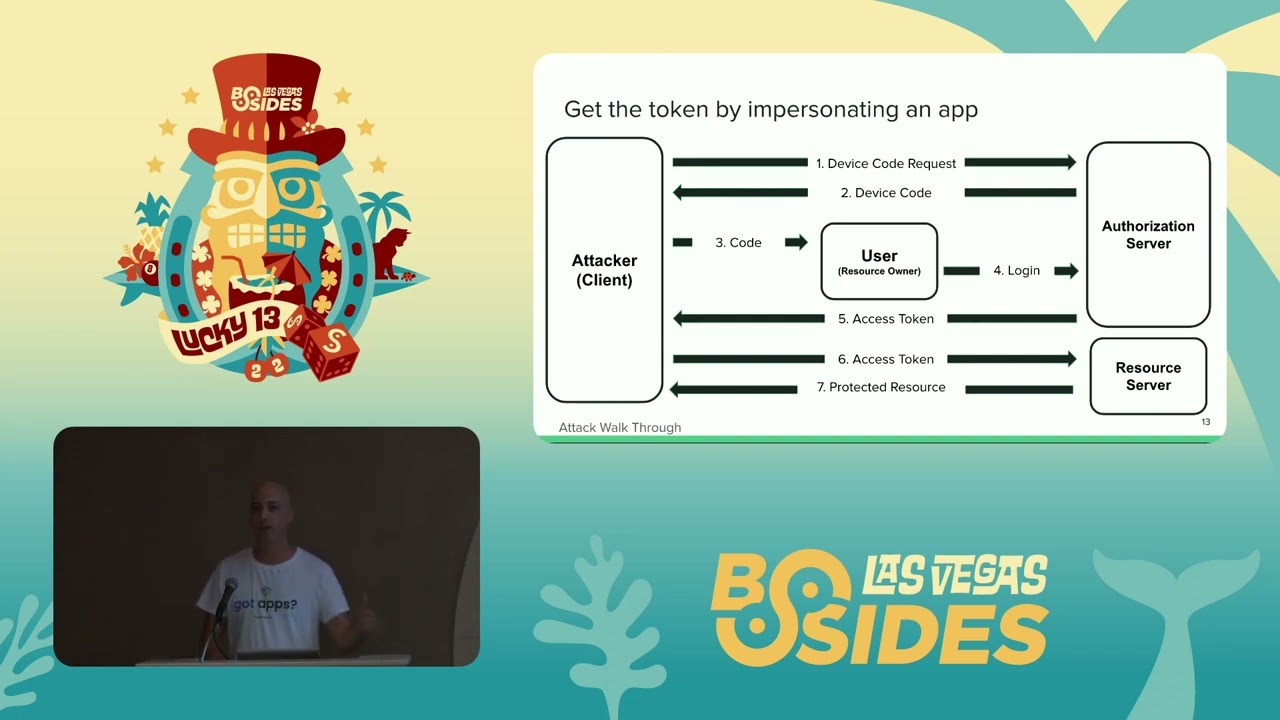
All right, welcome, welcome. No IP, no problem. Exfiltrating data behind AP. We got my man I said before Israel's finest was here, but actually this is the Israel finest all the way. Ariel Coleman, thank you, bro, for being here. Thanks all of our sponsors. We love you. Couldn't do it without your money. Chang volunteers, you all that [ __ ] Adobe, Aikido, Job Zone, blah blah blah. Profit run zero. No phones, please silence them. Don't be a dick. Uh, we're all here to hear amazing things. Questions at the end. Maybe one or two, maybe none. We'll see. And no pictures either. Nobody likes that [ __ ] You ready? Let's go. >> Hello everyone. Can you hear me?
>> Welcome to my talk. Thank you. Welcome to my talk. No IP, no problem. Exfiltrating data behind IIP. First of all, I wanted to say thank you for joining me today. I hope the talk going to be both insightful and interesting to you. So today's talk going to focus on one service in GCP called identity aware proxy. We'll explain what this service is, how it works and how it can be abused by attackers to excfiltrate secrets. So my name is Ariel Kalman. I am a security researcher at Mitiga and I came all the way from Tel Aviv, Israel. And a fun fact about me because I had to is that I prefer dogs over human.
So the agenda for today, we'll start by explaining what is identity or proxy and how it works behind the scenes. Next, I'll show to you two IP misconfigurations that we saw in the wild too many times. The next part will be a quick introduction to cross original resource sharing, a security feature in web browsers, and we'll explain how is it related to IIP and how it may allows attackers to excfiltrate secrets. And the last part, the most interesting one is an IIP configuration that if enabled allow attackers to excfiltrate secrets from sensitive environments. So what is identity aware proxy? Identity aware proxy is a service in GCP that acts like an identity firewall. It sits in front of your application and
intercept any request to that application. It controls the access to the apps based on identity. It blocks any authenticated request to the application by default and it has some interesting settings that I will show to you later. So how actually works when the user tries to access an application it sends the request and the request hits the endpoint of the application because we enabled IIP to protect that application. IP um gets the request and checks if the request is authenticated or not. If the request to the application is unauthenticated, GCP IP, excuse me, forwards the uh request, redirects the user to a Google authenticator page. The user needs to put his email and password and login log
into his account. If the user was successfully logged in and authenticated, he then need to be authorized to make sure he has sufficient roles to access the application. If you both authenticated and authorized, IP inject the authentication headers to the request and he can now access the application without fill in the middle each time because he's now has the token on every request. So we understood what is and what how works. Let's see two IP misconfigurations. The first misconfiguration is overly broad IM grants. When you use uh IIP to protect an application, you need to explicitly specify which users can access the app. And in GCP, we have two special member types. The first member
type is all users, meaning every user in the world, no matter if it's authenticated or not. And the second member type is all authenticated users, meaning every authenticated user to a Google account, no matter if that account is part of the organization of yours or not. So adding one of these member types to the list of users that can access the application effectively disabled IIP because now when the user gets to the authentication authorization part every user can go through even an attacker. This is how it looks in the platform when you do this misconfiguration. Here you can see a screenshot of the cloud console and you can you can see me adding all users member type to the list
of users that can access the application. When I do that action, I get a warning saying adding all users makes this resource public and accessible to anyone on the internet. However, when I do the exact same thing via the G-Cloud CLI, I get no warning and operation just executed quickly. So, it emphasizes how easy it is to make such mistakes that effectively disabled the IP. The second misconfiguration is exposing a bypass path around IIP. As many of you know, many applications have multiple endpoints. And when you use IIP to protect an application, you need to explicitly enable it for each endpoint. If for some reason an admin mistakenly forget one endpoint and didn't enable IIP for that endpoint, this endpoint is
not protected and attackers can sneak in through that endpoint and access the same data of the application. This is just a diagram to show how it looks. You can see an attacker that tries to access the application but it get blocked by the IP because he has no token to access the application. However, when he sent the exact same request to the other endpoint of the same application, he can access the same data and IP don't protect this endpoint. So we saw two IP misconfigurations. Now I want to do a deep dive into one risky setting on IP that if enabled can allow attackers to excfiltrate secrets. So the name of the setting is allow HTTP
options and the description says control HTTP options course preflight. But to truly understand what this setting is I want to first of all explain what is course and what is course preflight. So what is course origin resource sharing? Of course, when you search it online, the first result that you see saying it's something that designed to annoy developers, it works by giving you errors, leaving you scratching your head. So, while it's sometimes true, let's demystify it a bit and explain how it really works. So, what usually happens when a user access a web page is that it sends a request to the application and gets back the response. HTML, JavaScript, CSS, and images. And sometimes some of these
resources are hosted on a different server on the internet. So to fetch these resources, JavaScript has a built-in function called fetch that fetches resources from a different server. It basically sends another request course or region one to that server asking for that resource. But imagine what happen if instead of that legit JavaScript that fetches an image, you get a malicious JavaScript code that tries to fetch sensitive information from your bank account server. You want to to block this kind of attacks and this is why most browsers today have built-in security feature called same origin policy that basically prevents websites from accessing other websites data without their permission. So when the bank server will get the request, he
will check if he he wants to allow uh the origin to access this data or not. And then you will respond with a special header called access control allow region and keep it keep that header in mind because it will be an integral part of the attack that I will show later. So the bank server gets the request, check if he wants to allow it to access the data or not and respond with that header containing a domain which is the origin that he wants to allow it to access the data, the origin that made the request. My browser gets back the response. It checks if the origin that made the request is equal to the value in that
response in the header. If they are equal, he allows us to access the data and if they are not equal, he drops the response. So this is how this kind of attacks can be mitigated by the browser security feature called same origin policy. But now let's take it one step further. Imagine that instead of that malicious JavaScript code that tries to fetch sensitive information from the bank server, you get a malicious JavaScript code that tries to send post request instead of get request to the same server and trying to execute money transfer operation from account A to account B because the bank server will get the request and execute the operation before my browser will get
back the response. This kind of attack cannot be prevented by the same mitigation that I just showed you because it's too late. Now the operation of the money transfer already happened when the browser gets back the response. So to solve this kind of issues uh same origin policy has another h kind of solution that called uh co preflight and co preflight is a special type of http options request that is sent by the browser before the real before the real request. We basically ask the bank server is this request allowed or not. If the browser says yes, we send the real request, the original request that we wanted to send. And if the browser says no, my browser if the server,
excuse me, says no, my browser uh sends um doesn't send the request. And one key note to know about this kind of HTTP options request is that it's unauthenticated. And this is by design. This process of communication between the browser asking the server is this allowed or not. This process supposed to be lightweight and simple and we cannot change it. This is how it works and this is mandatory. So that's it. We explained I explained what is uh what is course excuse me and what is co preflight. Now let's get back to the setting and explain what happens if we enable that setting on GCP. So again the name of the setting is allow HTTP options.
So like we said in the beginning um when the user uh sends requests to the application if they are unauthenticated it blocks by the IP immediately and preflight requests are unauthenticated. So it means that every uh request from the user to the application which is un unauthenticated including these HTTP options request are blocked by the IIP when you use it to protect an application. And this prevents application that use course from working behind IIP. And this is why GCP added a security feature a security setting to IP that can be either enabled or disabled. And if enabled, it allow only HTTP options request to go through IIP without authentication, reach the application and let the response get
back to the user. Every other request, every get post or other type of HTTP request to the application is still blocked by the IIP. This is how it looks before we enable the setting. You can see that the user sends a simple HTTP options request to the application but it get blocked by the IP because he's unauthenticated and after we enable the setting we sent the exact same request to the application and we get back the response. So this is how it works and you can see inside the response a special header that I uh explained earlier uh access control allow region and this header supposed to uh contain the domains that are uh supposed to
access the information inside that uh resource on the web server. And now I want you to think like an attacker. What if the attacker can control that response? like what if the attacker can put some value that he wants to exfiltrate instead of that example.com and excfiltrate this as the secret. So this will be the exact attack that I'm about to show. So before I'm explaining the attack step by step, I want to explain the prerequisites and the diagram. So this kind of attack has a few prerequisites to work. The first prerequisite is that we have an application and we have that protects that application and the setting that we showed allow HTTP options is enabled on the IP.
The second prerequisite is that the attacker has some kind of initial foothold inside the environment. It can be any form of code execution mechanism. It can be a VM, a cloud run, a lambda function, anything that can be used to execute commands. And we have an identity with the role app engine.eployer which is a very common role being given to developers that need to deploy their new versions to their applications. And we also have this external attacker which is just a VM on the internet. And our goal is to excfiltrate a secret from the internal attacker to the external attacker. But we cannot just sending uh packets from directly from the internal attacker to the external
attacker because this environment is very restricted like no outbound access is allowed and the external attacker cannot access any resource from the inside because uh IP protects the application and any other resource is accessible only via private access. So the first step of the attack uh is that the internal attacker deploys a new version to the application. It's just a configuration file, a YAML file containing multiple configurations of the application. And this is how it looks. And inside that YAML file, it can put a value in the access control allow region that practically defined what uh domains should the web server answer to if someone uh sent HTTP options request to that server asking for uh which
domains can access the resource using course. So here the internal attacker put a secret inside that uh value and this is the secret that it wants to exfiltrate. In this case, I put shrug, but it can be any kind of secret. It can be any kind of secret token or certificate. Anything that can be encoded into characters. The f the second step of the attack is that the external attacker sent an HTTP options request to the web server because we allowed the allow HTTP options setting on IIP. This uh request can go through IIP and reach the application. The external attacker doesn't need any token to send this request and get to the application. And this is how this request looks like.
The third step and last step is that we get the response. The app engine responded with the response to the HTTP options request and inside the response you can see that the value that we wanted to excfiltrate this is from the screen of the external attacker. So it means that the internal attacker was able to excfiltrate that shrug to the external attacker without sending a direct packet. So this process can be automated to happen over and over. The internal attacker deploys a new version with a new secret and then the external attacker fetch it from the outside and the internal attacker deploys a new version with a new secret and the external attacker deploys fetch it from
the outside. And I was able to automate this process just out of curiosity to see how much data I can excfiltrate. And I was able to excfiltrate 15 megabytes of data during one day. And I know it doesn't sound like a much, but it's enough to excfiltrate secrets, token, and certificates that can be later used by the external attacker to expand the attack surface to the environment and access more resources and like expand the attack. So that's all. And now let's see how it looks in the logs. When you want to detect this kind of attack, when you automate this attack, uh you expect to see a spike in the number of operations. And you can see that the same operation
happened over and over. Every 30 seconds, user zero deployed a new version to the application. This is the first step of the attack. And the event name is create version or on app engine. And this is a very weird activity because no developer need to deploy a new version to his application every 30 seconds. And this is why it's so easy to detect. You can see here an example of a detection that detects this kind of attack. And this is the only detection you need for this kind of attack. And the only detection you can write for this attack because the only part which is logged is the first step of the attack where the internal attacker
deploys a new version. The the detection combine of three steps only. The first step is to filter the relevant event in this case create version on app engine. The second step is to group by the number of events define some time window and count the number of times this event happened during that time window. And the third step is to filter the number of the amount of times this event happened. So uh before I do a quick recap uh I just wanted to say that we disclo uh disclosed this uh behavior to GCP and they acknowledge this issue decided to currently put an update on the documentation of IP uh to highlight the risk of enabling this feature uh but
they decided to not fix the issue right now maybe in the future. So uh a quick recap I showed you what is identity aware proxy how it works in reality and what is cross origin resource sharing and how they are both uh can be related. I showed you two IP misconfigurations that are relevant not only for this kind of scenario uh relevant to more services and resources in GCP like the first misconfiguration of all users and all authenticated user. This is a misconfiguration that is relevant for practically every service in GCP that defines access. H so it you should check this out and uh look at your environment to see if it's relevant for you.
Uh I showed you how you can abuse one setting on IP to excfiltrate secrets and how you can detect it. Thank you so much for listening and I'm open to take any questions if you have [applause]
>> [clears throat]
>> H. >> Wait, come here. Come here. Come here. >> I'm sorry, I broke the microphone. Sorry, guys. Come over here. [laughter] We got time for another one. If every anybody wants to come up here. Here we got one more. >> Yep. Thank you for the talk. Uh if I understand well for the data expilation you need to um reconfigure as the app engine. I would like to know the different of privileges needed to uh redeploy a configuration on the app engine and the privilege needed for the AAP global modifications. So for example uh or usually users that can redeploy configuration on app engine has the has enough privileges to just modify the AAP configuration and uh go from all us
authenticated user to all user policy. >> Yeah. So uh the only permission that you need to deploy a new version to the app engine is the app engine deployer. But you asked about the AIP configuration and we don't assume in this attack that the attacker actually changed the allow HTTP option setting from disabled to enabled. We assume that this is the environment and the allow HTTP options is enabled and we highlight the risk of that behavior if like an admin use that setting. So the attacker doesn't need any permission to change the AIP configuration but he needs the permission the app engine deployer permission to change the app engine configuration this YAML file. >> Okay. And the privileges regarding the
app engine deployer is usually granted to a larger population that uh >> can you repeat >> the yeah the AAP engine deployer privileges is uh usually granted to a larger population than just AAP. >> Yeah. So, so most developers that use uh app engine to deploy their versions needs this role to like access the resources, deploy new versions and uh mess with the application. So, it's a very common role being given to developers and this is why it's a bit risky. >> Yeah. Thank you. >> Anyone else? We got a minute or two. Come on down. Price is right. That's a game show for you young people. Although y'all look a little old out there. And I didn't break the microphone
for record. It was already broke. No questions. Gesh. All right, everybody. Give it up for Ariel. >> Thank you.
Related talks
 23:47
23:47 17:21
17:21 19:46
19:46 21:52
21:52 23:03
23:03 3:30:16