Network Segmentation without a Network Engineer
Show original YouTube description
Show transcript [en]
[Music] guess so all right cool uh thanks for everybody for you know sticking around after lunch and attending this session here just want to say thanks to the bsides crew uh this is a pretty awesome event and I I've been eyeing it up for a couple years uh this is my first time attending and first time speaking so I I uh didn't know what to expect but I've I've loved everything that I've experiened so far so my name is Mike Burns uh today I'm going to be talking about uh Network segmentation without a network engineer how to defend against leral movement and ransomware using the windows based Windows host based firewall and active directory uh I'm local here to Baltimore uh
originally from Western New York but I moved down here about uh gez probably about 15 years ago uh currently I'm a security engineer at Cisco Mori this talk is no affiliation with Cisco whatsoever uh for uh formerly uh I'm was a senior technical architect and principal consultant at mandiant so uh did a lot of Assessments and responded with a lot of IRS and saw saw a lot of ransomware attacks uh also a former ciso at think stack so think stack is a local uh Baltimore managed service provider and uh really honestly cut my teeth there in security uh saw a lot of stuff a lot of good things a lot of bad things with the customers that we uh that we
managed but uh at think stack we were certainly in a position to uh increase their security posture so I just wanted to give them a quick shout out agenda for today we're going to be talking about the anatomy of a of a potential rans wear attack uh you know they take on many different forms I'm just going to kind of talk in a in a a basic terms how Network segmentation can combat that and the pros and cons of network segmentation a little education about the Windows Firewall itself uh from my personal experience when working with clients I've advised them hey we should enable the Windows Firewall we should make uh we should change the
rules and they're always terrified so out in the crowd uh you know who here has Windows and firewall enabled within their Network so decent decent amount how many are confident in the way it's configured a lot yeah well it might be working right um it's working if it's enabled but I'm going to be talking about some uh pitfalls that I've I've personally seen and how we can deploy out a strategy to strengthen that host based firewall and particularly talk about connection security rules so uh that this is something that was relatively new to me and we learning about Windows Firewall is anybody here familiar with connection security rules in the Windows Firewall oh looks like I looks like I
hit hit a niche so um again when I was at think stack this is something I I stumbled upon and learned a lot about and I was like wow if we configure this properly we could do some uh pretty awesome stuff with the Windows Firewall to combat uh you know attacker lateral movement and potentially ransomware and uh going to be talking about a strategy how to roll that out so here's a quick uh diagram put together by Microsoft I'm not sure the particular attacker they have um you know up here they they labeled the the attacker family that this was but this is a basic ransomware attack of once an attacker gains persistence in the
network whether they brute force a a password on a VPN that VPN or that edge device has a vulnerability we've seen a lot of those lately I think the ianti one just hit miter uh I'm not sure if that was actually their Edge Appliance or not but nonetheless uh when attackers gain a foothold uh through uh compromising the edge or in most cases fishing I think a lot of people are aware of uh one of the first things they do is on that machine they're going to run mimic cats they're going to dump credentials and they're going to do Recon on the environment and if they don't get the credentials they want on that machine that allows them to
escalate their privileges or potentially domain admin uh they're going to begin to move laterally within the within the network so you can see here this lateral movement you know they'll begin to connect to other machines that are uh within that Network and mostly likely on the same VLAN or in a flat Network so it's not only workstations they could also be be attempting to connect to servers and they're going to do that same activity of dumping credentials uh doing Recons seeing what other machines they can connect to until they find credentials that they're able to uh decipher or utilize or pass the hash whatever it may be until they can escalate to a elevated admin domain
admin whatever it may be to deploy their ransomware so um in the many IRS I've seen this is the common attack path that uh attackers are taking so the issue with flat networks uh when I'm talking about a flat Network I'm from my experience experience mostly seeing uh a a network where the domain controller the servers the workstations all the member servers all the IM services are all able to talk to each other on any port any protocol that might be a very large subnet that actually might be a couple vlans but there's no con there's no protection in between those vlans and that's Prime for lateral movement and the deployment of ransomware and within those flat networks rarely
are you have the ability to uh do any kind of intrusion protection or intrusion detection that could assist you in identifying this lateral movement and with that uh you know very uh few opportunities to increase your monitoring or monitoring for any kind of lateral movements so with even if there are a couple VLS in the environment from my experience again they're wide open and there's no enforcement from VLAN to VLAN so how can Network segment ation help when I talk about these flat networks uh you can divide up a large Network into multiple smaller networks and within those smaller networks and you can be deploying out uh typically in the lay in terms of network segmentation
we're thinking of routers layer 3 switches internal uh internal firewalls where you can be deploying out those Access Control lists to block ports and protocols to uh prohibit say stations from communicating the server over any port so like a file server operates over Port 445 you would want to make an ACL that says I'm going to allow my file servers I'm sorry my workstations to connect to a file server or Port Port 445 you know that would be an ideal situation but commonly as I mentioned even if you do have vlans there's really uh rare uh it's rare to see enforcement between those vlans and you could be blocking additional ports that attackers like to use in their lateral movement
which is wmi winrm RDP really those management ports that allow them to move laterally and conduct their uh conduct their attack also with network segmentation you could reduce the attack surface so as I mentioned one of the one of the tactics or techniques that a attacker use they perform recon who else can I connect to what ports can I connect to on any of those ports is it running a service that's potentially vulnerable that could allow me to run uh you know run unauthenticated code to uh then pivot to that machine so that again that's what I've seen in a lot of these incidences um attackers are finding these vulnerable Services because they're just wide open to the entire
network and if they're not finding credentials on that workstation they might move to a server that has a vulnerable service that's running uh and jump to that server dump creds and deploy ransomware also a network segmentation you could be utilizing it to isolate sensitive data or services so again domain controller any kind of service that runs uh identity management so your OCTA uh you know your OCTA agents that might be running on a server your cyber ARS any kind of password Vault you should be putting those in different segments of your network because if an attacker gains access to those and is able to elevate their privileges they can gain secrets and then proliferate their
attack so why is Network segmentation hard often when I've gone into environments they were built 10 15 20 years ago and they were built on flat VLS before uh we even knew what ransomware was or obviously it wasn't as popular as it is today so it's often an afterthought and when deploying out Network segmentation you often want to engage your network Engineers you need additional equipment as I mentioned those internal firewalls those routers those layer 3 switches and that involves a lot of work that involves uh you know planning that involves reip the network that involves uh reing servers uh workstations devices and ultimately that means downtime and that's really the thing that prohibits security I find in
a lot of cases I think as Sean metf mentioned here in the same vein we're scared to change passwords on service accounts because we don't know what's going to happen it's going to cause downtime that proh that prohibits you know uh increasing your security posture same with network segmentation if you told me to go reip my file server the first thing I'm going to do is like okay when's a good time to do it what services I'm going to impact who's going to get mad if down for 5 10 minutes a day whatever it may be so a lot of um a lot of organizations might say hey I want to do Network segmentation but um
I'm really handcuffed in doing so because it's going to cause downtime in my network even if you are doing Network segmentation uh that within a subnet typically you know within a user uh workstation subnet all those machines if they don't have any kind of host based firewall connected or never going to pass through a router never going to pass through an internal firewall or like three switch that could have acl's they're all going to be able to talk to each other directly and if you don't have any kind of host based firewall enabled they're going to be able to communicate over whatever ports and Protocols are open up on their um on their workstations so how can the windows
firewell help so I asked earlier who's familiar with connection security rules and I I don't know if I even saw any hands um again this was something that I learned in my travels uh and really what a connection security rule is is a feature of the Windows firewall that allows you to build a uh basically an access control list rule that can limit connections to authorized computers or even groups that computers are in so if you think about it that if you establish a connection security rule that says uh this m like machine a is only allowed to connect only allowed to accept connections from computers that are in group ABC and I'm going to deny
all the other connections so in a file server example I'm going to open up Port 445 and I'm going to say the only machines that can can connect over Port Port Port 445 are computers that are a member of my computer uh my client workstation group so if a uh Rogue machine ends up on the network that most that Rogue machine out of the gate is most likely not a member of your domain it's most likely not going to be a member of that security group and it can establish a connection to Port 445 which is open on that open on that server so these connection security rules are basically rules that say I need
authentication first before you even establish connection so that does that by uh basically within every packet or at least the beginning packet saying where are you coming from okay cool let me grab this the you know let me recognize your cerberos ticket and see what group memberships you have and see if I have any connection security rules or firewall rules that say you're allowed to connect to me so that was a feature of the windows firewall I was not aware of uh for many years and when I saw this I was like wait a minute could we utilize this to establish this network segmentation I was mentioning we don't need to go and reip networks we
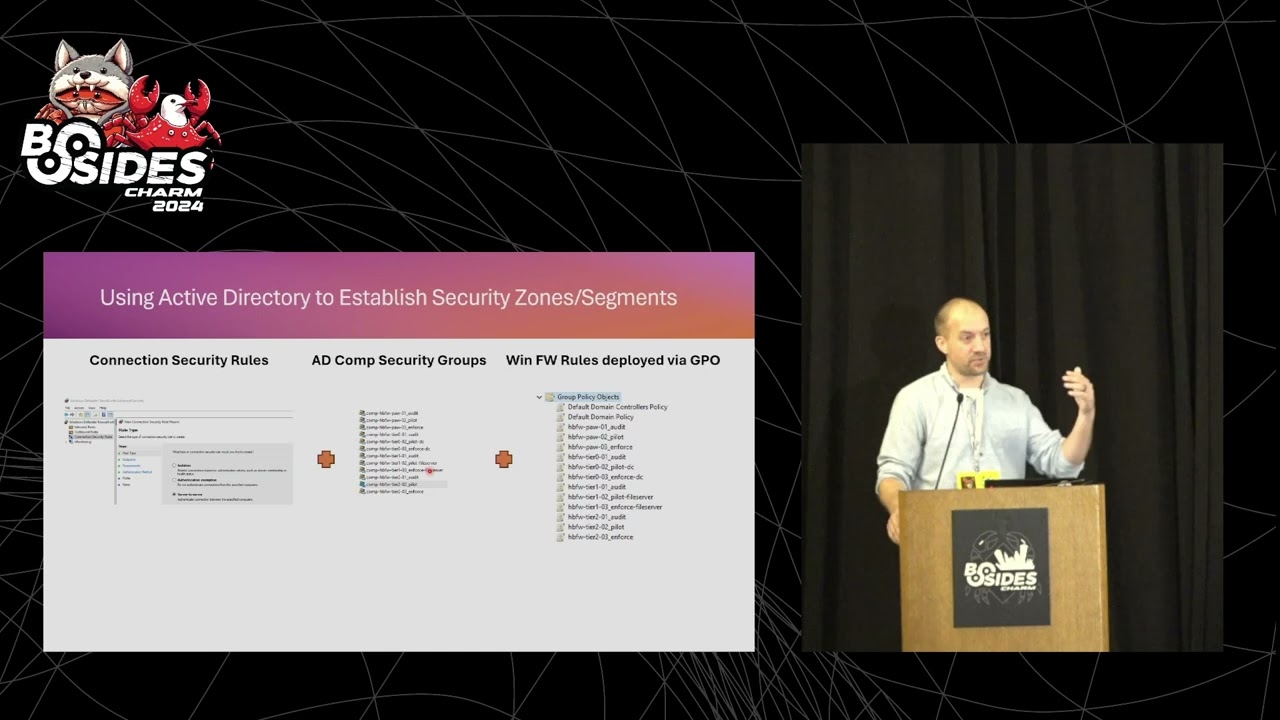
don't need to go and deploy out new hardware I don't even need to talk to my network engineer to do this I can use Windows Active Directory to establish those groups I can utilize Group Policy to deploy out these connection security rules and then also I could use Group Policy deploy out uh firewall rules that utilize these these connection security rules so really what it's doing is really establishing a secure tunnel every time a connection is requested uh from one workstation to a server or workstation to workstation so how can we use you utilize active directory to establish these zones and segments well first thing we're going to do is we're going to deploy out a connection security rule
into our Network and we're going to say we're going to deploy out a rule to all our machines that say Hey if you find a a mutual connection that also has a connection security rule set up on it establish a secure connection and then we're going to set up security groups and we're going to put our computers into those security groups so I kind of went with a tiering model here of uh if you guys are familiar with the Microsoft tiering model tier 2 is your basically your user land or your workstations tier one would be your member servers of like your file servers your web servers uh your database servers and then tier zero
if really anything that's tied to Identity or really highly sensitive data um so I established security groups based on that and I put in uh Those computer objects into those different groups where I believe they belong and then lastly I'm deploying out Windows Firewall rules via group policy that establish that group a can talk to Group B but group a cannot talk to group C so I'm actually going to run a little lab to show you guys that in reality because I'm probably terrible at explaining this and I think a lab really helps explain that
so some Windows Firewall misconceptions uh what I found is I've I suggested to somebody they're like no don't do it it's going to break everything and I've seen that happen so I can't completely deny that uh but also if I enable it I'm all good that's also wrong uh out of the box from me just deploying out of machine I went and took a look at the configuration there's about 250 inbound rules configured by default on just a windows workstation and a hundred of those are enabled and a lot of those are basically saying if you're a member of the domain come on in come over any connection you can ping me you can RDP me you can wmi winrm
whatever it may be so that's just like you know with an attacker hearing that is just like that's ripe for the Pickins so as I mentioned here there many of these rules are way overly permissive or not even needed I know know how many of you have kind of dove into these rules but you'll see like rules for like Xbox live like I haven't actually analyze that but I'm like why the f is that even there like you know I'm on a Windows 11 Windows 10 Pro machine why would I need some kind of rule for Xbox Live so a lot of these these uh these rules are way over permissive in nature particularly the ones related to The Domain uh and
it's just a nightmare for you know the allow for lateral movement and I want to give some credit to Jessica pay here I'm not sure if she's still with Microsoft but she did a talk and also she had a Blog that I couldn't find it anymore on demystifying the Windows Firewall that really it was kind of the Genesis for me doing a deep dive on how could I take what I learned from Jessica's talk here and apply it to potential clients or my own network and I was able to find a YouTube video so um I I would highly recommend watching that she kind of deep dies how the Windows Firewall Works um and also this was a talk that I
submitted I can't remember maybe three or four years ago to bsides uh charm and I you know I was accepted but that was the year that uh they ended up cancelling because of covid so I still had my cfp uh laying around and I saw the call for papers for this year and I was like you know let me try that again so I was fortunate enough to have the bsides crew approve this again so as time has gone on I found that many uh organizations are kind of going more cloud-based obviously you know is the concept of the domain going away not anytime soon um but I I felt that this talk was really prevalent 5 years ago
and it still is uh so again with Jessica's talk there there was a Blog that she wrote that was awesome five years ago that no longer could find but there's still a YouTube video out there so uh thanks to the YouTube group for keeping that around so kind of another um main not so much a misconception but kind of uh you want to educate if you if you want to do something like this you need to educate your stakeholders on how does how do stateful firewalls work as I mentioned is I would recommend enabling the Windows Firewall that clients or uh you know to my organization they'd be like nope it's going to break everything and
I was like well you know let me educate you on how a stateful firewall works so typically in a stateful firewall or probably always who knows but uh the client will establish or initiate a connection to a destination so think about my workstation going to espn.com that my client or basically my browser is establishing a connection out to espn.com ESPN is open on Port 880 Port 443 and my local firewall is saying hey I saw that you I allowed an out can outbound connection for espn.com I'm going to allow that connection to come back so that's important to kind of know as you're wanting topl out uh firewall rules particularly on host based firewalls is providing that education
that hey on a stateful firewall the connections we're if you see on the right hand side here we're allowing all outbound connections we're blocking uh by default all inbound connection connections and that explain the staple firewall explains why I'm able to get to espn.com and that traffic's able to come back to me now in in a staple firewall since I'm blocking all connections it's probably a bad example but espn.com can't connect to me because I'm going to deny that connection because ESPN sourc that connection and I have a I don't have a rule open for 443 for 4 80 uh so that's why uh ESPN cancom cannot establish a connection to me so I think the important thing to take away
here is your on your machine we're running clients typically you have your Chrome browser your micro your Mozilla browser your edge browser uh your AV agent your uh patching agent those are all agents on your machine that are most likely sourcing the connection to your server to open up that tunnel to allow that traffic to come back to allow that patch to come back to allow that AV configuration to come back so even if you're blocking inbound connections by default we're allowing outbound connections by default and it's those agents that on our machine basically that software that is sourcing those connections and you know making that connection to our server and allowing that traffic to come back in and rarely
for my experience do workstations even need to have any uh ports open to allow inbound tra uh unsolicited inbound traffic at all uh you know there might be an exception for an administrative workstation to be able to wmi to your machine and I'm going to show you in the lab how we could do that uh but we want to deny everybody else also with domain controllers uh you know I I found that you know domain controllers probably need to uh like Source the connection to connect to a workstation and you know vice versa your client your machine is connecting to a a domain controller so there's ports and protocols obviously that need to be open on domain
controller but the real takeaway here is that workstations rarely need any kind of uh ports open to allow for unsolicited inbound traffic so let's talk about how to potentially deploy a good Windows Firewall strategy so so first thing I'm going to do is I'm going to prep my environment I'm going to be creating ad security groups again as I mentioned in the kind of that tearing model I'm going to be putting uh my workstations in a tier 2 group I'm going to be putting my servers my member servers in a tier one group and my tier zero servers in a uh tier zero group in each one of those groups is going to have a different
firewall configuration deployed to them typically in the tier 2 it's going to be pretty uniform your workstations are connecting to client or connecting to server and they don't like as I mentioned they don't need any kind of inbound traffic open so they're all going to kind of have a uniform configuration but when you get to tier one and tier zero you're going to find that uh you web servers operate over Port 445 they're going to need those open uh web servers are typically want to be opened up on Port 80 Port 443 uh so they're going to need their own firewall uh configuration and database servers you know sqls 1443 on TCP uh so how so that's kind of the prep
is deploying out the are getting your computers into certain groups and also prepping out your uh gpos that are going to be deploying out your firewall rules that are going to kind of be applied in almost a onetoone fashion and we're going to be doing this in three phases uh an audit mode a pilot mode and an enforcement mode and those are actually three different firewall configurations so in mode one in is audit that we're going to be basically within the domain profile for a Windows uh firewall we're going to be allowing all inbound traffic I'm fairly confident that if you're not doing anything strong today that there's no harm in saying let all the traffic
come inbound and outbound to any of the devices in audit mode and that's going to allow us to gain some data and I'm going to show you a potential means to how to capture the local firewall logs on a on a workstation or a server and be able to analyze those to be going to make some rule sets we're also going to deploy out those connection security rule so really we're basically deploying out a rule that says uh within that connection security profile that says if you're on the domain and you see any connection attempt to authenticate uh and if you can't that's okay still let the connection through and then we're going to monitor the activity as we move
into pilot mode we're going to basically pick uh you know a couple uh couple workstations a couple member servers maybe one or two domain controllers to put into a mode where we're going to begin to limit the inbound communication so we're actually going to deploy out the rules that say uh only allow a file server open on Port 445 and deny all the rest of the traffic uh and if we make any kind of mistake I'm still able to get onto that file server and deploy a local firewall rule to allow for that connection to be open just kind of as a fouls safe mechanism and that's where as you see here we're going to allow those local
rules to be applied and lastly enforcement mode in enforcement mode we're going to uh disable all those local rules to be applied and what I mean by that is uh if an attacker were to establish presence on a machine and you allow for local rules to be created that attacker could just create their own rules and just say you know I've been denied on connection to all these servers you know let me stand up my own connection security rule let me open up this port that's the last thing we want them to do so in enforcement mode via Group Policy we're going to say deny the local modification of the host based firewall entirely and only allow those
changes to come through the uh to come through group policy also for our connection security rules uh kind of slipped in there there's two modes there's request mode of request authentication and there's require mode so as you get more confident in your configuration you could say hey I'm going to lock this down that if you can't uh connect over and you can't provide authentication I'm not going to let you in at all so that's where your enforcement mode could come in and here's the kind of here's the connection security rules deployment phases that I've kind of just spoken to here so really in audit mode and pilot mode where we're saying that any machine that gets this configuration uh we're
going to be requesting authentication on an inbound connection we really don't care so much about those outbound connections and we're going to request that authentication to be uh the the computer authentication and via the Kerberos ticket so what computer's trying to connect to me and uh within that you know we're going to request that via Kerberos and in that Kerberos ticket that ticket will have the group memberships of the computer and uh that will line up to the firewall rules that we apply that we would be applying and I'm going to kind of skip to that in a in a moment here and we're just going to deploy this out to The Domain profile uh
that what I mean there's three different kind of profiles that can happen on the Windows Firewall that's domain private and public so most likely here if you connected to the Wi-Fi you're and you have a Windows machine it probably applied the public profile uh if you're connected to your home network it's seeing a kind of a i a private IP address is going to deploy out the private profile but in most cases we're going to be applying applying this in kind of a work setting or a domain setting and your computer should recognize hey I'm on a domain so we're going to be applying these settings to it um to a domain Prof firewall
profile so as we're configuring the profiles themselves again in audit mode uh we're going to be we're going to be basically allowing all those inbound connections again we're going to be applying this to The Domain profile I would not recommend uh allowing all inbound connections on the public profile so if you were to do that basically if you were connected to public Wi-Fi and there's other people on that Wi-Fi and they're kind of sniffing traffic they could potentially connect to your machine so you want to make sure that when you're deploying this out you're always saying block inbound connections uh on the domain profile but in our audit mode on our domain again we we probably either don't have a firewall
enabled or it's poorly configured that we want to gain some uh data we want to gain some intelligence about how our Network operates so we're going to be allowing those inbound connections and Via our Windows Firewall log that we're going to be you know moving to a central repository that we can begin to analyze that traffic so that when we move to Pilot mode and enforcement mode we can begin to apply say block all traffic with the exception of these rules that I'm I am um deploying so again in that file server example I only want the client workstation group to connect over 445 and if you're auditing the logs you can to gain some confidence on This
Server operates over this port these are the machines that are connecting I'm going to make a rule for that and I'm going to deny the rest of the
traffic so I've kind of alluded this to a couple times this is my file server example I I feel like the one kind is very easy to explain or resonate but this is a rule I would apply to a file server so as I'm configuring my uh my firewall rule within group policy that applies to file server I'm going to say uh basically allow all programs again this is applied directly to the file server uh the ports and protocols that I'm going to uh allow to be open on that local Port is Port 445 again that's your s your SMB Port that allows you know for you to go uh use a map drive or wack
whack uh file server01 Finance Drive uh so we're going to keep that open uh for the action we're going to say allow this connection if it's secure so this is where our fir rule ties back to the connection security rule to say I have a rule that says I only want this connection to happen if it's done so in a cons uh secure fashion and that's where your firewall rule is going to say hey did this connection come over a uh via an authenticated method uh and the answer is going to hopefully be yes because we have a connection security rule that says with all the computers our domains should be uh authenticating to each other before they establish
connections and then lastly the authorized computers so again my client workstations uh are allowed to connect to Port 445 on my file server and I'm deploying that out on the Windows domain uh Windows Firewall domain profile so I mentioned a little bit earlier how can we gain some data or how can we understand what's going on in our Network and uh kind of one strategy that I I've utilized in this is using elastics file B agent so I'm installing an agent on uh every machine you could deploy out this agent to as few or as many machines as you want but basically that file beats is reading the Windows Firewall log I'm logging all successful
and uh dropped connections and I'm dumping this into uh basically a log aggregator in my case I just went with log iio it was very easy to set up I wanted to give a shout out to log iio I'm not endorsing them uh by any means I don't even know how I found them but I as I was setting this up I actually just opened up a chat and I said hey I'm reading the Windows Firewall law here's a long message string that has a couple Fields can you build a parser for me and they had it done in minutes that probably would have taking me a couple hours to figure out like how do I parse
this data within their system and they were just nice enough to do it Grant I had a 14-day trial um but as I continue doing this uh that that's the kind of support that they provide so not if you're going to you know a cloud hosted solution maybe do a Splunk uh Sentinel whatever it may be you can work with your your logging team or your detection team and they should easily be able to build a uh uh a parser for the windows fire lock like I mentioned the the logs iio team did it literally in a matter of minutes and I'm going to show you kind of what my dashboard looks like in that
regard so as I mentioned I'm going to be showing you a lab example so I've uh somehow managed to get all these machines running on this little laptop and I'm afraid it might crash so I might have to move a little bit quicker here because I think this thing's starting to overheat uh but I've got these machines so I have two PCS I have a domain controller a file server and uh what I've labeled as a privilege access workstation by no means is this like the way to do it but just kind of you know uh just wanted to show the concept that uh you know my privilege access workstation is just a a Windows machine
that I just wanted to show how you could set up these different security zones so with the firewall profiles I'm going to be deploying uh pc1 and PC2 will not be able to communicate to each other uh they also will not be able to Source connections to the privilege access Workstation uh or actually nor so to the file server except on TCP Port 445 your SMB Port um in this demo I have basically any connections open between uh you my PC Network or my workstation Network and my domain controller but I would suggest you know you don't want your your workstations connecting to RDP to your domain controller uh and I'm going to be showing you basically a Rule
table that you can depl deploy to say here's the domain control reports and protocols that should be opened an authenticated Manner and deny everything else and in so we would be denying uh your PCS from connecting to the uh your domain controller via RDP uh so again I didn't necessarily do that in this lab but you know take away that concept it's just looking if this is something you're looking to deploy all right so this is where talks go bad as when you do labs and demos all right so I have a bunch of machines opened up in a hypervisor here and you guys cannot see that let's
see I knew how to work PowerPoint probably there we go cool all right so kind of just a little proof of concept uh right now I have all of my workstations really all of my um you know infrastructure here in into uh all in audit mode and if we look at group active directory here you can see kind of all the different security groups that I built and within each of these tiers I've had to audit a uh pilot and enforce so pc1 and PC2 are both currently in tier 2 in audit mode and as I mentioned earlier that firewall configuration allows uh for you know free traffic to go inbound and outbound so if I ping uh
pco2 terrible demo let's go with uh let's ping the Paw all right I told you this is where uh demos go to die so let's see if we can figure out quick what's going on
uh if I was skilled enough to do that oh look at that all right so let's check the firewall settings on this real quick so firewall all right so that is the reason why my computer is not recognizing that it is on a uh on a domain Network so have a little cheat sheet here let's see if we can kick this into gear let's check pco2 as
well all right let's see if my domain controller can see those
machines this ping file
server1 well this is terrible let's give this a restart and what happens you take your laptop out of your bag 10 minutes before uh a talk so here I have uh basically this is a a registry key hack that tells the uh Network location assistant service that you are on a domain and keep attempting to to speak to the domain controller um until you recognize it so that's where I'm hoping that uh the network location service is saying I can't find domain a domain controller so I believe I'm on a public network and therefore it's not getting the proper firewall configuration so let's go to PC2
yep so I already have the key there so it's just having a little line of sight problem to the domain
controller see
feel like my's the ipv
I think all my IPS changed in my virtual Network and so the host names are not going to want to resolve correctly let's
see exactly you know love live troubleshooting is always a good thing so let's see if I can figure this out in the next uh 20 minutes here actually 10 minutes that's even more fun all right so let's see yeah p298 that's what I thought it was and if we look let's so if we look back at pco2 I believe that IP changed yeah dot 29 33 Le tell me I'm on the same subnet wow wow wow
wow
see 29 okay that looks right let's go into hyperv real quick
switch
manager all right that's on the default switch that's on the default switch
yep tell me that acronym one more time
ncpn I just have it ncpa a this is where Windows 11 sucks okay oh you know what that's yeah it's yep so let's do let's disconnect from here maybe I don't think that's going to help to be honest right yep
no I don't need it um
yeah yeah but looks like everything just kind of dude I hope you saved the
day let's see
that damn uh bsides
Wi-Fi see what happens there no no I'm not just from uh the hyperv yeah I think well that's again this is where demos go to die um because I'm gonna have to go fix DNS I'm gonna have to go you know do all that fun
stuff let's see yeah all right I'm going to skip that for a second so I'm going to connect back to Wi-Fi real quick and kind of just go to that logs iio that I was mentioning oh yeah [Laughter] right now you're really testing me um now what the hell happened to my Wi-Fi oh that's right thank you thank you that's it's awesome having a room full of you it professionals
[Laughter] all right I'll go to the trar guys if I have the active directory problem well giant apologies for that um take my word for it but really what I was going to show was in that audit mode that pc1 could RDP to PC2 could ping do it and then when I move PC2 into enforcement mode the rule set that I was going to have then let's hopefully I can get back on the domain controller here I which I can so we're going to go take a look
at the uh the pilot configuration for the host based firewall for my tier 2 machines go to policies window settings security settings Windows Firewall and inbound connection so I configured two inbound connections here saying allow the domain controllers to connect to uh to any machine or yeah to any machine in uh in Pilot mode and any of the privilege access workstations so if we take a look at this privilege access workstation rule that's being applied to to my tier zero machines we could take a look at remote computers and I said if that computer is within one of these groups allow the connection and since I'm only deploying out two rules that all other traffic
inbound traffic would be dropped uh so that's why I was hoping to show you by moving a machine into this pilot mode that if I went to Ping from pc0 that or pc01 uh that's not in an authorized computer group in the enforcement mode that was applied to pc02 so that would block basically all communication from pc1 to PC2 and then the next thing I was going to demo uh kind of from a a workstation to file server perspective is taking a look at this Rule and showing you it in a live perspective of for your file for your workstations and the rule that I'm applying to the file server that the file server is also
allowing inbound connections from authorized computer ERS that are in the domain controller groups that are uh also with your privilege access workstation groups that is allowing connections to be sourced from those machines and then for file Services uh my client machines and my tier zero Network which pc1 and PC2 are respectively in in each of those groups that it would be allowed to connect to the local Port of uh of 445 so that's what I was hoping the show in the live demo there but given my terrible preparation we we obviously botch that and then coming from that logs IO perspective that I wanted to mention that if you're taking if you're reading those local firewall uh audit
logs you could be dumping those into your sim you could be dumping those into a log aggregator and begin to see what traffic is allowed or denied so if I open up my parser here you can basically see some activity that was uh that was occurring uh while things were working uh here's the agent name the source IP the destination IP the destination Port so again on file server uh on a file server our uh machines in the destination Port is going to be 445 and are we allowing or dropping that connection so you can see here that once I deployed in uh that those rules in Pilot mode I began to drop uh traffic that was not approved D
let me see if I can throw this filter on here real quick and let's go back to like the last day when things were working so today let's go yesterday so when I Was preparing for this this is what I wanted to show when uh my the the uh 98 here is actually so we're reading from the agent of uh pco1 and and you could see 98 this actually was pco2 that we were allowing an RDP connection over Port 3389 but once I put the enforcement mode or the P the I'm sorry the pilot mode in which was essentially enforcing the rules I began to drop those requests so that's how you could utilize uh you know reading these
logs from the Windows Firewall to make you know educated decisions on what ports and protocols need to be opened to allow for your network to continue to operate and and put those rules in place prior to deploying that out and then when you're in Pilot mode if you made any mistakes you can make a you can make a local firewall rule change if you needed to and to finish up here so I kind of you know stumbled into this and I was hoping I I didn't want to uh but on the bottom half here one thing I found when things were working somewhat properly um that my network location service was not recognizing I was on a domain as you
guys saw there um that that is what was occurring because I botched up the network so all those machines were applying the public profile for the windows fir wall and not the domain profile which I was working on so that's why um that you know my demo basically failed but this registry setting uh when networking is working properly would tell that workstation or that server continue trying to communicate to the domain controller to understand you need a domain uh profile another thing that I found uh is a I don't know if you label it as a bug but but when deploying out the rules uh that I said turn on the Windows Firewall logging and the log
file was not being generated started to Google it and stubbled across this Windows art this Microsoft article and they said yeah this is a known issue uh you could probably read into it as to why but this is a little script that they provide to basically uh run on each machine to say fix all the ACLS on the folder where the uh firewall log gets dropped to and uh allow that that writing to HP that right to happen for the firewall wall to to uh dump its logs into that file so if you wanted to to start to read this traffic and you realize that your firewall logs are not getting written you might need to run
this script and uh common ports and protocols uh as I mentioned for domain controllers uh you know on the right hand side there these are basically all the uh ports and protocols that operate on I think a Windows 2008 R2 and higher uh if in a forest functional level if you're below that I hope you're not there's actually different uh different ports and protocols really it's the uh the dynamic ports at the bottom there the D FSR uh Port range that is a little bit different um for a domain uh a domain that's running on a functional level I believe it's lower than 2008 R2 and then on the left-and side uh you know these
are just some common servers that run within your network so we we talked about you know I'm having DHCP problems I'm getting IPS that I didn't expect um but those are ports and protocols that you would need open on a DHCP server uh you might want to say don't require or don't worry about the connection security rules for a uh domain controller uh just you know just open up that just open up that IP and that Port without any kind of connection security rule uh and also for database servers web servers and dnf servers so again I want to apologize I'm really sad but my demo didn't work um but I'm hoping at least the PowerPoint slides could uh
really fill in the gaps of how this could how this could actually be uh deployed out into a network to provide Network segmentation and again my name is Mike Burns I just want to thank everybody for taking a listen I'm happy to answer any [Applause] questions
yep in the what network yep yep
and and into the security group that we configured a rule for yep yep yep right yeah so basically if that attacker came into your workstation V and they had basic user credentials the hope is that via the firewall rules that machine will not be in any of those security groups that are allowed to connect to that to other machines and if you're prohibiting that then you're hopefully prohibiting them gaining credentials Elsewhere on other machines running mimic cats on other machines connecting laterally to other machines so you're really kind of stopping them in their tracks of doing their lateral movement and hoping to gain higher level credentials where they could then say now I have higher level
credentials I'm going to take my machine I'm going to register it to the domain I'm going to add it to the security group that can also speak to other machines so really you're hoping to stop really their first step of yeah I'm in the network I have an IP awesome but I have all these host-based firewalls firewall rules set up that uh are based on active directory security groups and that machine is not in any of those groups so it can't even connect yep
yep yeah so what what I found in my testing was like if I opened up a connection on Port 445 that connection would remain open for a while and I had to go onto the file server and run like I ran like TCP View and said close connection so there there is I'm not sure how long that connection would stay open but the file server they recognize hey I'm just going to keep this Connection open to smooth out the you know more requests um that's a great question I I didn't run I did not try that scenario so if I pushed out that rule while a connection was open um I'm not sure what would happen in that case I'm hoping
that the firewall would say let me kind of reset all my connections and reestablished them and enforce the new rule set yep yep exactly and that's that's what I was doing with TCP view yeah yep
yeah so that I never went that in depth I was really just hoping to uh establish that authorized that authenticated connection from computer to computer and I think what you're mentioning is like within the Windows Firewall you can also say like this program is allowed to speak outbound on this uh on this port protocol I've never I've never worked with Windows Firewall in that regard but I know that that's also a great security control uh and again this is kind of you know this application doesn't apply to every network uh you know I I would probably suggest you know probably small medium business networks that this strategy could work in but also it's security and layers too like I mentioned
I had one paw machine well I'm connecting up from that paw machine to a a workstation with domain admin you still want to have your tearing of you in your authentication silos as well I'm just hoping to stop that lateral Movement by deploying out rule sets that say computer a is not allowed to talk to computer B because it's not in the authorized computer group um only domain controllers can authorize that inbound connection yep yep yeah
yeah so I'm glad you asked that question because uh as I mentioned this the way this authentication is happening that I've done kind of testing with is Kerberos but another way you can do authentication is through certificates so what you could do for a Linux server that needs to do like an authorized connection is that you can uh you know you could take your generate a certificate for that Linux machine and uh from your active directory say your ad uh adcs server apply that certificate to that machine and then say allow certificate based authentication not necessarily Kerberos so that's another type of connection security rule is like I was setting up computer authentication based on
Kerberos but you can also set up computer authentication based on uh pki so that's how you would get like a non-domain join machine to be able to uh connect to domain join machines yeah oh well yeah 100%
yep yep yep yeah like I said I mentioned the the certificate Services is one uh one strategy I recognized of like how could I get a non uh 80 join machine to communicate to 80 join machines and you would deploy out a certificate from your active directory to that machine so it would use that to say hey I'm Linux machine 12 three I'm you know I have authority within your ad domain to connect to this machine yeah I think that's when it moves to like the the pki so I'm not sure how much yeah yep yep yep yeah exactly yeah I'm sure you absolutely could yep
yeah you speak a little louder y oh yeah one 100% that uh you know there's again this is only one strategy is like kind of it almost the network layer that within active directory itself you could also say you know deny log on locally for these uh you know for these groups of users and also don't um I'm try I'm trying to go back to my more so hardcore actor directory days but like don't allow anybody that's a local administrator to EST a remote connection to another machine so I would use that those strategies on top of this one and this one's more of kind of like again the kind the the focus of the talk was
like how could I do Network segmentation without network engineer I could dump my computers into computer groups and set up firewall rules to say group a can talk to Group B but group a can't talk to group C yep I'm really pissed that demo didn't work but it's the way cookie crumbles so I think I'm going over time and thank you very much to everybody and if you have any questions I'll be around [Applause]
Related talks
 41:33
41:33 18:48
18:48 35:12
35:12 40:23
40:23 18:17
18:17 45:05
45:05