Hacking Furbo: A Pet Project
Show original YouTube description
Show transcript [en]
Okay. Well, uh, today we'll be presenting Hacking Furbo, a pet project, and it's the culmination of several months of research between myself, Julian, and my good friend and co-ressearcher Calvin. So, a quick overview of what we're going to be talking about today. We're going to first discuss what Furbo is and why we chose them as a target. We're then going to get into the device tearown and talk about different aspects of Furbo, including the peer-to-peer communications, Bluetooth, as well as how we managed to spoof devices on the Furbo network. And then we're going to conclude with the disclosure process and how it went with the vendor. >> So, what even is a Furbo for those of
you who don't know? Well, on the left hand side of the screen, we can see the Furbo 360. These are essentially pet surveillance devices that you can install in your home to be able to watch uh your dog, your cat, whatever sort of animal you may have in your home uh while you're maybe in another room, maybe in another city, doesn't really matter because you can do it all through the mobile application. There are two models uh each with two subm models. The Furbo 360, which you see here, allows you to toss treats, uh talk to your pet, all those fun things. Uh and then there's a Furbo Mini as well. And each of these have subscription and
non-subscription models. the non-subscription being much more expensive. Uh there had also been done some previous vulnerability research on these devices back in 2021 on previous iterations. I think it was the Furbo 360 2.5 or something like that and that research was done by Somerset Recon and in that they found some really interesting vulnerabilities and so we thought this might make for a good target. Additionally, they had uh the Tommo Fund, the parent company of Furbo, has a vulnerability disclosure pro uh policy that's public. Uh and so we thought, hey, maybe this is a good target because if we find something, we're probably not going to get sued. So, the first device we bought was the
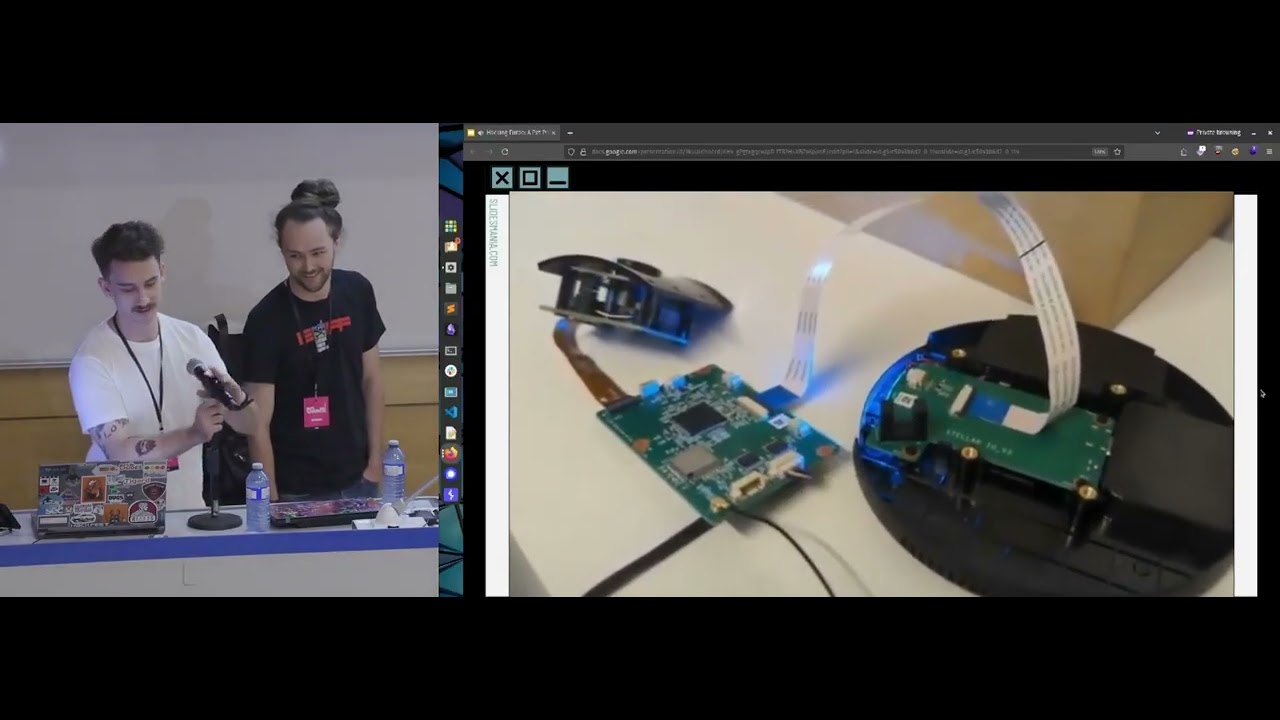
Furbo 360, and that's what we can see here on the uh left hand side of the screen. And uh once we got that all torn apart after some little struggling with uh the plastic bits, uh we found the UART port being exposed. Nothing too crazy. That's pretty typical for most hardware devices these days. Uh and that little red arrow is sort of pointing to that. And so our first thing to do was when we powered up the device, we wanted to connect to that UART and see what was going on. Uh and we got a little special adapter from PiShop. So huge shout out to them. Uh that allowed us to interface with the devices.
With a quick raise of hands, has anyone here ever used MITM router before? Okay, I see a couple people out there. So, for those who haven't, if you've ever want to isolate the network traffic from a device, but you weren't sure how to go about doing it, this is the tool we recommend using. Another tool that works very well in conjunction with MITM router is MITMem. Certem is a tool that can be used to find certificate validation vulnerabilities within TLS connections. So by using SER MITM in conjunction with Midm router, you can intercept and analyze all network traffic from a device as well as potentially decrypt TLS traffic if configuration issues are found. One of
the first vulnerabilities we actually discovered in the Furbo was a TLS downgrade vulnerability in the Fire Hose logging service that runs on the device during its initial registration. By using MITM router in conjunction with certm, we are able to intercept this fire hose track traffic and then decrypt the log data that was sent. And within that log data, we found the account ID, the device ID, as well as many other diagnostic details. Another thing that we noticed while watching the Wireshark logs and sort of doing our initial debugging the devices was that a lot of the communications taking place from the device to the cloud was done over UDP port 10,0001. Now, this is different from the research
that was done by Somerset Recon where all of the video streaming was taking place over RTSP and we weren't familiar with any sort of protocol that was running on this port. So, it took us a little bit of digging and we discovered that it was actually all being done over the through techk peer-to-peer protocol uh facilitated by the Klay network. Uh, and that's kind of what we can see here on the screen. Unfortunately, there's very little uh public documentation on this SDK and how this protocol works. If you go to their website, it's there's no help pages even. Uh you have to be a customer of theirs to get any information. So where we did learn about
this and got this graphic was from some uh research done by Mandandy in 2021 and they looked into the protocol itself and found some really really high impact bugs that affected millions of devices. I really recommend giving that a read. Um and so we can kind of see how this is all facilitated. So again, thank you for that this great graphic. Uh essentially the smart camera is communicating through the cloud to the mobile application and it is being verified and authenticated by a registration server and this will all come into play later on. Another thing that we noticed when we were sort of in this initial debugging phase was that the UART logs were extremely verbose. Uh there was a lot of
information coming through here and so this made our job very easy to figure out what was exactly being called as we were interacting with the devices. And highlighted here is the response to a request made by the Furbo API function uh to the device info sync endpoint on one of their servers. And in this uh it's kind of grabbing a bunch of information about what features it has available, what AI model it should be using on the device because like everything nowadays, it also has AI uh for better or worse. Uh but important for us uh was the fact that the firmware was listed. Now again unlike the Somerset Recon research tomopon has improved the security on these devices
and so we were met with a password prompt when trying to uh connect over UART. So we weren't able to drop into a root shell on the file system uh and we would have to find a way to find that root password. Brute forcing over UART is just not feasible. Uh and so luckily enough we found the firmware right here and we were able to pull it down. However, we were met with encrypted firmware. Running binwalk on the firmware returned nothing. was just a bunch of junk data. And so to using that secret key we had seen in the previous slide that I've redacted uh and a little bit of bang your head against the wall.
A friend of ours, Scott, figured out that you had to trim the block size of the firmware file by about 64 uh bits and then hex encode the key and then you were able to decrypt the firmware and gain access to the squash fs file system. With this, we were now able to get access to the Etsy shadow file uh and as well as all the binaries. And looking at that IC shadow file, we found that the root password was I know someone earlier was talking about this DEZ uh is what it was encrypted with. And for those who are uninitiated in cryptography, I am myself. Um DEZ is a fairly old protocol or sorry encryption
uh it's was first published in 1970 and it's a onetoone encryption. And so uh rather than trying to crack a hash or trying to to to do that, you're actually trying to brute force the encrypted string. Uh and so an 8 character encrypted string is equivalent to an 8 character password. And so a mere 11 days and 22 hours later, we got the uh root password and we're able to authenticate over that UART shell and get access to the live device. So now we had the firmware, we had access to the live file system. We were able to see what was going on with both and be able to debug and sort of reverse both.
The next thing that we wanted to figure out was how is all this peer-to-peer communication being facilitated. So, we turned to the mobile application and because I, you know, don't like pain, I prefer Android testing. Um, and so I pulled down the APK, uh, and decompiled that. And then after some reviewing of all of that decompiled a APK, I settled on the fact that it was likely all handled by this Furbo uh, P2P uh, files here. Within these uh one of them specifically the Furbo P2P command implementation uh file there was a essential essentially a definition of all the different commands that were being sent from the mobile app to the device and received from the
device back to the mobile app. And it sort of works on a request and response uh communication scheme. And here we have a listing of all of those as well as their associated command codes. And that's kind of the code that would actually be sent to the device. the commands themselves are less important to the actual uh functioning of those of those uh and whatnot. And so we hooked uh the mobile application with a free script that had essentially reversed all of these command codes and allowed us to see what commands were being sent when when we were interacting with the device. And one of the most interesting commands that we saw is the what's
defined here later on in that file, this um set uh snack call uh command. And this takes a URL. And on the Furbo 360, you can issue uh or you can set a custom sound to be played by the device anytime you toss a treat. And how does that happen? Well, on the mobile application, you can record a noise uh you know, saying, "Hey, Rover, come get a treat." And that is uploaded to an S3 bucket. uh the application will then fetch a pre-signed URL uh from that S3 bucket and then send that in the command over P2P to the device. This allows sort of a secure communication and allows you to upload your custom noises. But this
seems like something that could maybe exploit. Um and so we turned to the P2P manager binary on the device and see what how's that actually handled. Is this a way that we can maybe upload an executable or overwrite something that's later executed and maybe get a reverse shell? Well, unfortunately not. um they it seems like they've really improved their security there and rather than just blindly trusting whatever is passed to them, they kind of anticipated this uh and made sure that it's always saved as this custom.wave in this specific directory where nothing else resides. Um we also looked at the W file parser since that historically has been an area which has been exploitable on other
devices and other applications. Again, very locked down for us unfortunately. However, we thought maybe we can use a Freda script to rewrite that URL that's being sent to the device and maybe control where the device is fetching the sound from. Maybe make it our own server. And that's what we did here. So, you can see that example here where the URL for the S3 bucket goes in uh it gets rewritten by the Freda script to a collaborator server in this case. Uh and then we see the interaction from the device to the collaborator server. Another thing that we noticed is that there was no file size limitation as well. Uh, so we could crash the devices,
but what fun is that? Uh, I think it's a little bit more fun to put our own music onto the devices. Let's, uh, hope the audio works. So, you can see me here recording that sound, rewriting the URL in beautiful 360p. I'm sorry about that. And then tossing the treat. Oh, it's only playing on my computer. >> No.
[Music] Great. So, who doesn't want their furbo to play to root sandstorm? All right. So, when it came to hacking Furbo, we wanted to know what made these devices unique and more so why did some of these require a monthly subscription and the others didn't? And it turns out all this functionality revolves around the devices ID. The next question we had was, well, where does this device ID come from? And it turns out it's directly correlated to the MAC address assigned to the device. During the boot process, the system queries its MAC and writes it to the setup configuration file where it's then used as the device ID moving forward. So the next natural question was, well, can we control the
MAC address so we can control the device ID? And it turns out you can. By default, the device uses a technology called EFuse in order to set its hardware address. But after looking at some of the scripts that run during startup, we actually found some functionality here that would let us to specify our own MAC address instead of using the bakedin identifiers. By modifying the factory configuration file, we could set our own MAC address which then gave us the control of the device ID. Now that we had the control of the device ID, we wanted to see what sort of things could come from that. The first system we looked at was how trial licenses were being assigned to these
devices. So, something important to note is every subscriptionbased device gets a free 30-day trial when it's first registered. And after your 30-day period, you got to pay that monthly subscription to keep using it. We wanted to see if we could find some sort of vulnerability within this system. So, we didn't have to pay that monthly subscription and we could just keep on getting trial license to our device. This is the flow from what we can tell based on our research on how device trials are signed. Basically, the mobile app pairs to your device. It shares your Wi-Fi details and your account ID. The device itself then reaches out to Furbo Cloud with your account ID and its
device ID. The cloud then checks to see if this device ID has ever been registered before. And if it hasn't, it's granted a 30-day trial. The cloud then responds back to your device with the feature set that it has available. So based on this, in theory, all we would need to do is change our device ID to something that hadn't been registered before, and our device should receive another 30-day free trial. So on the bottom left, we can see the permissions.
Come on, hotspot. There we go. So on the bottom left we see the permissions currently available to our camera and the right hand side we have the mobile view that clearly says our device is now locked. I didn't pay my subscription fee and I can't use it. So what we're going to do we're going to remove the setup file so we can reregister this device and then we're just going to change our MAC address and then reboot the device. And then once the device is rebooted, we're going to complete the registration process in the app like you normally do, but this time the device is going to be sending a new device ID because we changed that MAC
address. And once that device has been set up, we're going to see we now have a fully functional camera. Yeah, look at that. I can see my little ducky. We go back to the permission file we showed at the start and we have a full set of permissions. So, who needs subscriptions? So what's important to remember here is in reality what we just did wasn't assigning a new trial to our same device. What we just did was present our device as a totally new device and that normal trial registration flow just took place. This gave us another question to ask. If we can register new devices by changing our device ID, what happens if we try registering devices that have
already been registered? Normally that would require physical access to someone's Furbo. But because we can control our Furbo and present it as anyone's Furbo, this should be possible. So this is what happens. If the device ID you choose is truly unique, it's not been seen before. Registration process works normally. Camera gets added to your account. You got a free 30-day trial. Awesome. However, if the device ID you choose has already been registered, you end up getting this Furbo already registered prompt during the device setup. and then the setup ends up failing, stating our account doesn't own that device. This discovery revealed the denial of service vulnerability that could be exploited by registering other customers device IDs.
When we changed our Fervos device ID and completed the registration process of that ID, we actually prevented someone from registering the real device assigned to that device ID. And where this attack gets even more serious is how the device IDs are structured. They aren't random. They follow sequential ranges based on MAC address allocation, which means instead of guessing blindly, an attacker could just focus on specific MAC address blocks and systematically pre-register large groups of devices without ever needing physical access to them. The impact of this would be significant. When future customers would later purchase one of these devices and try to register them, they won't be able to because their device ID is already bound to that attacker's account. All an
attacker would need is one furbo and they could start registering hundreds of furos and deny service to many future customers. So those who may have been paying keen attention to those videos may have noticed that a lot of the registration process is taking place over Bluetooth or specifically Bluetooth low energy. And so as we had kind of figured out how a lot of the other things were working, uh we kind of asked ourselves two questions. One, how do the devices use BLE? And two, more importantly, if you ask me, how do we exploit it? Well, with Android phones, uh there's a neat trick that if you have de developer options enabled, you can enable a
Bluetooth uh HCI snoop log, and that allows you to monitor all of the Bluetooth traffic from your device, your phone to whatever device you're interacting with. And we can connect to that over uh Android Debug Bridge and run that through Wireshark to be able to see what's actually going on in real time. And that's kind of what we're seeing here. Uh we can see that the furbal device uh that MAC address on the right hand side is connecting to our local host and there's some communication going on there. And as we watch this going on between our phone and the furbo devices, we noticed that some of the information at least in this case the Furbo uh name was unencrypted.
And so that led us to believe that likely a lot of this other data was unencrypted as well. And so we went through and reviewed but unfortunately because the packet sizes uh for these communications are negotiated to such a small size. A lot of this data is spread across uh multiple packets that are sent from the furbo device to our phones. And some of that also looked to be encoded in some sense. And so we wrote up a quick uh Python script to parse these files and look for some of the data that we knew would be present in this in a hex encoded format. Luckily enough, we found our access points password, find me password. Uh, it's kind of hard to
miss that. The implication is this. If uh an attacker is sort of near you while you're setting up your Furbo devices uh and they're sniffing Bluetooth traffic, they may be able to capture your Wi-Fi credentials as those are being sent from your phone to your Furbo and then connect to your home Wi-Fi network. The next thing that we wanted to see was what is actually being exposed by the Furbo device on BLE. Now, I'm not going to go too deep into how BLE works, but we can see here these different UUDs, and these are known as characteristics, and there's also uh services here as well. The characteristics can be thought of as API endpoints. They allow reading
of data, writing of data, and subscribing to an endpoint to receive a constant flow of data back. Um, and on the Furbos, there was only one UYU ID exposed with this write on it. And when we went to the mobile application and found a very similar implementation as it was for the peer-to-peer uh, communications for the BLE communications and what we see here, we found that there were a ton of different commands that were being sent and they were associated with a bunch of UU IDs that we hadn't seen exposed on the devices. And so that left us with a question, why? What's going on? Why don't we see this? and how do we get it
exposed? And so using a basic Python script, I fuzzed that write characteristic and sent it just a bunch of bad data and eventually uh with one of the commands ended up setting the device into sort of a hard reset mode which would disconnect it from the Wi-Fi uh until the device had been rebooted. Now again, the implications of this, okay, your Furbo is disconnected from the Wi-Fi. Uh you know, I can't talk to, you know, my dog anymore. Uh, so that kind of sucks, but Tommopon does advertise these as home security products as well as an added feature. So maybe someone who's a little maybe not as nice as Calvin and I wants to get
into your house. Well, they can disconnect your Furbo from the network and you'll have no idea what's going on when you're not home. So as Julian showed in the mobile app, we saw a bunch of these Bluetooth characteristics. Then when we when we first initially connected the Furbo, they weren't there. We eventually discovered that after issuing that reset command, we had to disconnect and then reconnect the device in order to see all the exposed gap characteristics. Once those were exposed, we quickly identified ones that could be used to leak sensitive details from a victim device. By this point in our research, we discovered multiple variables that were used to control the entire ecosystem. And we jokingly called these
the Furbo Infinity Stones. um they consisted of the device token, the peer-to-peer ID, the device ID, and the account ID. And we theorized if we were able to leak or capture these core variables from a victim device, they could be used in some various attacks. The device token and peer-to-peer ID were relatively straightforward to capture because they were exposed directly from these characteristics. The account ID, on the other hand, would prove a little more difficult to acquire. The only time we saw it leak previously was by that fire hose log with the TLS downgrade, but the window for that was only when the device was initially registered. After a lot of testing, we eventually discovered a new
scenario that we could trigger that fire hose service on the device. It turns out if the Furbo's disconnected from the internet for more than 180 seconds, that fire hose service will start on the device and attempt to send log data back to Furbo servers. In order to exploit this new scenario, we used four of those newly exposed GAT characteristics to disconnect a Verbbo device from its network, provide it with a new SSID, provide it with a new password, and then force the device to connect using those newly provided details. By running MITM router and certm on our control network, we can then intercept those Firehouse logs and acquire the account ID and the device ID. In order to streamline this
entire process, we actually built a tool called Furbonator, which automates the exposing of all the gat characteristics and lets you seamlessly interact with them with human words. And here's a quick video of us acquiring those furbo infinity stones. It's coming. So on the left hand side, we're running Furbonator. The middle is the victim camera and the right's our miter motor setup. So the first thing we're going to do is connect to that victim device and we're going to issue the reset command in order to expose those characteristics. Once those characteristics are exposed, we're going to start reading those sensitive details, including the device token and the peer-to-peer ID. Then we're going to issue the reset Wi-Fi command, which is
going to start that fire hose timer on the victim device, and we're going to send it our SSID and our password. We're then going to wait 3 to 5 minutes for that service to start trying to send log data back to Furbo servers, and then we're going to push the Wi-Fi ready command. We're then going to see the victim device connect to our network in the top right hand corner and the streaming for the camera is going to come back on because it has internet access and of course it has internet access. So that firehouse log is going to try to send data back to the servers which goes to us. We then copy that out
put it into a quick base 64 decode command and just like that we have acquired all the furbo infinity stones the device token the peerto-peer ID the device ID and that account ID. So, let's backpedal a little bit and kind of go back to the TUTK authentication flow uh and sort of revisit that in the Furbo context. First, when a device boots up, it's going to connect to the cloud using its device ID, account ID, and device token. Get used to me saying these things. Um, the peer-to-peer service is then going to start on the Furbo and checks for credentials tied to its peer-to-peer UU ID in the peer-to-peer o JSON file. Then if no credentials are present or the
file has disappeared for some mysterious reason uh the device requests new credentials from the furbo cloud and then the cloud will generate credentials and send them back to the device. Those credentials will be uh then stored in the P2P off JSON file and then it'll connect through that through tech network and you'll be able to see the device on your mobile phone. That's how it's supposed to work. So this is where things get dangerous. If an attacker replaces their unique identifiers with those victim unique identifiers we just acquired and then removes that peer-to-peer off file, we can request new credentials for the victim's peer-to-peer ID. And this issue is compounded by the fact that once new
credentials are issued, the old ones are completely invalidated. Meaning the only device that can now stream on the through tech network using that peer-to-peer ID is that attacker spoof device. This means when the victim opens their mobile app expecting to connect to their camera through tech network, they're actually going to be connecting to my camera and they're going to see whatever I want them to see. And that's what this looks like. So on the top left we have the victim mobile app and video stream and on the bottom left we have the attacker mobile app in video stream and on the right hand side we have a shell connection to our attacker controlled camera. So the
first thing we're going to do is remove our peer-to-p peer off file so that we can request those new peer-to-p peer credentials. And then we're going to start replacing all of our unique IDs with those Furbo Infinity Stones. That includes the account ID, the device ID, the device token, and the peer-to-peer ID. Once all those details have been replaced, we're going to reboot our device. And what we're going to see is the attacker stream's going to drop first, but shortly after that, the victim stream's also going to go down because we've just requested new credentials for their peer-to-peer ID. And then just like that, the victim phone's going to receive our stream and the attacker phone's no longer receive a
stream at all because we're sending all of our data to that victim account. When I move my hand in front of the victim camera, that's no longer what they see. And when I put it in front of the attacker camera, that is now what the victim sees. So this is like a James Bond Ocean 11 style attack. You only see what we want you to see. >> So in terms of disclosure, um we first reached out to Tommo Fund support team on June 21st. Uh and then after a little bit of back and forth, we were connected with the right people uh and delivered the full report on July 15th. uh they were a real pleasure to work with over
the last 3 months, very receptive to all of our findings, our recommendations, and even asked some really, really great questions. So, a huge thank you to them. Uh they showed a lot of maturity in their security posture genuinely. Um now, like I said, this was three months of research and in a 25-minute talk, we can only fit so much of that in there. Uh however, if you are interested in learning more uh finding out about how we took the chips off the devices, some of the other exploits that we found were weren't as interesting uh for this presentation, you can scan the QR code up there if you trust me. If you don't, you can go to my company website uh
softwarsecure.com/blog, I think it is. Uh and you can read the series there. Now, if any of you have any questions, now is your chance. >> Thank you, Julian Calvin. Any questions? This reminds me of the your last >> very similar. Yes.
>> Yeah. >> We we were writing the permissions to a file. So we we I was just using said to then rewrite all those things seamlessly instead of you seeing me type on a keyboard, but it was it was writing it all to the setup configuration file. So when the device gets registered, it pulls this file from its secondary flash and then all the information gets right there. >> So you have root access. >> Correct. >> Correct. >> So you'd think so, but it actually only reads it as soon as the device is booted and it doesn't go back to that file until it restarts. Every single time it restarts, it pulls back from flash and
then reads it again at once. So you had to change the MAC before boot. >> Okay. >> Great question. >> All right. >> Not that we found. No. Well, most the file systems actually read only. So we had to dump chip off, rewrite it, and then put it back on. >> Yeah. >> Great. >> Any other questions? >> Sorry, I forgot the other half my question. So when the chcast was reported to Google, they said, You set this thing up on a Wi-Fi network. There's no other way to do it. We're not fixing it. >> Yeah. Do you have any suggestion? Is this a problem for any kind of device that's on a Wi-Fi network that they can
always be this way? >> Uh more Bluetooth. >> Yeah. Well, so the the Furbonator script was actually all done over Bluetooth. So that was all uh Bluetooth low energy and all of those uh that reading of that data was all done over Bluetooth low energy. We added in the capability to uh I mean it's typically what the mobile app would do is send a new Wi-Fi network. Uh but when we're connecting it to another Wi-Fi network that's our controlled network uh that you know has the cert running there. We can capture those other details. The premise would be is that we can't reconnect it to the victim's Wi-Fi network afterwards. So we probably just disconnect it from the
network. Someone would come home and say, "Oh my furrow's acting up. I just got to reconnect it to the Wi-Fi." Uh we know how to get it into that state now. And so that's kind of the the the um premise there. And funnily enough, we've uh had a couple people reach out to us and say, "Hey, I have a Furbo. That's crazy." Or I've been scanning around for Bluetooth myself. Actually, I was down at um Bath, I think it was Bay and King or or Spadina and King or something like that, and I saw a Furbo on my Bluetooth scanner. So, these are very popular devices and and to find them on Bluetooth is is actually quite easy as
well.
I know the older Bluetooth.
>> So um it it's dependent on how it's implemented. So I think they were using I think BLE 4.0. Um but it's not necessarily a protocol specific issue. It's how they've implemented that protocol. So they've made it so there's no pairing process with a lot of devices. um in order to actually facilitate those communications, secure communications, you'd have to touch a button on the device while you're pairing it to get it to pairing mode or something like that, that wasn't present. Um which is probably something that would be a great way to to fix some of those Bluetooth specific issues. Um there is also encryption mechanisms that can be added. Uh and those are quite
quite good. Uh as far as I'm aware, at least for now, maybe quantum computers will will break that. Um but yeah, anyone else? >> Last question. into the hash like let's say you don't have master password >> so that um we got the the the shadow Etsy password we got that from the firmware that we downloaded from their website and the decrypt with the secret key but if you can't do that while we were doing that on the one side because it took 11 days we were also taking trying attempting to do our first chip off of the device to get the firmware which we did eventually do and then if you can success uccessfully chip off,
you can just rewrite the hash on the chip and then install it back. So, we did do that successfully. It's in our blog. So, if you can't get the hash file, your best or you can't decrypt it, your best job is chip off, rewrite the hash in the empty shadow, and then remount it. >> Actually, um on a project which just finished uh shortly after this one, uh we had a similar instance where we couldn't get the root password, so we dumped the flash and for whatever reason, binwok wasn't liking that file. Uh it's fairly common. Um, and so one of our friends decided to use a hex editor just to modify the encrypted password in
the firmware file itself and then just ref uh reflash the flash dump and because we set it to like 1 to 3 ABC, we were able to authenticate over UART. So it's a nice little solution that I didn't think was going to work when we were doing it. Right. >> Thank you, Julie and Calvin. That was a great talk. >> Thank you. >> All right.
Related talks
 48:08
48:08 45:56
45:56 40:53
40:53 40:54
40:54 4:14:50
 32:40
32:40