SiERRA-Automating And Scaling Forensic Investigations At Siemens CERT - Demian Kellermann
Show transcript [en]
so um yeah hi I'm here today to give you an introduction of our forensics platform that we've built at seaner over the last I think 3 to four years um basically we have an agenda that is quite packed so first I'll give you a quick introduction into Sean thir and what we do in general and a shorten uh architecture overview over the platform and then I'd like to dive into fre topics in particular that more or less make up the platform uh that's the workers the workflows and the user interface of course and then I'll try to sum it up and still have some time left for questions I hope so with that let's get right into it um forensics aert so
CT in general at zans is maybe one of the oldest corporate SS in Germany so we've been active for more than 20 years in some form or another um basically we've always been a mixture of of research and doing actual security operations and right now of course we're embedded in a much larger security organization whereas other teams like the product s uh red teaming uh security operations center and all the things you usually have in a large organization uh we areer we do the instant response for all the companies so all the business units and all around the world uh that leads to us also being quite an international team by now so we've currently six locations where we
have people and I guess this is growing over time uh for me in particular I've been at seen search for about 6 years now working as an instant responder and an forensics analyst and if you work at se for a while and you're interested in the topic you automatically become some automation engineer so I call myself that now as well and since the beginning of this year I've been the topic lead for the forensics inside SE third so what do we do uh basically the forensics team is a small sub team inside the instant handling team and we support uh instant handlings and instant handlers uh by analyzing the data and giving results writing reports and in the times
where we don't actually investigate we try to research and develop and extend our internal tooling and this is part of what I'm going to present today so how did look in the past um so forensics is usually uh in the instant response stage where you respond to an actual crisis so when frat intelligence has failed and something has actually happened uh then you usually have different steps so we will need to acquire data you will need to prepare it process it with different tools and then you need to analyze that data and in the end hopefully have a report of what has happened that is as comprehensive as can be and every incident Handler and every
forensics person usually has its set of favorite tools that all work differently try to visualize those with those different shapes so everyone has his favorite tools lying around and you're trying to use them and save the results in another folder and then you have new results and this all gets very chaotic ah yeah so this is the problem we try to solve in the end so what do you we want uh the problem with this approach is consistency so if you process a case today and you process another case tomorrow you might have your tools and one tool won't work anymore or you find a new tool but this is all not consistent not really
documented and of course scalability is also a problem since different forensics investigators will have different tools and you can't really compare the results of two different investigations if you haven't used the same tools and looked at the same data so uh the approach as we envisioned it is that we can automatically deploy all the tools we have at our disposal and this is all in a defined flow so this is the freey now let's get into how we did this uh so the architecture in general is uh we identified three big building blocks that we need uh to achieve this goal so we need an automation back end that does all the management of cases and jobs
uh we need a common tool interface meaning that for every tool we want to use uh we want to orchestrate it we want to start and stop it and look at its progress in the same way so that's why we want a common interface for this and on top of it all we need a user interface so we can actually look at what what has happened we want to see if all the tools run we want to look at the results and we want to document what we find so this all in a box is called Sierra and if anyone asks you it's the seens extensible rapid response automator so now you've heard that um some nomenclature before you get
into the details um basically our most most ground building block is the case uh a case just encapsulates everything we do in the investigation and a case usually has evidence items and as evidence we Define everything that we load into the case because we found it somewhere uh but we also Define as evidence anything that comes out of tools that we run over those first pieces of data we found so this gives us the ability to compute a hierarchy of evidence if you will so we will know this report came out of this tool and it was fed another piece of evidence so we can trace that back to the initial evidence and with that to an initial
asset that we investigated uh then what we also want in the case in the end is a finding and findings we Define as some relevant piece of information we found uh hopefully uh explained why it's important and why we think that this is part of the case and of the investigation on the more technical side uh what I will refer to as workers is basically all analysis tools uh that will report to a central job broker and tell that worker what kind of job they can do and what input they need for that uh on the other side a job is a request for certain worker to do some actual analysis with a piece of input
parameters uh we also use this job object then to track the job status and yeah manage all the jobs for the Tex stack uh nothing too uh exotic I think so on the bottom we of course need storage for all the data we will process and we're using uh S3 compatible storage there uh but we have that locally and for databased items so smaller pieces of information that we don't want to store in a file uh we use elastic search then all the workers get bundled usually in a Docker container and there's some sort of python running in most of them but that is not a requirement you could basically write workers in every language you want as
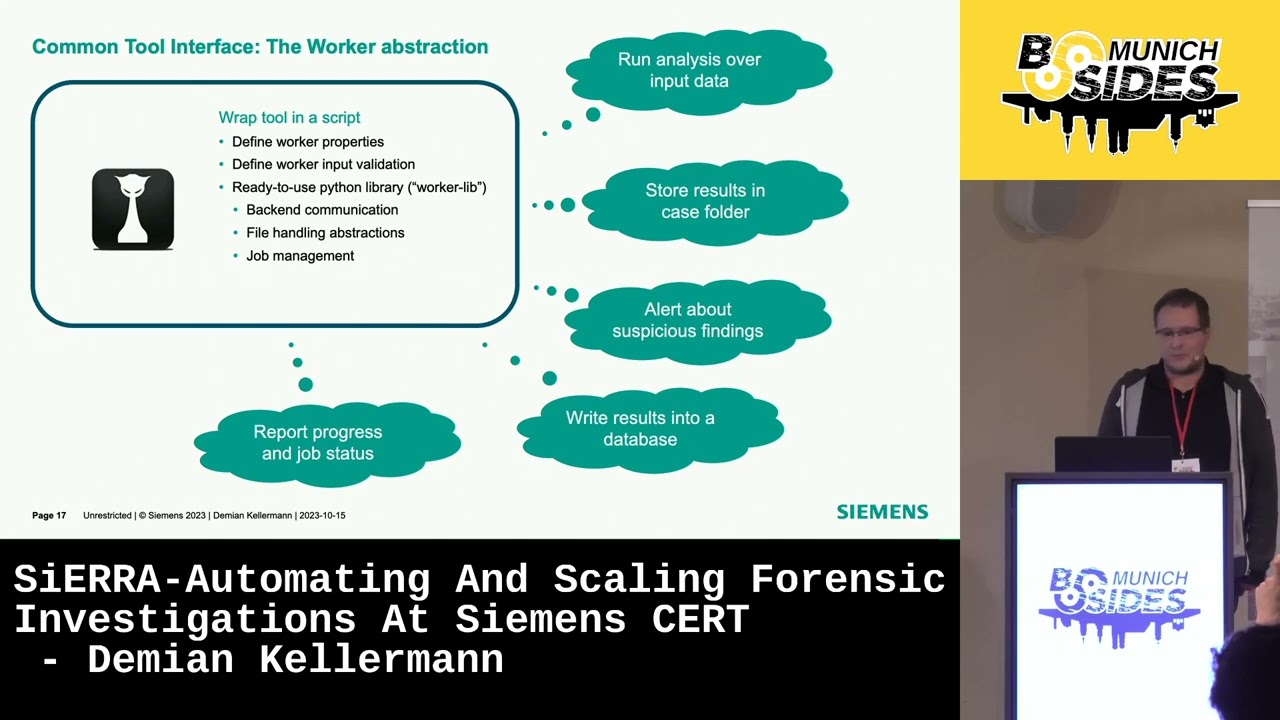
long as it can talk to the API and to the storage for apis it's also no surprise uh we use f fast API basically to manage cases to manage jobs to manage evidence nothing too special there and for the user interface we use fjs uh which is yeah a pretty nice way to to implement most of the things we needed and is also very extensible okay then let's get into a bit more detail with workers and I just like to explain this uh with an example so let's say we have hashcat or once not familiar hashcat basically is a tool to to crack passwords by trying basically by trying dictionaries until you find the right hash and this
is a command line tool so you can already use it pretty well uh but we will now want to wrap this in a script so you can use it as a building block um basically we have defined uh python library for this which we call the work library and this already uh extracts way uh the backend communication the file handling the job management so if you're implementing a worker for hashcat you can just use this library and it will do most of the work already for you and you have just to Define how the tool is actually used so you will want to run the analysis over the data you will want to store the results back in the case um
you can also decide to look at the results and alert the user about suspicious things that might be there you might want to write something something in a database for later use and you can of course report progress and status of your job so hashut is usually a long running process so it makes sense to report how far long you are in the process um as a bit of technical detail uh we use Json schema for that so workers will report to the back end uh in Json schema form what kind of input parameters they need so for example for hashcat if you want to crack Windows passwords we will need the Sam registry hive
and there are some other parameters defined here so for example the user can give extra passwords that should be tried if we already know some or it can there's a Boolean you can check if you want to do more brute forcing at the expense of more processing power um we take this Json schema in the user interface and automatically transform it to um yeah something you can click on and prefill it with with values from the case and you we can also use this um you can see that here uh to see uh how the job is progressing and this is from another worker but basically this is the status reports that workers can give
while they are running so you always have an overview of what's Happening that's it for the workers so let's get into workflows basically what we have now is nice and you can start different workers uh but still a lot of manual clicking if I want to run all my tools against all my f that I have so what we really want is some way to define which workers we want to run and which input data all based on some initial evidence we have uh so as an example uh we start with a dis image here and for that dis image I want to Hash all the files that are in it and I want to check if the hashers
check out for some ioc's I might also want to run other tools over the image like Yara or I might want to extract files from that image and then use different other tools to process them and that will split out more F and then I want to again check this against ioc's so there's no problem you can solve with a bit of Y so uh we came up with this definition language it's a bit like like a CI definition and basically what we have is the initial parameters that you define over here so you have Global workflow parameters like the input image in the example and then we have workers that use those like the extract artifacts
worker that's the first one that uses the initial evidence to extract files and then in this example we want to further then process event blcks that came out of this extraction and for this we can say this job will use the output of another worker and this automatically also defines the order of execution so in this case we know we have to use this one first and and after it's finished we can use the output for the next worker so this also implicitly defines par parallel execution uh but it also defines the dependencies so further along in this example let's say we have extracted these files so now we will need to start the next one the event log paer so looking
at our recipe we should now use the output of that artifacts worker and put it into the event lock paer so that's all this uh but obviously there's much more that has been extracted here so we can just pass this along to the next worker and what we do here is we also look at the job descriptions of the event lock worker and the event lock worker says that it only wants to process evtx files uh so we filter this list down and just start the stop start the next job with this evtx file as input and the same works for other workers as well so we always combine the output or listing uh with the definition
of input that the next worker wants to automatically filter this down and this works surprisingly well in practice it might look like this so this is an actual workflow we we use for testing uh we're starting with actually an zip file up here that has some artifacts that we collect with an agent and then a lot of jobs are running and if you look closely you can see that we have started to use sub workflows uh so we have better reusability of the workflow definitions that we have but basically it's just like I said so we start one work one workflow and it will just process the whole image with every tool we have okay then let's get to the user
interface and I have prepared some screenshots here and unfortunately they're a bit small so I hope you will will be able to see anything so basically we start with the uh case overview and here you will have the list of all the Assets in your case these are the base base evidences and you can Mark if they are still pending or if if investigation is finished with them and you can also mark them as compromised or clean or some other state and you also have some notes here if there's ever anything you you need to note you can also save that in the same case uh one step further when we click on an Evidence item you can see there's
some basic information about the host in this case it's a Windows 10 host and this white list of of evidences here is everything that the workers have processed that came out of this initial image so everything and all the steps that came out as a result will be displayed here so this is a dynamic list of everything that has been created and now obviously there are different kinds of information has been extracted in different formats so we implemented different viewers for those uh before we get to those um as uh maybe you remember workers can also alert us to things they found while processing and these automatic findings are also displayed if you scroll down a bit so
for example we have some worker that looks at certain event logs for Powershell scripts and it was oh there's B strange base 64 in those Powershell executions maybe you should look at that or we have another worker that looks as process and service executions and if it finds for example PSX it will notify us here that that might be something to look into and basically we've defined different things that workers will alert us automatically and this mostly al already gives us a good first uh jump into the case when we start working on it okay let's get to some of the views so this worker for example uh writes markdown reports in this case for for
Auto runs uh we do a bit of various total lookup and other things uh but basically what you can see is that the markdown is just displayed in the browser not that surprising I guess uh we have another worker that that does CSV as result so tabular data and this will be displayed in a table that you can also filter on but that's also not that interesting so let's get to some interesting things uh we have the possibility to display three views and and we use this exam for example uh for the output of a worker that passes the mft for us and it will write a database with all the mft entries so the file
system entries and we can display this here as a nice tree just like you're used to uh with the addition that you can also filter and search really really quickly inside this tree this also works for for registry and other kinds of tree like data that you might have and then finally there's a timeline view of course because no investigation is possible without having timelines um yeah it's not so different to to other timelining tools I think so we have a histogram where most of the interesting events are and we can filter and and of course select special uh dates where we want to start looking uh what's kind of cool is we also have one
click filtering for TXS in this database so we usually apply uh Sigma TXS and also the the inbuild plazo Texs so you can quickly filter down and look at events that have been taged um we can also see we have some predefined searches here that we usually use that you can also activate with one click so so something like everything that has an execution flag or things from what's here browser activity Windows event logs things like that so now the most interesting thing I think is uh documentation so everything you can see in the interface you can document by double clicking on it and if you double click on something you will get this dialogue uh do you want to save
this as a finding and basically what happens is that we look at what you clicked on and already prefill a text field uh with marked down text with what you clicked on and you can then extend this and describe why you think this is relevant for example and basically can use all kinds of markdown to emphasize what this finding is so finding is linked to an asset and to a time stamp and this means if we have collected a few assets a few findings we can then look at our findings View and get a chronological list of all the things that are relevant in the case uh we can also use uh like a Time Time
divider here so to get a better picture of how much time has passed uh but basically this view in the end allows you to tell the story of the case just as it it happened and in most cases this is enough to to use this view in the end to have a nice report of what has happened in the case okay now I have been quicker than I anticipated but that's fine um summary so I think we uh really increased the quality of our investigations by using this automated approach instead of using manual tools one by the other uh I also really like the low effort documentation we get by just think oh I think this is relevant let's
click on it and document it and maybe it's not relevant in the end and I can just delete that finding later but I have it here and it can can be forgotten and of course collaboration is vastly improved by having a web-based system instead of every analyst using his local computer and and using grap or or his favorite Text Editor to look at lock fice is much less collaboration even possible than having a system where everyone can click around in parallel and share their findings so for flexibility we've also found that reacting to new challenges we see in a new incident is quite easy because we just need to write a worker that automates whatever we haven't
looked at in the past but want to look at now and once we have implemented this worker one time we can include it in the workflow and after that it will be run for every case we ever have after this point so we are very quick to adapt to to New Challenges or new data sources that we want to process uh I also think the we've we've pretty much use all the the viewers we need so we we also have a few more exotic viewers like for Json data we can also display this in a nice way but usually what you have in the end is either a text report like markdown or you have something tap or
database so this has been uh has been shown to to be a very good tool to look at pretty much the whole case so we rarely have the need to download files and look at them in separate tools so usually the the web interface is enough for the whole investigation and what's also nice of course if the whole thing is based on Docker so you can basically take it anywhere you can run it in the cloud you can run it locally I have even have it on my laptop here so it works pretty much everywhere and if you need more processing power you can just yeah copy it to a server and have more power there
pretty much works everywhere okay uh with that I'd like to thank a few people uh first and foremost all the offers of Open Source forensic software uh in particular the lock to timeline team of course because timelines are important and very nice Tool uh but also Yi Mets who pretty much wrote Every PA you can think of and the sigma HQ team for all the sigma rules that are also very helpful when you process a database but of course I'm I'm sure I've forgotten a lot of other people that are also contributed very cool and important tools and from our third side I'd like to thank Stefan berer and Jonas Plum some of them might be in your audience
here um basically they started this project with me and have contributed a lot uh to the success of it uh with this I'm true so if you have any questions I think we have some time now [Music] [Applause] so okay so I'll start in the front well thank hello is this turned on uh thank you uh for your talk and uh congratulations on automating so much of your workflow that must be really nice to work with I was wondering uh what are some um measures maybe you implemented to cope with with the pleora of information you mentioned you know once you implement some kind of um other tool you'll run it in the future forever so
even increasing more and more the data each um yeah scan will produce how do you cope with all of this information and what are some strategies you have there I think the answer is more automation uh so yeah I already alluded to that the automatic worker alerts are a big factor in where we start our investigation to see where it leads so if you have more data you can't look at everything but you can usually code something into the worker to already alert you if there's something that might be fishy going on in this report or in that report so start there and only if you can find anything automated then you need to dig into all the data
manually hi congratulations for their presentation very nice uh just curious uh about the the input of data uh into the the platform uh you show in one of the slide the analysis of of a image of a file but you have uh a worker to to communicate uh with some live uh forensics like grr or something like that too yes we do so uh this is still in development and not live yet but basically we have an initial worker that can talk to different a EDR apis to get gather data that way uh but this also uh in a big company you have to have a lot of uh clearance to do things like this
so this is still in the development stages thank you Daman for this uh great presentation about the automated uh set application so I was being coming from the security background I I'm am uh having a bit skeptism uh so I want to ask you specifically what are the downsides what are disadvantages uh that uh of using this method or application well obviously you have an automatic workflow that will just do the same thing every time and it's a bit harder to to change this on the fly to do things differently just this one time if it's necessary in the case I think we're mitigating this because we can easily adapt it with new workers or just
change a workflow we've also had a case where we adapted the automation to run a slightly different workflow in a certain case so I've I've been hand waving over a lot of stuff obviously uh but basically the automation starts when when we get data from our collection agent and we can for example look at in which case this data came in and then depending on the case we can do something different than usually uh but of course it's still a bit more work than you having all the data on your laptop right now and then just running a tool you want to run right now which you can still do in some way because you can
download everything that's in the platform to your local PC to example to to apply more filters in Excel if you like that more for a CSV uh but I'd say this is a slightest Advantage just that of course by defining our workflows we have Define them and adapting them is a bit more yeah requires a bit more work than just doing it when when you're using one tool after the other
manually yeah uh perfect automation congrats uh my question is do you keep the records of um past findings is it possible to search for um retrospectively search if there um something in your case right now that you see already in the past like two years ago interesting question so it it is possible so we keep those and those are also in a pretty concise format so we can keep them for a long time uh but we haven't implemented a way to do it automatically yet so we we do have them you could probably grab for them even because it's all in ad Json file uh but yeah that that's that's room for improvement for automatic searching
yeah so is probably the last question um I don't see any GitHub link or anything in here so you keep it for yourself obviously but we all have automation needs uh have you come anything across which you could recommend which is of course not as good as your solution uh but something that prevents us from starting from scratch um so so first of all yes there's no GitHub link uh we have thought about open sourcing it and it's still not not off the table but there's a lot of processes and things to do before that that can be a reality and some of parts of the system of course are very adapted to zans and all its
structures and apis so yeah I can't be that optimistic that it will be released in the near future um the probably the most simple answer is the tools that that Google uses so there D of time wolf and as an automation framework and and time sketch and plazo of course that that I think are already automated using DF time wolf um and of course I think it's also a Google product toia that also tries to go in the same direction of automating workflows based on evidence items so those are probably the open source tools I I'd recommend okay um that's time so if you have more questions for Daman catch him out in the hallway so thank you so much
for coming please give Dam a big round of applause and
Related talks
 32:06
32:06 29:33
29:33 39:42
39:42 27:22
27:22 32:37
32:37 43:32
43:32