UPnP - Universal Pwn n Play
Show transcript [en]
welcome again hope y'all had coffee and cake and are happy now um i'm going to talk on topic of upnp universal pwn and play as we call it if you're an attacker it's the most amazing protocol you ever found on the network your defender i'm sorry you'll see why um agenda first of all bit of an overview what is upnp then we're going to attack uh sorry cover bit like how it works and attacks and a bit of defense also of course and maybe a demo at the end we'll see about that actually we had a bit of technical problems also upnp what is it how does it work um it's universal plug and play and
if you think back for some of you at least um something like 20 years about the early days you bought a printer you bought a scanner or whatever and then you had to plug it onto your machine and get it connected somehow and get it to talk and it never worked and your parents called you and all that and so then they came up first of all with plug and play and then for the network universal plug-and-play i mean the idea is quite obvious what you want to have is that device that you just put on your network and it all works and it's magic and if you you know your parents can do it
and well that's what what it was designed like so what you really need to remember about it what's the important point about it is there's no authentication there's no no passwords no anything there's no usernames no stuff it's just talking to each other and if there's a you know server client um it will provide functionality to whoever connects to it and there's no levels between you know regular users or or administrators or whatever because that would assume that you have passwords in between which you don't so if there's your pnp device see what it can do for you and quite often there's a lot um yeah it's not so much maybe you will wonder if you see this on a like on a company
network it's mostly for residential use really but if you're looking around for example right now you have the overhead projectors nowadays you mean all your printers all your tvs here these l routers and everything else they're all talking upnp your phones the applications there's a lot of them and upmp is probably one of the most widely deployed protocols on the local networks and sort of sadly also on the internet because no one stopped it um yeah it's a combination of you know sstp there's http i think it's partly based on udp it's partly based on tcp and it all works together quite amazingly and provides all sorts of functionality in the end um yeah so
first of all how does it work basically you have your operating system let's say windows and it wants to find out what kind of upnp devices there are on the local network so that's what it does it sends out a single udp packet port 1900 multicast address and it's uh that's the what do you see down there the m search it's are there any upnp devices on this network if so please reply and that's what you get back that's your reply also edp coming from the devices look something like this the interesting part is the red part where it specifies well yes i'm over here if you want to talk to me and if you want to find out what i can do for
you what kind of services i offer and what kind of functionality um you connect to my http port on you know ipport whatever and there's an xml file waiting for you you know just download the file pass it and it's all in there what i can do for you um yes so yeah exactly that's this part actually so your windows the next step is going to be it will connect to this advertised http port will download the xml file and then find out so what kind of device am i actually talking to what is this what does it offer and then you see it on your system tray of similar depends on the functionality of course
oh yes i know it's hard to read it's small that's intentional by the way don't even read it you get a whole lot of information in these xml files i remove the you know the clutter basically and that's part of what you get so what you see in this case for example so what kind of device is it oh well it's a residential it's an internet gateway device oh it's manufactured by linksys um it's you see the model you even see the software version isn't that amazing if you're an attacker knowing you know very detailed what you're talking to and then you can just google for exploits basically um yeah european peer pac attacks there's a
whole bunch ddos was quite famous for a while um if you think back once again there's a udp packet a single packet going out and then there's a reply coming back so that's quite ideal for you know your normal amplification attacks because the udp is easily spoofable so you send out a small packet requesting information from a upnp device and you get back a sort of beautiful a bigger packet announcing all sorts of services so you just move the source ip to whatever victim you want to hit and well and direct a whole lot of traffic this way and this was quite quite in use on the internet for a while until they switch to ntp and
and well whatever stuff it's nowadays in general upnp you saw the xml they offer all sorts of functionality which means there's interfaces different interfaces uh providing different functions and unlike zeroconf as far as i know upnp is more like a platform so it's every window can basically just use the upnp functionality and then implement their own whatever they want to have on top of it so there you have it's not standardized basically whatever device you order they have different functions under different names with different functionality and it's really it's sort of amazing whatever you find in these devices for example so once again there's no authentication no whatever if you can talk to it you can use all the
functionality it offers so for example if a bunch of devices offering you to remotely change the dns settings well if you're talking to the local router on the on the network and you can change the dns settings without being you know not logging in being administrate or anything you just send a plain text request to the upnp interface can you please change the dns to this server which is under my control and you get backer http 200 yeah sure why not it's sort of scary i guess as a defender but it gets better the requesting ppp username and password that's not you know sort of well let's call it a feature because it's even in the standard that's defined in
the upnp docs if you read them so same stuff plain text request well actually this one interface and i'm calling the ppp password function can you please send it over and well simple soap request in the http interface you see the event ppp connection interface being called in the get password function simple stuff that's the reply and sure enough why not here's the password once again no authentication just you know talk to it it's it's a feature that's what i mean about functionality um what else do we have oh yeah that was fun too um what about remotely changing the admin password of course without having the old one in the first place because some vendors think that's a good
idea um that's what you find out there um yeah that's another one that was a quite big vendor actually i don't know how many devices implemented this one but it was remotely possible to on one hand request the wi-fi the ssid and also the plain text wi-fi password because why not um yeah upnp amazing stuff and like i said it's every vendor seems it by on its own and provide its own functionality and we'll get to auditing it later and how we have a look at it and see what kind of functions your device may offer that was one fun that one was quite fantastic so i mean upnp is designed for residential use for you know home
networks and similar there's basically there's no point in upmp being provided on your these io routers on the internet side on the you know on the van interface um for whatever reason seems to be the default so you have millions of devices out there on internet really happily speaking upmp to you over the network over the internet that is including i mean upnp a big part of the functionality is when you're running applications or games also on your local network on the inside so it can talk to the router for example hey i would need a port forward i need this external port forwarded to me can you do this for me please that would be so
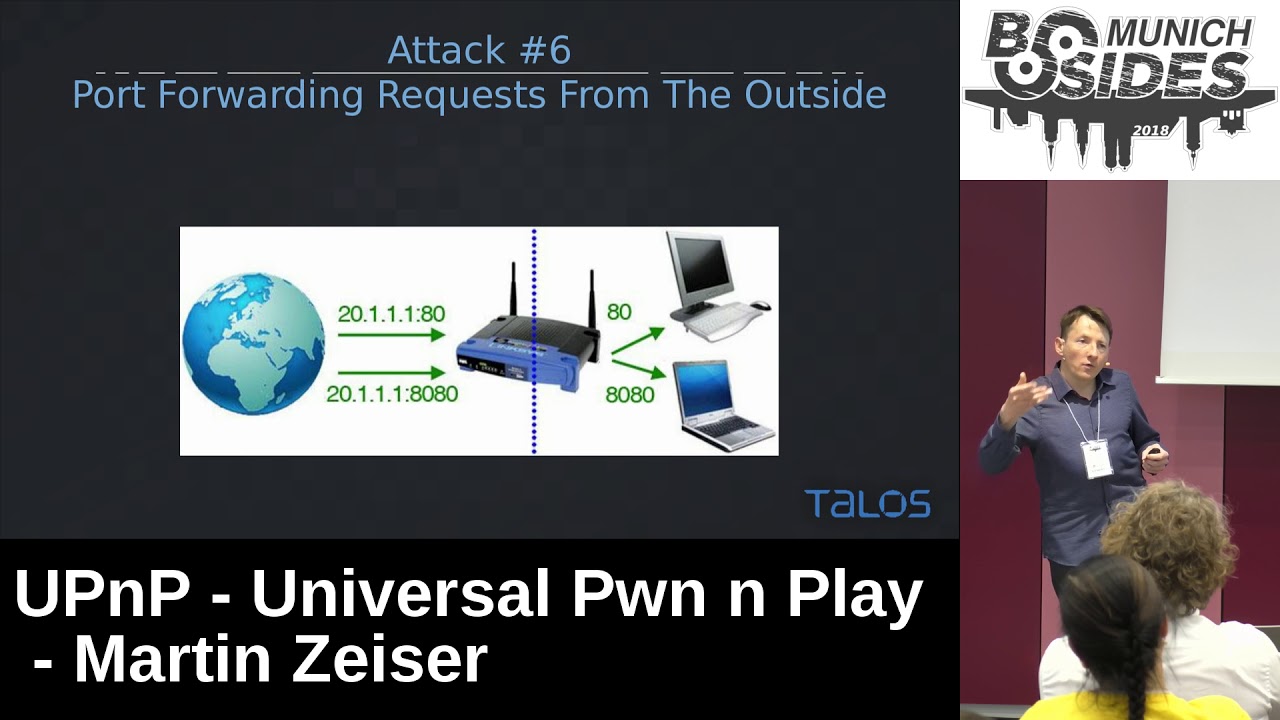
great now the fun part is of course if this also works over the internet and it does so it means you have a you know you can talk to it over the internet could you please open this external port and forward it to the inside to this ip address and yeah sure why not um so it's you know whatever there was devices they're being sold quite often as well we're implementing our firewall and anti-hacker stuff and whatnot and then run upnp on the external interface and you can just ask for a connection to the inside now even better the ip address you specify doesn't have to be on the inside you can also specify an ip address on
the on the external side on the internet so you can use it to just bounce around so you can talk to upnp can you please add port forwarding um forward port 25000 maybe to you know whitehouse.gov port 80 i'd like to do some stuff and yes it will do so and so that's not rare by the way that's a lot of devices doing this um yeah that's one of the requesting just you specify external port and internal port where you want to connect to the ip address and oh yeah least duration it's also fun i think it's the next slide actually yeah i mean those devices typically no logging um it's not just tcp you can also use it
you know doing udp and also quite handy for an attacker there's a custom timeout that you can specify so the rule will be gone after a while yeah finding upmp devices on the internet um some years back in late 2012 h.g moore the guy behind the metasploit project he scanned the entire internet for upnp devices so at least you know finding the ones that wanted to talk to him and he found about 80 million devices something like 2 of the internet talking upnp over the internet talking to him because you had something like 7000 vendors back then already implementing upnp in a sort of creative way and 1500 vendors i suppose is many more by
now so you can't just easily patch this it's not like you can talk to those 5 10 20 50 whatever vendors and get them to patch it then you have so many um yeah so what he was doing is sending these what we saw earlier the udp packet on port 1900 basically uh what windows also sends on the local network it's a hi um are you a upnp device if so please talk back to me and tell me where to find the xml config and so of note which that's why i'm pointing it out here so i test this it doesn't work for windows um which also means if that's not windows house replying those
80 million devices there was all sorts of embedded devices where there's printers network attack storage um routers of course and many many of them and tvs and digital video recorders and cameras and everything else um which was later used by the way when was the mirror botnet it sounds like two years ago the iot botnet it was used for ddos um that's was a whole lot of these devices also yeah um once again also so udp to port 1900 are you a upnp device udp back yes i am my high port tcps over there that's where all the functionality is that's where you talk to and where you you know get your whatever you want to do that's all tcp
that means just because port 1900 udp is blocked and you can't talk to it it doesn't mean you cannot talk to the upnp device if the tcp high port is open still and it's typically just a range of ports and always you know sort of a four or five different names for the xml basically you can just probe for it basically without using udp so even if some sort of firewall a provider so it's blocking udp 1900 that does not mean that it's you know there might still be um the tcp port for the upnp interface for the soap interface open port 5000 for example and willing to accept commands um yeah also html he had a look so
most vendors are not implementing their own upnp stacks which is probably a good idea they're buying or using open source or using just a few different stacks really so he found there was four different software development kits used in the three-quarters of these devices that also means of course when you find a vulnerability in one of these libraries that's good enough to attack millions of devices it's sort of critical that way oh yes then of course client-side vulnerabilities so so far what he had the typical approach is operating system sending out a multicast packet on local network are there any upnp devices and the device replying with yes sure i'm over here and my tcp interface is on this http port
but according to the standard the client the you know your printer for example may do so on a periodic basis and do just the same you know without being requested just send out the multicast packet well actually i'm a upmp device i'm over here if you want to talk to me my http is up there and you know just find out what i can do for you so that's what i was doing and sending these packets to the internet just announcing myself as a upnp device hi i'm a upnp device i have a http port if you want to talk to me you know just connect so once again if you think about this it
means i'm sending on an easily spoofable udp packet announcing a http service and you wouldn't believe how many requests i got back downloading the xml file so that means i can get millions of devices to connect to an http server of my choice it doesn't have to be mine it's not connecting back to the source ip address it's connecting back to whatever has been specified in the udp packet so i can get it to you know execute malicious requests on remote sites for you know exploitation or for dos i was wondering about the click fraud really um if i set up a website and you know include some sort of ban advertisement and then get a bunch of iot devices to
connect you know to click it um well it may or may not work it didn't try it um in general of course you get clients you get software to download an xml file that you created that you specified we all know xml is sort of hard to pass especially if you really get into it so there might be malicious xml files that you can craft to potentially execute code that's just a bunch of user agents that i saw connecting back to me it was interesting behavior you saw five volatiles obviously because i was trying to connect back and find out what i well what was talking to me and wouldn't accept any connections but it would happily reply to my udp
packet and connect back to me and download the xml um yeah so network attached storage i saw some business gateways um and many many more you know all sorts of bigger and smaller iot devices basically um attacking client applications now that's research from a colleague of mine it's alexander nikolich and um when i was doing my stuff he was well auditing uh upnp client-side library because you know you have applications like it doesn't have to be games there's also um basically whatever needs to exchange data over network and receive a remote connection from the internet will want to talk to your router especially to do what we saw earlier and request support forward so connection
can come back in so that's what he was having a look at and yeah he saw he found a torrent clients cryptocurrency using upnp and running you know a bunch of libraries and he audited it um which one is it the was mini upnp i guess this one yeah that's when he audited um it's in widespread use for many different clients and he actually found a bug in there in the xml parsing so this code that he audited and where he found a park is or was being used at least and on the top left that's transmission it's a torrent client um top right bitcoin we all know what that is and tor used to use it that was quite
interesting because a bit earlier they removed it from the cold base in the road something like um the c code here was fine but frankly we don't trust the underlying libraries and yeah they were right about it actually so what he found was an overflow in the xml parser which means your i mean your typical setup is he wrote an exploit to act as a upnp server on the local network and it was just sorry just um waiting for your typical upnp packet to arrive you know something like are there any devices i would like to talk to one so and he would reply yeah sure i'm over here there's my xml file come and get it
and that's what happened so the application fetches the xml starts passing it um there was a mem copy and buffer overflow and he managed to execute code on the application now the fun application that he decided to exploit back then was bitcoin so that means he was able to take over bitcoin clients over the local network the moment the bitcoin main client started up it would do you know send out a upnp request is there any upnp device on the network um the exploit would reply yeah sure my xml file is over there um trigger the exploit um take over the client it's you know sort of a could be an expensive bug fixed pen of course demo um we'll skip
this for now actually maybe in the end we had some technical problems while setting everything up so maybe not um yes auditing upnp so if you're on your home network or also in the company it's quite interesting really to just fire up wireshark and look for udp packets on port 1900 because they're quite a bunch of them flying around always from from your colleagues from operating systems you know just like windows linux whatever but also you realize that you have devices on the network like what is that oh wait that's an um that's an apple what's the thing you call the media center sorry no the apple media center the small box apple tv yes thanks apple tv for example
on and you know and similar that's just stuff that's on on regular networks and asking for upnp so if you want to find out what kind of functionality a upnp device is offering um there's a little tool called miranda written pyson miranda is very helpful because it will connect and you can just a bit like in a browser i mean it's text interface but still you can just connect to your device and map all the different functions see what kind of interfacial intel sorry what kind of functions the interfaces provide you can call the functions you can provide parameters you can change settings and so on and that's quite helpful defense i mean yeah patching obviously or just
removing it if possible would probably be even better ids ips rules will help mostly um not my preferred solution really like i said if you can just disable it remove it it's just not a good idea to run it really what else yeah general sanity no one needs to run upnp on an external interface to be reachable over the internet if you're doing that you're just doing it wrong really um same goes for port forwarding of course uh port forwarding requests from the outside to the inside that's not functionality it should even be possible for whatever reason millions of devices will happily do it um yeah and yeah like i said patches but we all know how that works
um conclusion yeah upnp is amazing it's the best protocol ever if you're an attacker if not if you're a defender like i guess most of the room um do something about it disable if possible um thanks a lot for now if you have any questions go ahead and yeah you might try the demo later okay
okay first of all thank you for a very interesting talk i'm gonna have to try some of that stuff so are there any questions
so uh thanks for the talk uh you could have uh tell us all this about five years six years ago yeah and uh it's right the same it kept the same and i wonder uh there is only a bunch of i don't know five or six uh really deployed upnp stacks and i don't know uh back then six years ago uh there were only two with known authors and uh the rest was unknown did anything change uh from what i saw the the hd moore uh graphic uh is that it doesn't change uh so there are still several uh [Music] several upmp stacks that uh that have no known author you know how it is it's the whole never
changer running system and it always is about money in the end it's cheap to use software it just sort of works i don't think it really change i'm really waiting mostly for the protocol to be phased out and replaced by something else it's a mess is there any software to uh to check which upnp stack is implemented sorry sandy what is there any any any software uh that can remotely check the the upnp stack that is implemented like i said i mostly i use miranda for auditing and i don't know any asset off there really okay but um yeah i'd go with miranda for the moment really thanks but you have all sorts of even in the same stacks
vendors you know modify the code base so you have different replies from the same software different versions maybe also it's yeah it's hard to i don't know it's difficult really yeah any other questions
um i'm wondering i'm seeing a lot of hotels never a lot of bonjour services also have you taken a look at them i haven't um as far as i know bonjour is more like i said that's the it's more static it doesn't allow you like upnp does to implement your own services or whatnot on top as far as i know brochure is more like you have to stick to the standard and nothing but the standard so it's probably also by upnp so so wide spread because that's the functionality you know that it offers it's um it's you know how it is it's a feature
have you been looking into the feature of upmp support somehow of media streaming and they have a limited audio and video support and i guess they at least at either home cinema thing that kind of can stream for my mobile and yeah it somehow needs to transform this data and i guess this data can also be exposed because you have audio and video decoders on the on the client side i didn't have a close look at audio video and i remember it's my what was it dvd player whatever or something my home network as well it also offered upnp services i did have a look it's what you described that's here audio video streams like i said it didn't have a
close look at it something else by the way that upnp provides is eventing so it reminds me of snmp so you can subscribe to events and have events you know when they happen send out packets to probably also sources that you specify somewhere so well it's basically something that should be looked at i guess really upnp eventing it could be something else where you trust you know a supplier single packet to um subscribe to an event um provide a source ip address and it's not yours and if there's plenty of events there might be plenty of packets another question sorry again um we had a discussion in our office because we have a sonos like this audio
thing and i guess it's also somehow you upnp connected how do you isolate such devices because um um you need to connect with your phone at least to to the device and it's very complicated we had internal discussion about this how um put it on a different network but then you have always to switch and yeah it's not an easy easy task ah isn't that the the general problem about security versus yes exactly yeah maybe have a close look uh you know run miranda on it really would be interested to to see the results and maybe just in offering you know innocuous functions nothing special about it but um maybe it will you know spit out the
admin password in plain text that's the same password like on the rest of your network i don't know um yeah but really run me miranda on it and see what happens and yeah just see what happens good luck more questions no more questions we still have eight minutes if you want to do yeah we could try the demo just i'm not very confident that it will work so what i have here is the the exploit my colleague wrote and i wonder if i can move this over here that's not too bad
now i can't read it from here so that's the yeah that's the exploit it's already running um waiting for connections to come in and that's the other shell that's one probably that's the one i want so that's bitcoin that's the qt interface and when i hit enter it's going to you know start up you'll see the interface and i can just tell you it's sending out the upnp packet and the exploit will reply with the yeshua i'm over here grab the xml pass it have fun good luck and the i'm sorry the connect back shell is probably not going to work what you will see is well let's try it bitcoin starting up interface and yeah so here's your segfault
and what do you see on the on the exploit side yeah exactly that's the shell which sadly did not work but the exploit is over here um so he like i said that's what he did he set it up on network to listen for the upnp packets reply send the exploit and well you saw the client crash trust me it worked for him and yeah bitcoin was quite an interesting target at least okay so um if nobody else has any questions then i have one more question go ahead yeah you said miranda can be used for auditing yeah um could it also be used to continuously monitor in your own network if a there are any upnp
devices or if anyone answers to any upnp it's probably the wrong piece of software really i mean it will um you can list the devices it saw on the network so it will tell you yes you know the list of networks that it sorry devices which send out packets so far but you probably want something else maybe you know it's write a piece of code couple lines of code just basically you're listening that does that already you can't recommend anything that does that already no i can't okay because i can basically i could understand how people are now a little bit worried about the stuff that's in their networks and they might really might might want to think about that
maybe but um yeah so you better start coding um yeah okay thank you thanks again for the great talk and yeah
Related talks
 29:33
29:33 39:42
39:42 27:22
27:22 32:37
32:37 43:32
43:32 22:54
22:54