BSMaaS 2020 - Hacking a Smart Coffee Machine
Show transcript [en]
hello this is a talk about coffee um actually if you don't like coffee it doesn't really matter because i don't drink coffee and i still work on that it will also talk very much about bluetooth low energy hacking and this kind of stuff of course um the other thing i wanted to mention before i start is that i like to do it in one single recording um so that it is like more live to you but this also means that well you will see my errors live um and if i say something wrong well it will be live and you know it's um the the difference between that anyway um let's uh jump directly onto the topic um so it was a smart
coffee machine and actually there's a story behind that and the story behind that is uh that i am one of the organizers of a ctf which is called phone so i'll skip a little bit from um the slides here and show you what this is there's a reason behind it right it's not just pure advertisements um it's a capture the flag for smart devices which means obviously that we need to find um challenges for connected devices and those that we vertically look for are those which are on real devices those that you can buy in a shop kind of no right and in 2017 for instance we did one on a drone okay there's a video here i'll skip
to the part where it gets so there it is you've got the drone and the participants had to make it take off here it is it is taking off in that case um in 2018 it was a robotics arm where uh the participants had to pilot that and uh open um usb fridge to grab some coca-cola right so we thought we thought well okay um now we need for 2019 something like that something which is visual but a real connected device and we need to do a challenge out of that and after some investigation we when it came to this smart coffee machine uh it sells for not that expensive around 130 euros okay on on the net
and um the thing which is a little bit strange perhaps is that it has only some connectivity through bluetooth low energy um you can't pilot it using wi-fi this was perhaps a little bit surprising or ethnic connection either it won't work it's not supported right so it means that you've got to get your smartphone um pair to the smart coffee machine and request your coffee and go and get your cup of coffee right doesn't come to you um and we thought okay well i'm gonna work on that do some research and um find a way to do a challenge out of that the first thing you do when you have a bluetooth low energy device
is scan the various services that it has it has implemented and the characteristics a service is kind of a container for various characteristics and a characteristic is like like this it's a box a label box well this one has no label sorry for that um but um then there's a content uh the label is kind of the address the identifier of the characteristic and the content is what you have in their value or something like that that's basically how it works and bluetooth works by you know querying up the characteristics so the boxes and fetching data which is inside in the box or writing putting data in the box you can do that with plenty of tools so
this one is on the smartphone uh nrf connect uh it is really handy very good you can also even send specific packets there to your ble device but if you don't want to use a smartphone well you can use um tools on your laptop so there are quite a few mirage is one that you might not know because it's not that well known let's say but it's really something that deserves to be um to be better known i think so there it is mirage i'm gonna show you a little bit mirage launcher i type in my password and there it is and you have like a prompt here which is waiting for various commands you can list the commands like that a
list of various modules sorry that you have and for instance if i want to see here what kind of devices i have around me i'm going to load the ble scan module and then i i can list the arguments that i could possibly set so i can set for instance the interface and i'm gonna run it i'll run it and well you see for instance i've got here a smartwatch which is close to my laptop actually it's really very close it's it's this one um and you can see other devices i don't think i have very much there it's got to i've got to wait it for it to to end and if i want i can query
the various services that it has and um the various characteristics that it's that it supports for that i first have to connect and then to discover the services which are around so there we go um the arguments are there so well i don't want to target this mac into mark address sorry but the one of the smart watch don't worry i know this is about smart coffee it's just an example because i no longer have the smart coffee machine with me so i'm just giving you an example it's just the same with the smart watch or any kind of ble device but we'll get to the smart coffee machine afterwards don't worry there we go and i run that should be
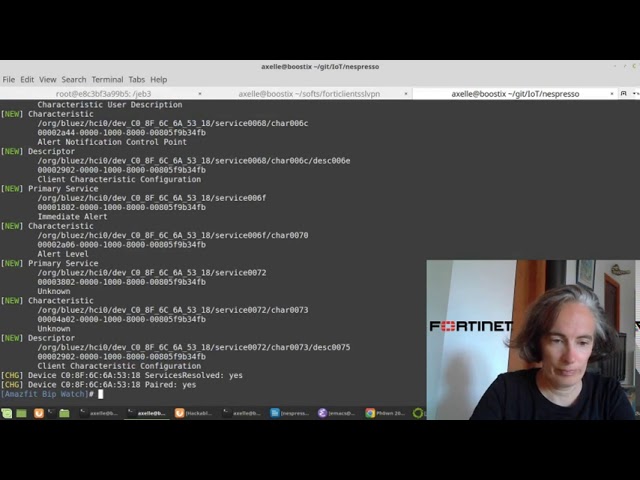
working yeah connection time is there and you see that it's pretty maybe i can put that bigger it's pretty neat because it gives you well all the services that it has so there's a heart rate for instance service and the characteristics of those so this is the generic access service which is a kind of standard device information service also is standard and you get the serial number string for my smartwatch which is there okay so this is kind of the thing that you can do with it with a mirage and it's pretty cool you can also use some other tool which is called bluetooth ctl um and this one is cool as well um so here well we see the mac address
of my smartwatch that is because it had it in memory but if we want to scan what we have while we put scan on and it's going to show what it has and then i'll put the scan off and then it stops scanning now i can start and connect to my smartwatch and type connect some connect and the mac address attempting to connect um [Music] it worked okay and yeah and now you can see it automatically tells you all the characteristics and services which are on this on the smartwatch which is there okay so this is cool this is cool um there is another tool and i think this is perhaps the best known which is
called a gaps tool this one but it is obsolete okay so if you ever go on a farm for ble and tell them oh well you know something is not working and i'm using a tool there they'll scream and tell you get tool is obsolete go and use bluetooth control and to be honest it works better right nevertheless if you use that it's just the same thing everywhere you connect i could have done it with another tool i connect and i try to read the characteristic and i get an error here read it attribute requires authentication before read write this is pretty explicit well it's explicit if you know how vld works a little bit
there are several security modes the first one is you have no encryption whatsoever nothing level two you will have encryption but no authentication level three you'll have authentication and encryption and actually there is also a level four with um some elliptic curve um encryption but i've never actually seen that implemented in any device but it exists right okay so if we want to get rid of this message authenticate requires authentication what we have to do is authenticate so this is level three this is what is done through pairing right now in gets tool um maybe i can do it here get tool um well it doesn't say level one two three it says level low medium and high low is one
two and three that's the way it works okay with bluetooth control it's more explicit it just tells you you say pair and it will work um let's try with that device that smartwatch i'm not sure it will work honestly i'm just drawing okay i'm attempting to pair with the smartwatch and yeah well we have to wait a little bit obviously no yes that's one thing i need to mention uh is that with bluetooth when something doesn't work um unfortunately you sometimes have to try again okay it's not like it will work all the time and that's the thing that makes it a little bit difficult uh it's not just it works straight over all the time it's it's not that
okay um well obviously it didn't work i'll try again fail to pair okay in progress okay so it's already trying to pair but um but it hasn't appeared okay maybe i'm not able maybe i'm already paired with another device on that smart watch possible and it doesn't like it i don't know anyway it's the way to do it okay you appear in that case to the smart coffee machine and if everything goes fine you will get that pairing successful here you can also do it with mirage and with mirage what is really cool is that well you'll have to load the module which is called ble pierre but look at all the parameters that you
can set actually all the keys which are used in pairing you can set them very specifically and set exactly the bytes that you want you can also set your capabilities oh i have a keyboard i have a display things like that so this is really cool unfortunately when i tried mirage that was over a year ago well i never managed to connect with mirage to the smart coffee machine okay now mirage has very proudly improved or maybe i did it wrong i don't know i never managed to do it but maybe it's better now right then while we do that and then we try again to read that characteristic that we'd read last time this one and we get another error this
time which is called attribute requires authorization before rewrite now it's really important uh all the teams in the cts well not oh but most teams in the cts got this wrong and we're telling you okay um i probably need to do something really specific with pairing so that i get rid of this message and i had to to really give quite a few hints there and tell them no you are already authenticated you have paired successfully your authentication is successful authentication and authorization are two completely different things right you are authenticated you your pairing has been successful you've nothing more you've got nothing more to do with pairing you've got to do something after pairing
that will indicate that you are authorized to access this or that service or characteristic it's a very neat functionality of ble it is seldom used i have seen this actually only on this smart coffee machine and that's what actually made it interesting for the the challenge in the in the ctf that's why i used that so how do i get authorization well we know that as we are able to communicate with a smart coffee machine with a smartphone we know that this smartphone has this authorization it managed to to get authorized so what we are going to do is we are going to sniff all the ble packets which are coming in or out of or the smart the smartphone and
look in there right um there's plenty of um where there are several websites indicating how to set this up it's not complicated and then i'm going to show you well what we get uh for the packet captures so i'm existing that my packet captures are over here wire shark on let's beat you snoop coffee so this is a lock that i got from my own smartphone and we opened this up and you see you've got this protocol hci command h-c-i-e-v-t now um either you were you very you know very well ble and then this is really you know what that is or you don't and then well you know um you can just search for it and
bluetooth has its own protocol stack and we can just kind of google around for for for this stack and see hopefully things which are um helpful to us so um well this one doesn't show hci but we see l2 cap which is here at an smp those are interesting you'll see those afterwards [Music] um yeah here we see haas control interface hci which is there okay so this is below smp smp is the one which is called security security monitor i can't remember protocol this is where pairing occurs so hci is before below let's say in this stack so it's not something that we will find we won't find anything interesting there sorry so the easiest is just to sort through
particles and we have att this one is interesting actually and then we have l2 cap packets which are there and those smp smp are the pairing you say pairing request pairing response but we said that the authorization code would never be in those packets because it has nothing to do with pairing okay so it has to be above above uh well we said l2 cap is not above smp so we could have att or gats over there which are roughly at the same level over here so we're gonna look into that so we're gonna look at the first few and here what we see is what the smartphone is going all the time to try and discover all the services and
characteristics that it see on the smart coffee machine that's the way it does it and that's the way all devices that communicate with the bla device do so the first few packets are not really interesting because there are discovery packets of their fine file information do i have anything in those handles or not yes we've got this or that um and it's not what we're looking for what we're looking for is well the authorization code has to be sent after this discovery but before we actually managed to brew our first coffee okay so it will be just after that probably oh there look this one is changing a little bit here we are sending a read request and
we get the response zebra two okay why not write request this time we are writing something over to the smart coffee machine and what could we possibly write if we are not yet asking for uh for a coffee well you've got it it is the authorization code okay to be honest you uh if you really want to find this out you probably have to do a few tests um i've shortened the path of finding the finding it but there it is this is the authorization code by the way uh it changes every time you reboot the machine and it's different on every machine so if you have the same coffee machine as i have it's
useless just to copy paste it it's not gonna work okay so we've got it that's pretty cool um now that we have got it well we are able to read all the characteristics that we want so now we are what we want to do is to brew our own coffee we want to get some coffee um and for that well we are going that's the way i did it well i i took the application the smartphone application there and reversed it and tried to understand what commands they were sending to the smart coffee machine to get their coffee and at some point i found a very interesting class which is called brew operations and now i'm going to switch
to this um this is jeb this is a reverse engineering tool for for android and for other platforms but it's pretty good for uh for android and um we are looking in the brew operations class now again i am really shortening the time frame here uh it took me several days to find out that the interesting parts i was looking for would be in brew operations okay usually what i do is i start from i work my way from the methods which are actually communicating with the bluetooth and sending patex packets to the characteristics and then i see who is calling those and then who is calling the caller and i work my way up through the
stack to understand what are the important points and here in this part there in brew operations you can see all the fields there's quite a few and the uh the methods that it has implemented and there are some pretty interesting [Music] methods this one for instance write brew now or right brew with temperature or right recipe or right schedule brew let's have a look at this one for instance well we see that it needs to be authenticated okay well we knew that and then it is going to write a blee characteristic right to ability characteristic which one well this one actually and this one is defined over here at the top of the class it is here it is instantiated here and
we have its service uid and the precise identifier for this characteristic okay so we know exactly which box it is it is going to look into let's go back to the code so it is it is calling that characteristic and it is sending this payload and the payload takes 0 and copy type id so this is interesting we see that zero obviously is the time okay so actually it tells me it tells them the coffee machine um i would like to brew coffee in 30 minutes in one hour and i don't know two hours or something like that and the coffee type is is it a ristretto is it an espresso is it a longer
and we see that the way it works is that well there's a fixed prefix three five seven four that's what it will send those bytes why no clue it's like that then the time will be four bytes and then two bites for a coffee type that is the way to actually get your coffee um and actually i can show you that it works i've got a video for that um and here i'm going to request a wristwater i'll explain about that this website a little bit afterwards uh i think yeah i asked for a fret oh and you see there it is it is working and it is getting my coffee and this website actually does the ble command which
is uh which gets to the smart coffee machine and commands it to get my coffee so that's how it works um there we go so those are the slides the coffee type yeah i hadn't show you the coffee type if you want to have a look at that coffee type is in this class sorry over here in this class and [Music] for instance this um this method shows us that ristretto is copy type zero espresso one lungo two and then we've got some additional ones americano and hot water but those are only you see from expert brew parameters those are only for a specific uh coffee machine not the one that i actually had so those are not working on
all coffee machines okay so this is how we can set the the car the coffee type um so we know how to send a command to the coffee machine to get our our coffee we could have got it also from the packet capture that was that's another way to do it so let me find it so i said we are going to request send something to handle 24 24 got to find one here there it is so you see here we send zero three zero five zero seven zero four and zeros so this means that we were requesting immediately for one coffee because the time is zero and the last two bytes uh are zero as well which means i was
asking at that time for aristo okay that's how that's also how it works so it's interesting different ways to work out uh what is happening but reverse engineering the the smart application is uh of course gives you lots of information there
so then well that's what you saw you saw in the video i did a web interface there that's because actually normally you just do it with your smartphone and uh if you want to pilot the smart coffee machine you need to be paired but then think if one of your colleagues if you're in a company okay and you want to share the coffee machine with colleagues well your colleagues are going to have to do a special combination on buttons on the smart coffee machine to unpair the previous colleague then they need to pair their smartphone to the coffee machine and then to request the coffee okay this is really too complicated we're in a family
it's really too complicated so i thought i'm going to simplify this process and share the coffee machine by using one of those new raspberry pies and the raspberry pi is going to ask act as the the only one which is connecting to the smart coffee machine and um it will be the only one doing the ble packets to to the smart coffee machine and the other ones every every other person in the company or in the family will just have access to website which is on the raspberry pi and that's what i did okay so we can request a ristretto an espresso or a logo and um well it works basically we we can get what we want from
their smart coffee machine you might notice here that we can actually also configure the cup size okay normally a restredo for instance is 25 milliliters but actually you can configure that a little and do anything between 15 and 30 millimeters right and so this is pretty cool this is something that we i found while i was reversing uh the application in the cup science operations class so it is here cup size well you see that there is a service the characteristic so there's one for cup size and one for volume and then yeah sorry i didn't show you we get the complete description uh identifiers to get to those characteristics um then if we want to modify
for instance to configure the cap size well we see that we need to be authenticated and then that we have obviously to set the cup size type sorry cup size type and also the cup size volume so we need to say okay i want to set a restrado to something else and then the volume the volume this is how it works it's implemented here while we write sorry here we write to a given characteristic this one volume characteristic and this payload get cup size volume data and we see that this is the volume two bytes and then minus one so this will be fff behind that and for the coffee type well we see that it's perhaps just above
to set the cup size the payload is get cup size kind by buffer this one and we will basically just set zero one two one the various cup coffee identifiers for the cup we want to specify so that's how we can actually uh customize our cup size and this is pretty cool because the standard application does not uh have this feature right so this is something which is actually in the code but hasn't been made available through the application so we are able to hack or kind of or our coffee machine that way and that's uh one of the things when uh the last challenge that people had to do in the cdf to to to have that's a coffee machine
so if we want to do it we have to connect to the smartphone to the sorry to the smart coffee machine pair get the authorization then specify which cup we want to customize then sets the volume and then finally we disconnect and then it persists over time unless we specify something else another a new volume and then we change the settings there are a few limits though and this is good because you can't set whatever volume for a risk fredo risk radar has to be in between 15 and 30 and things like that which is pretty pretty good so i'm going to show you also this video for that in action um so here i am trying to to get a coffee which
will be with 70 milliliters right and for that i am configuring the size of a cup which is the longer and uh saying it should be 70 milliliters now if you have a close look here this is the normal volume for an espresso this is the normal volume for ristretto and this is the normal volume for a lungo you will see we are going to end up in between
there you go you see so we really did have 17 million milliliters here it's not quite long ago it's firmer than an espresso so we really managed to to hack the coffee machine and set customize the cup size uh in that particular case so it worked and that's good um what else so at phone um 17 teams managed to find the authorization code and well done because it's not that easy i mean at first you understand really how ble is working one team managed to uh to brew some coffee without using the the smartphone application the standard application and then one team nearly managed to customize the the volume but they didn't finish on time uh
you only have you know like eight hours uh there at phone so of course and other plenty of other challenges so it's always you've got to be very quick and it was a bit short right but really good results there um if there's some feedback there about you know using ble and you have some ble device that you want to hack or do some research on what i would have to say is that i encountered really crazy birds uh with um you know sometimes connecting and disconnections you know they weren't expected things like that and all of this disappeared well most of it disappeared when i um upgraded my stack to blue zed 5.5 so really it's important upgrade to one
of the latest stack there which is perhaps not the default one that you have on your system it's really important because there are really lots of bugs and more stability with the new ones also i really do i did like bluetooth ctl which is a tool i hadn't really used before and i think it it is nice uh it is interactive and um in my code so my webpresso my my um web interface you know that i am using this one sorry yeah the this one i put all the code on github so let me show you um yeah here it is github crypt apps web press so feel free to use it uh it's um it's shared
and you have all of that basically the web interface is used with flask it's very simple because i'm not very good at web interfaces and then the web interface basically just calls one script which is called brew.sh which is a script written using expect and expect is really quite of um interesting because it's particularly done to pilot interactive tools and this is really perfectly suited for bluetooth control so here you say for instance that bluetooth control has a prompt which is going to be hash okay you launch it and then you send just like you were writing uh connect to the given address in bluetooth control and then you tell it okay expect this or that answer and
depending on that do this or that and uh this is just helps you work with an interactive tool and i'm pretty like that otherwise it would have been kind of difficult to do it so yeah this is something else which is a really um good with a ble also i found it pretty good that um the smart coffee machine had buttons physical buttons on it and special combinations to unpair or do a factory reset this was really extremely helpful during phone because well we were able between teams to reset completely the the coffee machine in a standard and normal situation otherwise it would have been a nightmare because a team could have you know put the
coffee machine in a strange um in stains uh strange status and it would be very difficult for the next team to to play with it so that that was cool the other thing also is that if you have such a coffee machine or some another one which is really similar well you find lots of documentation on the web like you know really detailed one there you have exactly what is inside um you have also tear downs uh of similar um coffee machines you can easily find replacement piece pieces of um of the coffee machines on ebay for instance you can find a new flow meter or the pcb here which handles the the buttons this is cool because it makes it
repairable and um you know in an area where sometimes when we kind of throw things away well here if you want to repair your coffee machine you can and i find that pretty cool um before i say thank you for your intention although i do say it i can show you also another short video um with um the the interaction with the the smart coffee machine you can also get the errors the error messages from the coffee machine and that is cool uh because it gives you some some information of what is happening and this is one of the case so i was asking for a ristretto here and it tells you the slider is open please close it so
the slider is the part where you insert the coffee capsule and this one had been left open and hadn't been closed afterwards so it tells you that kind of message well actually it gives you an error code and then you translate that to an understandable message so that that is good so as i said thank you very much you have the url here if you want to go and see my code and use it for your own coffee machine of course you are welcome to come and play to phone it is in the south of france and normally this year it will take place in january of 2021 and lots of kudos to other phone organizers
and thanks again also to besides munich organizers for giving me the opportunity to speak um through this video to all your attendees bye thanks
Related talks
 32:06
32:06 29:33
29:33 27:22
27:22 32:37
32:37 43:32
43:32 22:54
22:54