BSidesCharm 2023 - Driving Your Own Vulnerability: How to Navigate the Road of BYOD Attacks
Show transcript [en]
foreign
[Music] hey guys sorry about the technical problems I will freely admit that I am not good at PowerPoint I am much better at uh malware and reverse engineering so let me assure you right now that we're gonna be okay we're gonna be okay so this is um driving vulnerabilities navigating the road of bring your own driver attacks so this is me I'm Dana beeling I'm a wife a mom and a threat researcher in that order I have two boys that's a picture of them on the bottom and my husband I work at VMware carbon black and it is a phenomenal job they paid for me to be here and so I'm very grateful for the job and I'm I'm very uh thankful
to be able to speak with you today because you guys showed up for the talk that's after lunch on the last day which means that you guys are hardcore and awesome you're the people I want to talk to so before I worked for VMware carbon black I was a government contractor I worked for lydos for about five years where I reverse engineered malware wrote reports and generally explained how stuff works to manager type people and then before that I was a NSA civilian for 11 years and that was a phenomenal job I'm sure there's some of you in the crowd don't speak up now but that's that was also great because it gave me the
opportunity to reverse Hardware reverse software forward engineer software be a technical director and hold all sorts of jobs so it was also a phenomenal experience and before that I got my degree at the University of Hawaii and Manoa so any people from Hawaii here go bows so bring your own vulnerable drivers this talk is admittedly a pretty technical talk but if I uh if you remember back at the last slide I told you I was a wife and a mom in that order I and I'm going to get to a point here uh I want to let you know that even though that it's a technical talk don't leave even if you're not a super
technical person that looks at assembly on an everyday basis like I do you're going to be able to follow this talk as a mom you learn how to answer really difficult questions from these bright-eyed 10 year old who want to know how video game hacks work and they don't have the background to understand all the complexity of how the video games hacks works but you figure out a way to explain it to them to Foster their curiosity and so I'm going to do that for you today like maybe not to the level of a 10 year old but to a level that everyone here will be able to understand it so hang on hang on to your
seats we're going to have fun today um so to do that I'm first going to give you a baseline of Essential Knowledge you might need to know about Windows drivers just to make the vulnerabilities make more sense later on and then we're going to talk about three main types of vulnerabilities that are commonly seen in Windows drivers and this this is mostly about Windows a lot of the concepts carry over to the other operating systems but you know when they have one hour so we're going to focus on Windows here the vulnerabilities we'll talk about are vulnerabilities and the special kernel kernel only registers that is in the x86 Assembly Language we're going to talk
about i o controlled vulnerabilities yeah if you saw Andrew cases talk he was before me at lunch phenomenal talk I hope you listen to that because this carries over about what he talked about and then we're also going to talk about Plug and Play drivers and um how it's a new attack Vector for privilege escalation and I'll explain how all that works and I guarantee you're going to understand it and you're going to walk out and you're going to say oh I'm glad I came to that talk uh the last thing is we're gonna wrap up and if you have questions for me hopefully I'll have an answer for you if not I will research it and email you
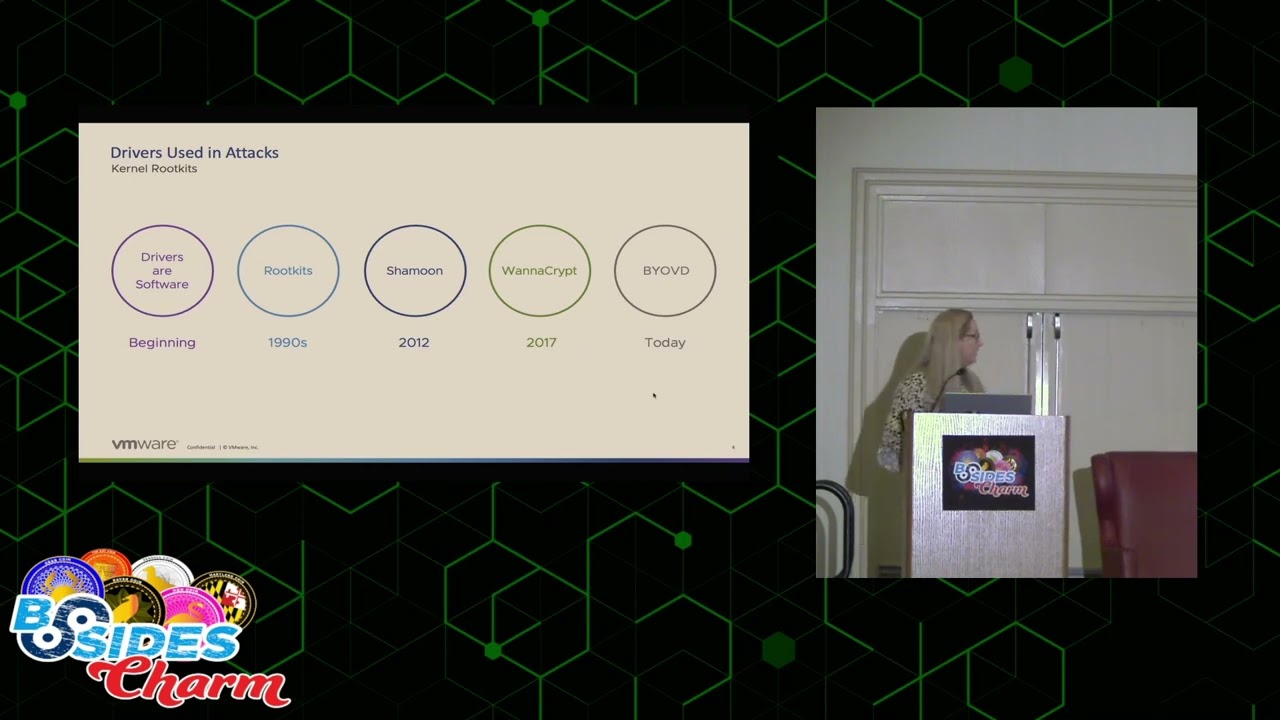
later so drivers we've had drivers from the beginning right we've always needed software to be able to uh manipulate the hardware and that's what drivers are plain and simple in the 90s we had root kits if you again saw Andrew cases talk before mine he talked all about root kits root kits basically whenever malware hides in the kernel so that way it's hard to remove or extremely persistent very stealthy um in the 90s really I put the 90s because that's whenever we first started seeing malware in the kernel but really the Golden Age of root kits in the kernel was like the 2000s there was like Zeus and stuxnick they had like all these hidden file systems and stuff so
so that's what we saw um in the 2000s um the the first use of a driver to commit malicious acts though was really shamoon I don't know if anybody remembers shamoon it was like ancient history 2012 but basically I'll give you the The Cliff Notes version of what happened there was that there was a driver it was called The Raw disc driver and basically what it would do is you would be able to you know run it on your system and it would allow you to partition your drives and basically do all the low-level drive manipulations that you wanted to do in an easy way and so what happened was some folks didn't like the
Saudi aramco so what they did was they uh overwrite all of the hard drives on the Saudi aramco Network that included the master boot record like everything was wiped out they ended up having to just get all new computers so that happened in 2012 that was and the interesting thing about that attack in general is that the driver itself was not vulnerable there was no vulnerability in that driver they just applied it in a very mean way especially if you were Saudi aramco and then uh the next one I wanted to say in the timeline is wanna Crypt so um if you've been in the industry for any amount of time you're probably familiar with wanna Crypt
um wanna Crypt used the NSA Eternal blue exploit for SMB to overwrite a special purpose register that would allow it to um basically run some special code that that makes it basically wormed it around the entire uh world so now you and and so that was really the first use of a a driver who was vulnerable being used to weaponize malware and it spread all around the world it was a real disaster but today we're seeing an increase in bring your own vulnerable driver attacks in fact just uh yeah last week I saw one it was the owl killer a-u-k-i-l-l sofos wrote a report about it and basically what it does is it takes the process Explorer uh driver and
you know what it does it just goes through the process list kills all the processes it doesn't want running when the malware runs plain and simple I'm really not exaggerating it's that easy so and you can guess what process it wants to kill right all of the security processes so when we think of drivers what do we think of we think we have our operating system and we have a device so we need to install a driver if you're old like me you think of CD-ROMs which drivers don't come on CD-ROMs anymore but for some reason I still think of that and you install it and then your device works so it's like pretty simple like
one to one no not quite so drivers work in a stacked formation there are a ton of drivers the reason that is and if you think about it of course no device is a standalone thing that will work independently it's going to have to coordinate with all the other devices on the operating system right so um the drivers work in stacks and they work with each other so it ends up being like the drivers are like this having this cacophony of conversation going on between all the devices on the system and the operating system it's not a one-to-one like like I think of it at least so this is my favorite chart about drivers it's really boring
but it explains perfectly drivers in the Windows operating system and I love it so much I have it on a whole bunch of slides in the future but um I'm going to explain every all the little boxes on here and it really will help you during the rest of the talk to understand what's going on so there's a whole like just like I said like drivers work in Stacks there's a whole bunch of different types of drivers and I can explain them to you from the top down or the bottom up but we're going to talk about it from the bottom up I guess so at the very bottom level you have like oh sorry so you have like the the drivers
are like the very lowest level drivers and they call they call them bus drivers because you know computer bus but I always think of my third grade bus driver Phyllis she was awesome but anyway so they actually control the I O with the hardware itself it's the very lowest level drivers We're Not Gonna really talk too much about those today but the two other ones that are important to think about on this slide are kernel mode drivers and file system drivers next up from the bus drivers are these kernel mode drivers kernel mode drivers can be written by Microsoft or the operating system company but the majority of them the very large majority of them are written by
third-party vendors who have Hardware that want to run on Windows and that is where we're going to focus most of our attention today there's also file system drivers file system drivers are like on the top of that kernel level driver stack and they basically control the file system so writing and where everything is on disk like NTFS fat and then if you notice there's this one driver up here above this dotted line called the user mode driver so if you have a video card that has the cool LED lights like on it so that way you can change it from green to Red chances are when you installed it it came with a user interface right so you can like
change those cool LED lights what's doing that is the user mode driver so the user mode driver is allowed from user space to talk to the kernel mode driver which is actually implementing the action that will change those light colors and one other thing that is very important to not know for the rest of the presentation and you probably already know this but I'm going to go ahead and explain it anyway is you see the dotted line separating user mode and kernel mode a lot of people I don't know they think it's super complicated it's not all that complicated basically user mode uses one set of libraries kernel mode uses another set of libraries and the
communication between the two is basic just restricted so you can only talk to each other through specific means I kind of think of user mode as like a punk rock concert so it's all chaotic there's probably a mosh pit you know guitars and people yelling into microphones and then down here in kernel mode it's like a concert at the Peabody or like the New York Philharmonic so everything is organized and there's like super a lot of rules like even a dress code so that's the way that I think of whenever I think of the difference between user mode and kernel mode you definitely don't want any of those punk rockers in the New York Philharmonic
so the first vulnerability we're going to talk about are msrs and NV byovd so msrs are model specific registers they were registers implemented by Intel I don't know super long time ago and they were originally implemented just to be debug registers but they found them so useful that they actually opened them up to the kernel and they provide some very unique functionality and there's a couple that I wanted to point out in particular that I put on the slide this is a screenshot directly from the x86 Assembly Language manual which is really boring but has some great information so basically if you look at this l-star register right here oh it's ia32 underscore l-star everybody
calls it l-star for short it says the target rip for the called procedure when syscall is executed in 64-bit mode that doesn't make sense why do they have to talk like that basically all it means is that whatever is in rip that stands for instruction pointer um when syscall is called whatever's in there it's going to be called as if it was from the kernel so um you guys like uh treasure hunts or scavenger hunts you guys like those I like those too so this is the way I explain instruction pointers to my kids say they're they're young so they they enjoy these like we call them treasure hunts what it is I I write little Clues on pieces of paper
and I I hide them all over the house like one piece of paper might say uh look under the couch cushion and another one might say they go to the couch cushion and they look at the note and it says go look under the chair and then they go look under the chair and there's another note it says look under the table so those notes in the Treasure Hunt are basically the instruction pointers okay so there's a there's a point to this so in one equipped what they did was they hooked the instruction pointer so if you think of my treasure hook treasure hunt notes as the instruction pointer what they did is whenever I gave my kid the
first notice they'd look under the chair and he looked under the chair and then whenever he looked under the chair there was a note it said oh go take your mom's car on a joyride eat all the ice cream and then by the way go look under the table so it just kind of it it gave them a it it pointed to Shell Code everybody knows what shell code is right it's a little extra bit of the program like in my example they were going on a joy ride but that's that's what it did so and it replaced l-star with an instruction that had Shell Code and this is what the Shell Code looks like so if you look up here everybody
you got this you got this okay I know that people get panicked whenever they start seeing um ghidra on the screen this isn't it's not it's not hard to understand when somebody explains it to you so this is um disassembly from ghidra it shows the setting how they're setting up putting the address in that register we talked about before the l-star register and then making this system call the WR MSR um to uh trigger that Shell Code so that way my kids can take my car for a joyride right and so if you look I want you to I want you to focus on this zero f30 because that's the call to the w r
MSR and then you also have all of these eight B's up here that's just move because you know I don't want to read hex it's easier for me to read like this you know English version this is a real sample by the way from the black moon malware it's also called KR Banker
so what we can do is now that we know that's how they're setting that up is that we can write a yarn rule to find all of the vulnerable drivers that are out there that actually implement this technique right so if you look here I told you to pay attention to that b B9 was it B9 that's that move instruction and then the zero f03 all of these are basically all the same thing it looks like a big block of scary text but it's all exactly the same thing it's just different iterations and different ways that could appear in code and so what we're doing is that we're in where we know that all drivers are going to call
this i o create device and that's the way that we know that it's a driver that's a function that will be in the driver code itself and that function will appear as that string iocreate device so by including that in the Yara signature we're guaranteeing that it's a driver um the other two strings there I O create device secure and I'll create device I'm sorry w d m lib i o create device those are just basically the same function that does the same thing it's just a different name and then um down there so so what we're doing is we're just looking through Yara to to find drivers that Implement that um and so whenever you run that you find
really interesting things so if you look up there you'll see oh three hits in virus total but then if you click on the relations tab look at all the hits 36.49 think that might be a vulnerable driver that that malware is using to hurt your system and Yara is something that's very easy that Network administrators could run to look for vulnerable drivers in their own environments so it's something that not only malware analysts can use so but you know we had that great talk um right before lunch about virtual or patch guard everybody calls it patch guard I don't know why I guess maybe that's an old name but if you go in the windows documentation they always call
it virtualization based security maybe it sounds more authoritative that way and everybody's really afraid of patch guard like even like the most smartest people I know when you talk to them about patch card they're like oh I don't want to talk about that it gives me a headache but I'm going to tell you all about patch guard right now super easy and then you can impress all your technical friends that you know about patch guard right now super easy okay so the first thing is smep that's the one one piece of patch Garden it was the first thing that Microsoft implemented right so smep you know what it does says if you're using that register that I
talked to you about the l-star you can't call user mode from that if you try to do that we're going to blue screen your box so basically no calls from kernel mode to user mode hard to understand right okay so that was the first thing Microsoft did smep second thing guess what guess what after they implemented that what the hackers did oh well huh there's a whole bunch of unallocated user space in in the kernel mode so I'm just going to move all of my malicious code that used to be in user space into this unallocated space in kernel mode and call it from there but microset Microsoft said not so fast they have a little bit of
mom in them too I think and they called that device guard so so smep no Colonel calls from user mode and device guard no kernel calls from unallocated space in the kernel and then the last part of it is the memory Integrity model module and basically what that means is that those all of those special purpose registers that are only available to privileged processes um we're going to monitor those and if they have unauthorized changes by unauthorized applications we're gonna again blue screen your box that's memory Integrity so it's not that hard to understand right they got that that's easy so if anybody says patch guard is is a mind-boggling okay you got this now you can explain it
to them so this is one of my very favorite quotes I love it says when you have a tough job in a plant this is from the president of I think the Chrysler company like way back whenever I don't know super long time ago um if I have a tough job and a plant and I can't find an easy way to do it I have a lazy man put on it he'll find an easy way to do it in 10 days and then we'll just use that method it's like oh so they they even had hackers way back then even before computers or so a lot of people um attribute this quote to Bill Gates
for some reason but it wasn't it wasn't Bill Gates it was good old clearance and I agree with it and and I think we as a community and hackers in general good and bad um do this a lot which brings me to my next type of attack which is the i o control attack so the way that drivers work is that like I was talking before about the video cards you'll have the user mode section of the video card which allows you to you know adjust the fan speed adjust the lights adjust how the colors are processed or whatnot and then you have that the actual driver that can Implement those changes so on the user mode side you'll
have the i o controlled triggers and on the Kernel node side you'll have the i o control actions so basically what it looks like is is this um it's uh eight digit hex byte value they're circled in green there or squared in green I guess and basically what it is is that they'll be one of these hex byte values in the user mode side and then there's the hex byte value in the driver's side this happens to be the driver's side and so as you can see this one eight zero zero two zero zero zero will give you the map view of the entire drive so you can map a virtual address space to a real address space
kind of useful if you're an attacker I would say nope I'll get it one of these days so on the Kernel side in order to uh have a driver you have to have two there's two functions that you can choose to implement your driver these are the two functions you can choose you have i o create device or you have wdm libio create device secure the i o create device the one on the left is the old one which doesn't Implement any security at all and then the one on the right is the newer one in which you can pass the windows credentials to the driver when you create it and the way that you send your i o
control call to your driver is super easy so you create your device using one of these two functions and then you can authenticate with it that's completely optional by the way you can absolutely create it with the i o create device function with no security at all and and then um and then send i o control codes to it and have like do whatever you want in the kernel and then you just send the command and the command is just that uh eight byte hex value so let's talk about the authentication right what are your options here so like I said you can send your windows credentials and tokens and you can um authenticate using
um just like the built-in Windows authentication facilities that they make available to the users which is really great except for that most drivers don't bother implementing those another thing that I've heard talked about but I've never heard seen actually used is that you can allow the driver to take the digital signature of the calling program so that way it ensures that the the command that it's receiving is from the actual bona fide application that it's supposed to be talking to I've seen it like in theory um talked about but I've never actually seen it implemented in a driver and then the Third Way and probably the most iron-clad way to protect that communication between the user mode and
the kernel mode would be like a TLS like communication which would require like a third-party server to validate the fact that both sides were talking to each other and then also protect that communication between the two driver and user mode side which right like as far as I know no one has ever done that I actually like looked for it because I heard I read on a forum where driver developers were talking about it and I actually like wrote some Ur rules trying to find an example I could not find anything so I think it's just Theory and then on the user side the way that you send the codes is by using this function device i o control and it
allows you to send whatever of those eight uh bytext digits this is what it looks like on the user mode side um this is basically the same code the top is assembly and then the one is a decompiled code just to make it easier for everybody it's super easy oh and the way that you create a handle to the device oh this is really complicated hold on to your seats you call create file yes create file and you just give it the name of the driver so now that we know all about how vulnerable drivers with i o controls work let's hunt for some so here's a Yar rule that I wrote and this one doesn't
look for all drivers with i o controls because honestly there's just way too many there's way too many so this one is looking for vulnerable signed drivers that also have the ability to do thread manipulation so I sort of um uh you know narrows it down a bit so that way I don't have so many drivers to look through and basically we can ignore the strings portion like the top portion up here because all of the variables are basically the same thing that they Define so what we're just going to focus on like this condition section here so if we look at the conditions basically I'm the top one is just saying we want to make sure we're looking at a
driver and like I told you already those are the two functions you have to call if you want to make a driver so the driver will have one of those functions in it and then this part in the middle this is the part where I'm limiting it to only functions that have the are limiting the drivers to only those that can do process manipulation and the way that I found those is just by basically like being a developer and looking for if I wanted to do process manipulation what functions would I use so those are those and then the probably the most important and the most interesting part for you is this not section down here
see what that is it's saying I only want to look at the drivers that aren't implementing security it's really that easy it's like strings like there I didn't even show you any byte code in this one right and then of course on the bottom it's saying I only want to look at drivers whose time stamps were valid or I only want to see drivers whose signatures were valid at the time that it was compiled so it could be an old driver but um yeah so signed valid drivers that don't Implement security and so this is what you get I think um this is just one screenshot of one page but whenever I ran it I got about a
hundred drivers back and this is what you get you can see um yeah some of them are flagged as malicious but the very large majority are not [Music] it's really crazy then Plug and Play drivers plug and drip play drivers they're they're fun too they don't provide as much functionality in the form of exploitation as the i o control because basically with i o control drivers you can do anything you want but Plug and Play drivers do provide a good mode for privilege escalation and oh I told you I would torture you with this graph right so if we look at this graph I already explained to you user mode kernel mode and all the
different types of drivers but what they did for Plug and Play What Microsoft did was see where this where the dotted line is the dashed line what they did was they basically like put in a whole bunch of libraries in between the user mode and kernel mode right there and what they did it looks like this so if I was like really good at graphic arts I would like have put that in there but but I'm not so this is what you get but imagine that this is like on that dotted line on the other graph and basically what it does is it it put a manager on each side to manage the um operating system
to manage the operating system uh calls necessary to perform all the perform the privilege escalation in order to well it's not a privilege escalation it's a I can't think of like the the legitimate word for it they are doing a privilege escalation but it's a legitimate privilege escalation so that way they can install the driver behind the user's back without any user interaction because it's great when things just work and you can plug stuff in the the big the problem with it is is that sometimes like whenever these drivers um the Plug and Play drivers actually install themselves or whenever you plug in your mouse it will install itself and then it will forget to reduce the privilege level
after it's installed right so it it elevates the privilege to do all the actions necessary for the device to work and then it just like hangs there so you plug in your device and plugging in the device gives you system access and that's all you need like it sounds too simple but yes that's the way it works these are the steps that um these are the steps that the co-installers go through and I just occurred to me that I didn't explain to you what co-installers were the part of the Plug and Play drivers that provide uh user feedback so say you have a I don't know high performance gamer Mouse right and I know of a mouse
in particular that has the spawner ability you plug it in and it might give you it might pop up a little user user screen that lets you choose what each button does on the mouse right does that make sense okay so a co-installer is that window that pops up that allows you to configure the mouse and that's where all of the problems are so we can also hunt for drivers that have these Plug and Play vulnerabilities that have co-installers that will Elevate the privilege and then not necessarily reduce or take the privilege back down to user user level and it's the same it's basically the same techniques that I did before um make sure that you're looking at a
driver first line make sure you're looking at a driver that doesn't Implement security and then um this is the call that is used for the co-installers right here there's actually two calls you can make one is the EX version which has additional parameters and then one is like the regular one but we're just looking it'll match on either one if we use that so it's there and then again we're looking for only things with valid signatures and so if we run a oh I didn't show you what I what I got back from that oh I got 160 matches there you go you can see it up there so so yeah there's a lot of those out
there so but you're probably thinking to yourself well [Music] no one's going to come to my house and plug in a mouse so they can get privilege escalation right well they don't have to come to your house it just has to be plugged in um with PNP util you can basically exercise any driver for any device that's currently plugged in so you know if you do have a vulnerable Mouse in particular you know you might want to get rid of it uh there was a guy uh will Dorman on Twitter whenever um this vulnerability first come into the public view who who saw and noticed this is that if you want to disable those co-installers instead of getting
rid of your mouse you can set this registry value it it wasn't set on any of my windows machines so I think you have to like go in and like manually create it and make it but basically it's just this disabled co-installers right here you set it to regarded one and that will disable all of your co-installers so but but then you're not going to be able to install your mouse anymore so that's kind of a drawback so um oh I finished like super early I'm sorry guys but uh we can talk about some anything you want um if anybody has any questions I'm more than willing to take questions I didn't on purpose talk about firmware
boot loaders or UEFI we could talk about driver signature enforcement it would be a little bit redundant since Andrew Case just talked about it in a lot of detail in the last talk but that's that's all I have for you today
thank you sure
oh one thing I didn't talk about that I did want to mention is that um the threat landscape for the bring your own vulnerable drivers is extremely prolific right now in the course of my work I see a lot of actors employing these vulnerable drivers and there are some security mechanisms like Microsoft does have the driver signing but it seems to me that a lot of the the techniques that people are using to prevent them is sort of a whack-a-mole solution right they're they're just saying oh there's a vulnerable driver I'm going to add the hash of that driver to the block list and so it's it's it it's a terrible way to handle it and we
know especially with the i o controls I showed you how easy it was to see if there was security implemented in the in the in the driver itself the problem is is that Microsoft is allowing the driver Riders basically carte blanche to perform whatever authentication that they want to perform so they have the choice of using the Microsoft embedded security mechanisms or to completely roll their own security mechanisms and anybody who has been in the industry for more than five minutes knows that running your rolling your own security mechanisms is always a bad idea so why are we allowing it in the most protected part of the operating system with these i o control commands and Microsoft is co-signing
these so I assume that they do have some sort of automated process where they're trying to check for these things but there's a lot of old drivers out there they're obviously not being a hundred percent thorough with their checking
so yeah from a threat hunting perspective just in customer environments foreign
or in a data center environment it's sort of transparent to me because I just see the endpoint systems and how the endpoint systems are affected it doesn't really matter to me where it is physically located whether it be on a rack of Linux servers or actually like a Dusty box under someone's desk like it works the same really from my perspective as a malware analyst
a lot of wind bug yeah um yeah I I I always like wish like there was like some genius out there with that would make like some like great replacement for wind debug but really wind debug is the only one that I found that really works well for drivers it you get used to it you know it's like that the grumpy Uncle at the family reunion
any other questions
one of the easiest things you can do is get a copy of my slides and see those Yar rules run it in your environment see if any of your drivers in your environment hit against those Yara rules and there's drivers all the time that are being discovered to have these vulnerabilities NVIDIA drivers there was recently the process Explorer driver um like they I I could just like well make a list super long and it's very surprising to me that the that it's that these type of defects can get out the door I think that it's just because no one was looking at this for so long that like we just kind of got complacent I don't
think not that anyone's being nefarious at all sorry always
or execute all their relational activities oh very easy um you don't even have to be in the driver to copy someone's tokens there are a lot of like well-known um token duplication attacks for different processes but yeah the problem here is that they don't even have that level of security not even tokens nothing like anybody can call those i o control commands at least if they had tokens they'd have something but yeah you're right you do have a good point that it would be very easy to copy those tokens and then use those tokens even if the window security was implemented in the drivers do you have any uh contact information or blog posts about this oh yes there is
a blog post that doesn't go into this much detail on the VMware website if you uh I don't remember what the name of it is but if you uh search byovd and then VMware it'll it'll pop up and then I also have my contact information there I I don't actually like tweet or like toot if you're using Mastodon but uh I I will reply to you if you if you um uh reach out to me I'm just a lurker like I'm too afraid to like actually talk on there
yeah that's it watch out for those drivers thank you [Applause]
Related talks
 51:34
51:34 47:22
47:22 28:12
28:12 18:35
18:35 48:55
48:55 52:17
52:17