Beyond Code and Clicks: UX Insights to Security Software
Show transcript [en]
so uh for this session we have Micah and Han speaking about uh user experience oh user experience in the security context okay so uh and if you have any questions you have to log on on slido and then you have to put your questions there I'll um they will have five last minutes for answering your questions so yep you can get started okay my fire stopped unfortunate all righty so seven years ago an internet-wide outage began services like GitHub Docker Square twio the SEC and more all stopped working and this was one of the biggest outages in the history of cloud computing what did they all have in common well they used aw S3 on usd1 and there was a little problem a
command was entered incorrectly and a larger than expected amount of servers went down so much of the existing internet had outage is and the reason why was a typo somewhere else in the world a developer updates an mpm package adding an mpm ignore when there was a g ignore in place what they don't realize are the two files are not cumulative and an N file gets leaked somewhere else in the world an infr Dev adds a kubernetes role and uses a wild card for verbs the expecting verbs like API verbs like get patch and delete and what they they don't realize is that there are kubernetes specific verbs like escalate somewhere else in the world a
Linux power user runs Steam and all of a sudden their hard drive gets wiped and somewhere else in the world an engineer misuses AES GCM for encryption and now 100 million plus phones are vulnerable so what do all these have in common well they are humans interacting with computers from typing a command line argument or this is also developer experience this is updating an mpm package this is also user experience like running Steam and this is also this is all just usability people interacting with technology four years ago I gave my first talk at bides SF I spoke about usability and security products and in retrospect that talk focused a little bit too much on Visual uis and it had
that assumption that your security team has the resources to build aui in the first place I was working at a larger company back then and now I'm at an early stage startup so I think that's provided me with much more realistic views about user experience for security teams where the resources aren't quite as in in abundance So today we're presenting Beyond Cod and flick ux insights to security software to provide a leaner and more General perspective on how to integrate user experience practices in your security software with understanding that ux is not not just visual it's processes it's code it's everywhere we are engineers at truffle security an open source company known for truffle hog the secret scanning
engine hi everyone I'm Micah a backend engineer at truffle security uh I love the terminal and keyboard driven uis and I'm Han I'm also an engineer and I'm very into the visual design side of things so I'm an engineer so I like definitions and I thought it would be good to start with the definition of what usability even is so there are three main parts this is the ISO definition up here on screen but three main parts are Effectiveness efficiency uh and satisfaction you'll notice that visual design and Aesthetics is nowhere in this definition they certainly affect it but the main point is it's not just about the UI so why does usability matter and I'd
like to answer that with an example there's a command line tool called Fisk it's used for formatting hard drives and all you need to know about this is that it's a potentially destructive operation and even though I live in the terminal I love using command line tools uh this tool terrifies me because there's no feedback um it does it's a it's a stupid command it does exactly what you tell it to do so if you tell it to like format your hard drive and it's in use it's going to format your hard drive and yeah just a typo could wipe my drive entirely contrast this to another another tool called CF disk which is basically an interactive
text UI wer around Fisk it does the same thing formats your hard drives but it has an interactive component to it uh it's so much easier to use because it shows the current state of the system on the screen I can choose from like a list of options so I don't have to remember all of the flags or options for it and it has confirmation prompts and it warms you about doing stupid like the device is currently in use so repartitioning is probably a bad idea so we also need to talk about human computer interaction because we're talking about usability of computer programs and there's really two main ways that we interact with computers a
keyboard and a mouse um but the user experience can vary widely though which means that it really boils down to the application design and there's three main sort of categories of applications that we put up on this slide um there's CLI applications which is mostly textual interactions guy uh or graphical interactions and there's also Tui which is like still in the terminal which I love um but it brings more of like the gooey uh interactive form format to the terminal and I think like the last example with Fisk and CF disk was interesting because they're both terminal tools but one is much more usable than the other and it really boiled down to the design of the
program so earlier we found out that Micah lives on the terminal and I do autona clicking so a year ago we built a terminal UI after seeing how non-engineers interact with truffle hog on the command line and it had us thinking a lot about computer human Comm human computer interaction and watching people use it for some it was their first time opening the terminal and how exactly do you build confidence in what you're doing when writing to what seems like the void how can we improve the learnability what about discoverability at the time we had just released we spent a ton of effort and released a cool new feature to open source uh Docker scanning back then um yeah Docker
scanning so there was all this cool work and how exactly do people find out about the cool work we've done well they would have to go to the read me or the man page and no one really reads documentation for fun so going back to the usability if um that all does not really seem all that efficient so back to HCI HCI is a bit of an academic term there's a lot of really interesting research here about humans and computers and ux is kind of like the implementation side of HCI which if you think about it has a lot of great parallels with security we have security research and security engineering um in my time in my career I
worked with some really great designers and they've imprinted into my brain that your users are human and it's important to design for people so when we write code we we can really control how data is interpreted and outputed but things get way more fuzzy when for humans so let's consider The Human Experience fully so as a study I think the security Community is really cool with all this knowledge sharing and two years ago I got to attend Loom Moco SEC which is a single track conference in Hawaii and there I was exposed to a lot of different security topics and I've heard some really interesting things from Patrick Thomas and Travis they were talking about this open source project
repo kid uh by Netflix and they were talking about how it does least privilege for missioning in AWS so Travis and Patrick shared stories about the makings of repo kid so before repo kid there was a project called Repo Man um you would go to Repo Man you would find your project and it would look the Repo Man would look at your Project's AWS roles and from there it would you would click a button and it would figure out the least permiss least privilege roles and apply them unfortunately no one really looked at Repo Man no one really went to Repo Man it became another dashboard in the background of a million other dashboards later on uh Travis also shared that
there was a conversation with a security team at another company that did something similar with a big exception that instead of having your users come to you we're just going to do it for you so it terminated the instances if it was not configured correctly unfortunately this became known as murderbot so I think we all want to work somewhere with a really solid security culture and organizational buyin but I don't know about you but I'd be really apprehensive about working with the team in charge of murderbot so this is where repo it ended up um it identified projects with vulnerable permissioning it fixed them but if things broke it provided a button of sorts to give developers an out or an
undo and restore so it was a really clever solution it fixed the low hanging fruit and it also identified what projects need a little bit more security handholding so usability engineering um I'm going to add this little caveat that I am using the words user experience and usability interchangeably and a lot of people do there are actually technically different things and usability is somewhat of a subset of ux but that said usability engineering so improving the uh Effectiveness the efficiency and the satisfaction of interactive systems it uses theories from computer science and psychology to Define problems and try to solve them so it's some what of an entire discipline and I mentioned earlier that security teams do not have
unlimited resources so enter discount usability engineering this was coined by aob neelon in 1989 and it broke down usability engineering into three parts one was user testing having people try out your product or your process two is prototypes low and high fidelity prototypes that you can test early and often three is heuristic evaluations how to evaluate projects by inspecting them with usability guidelines in mind today we're going to be talking about a third of this theistic evaluations we're going to go through the neelon heris stics there are other usability heris stics out there but I'm partial to these because there's only 10 of them and they're pretty straightforward so we're going to go through them kind of quickly but
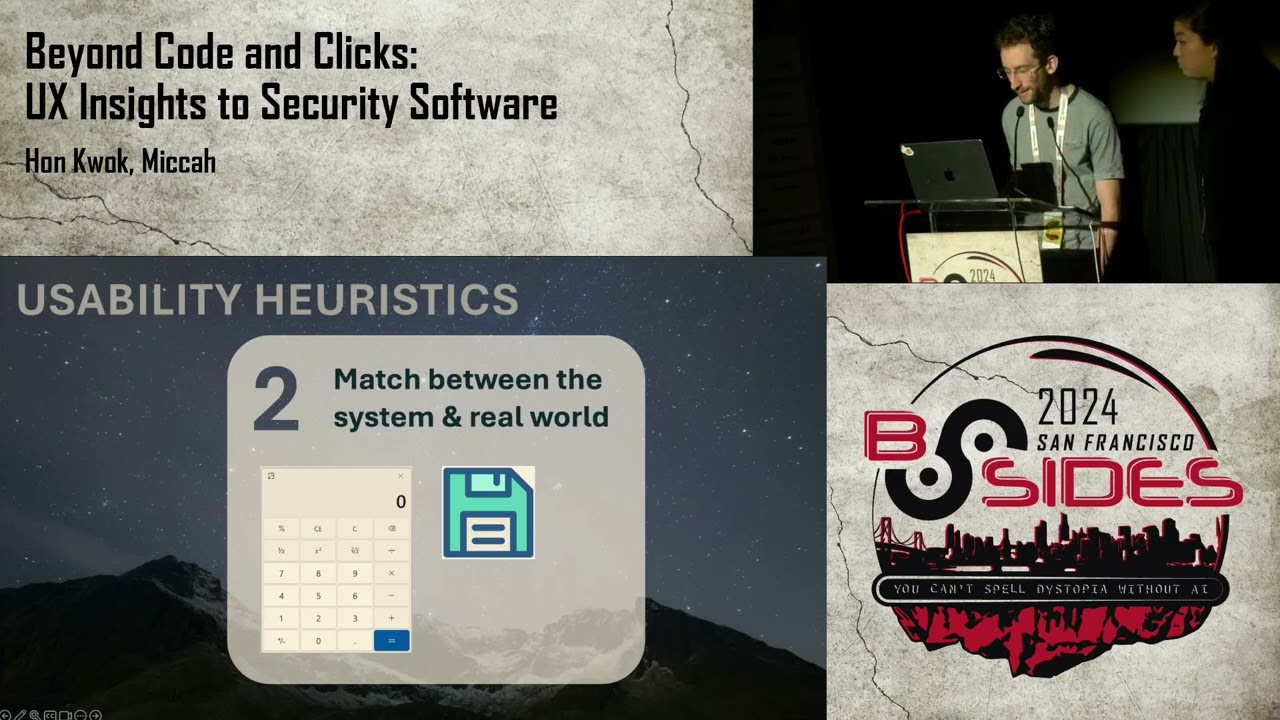
afterwards we're going to apply it to a somewhat common security scenario to start uh the first theistic is the visibility of system status let your users know what's going on and in a reasonable amount of time there are performance implications of this so slow things make your software process unresponsive or broken and when you have a process that takes forever to respond to it actually kind of degrades trust in your security culture as well the second here stick is the match between the system and the real world uh you want to communicate things in ways that people understand and avoid jargon and teaching too many new Concepts so a good example of this is a calculator app
because it looks like a real calc calcor and acts like a real calculator and you don't have to teach people how to use it three is user control and freedom so HCI is human computer interaction and it was a very deliberate decision to start with the word human so let people be in control but as all Security Professionals know we all and people we all make mistakes so it's really important to give people an easy way out we mentioned repo kit earlier it's a semi-automatic process that allowed the human to be in charge at the end of the day fourth is consistency and standards so people shouldn't be struggling to understand what you mean and Tech
doesn't happen in isolation so it's good to follow conventions uh the examples on here are like the hamburger menu it's pretty common knowledge when you click on that you're going to get a menu and there's also a man page on there which is kind of a standard way for command line tools to provide documentation next up is error prevention so the best designs carefully prevent problems from happening in the first place this is probably one of the hottest topics in security we've all heard of security guard rails secure by default secure by Design all of that focuses on error prevention six is recognition over recall you want to minimize a person's memory burden uh there's a law called
Miller's law that states that uh you can only hold roughly seven things in your working memory at any given time so people shouldn't need to remember every little thing and you want to make information visible and easily retrievable seven flexibility and need of use novice and pro users exist every senior was once a junior so shortcuts speed up interaction give people a way to do things faster but also design them so that they are easy to learn and easy to master so for example with code we have functions because we don't want to write the same thing hundreds of times the E theistic is aesthetic and minimalist design uh don't show irrelevant information if it's not
needed uh every additional bit of information can lead to information overload as we're all familiar with with alert fatigue and getting too many alerts number nine is recognizing diagnosing and recovering from errors so errors are going to happen and it's really important to help people recover and helping them recover intelligently uh security incidents have Lan less postmortem and uh going back to the earlier example after the Amazon us east1 S3 incident I believe Amazon added the five wise to their postmortem process and the the 10th and last heris stic is help in documentation so hopefully your system doesn't need too much additional explanation uh but still it's always good to provide as much documentation uh to help people better
understand and use the stuff that you make so those are the 10 neelon her istics there's plenty of written information around them though I will say they typically focus on visual design but back at University I did research with Dr Shana Daly at the University of Michigan go Blue Dr da created 77 heris for engineering design and creativity think industrial engineering with physical product design so we were wondering back then if by having these 77 heris would they improve our products our processes and our workflows and the answer is a resounding yes uh there is a whole bunch of scientific literature on how heris help engineering design ideation and creativity so hopefully we've started to
convince you that usability and user experience is not just Visual and um given these heris they are also not a checklist of rules that you have to just go through but with these 10 usability characteristics in mind we want you to think that it applies to more than just UI to demonstrate this and to help introduce these heris sticks a little bit more concretely we're going to tell another story in the form of a security incident so the story want we want to tell which some of you may be familiar with is um a leaked API key so we get this random email uh telling us we have an exposed AWS secret you know we're
panicking our blood pressure is rising you know you have these questions like is it real uh it is real you find out uh is it even our key it was our key you know who owns it what organization in our team owns it do I need to start a Sev you know who do I include so you know we start a Sev um we we decide to rotate it um is it actually rotated who knows uh you know and how do we prevent this from happening again this is the scenario we want to talk about um and use the heris stics to improve all righty so a secret was leak so let's look into that process in which
we can deal with that with usability guidelines in mind I put the T her istics to the side and we can have that as like a a little reminder to keep usability in mind as we're going through this so let's think usability Effectiveness efficiency and satisfaction so let's look at the to start let's look at the first heris the visibility of the system status uh we had the Domino's Pizza track earlier to tell us where a pizza is so is it in the oven is it on the way what about this report so if I were to disclose this vulnerability I probably want to know if the company got it um security at emails are pretty common nowadays but they're
not the standard so do I know if I'm sending this email into the void who knows similarly do we how do we know these inboxes are monitored how do we know um have you all heard of RFC 9116 this is security. text um it basically just points out it enumerates how do you contact a security organization so it has things like emails and it's like a whole standard so consistency and standards we love that um so it's like a good way to acknowledge that your report's going to be looked at similarly uh similarly we also have vulnerable vulnerability disclosure programs um very different levels of effort for a bdp but it's kind of just understanding
that um we can provide back status updates with the visibility of the system status but maybe we could even take it a bit further maybe we can um structure a form or something when they disclose a bug to us like what was your process of getting this what's the impact um so that said with just focusing on a single heuristic I I hope you all are seeing that maybe we can form better security Pathways just by think about it to the side um so we talked about heuristic number one but uh this also affects things like heuristic number four consistency and standards the method of contact uh the structure of the information we also have herotic
5 error prevention um we're being way more proactive about letting people contact us rather than us always having to reach out to them so um good that's good uh and also this having all this streamlines disclosure as well so is that not number seven flexibility ility and E of use if you attended The Secret Life Of Secrets talk yesterday we talked about prefixing secrets and random strings for Secrets as a way to identify Secrets quickly so also flexibility and ease of use so nine and 10 are just kind of a given error recovery and help in Docks but that all that all kind of encompasses how you can think a little bit about usability heuristics with
reporting a secret the next step of the process that we want to talk about is learning about the secret so the naive approach uh is to like manually research the secret if it's an AWS key going to AWS and finding it in the UI or searching through the docs to try and write a curl request to verify that it's active uh going to various different websites to to figure out more information about this secret and this can be tedious um it can be eror prone it's sort of an ad hoc approach this is not a skill think that anyone wants to get good at um and yeah it's very very inefficient um so if we consider the
heris sticks here the naive approach suffered mainly from efficiency of use which is her stick 7 um and that's a good place to try to improve the process with with something like an automated tool um for example uh in this case truffle hog the secret scanning tool could aut automatically uh scan the secret and verify that it's active and gather metadata about it we also want to consider the human in the system so from the human's perspective uh what would make this more efficient uh and really if you think about it having all of the context in one place all of the information about the secret in one place would really speed up the efficiency uh of this part
of the process you you wouldn't have to search for all of the right bits of information in a 10-page email thread uh you just have it in one easy to reach place and also considering the human uh this is a potentially high stress or time sensitive event um to kind of minimize the stress of the event we can think about some of the hero sticks so hero stick number four consistency and standards having guidelines on how to approach the situation um can really minimize the stress because you have a paved road to follow also Aesthetics and minimalist design as we saw earlier we only want to show relevant information uh to not overload the the
human and last help in documentation again uh you don't want to have to be thinking too much in these high stress environments so having help and docs can really um can be really helpful cool so everything's rotated now yall totally trust me don't you well ah no so is a secret live still um I don't think yall are just going to trust me but uh in security we always hear the words trust but verify but how do we verify so that's kind of this visibility of the system status coming up again but if we're doing this multiple times we want do it quickly um that's also uh flexibility and me of use and across the industry there's actually
a pretty standard process for rotating a secret um and I wanted to point that out because sometimes user experience exists outside of just you it kind of becomes uh this follows heretick four consistency and standards so it kind of becomes a standard and most people's um in the world of user experience there's something known as yobs law um where most people spend their time doing other things so have your things follow very similar designs and decisions patterns uh once you understand the why and how and um lastly for actually rotating a secret having a known path to rotating a secret so that's number nine and 10 Again recognizing diagnosing and recovering from errors as well as help
in documentation so finally we get to the Retro items this is the last stage of the process um let's start with a more heavy-handed action item that you may have heard before and that's adding the security team as a reviewer to all code changes uh we we kind of know this is a bad idea but why is it a bad idea let's let's look at the heris stics so this affects heris STI number three user control and freedom um this is giving all of the control to the security team and not allowing the actual code owners to make changes uh easily this also affects efficiency of use or here s there's one team blocking all changes that's clearly
going to slow down efficiency and this also affects helping users recognize and recover from errors or hereis stic nine uh this is by having a separate team handleing the security it's somewhat of an opaque process where the actual Engineers aren't empowered to learn about and prevent the issue themselves uh so we can ask ourselves is there a process that improves on these three here sticks that improve the usability and one idea is to use a pre-commit hook to catch Secrets um so let's go through the three heuristics that we identified and see if they've been improved so the first one was user control and freedom does that is that improved with a pre-commit hook uh and yes I would say yes people can
disable uh the pre-commit hook it it is a local check uh which can either be either good or bad but uh um this is good for emergencies uh for example if the security team is on vacation or things break then Engineers can still have an out and bypass the the check okay does this improve efficiency of use uh well yes it's an automated check which is much faster than a manual human check um and lastly does this Empower users um does this let users you know uh does this let users learn about and fix the problem themselves and yes it's running on their machine and it tells them directly uh what the problem is so we hope that this random bug
Bounty guy emailing us has helped give you a better idea on how we can apply usability engineering uh and thinking with the neelon eristics to a security situation and process and this we really want to drive home that this isn't just uh about the visuals um it does play a part in some parts of it but it really applies to the whole process thank you all so much for coming to our talk and if you're walking away today we hope you have these takeaways usability thinking applies to more than just the UI as we saw in the last story thinking about usability for a scenario spending multiple systems can help shape how we design those systems
two design for people and not users word users also kind of dehumanizes people but as we're thinking about user experience we need to consider how people feel and think when using our software our Tools in our processes acknowledging human behavior and Engineering safeguards so people are going to interact with technology differently and occasionally they make mistakes so setting up guard rails for the best course of action is good and lastly we have the neelon heuristics for easy peasy DIY discount usability engineering thank you all so much for coming uh feel free to ask us any questions you may
have okay so thank you so much speakers and uh so there are a couple of announcements so uh we have a vulnerability management um session at 12:15 in theater 9 the coffee stations are open until 3:00 p.m. today so if you want you can get them and uh we have head shots all day and I'd like to thank speakers again so if you can give them a round of applause [Music] [Applause]
Related talks
 16:52
16:52 34:12
34:12 28:29
28:29 29:24
29:24 32:13
32:13 30:17
30:17