Supercharge Your SOC with Sysmon
Show transcript [en]
ready to go everybody hear me all right my name's Matthew Metta this is Chris Lee we worked for Susquehanna Susquehanna international group s IG where we're basically a Wall Street firm right over on City Line Avenue we're here we got a booth next door they're giving away coffee no anybody want some coffee go grab it so lock alum grant stuff's really good go over twelve over a booth you know they're here to talk to you they're here to they want your resumes you know we're here to recruit so so go talk to those folks what we're here to talk about today is is our adventure with sis Mon Chris and I work on the stock at Susquehanna
children we we're the ones that are bringing in all the log data and norrison we're writing the rating the rules and the same to fire alerts and then we do those investigations and if you go back in time before we started using system on we're very much network focus we were branding a lot of network perimeter logic you're bringing in you know firewall logs bringing an IPS log for bringing in web proxy lots and we were really good at finding malware using those logs we could find command and control traffic really well but then we would go to the hosts and try to figure out what was going on the host but we didn't have that host we didn't
have that host level forensics visibility we didn't know what processes were running on the post what was generating that that network activity so that was our pain point so around that time we decided yeah we wanted to try to solve that boost endpoint visibility problem at that time we also knew that sis mom was a tool that was catching a lot of catching a lot of attention in the security field we're starting to see conference faults on on hey there's this new tool called system on that can detect attacks we're starting to see bloggers and researcher posting hey there's this really new there's this attack technique that we're seeing out in the wild and you know I ran that
attacking and I also stood up system on in my lab and sis mom was able to detect that activity and that was really cool so we knew that this mom you know potentially had was viable to solve that problem for us to give us that level of disability but the problem is when we saw those conference talks and we saw those bloggers writing about these their research they're really just standing things up in a lab nobody was really doing it at scale we had to solve this problem in an enterprise environment we had to solve it over a thousands of employees we had that you know create processes that were operationalized we could do it all day long and do it
efficiently and there wasn't a lot of research out there on that so we we kind had to build that all and that's what this talks about it's not just a system on primer that will get into that real quickly just to get up to speed on the basics of sis month it's really how do you do it in an enterprise environment how do you how do you blue team with this stuff so so let's start with that's this month primer if you haven't come across this money yet it's it's a tool that's gonna give you visibility very rich for both forensic level visibility and what's happening on a Windows endpoint it's it's it's from the SIS
internal suite of tools so it's a free Windows utility if you've done any windows administration you're most likely familiar with sysinternals it's going to install as a service on your on your workstation or server it's going to run in the background and it's just gonna watch what's going on and log lots and lots of data about what activities happening on Grand point and it's gonna log it to the Windows Event Viewer there's a lot of different things that system on looks for these are all the different event IDs the two that were that we focused on the most was of NID number one process created events process great events is every process is voting on a Windows system it's going to
give you very very rich information about those processes it's going to tell you the file that created that process the process image it's going to tell you the parent process it's going to tell you the command-line parameters that were that were sent when that process was created and you get all that command line level detail it's going to tell you what hashes of the files have created the process another one is network connection events it's going to tell you every network network connection that that hosts me it's gonna tell you all the typical things that you'd expect on the network connection protocol or its source and destination port source and destination addresses it's also going to tell you
the user and the process that generated that network traffic which is particularly valuable driver load information and tell you what drivers are loaded as well as the signature information for those drivers what whether the file hashes for those drivers that were loaded another one that's interesting is create remote read an IV number e crate remote thread is if you're injecting a thread into another process so attackers might use this to migrate to another process in order to get certain privileges or a hi there malware on your system sometimes if you're running mimic apps on the system and you want to dump credentials how to else ass it's it's gonna inject or remove thread into L SAS and you can
sect mimic a style attacks and there's quite a few other things I'm not gonna go through each one but there's quite a few other things but what we found is that six months pre actively being developed every couple of months we see another version coming out and the newer versions the the newer versions have these new event IDs and these new identities that they bring out the most recent ones where I think pipe events 17 and 18 the latest version they also had WMI events 19 through 21 they're really tracking to what they're seeing in malware what they're seeing in these attacks holes that are being released they're trying to they're trying to add in the features that will detect those
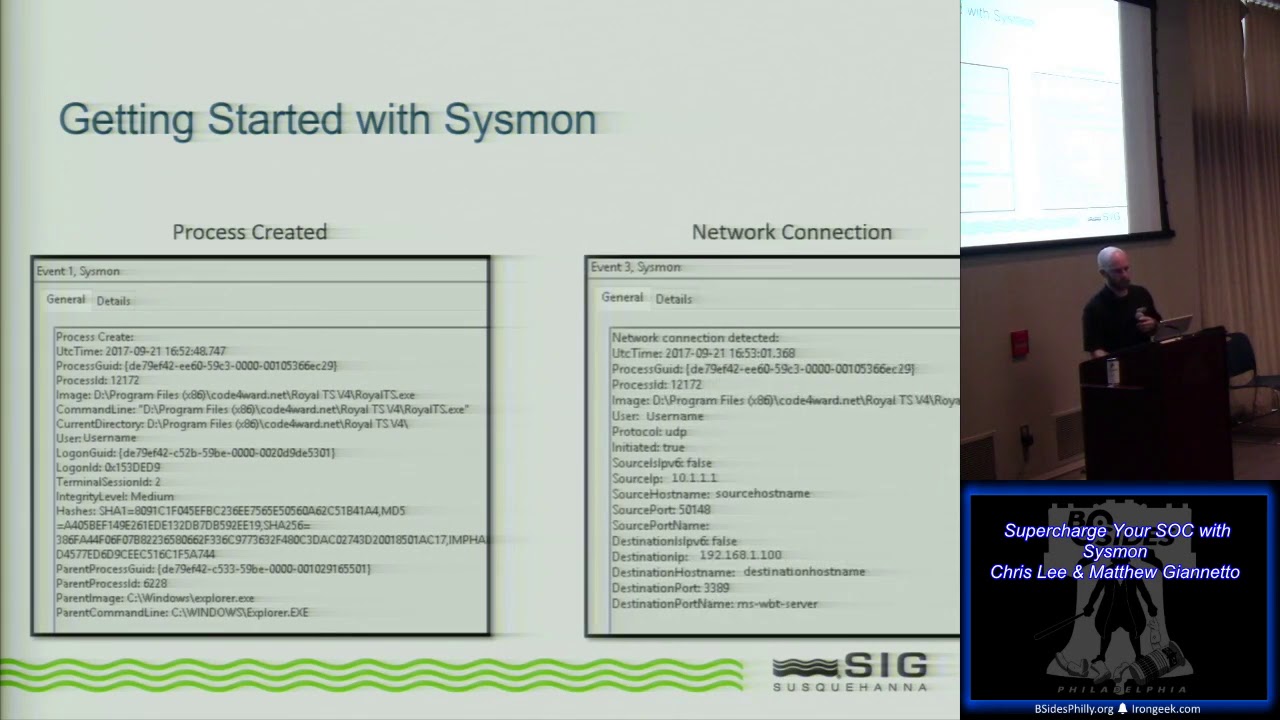
types of tools so they're really trying to track with with the with the offensive side as well cool oh yeah so let's uh let's real quick kind of take a run through here we'll just give you this rest of this primer as Matt mentioned we started with those process creation events in those network connection events that was really our goal right we wanted solved an internal network visibility and we wanted in solve that host based network connection event data so we started there and we just picked those two out of there I'm going to show you kind of the data that you're going to get in the detail and hopefully by seeing this you'll understand why as we go through and we
put this into our analysis piece this is the rich data that we care about and this is really going to be beneficial to us down the hall down the road so when we fired this up when we start with this process creation events this is all gonna log by the way I don't think Matt mentioned this but this logs a local week to the Windows Event log so anything that's in Event Viewer that's how you're gonna access this data and it's at the start of your you know your adventure with this so you'll go in here and you'll drop this down and you'll see these event IDs so when we generate a process creation event this is that rich
data that Matt was talking about right we're gonna get timestamps on it we're gonna get the process grids we're gonna get all the Associated information right we're gonna get the image that ran the actual application along with the command line so any of the parameters that ran with that if it wasn't just launched like it is here you would see all that data you'll get the rest of that information right you'll get the file hashes wet right get Shaw's md5 and you'll get the Associated parent processes as well right which is really really big for for us later on when we start talking about parent-child relationships when you're looking at malware and other malicious processes and going through that
investigation so this was real easy you turn it on and it just logs all those process creation events on the endpoint to pair with that again for our goal for the networking side of this was the network connection events and when you start firing these on the host you get a whole nother subset of data that you can tie directly with this right if you'll notice at the top we're looking at the same process grid so we know that this network connection event stemmed from this instance of the application running in this case this is just a Terminal Services client on my desktop but here I can gather that this instance of Terminal Services Terminal Services tool
is making an RDP connection to another host right and I get that data I get the matching process grid and I get the matching path so I know that application ran or made this network connection hopefully you're right they're off the bat you can kind understand where that's how are you going to be beneficial to us when we did this we started it and as Matt kind of mentioned we have about 6,000 endpoints that we need to do this on so there's some other pieces to solve this that we'll get into as well beyond this point I just want to kind of touch on this too we'll get into where we started with it so when you start one of the things that
you're probably saying is things like network connection events or things like process creation events that can be noisy right that sounds really really verbose there's a lot of stuff happening on an endpoint and when you're talking scaled it's six thousand endpoints that's a lot of data the nice thing the system on is you have a fully functioning set of filters that you can use via a customizable XML so when you go into this you have the ability to include and exclude very detailed what you're looking for you know based on your needs for us and for those of you I highly recommend it swift on security has a collaborative config that they've put out there and
that's kind of what we use is our starting point we realized that you know there's some really good data in there and it was a great way for us to you know kind of dip our toes into the water and say hey you know how does this work how can we really get the most out of it so we started there and they have a really great collab config but for us and ultimately when we expanded this out to other things beyond those to process events we realized that we could cater this to our environment and squeeze even more out of it than that that basic config that Swift has so you'll see kind of some differences here where we've
gone beyond what they were doing and we've dabbled in some of these other events you know for specific use cases with the hopes that we can detect some of these things with that additional data so at this point we kind of talked through the fact that this is happening on the end point since logging to the local Windows Event log one of the things that syslog doesn't do though is provide a means for transport right we're talking about wanting to use this in an enterprise environment you know in our particular use case a sim or a log management tool having that data log locally on the endpoint is great but you don't want to have to go and look at
that you know that data on the endpoint as well as the fact that you're not going to get that that alerting based on based on events if it's just on the local endpoint so we needed a way to get that data back to our you know back to our sim tool so that we could really take advantage of that analysis piece for us we found that you know we could do it for free and relatively easily with Windows Event Collection does anybody here use Windows Event Collection before ok cool a handful of people right if you're not using this or you haven't heard of definitely take a look it's fantastic it's native to Windows it's agent lists
anything Server 2008 and up and windows 7 noon up I believe is running it and really what this is doing is you can think of it as like a syslog 4 for Windows right you're taking taking events and based on GPOs telling those systems to send those events to another location in our case we're talking about a localized collection server so will you spin up a collection server it's super easy if you've ever gone in the Windows Event Viewer and notice the subscriptions tab at the bottom that nobody ever uses that is a Windows Event collection so you spin that up it starts to win our end listener and basically you configure subscriptions right which
are really just subsets of event data that you want to collect so you can go in there and you can say give me all of your system on logs give me all of your you know Windows application logs Windows security logs Windows system logs it's not limited to just this Mon it's anything that's being logged to that Windows Event Viewer you set that subscription up you set up your list of hosts that you want in our case we just use domain computers you say anybody that checks in to this thing we're gonna want you to push your logs to us and that's it the other side of it is on your endpoints it's a simple GPO that gets
applied that GPO simply states via the the subscription forwarder that says hey go to this server check in and see what subscriptions you have and it'll do that we push it to the endpoints all of our endpoints will reach out say hey what do I need to send you we have that subscription configured to say we want to you know take all this data in and what will happen is from then on we'll have a push of that data constantly from our endpoints to the centralized server this is great even if you don't have a sim tool so even if you're you know you're a smaller shop and you don't have a simple or a place that you can do you
know analytics with Splunk or elk this is great to centralize that data because now you don't have to worry about going to each individual endpoint you're getting it at least in one location that you can go through and you can filter it search for at this point really what we're doing is we now have that all in that centralized collection server the next step is we just forward it from there into our sim tool and this is where we're really going to get that rich analytics right we're now taking this data we have it in our sim tool in our particular use case this is where we really found the benefit of of the simple to be able to cater our
sis Mon config so we started with that basic configure we had put it into our sim started grouping by you know processes that were being created network connections that were occurring and tried to find all the noise and the things that we would expect to see and say we don't care about any of that let's go ahead and filter it out well this is too noisy and it's not sustainable from an event rate perspective let's get rid of it so we did all that you know reapply to torch this Mon config and got to what for our unique environment was a custom tailored configuration I think and when we approach our configuration I think we
really did approach we want to get as much information as possible and and even though system on generates a lot of information like I said it's very verbose it's absolutely sustainable you can handle it we didn't have we didn't really but up to a lot of problems where there's too much data I think you know there were some processes that just created an absolute ton of events and this is really valuable to help identify those make a decision on whether that's something that fits in your use cases do you need to see this for any of your use cases do you need to see this for forensics review and if you don't get rid of it because it can help you with
some of the capacity issues but but overall and if you if you think back to that to the if you go back to that Swift on security slide where we're comparing on what we did versus what slips on security that we always try to bring in more and more information we've had a lot of success with that we've been able to handle everything been able to throw on it with just a little bit of doing absolutely alright so we identified sis Mon as a solution figured out the configuration that we wanted to use what was it what was our initial use cases with the process created event and the network connection events and expanded there as we had some success
we're transporting those logs was whack to a centralized server and then we're shipping those lot from that centralized server into our sim alright so so this is kind of how we did it at scale the log collection of visibility piece this is how we did that at scale and on our enterprise the other downside to sis Mon is all you're getting is the utility that's going to be logging that very rich forensics information it's not going to do any of you any of the analytics for you you need to solve those problems on your own just to be able to search through that data you need to get it into some sort of log management tool or sim
Splunk ELQ or your sim you can start to analyze that data that's that's one part of the problem to solve another another thing other things that you need to solve as well you're gonna need to compare it to buying going out and buying something rather than bringing system on in yourself and and trying to build it out yourself you could go out and buy a commercial TDR tool when you do that you're gonna have you're gonna have a vendor that's they're gonna be giving you that user interface for you so that you can search through that log data they're going to be creating security content for you and you know rules and and different analytics on top of the
data that identify hey this is a suspicious processor this is anomalous you know you're gonna have all that with a vendor if you're just using system ID as an open source cool you got to build all that yourself and that's what we did and that's what this next session of the presentation is to kind of show you some of the things that we built on top of this system on foundation and try to jump-start you if this is something that you're interested in try to jumpstart you can give them give you a couple tools and a couple starting points on how to do that so the first thing we want to we want to talk about his
symbols what are some of our most successful sim rules using this system on data what are some of our favorite things here so let's walk through a couple the most successful ones you want to kick off the first couple yeah absolutely so I'm this is probably one of our most fruitful and beneficial rules that we have our detection of word doc macros via the system on logs so this is real straightforward and simple to set up there's not a lot that goes into it other than spending some time tuning based off of what you're seeing in your environment but basically what you'll do with whatever rule system you have in your sim is you're just gonna
look for those process creation events and really do a parent-child relationship check again right we're gonna say whenever the parent is Windward XE and another process is spawned by that right so that event log is gonna say you know malware XE with parent process Windward XE fire firing offense right fire an alert and let me know because you know beyond those normal cases that we would expect that will you know we'll get to talking about tuning you don't want that you don't expect word to be launching processes right that's very indicative of macros executing and running command-line PowerShell we you know and so on so all you gonna do is look for that and you can compare it
against those process images again before you start firing actual alerts on this take some time to do some of that analysis look back and historical and say hey you know now that this has been running for 30 days what kind of stuff is normal in an environment right things like Microsoft help so if you hit f1 when you're in word that fires the EMS help or Doc Watson if the the process crashes those kinds of things are expected you know they're their normal behavior that kind of stuff you can go ahead and tune out and once you get this little real lean and mean it's fantastic for that because now anytime we see that kind of suspicious activity where words
you know executing a macro we get we get an alert real fast and we can take a look at it yeah this is probably our this is our number one detection for detecting anybody clicking enable macros in a mouse Mangino you still have users that are getting the systems compromised with ransomware you know this this is the one that catches it every time we see this come in we look at what's going on we're reaching out to that user saying hey did you get an email and enable enable macros yeah and and kind of into note that right we talked about word and that's the most fruitful but uh any of the office we are really any
application that you can think of where that application shouldn't be spawning other processes you can write a rule like this to do that exact same thing to not that normal noise and then you've really got yourself a nice rule to detect you know anomalous activity by for most of the commodity threats right now are using we're doc macros to get that foothold I imagine that if somebody's using some sort of exploit this is going to also pick up if somebody's trying to excavate some vulnerability and work rather than just using some sort of enable macros functioning or so so really this this one's really viable for any of your high-risk client applications anytime where users are bringing files off the
internet and opening them up with one of those applications whether it be office week Adobe Reader any of your browsers fool this kind of framework of a little work this next one too is probably one of our top rules especially as of late this is really great for you talking about living off the land and attacks that are now leveraging you know applications that are built into Windows is detection of suspicious PowerShell activity right so execution of PowerShell that's anomalous in this case we're doing similar things right we using that same event ID so you talked about the value of system on process created events it's the same thing now we're looking at show me instances where
PowerShell is launching and then in that command line we're seeing some sort of anomalous or suspicious commands being run in this case right maybe it's encoded command which is not typical for legitimate processes right there's no reason to 101 that that command line encoded or hidden Windows we're using tools like invoke expression or downloading a file sorry things that again just most usage of PowerShell from an admin perspective aren't going to do these things so tell me about it you know I I know that that's there I know that I can to not to known good stuff within any other cases of that tell me about it let me know I'll you know I'll alert our
analysts can go we can have a look at it and see what's running here and this has been the you know the same kind of thing this hide with the word macro detection you know really complement each other nicely as we've seen some of these attacks where you know the macro executes and what's actually executing is a PowerShell command and it's running invoke expression or it's running it encoded so we can't see what it was doing so that's great from that detection piece and they pair nicely together yeah so just a point of clarification about about what's actually being logged here by system on it's not trans not transcription logging on PowerShell you're not getting every
single PowerShell command that's running within a script or if somebody has an interactive powershell session open you're not seeing every every command that they type what you're seeing is that initial launch of power show so it's really good when attackers are using PowerShell to try to get that initial foothold when they don't already have access on the system they're gonna they're gonna try to get some sort of powershell one-liner to run it's not some scrip while that's already on the end point it's some all-inclusive one-line PowerShell set command that they're trying to run to get that foothold and that's what we're really trying to detect here we're seeing a lot of those same militias word macro attacks the
commodity malware when you click enable macros typically the first thing that they do is run some sort of PowerShell commands to download some malware binary and then execute it on the system this is a really nice job of detecting that we also had a lot of success with this in if you haven't if you have an active attacker in your network that's trying to laterally from system the system they're going to typically if they're using PowerShell to get that initial foothold you're gonna trip this a lot of the time because they have to have everything kind of all-inclusive in that initial command one more thing here the the you're gonna have some legitimate stuff in your
environment you have to tune all these rules require some level of tuning and it's going to be absolutely custom to your environment to figure it out but in this particular case I you can look we have a lot of stuff running that's just legitimate stuff that our technologists and our firm have built that run with certain keywords so we'll just - now certain project names from the command line and that'll help us get past a lot of the legitimate stuff in our environment so these are the two big wins from a commodity malware point of view this one's also and that initial foothold point of view if you're somebody's targeting with a mouse spam or phishing it campaign or active
attackers moving laterally these two are really good for that these are probably our two most successful templates we had a pen test recently and we had our pen testers try a number of different attacks on us in it and it really got us thinking about how we could use this system on data in creative ways so so these next couple of ones are a little bit more creative on how we could detect some of these attacks that we're taking place first one we'll talk about is rubber ducky and mouse jacking attacks they're very similar attacks in that the attackers are trying to get their footholds by injecting keystrokes into a system with a rubber ducky attack you're
going to insert a USB Drive and in a into an unlock system and if when you insert that USB drive is it's going to act like a keyboard interface and automatically start sending keystrokes to your system effectively what the keystrokes are doing is start run typing in a PowerShell command and hitting Enter and that's that's the exploitation on a mouse jacking attack the concepts very similar but what I'm going to try to do is is hijack the connection between a wireless mouse and its receiver and if I can intercept if I can if I can inject into that then I can inject keystrokes and and then the attack follows the same general than the attacks gonna really
the same I'm gonna send keystrokes to go start run PowerShell on my command and get my initial foothold so we thought how could we detect this with PowerShell with system on logs and what we said is let's look for a process create events where the parent process is Explorer right because if I go and start run and typing in your command you're doing that within the Explorer shelves so the parent process is going to be explored and then the process image file name is PowerShell daddy accident so this one's going to require a little bit of tuning because you're absolutely gonna have a tough that runs PowerShell from Explorer the first one to get rid of is tune out
anything where there's a reference to a dot ps1 file where there potentially double clip double-clicking a script the attacker when they're trying to do this they're not going to be leveraging us a ps1 file that's already on this because they're trying to get that in a public hole so you won't be tuning out that attack the second thing is well if I'm an explorer and I double-click PowerShell that's also going to fire this rule as well so you have to to now to fill up somebody to try to open all PowerShell and then you might have some other things in your environment that might rip this but the first to once you've got those joong-dal it's much
last month the tuning should be a lot easier
sticky keyd facts so the concept here is if I if I want to get persistence on a system if you're if you're not familiar with the attack if you if you hit shift 5 times it'll run that let's have accessibility executable that'll pop up on the screen that's just calling set HD dot exe that will even work so what the attack is is you swap out set each CXC with a piece of malware or even just CMD command dot exe or CMD dot exe if you hit shift 5 times it'll pop up the shell that works even at the windows login screen so that's act potentially gives you the ability to get access to a
system without log again so we could set up a rule to do something very similar look for execution of set HC exe but look through your locks find all the legitimate hashes for set HC exe that exists in your environment you'll get that one people you know when people trip that that'll generate the log and you can just look for all the legitimate ones validate that there really are set HC dot exe put them all into a list then you can write your rule to say if IC set HC dot exe executes and it's not one of these known good file hashes in my environment fire alert so I think it's just worth stating off that
to write that's mostly stemming from a physical access to a device right or or an unencrypted drive right removal of the actual physical device placing it into another drive placing it into an enclosure and then from another machine dropping a replacement of whatever executes will write CMD dot exe or the the help dot exe so that when you pop it back into the into the actual chassis and you fire that thing up you're gonna run that by executing stickykeys so there is a little bit of that from a physical access standpoint all right I'm gonna pick it up here because we're we got a demo that we want to get to so some lateral movement
attack you've had some success detecting lateral movement very similar process created event if you see the parrot processes WMI prva SDXC and it's launching command dot exe or powershell about AC that's that's gonna be suspicious that could indicate somebody moving laterally from system to system using WM i to execute to execute a process on the system we when we wrote this rule up we didn't see a whole lot of legitimate stuff that was doing this so this is one that doesn't require a lot of tuning but can detect lateral movement with WMI you can do the same thing with PS exact if some if an attacker or somebody's using yes exactly move laterally within a system you can
just look for process execution for PS exec bc dot exe I wouldn't accept expect an attacker to be running just PS exact straight up without trying to hide it or manipulate it in some way if you want to try to text somebody being sneaky with it you can get creative if they're using one of the legitimate yes exactly cuticles maybe they're just renaming it you can create a you can create another list of known hashes for PS exact a DX e and similar and then look or anytime one of those hashes executes but they have a different name that could indicate that somebody Frankie use PS exec on the slide bonus if you if you can get your sim you can write a
rule if you're using the sim you can write a rule that Auto populates a list of known hashes for PS exec that you see in your environment this will kind of tunes itself I mentioned this one earlier but you can potentially detect mimic cats attack or memory you can detect some of the dumping credentials from memory by monitoring for create remote thread to your LSAT exp or win login processes there's there's not a lot of things that do this but regardless is very easy to tune just turn it on take a look at what's injecting into one of those two processes tune out the things that you can see that are legitimate and then just look for anything new that's
injecting into those processes alright those are those are the same rules so when those similar rules fire we have to do an investigation we think that we think that this investigative process is one of most important processes in our sock the better the more effective that we can do our investigation for more more alerts that we can look at the more efficient that we are we're doing something that we thinks a little different we're using a combination of PowerShell and Excel to do these analysis of these system on logs so we basically have four pieces of PowerShell that run the first one the way that we run it is we give it an alert ID out of our sim so we say yes
get processed search what it's going to do is power cells are gonna reach out to our sim pull down the similar it's gonna find the subject of the alert and it's gonna find the time parameter when did this alert occur when did it start when did it stop then it's gonna craft a query and send it to this end to say give me all the logs give me all the system on logs for that host on that given time frame and add 15 minutes before and 15 minutes after so we can get some contacts before and after the alert fire it's going to pull those logs back into PowerShell programmatically the next thing that we're gonna do is
we're going to analyze those locks and we're going to enrich the logs with tags if you think are interesting the first one that we're gonna focus on is identifying the suspect which process triggered the alarm we can get that from the sim in the alert and then what are the who the parents and who are the children processes from that suspect so we look at that parent process and and process relationship in each one of those system up process created a log created logs and we identify the parents and the children and we add a tag in that PowerShell object for that third and the other thing that we do is we other we look for things that otherwise
look suspicious is this process running out of the app data directory is this process an admin tool like CMD dot exe or PowerShell dot exe is it running from a scheduled tasks things that an attacker might use that are relatively unusual on a system and what we're doing is so we're adding that tag here the third thing that we're going to do is we're going to export these programmatically to excel and this isn't creating a CSV file we want all that rich formatting that you'll get with an excel file so we're going to programmatically interact with excel using column objects in PowerShell we're gonna open it an instance to the application we're gonna hide the window
we're gonna paste in our log data we're going to format it as a table with colorful formatting we're gonna have organized our columns we're gonna sort the data we're gonna highlight anything that has a tag all right if we tag it as a suspect it's gonna be in red that's gonna be our starting point if it's a parent or child it's going to be an orange to see that relationship and if it's just something suspicious is going to be yellow so we paste that into excel format it as such and save it off to disk we've actually got this to a point where the analysts would typically run out process search given an offense ID
and all this runs and collects all the information about 30 to 60 seconds we've got to script it out so that when the alert fires these things run in the background so when the analyst is ready the data is already there they're just popping open an excel file that's already been created in format in form all the informations in the excel file most interesting stuff brought to the forefront and so the analyst can focus in on the most important things so you got demo for this yeah absolutely see if I can do this one-handed with a mic than the other so let's go through this right we've talked about this a couple times now it's our favorite just because it's
so easy and it's it's something that everyone can relate to at this point we're going to assume that somebody's received your typical Mouse spam like this if you haven't seen this you're probably compromised but we're going to assume that this user who's opening this up and said yeah I'm going to enable editing shirt from our analyst side we're gonna see that initial similar fire we're gonna see that a couple rules were masked here our top two favorite that we talked about earlier are suspicious process by a word and are suspicious powershell command perimeters fires rather than having to go through this interface and view the data here we have that tooling that we've now used
with that custom powershell I'm sorry custom excel document so as an analyst our team we just go over to this pane we run in PowerShell just this one liner to feed that document out to us and we're gonna get see any heart Jesus isn't here apologies we're get this nice large spreadsheet of data and again what we're seeing here is that that time frame based off that offense that fired so the simple right the the suspect event and we have that timestamp this is gonna then gather all of the events that we have from the 15 minutes before and 15 minutes after if it exists right if this is happening at a time where we're not getting to it
right away we'll also have that that subsequent 15-minute window as well we can also run this at any time with a manual larger window should we need to but ideally we're gonna pop in here as an analyst and I'm gonna see this whole wall of data now typically for us because we use this every day we know what we're looking for we know how we can go through this and we can systematically find what we want for the sake of the demo because because we're kind of limited in screwed and real estate we're gonna shrink this down here and I'm gonna take out anything that we didn't tag from this event and what I end up with is a much smaller subset of
data right we have tags and yellow tags and orange tags in red and those are gonna be broken down by why they were tagged right whether these suspicious things like scheduled tasks that we said we want to know about and we want to highlight when that happens we see things like admin tools running and we see the relationships the the parent grandparent I'm sorry parent child grandparents and then we see admin tools as well so we did all of that you know automatically and we now have this subset of data that we can look at when we look at this here you're gonna notice that highlighted red right that's the suspect that's the thing that matched our sim rule that
said if you see word spawning another process tell me and what you're really getting from this data standpoint is a look that this is difficult on the screen enhance I don't know if we can enhance anymore I'm actually gonna bring this over so we'll have this we'll have this list right and what I'm gonna do here is I'm gonna look at that highlighted red where I can see that the process that ran was cmd.exe and I just don't see because it's off the screen here The Associated parent process column saying that word but if I actually go in again we get the hell out those pearl command-line parameters right that's all captured in the system on data I can see up top here
in that that white pane the fact that command Ryan right and it calls PowerShell and we see some calls here for some functions we're gonna create some new objects you see an executable named we see the pulling of two PNG files from a couple of domains and then we see some you know some subsequent stuff to write that out and we'll launch a batch script from a temp folder as well so some pretty nasty stuff here obviously we know that this is you know is malicious but we get all that data here and we kind of know what we're looking for as we go down this chain now what I can do is see exactly that right
so the next line below it is going to be that instance of PowerShell running with CMD that XE as the parent and again in that case the command lines are the same it's just the fact that power shell called CMD and then fed it that line but we'll go down further again and we'll start to see that subsequent activity occur right we'll see the fact that CMD generates this command line to run this batch file out of that temp folder so now we know that that batch file read as well as immediately following another temp file that executable that we saw so all of these things that we saw tied to that original mal mal spam email that
launched we see all this and we have that data here will go down subsequently again and see that that executable is called and we have a child process to that executable that gets dropped in you know app data folder called but RZ and but our Z here runs and that's obviously interesting enough concerned but then as an analyst I'm gonna take note here a little bit further down that I can see highlighted in yellow the fact that we tagged past engine now running that same executable every three minutes some from a persistence perspective we had the original parent-child relationship to say that we saw that executable running but where that would have fallen off initially and we would lose that
visibility the fact that we care about looking at things like schedule tasks and other admin tools we now have this nice pretty picture of every three minutes on the dot that executable running again anything you want to highlight there and if you want to talk about some of the other data in here I mean just to recap right so so we started with SCM viz cmd.exe running that powershell command we see that rich full command line up the powershell command that runs because this is that initial exploit attempt it's got to have all the information in there so we see that they're trying to download a file they're executing a file they're executing a batch job and then
because of the parent-child relationships we can see we can follow that chain down the process stack to see what's launching what all the way down so that's a good point too let's let's talk about following the chain the other way real quick right we knew that this is what fired our sim rule because that's what we were looking for but maybe now as an analyst I want to try and determine well what file was opened in word that I actually care about right I now want to be able to go back to whoever that user was and say hey you know do you recall this email with this file yada yada yada I can go back up
with those grandparent relationships so now immediately following it I see word spawning and the command line forward I'm gonna get this nice little convenient set here we're in temporary internet files for Outlook attachments I see something called secure message dock right so now I have the name of the file that ran because I have that that actual command line that ran when Outlook opened Windward and I can see the file name obviously at that point - you're also getting the fact that this came from an Outlook email right outlet was the parent process for this we know this came from an email not from an eternal location so we have the whole picture at this point right we know you know we
were alerted because we saw some weird PowerShell running but we can now go back to the user and say hey we saw that you were in Outlook and you opened up Word you know we usually see that these are malicious Word doc macros did you did you open did you get a suspicious email can you send that to us can we go and then use that information to search our lives to see if anybody else received the same email we know that the system was successfully compromised we can see that the download was successful our proxy didn't block it there were additional processes that responding after that so we do know that they did get their hooks in this if we didn't see
those processes spawning we might be able to say you know what we saw that command run but they didn't successfully download the file and we're confident that the system's not really compromised we don't need to pull it we don't need to reimage it we don't need to disrupt the user this is the value that we get now with host visibility that we didn't give the network visibility that I mentioned earlier where you can see you know that the malicious downloads of the CNC traffic now we actually know how compromised is the system right and it's worth noting in - this was all done with just that single event ID from system on right the process created events this
wasn't using anything else here so just by turning that on you know on your endpoints you're getting some really rich data that you can really use you know the network connection piece and that visibility and some of the other stuff we don't have in this tooling and we didn't have to show you but but you can just imagine we're adding that on and bolting it on enhances all of this 95 percent of the value that we get out of six months of process created event the network connection event really helped us solve the internal network visibility problem when we have a compromised system answering the question did that system talk to anybody else you know to try to detect lateral
movement once we have a compromised systems but most of the value that we get from process creative events we're getting a little tight on time but we're getting close to the end here so just I wanted to get some some jump starts here that if you wanted to try to build something similar the first thing you needed to do is get those logs it wouldn't make sense for us to give you a get the locks from our sin because it's custom configured but you can get them straight out of the Windows Event Viewer over this one-liner in PowerShell it's built-in when I get win event give it the parameters it'll pull all the system on logs from that local system and you
can run this remotely over the networks or remote computers as well so if you have sis Mon configured and just logging locally and you're not even centralizing it you can still pull those logs over remotely and start to do some of that analysis the problem is that that's gonna give you data that's just raw payload information it's not very powershell e it's not going to have everything parsed out so that's easy to work with and paste into Excel here's a function if you guys are interested in the slide deck we're gonna try to get approval to get this sent out so grab a card from us or we'll have their email address is up at the end talk to us
we'll ve this we can but this is a function that takes that raw payload and extracts out the key value pairs and adds them as properties in PowerShell so that you can work with them as objects this is just the cheat sheet of how we interface with Excel programmatically with PowerShell again it's all built-in you don't need to download any additional libraries or anything to do this it's how you open up an instance of Excel programmatically it's how you hide the window minimize the window it's how you format things this table that's how you do a conditional formatting saving it off closing it up cleaning up after yourself this is a cheat sheet to get you started
this is all available in the internet you know it's just hard to root through and figure out how to start but this is a good cheat sheet or a like a getting started another thing that I would recommend is if you're if you're gonna try to code to interact with Excel programmatically take advantage of if you ever seen the record macros function with an Excel if you're trying to figure out what functions will do certain things you can use that record record macros do the changes that you want to do programmatically manually in the user interface and then stop recording it's going to give you the code that I use that it would use to make those changes
you can use that to kind of get an in on what functions that you need to focus in on wrapping up we're trying to do some more advanced analytics with this everything that we've talked about today is very much getting the logs were firing alerts reviewing the logs but we're not looking at things from an enter from the environment point of view we're not relating to our environment to understand what's normal in our environment this is an effort to do that as well score it's a custom I'm a sequel back-end database that we that we created that it lightly we query all the processes that ran in our environment on every endpoint we summarize this data
pretty granularly but we summarize it so it's like this process ran with this parent process by this user on this workstation ten times between this time in that time and we've stuck all that into a database and what we had at the end of the day is the ability to say hey I see this hash in my environment how many other systems in my environment have run this hash and I'm you know if I'm doing an investigation I come across a suspicious hash and I answer that question I say well only this systems been running it I'm gonna have a much different concern than if mm systems in my environment are running and that probably tells me this
is legitimate or to my base image or we're really owned we have major problems the second so that's the prevalence that's this concept of prevalence that this solves for us that we don't otherwise yet the other one is we take those logs we ultimately have a list of hatches that are run in our environment that we've seen in our environment we have a nightly job that just checked those against virustotal and pulls back the results and say you know what if I have processes in my environment you know I can run those across 60 antivirus engines using virustotal if they've seen that hatch before and they can highlight you know we can run queries to highlight things
that are better known bad by virustotal also to get started you know just to recap a lot of things that we talked about if this is something that you want to do in your environment highly recommend just start playing around the system on if you have and just install it you'll get an immediate forensics benefit right off the bat even just start with the crate remote create the process created events again we get 95 plus percent of the value from those once you get that deployed out then you can start to look at centralizing it to one place that'll give you a longer-term forensics tour it'll give you the ability to hunt or run your scripts from
one place so you can look for you can have scripts to look for certain malicious activity all in one place get it integrated into your Sam that's really gonna enable you to do the analytical piece and tune things much more effectively and if you can get into your Sam you can start doing that real-time detection as well I highly recommend to the thing that you're not going to get with system on or eat probably even your sim is a really good way to to do those investigations to see those relationships to highlight things that are suspicious consider using a powershell in excel to do that anything else that's it all right that's what we have so thank you very much
thank you
carefully which this mine are you able to detect like fire less memory memory based powerful attacks that may or may not generate any events or the nineties if it's if it's spawning a it depends when you say file it so if it's writing to the right to free it does have register you just open up the windows command and then just make a that API call to windows API and that's may not generate an event for you would you be able to it is very process it is very process looking so if the result is that it's creating a process yes you'll be able to see it if you're injecting into memory and bypassing is to need to
create a process you might detected with process access events or threat injection events free remote read but the key is yet created to create the process can you detect the windows command the power flows for business command when they run the script would you be able to detect that assessment like they say run the power show to a Windows command script you would see that okay but nothing afterwards right right once once Power Cells open and if you have an interactive session you're not gonna get anybody else has any questions feel free to come up we'll be here will also be at the susquehanna booth the SI booth next door if anybody wants to chat
[Music]
Related talks
 49:41
49:41 41:24
41:24 37:47
37:47 55:44
55:44 19:28
19:28 41:51
41:51