Keeping up with the Jones's and other APT threats
Show transcript [en]
welcome uh keeping up with the joneses and other apt threats um as i started doing the the presentation i was uh you know wondering who this was for and it's mostly for blue teamers red teamers are certainly welcome red teamers may poke some holes inside the blue team here it's supposed to be a technical talk if in fact you are management there will be something for you as well so um with that being said uh keeping up with the joneses and other apt threats you know we're constantly being um security is a as a changing field all the time you need to keep up with with threats and yeah that's what this talks about trying to give you some ideas all right
who am i i'm 22 years in security blue team mostly blue team i spent some time in japan i spent four years working in japan so you'll see some actually jp some references there they've got some good stuff coming out from them i've been working with with splunk for the last five years uh it's not every day that i align myself with the technology but i certainly like to use uh splunk um so we're gonna cover over uh a whole bunch of stuff with splunk this morning i'm a father of three i'm coaching hockey otaku means geek in japanese i certainly like cysmon and i'm on the blue team so to get started this first screenshot
is as you can see is running as nt authority system one of these things that you want to be aware of is the fact that whenever somebody runs who am i's system in your in your network uh in all the endpoints that you protect you certainly want to investigate that there's a splunk command down at the bottom it's as simple as that um i'm not going to break out all these splunk commands but it's it's really quite simple um and that's what i want to start off with just starting off simple uh today's agenda i know everyone could be wearing jammies or or no pants uh really depends i know we've we've all kind of lived through this since uh
since march um here's the agenda uh a monitor first paradigm um i used to uh yeah i mean i've been in security for 22 years i've kind of resonated with a monitor first paradigm and we'll get into that um responding to cvs in a quick fashion you know we're going to talk about that we're going to talk about patching in a quick manner how data moves in your environment and attribution and forensics do matter and the places you'll go as i said as i started doing this presentation um i realized that this is probably going to be a little bit of a personal journey so um bear with me and let's let's take the journey
all right the monitoring first paradigm i resonated with richard baitlich this was a tweet back in january um and he actually referred back to bruce schneier here bruce schneier i actually met back in in 2000 um i had a chance to yeah i just met him randomly at black hat and i certainly have followed bruce schneier a bit as well uh but the monitor monitoring first paradigm is is when my uh my boss or my cio comes to me and says you know are we protected can we do this can we can our can we take our business and this and this down this road can we move to the cloud well i'm thinking i always think first
what can we monitor that can we monitor before we can do anything before we decide any uh the security risks or mechanisms so um that certainly resonates with what richard baitlich said uh bruce schneier um you know the bullet point here is how to how does the ci know what security products to install and whether they are working you know having a monitoring first paradigm and monitoring and having that visibility allows you to decide uh what technologies do you need and where are you weak it's something that everyone can do it's something that a a network administrator can do today to provide immediate value to your organization what it also allows you to do is permits
a baseline um you can just distinguish what's normal and what isn't normal in your environment and what i've also found too for the the management uh you know people in in the presentation here is it can establish real risk you can actually determine what is real risky in your environment uh so security monitoring is not um some of these things um again some of these mistakes were made in the past by myself again this is part of a personal journey i certainly like the sign on the right yeah this is my ideas i'm just sharing my ideas i certainly like b-sides i like the community i think it's just a matter of sharing and that's the whole purpose of my
presentation today is to share ideas and hopefully this is valuable to you um security monitoring to me is not monitoring just your perimeter firewall logs everyone is um
thank you for that it's not about just grabbing your perimeter logs you want to be looking at your endpoint logs endpoint logs is exactly where all the action happens i know aj leese was just talking about incident response you definitely want to have all your logs in place you don't want to create logs on the fly you definitely want to be collecting your endpoint logs uh if you've invested enough in protection you don't need sound detection that's that simply is not true that's it's been a way of thinking for quite some time now all right um perfect as the enemy of good let's just start off with that um uh i'm just encouraging to get
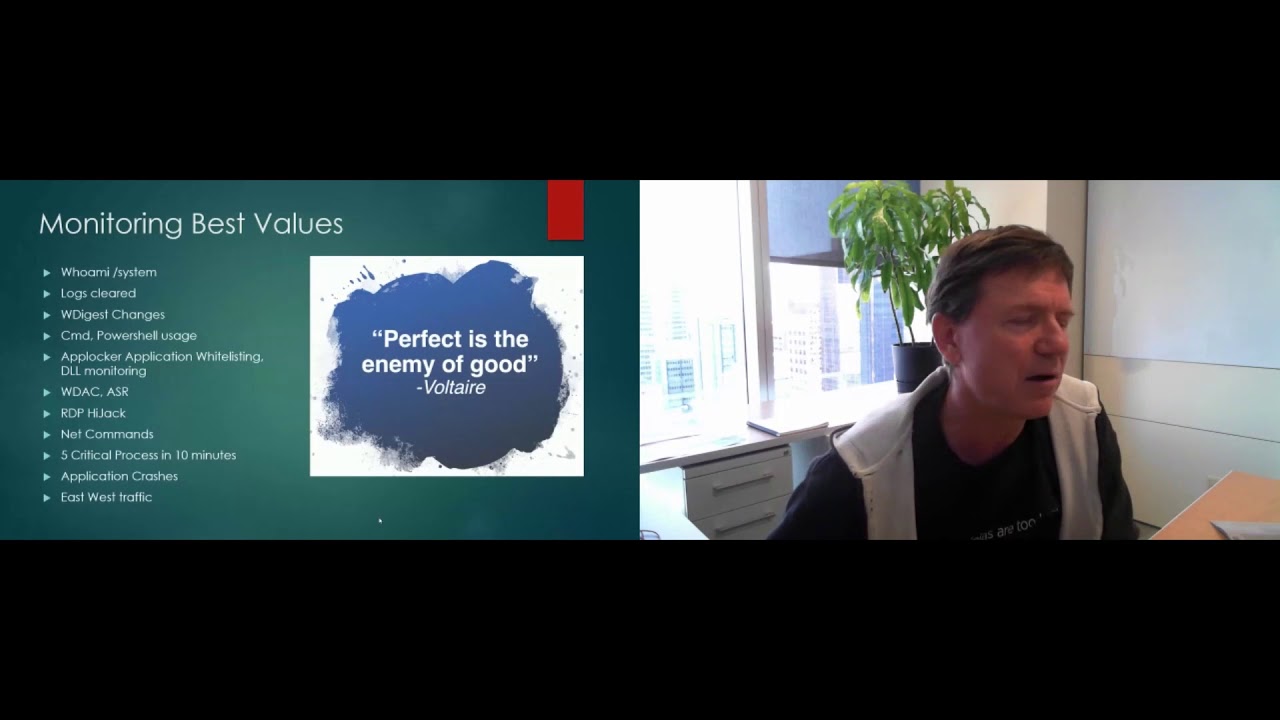
started again i think if you're just relying on your av in your environment um you're you're in trouble um this should not be news to anybody but if uh if you're certainly just relying on on antivirus you're you need to do more you need to actually be monitoring your and detecting what's going on truly going on in your endpoints um some monitoring best values uh these are these are uh some of the things that i've done in the past and recently uh that have proven to be good value you know who am i system we've already discussed that uh logs being cleared on your endpoints something you want to take a look at something you want to know about
the w digest changes attackers there's a lot of red teamers here at security conference they're flipping the bid on the w digest registry change what this does is allow clear text passwords and mini cats so if if this registry setting is being flipped you want to know about that um powershell powershell is being used to download stagers and more executable content throwing stuff in memory you want to see exactly what's happening in your powershell we're going to cover more of that in detail you want to see every cmd you want to see every command that's run in your environment wouldn't that be wouldn't that be awesome stuff um you wanted to monitor so any white
listing products you might have in place you want to be able to to troubleshoot any white listing issues that you might have if you're rolling that out across the organization you want to know about uh when your app locker or whatever whitelisting technology you're using is blocking uh windows defender application control and attack surface reduction these are all microsoft technologies that you can roll out but you need a logging infrastructure in place so you can actually monitor for some of these things you want to be looking for rdp hijack again a lot of these things are probably being covered with different speakers today um i certainly already enjoyed evil mog already this morning i'm looking forward to a couple other
talks uh you know the rest of the day and tomorrow you want to be looking for net use commands anything that's net based in your environment one that's that's got some good value here is five critical processes in 10 minutes you'll be able to see the syntax of that later on look for application crashes this is good for your help desk um you know you can actually be proactive uh you could actually call up a user and say hey look i've noticed that your your system's got all these application crashes you know can we help you fix this particular program uh another big one here is east-west traffic client server traffic usually north-south um your your
endpoints don't usually talk to each other you want to be able to to determine what is what is good and what is it normal east-west traffic um one a couple other things here just a couple more slides on this explicit credential logon is is excellent it's a windows security event coming from your windows log 4648 is when someone does a run as command on your windows box or they simply use again a different set of credentials on that particular box to log into another box typically defining lateral movement a couple other good things here is lsas process access and lsas file created you know something that's being a file that's being dumped from lsas might be indications of a password
number um again you know it's been mentioned earlier already in the conference by aj you don't want to look for new tasks services you know accounts created these are all kind of given things you really do need to look for them um one thing that i like and again uh sysmon was mentioned is a new process and then a network connection outbound to the internet it certainly is a is a good value alert to be notified about uh having visibility into your your endpoints you can determine all the macros that have been run in your environment uh i don't know anybody else but trying to disable macros in a in a business environment is extremely difficult and
and where you start if you have if you have the logging infrastructure set up there's some good ways that you can actually determine what macros are being run and who's who's running them wmi is another form of persistence by by malware and attackers you want to be able to see your wmi across your network i've already talked about system crashes uh windows seth and utilman um a common way to to pop out the password on on boxes where people might have physical access we look for that use log on when our user log logs on to multiple hosts again these are all just ideas i do have some some syntax for you later on in the
presentation uh and again as you mature in this process um your your little monitoring um setup that you've done and and getting gaining visibility into your environment you're going to start applying the miter attack matrix to your detection mechanisms you're going to maybe follow the the kill chain the lockheed martin kill chain you might actually incorporate that some into your detection some other best values that we've done we use a tool called auto runs from system terminals uh we actually auto run and check every every um auto extensible start point in our environment on every end point so uh quite extensive there we also check every binary against virus total it'd be nice you know to know that every binary
that's running in your organization just want to get a second opinion uh about um get a second opinion from virus total if in fact this is is legit or not okay i've talked about a bunch of tools and stuff for things you know how do we actually get this done um this talk is not on cisvan or or splunk in this case there's been so many talks about that this is not going to be doing that but if you do need to get started sysmon highly recommended mark krasinovich who's the cto of microsoft's azure he still maintains sysmon i know you can hit him up on twitter if there's anything wrong with sysmon it's actively
it's actively maintained it's it's running at version 12 and new features keep coming out uh version after version with sysmon you need a filtering um type of a program you need a filter to collect all the logs if you just turn sysmon on you're gonna be um enveloped with just too many logs so i highly recommend the the filter file from olaf hartung olaf has done quite a bit with sysmon and splunk and he's certainly someone you'd like to follow i put swift on security here as a tweet uh swift has also done a lot um she's got her own uh filter up there and those are kind of the two de facto filters that you want to apply with
sysmon um free tools splunk like i said earlier i don't usually align myself with a vendor but splunk is just a fantastic tool it's called spl splunk processing language if you're familiar with oh gosh i mean i grew up with dos but if you're familiar with running things in dos or a powershell from the command line and just even piping in general you know from linux as well splunk has just got a great spl it's called great command line splunk also provides you a couple dashboards here uh splunk security essentials is free uh you can fire up a splunk trial you're allowed to have 500 megabytes per day of data coming in uh when we first started monitoring
endpoints we were uh we set a limit for 10 megabytes on every endpoint so with a splunk free trial you have 500 megabytes per day that leads that leaves you with 49 or 50 endpoints worth of logs that you can pull in and at least try this out and get it working um another thing i want to mention is the threat hunting app for splunk it was uh created by olaf hartung again a free app you just installed it into your splunk instance now he's actually integrate integrated that with the attack miter matrix so a lot of that is done for you so uh highly recommended um i did a virus total integration with uh with
splunk talk back in 2017 i guess that was the last b-sides um i was one of the the organizers back then so um but i did a day workshop and if you want to go to these slides are still there and there's some files there it'll actually give you some information on how to integrate virus total right into your splunk instance and uh and automate that and send every every hash from every executable that's run in your environment and send that up to uh send it up to virus total for a second second guess um for our auto runs we're using a thing from planter it's an auto runs to win event log it's a it's a powershell script um
definitely want to send you that way palantir yeah they are uh yeah it's a great it's great script it's worked very well uh we've automated this there's there's absolutely no issues it runs runs like a top um now if you wanted to set up your entire environment uh chris long here has created what is called a detection lab you can actually spin up an entire set of vms you've got a dc i believe as a not actually just spin up a server install splunk you have a vm that's just mimics the workstation and it loads a lot of these tools up automatically for you chris has poured a lot of time and effort into this detection lab
um highly recommended if you're just starting out all right so so monitoring examples let's let's get into some some uh let's get into the deep stuff here so uh again i resonated with this particular tweet um you know basically there's there's two tools out there that are they're going to be often used by i think a lot of the the red teamers that are out there um what struck me was uh the talos security paper here by cisco um they have identified a lot of the the malware authors are now using uh koala strike and they're just using it uh certainly the usage of cobalt strike has gone up of course mimi cats is something that
we're all aware of and we've got to be able to detect the mimic out so we're going to take a um we're going to take a quick look at um you know how do we attack these two popular tools that are being used by malware um kyle is on the line and and kyle um thanks for for mentioning cobalt strike uh source code was leaked did not know that um i'm looking forward to kyle's talk uh i think it's this afternoon um where mine leaves off i think kyle's is gonna pick up so we haven't coordinated any of this but i just just have that feeling so let's just dive deep into um [Music] into powershell what we need to do to
set up powershell first and then how can we actually detect uh some cobalt strike uh one of the things you want to do is certainly enable script logging that doesn't happen by default uh you want to block outbound powershell with windows host firewall without the visibility um into all of our endpoints we you know we certainly wouldn't have been able i wouldn't have been able to convince management that we need to turn on you know uh outbound firewall uh powershell outbound uh highly effective um blocks a lot of mile blocks a lot of malware we'll look at the syntax here in a second constraining language mode powershell has a thing called language modes if you can put it into
constrained language modes some of the the deep.net stuff is is limited and uh you can actually use so application uh windows app blocker to get it into constrained language mode um here's some ideas to monitor for it's not a be-all end-all um just a word of warning uh there's some there's some tips here on how to monitor powershell it's not a um it's not a be all end-all and i'll show you the weaknesses and some of the of this monitoring so you want to look for abnormally long power shell um a64 for sure uh the powershell outbound powershell spawned cmd this was by semantic semantic actually in 2017 i don't know how accurate that is anymore
but you want to see powershell spawning cmd um you want to look for a suspicious command line um and here's some ideas that have paid dividends for us you want to be looking for event code 4103 and 4104 from the the powershell log this is a completely different powershell log it's the windows powershell log you want to be looking for event code 400 and we also use sysmon sysmontels is when powershell has been started um here's a way to block powershell outbound on your firewalls there's a couple of uh of ways to do that in the bottom you can see that that's the the actual rule itself you can do that through gpos i highly recommend to do this through
gpos and you want to make sure that you're not allowing your local admins on workstations to change firewall rules um uh the bottom example uh blocks everything except for the 10 dot uh slash 8 network and the the the example on the right blocks everything except for the 10 for the rfc 1918 addresses they are allowed out as well uh that's what i'm trying to say all right how do we actually determine cobalt strike you have to read that white paper there's some there's some good indications there um practice this with your your red team uh certainly get the logs that you need to and go from there um one that pays dividends for us
is looking for anything with the i o memory stream we look for that in various places we look for a new service being started which is event 7045. there's the event code there that's a new service has been started keep in mind that powershell is actually system management automation.dll we look for sysmon image load event code 7. we look for some of that in an environment you want to be able to to baseline some of that and see what's normal in your environment this next one is is we use auto runs uh auto runs sometimes will will tell us exactly the the powershell syntax that's being run whether it's a service startup whether it's a task
um whether it's a schedule task you know we'll actually see all of this so these are some of the the verbs that you're going to be looking for i think if you're not aware daniel bohaman he's the guy that speaks at blackhawk black hat and derbycon and he's always obfuscating powershell so you can see the downfall here these verbs are are just not going to catch everything you need to be using uh extreme regex and um here's a good example of looking for uh encoded command in powershell i saw this the other day and i was really quite quite happy to see that impressed i don't know spatially but i know she's speaking at the sands defer conference that's coming
up here real soon
all right mean cast detection uh these are just some of the the things that we use to detect uh explicit credential log on will help us uh we've already covered that earlier i will cover that in a second uh debug is assigned to log on debug user right lcs file created and lcs process access um it's not a be all end-all but it certainly will will slow uh slow the malware down or let's say it's an attacking team somebody's landed on your network but remove all workstations from sedbug and sc create token privilege i'm giving you stuff here that that works that works in an environment it's worked in our environment there is absolutely no reason why our
workstations need sc debug or create tokenproof i mean we had to um we had to go through that slowly and methodically but we we determined you can in fact remove that so how does that help uh mimikatz requires uh debug in order to do a lot of its magic um the attackers still can simply run as local system as we've noticed and um they might run who am i hopefully we'll detect them and they'll just give themselves debug privilege but at least there's there's more um detection mechanisms that we can search for um here is something here so this is the explicit credential log on four six four eight um you want to be looking for you know
process names that are like this so if you're seeing uh somebody logging in with wimmick or powershell or even uh cmd um you know chances are that's that's not good um the the debug user right we look for the security log for event code 4704 we're looking for the user right sed bug that's this identifies when the debug privilege is being used um another one we look for is the 4672 ins and security partner in the yes it's in security as well and you want to when a user logs in with the 4672 you're going to actually see the sc debug privilege privilege being assigned to that login so we follow up with those as well another
thing that you could be looking for is when lsas does a sysmon file crate which is event id11 you're going to see that so password dumpers from lsas you know will you might see the output of a file created i i want to recommend semi bus say you didn't i'm butchered his name but go to his github there he's got a lot of examples and olaf hartong as well a lot of examples you saw the the the link earlier on exactly how to detect mimi cats in your environment so as a blue team you want to make sure that you're you're detecting some of these popular tactics um this is infosec advice um it may be
good for your environment may not be um just like these images are but i'm i'm sharing this again because this has worked for us moniford for w digest we've talked about that uh remove sedbug and create token privilege we've done that across our environment that works windows windows host-based firewall definitely has to get done you know we started with inbound restrictions first and then we moved on to outbound restrictions um powershell outbound restrictions for sure uh it's just simply not needed in your environment um you know i heard a talk the other day by uh jason foss and he's a sans instructor he teaches the um the sec 505 powershell course and um um yeah there's just there's just no
reason for uh powershell outbound uh connections but anyways uh follow jason listen to what jason has to say uh regarding powershell um you know when we were doing prevention you know we noticed we're pulling in all these logs uh some of the things that jumped out at us were llm and r uh uh the the name resolution for uh for basically for home computers for windows home computers is simply not needed in a corporate environment uh just incredibly chatty and noisy so you're gonna realize that hey all this stuff can be disabled let's just disable it and uh there'll be no implications um you know and that bias smbv1 you know eva mog i was talking this morning about ntlm
and uh you want to make sure that you're you're getting rid of all these uh these older base protocols um samaritan was a powershell script put out by the the guys that create the uh the ata server from microsoft um that particular tool can be run on workstations and servers uh it uh it blocks the ability for net session that session allows an attacker to enumerate sort of who's got sessions on on every single box in your environment and it tries to to neuter a bloodhound and tools like that all right deny access to this computer from the network built-in administrators we we restrict access to to end points very very restricted our east-west traffic is is very very
minimal highly recommended and it's very doable um now what uh you know what i've learned in the last few years is certainly you're going to have monitoring gaps and you need to be looking at automation and you need to be validating uh your detection mechanism so um let's just uh start off i mentioned here with olaf and swift on security they have some uh filtering for sysmon you want to make sure that you're you're collecting the right information you want to be able to to to detect a malicious attack on your systems um you know i'm going to say olaf stuff he's done a lot of research and so has swift use those configs as learning tools
um what you want to do then is the next one here is the attack navigator uh certainly you want to uh to get into that i know all of hartung again has done quite a bit of work on attack navigator and you can actually build that right into your your system um i was in the boss of the sock training on tuesday they actually mentioned tim fraser stuff here as well adversary simulation it just allows you to attack let's say an end point in your environment and you can make sure that your detection mechanisms are in fact working i want to do a shout out here to red canary um you know when i first picked
this stuff up it was so easy and simple to use and here's a couple of examples um invoke atomic test uh t1117 um you know that is uh an attack matrix ttp uh you can bam just test that against your endpoint and away you go it was really simple and easy to use another one that i've used is the apt simulator by nextron systems florian roth is a guy highly recommended you attack your workstations make sure you've got coverage make sure that's working do that on a regular basis um weekly or monthly if you can and automate that because that's going to take up some time as as a blue team defender you're always constantly
your environment is changing uh machines are being patched things are being updated uh the parsing you've got a lot of things to keep him in mind you know rules might be changed inadvertently you definitely want to automate some of this to keep up to speed um so the the the gaps is you definitely want to stay up on things and this is where you can fill in some of the gaps i'm just giving you some examples here so so fireeye puts out an m trans thing an annual report but you know you can just read the report you can see the mitre attack techniques that were very popular that they've seen you want to make sure that you are
detecting in your environment at least these particular tactics and techniques so a very good they go down into details and give you uh details i'm going to refer to this cisco cobalt strike talos thing um yeah there's there's a there's an artifact that you can certainly look there for aisle memory stream and uh look for that in many places and fine tune your um fine-tune your what you will call it your detection mechanisms um this just came out this was a recent one i just read it's a rock speed run two hours to ransomware um you know they're using cobalt strike 85 rubius just make sure that you know a great read this was a great read highly
recommended if you read that make sure that you've got coverage and you can detect these types of of things another one here i'm just adding is is checkpoint this particular one is just disabling windows defender if you're running windows defender in your environment geez we could do another talk just on windows defender the topic would be defending defender if you're running defender make sure that you in fact are defending it as well the next one here is cv responses i mentioned this in the the agenda you know what i found is you know as we've matured and we've got a good detection and visibility and you know my boss comes to me and says hey look you know
do do we have this internet explorer exploit this uh cve 2020 0674 i mean are we actually exposed to that how quickly do we need to patch you know well i could simply do a search for jscriptd dot dll um you know it's it was found in in this particular windows code integrity operational log it's event id 3076. um you know i was able to to go through our environment and come back and say yeah no we don't use it very often you know these are the the endpoints that do use it and we need to start patching these as a priority um you know another example is the cv 202061 um yeah the the uh
elliptical curve cryptography one i'm kind of drawing a blank on anyways we used event id 7 to do that um this last one here just absolutely scary a cvss score of 10 uh your domain name system servers when they fail to properly handle requests um you know we actually needed to get that done absolutely immediately and and very very quickly um that was application id one if you wanted to see if in fact anybody was was doing anything fishy with with your dns servers um and there's the actual search syntax for that and uh some regex there i like regex i can't wait for uh some other talks here and uh hope to gain some more
regex i love this picture um i just love this picture you got a problem um you got a problem if you you can't patch sort of immediately uh andrew robbins guy one of the creators of a bloodhound um yeah you have to prioritize patching sometimes you know detection isn't just enough you just need to get some of these things done so um i resonated with this tweet that's why it's in here uh your patching person is key you want to make sure that they are your best friend and getting these patches done as quickly as possible just a reminder here that the net logon or also known as zero zero log on vulnerability you need to be
monitoring for that and you need to be looking in your windows event log system you're looking for these particular codes um it's actually in audit mode right now and microsoft will be explicitly blocking this uh sometime in january or february so make sure you're you're monitoring for the the net log on vulnerability um again another shout out for for splunk here um i just wanted to show this it's called a sand key diagram on the in the lower right here this it's not a great snapshot story but on the left is is a system you can see it's system 24 it was reaching out to four other uh systems it was doing east-west traffic very very easy to to detect as
an investigator you want to have these daily visuals pop out at you and say hey look this there's a problem here this is not normal and you can do that with uh with sankey from splunk um as a member of the blue team you know you need to know how traffic moves in your network um and you can do that with with these tools sysmon event id3 is network connections all over the place so you want to be monitoring for your your traffic um when i first again this is a personal journey when we first sort of gained visibility and stuff like that we were like um yeah this is great we started seeing stuff that we we didn't normally see
and uh we were able to to do investigations we do investigations on anything and everything that comes into our environment if av blocks something you wanna you wanna research that out why did av block it how did it get in in the first place and what do we need to do to prevent that so that av is not our last line of defense um i resonated with this one from paul nelson you know sorry to be glib but if you if you're not doing investigating you know then you need to be on a threat a thread negotiating with ransomware crews and that's the threat for you um and another thing i wanted to to talk
on uh was attribution matters in forensics matters so um again aj as a talk i saw this morning he he talked about doing incident response and and malware analysis so stuff like that does matter um and then jessica payne this was basically three years ago but if you're actually not monitoring for well document technique uh publicly out there you need to be we just talked about that we talked about that with cole strike and mimi cass as a couple of examples uh that leads into the next slide though one you know when we when i first started out with this you know i was thinking attribution attribution is really really hard and uh or used to be um but when we do
our investigations you know we're a simple company we have a simple business we didn't need to detect as a management decision we didn't need to detect who was who was attacking us we just didn't have the time for attribution or or even you know the motivation behind you know some of the attacks that we that we see um so we kind of stopped on this pyramid um the hierarchy of needs from matt swann at over at microsoft uh i really do appreciate matt uh sharing his stuff and and again he was on a journey too he hasn't tweeted out much lately but uh same thing with us we can you detect your adversary activity within your environment and
that's kind of like the behavior and even the hunt level we're at but we wouldn't dive deep into um you know threat intel um but i i this is where i i said earlier i think uh the talk by kyle later on this afternoon i think kyle's gonna be certainly talking about um using threat intel and going deep and to me this was a natural progression to get to this point so we're really at the point where you know we do want to know what attribution is you know our investigations seem um not sufficient we kind of close the the ins the incident we say yep this certainly was a thing we know how it came in we know how it
was blocked we know how it stopped um but you know for for me on my journey um threat intelligence and sharing is is really uh the next few steps for us to get to that top of that pyramid all right so places you're you're going to go i'm just going to cover this tweet on the right this was by jessica this was probably her her experience when they um they do what you call it monitoring and um you know she suggests here this led to to lapse it leads to jump servers firewalls and white listings so we certainly experienced that we also experienced you know app locker we also experienced windows defender application control uh we disabling java in our environment
now you know a nice nice bonus uh macro inventory i've talked about that earlier uh you can actually determine macros run in your environment um there are some tips in the appendix so be sure to download the presentation and that will be available later on um well we we can determine data flows in our environment yeah we can answer questions immediately about a cv cve's impact on our environment immediately and we can actually plan for patching and not just react um we can categorize our and review our tech the techniques that allow the malware to get in and we can actually then plan so this is what i'm talking about real risk you're actually seeing the
real risk on where the rubber hits the road you're seeing the the malware comes in whether it's through through phishing uh through email or through user downloads or very rarely in our environment through usb but you you can actually determine exactly what has come in uh to your environment places you'll go part two um you need to validate your logs of open source tools i've given you some uh some of that already um we're requiring and monitoring code signing uh what we're just doing that because we can deploy some of these code signing technologies windows defender application control app locker they all rely on code signing so we're demanding you know outside of our organization
anybody wants to do business with us you know your code has to be signed that was a surprise um yeah we're increasing the security in our suppliers and our vendor maintenance we're kind of going down that road a bit more now you know threat intelligence and community community sharing i kind of talked about that already and um yeah that's kind of the next steps for us i'll let you take a read on this comic this one i just just kind of resonated with again our end users are sometimes feel invincible i think
um so i guess why are we doing this you know security the blue team deserves to see all the malware that your users are installing um you know what um what i've noticed over the the few years here is let your users know that you can identify patient zero you don't have to uh you can do it very subtly and they they kind of get the message that they're realizing that hey oh geez if i download this stuff this guy is going to be able to figure out that landed on my machine and then it's spread throughout the entire network so you can let them know subtly and you'll actually see gradual change um why there's a couple other things you
can do every hash in your environment i mentioned before the tools should be there for you you can get changes approved faster security changes be sure that you fight back you know aj again talked about um you know quarantining your systems make sure that you you you do have a quarantine we have uh an ou and an active director we're quarantining machines we still have access to them to pull memory and to to do our investigations but be sure to um be sure to fight back be sure you you send them in a uh block all outbound connectivity um you're gonna be able to show real numbers that support risk and i have a quick question um for you
guys i don't know who has done the krb tgt password reset uh that's kind of the end of the the presentation um i just want to say thank you if you guys can take a quick second to say that you have reset the password you're thinking about it or what is the krbt krbt gt account um if you guys can let me know hope you enjoyed it uh slides and and the urls will be available i've got some some more stuff coming up here in the dependencies so you want to take a look at that stuff thanks for thanks for joining and krbt gt if you guys have any any any feedback that's great thanks