Cloaked in Pixels: Concealing Payloads with Steganography

Show transcript [en]
first of all thank you everyone um for coming to this talk I want to check can everyone at the back hear me all good so um I'm going to be talking about steganography um my talk is called cloaked and pixels concealing payload with steganography uh before I get into it let's go for a quick agenda I'm going to start off this talk with an obligatory who am I an introduction into myself um I'm then going to move into what is steganography I'm going to do an in to stenography I'm going to explain in detail how um we can use steganography to uh achieve a certain objective um I'm then going to get to the heart of this talk and this is a
proof of concept um steganographic Shell Code encoder uh and Runner demo I've created um I'm going to explain how this works and how it can be used and then I'm going to switch seats move to The Blue Team side and perform an analysis of a few um samples of malware found in the world that abuse steganography for evasion so who am I I am Ben I go by the online handle polygon Ben I've got a YouTube and a few blogs which I've linked up there I currently work as an analyst in AOC at Accentra um I got introduced to Security in my when I was around 14 or 15 for a government funded scheme called cyber Discovery and
there's a a photo of me looking a few years younger at one of their in real life sort of CTF events okay so enough about me let's get into this talk what is steganography okay so the word itself originates from the Greek words stnos and graphia which roughly translate to covered writing so from the atmology of the word we've got a vague idea of what steganography actually is okay so if we look at the official definition we can see stenography is the practice of concealing information within another object um uh another message or a physical object to avoid detection to avoid this message The Secret Message being read okay so let's have a look at
a few cases in history where steganography has been you has been used or abused to achieve an objective so the first ever recorded use was around 500 BC and there was this Greek ruler called hisus he was the ruler of an area of land called meatus and he was being held against his will by a certain King Darius um hisus wanted to communicate with his brother uh his son-in-law sorry Aristocrat who was looking after the uh looking after meatus while he was being held captive and he wanted to send a message to his son-in-law Aristocrat to tell him to start a revolution but he couldn't risk this message to his son-in-law being intercepted so um hisus
took his most trustworthy slave shaved his head and tattooed a message on the shaved head saying to Aristocrat to start a revolute and to free him he then waited to so the hair on the slave grew back and the message was hidden and he sent the slave on his way um if the slave was stopped and um searched there would be no visible message because it was hidden by his hair on his head okay so that's one particular use uh one case where stenography has been used to transmit a message um going forward a couple of thousand years we get to Nazi Germany and uh Nazi spies used micro dots on benign objects to go Espionage
information so what is a micro dot a micro dot is a tiny photograph or um a text document which is reduced to the size of a DOT sometimes as small as 1 millimeter um a fancy Contraption of lenses is used to downsize a regular document onto um a DOT on a benign object and then they could only be read with a microscope or some um uh some uh like a a microscope to enlarge it okay so if the for example the the doll was passed across borders and it was found an intelligence officer would not suspect the doll of containing Espionage information because it looks like a benign doll and the dot is so small that
no one would um suspect it to contain Espionage information okay for the remainder of this talk we're going to be talking about steganography in the context of malware and specifically um looking at how stenography can be used to hide malware so digital steganography is a subset of steganography which only really considers um uh involving embedding data hiding data or malware within another file okay this could be an image uh a video or a benign document a Word document an Excel file um if you're creative enough you could use any particular file type um and hide data in it somehow however in the wild you see a certain few file types which use um stenography more often than others
okay how is stenography achieved there are loads of different methods to um perform stenography um for the remainder of this talk I'm going to be talking about a single type uh a single method and that is least significant bit steganography so uh least significant bit stenography abuses the fact that when you've got an image and it's made up of pixels and each pixel has color information stored in binary if you change the least significant bit of that binary number it has a small impact on the overall value if that statement didn't make much sense do not worry um this is a really important concept and we're going to go in a lot further detail um so it's fully
understood so I'm going to take one step back and we're going to ask the question how are digital images stored what is an image um a digital image is an array of pixels and that begs the question what is a pixel how do we Define a pixel the pixel is a smallest unit of a digital image these are a pixel is the smallest unit which can be individually controlled and minute plated and when I say individually controlled and minute plated I mean can we change the color so um they are quite literally the building blocks of an image an image high resolution one may have hundreds and thousands if not more um individual pixels which you can change the color um
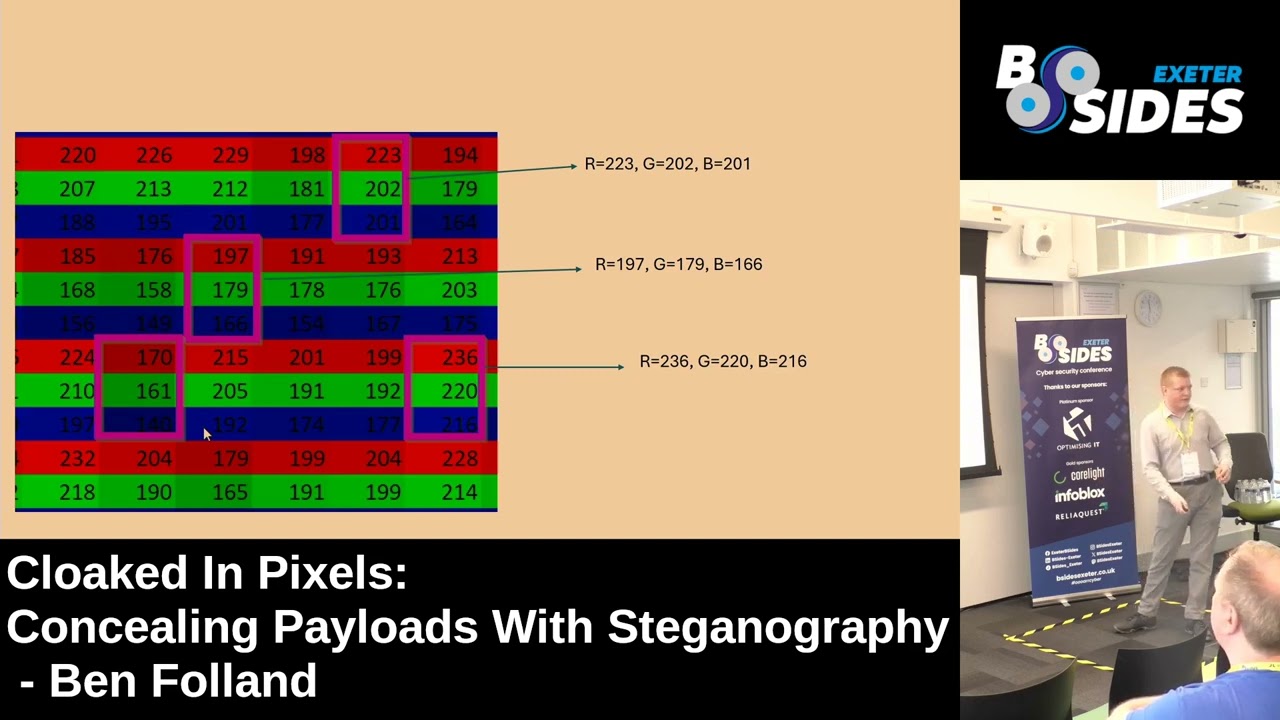
these pixels store three numbers and the numbers represent the strength of the RGB components of that pixel um and just to explain this a bit further I've got an analogy here um that should be uh it looks like an image of time bridge in Newcastle in an Excel spreadsheet I can see it hasn't displayed it too well but I'm still going to play this um and we can see we zoom into this Excel spreadsheet and um we can see this isn't actually spreadsheet it is an Excel uh sorry it isn't an image it is a spreadsheet made up of loads of different cells and what I'm doing there I'm highlighting three particular cells um and I've highlighted one red green
and blue cell all in one di column and that is one pixel you can think of that as being one pixel it's got three numbers one number to repr the strength of red another number to represent strength of green and the final number to represent the strength of blue so um by the way if you wanted to try that out yourself you can upload a photo There's the link to it there and it will convert it into a spreadsheet it's quite a fun uh thing to play around with just to highlight this um Point I've got an Nevo analogy with a a simple web app I wrote and we've got you think you can think of that red box there being one
pixel and we've got sort of three columns here for RGB and um we can change the the the number to adjust the strength of the corresponding RGB component at the moment there is 255 in decimal which is what we all count in it's what we know as our numbers and then we've got the binary conversion above that um I'm going to modify these number numbers a bit and I'm going to start off by going through each color individually so I'm going to change that to zero and then we're going to choose the green maximum 255 and we're going to do the same for blue nice what I'm now going to do is do a mix of these two colors and see if we
can get maybe a pink color so we going to add a little bit of green and more red okay and now we can see we've got a pink color what I'm now going to do is I'm going to modify the far right hand side bit on the binary uh conversion of each of the RGB components so at the moment for the red number the decimal number is 231 and we're going to modify the far right hand side bit and turn that from a 1 to a zero okay and we're going to do the same uh for green and blue and I want you to notice the color of this final box and what impact this makes so we're going to
change that from a 1 to a zero and going to go to 230 and we're going to do the same from there and so on and so forth we've modified the three bits and it's made a small impact on the overall color and just to highlight this this is a really important Point we've got two pixels here which look almost identical in color but we have modified the far right hand side bit and we can see for the decimal conversion it's changed by a magnitude of one for both of those that far right hand side bit is called the least significant bit modifying that has a small impact on the overall number and hence has a small impact on the overall
color and that is where we can use uh steganography so we've got an image and it's made up of pixels and each pixel has an RGB component we can modify the least significant bit for each of the RGB components of each of the pixels and it won't make a big impact to the overall image okay you would have noticed an image has a finite number of pixels right you can count the number of pixels and let's say the image is X pixels wide and Y pixels um tall each individual pixel we can encode three bits because we can encode um one bit for the uh least significant bit of R and then one for uh green and one for
blue and so on and so forth so if you've got X pixels wide and Y pixels height there is a maximum amount of data you can encode with uh stenography and that's 3xy so that is important to know um there is sort of an uh an upper limit to the amount of data you can encode so we're going to get to the heart of this talk and this is the python implementation for the Stog graph Shell Code encoder and Runner so I've got two scripts one is V2 encoder and the other is V2 Runner I've also got the get up repository where these are hosted and I've got two blog posts which go in detail to the source code how this will
works how it all fits together I'm not going to be able to explain all the code in detail today and I would encourage if you're interested check out those blog posts and have a look at the um the repository let's briefly go through this first script so the V2 encoder this script takes an image um a normal image legitimate image and takes your shell code and it encodes the Shell Code into the image and it can use this least significant bit stenography to do this okay so this would be run on your sort of your attacking host the one you're staging your payload on you wouldn't run this on your sort of compromise host your target host um here is the source
code for this um there is an important function in code LSD and I've reacted this to space this function uses Le significant bits tonography to Loop through each of the pixels and then modify it to embed your shell code the other important thing to uh note is there there is a variable called Runner string and the runner string contains further python code this python code is used to execute the Shell Code this python code in the runner string variable is also embedded into the image okay so that's the the uh the encoder script and we're going to move on to the runner script and we'll put a bit more attention on this one this one is to be
executed on your target host um the one on your compromised host basically um this source code is a lot smaller um and we've got a decode function the decode function reads the image and goes pixel by pixel and pulls out the least significant bit and then we've got a bit at the bottom which basically executes this um and executes the Shell Code and does whatever the Shell Code does and I'm I'm going to step through this decode function because it is important so it takes one parameter and that's the file name of your encoded image your malicious image okay we then use um an image library to pull out the width and height values and then we do a triple um
nested for Loop so we Loop through each pixel and then for each pixel we Loop through the RGB components and then we pull out the least significant bit of all those RGB components of all pixels um when we did when we did encode this Shell Code and the other stuff into the image we needed to uh add uh eight concepted zeros or a n b to indicate that this is where our data is up to and then when we decode it we look for those eight consecutive zeros and that will um tell us that all the data on from that point is normal it's normal it's the it's the image it's it's benign and then
everything before that is what we're encoding okay um so that is the script the other thing I want to uh highlight is this um we've got at the top there the buffer that's the Shell Code and then we've got this stuff which is in the runner string variable all of this would be encoded within the image this would never be written to this and that's an important point to make this would only be pulled out dynamically and run in memory if this uh script was stored on this it would likely get killed by antivirus very quickly um but that's dynamically extracted from the and then execute it and I've got a semi live demo here um
it's just a recording of me doing this earlier and on my right hand side I've got a Windows machine and on my left hand side I've got my attacking box what I'm doing is just showing Windows Defender is enabled um and it is and then I'm also going to show you the process of once window Defender is running and it is Ms MP g.exe and then there's also Hitman Pro which I believe is an antivirus associated with sofos and that is running once we've done that I'm going to generate the Shell Code and I'm going to before I do that I'm going to show this image new castle.png this is a legitimate image it hasn't been
modified yet okay once we we've got that image we want to generate Shell Code which we can embed into that image and that's what I'm going to do on the left hand side here uh first of all I'm going to get the private IP address of my Cali machine so when we generate the Shell Code and for example I'm going to generate a reverse shell here you could do whatever you want um but just for example I'm generating a a basic um Windows uh shell code for that c box um so I'm using Ms Venom to generate the Shell Code and then I'm specifying the El the list H the private IP address of the Cali machine and I also need to
choose a port to listen on and I'm going to choose Port 31 337 and then finally I want a format for the Shell Code to be generated to be python and then once it's' done that it will take a few seconds but we'll get our Shell Code generated and now we need to move this and save it in a in a text file shell code.txt and once we've got that we can embed it into the image and we can run it so I'm saving into shell code.txt and then I'll run dur on this side and we can see the size of the shell Cod txt files been updated we can type it out we can cast it out just to
verify that um text file now has the the Shell Code Okay so we've got the Shell Code we've got the image we can now that encoder script um to encode the image the Shell Code and that's what I'm doing here python V to encoder we need to pass attack s for Shell Code and attack I for image and then pass that through the command line argument and we will see when I do that it will generate a new file and this new file will be embedded with the the Shell Code and hopefully uh when I do that it generates Poore Newry I'm going to get these two images and we can compare them on the right
hand side is the malicious um uh image but we can see they're indis indistinguishable they look almost identical you wouldn't suspect the one on the right hand side was malicious okay we've got this malicious image and I'm now going to go on this V2 run and script and I've hardcoded the file name to the malicious image there um now we can run this and see if it works but before that I want to set up a listener on my C Machine um just because the Shell Code I generated was for a particular port to pull back to C machine so I need to listen on that P on the pad machine and I'm listen on 31337
I'm using neet p to do that and then once I've done that on my right hand side I'm just going to execute the script and we can see we get a reverse shell P back I can run who am I whatever I wanted to do um I've got remote access to the Cali uh to the windows box from my Cali machine and just to show you I'm going to create a directory you have been poned on the Cali machine and it's creating it on the Windows machine that's just to show you um we've sort of just compromised it obviously you could um choose whatever Shell Code you want it to be you could um embed a Cobalt Tri
Beacon you've got freedom to use whatever Shell Code um however there is an upper limit to the amount you can encode however I've never got close to that okay um this didn't get detected by Windows Defender no detection flag up however if you did some um really strange C code which deployed ransomware maybe that would it all depends on what you want to execute um so just to show you we can upload those two scripts or sorry we can upload the V2 Runner script to V virus photo and it has no hits that's because it doesn't contain any sort of malicious code um all the malicious code is stored within the image using Le significant graphy which
virus won't protect um if you the B2 Cod strip is would flag as malicious because there are strings in it um which um antivirus vendors would definitely uh flag up so why does this evade antivirus and would it devade endpoint detection response so how do this antivirus work um antivirus vendors they have signatures for known malicious code and that when a file is written to this it will scan against these known signatures these signatures May be specific strings they could be Yara rules they could be hashes okay in this case we've got no malicious um signatures stored on this it's only dynamically uh sort of generated when it gets pulled out in memory from the image um would it bypass
EDR I haven't tested this I don't know for sure and it depends on the Shell Code for this reverse Shell Shell Code I suspect it would EDR doesn't work by using signatures on files it works by looking at the behavior generated by the activity which is going on so mainly the process for an activity or the network connections the process makes and the registry modifications and so on and so forth in this case I reckon EDR would kill that process so that's my sort of proof of concept let's have a look at a few cases where stenography has been used in the wild um by real hackers by real threat actors and the first case
I'm looking at begins with um a malicious Word document delivered by fishing like a lot of these malicious Word documents they have a macro and this macro DBA macro contains um usually that it download further stages to perform further actions so we can use a tool called o VBA to extract the macro from that word document and we can see it's obstated it's unreadable you don't know what it's doing so so I'm going to quickly decate that that took me a littleit a lot longer than one slide click but we can see that's roughly what it translates to that is what would happen um and I'm going to break that down we can see there is um a load of
sort of just Windows commands being ran and these are the commands first of all the directory which this is executing from is changed to Local app data after that a JPEG is downloaded from this external domain club.xml Steam format.com and this jpeg is sorted outputed to this local app data directory and then the C util command is used to decode the jpeg to an AE the C util is a native Windows binary it's signed it's used by CIS admins to manage certificates it's not malware um it's what we call a LOL bin uh living off the land binary it's legit but it can be used to perform malicious actions so we've got this jpeg here let's inspect
this we can download that ourself and we can run the file command and verify hey this is this is a normal jpeg it's not an executable and we can open this and see it's a photo of the James web telescope okay but magically when C was run on it an exe was extracted somehow so we can do some further analysis and sort of dig into this file and I'm going to use the strings command to do that I'm going to run strings on this JPEG file and see what else we can find um when I scroll up to the top we see the the sort of jpeg magic bikes the header at the top which indicates this is a
JPEG that's what I mean it is it is a JPEG if we scroll down we see we see a big section of text and it begins with begin certificate okay so we can remember and I'm going to go back one slide um that s util command was used with the decode flag and when that command is R it will look um at the the jpeg for that begin certificate and it will b64 decode the contents so what we can do is um copy that Bas 64 text which was embedded within the image put it into cyberchef and basically for decode it and we can we can see the sort of MZ at the top and that this program
cannot be run in DOS mode indicating this is a portable executable if you wanted to sort of verify that you can even um um there's a there's another cyberchef function called detect file type you could put that in there or you could download this and then upload it to virus total and you can say this is sort of the final stage payload so the word document uses a malicious macro to download a JPEG and then it uses siru a Lin to extract an ex from that JPEG and then it will run that um that is one particular case um I'm going to go over another case now from Trend Micro they released a blog post on a
particular strain of malware which they named power and like a lot of malware is delivered Vice fishing and in this case we've also got another malicious Word document the word document has a macro and the macro uh executes some windows commands and then it eventually executes Powershell this Powershell downloads an image and plays around with it and then magically we can see further power shell for so let's have a look at this Powershell which is executed um and which downloads this image okay this is what it does here I've got no idea what the full URL is but we can see it downloads that PNG and it does some bit map and get pixel operations in the
Powershell to um extract it this one also uses least significant bits technography and it's using an open source tool called invoke PS you can download this on get up you can use it but like a lot of tools pen testing Red Team Tools which were created for a legitimate purpose um like mini cats they become Abus in the wild um so there's the link where you can download it and I've got an example of how it's used you would download this on your sort of staging box where you want to prepare your payload and you would run invoke PS image and then you can supply a Powershell script you want to embed within the in and in this case
just for example I'm doing invoke minat and then you supply an image in this case bid nule and then an output it is evil B evil Das B bze Newcastle so when I run this it gives us a oneliner we can use um which automatically uh opens the image in this case we can see it's using a hardcoded file path from my PC um previously we saw that posted on a HTTP server but in this case when I generated it it uses just straight from the the VM I'm using and it gives you a one liner to sort of extract that second stage payload from the image and execute it this is a lot neater this one ler than my group of
concept um but it's been used in the wild I thought I thought to mention it and just to show you we've got the two images on the left hand side we've got the bid New Castle and on the right hand side we've got the evil Eid New Castle um you can see a slight difference but it's not major um you wouldn't suspect this one contains a mini Pat SC okay so there are a few other cases I want to mention uh one of them uh comes from the huness team and recently this year they were dealing with a campaign um an xorm campaign and once again it starts with fishing um this fishing uh contains an attachment the attachment
contains zip um that had a BBS grip which uh downloaded further Powershell and then it downloaded a death paper okay if you for a de wallpaper M you pop up your desktop you should be worried um in this case the def not wallpaper you seg go to stenography to um encoder xorm binary um J Minton from Huntress did a YouTube video on this I would recommend checking out um and Izzy posts about it there so um one final thing I want to mention this GitHub rep this GitHub repository St in the wild um it lists all the sort of places where um in news articles or security blogs where steganography has been used in the Wild
by FR actors to evade detection um there are some really interesting stuff mentioned here and if you if you like this talk I recommend checking that out um I've yeah I believe that's it any
[Applause] questions what's your favorite dinos T-Rex yes how would that's that's a great question so um for the audience trap hunting is uh a process you will perform to to maybe identify malicious activity which your current detections have missed um first of all if I was a threet hunt for this I would want to um have visibility of the process activity on all my hosts with the command line arguments involved and I would start off fairly simply just by looking for um processes with um uh file extensions for images like jpeg PNG and so on and so forth in the crown line arguments of processes and if you find all processes which have those um sort of file extensions of an
image in in them you can quickly be able to identify ones which may raise concerns for example if you saw one C or another sort of native Windows Lin then obviously you you should be concerned if you s something like photos. exe you don't need to be concerned that's like legitimate um when you do that FR hunt threet hunt um you can also create some detection logic off the back of that right you could look for um C util processes spawned containing jpeg PNG in the command argument and when that generates when that process is formed you alert on that and you can identify that um any other questions thanks much thank you very much
Related talks
 40:47
40:47 38:06
38:06 35:42
35:42 13:22
13:22 53:54
53:54 3:19:17