Recognizers for the Rest of Us: Building a Lightweight Threat Intelligence Platform
Show original YouTube description
Show transcript [en]
Hey everyone. Uh, welcome to Recognizers for the Rest of Us. Building a lightweight tip. Uh, my name is Striker and I work at Fable Security. Uh, and this is a process that I first put together because when I first joined the grid of cyber security, I could not possibly keep up. uh everything was going by way so fast that I just had to come up with a new way to do it and I didn't have half a million dollars to spend uh on one of the professional solutions for building out a recognizer uh or as I normally call it a threat intelligence platform which is what we're going to talk about here today what we what I ended up doing
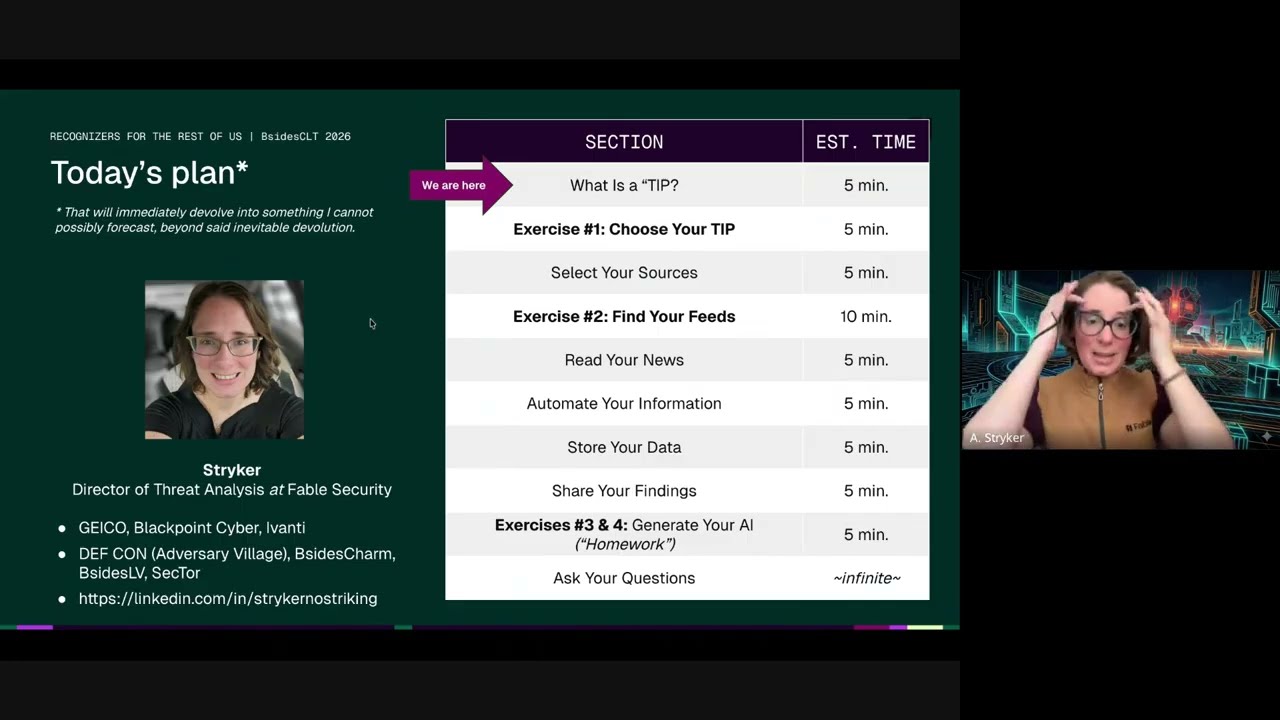
in order to be able to resolve that. So again, hi, I'm the director of threat analysis at Cable Security. Uh I used to work uh for Geico, Blackpoint Cyber, and MDR uh and Avanti, uh a cyber security vendor. I've spoken previously at Defcon at BIDE uh around the country as well as in Toronto at sector. Uh and if you'd like to connect on LinkedIn and have more questions, always happy uh to give you a hand um even beyond today's presentation. So, just as a quick kind of review of what we're going to go through today, we're going to actually define what a tip is, uh, because there are many different types of recognizers that you could build depending on what
you're looking for and who you're reporting to. Um, and then we're going to figure out exactly uh what our minimum viable uh, cruiser is going to be. We're going to pick out the appropriate sources for what you're trying to do. Uh, and then I'm going to walk you through a whole bunch of ways in which we find hidden RSS feeds. Uh, and then how you very quickly can review these things, automate it, store it, share it, even use generative AI if that's what you want to do. Uh, and the key here is I'm going to show you a bunch of different options. I'll show you how I built it when I first built it. I'll show you some of the ways in
which I'm I've iterated this process over the years and how we're using it at Fable and part day. uh and let's get started then. So first of all, what actually is a thread intelligence platform? Uh let's break down each of these words. And full disclosure, many people can think of uh different ways to define this. And this is how we are defining it today for the sake of this exercise, right? Um, I'm not going to sit here and say you're going to be able to recreate uh one of the big pay-to-play players uh with all of the functionality and bells and whistles, but at its core, a threat intelligence platform tracks bad guys or uh bad events that could impede whatever
you're trying to protect, and it takes uh the information about that thread, turns it into intelligence, which we'll get to a little bit here in in a second. Uh, which is contextualized information that's actually useful. And a platform basically is one centralized place or series of places that have been kind of stitched together in order to accomplish a single task that none of them could really do uh on their own. It is the quintessential uh this sum this sum is greater than its parts. All right. So basically a tip you can think of it almost like a process when you're uh gathering threat intelligence. So a source will have new information about something you care about. It'll
enter a feed uh which is like a channel and a digital channel uh for collecting all of that information so you've tuned in to the right TV channel for the episode of the show you wanted to watch. And then once you have all of the episodes, uh, you have to decide which ones you're actually going to watch first. So you're going to triage that from a board of some sort, a dashboard, uh, terminology changes, but one central place. You're then hopefully going to be able to put in automation so that you can extract out the metadata and any of those important nuggets that actually matter for your organization because you don't always have to do the same thing
every time. You're going to then store it in a database of some sort so you have it available and easily found when you need it. And then you're going to send that intelligence to the people or the tools that need it most. also programs and how that is formatted and how that's written up can take many different forms. This is one of the forms in which uh I first distributed it when I was doing this for fun just to see if I could do it a couple of years ago. This is end result intelligence that I pulled uh having uh uncovered a lot of this information from uh a feed that I put together um in order to demonstrate uh
what the operational impact of cyber security was, not necessarily the uh the technical details on the backing. I wanted people who weren't technical to understand just how bad this could get, but phrased in very human ways that they could understand. And at Fable, we actually use our uh parts of this particular process to pull together into a custom dashboard uh where we explicitly pull out uh the human uh threats that externally could impact our company and our clients uh and use that to inform different awareness briefings that we send out on their behalf. So uh with that if you remember nothing else from this presentation one information does not equal intelligence information data IOC's uh the latest
headline that your executive sends to you that's all good information but you have to be able to judge whether or not it's accurate whether or not you uh the source is reliable whether or not it's relevant for your organization or whatever you're trying to protect has to be contextualized. And then you need to repackage that information out of how you originally got it into a way that somebody can take an action. And even if it's just they read it and then they actively decide not to take action, that's also an action. So that's perfectly fine. Uh a tip, our thread intelligence platform does not equal an information horde. Do not try to collect everything at once.
um collect and keep only the information that is relevant and still good for your goals and that you can act on. Don't create a doomsday library. Uh you will never visit it again. You will never use it again. Collect the things that you can actually take action on or need to inform other things.
Uh from there uh the third thing is if the tools you already have and know are available. Don't think that you have to buy the very specific uh thread intelligence platforms if you're trying to get to a minimum viable product. And we'll talk a little bit more about this here in a second, but you're going to want to create a minimum viable tip here. It's lightweight, right? You're gonna you don't need to buy the full recognizer if you can get by on a cycle. Uh and so while you're looking with a handheld scanner perhaps uh for the information that you need. So the tools you already know and have are going to outweigh even the open- source tools and
definitely a lot of the paid ones uh when you're trying to figure out what exactly you need to do. So brings us to our first exercise actually. Uh you need to figure out why you are building your recognizer. Uh is it just for fun? Did your boss ask you to do this? Uh what exactly are you even securing? um why would you collect for example or worry about vulnerabilities in Linux if you're not responsible for dealing with the servers? Um I personally don't collect patch notices in the threat feed that we do for um Fable because we don't do patch notices because that's a technical control that needs to be rolled out from it. that is not
something that uh an individual employee will often be able to do. Um I do collect that information. We do make it available and and I do keep an eye on it personally, but that's not what I'm securing. I'm securing human behavior. And so that's what my threat feed is tuned to. That doesn't make the other stuff unimportant. It just keeps my feed focused. Who or what are you sending intelligence to? You could be sending it to a tool. you'd be sending it to a person. How do they best like to get that information? Have you formatted that information? Do you have a template for it? Um, have you asked if it's a person how they best
like to receive uh any sort of intelligence? And then what do you want them to do? What is the end result if you do your job correctly? What would you ideally have happen? And then finally, think about what tools and skills you already have. Right? Again, this could be a great opportunity for you to extend your own knowledge and your own uh an excuse to learn how to code if you wanted or an excuse to do something else. Um, but start with what you know first and then pick one thing if you're going to build from it. So, for example, when I did this, I learned about web hooks and I learned uh and I
got to use a lot of my former metadata knowledge uh back when I was helping to uh triage websites. So, I knew a lot about how to find the backend schema of things, but I didn't know an awful lot about automating between systems. So, that was one of the first things that I learned how to do while building on things that I already knew. And I will make a note here. If you're going to make this the information in this tip publicly available to other people, your biggest mistake is going to be uh if you only think about what interests you and not the person you're or the tool that you're sending this to. Again, you
really got to stop and think why you're doing this. So, I did this whole big rigma roll a couple of years ago. I shared the link with all of my buddies. uh I would often, you know, use it and and I was so excited and I'd build this thing and I thought I thought, you know, I was building this for uh to help my security friends and nobody used it because it was such an odd hodgepodge of information because these are the most interesting things that I thought were cool, not necessarily things that other people ever needed. And so it became um a very interesting relic and project and exercise for me and I had to learn how to tailor it for a
specific audience. So figure out who you're talking to first and don't just collect stuff that you think is nifty unless of course that's your personal goal which brings us to your turn. And if the answer to the first question here on the screen, I want to build a tip because is I want to build it because I want to be able to share cool stuff that I think is cool with people. Great. There you go. But most often if somebody has asked you to do this from a professional perspective, has asked you to do uh uh this kind of work, um you're going to want to put in what why they're asking. And if they they're asking just because
somebody thought it was important and needed, then the rest of the questions will help you here. Uh my tip will collect information about specifically again think about what you're protecting. Think about the organization uh the tools the tech stack and the types of people that you have. What would be most important? And if you're going and don't try and catch everything. Maybe you're only ever going to try and catch all of the Microsoft things related things, right? Maybe you're only going to catch everything about lateral movement. Maybe you're really interested in living off the land techniques. Maybe you're tired of missing uh besides calls for proposals. So, you're going to create a a feed where th that information and those
announcements are just going to be fed to you in a certain way. Um get specific the resulting analysis. So, after you collect the information, you're going to do an analysis because that's what you do as a person is contextualize it. You'll then be sent to something or someone and then you have to figure out how you're going to send it via messenger pigeon singing telegram API um a slack message an email and then imagine ideally what that person will do because they got your intelligence ultimately with the goal of making things more secure because you don't get budget unless you can justify uh why you did that. Hopefully, you've been filling in these blanks uh while I have been
going over this slide. Just keep that in the back of your mind as we go through the rest of this presentation because those answers are going to impact how you choose to uh build your own recognizer here moving forward. So, you're going to select your sources now. And this is really fun. Um, one of the one of the big reasons people uh buy recognizers on the grid is because they come preloaded. It's harder to build things by yourself and you don't always know what you're missing. So, I'm going to about to show you how you can start broad and find the primary sources that you think are worth it. All right. So most everybody knows
secondary sources like these. I call them secondary sources because they didn't source the information. These are basically curators of a whole bunch of different uh uh security blogs just like you um would like to uh initially find, but they already know where they all are and they surface what they think are the most interesting that'll get the most eyeballs, etc. and they'll summarize it and rewrite it in their own words for their own audience. That helps you identify things at first. And and when I first started, this was as far as I knew how to go. I had a couple of colleagues who told me where they went. Uh Bleeping Computer was a big one. Um Walker News.
I liked Wired. Um I have a fondness for the register um and their editorial recorded future blog. Um I got access to. So, I started there, but they don't always get it right. And often they're a couple days after it originally published because somebody else has to surface it and then rewrite it. That takes time even with in today's day and age. So, how do I find those primary sources so I get notice about the information I need before it hits the headlines? You look for the quotes. So here for this particular source for tool shell um researchers at eye security say they discovered whenever you see that underline that's going to be a hyperlink to some sort of resource.
Sometimes if they're not great it'll be a hyperlink to like if they hyperlink a keyword it might be to another page on their website um to keep you in there. In that case, what you would do is Google search or search on the web browser of your choice, uh, I security, and then you would just paste in that quote, dozens of systems actively compromised. And that'll bring up the original, um, source for you pretty quick. And then here, uh, you see multiple different, uh, hyperlinks here, and I' I've pointed out where they are. So, you can find GitHub repos, uh, to plug in. you can find an actual original research and add that research blog to
your feed so that next time you'll be able to just sort through all of your actual research sources first instead of anything else. Uh there's also people you can end up finding. Now I don't personally follow this person um but they might have piqu your interest based on what he said and so you could follow them for the latest news and see what they have to say about things too. So, it'll find people. It'll find interesting social media people to follow. Uh it'll find actual repos. Um it'll find research blogs. Highly, highly, highly recommend you go straight to the primary sources. But if you'd rather not, here is my seed source list. Now, I'm adding to this constantly because I'm
finding new niche security teams uh to go and and follow. Um, highly recommend just take a quick snapshot, take a quick screenshot, whatever uh and go follow these um and use these to seed your feed. If you're interested in general uh cyber security things, you can do uh different source seed list. Uh if you're doing vulnerabilities for example, I would highly recommend finding the security bulletin pages for all of your tech stack that you're worried about and go ahead and find those on the back end in the next exercise. Uh but that's my initial. So now we're going to find your feeds, right? So you have found the sources of information that you want and you have
this initial list. So how can we collect the information? Well, we can do this in a couple of different ways. Um, it used to be that you were able to when you find a primary source like this, you could click into your browser and it would create an RSS feed for anything new that would pop up on that web page. They depreciated that functionality almost so long ago I can barely remember. Um, but uh you're going to have to be a little bit craftier these days because researchers when they publish They want you to go to their website, right? They want to make sure that you are giving proper attribution that they can direct you to services or to
products or whatever, right? People giving out free things, even if they mean well and they want to protect people, which these researchers typically do, they still want to be able to make money so they can afford to eat and continue to protect people. But that doesn't help us if we're having to go visit 150 different websites every day just to see if something's new or triage that in email or something like that. So what do we do? We find the feed because every blog, every website has to have some sort of back-end feed to feed to to present the information in a way that makes sense. And there's a couple of hidden ways you can find it in the HTML.
But first, you can always try Google Alerts. If you're looking if you're not caring so much about a primary source like what we just showed here, you can always go to Google Alerts and have it create a uh feed for you. Now, there is a little uh uh RSS symbol. It looks almost like the Wi-Fi symbol almost uh in that picture of Microsoft Security where I'm just looking up a random keyword. It supports boolean search as well. Uh so go ahead and mess around and see what ends up getting pulled for such a such an alert. And you can toggle it to pull in every time something new happens, once a day, however you wanted to do that. It'll
spit out a URL uh where you can see here it'll put the information into a very nicely structured uh data set for your eventual dashboard and uh database. But if you're looking for, excuse me, if you're looking for the RSS feeds here uh in the uh great wide world of the specific primary source that you're looking for, what I would do is I would go to that homepage of the source. So here you can see I didn't go I didn't try this on the page of that specific blog I wanted. I went to actually the primary homepage of in the US the security blog and you can see that up in the URL. Um, and I rightclicked on the page. I
said view page source. I clicked the little line wrap checkbox up at the top so I could actually read this thing uh without having to infinite scroll to the right. and then CtrlF to find RSS atom or application XML and you can even see um you can see the application RSS plus XML here in order to get to the feed. Note too that we found two here in the backend source. We have blog feed and we have security blog and comments feed. Would not recommend the comments. that's going to flood you unless you're really curious about what's going on. So, a second way you can do this is you type in main blog or site, whatever that is.
And again, this is the Microsoft US security blog. That's what we're considering our main site. Black any of those end points. And if you wanted to get more specific, like if they had a specific blog category like uh notices or uh zero days or something like that, type that into the to the domain before you do slashfeed. So you can sometimes see if there's um um if they're just hiding that feed. So it would be slashfeed or slash RSS and by forcing it into the domain. Always a good thing to try. Finally, this is a little bit messier and isn't necessarily something I would recommend if the other methods uh work first, but you can always go to that
main site. And you can see here that I had to go to the actual root uh microsoft.com domain uh and try either the robots text or the sitemap. All websites have to tell search engine bots and generative AI bots now as scrapers what's on their website and how does everything relate to itself. Somewhere within your uh the website will be that source feed of information and it's a little bit buried. So I went to the main site. I managed to find the security map index. I clicked on that and then I eventually found the US site map which then got me to that threat feed which I can then parse through uh to see when anything new is added to
that website which I'll catch a lot more noise than I would have otherwise just going to the blog and creating the RSS feed. But it gives you an option if things really get dire. So now it's your turn. Uh, and what I'm going to do is actually be quiet for like, you know, 5 minutes. I'm going to pause and you guys are going to give this a try. I gave you a whole list of sources earlier or you could just go search online for a research blog or a website, a media outlet that you wanted to follow, excuse me. And uh, try out one of these things. Try and make an RSS feed. uh using one of
these different methods.
And for what it's worth, I know that on this recording, if you're watching this in the future on YouTube or or uh a different platform, you could just hypothetically pause this and then move on. But for the sake of the actual presentation and the live humans and knowing that everybody means well, I do this in this presentation to make sure that everyone actually does take the time to give this a try. Um, or and if you run into questions at this point, you can always in the future contact me on LinkedIn or use the chat now.
Hey, that was less than five minutes, but I'm going to keep moving on. So, now that you've found some feeds and I've taught you how to find some of them by hand, I'm going to do what my favorite math teacher in high school did, which is, now that I've shown you how to do it by hand, let me show you some cheats. Now, I'm going to present a whole range of things and ways in which you can find them that I have been recommended personally, some of which I've used. Uh, I have not actually verified most of these myself, so please use at your own risk, especially browser extensions. Um, I cannot vouch or guarantee that they still exist by the
time you watch this, that they're still accurate, um, that they're still useful, that they're still cheap or free, uh, that they're secure, that they're private. So, please use your best common sense and think about now that I've given you some of these options, think about alternatives in your own tech stack that might be able to be helpful. Personally, I really like um Beadley. That's was the natural drag and drop kind of feature that I was able to use at the time. Now, I've gotten uh better at identifying these things uh and identifying tools and I use more sophisticated tools now. But at the same time, sometimes just it doesn't matter how sophisticated it is as long as it
does the job, right? So now you need to read your news and you need to be able to do that quickly and you need to be able to sort it quickly which for me a dashboard. Tada. Here is my feed dashboard. Um this is done in Feedley and this is a screenshot taken from quite a while ago but it gives you an idea of what it looks like. uh what all of those feeds ended up looking like. And you can see I had a lot of articles to go through um and from a lot of different primary sources. And I want to draw your attention here to the different like collections. Um so they're called feeds uh within Feedley
and Feedley also calls like the buckets you can sort them into like you can pin it to a board. Um but uh other programs and other ways to do this will organize it differently. You might have channels, you might have uh literally buckets, you might have um any number of different ways to tag information that makes automation a lot easier. Uh because not everything in your feed is going to be useful. These people are uh generally talk about the things I care about and they are generally reliable enough that I would consider them a source, right? But not everything is needed for what I'm trying to do professionally. So I have to hand sort it all. And you can of
course put in automation and experiment with Genai for this uh especially these days. We'll get to that a little bit, but uh for now it also forces me to see what the headlines are and what I can expect to hear from executives soon. So these are the different descriptions of the feeds and the boards of why I generally um sort things into. And here are a bunch more feed collection options. And to be frank, uh, at this point, you're starting to feel like this is probably like a sim, right? It's just a sim for external telemetry. But when I first started building this, I didn't know that word. I didn't understand that concept. Uh, so I
treated them as dashboards or channels. Uh, some of the other ways that you can aggregate data include stuff like um, uh, MISP and and they have these sorts of, uh, similar aggregation features as well. So now, how are you going to automate your information? Because you need to do this pretty quickly. There's a lot of stuff you need to do and you're probably not getting paid to look at a feed all day. So what you're going to do is realize that on the internet at least where I have taught you to do this, there is a lot of backend. You saw that view source code how it was all structured in with different tags in the HTML. There's a
lot of metadata just like there is for security logs. So, uh you have you're going to have your title, you're going to have where it comes from. Uh there's often a description, there's often a date, and I would highly recommend uh you try and get that date of publish versus the date of retrieval. uh so the day you first accessed it because you might end up seeing something or a reference or include a reference that's older or wasn't immediately published on the day that you saw it. Maybe you went on vacation, god forbid, and you came back, you know, a month later to to your threat feed. Um that would you would want to stick with the data publication.
Uh the original URL and data sensitivity labels if you're collecting things out of um places that are not just openly available. Uh, I have included here definitions of different data labels and what you would end up doing. For the most part, and we'll talk a little bit more about this later, but for the most part, what we're going to be doing is public data. This is all stuff that's freely available and disclosed to the public. Even if you were to do a dark web feed, that would kind of technically be public data anyway. It's just hard to get to. That doesn't mean that it's that proprietary. uh inside the company, there are other types of data labels that need to be
added. And you want to make sure that if you ever include information in your database that isn't just uh it would be TLP clear um uh would be the the label in in um thread intelligence. Uh you want to make sure that you're labeling things as needed to make sure that they they stay that way. So again, so here's a here's a reminder screenshot of what some of that metadata looks like on the page. And once you have a pattern and you know what the property is called, uh you can actually uh code in bots to look for those fields. Uh and I highly recommend going to schema.org, which is the official nonprofit maintainer of the accepted
metadata tag variations. And there are more tags than just the few that I have labeled. So every time you grab a metadata tag, that's a new variable. That means there's more ways that you can sort and contextualize the information to have it become intelligence. Here we go. So these are some of my automations. There's a lot of automations. They get really complicated really fast. And this is just one of those uh one of those trees. I use Zapier because again I didn't know how to code at the time uh and I wanted to make sure that the information was sorted. So the basic process at the very start is that I would put an article in the board. I
would then make sure that it didn't need me to go and drill down to get a primary source or something because I didn't want it to sort. I didn't want it to not process the uh bulky PDFs I was putting in this library. Uh, and then it would make a record in my database of choice that I could find it later like a librarian and I could check it out and see what was going on. So, your automation can can do probably pretty fast uh extract metadata. It'll preserve relevant information and sometimes you can have it print uh the page to PDS or scrape the body text of an article. I have a friend who was
trying to build one himself and he had a collection of links and alas in a lack of day it completely um every time he went back to a URL all that that information was gone often after acquisition or the company folds they won't leave their information up uh or they'll have changed it in some way that is problematic. So being able to preserve the main thrust of what you're going for is really important. And then you can store it in the chosen database. So it's not just breaking it down into filters, but you're able to format it within some sort of storage place. I used Air Table for this one. Um what it could do next. Um so so think of this
as like next steps of automation. I wouldn't recommend doing it right off the bat. uh for your for your tip. Uh it can write up messages if you create a template and then you use the metadata variables in that record uh to be able to merge in and just automatically send out summaries of specific things for specific people to have it become actionable for that individual. That's great. Remember, you have to vary your templates per channel, though. An email sounds different and should be different uh and will have different pieces to it like a subject line than a Slack message or an IOC feed. So, make sure you you format that correctly for all the
different distribution channels. Do it once though and then you don't have to do it again. You send it to the corresponding uh distribution channels uh at a specific time of day or a specific uh trigger to a database field change. You have like a if this is filled in then send it here kind of moment. Uh, I sent my um security top five results of the new additions to the database every day at 9:00, I think, and then it would wipe actually all of those items uh from the list to be triaged um because I'd already reported on them. Uh so it would have cleared this late for me automatically about 15 minutes after that sent. Uh and then finally, you
could have it archive things. So, uh, everybody knows that a lot of our, um, information, the latest information, latest iteration of that information helps us keep up with the threat landscape. This is especially relevant for stuff like IP addresses where you get like a month at max of it being viable to block. So, for things like finished intelligence and reporting and these kind of bulkier things, consider having a kind of archival automated archival system uh, or at least a reminder to look out the latest information. Here are a bunch of automation possibilities. You can code your own. If you vibe code, don't put it connected to anything internally, please, ever. Oh god. Yeah. Uh just be aware. Don't do
don't be stupid. Um and don't be afraid if something seems simple or feels again the point is to make it work to prove that this is something worth investing in. It doesn't have to be fancy so long as it works and it's secure. Uh so don't use what you know or what you have. But how are you going to store your data? I use an air table. Uh this is just basically a very fancy notion or um very fancy Excel sheet or uh Google sheet. Oops. Uh so here is an example of record with Genai um with the uh CISA had released a uh Recidia ransomware update. So uh you can see here that the TLDDR was actually
summarized from like a 16page PDF at the time uh is that I could at least get the keywords of what was going on. go. Now, at work, we actually extract um more information um and run it through Genai uh for me to sort through and double check. And I'm usually correcting this and making it a little bit easier, but it gets about 70 to 80% of the way there. Uh and I can see at a glance what's going on and uh what the different attack vectors were that somebody could have stopped someone. And we use this in a couple of different ways that I'll explain later. Here are a couple of different databases. Uh, go
for it. Think of different ways and things you have access to. Remember that the what you have access to and know how to use trumps any sort of fancy stuff. And if you MISP is great, um, notion's great. I started out using folders and spreadsheets. It's just one of those moments. All right. So, it's not enough to hoard all of this information, right? we have to share the the wealth. Uh and once we decide that we have information that is worth taking action on because we have contextualized it and reformatted it into a way that someone else can use it, how are we going to do that? So for me, one of the things you have to do again
before this is to clean it. Uh so this was actually based on the uh this is the geni poll of the striker hack moment uh from from just in the previous section and they did not add the crucial part of this which was uh credential rotation that where uh the attack sector is specifically uh stolen credentials from an infosaler uh that was sold on the dark web and malingered for years uh and then reused in the attack. Moderate confidence likely happened. Uh I don't press approve until we make that fix back in the day. So once I made that fix and and that was always the case for every piece of content uh that I I
absorbed. Um so you're always going to have to do some sort of correction. Don't think you can put this on autopilot completely. Uh here are the three different I would automate an email. I would automate a masttodon post. I published on uh medium. I had LinkedIn. I had LinkedIn posts. I didn't use Twitter cuz I was weird. Uh but these are all the different ways in which you can just automate that output um once it's formatted because it's just pulling the variables from your database record. So it's like a plug-andplay at that point with your template. Nowadays, I have quite a few different distribution methods that we use uh for this. And my um whenever I add something
new to the human risk feed board, uh I there's an internal channel where people can talk about it. Uh and I use all of that information and cut and paste it into a Slack message because that's how my stakeholders internally who are making briefings like to receive their information. Is it fancy? No. Is it what I personally prefer? Not really, but it's what they do. And because they are the ones using the information, that's what counts. So, here's a whole bunch of different ways uh that you can possibly do this. Uh I highly recommend that you talk to someone to figure out what your internet site is. Uh if you can start getting onto like some sort of bulletin
or blog or automation that way, if you're going to be distributing awareness notices or something like that. Um and always remember, your mouth is a great distribution channel. Speak up. So finally, we're going to generate some AI, and this is homework for later. Um, how can we use Gen AI tools to speed up analysis? What it can't do, and I will argue that out of the box with a pasteandplay prompt, it's going to try. You're going to have to take a lot of swings at this to make it work consistently. It's gotten better over time, but it's not perfect. So, don't expect it to do all of the work for you. Um, the first, it
won't be correct all the time. It will hallucinate. It will not find all sources and information if you're trying to um, uh, consolidate. It will play favorites with the first third problem. And if you print the page to PDF, it won't always read the whole PDF be it will not be consistent. The outputs will not be identical. You probably saw my email where one of the summaries had a bullet and the other one just started as a paragraph. It was the same prompt that generated those two different formats. For some reason, it will have difficulty applying multi-step instructions though agents uh random uh the the rags uh with graphs source document references for it to go back and remind itself which can
also be skills and claw etc. Those are all very helpful. Um but multi-step instructions are can be problematic and it will not convert information into intelligence for a couple of reasons. Um it will not be able to validate which sources are most valid without again additional instructions and it will forget those. I've seen it try and grab uh complete strange weird blogs as sources to authenticate on some very uh specific information just because it's what showed up in search fastest. Uh I it has difficulty forecasting um because even as it sees patterns um it just has had some very odd moments with that. So, if somebody has perfected this um and is willing to share publicly
and hasn't locked it behind a half a million dollar tip, I'd love to hear. Uh and the last is relevancy. Um you don't want to be uploading source docs. Oops. You don't want to be uploading source docs to your uh tip as a rule. uh which means that it will not know what's relevant for your organization to do any sort of relevancy application and contextualization for your organization. You have to do that as the person. So, as an example, I asked a whole bunch of Genai um pieces to find uh aliases for um uh Linen Typhoon and it's very quickly gets to be conflated with other organizations or doesn't think it even has them. So, again, never put internal or
sensitive data into chat bots. Um, this includes you want to only have it be uh open source intelligence clear TLP clear. Um, so if you're a member of any of the information sharing places, uh you don't want uh TLP amber. That's not allowed. Um, you never want to put your tech stack in there, including what operating system or versions you have. Uh, you never want to put in any crown jewel assessments. You don't want to put in what known vulnerabilities, security gaps, or what compensating controls you're currently using because then you'll be giving thread actors a map. Um, you're not going to want to put in any implementation. You're not going to want to put in budgets and financials in
order for that contextualization because you are then putting proprietary information into an open model. Now, if you have discussed this with your uh department, you're going to host this on, you know, a known good server and all of the rest of it, and you want to put those controls in place, do it deliberately. Don't do it by default. All I'm saying. Now, what it can usually do well is summarize. This is a 16page PDF that it managed to summarize into a relatively short paragraph. It can help you find patterns. And if you're not sure what something means, it generally does a pretty good job with that, especially if you ask it for multiple sources, words,
definitions, uh, and best practices. Again, it'll pull from that and help, uh, give you comparisons and metaphors for things. All right, so you have two pieces of homework. The first is what I call the Xerox copy problem. It's when you ask it to repeat the same output over and over and over to just to show you how the output will change over time, either within a chat or every time you use an instance of that pre-plugandplay. It's not fatal to using Genai in this kind of work. Uh but it is a consideration and I wanted you guys to to kind of um have that in mind. This, by the way, this prompt is what I
personally use in order to uh shorten things. And the last exercise is hallucination station. There uh list 20 aliases for the threat group scattered spider in whatever genai chat uh you want to use. It will be fun. And then in a new chat I want you to lower the temperature. And the temperature is basically a way of standard deviations. Um, the lower the temperature is, the less likely the outputed text will deviate substantially from your input. And by raising the temperature, it's going to encourage it to go further a field and get more creative. Uh, highly encourage you to try this and see what the outputs are like. Uh, and it's very, very fun. And with that, you have officially built
a recognizer for the grid. um for your grid specifically. And whether that ended up looking like a cycle or a fullfledged piece of futuristic cyberpunk transportation, it's yours. Use it. And I'd love to hear where you end up taking it. Anyway, thank you uh so much for your time. Please ask your questions now either uh over LinkedIn or uh in chat if you're uh watching this at beside Charlotte 2026. Uh and thank you again. This is end of line.
Related talks
 41:15
41:15 45:10
45:10 33:44
33:44 20:40
20:40 12:08
12:08 29:30
29:30