Where's my dough?! A look at web skimming attacks on e-commerce websites
Show original YouTube description
Show transcript [en]
Sounds good. So welcome everybody to my talk. I am happy to meet you guys virtually. Welcome to my talk, Where's My Door? A look at web skimming attacks on e-commerce websites. So before I get started, I want to give you a brief introduction about myself. I'm a senior product security engineer at Salesforce. I specifically work on the commerce cloud product. for Salesforce. Prior to Salesforce, I used to do a lot of pen testing, fact modeling and code review. And I was in consulting part of aspect security and UI. I go by the clumsy coder on Twitter. So I'm available on the intro webs. If you ever want to catch up to me. The agenda of this talk is to give you a
brief overview of web skimmers, what they are, the information they are after, e-commerce sites they have manifested in, known hacker groups, that's Magecart, some web skimmer characteristics, such as how do they detect payment forms, how do they exfiltrate data, some of the anti-analysis features we've seen manifested in these skimmers. And then dive into a little bit of the mitigation strategies that we want to enforce to avoid web skimmers from doing what they do today. So before we jump into it, I want to talk about what we're looking at in this talk. We're looking at the e-commerce platform and just to give you a lay of the land, an e-commerce platform is something that's providing the infrastructure
and a reference architecture for merchants to build their storefronts on and kind of build their website on. And then you have partners that collaborate with the e-commerce platform to write plugins and extensions over your e-commerce platform that your merchants can use. For example, order management plugins, checkout plugin, and so on. So let's look at typical online shopping process and how a web skimming attack works in the context of an online shopping process. So a user visits a website, an e-commerce website, enters their credentials to log in. The user likes a product, so they they move that product onto a shopping cart. Immediately they move to a checkout page where they get to fill in their credit card information. And in that checkout page,
unknown to the shopper, a malicious scripts executes their, collects the, the credit card information and manages to exfiltrate that information before the order is placed. Now, sometimes This is of course unknown to the user. Sometimes it is also undetected by website maintainers or site administrators. Let's dive into some of the how web skimming actually started and some of the origins of web skimming. It started in early 2014 and in 2015 when a bunch of hackers started attacking Magento-based e-commerce websites. They were specifically looking for admin consoles that were exposed or arbitrary file upload vulnerabilities through like C-Surf. And they targeted these admins to upload these web skimming codes specifically in locations or in pages that were involved with the shopping cart.
And as you can see, these were all under the Mage
Shubha Sadegahararararararararararararararararararararararararararararararararararararararararararararararararararararararararararararararararararararararararararararararararararararararararararararararararararararararararararararararararararararararararararararararararararararararararararararararararararararararararararararararararararararararararararararararararararararararararararararararararararararararararararararararararararararararararar Third party libraries hosted on the site's infrastructure, third party libraries hosted on CDNs and also third party plugins or extensions that are part of the e-commerce ecosystem. Fast forward to 2020, we've all seen in the news, big incidents related to web scamming attacks, namely Ticketmaster, which was a huge supply chain attack where the
Magecart managed to compromise a third party service called Inventa. British Airways, where they managed to compromise the web server itself and host their malicious script. They hosted it in a script that would look very common to any web application that would rely on like Modernizr.js. New Egg. where they again hosted a malicious script directly on the checkout page. And then you had Macy's where the malicious script was added to the payment and the account profile pages as well. Let's look at an example of the skimmer that was manifested in the British Airways situation. You can see it's a simple and elegant web schema code of just 22 lines of code. Here you see that there is an event
of mouse up and touch end that is binded to the submit button of the checkout page. So here with just the mouse up and touch end, you observe that this was not just targeted for like a web based application or a shopper going to a browser, but also the touch end indicates that it was also targeted to shoppers that are shopping using the mobile app as well. So this was a very well-crafted attack by Magecart and they knew exactly what endpoints the application is calling and they had done a lot of recon before they actually targeted British Airways. The other thing that I want you to make note of here is that the exfiltration URL. The exfiltration is happening via an Ajax call and it's happening
to davage.com. Now, another thing to call out here is that they have spun up an infrastructure that mimics the infrastructure of British Airways. So anyone auditing the traffic would assume that BAways is part of the British Airways infrastructure as well. Does they get to be persistent on the server and exfiltrate as much as credit card information they want as long as a site administrator manages to call that out. Similarly, we see what happened in the case of new eggs as well. Well, an elegant just 15 lines of web skimmer code was added. You'll be able to see that it is the same group of Magecart because they use the mouse up and touch end technique targeting not just web browsers, but also mobile apps. And
again, they are using Sajidhan Vandpalajantharjeeva. The infrastructure that mimics a new new egg and spun up a whole new infrastructure that is that is very similar to new egg to to kind of get all that data off from their servers to do their C2 domains. Sajidhan Vandpalajantharjeeva. Now, based on the targets that these hacker groups attack. based on the volume of credit cards they get, based on the skimmer characteristics and the infrastructure set up, Threat Intel groups have managed to profile them into seven groups. Groups one, two and three relatively go for small size to medium size storefronts and compromising anywhere between 2,000
to 800,000 victims. They use the same domain that hosts the script that is also used to expel the data. Now, whereas group four to group seven starts getting a little more advanced. Group four goes after high value targets. They usually go for thousands and thousands of credit cards. Their skimmers also have a self-cleaning ability or anti-analysis features to them. We will walk through one of such examples as well. They also have complex infrastructure and their exfiltration or C2 look more like ad domain CDNs and analytics that you'll be used to seeing. Group five comprises of, of groups that go again at high value targets. They go for again, thousands of credit cards in bulk. And they also look at
third party, third party domains that the target domain relies on to compromise that third party does get a foothold into the major or the exact target they are after. Group six is the one that I showed an example of a skimmer in the previous slide. These are the groups that go again for high value targets like British Airways and Newegg. They directly inject the skimmer into the payment and checkout pages. They write very simple skimmers usually between 10 to 20 lines and compatible with both mobile and web as well. The seventh one is also very notorious because they use proxy exfiltration domains and these domains actually belong to legitimate organizations. So it gets even more harder to kind of
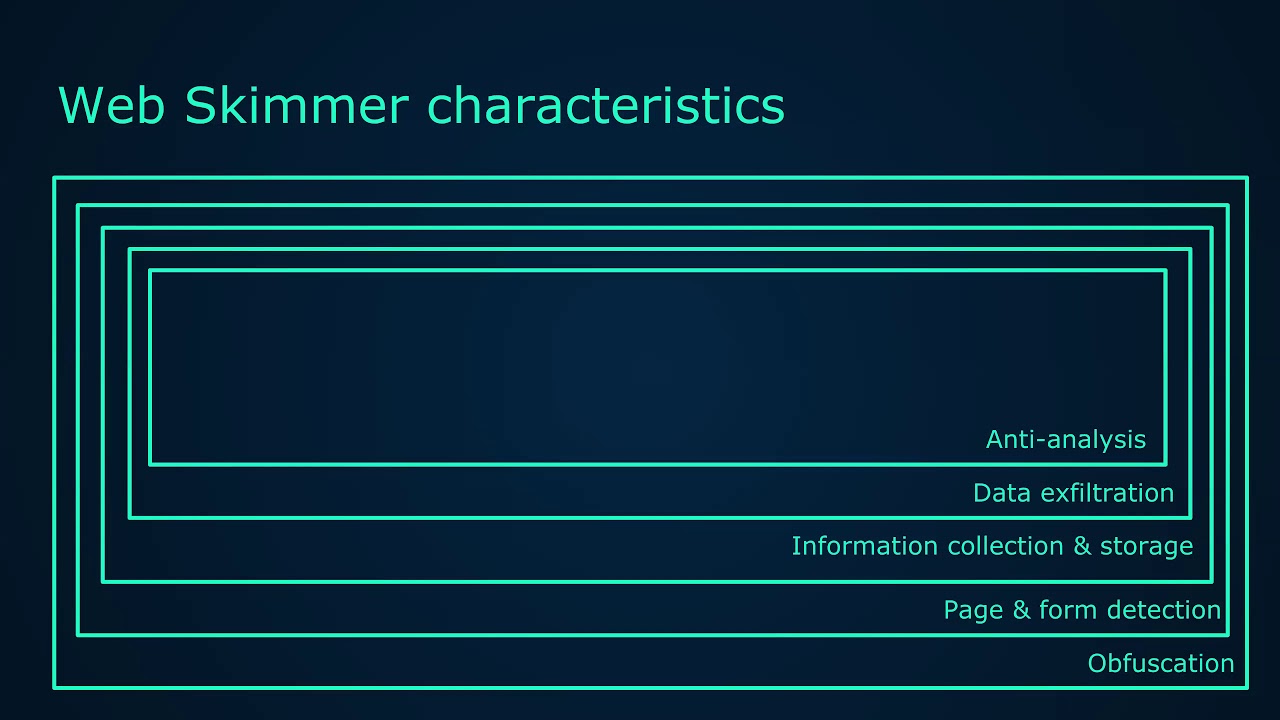
take down these domains as well. So let's look at some of the web skimmer characteristics. Over the years, these hackers, this hacker group has matured and they are getting very sophisticated in their skimming technology. And more often than not, it is now starting to look like banking malware where it has a layer of obfuscation. It has some kind of page or form detection. It has information collection and storage mechanisms, wherein a multi-page checkout, the skimmer manages to detect that and then store the user information in the local storage of the browser. Data exfiltration techniques, they manage to mimic the infrastructure of their target. They manage to exfiltrate data using a get image, which we will definitely be walking through.
And then also a lot of anti-analysis technique where they detect whether an auditor is actually looking at the source code, detecting whether the user is in debug mode and does self-cleaning or erasing their schema code. So web schema obfuscation techniques. So the main purpose of obfuscation is the action of making something less clear and less easy to understand, especially intentionally.
The obfuscations that you commonly see when it comes to these groups is name based obfuscation, code flow obfuscation, dead code insertions, string encryption, minifications and compression. So everything to make it difficult for anyone auditing the code to see what's happening. Let's look at group seven's skimmer characteristics specifically. So
Group seven skimmers are highly configurable. They not just allow you to just set the target domain name, but also let you configure the exfiltration or the proxy domains that you want to send the exfiltrated data to. So that's what you see here. And
these two parameters or these two attributes here or variables here. Oh, this is the schema code and it's relatively simple to go through the schema is simple in that it will check if a certain element ID. Check step review is displayed ensuring the victim has reviewed the products they are paying for reviewed the shipping details and finally filled out the payment information. If the form is active and populated, the schema will go through the individual form fields to grab the information. At the end, all the stolen data is concatenated into one string with each data separated with a pipe symbol encoded into base64 and prepare for URL encoding. Now, after the data is encoded,
sorry, after the data is extracted and turned into a large data blob, the exfiltration starts. The exfiltration of the data is done in the form of a get request instead of a post request. The skimmer creates two image elements.
And which then get the source URLs set to the compromised websites used for proxy. The encoded stolen data is appended to the URL along with the host name of the store the data actually came from. So you can see that here. So some of the skimmers also have anti-analysis techniques. And in this example, we see that it is using the debugger keyword. And if there is anyone auditing a checkout page that actually has the skimmer embedded in it, they would actually end up opening the browser's developer tools. And if the developer tool encounters the debugger keyword, the execution of that page would actually stop And it would expect the user would actually resume the control flow of the program. Now what the schema does
here is it makes note of the date and it makes note of the times and calculates the difference in the time. If it is greater than an redefined offset, it sets the is debugging true. And this informs the schema to kind of delete itself from that DOM or from that page. So these are some of the techniques that these groups are now starting to use to kind of evade detection and being audited as well.
There are also steganography based skimmers. So how often do we go to a e-commerce site and we see a label like this on a checkout page, right? There are ways in which the hackers have managed to even
Amitav Ghoshnavjeevaajanajanajanajanajanajanajanajanajanajanajanajanajanajanajanajanajanajanajanajanajanajanajanajanajanajanajanajanajanajanajanajanajanajanajanajanajanajanajanajanajanajanajanajanajanajanajanajanajanajanajanajanajanajanajanajanajanajanajanajanajanajanajanajanajanajanajanajanajanajanajanajanajanajanajanajanajanajanajanajanajanajanajanajanajanajanajanajanajanajanajanajanajanajanajanajanajanajanajanajanajanajanajanajanajanajanajan
that checkout page and turns out that is a JavaScript API call that's specially slice, it's called slice where it extracts that extracts the code from that position and invokes it as a function and does running the skimmer on that page and allowing it to get, do what the skimmer does and exfiltrate credit card information. WebSockets.
This is one thing that we've never thought of that could be used for web skimming, but turns out the hackers have managed to even use WebSockets as well. So if anyone's using WebSockets and we want to audit and see how this WebSocket was actually initiated, we'd actually try to search for a WebSocket initialization in that page. But this is a very nice, nicely obfuscated obfuscation technique that the hackers have used here. They have managed to cleverly hide the skimmer loader by using a CSS class to construct the WebSocket URL. And that's what you see here. This is the origin WebSocket call that. This is the actual code that creates and reaches out to the server using WebSockets. And this is the actual
routine that uses the CSS to kind of construct the WebSocket URL.
Once the WebSocket URL is created, it reaches out to the attacker's domain and the attacker's domain keeps sending some benign responses until it sees the checkout in the URL. Once it sees the checkout Aaliyantharajantharajantharajantharajantharajantharajantharajantharajantharajantharajantharajantharajantharajantharajantharajantharajantharajantharajantharajantharajantharajantharajantharajantharajantharajantharajantharajantharajantharajantharajantharajantharajantharajantharajantharajantharajantharajantharajantharajantharajantharajantharajantharajantharajantharajantharajantharajantharajantharajantharajantharajantharajantharajantharajantharajan
hundreds to thousands of storefronts. So what can an e-commerce platform provide to the merchants to make their storefronts more secure? And there is no silver bullet here. The solution is going to lie
on the collaboration of the merchants, the e-commerce platforms and the partners combined. So let's walk through some of the mitigation strategies that an e-commerce platform can provide to begin with. E-commerce platform can enforce two-factor authentication across all merchant site administrators and developers, harden server operating systems, reduce the attack surface by minimizing the exposure of services like SFTP and SSH,
Sajidhan Vandpalajantharjeeva. Provide secure by default configurations. So if the merchant spins up a new storefront, the e-commerce platform should always provide it over HTTPS and provide configurations to communicate over secure ciphers, for example. Sajidhan Vandpalajantharjeeva. Update developer documentations to reflect security best practices for reference architectures for the merchants so that they always start with a secure state when they use a default spun up storefront provided by the e-commerce platform. Perform secure code reviews of partner code extensions because we're seeing a lot of these hacker groups now target partner code vulnerabilities in the partner code to kind of compromise the merchant storefronts. perform secure code reviews of all of those extensions that the e-commerce platform maintains in their marketplace.
Sub-resource integrity. This is a very, very common approach to kind of stopping execution of malicious scripts in your website or your domain. So say you have the myshop.com and it requests a site,
Sajidhan Vandpalajanjeeva. And the site loads a JavaScript from some CDN.com or having a copy or the integrity or using the integrity attribute in the client side. Sajidhan Vandpalajanjeeva. Would be very beneficial because the browser would already have the hash or the message digest of the script that was requested. Sajidhan Vandpalajanjeeva. Once the script is downloaded onto the client, the browser now calculates the message digest. and compares it with the message digest that was already in the client. If it matches, it executes the script or else it will not allow the script to be executed. So what happens if a web skimmer is actually present in a script from some CDN? In this case, the hashes
would not match and the browser would not allow the skimmer to be executed and does the data might, will will definitely not be exfiltrated to the attackers domain. So sub-resource integrity is a very good friend
for when it comes to checking the integrity of the scripts that we run in our domains. And this is the general error message that you would see on your browser when a sub-resource integrity check fails. Some SRI considerations, it is a trust but verify approach. Well-known CDNs support this today and they provide you a hash with corresponding version values of each script that you want to use in your domain. Update the sub-resource integrity attributes when scripts are updated. It's very important to do that or else it might break functionalities in your website. Integrity attributes can also be applied to CSS. So you might want to consider something like that. and partners that develop extensions for e-commerce platforms must also now include SRIs. And this is something that
an e-commerce platform can start holding to partners to start enforcing SRIs in every script in their extensions as well. And partners must also now maintain and make available the extension versions and the corresponding hashes as they maintain their third party code and provide them for merchants to integrate in their storefronts. Again, sub-resource integrity is almost supported by all browsers today. It's been there and it's very reliable. The next one is content security policy. And this has traditionally been used to mitigate cross-site scripting vulnerability attacks or cross-site scripting attacks by white listing Sources or script style and other resources. And this is exactly what a typical content security policy would look like for the site. So default, it
would allow any resources to load in that domain. Script source can be anything that is listed here. So it would be some CDN.com. Font source will be from the domain that it lists similarly style and connect to only domains that is specified and connect source applies to event sources, XHR requests, and also if I am not mistaken, WebSockets as well. So let's see how this is going to help from an e-commerce standpoint and how it can protect a storefront in an e-commerce platform as well. So that comes back to my question, right? How is this, is CSP going to be good for an e-commerce platform and from a platform perspective that manages hundreds to thousands of storefront? How can we scale the solution for our merchants
on our platform? How can we detect in advance of a sub resource compromise and inform our merchants? How can we allow our merchants to decide what resources they should be loading in their storefronts? And How do we allow our merchants to profile the known good resources versus the known bad or even worse unknown domains as well? So there are a lot of problems and we want to see if CSP can actually help us solve these problems. It turns out there is the CSP simulation mode and specifically the content security policy report only. So this response header instructs the browser to report any violations related to loading content to report violations here in the report URI section. And that is an endpoint on your server.
In this case, the browser is going to send a JSON formatted violation report to our endpoint. And note that with this configuration, CSP does not enforce any restriction for loading contents, but only reports the violations. And for merchants that heavily rely on third-party resources, it makes sense to evaluate the current state of your application before rolling out a draconian policy to your users. And as a stepping stone to complete deployment, you can ask the browser to monitor a policy, report violations, but not enforce restrictions. Now, the next step is crafting a policy for your storefront by evaluating the resources you're actually loading. Once you think you have a handle on how things are put together in your storefront, set up a policy
based on those requirements. Crafting your policy is first analyzing your resource dependency that gives you a great way to ensure your storefront functions flawlessly for your shoppers and mitigates the risk of web schema injections through compromised domains. And this is one of the major advantages of you get to know the known good resources for your storefront. Thus we reached the final phase of policy enforcement and alerting as well. So CSP's ability to block untrusted resources client side is a huge win for our merchants, but it would be helpful to have some sort of notifications sent back to the server so that you can identify and squash any bugs that allow malicious injections in the first place. So by combining the content security policy, With the report URI,
you can do exactly that. The CSP Violation Report now act as a good resource for investigating Magecart type attacks. This report contains a good chunk of information that will help you track down the specific cause of the violation, including the page on which the violation occurred, the pages referrer, the resource that violated the policy, and specific directives it violated. And it also provides a copy of the complete policy as well. So this allows e-commerce platforms to build intelligence of known good versus known bad domains, allows deployment at scale across our storefronts. Now zero customizations are required. It's only at a configuration level. All pages on the browser can be monitored, including payments and payment pages as well. And now
we have the ability to alert merchants about compromised domains across the e-commerce platform. Again, these are very well-known policies or headers that are used and supported across browsers today. Coming to the last mitigation is using off iframes. If iframes, now again, CSP directives as a binary approach, either the resources allowed or denied. So what happens to content that you kind of trash but not completely trashed. This is something that probably beautifies your page or something that way. Iframes can provide part of the solution, like by providing a separation between the application and the content that you load. So let's look at what protections iframe provides out of the box. So the content that is loaded is limited
to the outline of just that iframe. When an external resource is loaded in an iframe, the browser's cross-origin policies kicks in. So no access to the parent DOM, no access to local storage, index TV or cookies. Sounds good, but I don't think it's good enough for the following reasons. Cross-domain iframes will still allow embedded resources to trigger alerts and pop-ups. It can even invoke browser plugins. It can autoplay videos, present submitable forms, thus giving a segue to phishing.
And in some cases, when you iFrame the same origin as the parent's iFrame, it may get access to the window top object as well, which makes it kind of scary. In comes the iFrame sandboxing. Now, this further locks down the resource that you embed in your domain because it does not allow access to DOMs to your parent DOM or indexDB. It does not allow access to the same origin, forget same origin, not even its own origin, access to render forms, access to render the pointer logs, access to execute any JavaScript, may be event handlers, JavaScript URLs, or even no scripts. And also does not allow access to run plugins in any which way. Now that is, but how
useful can it just be to lock down all of those, right? What happens if we want to give certain permissions and lock down the rest? So in such situations, there are granular flags that let us do that, that let us maintain a whitelist approach. So we can provide the ability for that sandbox resource to provide form permissions to allow pop-ups. to allow pointer logs, that's mouse movements, to allow access to their own origin, to allow scripts to be executed within their execution environment, and allow access to top navigation as well. So by adopting a whitelist approach in which we only grant permissions to capabilities that are required, we've reduced the risk of embedding the resource in our storefront with no ill effects. So it's a win win-win situation for
everyone concerned. Can I use it is widely supported in all browsers today. This brings me to the end of my talk. I am, as mentioned before, available on the interwebs. And if I do not have the time to field questions, I'm definitely available on the Slack channel as well. Thank you.
Related talks
 26:58
26:58 19:06
19:06 45:38
45:38 26:57
26:57 45:54
45:54 16:09
16:09