BSdiesSLC 2015 -- What To Do When "Something Bad" Has Happened -- Jason Wood
Show transcript [en]
all right thanks everybody for coming out can you guys hear me okay back there okay good deal um so the this talk like i said what to do when something bad has happened and a lot of this was driven by things i've observed during penetration tests when the ops team is starting to try and troubleshoot what we're doing and figure out how to keep us from getting access to systems and and it it gets into be kind of interesting to see how that can play out into things um you already heard a little bit about me i'm a pen tester for secure ideas it's what we do day in day out pretty much uh like i said i'm i'm a sysadmin by by
trade that's my background linux and windows infrastructure roles a lot of time spent in that it's just keeping things running and in the underlying systems i do a lot of volunteer work mostly with with kids teenagers between scouts and cyberpatriot which is a great program to get involved in for teaching kids computer security as well as civil air patrol so those are all things that i spend my time doing which has grown to be quite a bit of time recently so as i was thinking about this how do we find out that something's gone wrong who here has worn the phone or the pager yeah you're sitting there you're doing your thing usually at an inconvenient time
you've got family around or whatever you're you're doing something else where you're away from a keyboard finally and your phone starts ringing and you get pulled back into work now hopefully when your phone rings these guys aren't the ones on the phone telling you that you have a problem i have some friends who have gotten those phone calls you know where the secret services is doing their investigation and hey we uh we found some of your data on the server that we're checking out we think you might have an issue sometimes you're going to get these phone calls somebody in the organization is calling oh my gosh i think i'm hacked i'm going what do i do and they're panicking and
they're freaking out and the usually when i got those phone calls where people said i think i'm hacked unless they had things really popping up all over their system which that happened um i found that it was something else a lot um but you know sometimes you're you're gonna somebody's gonna see something and they think yeah we've got a real problem here um most of the time when i've been pulled into things something just looks off about this uh servers acting a little strange or something like that they're not sure what's going on and say hey you see get called in for troubleshooting and you start looking at it and you realize hey maybe maybe something else is occurring
so what i want to talk about is we're going to dive into when we get these phone calls or when we get this asked to go check something out how do we do so in a way that prevents us from shooting ourselves in the foot and the first thing that um i see people do when this when they think something's wrong they start to panic oh my gosh we've i've got a problem we've been we've been i'm going to get fired or whatever it is um and so they get really upset and they get rattled and when we get rattled we start making even more mistakes um so i always say you know just don't
panic some thoughts that we may have you know here is you know who should i call should i call my boss now what do i tell them if i do right hey i think we had an incident response document where is that that might be handy right now um and the last one here you get some folks that you know they take this as a you know they get all belligerent they're going to show this guy and they're going to mess back with the hacker or whatever it's where i got our bull in the china shop here you know running around generally causing havoc as they're they're fighting back so rule number one when you get called
in to check out something that may be security related don't log in as domain admin um we'll get to this a little bit later but you know sometimes in pen tests we'll make a little bit of noise on the network so that somebody with elevated credentials to the domain actually logs in we want them to notice us so use the permissions you need something with maybe local administrative rights that you need for just right here but it's not going to spread laterally i'm not going to be able to turn around and pop other systems elevate my privileges the attacker starts moving around to other systems we're going to have a really really bad day at a bare minimum
you're going to spend a lot of time now chasing around to different systems most the time though when i've seen this is people didn't even notice we were there and as they're they're looking at that uh at the systems themselves but a lot of times our goal is like get hashes get credentials whatever it is so that we can move on to the other system i'm on a relatively under uninteresting box but if i can get somebody here then that's that would be pretty cool rule number two who remembers this gentleman uh from the iraq war um he got up there all the time saying how nothing was wrong they were beating the pants out of the u.s
and um that just wasn't happening so who's here had somebody where they look at you find out later they've had some kind of incident they know something's wrong they don't want to tell anybody and so if anybody asks them this is what you get from them one place that i worked actually we had we had a group that had their own server room off to the side and it was separate from all of the rest of it operations and systems administration and their job was to go out and download data from various sources and that would then be processed and uploaded to databases they had a large number of systems doing that and they got infected with
some of the more fun viruses of the early 2000s and they said nothing for two days and then when we find out it was when it finally spread from their environment into ours and you know when we had 30 systems to deal with we didn't know about it when we had 500 systems to deal with that's when they finally admitted oh yeah we didn't want to say anything about that um so be willing to communicate and let people know ask questions because sometimes particularly you know during some kind of incident somebody else may have some information that that'll help you out you can get a second set of hands to go check out other systems whatever
so some things that you we i guess we do during pen tests and folks would want to look at uh what are they checking for when they get on the box okay we've had some alerts um what is it that i'm even trying to see and this is something i talk about to my cyber patriot kids a lot as they're looking at systems that have been um you know purposely they're looking at virtual machines that have back doors in them and malware running and stuff like that and they're supposed to try and figure out where it is i start saying well you know what do you normally see on a windows box what do you normally see on a linux box
what looks unusual to you now to them that's hard right they don't they're high school kids or even middle school kids they don't have lots of time doing systems administration and and seeing what the systems normally should be i found that you know as a cis admin you just kind of get a feel for what's supposed to be there and what's not uh which is not to say that i necessarily spotted everything that happened but you know that's that's kind of things we're looking for any kind of new changes users that are cropping up all the sudden you think that would be obvious but sometimes that that doesn't get people's attention any kind of changes
from our normal behavior is it normal for jason to log into the server via ssh yeah he does that all the time is it normal for him to do it at 4 30 in the morning okay jason street will get up at 4 30. i won't if it was 1 or 2 o'clock in the morning maybe me but by that time i'm out cold and you won't see me till 10. um but you know if somebody's logging in at 4 30 in the morning that might be an issue now maybe i got a phone call and i've had to log in to troubleshoot something and so that you ask some questions you find out okay yeah that was that was
legit right but other times we see login activity that's out of out of normal hours uh or changes transfers going on that shouldn't be happening you know wait we don't have this job running at that point what's going on uh any kind of signs that someone is or was connected to that system you know is i'm out here looking at this thing is there anybody even logged into it in the first place and you would think uh that that would be kind of uh something i would look for right away but other folks you know is in our experience we we've been on boxes and we're spending time hanging out there having the grand old time tillage and
data and whatnot and we know the sysadmin is actually actually logged into the box looking for some noise that we had caused and an hour later they log off and we're still here um not not something that you want to find out about after the fact so unusual network connections i and i i've sometimes i'm this obvious with my cyberpatriot kids when i'm doing demos with them and trying to get them to practice and see some of this stuff you know what looks odd here well we've got some connection on port 444 out there and it's running under process id what is that 3532 well maybe we should go look and see what that is so this is just netstat
dash nao all right get the pid now i'm gonna go look at task manager or task list and see okay what is running on that that process id well kind of unusual for run dll32 to be logged into or connected to some other system over the network randomly so that's a problem in this case you're just looking at a uh i've got my terpene up on this this windows box and i'm connected to it and and this is what it looks like from the other side anything odd like that why is a server talking to this other server over here i don't recall running that service listening on the network on you know port 1337 or something like
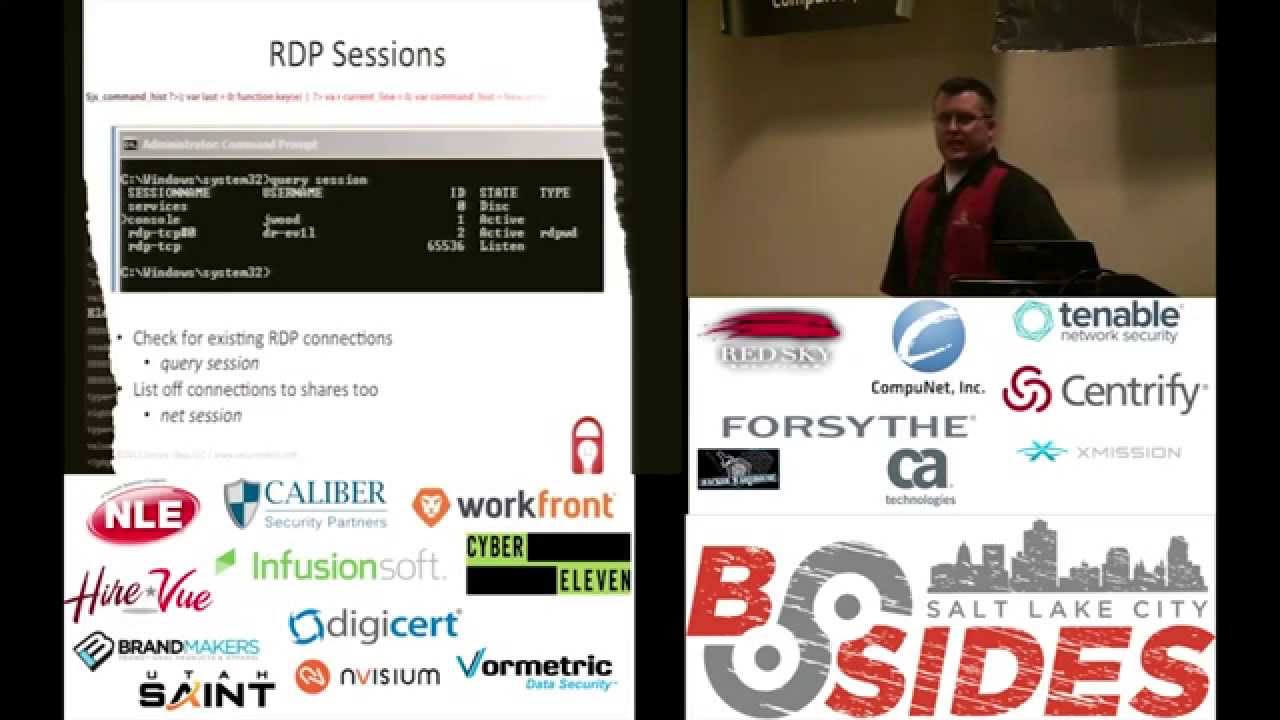
that um whatever rdp sessions so a while ago we did a pen test it was actually last summer where we found this vulnerable java web app server fantastic we deployed our war file to it and somebody had installed tomcat with the default installer next next next next next do i wanna install it as a local system absolutely because i don't wanna go get a service account next next next next and now we're system on this this windows box great we've got full control of it we created a user account we decided to be really subtle we created a user account from the command line we added it to the local administrators group now we only have
permission to our one box here and uh you know we didn't have any domain permissions at this point but um and we just logged in via rdp and we're poking around the box and you know looking at database connection files so that we could potentially get into other systems and and whatnot and um one of the problems we had is that we didn't we could we there weren't any credentials cached we didn't find any hashes that were cached there nothing that was going to allow us to see and to get out around to the other systems and so we're like well so we started causing some noise on this box when the sysadmin finally logged in like
i said he sat there poking around on the system for a while investigating the alerts that we caused and never noticed that we were connected via rdp and here i've got dr evil logged in okay we didn't use dr evil we used a user name called secure ideas which is kind of unusual for this environment but he never looked he never saw that we were there we stayed logged into that machine for a couple of days before we disconnect it on our own so some things to look at here i mean you can always go in and open up the mmc and say okay you know go to terminal services and see who is who's tied up on this box is anybody
connected at all quick easy way to do it though that's kind of a hassle to open up that mmc sometimes it takes a while just open up the command line query session hit enter and here you go we see who's logged in at the console in this case i am and dr evil over rdp this is a sure sign right here that okay now we've got a real problem if we've done this right we're again not a domain admin we we've got limited permissions enough permissions to maybe the local administrator account or whatever but we can query this information without uh granting that access sideways throughout the environment you're also going to want to look and think things like hey
is anybody connected to this thing over the network got a net bios connection to it or something like that run that session real quick see who's talking you know what open shares or files we have going on that may give us some information as well i debated putting this one in here because it's kind of obvious we're on a linux box something unusual is going on it's kind of normal to just run who who else is here as well as the net stats and all that other stuff that i showed you that we we talked about a little bit along our windows box um but again we hear folks who never notice that they're poking around
the system or they're not even looking for things but they've never noticed that hey somebody else is logged into this system and i don't know who gomer is or why he's connected to my box maybe that's something i want to go check out when when we see something like that you know all right we've noticed that gomer is here when did he show up well in this case gomer showed up last night at 10 o'clock because i was still working on my presentation at that point that gives me some time to start you know time range right there to start looking around and seeing okay what changed around that time what other things have occurred here around this
time that might be of interest to me give me some idea what this person's maybe looked at or done or tried to do something comb through logs on start looking through our windows logs for specific events now i just went ahead i started to hunt around for all of the event ids and then i found this fantastic page here on lenny's elter's website incident dash seltzer.com log dash rew checklist um and i went well shoot why am i going to copy it out of there and put it into my slides he's already done all this work let's just give him credit for it he's got a lot of great stuff on here just little checklists and stuff like
that to prompt you to think of things have i done this have i done this oh i didn't i didn't check that um in my case i was looking at okay what are the login login off events that i'm looking for on windows box so we've got you know event ids 528 540 for successful logins failed logins 529 through 537 539 38 50 etc for log off any kind of changes to a user id these are all things we're going to want to to take a look at when did it get here did they change somebody else's permissions have they changed the password on this box have we put it into a different group uh elevated our
our access rights to the system by being able to do that uh services being stopped or started could be really important uh so for example i'll get on a system and i'm looking around and i'm wanting to upload some tools to this thing to see what i can do and oh doggone it they've got some antivirus and i haven't done anything to obscure this particular app and it's getting caught oh wait i'm running a system net stop symantec fabulous now i have no av i can do what i want just the fact that service went down ought to you know raise some screaming red flags to everybody that somebody you know their shenanigans going on here
so we want to keep an eye out for these type of events go through these logs and see you know which of these events show up scripted out have some scripts written out one of the things that we use internally is secure ideas as we write scripts and we find that they're useful be it for systems administration for internal boxes or pen tests or whatever we check them into subversion repository you know i write up a useful little python script for something or other boom it goes into source control makes it nice and easy because everybody knows here's where you go to look for this stuff so if i want to see if you know
where did i put that script at that's where it is and all the different various different versions of it linux systems uh you know logs are we're not looking at event ids necessarily but if we're looking for things going on with users and authentications and changes to users authlog is our friend and i just did a couple of simple little searches through here where okay uh when did somebody log in via ssh so i'm just going to search offlog for sshd see what shows up um you can do that for the console now in this case i searched for gdm it was a gnome system you pick your windows manager at that point but that's actually on the box but search
around through that you might need to do some additional filtering like in this case i tossed in looking for sessions specifically to cut out some noise and then look for any activity where somebody's suing or using sudo um this morning i actually noticed i messed up on this one a little bit because that command is kind of redundant because i'm looking for sudo or su and su will just find it however initially i had a space after that su to look for just su events which is why i had it in there but uh this like i said today i was looking at i was like oh oops whatever um but here's some examples of the data
that we get out of this and we may get some stuff that okay i need to ignore invalid user support uh in this particular case but i certainly want to see things like um you know me suing a couple of times here on this box take some more looking at authlog you get a message saying that there's a new user so that's something nice and generic i don't really know what i'm looking for i just want to see you know if something got logged about a new user being created so you grew up for new user oh we've got a username gomer has showed up at this point all right well now i have something else
to search for let's see what else gomer has done and now i actually start getting a history of what's gone on uh we see the account being created uh we see him log in via ssh and i added gomer to the sudo group which on an ubuntu system gives us the ability to run sudo azure so uh but i've got a nice little timeline here on some things that have gone on
one of the things we talk about with our clients an awful lot okay you did this stuff how do we even know that you were there this this is actually a little bit more on the lead into having an incident stop and think about it some some of these sensitive changes we've talked about how often should they really occur does somebody show up in the don't get added to the domain admin group day in day out do they do in your environment but it shouldn't happen very often new users shouldn't be created except for when there's a new new employee that's come on so we want to look at that and you know when did the
people get added into different groups or files the sudoers file or the studio group when should that happen it shouldn't happen very often and we should be watching for that we should be monitoring and looking for that so that again as soon as this happens something should scream and i may be able to say yeah i just did that that's fine that was part of an authorized change or not this is something that as a sys admin i knew was there you can add exceptions to antivirus this is really cool when you pop a box and you want to upload your tools just add an exception to av so you're going to want to look for that any sign
of an exception showing up where it ought to be it's even better when you pop a system and they've already added the exceptions for you to see colin temp so i don't even have to do anything i just copy my stuff in all right we talked about services going down but we do want to know hey who did that why did it happen was it graceful or did it crash or what went on around that all right here's the thing with some of these you know the idea of uh some of these mistakes that we can make there's not many there's not much room for a do-over right we're not going to hop on our time
machine and stop ourselves from going being stupid so we do need to do some preparation um it's it's much too late when we're already bleeding so some things to think of you know have your tools ready have that subversion or git or whatever your repository of choice is have somewhere where your tools are hanging out at have it deployed to dvds or usb drives so you can use them without installing them onto the target system we can just run them from right there have some resources on hand one of the things i like i ran across recently is the blue team handbook windows and linux it's not in depth it's not a big thick tone on
on incident response or anything like that but it has a lot of references to commands and how to do things and stuff like that and so i recommend that to folks one thing to keep your mind on or keep in mind as well is you don't want to necessarily tip your hand too soon there's a fine line here where we go through and we're gathering information and well we're going to hit a point we're going to start locking these people into an area and kicking them out of our systems if we tip our hand and do it too quickly when we're not really ready and we don't know what they've really done around the environment we let them know that we
know that they're there and then all of a sudden you have potential where they can start to be destructive and that's not something we don't we want to have happen and always be ready to call for help there's you know all of us usually are working on teams we've got somebody to reach out to we know folks who have have more experience than us i mean i've got a lot of great experience i think but when i run into things that i'm not sure of or whatever i'll contact danny and say hey have you done this recently what do you think how should i go about this and not unusual for him to point out something that uh
that would have been a mistake on my part so you want to keep that in the forefront of your mind don't let our ego get too far ahead of us uh is we're trying to i got this i'm going to show this guy nothing wrong with talking a little bit with the folks around us so these are just some things like i said found this as part of doing penetration tests where we found that we'll do things like the av exceptions and uploading tools or causing alerts to happen to get them to log in with elevated privileges things that they don't do when they're actually trying to find us surprisingly never noticing that we're logged in via
rdp uh these are just some some observations that i have from from being the bad guy inside of somebody's environment and seeing where they they have no idea where they're even though we're fairly loud and obvious somebody who's really trying to hide you know is going to make it even more difficult any questions no i hope that was useful and interesting to you all and thanks for coming out
Related talks
 56:25
56:25 41:28
41:28 1:00:45
 53:47
53:47 55:42
55:42 52:16
52:16