SatheeshPandurangan
Show transcript [en]
[Music] good afternoon folks welcome all to the session on uh purely on malware analysis specifically for the window so what we are going to talk about is uh the service events and the task scheduler specifically on Windows if you ask me that uh all this whatever we are going to discuss doesn't happen on Mac or Linux yeah it doesn't matter what platform it is only that kind of VES what it helps to activate it that's what matters so what are we are going to discuss today it might happen on l or ma but it depends on what privileges do you have and how the Mal gets into the network so that's how it revolves but
what you're going to talk today is purely on Windows purely on Windows service schuer and Service events as well as a taser right so yeah myself Sati pandangan so I have 15 years of experience in the networking and security industry so yeah that's a short about me myself let's move
on so yeah what's Mal so since we going to talk about the we'll discuss about the basic what's Mal malare is nothing but an malicious process that enters into your system and compromise your system stuff by hiding the process or hiding what it does so that's that's kind of a Mal are different kinds of Technologies or different kinds of malware scenarios are there maybe it can be a run someware or it can be a root or it can be a key logger or SP anything so it depends on the attacker's mindset what he wants to do right he wants to he wants to look into your analyze your system for a prolong time period he can do spy want
to track your passwords he can do key or you want to do rans you do for rans it depends on what kind of activities he wants to do so malare is one of the main process which helps to hack the systems on your endpoint devices and take a control of the machine and and get get what other the information that that is looking right and yeah so when we are talking about malware we need to talk about first system so there are different steps in malware so malware like first you need to do the Recon and then you need to get into the network and once it is done you need to do privilege escalation to escalate your privileges
to an admin or higher level Privileges and once it is done what you do you need to stay in within the network to make sure that you're staying in the network for a prolong time period so that you can do all the activities what you are planning to do so for that purpose we need to maintain persistence persistence is like you are hiding yourself within the system so that no one is able to understand or no one knows that there is a malware within our system they are trying record or swiping off all the data within the system so that's called pstem so what are the different methodologies of pstem that happens in the windows system one is like registry
run Keys registry run keys are nothing but the registry keys within the system which which is a configuration for OS operating system and the softwares which can be managed and startup folder startup folders whenever we bring up the system what are all the application that starts along with the startup holder read a browser or calculator or any other application when you once you logs in it will automatically start so during that time the malware attacker can able to pitch in the process so that once the user locks in the malware automatically starts it doesn't need an extra push to start it manually so other one is schedule task which are going to discuss in detail right now and windows Services
which are going to discuss it and and the next one is boot key so boot key is like not previously as compared to other persistent methodologies the boot key happens at the Cur level where input output exploitation or the memory analysis it happens at the core Hardware level where it is difficult to understand or difficult to identify what kind of malware it is whether it's there or not even if you go through with the tools or any any hardware like Hardware related to it's very difficult to identify so boot key execution is similar to root kits like root kits and boot key both of them are happening at the hardware level or the mem level
which is difficult to identify and app and DS DS are the Dynamic link loader file which is helpful for the configuration files in our system in our Windows system right so if you want to modify anything on the system once you modified all this modification changes will go into the dll files so if modify if attacker tries to modify them no no one knows about it and the last one is fileless malware fileless malware is basically happens execution happens directly on the memory right so memory debugging is a it process together that's that's pretty complex to identify so so if you if you look into the bottom four it's difficult to identify the malware is present in your system or not
if it is on the top four with some of the tools and Technologies what we have we can able to correlate it and identify there's a malware sitting in our enironment so it depends on what kind of uh Technologies we use and how we manipulate it that's that's what we going to do it
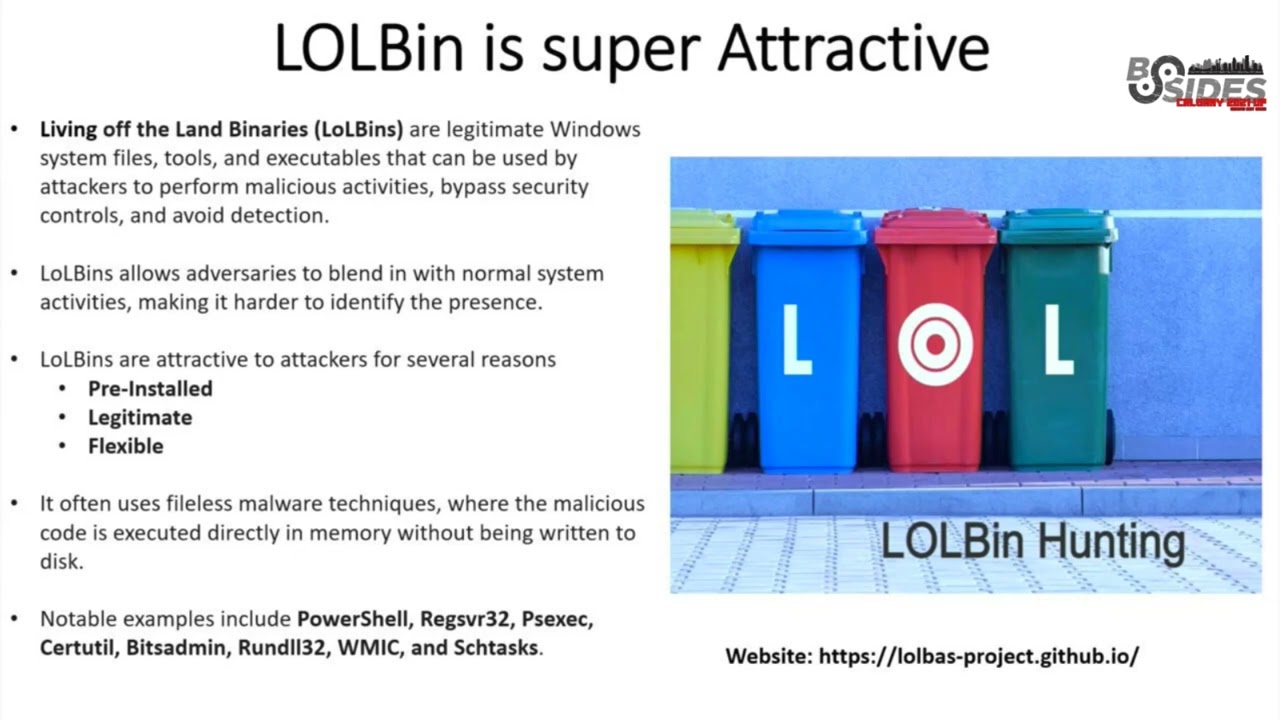
now okay so the next thing is L bins L bins are nothing but the living off the land so in in Windows there are many utilities common utilities are there which helps the it admits to make the process easy enough in a day-to-day life maybe we have everyone known about the Powershell right Windows Powershell power shell is used for executing any scripts or writing any any of the lock files like lock files or remote connections anything that can be done what with the same thing can can be done by an attacker right it's the same privileges one thing is the differentiation is whether it has been done by the it admin or by the attacker
right if he is having the Privileges he can escalate it to the higher privileges using the power sh so L bins or living off the land are some of the genuine Windows system files which can be used by the malware attacker for his own purpose like T so it is a normal system which is existing it is already present to the system you don't need to install it it's present right so L bins are pre-installed and they are legitimate legitimate in the sense it's it's provided by Microsoft itself you don't need to do anything right and it's flexible flexible it's it's like you can execute a script or you can do a remote desktop connection or you can uh you can
download files and auto executed all the things can be happened in the L bits so these are all the files that the malware attacker trying to use and bring it up to install malware and be assistance into the network so some of the common or well-known doin are a shell the Registries or Ps executables certs is specifically for certificate management and run dll is for the dll files and schedule task so these are all the some of the main key points that most of them will use for but if you want to there are about hundreds of uh system internal files that are part of Windows which can be used for uh any purpose so if you water all the list of
files or list of the system internals the link is over there there you'll see the couple of like hundreds of entries over there these are all genuine files if you install it it admin will think that they are all the genuine process which might be running on based on the requirement right but only the malware knows that they are utilizing that genuine process for installing the malare okay let's jump in about Windows services so what is Windows service let's say I want to install a software I want to install an antivirus agent software it's an antivirus agent what you look it was a a beautiful UI but in the back end it will be called as a
service and it will be installed on the system so whenever you whenever you boot the system this this Windows service will automatically run and start up so that it would you you don't need any Interruption for manually starting there are some processes which you can manually start but most of the windows processes will be automatically started you don't need to worry about it right so that's that's one the main persistence mechanism where the malware authors use it so what do this like we know that we install some Au let's say if we install the antivirus and malware attacker tries to spin up another process similar to the malware files like malare files in antivirus files and
say let's say we are installing maaf it's called the service name is called me.exe and the malware attackers also says that just Mal like M 1. or 123 or he can and rename it something like maaf extension. exe so do we get any doubts on it no or if you can also name it as me.exe you may not be having a doubt thinking that it's a genuine process right so he can manipulate that Environ that malicious file and run into the service so that's how they can enter into the persistant method so why are why are they doing it main thing is it is mainly used for the lateral M like hiding into the system and spread it
inside your organization spread it inside your systems within the network and staying undercover how long you are able to stay undercover even after the reboot or even after the user locks and multiple times that's that's that's a advantage of being malware being into the network like try to collect or gather more information into the system right so that's that's a one and where do you need where do you can look into the all the services that are running in your system you can go to this path and you can check it out what all the services that are running obviously we may not be able to see all the services like thinking like what it might be it
the naming convention might be different but so if you want to look into the service this is a default UI that would be shown when you're looking into service there would be hundreds of services would be there and it would be saying whether it is automatically triggered or manually triggered it's local system or it is triggered by an external person and you want to look into the service let's say the storage service what it does and how it starts and whether you want to do any uh recoveries and all those things would be listed over here right so same way instead of storage service I say that storage underc service do we able to detect it whether
it's a j process or it's a malicious process no right so so that's that's that's how the malware attacker trying to play into that one so this is a way to access Windows service and you can access it CLI also there is another INB tool called Auto this is one of the tools which is provided by the windows to to get into that like previously we have seen only the window service and this tool is provides a list of services for multiple services like you have anything on the log on it will show the list of log on it has done and schedule task services and what are the changes that is happening in the drivers or boot
execute all the list of most critical processes that is there in the system this is one tool which will help you to list all this things the single tool itself okay so this is one of the a basic picture of what happens when you're creating the service right so when you're creating the service uh it gets registered into the specific part like HLM system under the services and how it gets executed there are four different methodologies one is Powershell we can use Powershell to trigger and Mala services and another one is schedule uh service task so this is we are going to discuss it later and wmi is the Windows management instrumentation that is is one of the
older technology which is used for remote connections obviously most of the males might be entered into your Network bya remote connections or fishing attach right and the last one is Windows 32 it's a older technology but not many people are using it so mostly how it enters into your network is Parell and sc.exe that is what we are going to look into it now and how we can dedu it like let's say there is a Mal that is there in your system how you caned so every system will have an EV blocks like lock systems so when you're trying to analyze that lock system you can try to correlate what is happening in your network so there will be something
called security locks and system locks and there will be a specific event tag with all the persistance attacks so we'll be we'll be discussing in depth about all those event IDs what we need to look for specifically if there is a malware into environment so these are all the steps that when when the service creation happen that that Pro getting process right any questions here so the creation how does it get gets created and when it is getting created how it is getting detected right
yeah it's there but not all the services are provided that mechanism some of the services are the certificate Authority there you provide the certificate genuine certificates saying who you are then it says that yeah I can validate the author who ass signed it to the services then I can allow that but not all the organizations has implemented it and it's bit complex because you need to give that certificate for each and every services and it's pretty complex to maintain the certificates and you need to renew the certificate yeah it's a lot of complex process but yeah you can't do it but think about the massive complex you might be having 200 services 200 plus services in a system and in your
endpoint or in your Enterprise organization you might be having 200 let's say 500 devices think about the complexity that will beol yeah obviously you can do it maybe you can do it for some of the critical infrastructure where you want to protect your organization like organization data those services like you can specifically find Q in your configuration for sear Authority the services
right so yeah we have discussed about the events right so so there is the event let's say there is an attack happen then the event gets recorded and in the even clock it says 4697 and it is like there is a new service getting installed when whenever a new service getting installed there will be an even triggered there will be log message that will be getting recorded on the system that is like 4697 it is on the security log and another log is called system log both of them are same if you see that security logs at 4697 system logs at 7045 what's the difference like security locks and system locks are convey both the same information but it's a
different like wording different naming convention so security locks mainly records all the events related to your access your permissions your your files getting deleted anything related to your privileges your accounts or all those things getting recorded in the security locks in case of system locks whatever changes that is happening in your Os or applications or software those changes would be recorded in the system locks you can refer both the locks or if you are based on the scenario you can refer to any specific locks in order to gather the data but most of the times it would be correlated so that it would be helpful if you gather or if you look into that both the
locks to get a detail understanding and also cismon lock Sison locks with the event ID 12 and three so if you see that event ID 12 some key registry has been created or deleted right or if you if you look into the system ID 13 that means existing system Keys has been modified so if you look into the these two entries then you can say that why we are doing it let's say I'm I'm doing a process I running or all those things I know what process I'm running in my system and if some modification happens if you get a log event on my process or my own application yeah you know that I'm running it I know that what is
happening but you have never done something or let's say you are working in Calgary and this happens in the Asian time zone in the midnight time zone and someone happens to do all this modifications so that means something malicious right you have never done it your office timing is from 9 to 6:00 p.m and you're in you're in Calgary time this happens in the Asian time zone right that means something malicious and you you have never ever done it so it is better to look into all this event logs or the services to check for whether it's a malicious entry or not so yeah how does it look like so this is one of the windows service event
so so on the left side on the green tab that is what the default locks it would be like application locks anything specific to the application can be recorded in the application locks security locks setup lock system and forward and the below ones are specific to what applications we have installed like Intel like like whatever the applications you have installed onto the uh bo you can look into it and if you look into it individual events like I've done a login and the login ID is 4624 and if I have genuinely done a login I know that it's me and this is a time zone I've logged in and this is a time I've logged in so it say which system L
what is a laptop and what is a domain Lo and log type is that means it's sucessful login so even if it is a login or then you can identify whether it's a successful login or it's a login or something is continuous faure is happen all these things can be recorded in this one and yeah here all the details that it gives a complete overview about what it is and what kind of in what kind of background information that is happening right so whatever we have seen in the previous slide so the event ID 4697 and 7045 you can look you can look into this uh in this in this UI this is a one way like
this is a this when you're when you're trying to look into it manually this might be a proper some process you can push all the logs into a log analyzer tool to to dedu this on a scheduled basis like if there is anything malicious process just alert me up so that I can trying to look into debug more what is happening so how we are going to do it that's what we'll be looking into it next okay so till now we have seen the services now why malware authors create the malicious service one is privilege escalation obviously you get into the network that's not you get into a user you get into your normal user normal
user doesn't have any High privileges or the root privileges right I want root privileges so that I can travel or do the lateral movement into other networks or into the data center or into the critical assess right so that's one of the main reason for malware authors to do persistence and doing the lateral moment it's not it depends on ATT either I want to compromise only the data center Mission which is only critical or I want to compromise a whole Network right it depends so the more and more you are into the network the more and more you stronger presence into the network to gather more information as for the attacker's perspective okay so how does it happen
let's say I'm trying to install a file called this. exe and it is under this path okay company space name what the system does is it will it will first check for anything company.exe right let's say I'm a malare like I'm a malare author I know that there would be a lots of Windows genuine for folders would be there if something is there with spaces I can say that or that specific file name because the moment system looks for it it will automatically execute company.exe in looking for the full path so if you if you keep your exe file in the specific path it will automatically execute if the user executes his own his own
service right you don't need to do anything you just need to keep them analyze them what can be the folder path that you need to keep it in and and just post it it will automatically execute it or if there are some genuine files the user writable service part if there are some genuine files you just replace the genuine service files with your own exe files or Genuine software files with your own exe files if let's say there is an MCH software not me let's say anything like Mozilla software MOA software is is there in software folder instead of MOA software I'll just go and keep my own malware file rename as MOA software so instead of executing even
the user also if Tres to execute or install Mozilla software you will install the malicious Mozilla software as compared to the genuine file right and can also modify the existing Services file so these are all some of the methodologies where he can modify or execute it into the users Network so so this is this is kind of the logging EV that would be recorded whenever any activity happens be any service getting installed or service getting deleted modified or any scheduled task getting installed or any authentication process getting created like successful authentication or failure authentication or if there is any login failure continuous Brute Force attack is happening all these things are getting recorded only thing is we should know
what information is getting recorded and what is the right information for us to debug so that so each and every event event information gives us a minute information like what is happening and how it is happening so that it correlates us to debor or trying to identify the malware process okay so we'll we'll discuss about this later so how to identify the malicious service let's say it is already there in your environment okay so one is like how to like just check whether house strong it is in your service like how how strong like in the sense it can able to Prevail into your network or extend into your network into your ENT oranization or or just check for any generic
Services which are genuine like sometimes that may be some services with the name of some common names not all malare aors are pure like highly sophisticated there might be some malware authors just just for the name sake just give some names random names from that itself we can know that whether it's a malware file or it's a genuine file so if it is 27 435 you may not be installing or not many of the genuine software processors or software applications may not be having that kind of a name that Exel you can say that something fishy in it right or in case of it's it's something it's in the path like C dollar or admin dollar or any any
unknown path which you see into the system that means something fishy is happening or if there is a network let's say the persist happens the next thing what you need to look into is you need to look into the Network locks if there is any connection to the command and control server so command and control server is nothing but after getting established into your network the malware files or the script files will try to connect to the malware author that is called command and control server to do or to like what is the next what should I do after getting into the network getting into system should I do the ransomware or should I do log keoger
or should I just do sky or anything you have a question
yeah so so about the command and control Ser right like yeah so this this happens with command and control sir most of the nowadays uh with with the ttps all the techniques and Technologies uh they're able to identify what are the command and control servers immediately with the DNS resolution but what happens is one of the unique scenario is I've seen many command and control which comes up which pops up online once in a year right so how do how do you identify whether a command and console server or any any server which are trying to communicate is a malicious or not not that means it needs to be active enough in the online and and you need to gather what process
it is going on and what it is doing if the command and control server is online for half an hour in a whole year how you can debug that so this happens in many scenarios where they spin up a new server and that new server would be coming online only once in a year that will it would be doing this activity and it will go offline it will be online for half an hour within half an hour it'll do it process or take over whatever it needs to be done after that it'll go offline you can't even search about that command and control server so that means you never ever have any idea about what
it is happening so next time if someone if after a year if the same command and control servers comes up do you have any any ptps available no that's that's one of the most ways like the malware attackers try to spin up and use it so if if even the technology one of the one of the authors identify whether the command and control server is there it might be available to all the Technologies with the Bas of Technologies all the organization might know that this is a command and control server but if you have a limited information you may not be even knowing that you're are talking to a command and control server and your informations are
getting lead right so that's that's kind of a tricky process that Al author using so what are the attack techniques and mitigations one is one of the most important one is the remote connections Whenever there is an system that is there obviously you you trying to see a remote connection that means something fishy is happening like not everyone will look for the remote connection break until unless you specifically enable it right I want to I want my it admin to look into my system so I'll just do the remote connection or give the permissions for the remote connection but in in other scenarios if something remote connections happening that means there is something suspicious so whenever there is an event ID like
5156 which is like theat Windows plat filtering platform has entered a remote allowed a remote connection that means some remote connection asare attack happen and 745 followed by 7045 which is nothing but a new service as install what it is like malware attacker got into a system using the remote connection after that he has immediately installed a service so that's what we try to we try to write a script saying that if there is an event ID 5156 and there is a name any name which you feel that suspicious and whatever the destination address you want to give and the port number and what this this event the event are critically important there's an there's
a remote connection as well as there's a new getting service installed within one minute and for the same computer name that means something malicious right remote connection it's always malicious until others you know you have allowed it so this is one of the rule which you can write it in in any of the software in any of the loging tools loging tools maybe you can use plank or you can use manage engine but there are lots of logging tools I'm not recommending all the things but these are tools which we use regularly to debug all the attacks so similarly in case of an system event so we have seen that previously the Sison law event ID 13 and
12 right if there is a new event that has been generated or created use the same Rule and change it to even 13 and if it happens within the same minute and same computer name that means it is malicious try to flag it up and what are the other things that might be happening so 4624 if there is an event ID 4624 4624 is nothing but a successful login obviously everyone does a successful login right not only you the malware authors can also do a successful login on behalf of your account right so if it is a 4624 and it's a successful login login type three and followed by 4697 is the new service has been
installed there is a new login and immediately there's a new service has been installed with the same computer name some are spe or the same thing 4648 is the login process has been attempted with explicit credentials so like you can give a script instead of manually tying you can give a script to execute all the scripts so one of the pattern this is one of the pattern one is remote connection and when there is a specific login and there's a new service that has been installed then you need to be suspicious enough and the next thing is we have previously seen that the and L bins right so L bins are the genuine files which will be used for the windows
process so if you see any of these services are getting inst executed C script or all the services are the genuine or most likely used but you may not be knowing whether it is a genuine or mal auth so just try to De it whether it's installed at a specific time and that might be a suspicious might be I'm not saying all those time it might be a suspicious it might be and other thing is privilege escalation attack so this is one of the main thing like obviously they will try to escalate the Privileges as a normal user I may not be having enough privileges so they might try to log to your network as a
general user and after that they will escalate your privileges to the admin users so that they can hop on to multiple missions or create create another system admin login itself which they want it's not like whatever they want they can make it it's they can spin up a new admin user itself
and the suspicious pass and the execution so we know that uh all the things are commonly executed P like Windows servicing or Windows Microsoft Windows Microsoft Windows Defender those are all genuine parts but if you see something suspicious on these parts as a specific time period with an unknown process that means that is suspicious part same thing goes for the SE SC is also one of the partial not for one of the windows Services which which gets executed easily into the network for maintaining the process s yeah I'll I'll share this PP later so if you want to uh take a note of it like uh as you can refer to the pp later to
check what are the law G like the mitigation rules looks like so that it will be useful for you to refer to it dat and temporary service we all know that uh not many of us will use the temporary service or any process will also won't use any tempor if there is anything temporary service or if it is any modification of existing service all the things matters a lot right so only thing what you need to look for is what is the service that I'm installing what I know into my system what I'm installing into my system just do a track of it then if you have a track off it then you can easily identify whether
something is malicious into your system this is not only for the Enterprise even for our personal devices also you can do this process right so don't don't try to install any software which is a uh which is shared by an external external links this this happened to myself like I try to install one of the genuine software instead of trying to download from a genuine like the UI let's say I want to download mosula instead of going to mosula I just say that download Mozilla the main thing first thing is Mozilla URL will come below that you'll be getting lots of extern URLs which points to mosula I clicked the second or third URL and it downloaded the Moosa file but
interesting what had happened it's a Trojan right it says it's a MOA but inside there's a Trojan malare after getting executed I was I was not aware that I've installed a virus file and it was it was hidden for three days there was no activity into my system and nothing was malicious I don't see anything malicious after the third day it started extracting all the details it was communicating with the command and control server and Gathering the information about me then only I try to identify yeah something squishy is happening into my system then I look Deb the services what is happening that time I saw that yeah the mill. exe file what I've installed thought is a malicious
genuine file it's a malicious because I Tred to download it from an external URL it's not a genuine URL genuine URL in the sense not the organization's
URL
yes yeah yeah always always if you want to check that whether you want to know that whether you are installing a genuine software or not check the md5 hash each software will have an md5 hash file which says that whether the software file has been modified or not you just go and check into that the software whatever you have genuinely download from the uh from the original URL what is md5 Hash that should match with the software that you have downloaded if it matches then it's a genuine file otherwise it's a mous something might be happening fishing okay so till now we have discussed about the services Windows Services the next thing is Windows T
scheduler so how many of us schedule alarm clock right everyone schedules alarm clock to wake up in the morning or do some scheduled task same thing that the windows does so let's say I want to execute a script at uh the specific time perod or let's say I want to analyze all the logs that has happened for the whole day I want to collect it at midnight 1200 p.m. and I want to execute the locks or I want to analyze the locks I'll do windows schedule task I'll say that try to execute the script exactly at 12:00 a.m. everyday night to analyze all the locks which is there in my system to identify if something is there
something happen what are the software installed what are the process that is getting killed who has locked it I can do schedule a task and say that yeah go ahead and do it I forgot about it right the the important thing about this is like it's all happens at the background you don't need to know you there will be any uh triggering events or any uis that you can see into it like what is happening it's all happens completely in the background you don't even get to know any information what is happening so that's how that's that's one of the next methodology that malare attack us take it so if you want to trigger and script
in a specific time period or regular intervals or any specific like let's say I have an user login failure if there is a user login failure immediately schedule a script and say that what happens anything anything might be happening on this thing so this this specific tool the malare authors are using it to try to hide themselves into the persistent methodology and execute other task what are we are discussing till now is like persistence it is one of the process for the malware to be present in the system after being persistent they can do whatever the task they want right I can I can be a sleeper cell within the system I can understand what is
happening within the system for a long year one year or two years or I can immediately hack the system say I want the ransom from you it depends so persistence is one of the methodology to be in the system right so task scheduler is to schedule a task at any point of time any day instead of going and manually scheduling it you are just scheduling via the scripts that I want to execute it at every week Monday midnight 12:00 a.m. or early in the morning 10 10: a.m. whatever it is so how to schedule a task you can schedule it either in the UI or in the background so this is one of the this is
the UI for the task scheduler you can go and schedule the task these all the default task name and let's say it says uh it this this Tas schedule at 12:25 p.m. or 12:25 a.m. every day or this schedule task will be log on Whenever there is any user logs in it depends on what is your requirement based on your requirement you can create a task and who created it what was it what was it last run and when it will next run and all the things would be detailed over here so if you look into it if you see anything malicious if you see something suspicious in this one that can be a malicious process which you can debug it
and where to look for so in the windows we can look into the system 32 tasks all the tasks would be listed over here or if you want to look into the registry files whatever the task you getting created that would also be recorded in the registry files which malware authors mostly do to modify and be persistent in the system and what are happens like same way whatever happens in the windows Services we have the event locks right similarly whatever happens in the task we do have event locks getting recorded in the uh Windows task schedular operational. etvx and this is one of the this is one of the most common attacks and it will be displayed under the MIT
attack if you go into this MIT attack it will show that list of malware authors or the malware uh like who allw which which uses task or which key logger uses task or which all the different kinds of authors use Tas all the things would be listed in the MIT attack and ID is this ID to Che for so how to schedule a task and how to list all the task these are all the different commands to execute either you can do it manually using the UI or using the script but most of the schedule task would be done using the script that's the best methodology you don't need to manually go hey I need to I need to do a
schedule task at 1200 a.m. do you sit in the office at 12:00 a.m. and wait for the time to come and schedule it no but you need to use the UI some people might be looking for the UI but best thing is always write a script and schedule it on time run it on time so that it can execute it and do the process for you so yeah now we are going to look into the real malare analysis like analysis the sense what happened in case of one of the attack AUM is one of the one of the group which attacked Microsoft Exchange servers in 2021 so they are the group who are also part of
the tus malware tus malware is one of the famous malware for specifically for the Windows task how to be persistent within your system let's I I logged into a system I want to be persistent and I want to make sure even even after the system reboots I want to be persistent in the system there are some malvas which gets logged out once the system reboots or once a user lcks in again log out and login again you may not see there malare running because you logged out that means you are Pur is not maintained or you you are not able to be in the system part of system but this kind of a malware they try to be
persistent whatever happens whatever happens you try to reinstall any software or you try to log out log in at any time or you reboot whatever happens this malware will be persistent until unless you manually identify it and do a do a mitigation technique right so taras Mal taras malber mainly they have done the persistance so that is done by the half so that is nothing that we are trying to do this High the schedule task how do we do it we are going to we are going to look into it later so schedule task what what do you feel like anyone knows about that how do you hide a schedule task or what it is and
how it does so the thing is like schedule task will all these recorded entries are listed in the registry files and you know that all the softwares will have the registry files and it will be recorded right so the same way all the files or all the software configuration files will be recorded the registry files if you try to modify the registry files and include your malicious process and once it is processed you you maintain the persist but being persistent even after the system V boots you need to delete one of the one of the permanent configuration values in the delete after are doing so whenever there is an malware malware attack happens like not malware
Whenever there is a task schedule happens the entries would be created on these two PA this is the path for this Tas and the entry would be created under the task what is the task and that tree under the tree what are the task details would be there so the both the parts would be listed over here and if you go into this path it will tell you what are the details about the stas scheder what it does and how it does who has created it and you see that it'll say that it's a Windows system Windows sis log and all this it it would be just like it's a code based and you need to
need tools to Deb what is happening right so but the main point is the these are the two parts one is under the tree one is under the task these are the two parts where the scheduled task will be recorded and all the references data will be listed over here and one of the main parameter is the secure descriptor the SD value so what it happens and how it does for the task would be recorded in the SD value right so this this malware author created a file called c.ex everyone knows that calculator is a simple Cal and it's a genuine process calc.exe is a genu even if you search for it it's a genuine process right so
malware somehow he framed and changed at cal. DXE for a malicious purpose and he created a special task Schuler and once a task Scher gets created it will give an scrip file which also says that yes created the task and the task arst under the genuine process
right so what now he does is this is one of the process which he has created it and he goes to the SD value and the moment you delete the SD value all your task Scher files or the task Scher itself would be hidden so that's that's one of the key Point like you can't directly go and delete the SD value you need to have the higher privileges so as a general user you can't go and delete it so you need to go there and become a high privilege user or it admin then go and delete SD value that means your task itself being hidden into the system no one else can able to identif it apart from what you
can look into the logs log analysis is the one way where you can look into it whether is there is anything suspicious happening into your environment or not right so once you delete it it's all gone there's no records or events even if you look into that Services whenever you install a service that means there will be a service record created right but here in this case moment you delete the SD value it's all gone but yeah don't delete like when you're when you're trying to debug don't modify all the values because if you change all the values your existing or the genuine program might be corrected these are all for the referential purpose because uh
when when malware authors are doing it they know what they are doing it and how how it works on so when we trying to debug or analyze it don't touch any of these FS just you can look into it what is is happening for reference purpose but if you're changing it your genuine or generic Services might be interrupted because you are changing the process how it actually needs to work on right so this is one of the methodology way they were using it to do it like not not all the malare authors were looking for it like they will look for services or other things but here this one of the specific scenario like Tas malware has
deleted this SD value and be persistent even after the Rebo so how do you know that whether your system is being having the malicious Tas chainsaw is one of the tool where you can load your task schedular locks and that will help us to identify whether is there is any tampering that has been happened or not that tells you what are all the tampering has happened for which computer name and what is the Target that has been changed here there is SD value has been changed here there is an ID value index value so these are all the different kinds of task for the objects that has been changed so this this one of the tool which you can try
to use it and analyze it so yeah what are the recommendations for it there is one thing is you need to look into the locks this is the only logs which you can grab it to identify whether it's a hidden task scheder or malicious task or not and the event ID for this hidden task schedule is 4698 4698 is nothing but a new task has been created and it would be recorded even if you look for any other logs like system logs or service logs or syston logs anything nothing would be having a record of this specific hidden malare only this is the log which will have that even if it is deleted or recreated
only this do file will be the reference for you guys okay and and also if there is any communication with the command and control server that's that's the next mey but communication with the command and control Ser that might be generic any malware can be doing it whether it's from a Windows task Schuler or not we are not sure how do we refer to it that's the logs is the one we and so the defender the Microsoft Defender has identified these are all the uh key points that if you see any of these patterns that is kind of a t Mal so so Microsoft depender has identified and this has been given to other platform vendors virus vendors also so
that they can able to defend the stus Mal so how do you hun for the suspicious similarly for the specifically for the scheduled task so anything anything you create a schedule anything like schedule task has been created or registered or modified during a unwanted time period or unknown user or being a high privilege user that means something suspicious so schedule task with a shorter life lifetime not many people will be scheduling a task with a shorter lifetime you might be going for for a longer process or weekly basis or monthly basis or something like that if it is something for a shorter lifetime yeah something fishy might be there or if it is using a l bin activity
L bin are nothing but the genuine files which we have seen it previously right so they might BND it with the Lin activity to to hide it like to to hide them into that genuine process not many people will have a suspicious about it and if it is a remote task creation if it from the remote Des is created yeah it might be malicious and this is a rare event that that that might happen or might not happen based on the triggering boundary yeah most of the things are like if there is any task update or thiss just go for it right so generic generic rules about protecting from Mal so have a anti-al moment most of them will think that the
comes from external vendor or external uh
internet right so most of the malware or any attacks come from an external attacker no it might also be come from the anti-al moment like within the network also cross Network also you might be having attacks that might be happening so always look for or make your end point secure that full proof that the your network is alone having privileges to interact with your system the external network might might not be having the same privilege so that is one of the methodology to make sure malare is not into your network and always configure a lease privilege model whatever it is so leas priv any user it is always configure with or give the Privileges as least preg based on the
roles you can increase the Privileges but it should be coming from an IT admin don't directly give the privilege access to any users and also use strong password and secure mechanism secure authentication and restrict using administrator accounts whever it is necessary never ever use admin accounts for any processes until unless it is mandatory for you to do it and limit the application prives we may not be we may be thinking that one the end points needs to be restricted also limit what are the application needs to be privileged that has given to the applications right it's not only the the whole system individual applications should also be fine tuned to make sure you're you're reducing the risk of
getting Mal into your system and also safe uh safe browsing and email security and fishing attacks you all know that security awareness is one of the main thing where entire organization needs to have not only the the employees all the people within the organization know what it is and how it is and there should be the latest trends that should be educated so in my organization what we do is we try to do six months once fishing attack scenario that happens so what it happen like let's say there is a trend happening within the organization and we are trying to uh change our email database server and immediately we'll trigger and fishing attemp saying that
there is an email email update email server update that has been happening so please click this link to check whether your account is safe enough or not in that case it's a genuine fishing process which is correlated to your event right which is correlative recently happened so what you do is try to do fishing attacks or simulation every six months once to identify how the user behaves and the last one is backup and restore prod procedures to make sure your data is backed up in a remote location if anything happens you can recover it back that's it about uh the Tas schuer and Window Service events any questions yeah I can understand it it's too technical but yeah the thing is like
you you need to put your efforts on uh understanding what you have seen through like specifically on the on the services what you have seen or any malicious services or the event IDs what we have looked on to so all the things correlate it and create a script or create an lock pattern and put it into the system so that that script will automatically execute on a daily basis to understand if something has happened fishy it will immediately alert so that you can take an action on it so all the things what we have discussed is like it's and it's a methodology to identify something is happening in your network so the mitigation it all happens like
you need to write a script understand the different scenarios or the patterns based on your environment in case of an industrial environment this might be different or in case of an Enterprise organization the scenario might be different so find tune your scripts or the attack methodologies as per your organization and write a script or into the log management and schedule it so that you can identify what all threats are happening in their environment and mitigate them at the early right this is one of the methodology I'm not saying this is the fullprof this is one of the methodology to identif early instead of getting it into the network and blaming say he got attacked and
somewhere yeah that's it from my [Music] f
Related talks
 41:51
41:51 49:41
49:41 27:37
27:37 1:05:41
 44:35
44:35 51:34
51:34