Writing Custom Splunk Applications
Show transcript [en]
that's kind of my passion in InfoSec I have only 30 minutes to cover a lot of date a lot of information so I'm gonna go quick I'm not gonna go over what Splunk is I'm not going to go over the architecture of Splunk I'll figure you can go to spunk calm or whatever and look at that stuff I'm gonna focus on applications writing your own custom apps I will at one point touch on where the apps reside in the architecture but I'm not going to go through all that mainly I use custom apps to handle the massive flow of data I love Splunk because you can throw just anything at it unstructured data whatever and just drown yourself in data
but I like to be able to get it you know under control and start and start wrangling with it one of the things I love about Splunk is it seems to be designed for the way at least my mind works security teams so to be able to pull information out I don't know what it is but it just makes sense from more of a security standpoint versus like a business intelligence standpoint so I'll cover some of that if you have questions at any point go ahead and ask I'll ask at the end of it if you have questions but go ahead and fire away anyway so first thing I want to talk about is very
foundational the Splunk calls at the common information model so what it is this is from the actual spunk documentation it's a set of field names and tags which are expected to define the least common denominator of a domain of interest basically it's it's a framework that Splunk has already built that allows you to pull in disparate data from disparate sources and pull it in together and distill it into areas of interest for you it basically breaks it out in two primary components tags a set of tags and then a set of extracted fields that go along with those tags it's its own application so you download it it's a free app that spelunked produces you install it and it has all
this stuff it is leveraged by a lot of other apps likes plunks own enterprise security app various things some dashboards they will leverage this and it provides an awesome foundation and the best thing about it is you can extend it so how whatever your environment needs this application can be extended very easily so I'm going to give a couple of examples of how this works first I'm going to use an authentication model again this is all from some of this is from Splunk documentation and then also how I've used it so some of the tags use here authentication default privilege this is going to be where you send Active Directory logs LDAP radius tax whatever
authentication type event you might have firewall authentication web application whatever whatever you've got you can throw in into here that's kind of the idea so then you can search with those tags once you've distilled all of that for example the default tag right there that would be used for like a default credential administrator credential or something logging in privileged user that's privileged user interesting those two can really be extended by using input lookups in Splunk where you can pull in you can pull in like CSV files of people who might be privileged in your organization or default account credentials default accounts you might have and and these can leverage that so basically it'll just pull that in and you can do a
search so clear text obviously if something's clear text and then some fields that are typically used with authentication action so is it successful or failure source the source of the authentication destination where they authenticated and the user so down below I have kind of a an example search already see that okay hoping so tag equals authentication and privileged and then looking at the count by user the action and the source so a search like that if you have all of your app all of your information feeding it correctly you should search for any sort of privileged authentication across all of your authentication events and sources another example would be IDs so again this is this data model is primarily
defined for intrusion detection events both network host application so that might be a laughs something like that and then typical fields used for that are going to be source test write severity and the signature that might have been triggered as well as ideas type so at the bottom there I'm looking for IDs events that are network based that were critical across all my devices so I might have you know a Palo Alto firewall maybe I've got some Cisco firewall with IPS somewhere I've got a laugh right and I've got endpoint type IPS this would search across all of those that's kind of the idea well it would search over network based based on the search so components so custom
application is primarily made up of these directories and then files in those directories the local app comm and the metadata files I'm not going to cover today because of brevity but they those are just basically metadata Raymond's just information about your app very basic stuff what's it called right who wrote it that kind of thing I'm gonna focus on the stuff under the default directory and the lookups directory because that's really where the rubber hits the road with with custom apps so an example app Kampf in the default directory I'm gonna use in all of this I'm going to use just an example web application firewall custom app this is one that I had to build at
one point because our vendor vendor didn't have a small gap and oftentimes even when the vendors do have Splunk apps they don't conform to the common information model and so I end up rewriting them anyway to fit that because that's kind of how my mind thinks I can fit it under different domains right access network security right account management right I can I can start bucketing it that way and a lot of times vendors don't think that way so this is pretty basic you know is it configured is it enabled when you install it who the author is version and then is visible I usually use false that's going to be in the in the Splunk
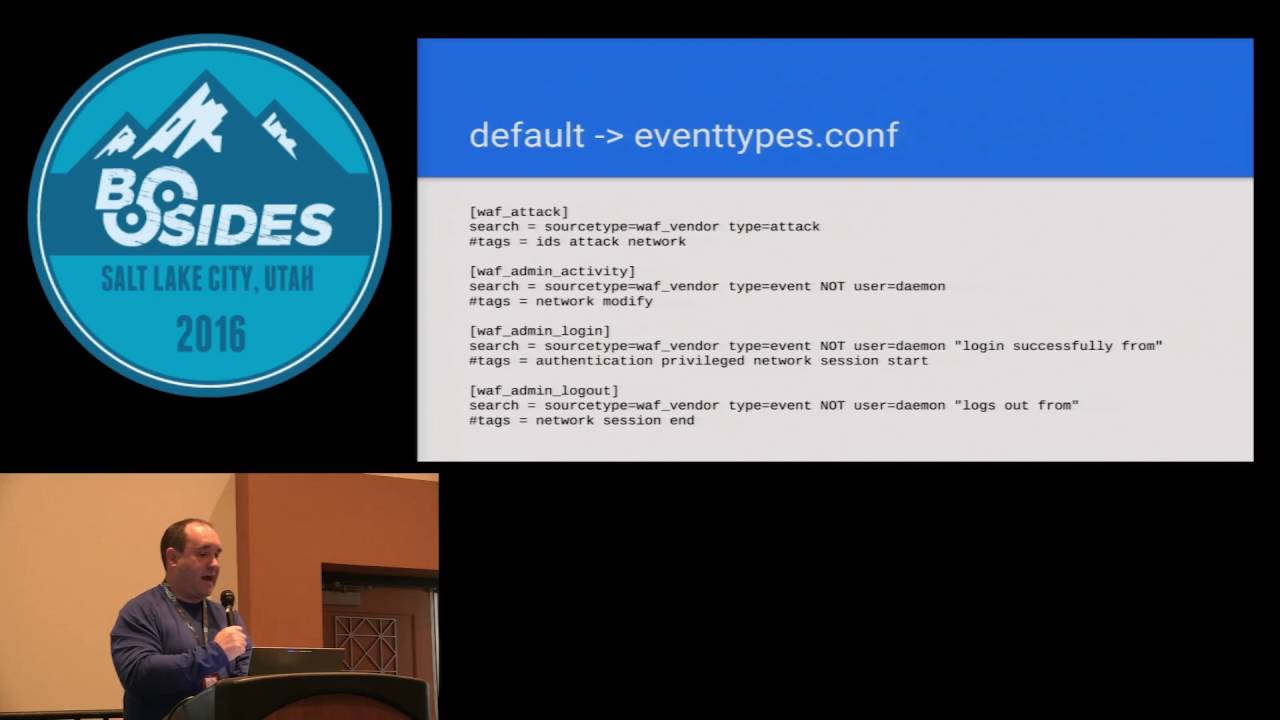
UI up at the top left where you can click and is it going to show up in that drop-down of apps I usually don't do that because this is usually under the covers type stuff I'm doing but if you hit true it'll show up there event types so now we're starting to get into a little bit of the meat so event types are going to be where you identify certain searches that Splunk would do and you're going to basically generate meta information an event type that then can become searchable so take that first one laugh attack so everything after the equal signs so search equals and then that's going to be the search within Splunk that you would do
from a search field that would create that that event type then I've got tags that are going to be associated with that event type so take the next one down the laughs admin activity so here's one that I want to look for it's the source type isn't whatever my wife vendor is type equals event and then not user equals daemon because this product happened to do a lot of activity via the daemon user I was looking for a specific admin activity someone some one of our admins logging in and doing something and then I'm calling tagging at Network and modify next one down I'm looking for authentication events from an administrator and you'll notice I'm
putting in their tags are gonna be authentication privileged it's a network login and I'm starting a session okay that's important because the next one down I'm doing session end now a lot of a lot of products do not when they log a login they always they don't always put in the length of the session when someone logs out I know like some Cisco stuff does but very little does very few vendors do that this lets you basically abstract away from that and use the timestamps that Splunk has to determine the duration of a session right so I can say I'm gonna look for session and session start and I'm in a delta the time on that and I
know their duration make sense so next is going to be the tags comp file and this is pretty self-explanatory basically lines up with going back to that events type you I have all the tags there and the event type name so in the tags I've got event type equals the event type and then the tags associated with that and I'm enabling or disabling them that where it says in the brackets event type equals whatever that now becomes a searchable field in Splunk so when you're doing a Splunk search you can type event type equals whatever and it will automatically find whatever you've defined here you don't have to remember everything that that defined that event
type all right so transforms this is this is where the meats really is so a couple examples here basically the Nate whatever name you have in the brackets is only going to be relevant within your app that doesn't matter to Splunk internally you can't search on that you can so here I'm the top one laugh changes I've got a regex that I'm looking for a specific log entry and then I've got parentheses because this is basically following pearl compatible regular expressions and you can pull in those any information in the parentheses as a variable then under format equals I'm just saying the first item under parentheses is the field user next one is the field action right next one's
command so now those become fields like when you're in Splunk and you're looking at event you have all the fields on the left side that you can search these now become fields that are available to you okay next one wife admin off you can see same thing and I'm creating the the fields there another example I'm just calling a wife event one and you can see I can I can chain a ton of these together and pull in a bunch of them the bottom one I want to call special attention to I've got format equals laugh underscore action that's my own event or my own field name that I'm creating so you can see you can extend these you can name
them whatever you want I'm gonna this this this this Web Application Firewall the action that it took is something what it put in the logs is something that I didn't really want to work with so what I did is I created this this why I named a wife action and I'm now pulling that in as wife that that field name then what I do is in the transforms calm I I define a look up okay and I label a file name a CSV file because I want to remap the what this this product call anytime there was an event if it was an allowed event that the wife did not block it would log alert if it was a blocked one
it would be alert underscore deny which to me those aren't really useful because I have other devices that use different nomenclature for for how they a lot allow or block things so in the CSV file that I just referenced in that lookup it's a really simple I've got on the Left laugh action which I had defined in my transform when I extracted the field and on the right I've got action okay which is now for conforming to the common information model and you can see I'm translating alert to allowed alert denied a blocked success to allowed and I can add whatever I want here so that way when I do a search for anything and
you know anything to do with the laughs and I want to see whether it was allowed or not I can just do action equals allowed right in my search and then now that's gonna do that I don't have to remember what the nomenclature was per vendor that I have logging Splunk it's now normalized for me on my team yeah
this one right here so back here I'm I'm pulling it out of the the log yep and then here I'm in the transforms our comm file just lowered and further down I'm actually referencing a look up and telling it here's the file that defines that look up because this this file name is associated with this app so this app and that laugh action shouldn't you if my reg ex is crappy then think more things are gonna get caught but if you get your reg ex correct then only events that match that reg X should get defined as that field no because it's a different reg X okay that ain't your question you asked me afterward so
here's a here's a different type this is a Palo Alto so so Palo Alto in their logs they're just their logs are basically just comma separated values so it makes it really easy to bring into Splunk here I'm defining a key value pair and I'm saying my delimiter the third line down there is a comma and then those are the fields so I'll have to do any regex I'm just saying if it's just go through if it's a field that I don't really care about then I might just name it some nonsense thing but I can pull it in and now all those fields become available in a Palo Alto threat thing right here so then in the props
comp is where you use all of this so that first line first couple lines I'm defining the source type for this application I'm calling it wife source now you notice I'm not defining how that data is getting in I'm doing that for this one via the date in put Splunk ass so I'm just saying if it comes in on UDP port such-and-such then define it a source type last source and then my application looks for that store my application looks for that source type laughs source and then that next line is now should line merge usually that's going to be false that's defining whether you're going to merge multiple lines if you have an application that merges that has
multiple lines that kind of come in and in the logs but really should be one item then you can merge them you make that true now it merges them together so then here's where you're defining what's getting used for the application all of the other stuff you could do the work and if you don't define it here your application never sees it and Splunk a never uses it so you have to get your your you have to type the names correctly I troubleshot a ton of things where I've basically fat-fingered things and caused myself a lot of problems so first I'll take that first one report laughs action equals wife action so the report tag is basically pulling in any
of the items as I come back here see I've got this wife event one any of those kind of items show up in the props comp as a report and you can name them whatever you want I usually keep the two the same so that I don't miss type things so I'm pulling in the wife action the wife event one wife changes wife admin off those are all the transforms I did previously field aliases so sometimes I can get maybe whatever application I'm pull whatever data I'm bringing in might have the field the data in the field is correct what I want but the name of the field isn't matching what I want to use so again I want to
map it to the common information model so for example the first field alias wife device I'm calling it this device actually had a field called dev name equals and have whatever the device name was but that doesn't match common information model common information model wants DVC for device so I'm just a liasing that over to Deb name equals device so all of those I can do that with you'll notice I didn't do that with action again that's because then you'll only want to aliasing x' where the field value matches what you want to have later in the application if the field alias if the field value is not that way then you need to do a lookup and that's where
you're basically rewriting that field information so the bottom one you see the lookup I'm named I'm pulling from that woth action lookup and I'm taking the laughs action column from that CSV and I'm outputting action the action column and that's that's pretty much it here's a different example where I'm pulling from a source type and I'm actually a lot of times you'll have a lot of different devices maybe you can't change what port they log on or and they're just going to default to UDP 5:14 for syslog or something and you can't change that port or you can't put a forwarder on on the device whatever it might be so here's an example where I'm taking syslog data
which may be I have 8 devices logging to syslog and I'm gonna rip that out and I'm gonna read recategorize that to a specific source type so this transforms I'm forcing the source type to change from syslog to what I'm determining and so in my transforms Kampf this is where I'm doing that I've got a regex that matches it needs to match all of the logs for that source type if you don't then you're going to end up some events from that source are going to be mapped to source type whatever you define here and some are going to be syslog and you're going to get incompatible data so and then I'm just formatting it is
source type is what I decide so where do the files go so they go in the at-sea apps and then whatever you name it extracts our search time events so they go on the search head and transforms our index time if extractions so they go on the indexers you'll notice I only use I only showed one example of transforms they're there they're rare I don't use them a whole lot but you can put there's no harm and placing them on both which is what I do so I hate to get in the business of putting search stuff on the search head and index F on the index because I I'm gonna mess up and my deployment server
this makes it easier for my deployment server to just push the app to both so Splunk doesn't care and it does the work for you in deciphering which one goes on which ok real quick so how do I use that so some tips here main thing here is just start asking questions decide ok I want to use what what question do I want to ask what information do I need and then build your app to pull that information in I put a void pie charts because data analysts hate pie charts human eyes can't tell the difference between the sizes ok so a couple of examples some examples here on the right I've just got a single pane from a
dashboard that I pulled on March 8th this is authentication events and I'm tracking access over time by actions so I'm only looking at success or failure you can see there's a huge increase in failures what this ended up being is I could click on that and I could drill down and see what those are but those were we had a back-end process that the authentication mechanism changed and two systems didn't reflect that change and generated a crap-ton of failed authentication failures so I'm able to spot that the search that generates that is over on the top left I'm just again I'm looking at authentication events I've got two variables action and user type that you can see or dropdowns in
that dashboard on the right and then I'm time charting that actually that failure will fail your columns were both windows events as well as web application logs on on the backend so I got both types on using the tag equals authentication another example below that failed user accounts I'm authentications and failures and I'm sorting them are created enabled accounts again I'm looking at I've tagged account management creation and then I'm pulling in the information that I want or sorting it however I want and that will pull in whatever somebody creates an account on the firewall so many creates account in the database someone creates an account in Windows or interactive directory or whatever it's gonna grab all those here a couple other
examples this is URL filtering so we have URL filtering logs that are from different vendors I want them all and they're in different data centers and I want them all correlated together so the top one there I've got I'm sorting it according to on the y-axis I've got users X access count I'm looking for stuff that has a lot of count and very few users so I'm I'm looking for things that look anomalous there the bottom one I've got potential beaconing so I'm looking for things that are URL queries that I'm looking at the Delta between epoch time I'm using epoch time and I'm looking at a delta to determine something that's making the same request over and over
and over again and again the useful thing about this is I'm doing this across all of my URL filtering logs which are different vendors here are some resources I'm gonna post the I'm gonna post the slides so you don't need to record all that the bottom one is my favorite pcre test for not screwing up your regex every Linux Mac OS has it so any questions if you do contact me any questions right now I kind of blew through it but okay thanks
Related talks
 56:25
56:25 41:28
41:28 1:00:45
 53:47
53:47 55:42
55:42 52:16
52:16