Rapid Unplanned Disassembly: Hacking Flying Things

Show original YouTube description
Show transcript [en]
Okay. Hi. Um, at the moment all I can see is two bright spotlights, so I assume there's people in front of me. Um, welcome to my talk. Um, rapid unplanned disassembly. Um, yeah, a hacking flying thing sounded like a great idea. Uh, for those of you who don't know me, um, my name's Dale. Uh, by day I am a software developer. I'm a probably most famous now for being a duck builder. Uh I'm duck guy. Uh I mess around hacking. Um I make things. I build things. Uh I've been doing various things for over 25 years. I've been paid to write code. And um I always describe myself as a jack of all trades, serial
skill collector, and high functioning hoarder. I found this quote the other day. If at first the idea is not absurd, then there's no hope for it. If you've met me and some of my ideas, um you'll know what this means. So, let's hack a drone. Um or at least let's not crash a drone. But I'm not going to hack this drone or this drone or this one. Let's hack this one. This is the E88 Pro. And I know what you're thinking. Why? Why this particular drone? And that's why
this drone off of Teeu cost 104 rand. Obviously, there's more. There's taxes and everything else. But this is 104 rand drone. Actually, the real reason is because I have to somehow justify my t-u shopping habits. Um, you can't buy one thing off Timu. Uh, I have bought a lot of things and the wife is starting to ask many questions. So, the goal, the goal is very, very simple. I want my own private drone army. Um, but let's just keep it simple and say a single drone that I can control from a computer. How hard can it be? Okay, so here is the specs of this fantastic drone. It's called the E88 Pro drone 4K professional GPS HD 4K RC
airplane blah blah blah blah blah. It is a mouthful. Um, so they claim dual 4K cameras, gesture recognition, object tracking, GPS, a 4 channel remote control, Android or iPhone app control, FPV, and it's made of a high strength plastic. Remember, this thing costs 106 rand. This is incredible, right? Okay, so first thing, uh, no, it doesn't have dual 4K cameras. I'm being generous when I say 3K because it's actually probably closer to 2K. Um, if you own a webcam from about 25 years ago, it's got a higher resolution and better quality picture than this thing. Um, it claims it's got gesture recognition and it kind of does. It does this in app, not on the drone itself.
But remember, it's got a potato for a camera. So your gestures have to be very large for the stupid little thing to pick them up. So basically that doesn't work. It's got what it claims is object tracking. Basically that is the very large colorful blob moved slightly and so it tried to follow it. It doesn't work. It claims it has GPS. No, it doesn't. I don't know where they found the GPS, but there's no GPS in it. It does have a 4 channel remote control with it. It does have an Android and iPhone app. They claim it's got FPV or firsterson view. Now, the idea how they do this is you take your cell phone, you strap it
to your face, and then you fly it with a controller. There's only one problem with this. There is somewhere between a 5 and 20 second delay between what you where the camera is and what you see on your screen. Now, I don't know about you guys, but I can't fly. having seen where I've been. Um, then they claim it's made of high strength. Yeah, high strength and resistant engineering plastic. I have a few of these. I have crashed many of them. They are all broken. I have one drone with me right now and that is currently the only one that is not as broken as the others for now. So, it's amazing drone, right? Remember, it's only 106 rand, so I'm
okay. Um, if you've shopped on Teimu, then this sounds kind of right. You never buy one thing ever. So, I bought four. So, let's hack a drone. Now, I'm going to start at the hardware end. And this is how a drone works internally. You have four motors. Now, I'm using drone here. Technically, it's quadcopter, but we all know it as a drone, so I'm just going with it. So, there are four motors. These things are the spinny things that make the drone go up and down and forward and backwards and left and right. There's a battery of some kind. And then there's this imu or in inertial measurement unit or an accelerometer or some combination of
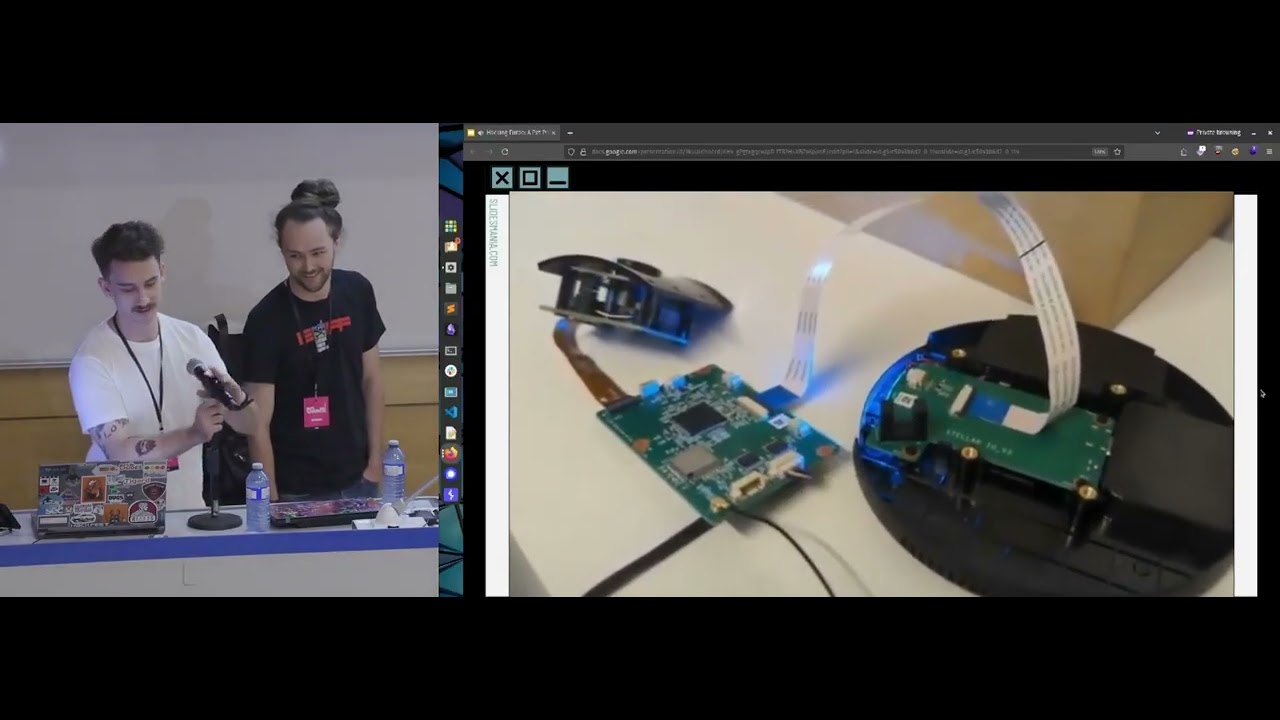
fancy sensors. And basically that figures out how much the thing's tilting to the left or to the right or forward or back or whether or not it's upside down lying on the pavement. Um, and then there's a radio and that radio talks to the controller and that's how a normal one of these cheap toy drones work. Obviously, if you got a DJI, it's much fancier than this, but DJIs don't cost 106 rand. And if they do, would someone please give me a few of them? This is how it goes with Wi-Fi. All they do is basically strap a Wi-Fi IP camera to the drone electronics. So on the side there on the right hand side or left
hand side uh you can see there's a Wi-Fi controller board. This is some form of board that has Wi-Fi and can talk to cameras. There are the two potato cameras hooked up to that and that does Wi-Fi. Now, in this particular case, it talks serial from the controller board to the microcontroller. It's oneway serial. It's transmit only, which makes things interesting. So, how do I fly it? Well, there's two ways you can control a drone. There is the controller or there's the phone app. So, the controller is pretty simple. It's got a bunch of buttons. It's a four channel RF remote controller. Uh, this particular one's got a 2.4 GHz radio. I have no idea whose radio stack it is. I
assume it's some vaguely Nordic thing, but it's all unbranded. Um, and they claim you can use it with the app or the controller itself. You can clip your phone into it as long as you don't have a too big a phone or too small a phone. But if you have the Goldilocks phone, you can clip it to your controller and then you can try and control your drone while watching where you've been, not where you are going. The app, so the app is uh more interesting. So, it's available for Android and iPhone. Um, it allows for camera access. It's got full flight control of the drone. It connects to the drone over Wi-Fi. Now, here is a audience participation
thing. Who can tell the difference between those four identical drones? Okay, let me help you. That one uses the Wi-Fi cam app. That one uses the Wi-Fi cam app, but different protocol. Those two uses the RC UFO app which is a different app and a different protocol. I bought four drones at the same time from the same place. Four identical drones from the same seller, two different apps and three different protocols. This is fine, right? By the way, that comes from Teimu. I own one of those as well. So, there's three options to hack the drone. I can reverse engineer the protocol. Uh, I can reverse engineer the firmware. Or I can reverse engineer the app.
Now, I'm not going to bother with the controller itself. That requires RF Voodoo. I I am not skilled in RF Voodoo. Um, if someone would like to buy me all the gear so that I can do RF stuff, please come see me. I'll gladly take free stuff. So, let's start with our reverse engineering the protocol. So, the drone acts as a Wi-Fi access point. It uses standard 2.4 GHz Wi-Fi. There's no security. There's nothing. It's just an open AP. Um, if you have the Wi-Fi, the RC UFO version, it will start with Wi-Fi UFO. The other ones have randomly create generated names and they have I'm going to be generous and call it a serial
number. I think it's just come random few digits afterwards. It's limited to one connection at the time to the Wi-Fi. So if your phone's connected to it, nothing else can. I'm pretty sure that those of you who have tinkered with bumping people off of Wi-Fi, I'm pretty sure those things will work against this. I didn't bother. And when you connect to it, your drone's IP is 192.16811 and your device will be 100 and that's it. Um the basic port scan, I know the picture's small but doesn't matter. Um basic port scan of the device is there's only one port open and that's port 7070. That is for the RTSP or real-time streaming protocol. This is only on
those two drones that use the RC UFO app. The other ones use some other mysterious protocol that I had poked at, but I've only got so many hours. I'm going to do three different versions of this talk. And that's basically it. There's nothing else open. So, how do you reverse engineer an app on an Android phone? I I don't have money for iPhones. I'm sorry. Um, now, yes, I know you can dump Wi-Fi if you have the right Wi-Fi card and all the fancy software. I don't do security for a living. I don't I just mess around with the stuff, so I don't have all that gear. Turns out that this is really, really easy. There's an app in the App Store or
the Play Store that you can install on your Android device, and what this will allow you to do is dump all the traffic flowing in and out of your device. Now, for their app to work, you have to switch off your mobile data anyway because the app isn't very smart and it can't figure out where to send anything, which is great because then all the ad inapp ads turn off. So, it's fine. So, what you do is you install this pcap Android or PCAP Droid app, which is pretty cool. And what it'll do is it creates a fake VPN and then it shves all the traffic across that VPN and dumps it to a pcap file which Wireshark will
open. Like I say, if you have a rooted phone, there's other ways you can do this where you can send the traffic out. And iPhones have some fancy mirroring mode, but I think it's only on certain versions of iOS or something like that. Um, so I've just gone this pcap route. It's relatively easy. So, I've done that and you get a pcap file that you can now stick into Wireshark. If you don't know what Wireshark is, go play with it. It's amazing. It is a network analysis tool, I guess. Allows you to show what's going in and out and across your network. And if you enjoy poking at things at very low level, this is really cool.
Unfortunately nowadays everything's encrypted and there's all kinds of things like that. Back in the day, these kind of tools were amazing because you could sit on a network and see everyone's password in plain text. But those glory days are unfortunately over. Um, so what I did was I loaded the pcap file in there and then I scroll through it. Now remember, I know nothing about this device. I have guessed how it works, but I'm looking here for some confirmations. And when you're reverse engineering, that's how you do things. Reverse engineering is all about taking a guess and then seeing if you were right. And if you weren't, well, it's not down that path and you take another
one. And you keep doing this until you figure out how the thing works. So with this, I was at least able to tell that the protocol is UDP. For those of you who don't know what UDP means, it's TCP's sort of longlost steps, cousin, child, whatever. It's a very weird protocol in some ways. TCP when you send a message, the other side says, "Cool, I received it. Please send your next one." And this kind of thing. There's a hand shaking and there's discussion between the two sides. UDP is yolo and off it goes. There's no guarantee of the order of the packets. There's no guarantee the packet arrived at its destination. And in fact, you can send it to the whole
network. It doesn't have to be a specific device. But UDP has one big advantage over TCP. And this is why they use it in these kind of devices. It's fast. It's very, very fast because it doesn't have all the crazy overheads and all the handshaking, the protocols and everything else that TCP would have. So most of these kind of things where speed is of the utmost importance, they use UDP. And when I say speed is important, think about it. Your drone is currently going straight for the ceiling and you don't want it to hit the ceiling and you want it to crash on the floor rather speed there is important and you don't care if the connect if your one packet
that says hey please stop arrives there quick uh or arrives because all you do is you send it 5,000 times and hope one of them made it through and that's very much how this app works. It just spams the other side, hopes like hell the drone picked it up and that it did something with the information. So you'll see that like hey please stop goes through like a 100 times and turn left goes through 100 times and occasionally turn left goes through and a few turn rights from earlier go through and sometimes it just goes right instead of left and that's how you kill another drone. So you look at this thing like I say
it's UDP based. I now know the port number at 7099. There doesn't appear to be any kind of acknowledgement. There's no authentication. There's no pairing. There's none of that. It's literally you connect to the Wi-Fi, you open the port, and you shove some data down, and it goes cool and then tries to do whatever you told it. There is a periodic heartbeat packet that goes through. Now, I have no idea what this packet's for. If I was building a drone, that packet would be Oh. If I don't receive that, then clearly the controller's walked off a cliff or something, and I should probably go land in this thing. It doesn't really do anything. It doesn't care. You don't
have to send it. I send it occasionally because why not? But it doesn't seem to do anything. Besides, I'm pretty sure that this drone couldn't land itself even if it wanted to. So, all it probably would do is just cut the motors and drop. So I can carry on doing this sort of reverse engineering and using Wireshark. But this is going to take ages. And to be honest, there's other more interesting parts to this drone. So let's take a different route. Let's reverse engineer the firmware running on the drone. Now the drone consists of two different microcontrollers. There's one that controls the flight or the flight controller. I'm leaving that one alone. I don't care how it works out, all the
algorithms and all that kind of stuff. I just want to control it. So, I'm only looking at that little Wi-Fi board. So, the main processor is a KL908. There's a bunch of numbers there. I can't find this. It doesn't seem to exist. The firmware is stored on a chip which is a 4 meg uh 4 megabit SPI flash chip and that's relatively easily dumped. If you're one of these people who have poked at any kind of hardware biases um or any of those kind of things, then you probably have one of those little clippy things. You clip the thing on, you plug it into a programmer, and you can dump it. Um, one of the interesting things is
this chips chip ID is all zeros. Um, and it will just work. Um, I tried a few combinations and I got it to go. I've got a relatively nice programmer, but you could do this using an Arduino or Raspberry Pi Pico or any of those kind of things. So, I dump the firmware. It's relatively easy. And then what? Well, I don't know what this firmware is. I know nothing about this device. I can't find it on the internet. So, if you're get a random file, binary file, and you don't know what it is, and you can't figure out what it is, my favorite thing to do is use strings. Now, if you haven't heard of this
incredible tool, strings shows you all the strings in the file. So, I ran that on the file and there's tons of files. There's error messages and there's very cool and very interesting logging. But one of the things I found was this HD SDK and I was like, "Woo, that looks like an SDK. Maybe that's linked." So, I did what any sane person does nowadays and go stick it into Google. I did try the AI tools. They told me a whole lot of stuff. It's all fake. It doesn't exist. Um, so I went to good oldfashioned Google, did a search, and like I say, it came up with some sites. Another one. Okay. So, can anyone tell
me what these three things have in common? A Wi-Fi camera, a visual ear wax remover, and a E88 drone. Yeah. So, it turns out that all three devices use the same chip or at least the same SDK. So, it seems to be that this HD SDK is used for a bunch of really, really, really cheap devices. Now, when I mean really cheap, that Wi-Fi camera you can pick up for about 20 rand. At one point it was 20 rand on take aot but then take aot got wise to the fact that they were losing money on these things and someone bumped up the price. Now it's cheaper to buy them in from Teimu. If you are interested you can buy
five of them for about 90 or 80 rand. Um I do suggest sending it to an alternative address so that your partner doesn't ask why are you buying five mini Wi-Fi cameras. By the way they also are equipped with the potato camera on it. So, I don't know what you're going to do with the photos. Um, there is the V visual wax remover, which is a whole line of strange devices. Um, there's endoscopes, which are Wi-Fi enabled should you want to wirelessly stick things down the drain or something like that. And then, like I say, drones. Now, it turns out that this chip or these chips are used in a bunch of drones and they all have a vaguely similar
protocol, but they were all different. I counted 14 or 15 different variations of a vaguely similar protocol, but none of them were close enough to my drone to actually be useful. Um, and yeah, the markings are always different. The manufacturer is always different, but a few people have figured out that the pin out of the chip is vaguely similar. So my guess is is somewhere there's a place churning out all the silicon and then there's a bunch of people laser engraving various markings on it. And this is all happening in China. Remember this device cost me 104 rand. It probably cost me it cost like four rand to make the entire thing. So you know the chances of
finding anything useful is pretty small but I was determined. So I want to know what architecture this uses. If you're going to reverse engineer a binary file, you need to know what it was built for. Now, some of the sort of usual suspects is things like 805 8051, which is an ancient, well, I say ancient, it's still in everyday use, but it's a microcontroller architecture from about the 80s. Uh, there's ARM and all the ARM flavors up until modern day stuff. Uh, there's risk 5 or ris, which is the new one on the block. That's the sort of semi-open one. I've stuck MIPS in there. Um, that was the one that was on all the routers a few years ago,
about 10 years ago. Um, but I don't think anyone is actually still manufacturing anything using MIPS. I think MIPS was also what the PlayStation used or that. No, no, that was Power PC. But anyway, so doing a bunch of Googling around this, there are rumors that it uses an architecture called Sey. Now, turns out that Sea Sky is China's version of Risk V, but not based on Risk V. So, what happened was Motorola had something called MCore architecture, which they kind of forgot about or left on the side of the road or whatever and didn't want and some place in China somehow got it. I don't know if it's actually licensed or what. And that sort of got twisted
into sea sky which is China's answer to risk v. The idea being that it's an open I say open vaguely open um architecture that they can then use in their devices. Again all of this is rumors and via Google translate. So who knows maybe it was the recipe for a hot dog. I don't know. And from my searching, it seems like this chip could be a variation of a common chip called a TXW806. But again, I'm not sure and I don't know and I'm just guessing here. Okay. So, I found out that CK Sky is supported in Rode 2, which is a reverse engineering tool. It's also in Ryzen, which is a fork of Red 2. Most of us here have
probably played with GIDRA, that is the NSA's tool. Um, gedro. There is a plugin for Cs Sky and unfortunately none of these work. I passed the file through and it vaguely does something, but I'm pretty sure that if you did that many circular loops, nothing would work. So, I think there's something broken. So, I given up on that one for now. and I decided I will tackle the app. Now, reverse engineering apps, especially Android apps, is relatively easy. What I did was I downloaded the version of the app, the RCU UFO 1.8.1 version, and I took it from the Harmony store. And I'll explain why later, but Harmony, for those of you who don't know, is Huawei's
version of Android. And they have a store, but there's like a back end to the store that shows you all the versions, previous versions and things like that. I used the tool called Jedex. Now, if you ever play with APKs, this is my favorite tool. You literally take the APK, you drop it into this tool, and you magically get code. And the code is actually human readable. Um, and that's basically what I did. So, I took this version 1.8.1, I dumped it into Jed X, and there was weird code in there. There was no code that I was expecting. If you've done Android development, then you know that normally you've got a bunch of activities and there's, you
know, forms and on those will have buttons and text fields and all this kind of stuff and there'll be a whole lot of code in the background and that's what I was looking for, but it wasn't there. There was a bunch of encryption stuff that was horri like very very obuscated and that was about it. And then there was a big blob of binary stuff but I couldn't do anything with it. So I Googled all the various libraries being used and it turns out that I'm not even going to attempt to pronounce that but that one is listed and that is used to encrypt applications. And it turns out that a bunch of malware uses that. If
you're building malware for Android, you use that so that other people can't look at what you're doing. And at this point, what you're supposed to do is you go chat up Leon and you say, "Hey, can you show me how to use Freda?" Because if you hook Freda into this app, then you can actually puretate the unencrypted data. But I'm busy and I don't think Leon's going to answer my questions. So I decided to do something a little bit different. I went and downloaded an older version. And this is why using the Harmony Store is quite cool because I took a guess. I'm a developer. That means I'm lazy. Which means that I'm not about to
implement encryption on day one. I'm going to do encryption when they tell me I have to encrypt the thing. And I was pretty sure that whoever built this app did encryption as a last thing. So I just went one version back. one version back turned out to be 1.3 from 1.8.1. So I'm not sure how that versioning happens. I stuck that into Jed X and that didn't have any encryption. So now I had code. Okay, so now I've got code. Cool. Now what do I do? Well, I once many years ago wrote some Java code so I can vaguely read this stuff. So what I did was I went trolling through the code. I found some things that looked like they
did what I wanted it to do and then I did what everyone did and shoved it into an AI tool and said, "Please make sense of this." The AI tools kind of made sense of it a little bit and then hallucinated a whole lot of things and built this really fancy looking, very nice tool that doesn't work at all. So, I went through and did it manually. Um, I'm going to summarize here, but basically what happens is there's a UDP com thing that sets up basically like a socket connection and then there is a flight controller thing and inside of the flight controller code is all the code that says go up, go down, go left, go
right and it converts all that into a bite string and sends those packets across the network and you're done. So there's one thing missing from my great plan and that's the video stream. Now the reason I am doing all this on the app on the drones that use the RSC UFO app is because that app supports the real-time streaming protocol. The other app uses a very weird setup. What you do is you speak the magic incantations over USB to the device and the device connects back to you on a UDP port. And then it spams you with frames. But what it does is it doesn't seem to use a known protocol. What it does is it seems
to do randomly send you some bits of the frame that have changed since the previous frame which you probably also got wrong. So normally what happens with these kind of things is every couple of frames they send you a right a frame that's good so you can correct. That one doesn't seem to ever send you a correct frame. So, um, I gave up. I did try. Turns out there are some smarter people than me who have figured out some of their protocol because it's similar to the one that the very cheap Wi-Fi cameras use or some of the Wi-Fi cameras. But again, in typical style of these cheap devices, someone put their own magical spin on
it, so it's not 100% compatible. And so, I decided I'll stick to ones I know. So, I went this way. What I do is you connect to this real-time streaming protocol. If you mess around with W like IP cameras, then you would have seen this before. U this is the same thing that streamers use and all kinds of other things. So you can just use good old FF play for those of you who don't know that's part of FM FFmpeg and you can connect to the stream and there's the video feed. Uh by the way the video feeds flipped 90° because reasons but it works. It also there's a whole lot of messages about how this is
a deprecated color format and you really don't want to do this and blah blah blah. It's all terrible, but hey, it's cool. And so what did I do next? Well, I shoved all that in Python and I wrote my own code. It's not that hard. You open a connection, you shove down the correct values hopefully the drone flies. Now, I don't think this is going to work. I'm pretty sure it's not going to work. So, I brought ducks to distract you all and that's why I'm wearing the duck code. So, um if anyone before I do a demo, does anyone have any questions because we got a few minutes. So, I'm going to delay the demo
and throw ducks instead because yes, someone no one anyone got a question, please. >> There. >> No, it's not. But it's okay cuz I don't know. It's not my problem. That that is the joy of being a speaker. It's not your problem. It's someone else's. Um, by the way, um, there is a QR code on the bottom of your duck. If you scan it, it will tell you your duck's name. It will give you a photo of the duck and a description of the duck. All the ducks are named after vaguely besides things. I'm terribly sorry. [laughter] I'm terribly sorry. Here we go. Have another one. Okay. Um, anyone got any questions? I thought I'd get one. No questions. Just
do the demo. Oh dear. Okay, I'll do the demo. Yes.
>> No, no, it's not. Don't worry. Trust trust the duck you are. >> It's just because all the codes start with a B. There we go. Yes. Yes. [laughter] Um I uh Okay. So, what I'll show I I don't know if you can see, but here is the here is the drone. It's very cool. It comes in a bag. The bag feels stronger than the drone itself. Um the drone folds, which is very, very cool. Um, I don't recommend flying one of these things in near a strong breeze, let alone in Cape Town wind. Um, my air con was able to make the drone drift across the room. Uh, it is very cool because the battery,
if I can get it out. So, the batteries look, you know, nice, although they weigh nothing. Um, it's got a built-in charger in the battery as well. So, you just plug in a USB stick um a USB cable. So, what we'll do now, please don't connect to the drone's AP. Okay, wait. There we go. See, blinky lights. Let's see. Now, I I'm pretty sure this isn't going to work. So, um, see, first you got to see does it. Yes, there we go. Okay. So now
in my haste to not do demos, I um close my uh let's see that should be good enough. And now you can all watch that I can't type. Uh, I'm here talking about a drone that cost a h 100red bucks throwing ducks into the crowd. Okay, so uh Mquack is the app. Um, so let's try. Okay so yeah, that is the please stand by. Um, okay. So, let's see. Oh, you kidding me? I got to stole the gift. Um, I decided to use a different laptop for this and I I've only had two hours sleep. You can tell, can't you? Not at all. >> Coming. Oh, that's another thing. Um, one of the batteries caught a light when
I plugged it in. [laughter] Um, I know this sounds like you shouldn't buy these things, but honestly, where else can you get a drone for 100 bucks? Doesn't fly though, but it's, you know, um, depends. Is my wife going to Is my wife going to find out the answer? Okay, lots of hours, but um I should have bought a slightly more expensive model and not as many of this one. Next year, DevCOM. Um so, originally my plan was the the plan for this whole thing was uh I wanted to fly this under AI control. I don't know if you read the abstract, but the original plan was I can get a video feed. So, I thought it's
got a downfacing camera, so I assumed I could fly it and use the downfacing camera to determine where the drone is. And even if there's a slight few millisecond delay, that's fine. But when you got like a five or 20 second delay, um it gets a little bit hard to do that. Okay so let us see if this works. So, we'll do a [snorts] heartbeat quick. Let's Let's go wild. Let's try. Okay, this is We'll try the other one because
please work. Please work. Yeah, it is connected. So, this is the problem with this drone is that um this should be working, but it doesn't always work. Um yes uh we can try the other one but I think the so all these scripts like I'm pretty sure that when I walk off stage it will suddenly take off. See there we go. So uh why is it sending to sending to the wrong place?
Yeah, it's sending to the wrong place. Okay, so you can all watch me live now at code. Has anyone got any questions while I I mean I think I've got still time. I don't know. Yes.
In a circle. [sighs] In theory, yes. No. So, the problem is is that in theory, yes, you can send in a sequence of commands and you can say, well, go forward and then for a second and then go left and then go right or whatever it is. But, um, the height it will go and the speed it will travel at will vary drastically depending on how charged the battery is. Which means in your anywhere from minute to 4 minutes of flight time, it could go really far or not very far. Then if someone happened to breathe near it or the air con was on, your drone could be anywhere from there or there. And that's the problem. Um, all of these
drones have another problem in that as they get close to the ceiling, they get sucked into the ceiling and because of weird delays, you can't get it to get off the ceiling without killing the motors, which means that it will then plummet to the floor. Now, I don't know if you guys can see, but you see those spiky things? That's to make it stand straight. But what happens is when it hits the ground, those hit the ground first. Now, do you see the the the industrial strength plastic? >> Yeah. So, um what happens is um when it crash when when you land it at high speed, um these break and that's what's happened to almost all of the drones
that I have or the other three, well, two of the others. Um one of them had a cat catastrophic meeting with the ceiling, the floor, and then the counter. And unfortunately, I didn't get that one on video. So, um, this is the joke is I have a little camera that I was recording in the little room when I was testing, and the one time it wasn't recording was the one where it had the epic video format. It would have been amazing cuz it literally took off, hit the roof, b hit the ground, bounced, and then hit the counter and that was the end of the drone. So, um, for 100 bucks you get about five minutes of flight
time, which means you can get five minutes of fun and a spectacular crash, at which point you go get your next drone out. Anyone want more ducks? Cool. So, I'm terribly sorry. Um, I'm not going to take up too much time. Um, those of you who, if you want to follow me, you can find me on xor.co.za. All the links to all the platforms are there. I'm all over the place. Uh, I am occasionally on Hack South. I sit there an idle, invisible most of the time. Um, like I say, I'm not really a security person. I'm just some guy who throws ducks into crowds. Um, if I find time, I'll be sitting around. You can come ask me. I'll try
and get the drone to fly. Um, like I say, I'm not going to try and debug code live on stage. Um, yes.
there. So, the problem is this the the chip on here is really slow. So, if you've ever built I don't know if you've tried with like a ESP32, you can get the CAM module. Now, you'll notice that there's a delay delay on there, but it's not that bad. Um, let me see if I can quickly show you how bad this delay is. It's It's not this side, it's that side. Um, I think it's just a case of it's trying to do whatever flavor of um stuff and it's trying to do it all. Just get this quick. So, it's trying to do everything. Um, it's trying to do all the encoding and I think that's what the problem is.
Um, Well, you can just pull it off. I mean, it's not I mean, it doesn't seriously I'm not even on Okay, wrong laptop clearly. I wish I had that there. But yeah, there's a delay. So, like the delay is quite substantial. Um, this is what happens when you switch laptops the night before. Um, but the the whole delay is on there. It's all the encoding and everything else. Um, these chips don't have much memory. Um, as far as I can tell, they're kind of terrible in general. Um, but like I say, I you can buy a camera. It's the um A9 camera, but it's not all of the A9 cameras, but some of them use this
family of chips. And then that one you can um it will try and get a stream. Um, and you can, some of them also have the real time streaming protocol one, which is not as fast, but the picture quality is better. If you try go for the weird UDP one, the image arrives sooner, but you can't make out what the image is. So, your choice is slow and you can see things, or you can't make it out, but it's there really fast. So, um, like I say, it's this this was all going to be a setup for another talk I was going to do where I was planning to have like 10 of these and they're going to fly in
formation and all this kind of thing. And yeah, I discovered that 100 rand, you know, you get what you pay for. I was expecting a lot more for my 100 rand. Um, you know, at least a spur meal size thing, but you know, um, like I say, it's been fun. Timu is great for this kind of stuff. You can find a lot of things with questionable designs and build quality and everything else. And if you're curious, it's a lot of fun. I think that's my time. So, thanks very much for coming. Uh, come find me if you've got questions. Uh, if you've got a duck, please scan it. Go look it up. Um, if you don't trust the QR code,
there's a number on there. Starts with a B, so it' be B A something something. And you can stick those in. and your ducks are all named and they have a description and they tell you where you got them. I know it sounds silly um but I'm planning on infesting the world with my ducks and I would like to know how far they go. Thanks. You've been great. Cheers.
Related talks
 45:56
45:56 40:53
40:53 4:14:50
 31:42
31:42 32:40
32:40 23:55
23:55