Of Microchips And Mammals - Elliott Nash
Show transcript [en]
thank you very much hi everyone I just want to say thank you to my talk titled of microchips and mammals uh point to anyone who got the Steinbeck reference there um I'm going to skip a who am I because uh going to cut the time pretty short and I'm just going to jump straight into it so I'm sure at this point the flipper zero needs no introduction but just in case it's this little Gadget I'm holding here uh it comes packed with various Technologies to interface with all sorts uh sub gz I infrared blaster I guess um Bluetooth hopefully you managed to avoid that Bluetooth spam attack um the one that really caught my eye was the
RFID uh reader writer emulator so I was looking through the extra actions in the RFID menu and I noticed this feature here the askk and the animal bit really caught my eye because if there's one thing I love more than hacking it's animals and I knew as soon as I gave talk about pet microchips I knew this is what people would really come to see so here are some of the various animals that take up way too much of my time I had a hunch this ask feature was to do with microchips uh so armed with my flipper in one hand and a handful of dog treats in the other I called my dog over and I tried giving it a scan and
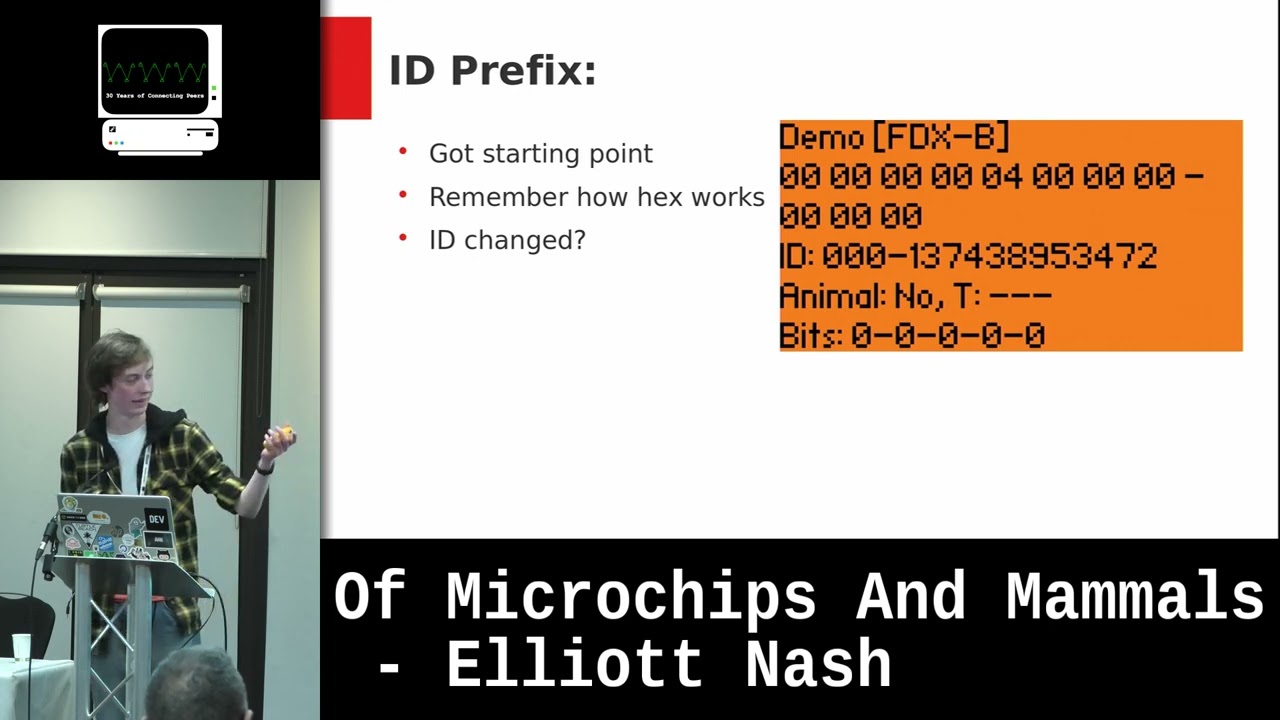
sure enough I got a read so I was now looking at my pet's microchip so let's go over what information we have available at the very top we've got fdxb so that's the protocol that it uses then got a load of hex we've got an ID um and I'm going to kind of run through this talk as I knew at the time so I was guessing this was probably the bit that would be useful to the vet uh we have confirmation my dog is in fact an animal and and then we have the very descrip named bits and these all zero so there's not really much we can glean from this uh and don't worry I haven't used this
isn't my dog's actual microchip it's a Rand reg generated one I'm not going to dox myself in my first cont talk so now that I've read the microchip I wanted to have a backup of it just in case I copied the file over to my computer but when I used cat to open the file and pun not intended there but very much enjoyed I noticed that none of the actual information was there I've not got the actual key um and I'm going to use information to refer to stuff like the ID and data to refer to the hex so this got me wondering how is that data converted into the information that the vet can actually
use First St was doing some research and this was filled with some highs and lows The Flipper zeros firmware is open source but my C is awful so that really wasn't much help there is public documentation for fdxb but it didn't really correlate with what I was seeing on The Flipper when I looked at all this information I should have been seeing more data than I actually was so that led me around in circles and again wasn't much help so I guess I had to do it the slower but the more fun way and work out myself so the first steps was establish an upper and a lower bound I wanted to make sure there wasn't any sort of weird
inversing or anything like that so I set everything to zero to make sure that it all resulted in zero and it did and I set everything to S to give myself the maximum so I now knew what I was kind of working between I guess the different parts of the hex would convert to the different parts of the information so for me the next stage was to figure that out and kind of where that boundary lies so I walked one through each and just made a note of what was changing um I mentioned that Pitfall I forgot how hex works I will elaborate on that in just a bit So eventually I found that point
where the information changed it goes from the ID to its prefix so I could focus on just getting the ID uh time to just work on how that's actually encoded so some of the eagle members of the audience might have noticed this while I was walk Walking the one through but at that time I wasn't really focusing on how the information was changing just that it was um one of the mistakes I made here was that while I was learning about binary at school I only really focused on most significant bit first so that's kind of how I was facing this I was doing it from the very end there and you can see it goes from f e d and goes 06
034 it kind of jumped around so again I was trying to sort of work my way through there and it just wasn't clicking took me way too long to try this but I decided to try it from the other end and this did help move things forward I still wasn't quite realizing why the lowest I could get was eight but at first I consider it maybe just worked in weird intervals maybe it jumped but it's not how binary works that clearly wasn't right then I came to the realization so I made that mentioned that Pitfall earlier about forgetting how hex Works uh the mistake was that I kind of forgot that hex can be like a representation of
the binary instead of the actual data itself so when I broke that hex down into the binary I realized what I wasn't seeing so it said that eight and that's because of those trailing zeros we reading from left to right here and obviously eight in binary is at 00001 so that's why uh so it seemed counterintuitive but I try a different number a larger number and hope to get a lower ID and yeah that worked so I did actually manage to get the result I was looking for again seem counterintuitive but as long as it works I tested this a few times with random numbers I generate a random number convert that into binary into hex and then wrote it to the
flipper and this will seem to work I was getting the same information on The Flipper that I was getting on the actual like the number that I generated so now that I figured out that ID's encoding I can move on to that prefix before it I started in the same way but I notic that sometimes when changing the prefix that ID changed now remember when I was working out the boundaries I thought I wasn't meant to be touching that part so clearly I was missing something I had to go back to the drawing board as mentioned I thought it was that second hex character in that fifth bite where the prefix ID started but that
wasn't really working out with what I was seeing I again broke the hex down into binary to reveal the answer so in reality it didn't really elaborate on this much but the green there is the ID with the blue being the rest and that's actually where the boundary lies I kind of assumed that the it would all fit nicely into the hex uh forgetting that doesn't have to of course it can kind of bridge it and work halfway through so once I did that I was able to again Generate random numbers but I tried with larger numbers that would really lead to ones being in that bit that sort of Gap where I thought it
would be and again that will work I've got larger numbers we manag to get it correct so I kind of glossed over this because I was just testing but I'm actually going to talk about how to decode the information so you get the hex and you break it down nibble by nibble into binary as I've done there uh remembering where the sections between the ID and its prefix lie uh you just split it into those two parts and then you work out each part convert it from binary into decimal if you're typing into a calculator which I would recommend over doing it by hand remember that we're reading most calculators like binary calculators work most too Le significant
bit remember we're doing the other way around that's spent way too long way too long reading it the wrong way um but you can see here after converting the binary into the decimal we have got the same numbers the 589 and the 163 we can see that is actually how that ID works so let's go with what we've learned so far kind of recap the main ID is stored in the first 38 bits that's when counting left to right the next 10 bits are the as I call prefix I actually look this up afterwards like I say kind of working with it as I Know It uh that's actually a country code or a manufacturer code it depends on uh the
kind of laws in the country and the individual manufacturers uh so that's the next 10 bits the binary doesn't have to I say fit neatly I guess kind of work neatly within the hex obviously if you got a long string of binary like that it can the different sections can obviously spam the different he characters it's too simplistic to just think that everything's going to fit nicely and then the hex is a representation of binary but doesn't mean that no sorry I'm ring my notes Here uh binary can be read either way um right to left is more common but always good to bear in mind it doesn't have to work that way so you don't spend too
long trying to hit your head into a brick wall so this is the bit that made me really want to give this talk uh I've seen online some people trying out the flip Z's fdxb feature and posting about it and that's great um seeing people experiment with it and playing around is what made me really want to give this talk they recognize the risk of posting the ID so they've redacted it sort of like how I've done here but remember though as we just learned the ID is actually read from left to right so although they've covered the end of the ID yeah there we are that was a realization it's all actually in the hex
there uh it was utterly useless I did message some people saying just to let you know you've you know not redacted it at all um I got no responses I don't think anyone deleted any posts I don't I don't understand myself but there we are um I would say a better redaction would be something like this obviously we're now covering the actual part of the data that converts into the information how how much you want to redact is up to you it's personal choice you might decide to do the whole ID you might decide to to leave the country code you might decide to partially redact that's fine just make sure you actually know what it is you're
redacting instead of not at all uh so unfortunately I wasn't quite able to discuss how all the data was encoded um I wasn't able to work it all out myself and I'm just being told I've Got 5 minutes to wrap it up so I've decided to leave this as a challenge to the audience that's my excuse at least uh I have seen and this is all bit rarely there's sometimes a temperature stored at the end of the chip uh you might sometimes see I might have to yeah so there's that t colon and that's sometimes a temperature I haven't been able to work out how that's encoded um I also haven't been able to find out
much information on the bits section at the end all the information that I found all the documentation all just calls it extra information in quotes with no indication as to how that's used for what systems might use that so that's another challenge um if you do find these out please get in touch my Twitter handle is down there in the bottom left um the prize for that is that I think you're very cool not really got anything in the term of monetary prize I'm afraid but get what you got uh I'm going to wrap this up and I always suck at doing endings so I'm just going to say thank you everyone for coming to the talk
really enjoyed doing this and I appreciated it and yeah thank you thank
you questions y not so much questions as much but challenge accepted challenge accepted that's some of the bits at the end are used um for vaccinations for certain things like P virus are they yes okay well you Inn the prizes I think you're very cool uh that's really interesting to learn now so actually I had I do have a question which kind of follows on from that that this isn't a proprietary system that you're using that's one manufacturer is making them this is it this is an open source so that data that you've spoken about and the data that you've spoken about must be defined somewhere per manufacturer each manufacturer can have their own interpretation of it I also not
consistent I also could have save myself a lot of time by just reading the iso standard for this which does outline how it all works at least in theory but that costs like 40 quid from their website so so it's probably behind an ISO standard probably uh yeah ISO I can't remember the number8 something else uh I also want to say none of this is exclusive to The Flipper zero uh I have tried doing it with a proxmark I didn't have one at the time hence why I gave this talk very flipper Centric but I have done it with a proxmark 3 uh it actually gives it still doesn't tell you so when I mentioned about how the all
the websites I gave I should have been seeing more data um it actually gives you less it tells you less of the hex that's on there um so you can do it on other stuff I'm not saying it's flip Centric but that's just what I used and obviously anything that can read microchips probably have a feature for this thank you again thank you very much
Related talks
 28:37
28:37 47:15
47:15 33:48
33:48 49:41
49:41 34:45
34:45 10:48
10:48