Password Expiry is Dead: Real-World Metrics on What Rotation Actually Achieves
Show original YouTube description
Show transcript [en]
Welcome to the last uh talk for Passwords Con 2025 at Bsides. Uh it's really been a um a great couple of days that we've had some awesome talks. I'm sure we've learned a lot, those of us that have come for uh some of the other talks as well. And uh on behalf of myself and Pere of course who could not be here, we want to thank everybody who attended and of course the speakers as well. Not forgetting to thank our diamond sponsors Adobe and Iikido and our gold sponsors uh formal and run zero. And then of course as as always mentioned all the sponsors, the volunteers, everybody including yourselves who make conferences like this possible. Uh we're
a community. We work together. We research together. We teach each other and Passwords con is just one uh piece of that that great puzzle. So yeah, thanks very much for attending this this year. So let's move into password expireies dead real world metrics on what rotation actually achieves and a little bit of the thunder was stolen by the previous speaker but I'm happy about that because he's kind of laid the foundation a bit about where we're going and why we're having this this this talk now as well. Just a little bit about me. Uh so I've been about 21 years in cyber security primarily pentesting architecture. I've been on team hashcat since I think 2013
somewhere around there. I'm currently the chief tech technology officer at Bitrack Cyber Security. I'm also on the CFP review board at Bsites Athens and safety ops for Bites Las Vegas as well as now uh running passwords con and yes I have set an undisclosed number of hash rigs on fire in the past. So, um, yeah, on the team if there was, uh, ever anybody that was setting hash rigs on fire, I I seem to be quite good at doing that. Cool. Then I just included a mandatory cat picture. Those of you who've been following Passwords Con for a number of years will remember we used to have a mandatory requirement for cat pictures and uh, I think it's time we slowly
start introducing that again. So, I thought let me put that in quickly quickly. But let's jump to the next slide. How many of you recognize uh these uh what is being said here? Um right. So these are quite old, right? Um and at the time uh they came from the PCIDSS something authoritative. Uh the best practices one was from Microsoft and then there was also um a list one mentioned there as well. And they all said the same thing to us. They said, "Change your passwords every 30 days. Expire them." That's how you keep things secure. That's how you keep your company safe. That's how you stop yourself being hacked. Okay. Most of this came from
about 2010, 2011, 2012. Where we are now, did did that work? Did it not work? Well, we can see it didn't work very well because we were not anymore secure. We see some massive leaks that have happened. hacking breaches are all over the place. So something was not right about that and the fact of the matter is it doesn't work and it never did. Password expiry was not the magic bullet of every 30 days or every 60 days when all our staff and all our clients and all our users change their passwords that suddenly things were going to be miraculously secured. They would pick strong uh candidates that pick ultra strong uh passwords and everything was
going to be fine. In fact, quite the opposite happened. What we in fact did is that we drove the reality of user behavior in the wrong direction. Okay? And the reason for that is because users are very good at finding ways to do the least amount of work they have to do when it comes to choosing a password. Right? If you tell them that they should uh enter 10 characters, they will enter the most basic 10 characters they can. When you tell them it's got to have a number in it, guess where that number is going? At the end. When you tell them it's got to have a special character in in it, well, it'll be something at and a
number. Okay? Usually things like that. So, and it's not because users have a malicious reason for doing that, right? They're busy. They have a job. They got things to do. They want to get things done. And you now come and step in the way by telling them to change the password all the time. And so they will pick what is the easiest thing for them to remember. The same thing applies to when we told users to change them every 30 or 60 days or 90 days. We expire it. They now have to think of something else, right? And remember whatever company or organization we representing is one thing. They have maybe a password somewhere else. They
have three or four accounts. They have their social media. They have their there's so much that they need to remember and think of. And so this drives them to find ways to do it as easily as possible. It's also why if we consider tools like hashcat for password cracking, how many of the rules were optimized for this and how the hit rate on those rules is so high because users will find a way to introduce a pattern to make it easy because they have to change their their passwords all the time. Patterns when cracking are often based on how uh user behavior is when changing them as well. So we all the rules all the methodologies that we've seen and
there's been some talks during uh passwords con that has covered that kind of topic they've all centered around how users uh will adapt the requirement to change a password. So some examples, right? We have our base word which is in purple on my screen. I'm not sure how the projector is rendering it, but that's the base uh one that they started with and then as they're getting forced to change it, they're making some quick changes in their mind. Okay, let me add a number. Let me in increment the number. Can't increment the number. Okay, because you're remembering some of them. So let me change some of some some of it. So statistically and in all the
years of password cracking that I've been doing and that everyone else I think has been involved in um you will notice that these patterns come along all the time. As users have to pick new passwords they will make them uh statistically become some kind of a pattern. And it's even more interesting if you have the opportunity and it's not everyone that gets this opportunity to look at a company or a corporate domain uh passwords over a period of time. And by time I mean like four years or 5 years constantly cracking them when that password expiry was required. You will notice that uh these patterns were creeping in quite quite a lot. So we were a bit responsible for that for
making users change the passwords all the time because they had to think of something they can remember. So the result of that if you look at some statistics and obviously I have renamed uh some of these organizations to use case for obvious reasons. So use case one through four where four is the one that has the longest requirement in between password expiry for the users. Right? So looking at use case one in the banking industry a 30-day password expiry requirement. Back 10 years ago, we were told that's the way to go. It's the safest. There'll be no issues. Look at the next column. Passwords with trivial increments. 60.4% were matching were cracked with simple rules that were just looking at
incrementing things in the password. Usually something at the end like a number or a letter. The total crack rate 89%. So, did it actually help anything? No. when when the breach happened, mand mandating password expiry didn't actually make you any more secure than it did the next person or the next one. Right? So, going to the next use case, uh, finance institution, 30 days as well, 54.9%. easy to crack. But the rules also primarily being the ones that were um that were users incrementing or appending or doing the usual at June 1 at August 1 and so forth to try and constantly change the password to something that was that that made sense. Um, and a side note here, if you are a
hashcat user, there's a very nice mode you can use in hashcat which will show you which rules are the ones that are cracking um the majority of the password. So you can then work back from that and script it to see what the majority of them are. In this case, the trivial increments are the ones I'm calling where it basically just appends things at the end of the password because the user had to quickly pick something new and 91% of them were cracked there. Use case three was a power utility. They had slightly longer 60 days. Okay, bit better but still every two months and that comes very quickly when you're a corporate user and you're working and
life is carrying on. So they would have to change that password as well. 62% there were matching trivial incremental rules. And then the crack rate or the total crack rate being 79%. Now the last one in back to the banking industry again was 120 days plus and the reason I've done this is because um this one kind of m made up of not just one uh or organization but a few in the banking industry where they had at least 120 days. Some of them could have had uh 190 365 and so forth. But notice how things are changing slightly now because the passage with trivial increments is coming down. So stronger passwords are being automatically chosen by the user
because they don't have to change it so quickly. They'll think of something strong, right? I I'll think of something that I I will remember. It's good. It's locked in and it stays there and it's not going to expire in 30 days and force me to use something else. The crack rate there 70%. So here's something interesting too. It doesn't necessarily mean it's making the passwords more difficult to crack. Right? What we're saying we're not saying here is that it's a magic it's a magic bullet as it were that when you increase password expiry to 90 days and something days or a year suddenly no one's going to be able to crack them. It makes it more
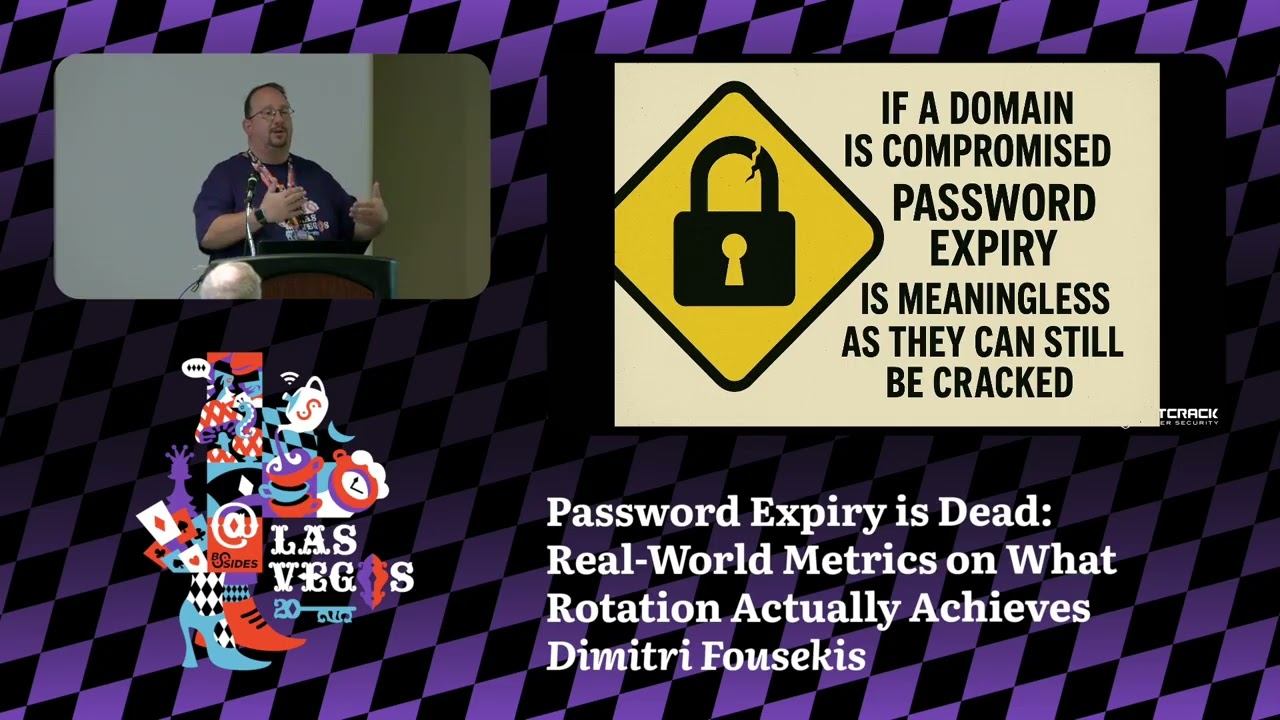
difficult but it's not as uh it's not as um it's not that silver bullet as it were that's going to stop anything being cracked. So what we're saying here is that you can't rely only on password expiry. And I think that that's what's coming across as well. As we continue, you'll see from the other ones. And so if a domain is compromised, your password expiry is meaningless, right? It is. It's meaningless because whether it's been sitting there for a year or it's been sitting there for 30 days if it's not a very strong one or if it's you know the way computational power has has has progressed today when it comes to cracking NLM they will be cracked. So password expiry
cannot be relied on on its own to secure an environment anymore than it used to be. What are the other negative side effects? Right. It causes people to increase the forgotten password tickets at help desks. Okay. Every 30 days users change their password. It's now been 3 months. They need to log in. They've been on vacation for 2 weeks in the Bahamas. There's been a whole lot of alcohol flowing. The brain is not exactly where it should have been. And which which password did I use? Cuz I've changed them so often. I don't remember which one. Call the help desk. Right. So, it increases that as well. Also, password fatigue gets gets increased which results in insecure practices. I need to
change my password every 30 days. I'm not going to remember it because there's so many of these things and you're remembering the the the last 10 which I had. So, I'm going to start writing them down on little postits and little notes in books. There's a book uh I saw a book on Amazon the other day. It was called a book of passwords where you can write down I mean I don't even know why it's being sold on there. should it should actually come with like a warning strapped to it. But but anyway, but people do that because they have to change them so often they want it somewhere where they can remember it. And then like we've shown there's no
measurable benefit, right? If you are breached, the fact that the password was changed every 30 days, 60 days, 90 days or or longer has no actual measurable benefit. So why do it? Why force the users to change it so often? create all that uh password fatigue, all that help desk uh increase in workload for them when in actual fact it's not going to help anyway. And so what happened? We have adjusted the approach. NIST has adjusted its approach and said that um I don't know if you can read that uh small text. Well, basically the short of it is what we're saying. There's no actual value to forcing users to change their passwords to expire them every so often.
rather focus on other means of securing that method of authentication. Let the user pick something strong that they remember and that will be there and valid for a long period of time. Microsoft says the same thing. And uh some of you will have noticed if you're uh when you're logging into your your Azure and other platforms and trying to set the policies and you try and make that policy quite short, it actually brings up a little message saying, you know, this is not really recommended. do you want to do this? You're creating more issues than you're going to solve. So, thankfully, we've adapted and realized that this is a problem and so we need to do something about it.
But then the question is, okay, so we're going to allow passwords to be valid for a very long period of time, but that how does that help us? What can we do? Because we may still be breached. There's still an issue. Okay. Well, there's a few things we can do and we can work on. time to crack scoring is an interesting one and some of this I think was covered in the previous uh previous uh talk as well just before this one. So crack the the passwords in the domain and I think about five or five years ago or somewhere along the line there was a um a passwords con in Cambridge and this came to the four as well. It was why not
crack the passwords in your company. There's no law against that. There shouldn't be a law against that if you're within the organization and you've got ownership and you you've got the permission to to do it. So crack them and use the time to crack to understand which are the weak ones and maybe focus on expiring those instead of everybody. Okay. Event or risk based resets. Okay. So if your sock or your SIM or whatever is doing your threat analysis, maybe you have a a dark web feed that's telling you that credentials have been leaked. that can trigger an expiry and a reset. Time is irrelevant there. Soon as that risk comes in, you should rather I seem
to be having the same issue that somebody else had. So, let's just reset this quickly. Okay, let's see if it comes back. And we wait and we hope. And it's back. Okay. Um, so yeah, so trigger the expiry or the reset on an event. And I'm using expiry and reset together now because we don't actually want to expire the password unless there's an actual reason to do so. Credential entropy monitoring is an interesting one. Again, using tools like hashcat. Look at how much entropy is in the the the passwords that are being chosen even by one person. So you can build some interesting tools yourself here. Um, pick your favorite uh DB, MySQL, Postgres, whatever you want to use.
Start putting the data in there and look at things like entropy per user is an interesting one, right? So, five users in the organization, very strong password, no issues. You got another user that it keeps showing up in breaches. They keep resetting it. It keeps having issues. They lock themselves out. It gets changed again. And the entropy is not that great when they are setting new passwords. educate them and then force a reset so that you get something stronger and then of course multiffactor authentication is the one that everybody N Microsoft etc are mandating on top of it all uh to ensure that if that password is breached um that it's not a an issue for the
organization now one thing to note with MFA is that unfortunately we seem to like these uh these one solution solves every everything thing because we first said expire passwords and then Every everyone's happy. That's going to stop us being breached. We realized that doesn't work. Put on MFA. So, we did that and then sat back and said thought, well, okay, that's going to fix everything. It's not. Okay. MFA still needs work. The amount of organizations I've seen where the fallback for when MFA is not available is just nothing. Oh, you didn't have your phone, your authenticator, so we'll let you through. Because when we don't then the business comes down and says you're you know
securities in interfering with uh with uh the corporate we're losing funds just turn this thing off and what happens somebody goes and turns off MFA and you're back to square one again or failing MFA failing to something less secure like email right if you think somebody's breached your environment there's a very good chance they're reading people's emails so falling back to sending one-time pins or MFAs of some kind to an email that's a bad idea as well and so is the please press the button on the phone to accept this login because fishing and fishing are very good at targeting that kind of thing. So there's various ways of of implementing strong MFA uh authenticating the device
checking is the device the one the user had and we're not going to go into detail about that now but what what the point is here is put MFA on top but make sure it's implemented properly and securely and robust and then you don't have to worry about pass password expiry because it's that you don't need that value from there either. Hashcat is your friend, right? And and I know there's other uh password crackers out there, but since I'm on team Hashcat, hashcat. Um, if you need help on how to use Hashcat, they have a Discord. I don't know how many people know that there's a Discord server where not only there's a lot of helpful
people, but the people who actually write the tool, work the tool, build on the tool, use it for cracking are on team hashcat. They're there to help you use it in a way in your environment that gives the benefit that we've seen to do this risk based approach of expiring passwords to audit them to understand what's going on in the environment. Hashgcad version 7 like we announced let you cater for custom setups a lot easier. So we tend to focus on active directory a lot but there's many other applications that could be expiring passwords and don't need to stop doing that there. But then you also want to audit those. Well, now you can because
if they're using an algorithm that wasn't common, you can now use the Python bridge in Hashcat to ensure that it can crack those those those passwords as well. Um, and then use it with automated modes. Hashcat can be scripted very well, right? You've got modes such as dash uh uh capo which will um which is optimized kernels when tracking below a certain uh uh keyword length or candidate length. Right? If you know your users are not setitting passwords of 22 characters, they're sitting somewhere around 13 or 14, optimize it so that it cracks faster. And the dash uh W which tweaks the workload. So use all of these, put them together so that you get the value out of that.
That is the time that I have. Uh and once again, I just want to say thank you to everybody for attending uh passwords con this year. Um, as I mentioned in the beginning, the speakers, the sponsors, everybody. Um, take what you've learned now for the rest of the year until we come back here again for BIDES. And you know, we're always everybody's looking for speakers. Do some interesting research, do something that build on what has been said here. Come back next year and and really show us what what you've done. So, don't forget to submit uh to the CFP as well. The next Passwords Con is December 1 to3 in Prague uh in the Czech Republic and
information on that will be released soon at Passwords Con but of course it will be here again next year at Bides as well. So I have done enough speaking and uh yeah thanks everybody for attending Passwords Con and uh I hope you have enjoyed the rest of the day.
Related talks
 9:41:01
 22:42
22:42 34:07
34:07 31:01
31:01 45:27
45:27 42:48
42:48