NAC to the Future: Bypassing Network Access Controls and Improving Red Team Implants
Show original YouTube description
Show transcript [en]
So welcome everyone. Uh my name is Rick Consul and uh this is Knack to the future uh bypassing network access controls and improving red team implants. So quick agenda for today. Uh we're going to get into just a brief introduction and some definitions uh for what we'll be talking about. Then we're going to talk about how we bypass network access control, how we can enhance uh existing tools uh to just have better and more automatic network access uh bypasses and then how we can defend against these bypasses. So like I said, my name is Rick Consul and I'm a penetration tester and security risk adviser. So I have the people who cheered. I don't know if you
can tell, but they're also from that company. And uh what I really love to do is develop uh custom offensive tools and hardware and which is what I'll be talking about today. And I like to focus on the intersection between AI and security. So [snorts] let's get started. So, why I'm here today is that on many of the penetration tests uh that we go to, the on-site ones where we're actually physically plugging into client networks, uh we frequently encounter uh forms of network access control. I'll preface that by saying there's many many times when there's no network access control at all. [laughter] But when we do encounter it, uh oftentimes it will be this 802.1x network access control.
And I'll explain what that uh is in just a second if you do not know. So we I was tasked with creating a tool to bypass this form of knack because as you can imagine if you're trying to plug in and do an assessment and you can't even get network access uh that really [snorts] stalls the whole operation. So we need a way to just hit the ground running uh and be able to get the access that we need in order to perform the actual test. So today what you'll learn is how 802.1x network authentication control uh works uh how to bypass it and then why so many networks either don't have knack still or uh why they can still be bypassed.
All right. So with that uh I'm going to define uh some of these concepts for you. So first is network access control. So this is just a security system that decides what devices are allowed to authenticate to a network. So for this we're going to be strictly talking about plugging in uh on the wire uh to get network access. A knack bypass is any technique that allows an unapproved device to connect to a network secured with network access control. So just anything that can bypass that. Then we have 802.1x which is a form of network access control that is portbased and I'll describe what that is. uh but a device has to prove it is uh who it says
it is authenticate in some way to get access to the network. And then finally uh a MAC address for those of you that don't know uh is just an identifier assigned to it could be the Ethernet port on your laptop or the wireless card that you're using. Uh and that's kind of a unique identifier to separate itself from others uh on the network. Okay. So we'll briefly talk about the types of network access control uh and then I will go into them in more detail. So in I'm just speaking very generally here. So the first type and they go kind of in order of complexity for deployment and also uh their security posture. So the first we have is MACbased. So access
is granted based solely on your MAC address. So I'll show what that looks like. And then we have port-based where a device must authenticate to some authentication server in order to be granted access. And that authentication uh basically opens up the port that it's connected to in order to allow uh that network uh that network access to happen. And then finally agent-based where whatever the devices need some sort of agent software running that further authenticates and encrypts uh and secures that uh network connectivity. Okay. So with that in mind now we can talk about how we can bypass them. So the first one I mentioned was MACbased network access control. So generally how it works is the security system uh will
keep a list of uh Macs that are allowed to pull an IP address and interact with other devices on the network and that's it. [laughter] That's the only that's the only thing that's happening there. So I like to think of this as a bouncer outside of a club and you go up to the bouncer and he says what's your name? you say your name and if you're on the list, he'll let you in. And if you're not on the list, you're not getting in. So, as you can see, it's pretty rudimentary. Uh, but this is something that we actually see very commonly. So, how do you bypass MACbased Knack? Well, if you're outside of a club and
there's a bouncer who's checking people for names, what do you think you should do? >> You lie. [laughter] So, you just say whatever name that is on the list, any of them, and then if you say the correct name, he'll look at it and say, "Oh, welcome, Mr. So and So, Mr. HP printer." So, you basically just wear the mask of whatever device you're trying to uh spoof and then you'll get network access. So what you can do is say you're physically there at a client office, you can plug in passively. You're not trying to pull an IP. You're not trying to do anything. You're just listening for any packets that hit that port that you're
plugged into. And when you're doing that and you're passively listening, you can open up in Wireshark, whatever. And then you'll start seeing a bunch of different MAC addresses pop up. And sometimes Wireshark will automatically translate them into what vendor they are. And I'll explain that in a second. But you might see, oh, there's a bunch of HP printers. They use HP printers. That's perfect. Uh here's this MAC address right here. I will use it. And then once you uh clone your MAC address using uh or not clone, spoof your MAC address using MAC changer, then you reconnect and then you're allowed in. Now sometimes that doesn't always work. Sometimes if you use the exact same MAC address, you'll have some
network connectivity issues because the two different MAC addresses on the same network and they're causing they're conflicting and everything. So generally what we'll do is we'll increment the final octet of the MAC address by one. So, we'll increase it, decrease it, and see if that's allowed. And we can take that further by messing with what's called an OUI. So, what that is, and I apologize, the screenshots are probably a little small, but an OUI, it's the first three sections of the MAC address, the first three octets. They're all hexodimal, and what that translates to is the vendor uh of the uh like the the vendor of the device, the manufacturer. So for HP, they have a bunch, but those
any of those three first octets indicate this is an HP device. So say you're uh you know, you're at the office, you just ordered 200 printers and you're trying to set them up and you're trying to get them all allowed on the knack uh and you realize they all have the same first three octets. They're all HP. I'm just going to wait list the first three octets and then every other printer is able to connect them up to write each one down and keep track of them. That's great news for us because all we have to do is uh set the uh set our MAC address to the first three and then doesn't really matter what the rest is and then
we'll get access the same way and they just think that we're a printer and they allow us in. So there's blanket allow lists for the OUIS and of course UI stands for organizationally unique identifier and you can look these up online. There's uh multiple sites that allow you to do this. There's ones where you can search by vendor and it shows all that are related. And then wire sharkark has a reverse lookup tool where you can look up a an OUI and it'll show you the vendor that it's actually from just get some water here.
All right. So now we'll talk about port bait portbased knack which is the main topic of today. So how this works is devices must authenticate to an authentication server. That could be a radius server in order to be granted network access on the switch [snorts] and they could be that could be in the form of a username and password or a certificate. And the way I like to think about this is it's like a club but instead of a bouncer it's a door with a little slit and the guy slides it open. He goes, "What's the password?" And then you have to say it and let you in. And then us standing, you know, on the outside, we
can't like we don't know what the password is because we can't hear. So what do we do? What we can do and I'll explain this more in detail in a second but we can take an attacker control device and basically put it as a man in the middle between the supplicant which is whatever device is authenticating to the network. So you can think of that as a printer or an IP phone or whatever. And we put that in between we put the attacker control device in between the IP phone and the port in the wall that it's connected to. And that eventually leads to the switch that manages the authentication and all that. And then the device allows the uh the um
IP phone to authenticate as normal and do its full authentication process just like totally transparent pass through. And then once the authentication's complete, the port enters what's called an authorized state. And then anything sent from that link is then trusted and authenticated so long as that traffic is coming from the same IP address and MAC that authenticated originally. So if you have multiple MACs uh communicating, like if I just set up like a regular dummy switch on that port and had the IP phone authenticate to it, if I tried to like also plug into the switch and try to send traffic, oftentimes it would just block you because there's multiple devices communicating on that port. So
the way to bypass this is what we do is we just that the device that is sending our traffic through is masking it as the uh IP phone. So we're cloning our IP address and MAC address. Uh and all of our traffic appears to come from the IP phone. So the way you can think about this is two people in a big trench coat. [laughter] Uh where the IP phone is the guy on top who says I am who I say I am. Let me in. And then we are right there [laughter] in the under part. And as long as we stay in the trench coat and we're walking around and pretend to be the IP
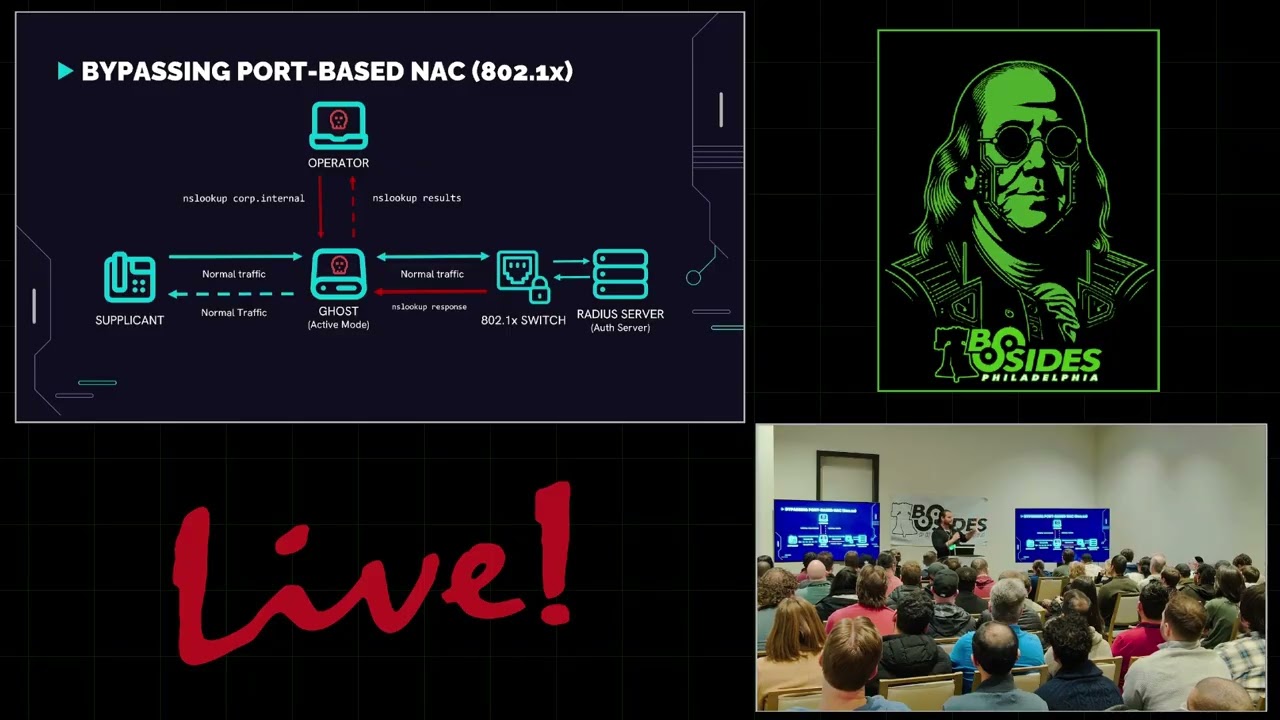
phone, we can really do whatever we want and they'll just think that it's the the phone doing that. So here's a little diagram to help kind of explain that better. So uh we have a supplicant which is our IP phone. It talks to the network switch through the wall. says, "Hey, I want network access. Here are my credentials." The switch forwards that along and says, "This guy wants network access. Here's his creds." Radius server processes them, responds, and says, "Looks good to me. Let him in." And the switch says, "You're good to go." And then network access can proceed. So then uh in this other fashion where I say we introduce an attacker control device, we'll call this the ghost. That
sits in between the supplicant and the switch. And then all the communication between the switch and the radio server stays exactly the same. So then the supplicant says, "Can I get network access?" And the ghost just forwards it along like normal. And then when it gets the response from the switch, it forwards it back to the supplicant. And then the switches or the IP phone's authenticated and network access can continue as normal. We just have this passive ghost in the middle. So what do we do with that? Uh just an aside here then after it's authenticated if the supplicant decides to communicate and looks up cisco.com or does whatever it needs to do that just
passes on as normal. So now we introduce an operator and the operator can connect directly to the ghost and this could be over Ethernet or Wi-Fi or whatever and then the operator decides to send its own traffic. So as you can see the supplicant is traffic is moving as normal. It doesn't really notice anything's happening. Then the operator says, "I want to look up the internal domain name." So the ghost receives this and says, "Okay, the operator's plugged in. The operator says, I want to look up this domain. I'm going to forward it along as if it's the supplicant." So it's going to modify the MAC address, the source MAC address and IP address to
that of the supplicant and forward it to the switch. And then according to the switch and then anything else on the network, that traffic is coming directly from the IP phone. So then they get the response and the ghost sees the response and says, "Oh, this is the response. This is supposed to go to the operator. I'll send it back up to the operator." So the operator can actually uh send whatever traffic it wants through the ghost and it's completely masked and like everyone else in the network thinks that the IP phone is running map and doing a bunch of crazy stuff.
Okay, so now that you understand how the ghost and the bypass works for 802.1x, here's how we can actually apply that to tools that we can use in the field. So this uh whole talk and the device that I made was inspired by a tool called Doljs and this was made by uh Forest Castler at Spectrops. So really cool guy. Uh last commit was 2023 or so, so relatively recent. Um really cool work by him. Um, so shout out in case he's in here. And uh, the tool was originally built for a Nanopi 2 RS. So for those of you that don't know, just a single SBC with two Ethernet ports. Um, and that's that
was the target device for this. And it was running Abuntu Core. So there were some outdated elements to it. Uh, with the newer versions of um, Debian and Ubuntu that were releasing and the new devices that we could put it on. Uh, it wasn't exactly out of the box compatible. And uh due to the nature of it uh of how the attack works uh really attacks were more or less you know a little complex to handle uh because if you think about how the ghost was sending um traffic to and from uh the switch if you wanted to do a relay attack you'd have to do some IP routing rules to get that together. And I'm uh running a little bit low on
time so I'm going to speed it up slightly. So if you have any questions please let me know afterward. Uh and the it was a hardcoded installation as well. So uh if you wanted to install it on different types of devices uh there would be a little bit of tweaking you had to do in order to get it working properly. So for my implementation which looks like that uh it was running on uh Debian 12 uh there I modified the installation to be dynamic. So if you're running on different devices with different interface names or different sets of interfaces or whatever you could modify that during the install um just to make it a little more um dynamic for
different types of devices. It had uh more resources in the nanopie and more ports. So it was very easy just to get an operator to plug in uh over the wire. Uh I switched the uh method that you use to um actually ghost yourself because I was running into several issues with the natting that the ghost device was doing. Uh as you can see very user friendly instructions, duct tape and a Sharpie that was smearing every time you touched it and it would rattle around in this box and it would smear itself. And it also I don't know it looks like a bomb to me. Uh and this was actually a huge not a huge problem. It would have been a
huge problem because we bring this through TSA and TSA is like what is this thing? And then uh I was this close so close to I didn't even think about the potential impacts at the time, but I was this close to putting a sticker that said this side towards enemy on the on the on the switch part where it goes into the wall. So oh glad I didn't do that. Uh so this tool is really cool. It worked great, but it did have some drawbacks. So, it was, you know, heavy like aluminum case. You had to lug it around. Wasn't that portable. Really attack still suffered the same issue of the IP routing rules. Uh, you
needed to update it manually. So, if there was a bug or I needed to do something, they had to send it back to me. I'd make the adjustments, send it back out. It was tough to manage, especially when you needed multiple devices. And it looks like a bomb. It's not good. [laughter] So, introducing version 2.0. Code name fart machine. You might be wondering why I called it the fart machine. Well, it's really for two reasons. One, because it's a ghost. It's completely silent. And then the second reason was because it was a deadly tool. So, it's silent and deadly at the same time. It was perfect. [laughter] So, uh it utilizes multi multi-nick dongles. That's what you're seeing
there. It's two Ethernet ports, um over USB. That's important because it shows up as two interfaces. So then what we did with this is we used this device this this little adapter and instead ran the attack directly in our attacker VM. So the attacker VM would basically be the ghost and the attacker at the same time and then any traffic that the attacker VM generated would automatically get ghosted and um put on the network basically visibly and I adapted it for net plan because we needed to use it on Abuntu. So I had to modify that from Etsy interfaces. Okay. So what features does this fart machine have? Well, no external device, like I said, no device bottleneck. So,
if it was a lower-end uh mini computer that you're using, there'd be no [clears throat] resource issue. Relays are easy now because it's on the attacker VM. No IP uh routing rules needed. You can run the attack whenever you want. You can turn off whenever you want and it's perfect for on-site so you don't have to lug around an extra device. You can just sit down, plug in and ghost whatever you need to ghost and you can get right on with the engagement immediately. In terms of results, it's consistently bypassed networks with 8021xnac. Uh haven't had an issue where we've ran into it and uh we can bypass enterprise implementations of it such as Ruba Clear
Pass. It's actually worked exactly the same. No other issue. It can bypass that no problem. So now how can we apply it to uh red team implants? So the fun thing about it is a normal Red Team implant, you plug it in, it shows up as another device on the network, another IP, another MAC, and it's doing its thing and doing all this crazy stuff. This is undetectable from a network perspective. Of course, if it's running a bunch of crazy things and generating gigabytes of traffic, that's not good. But anything that it does appears that it's coming from the thing, the device that it's ghosting. So if you plug it into an IP phone, any traffic
that's coming from it is just coming from the phone. You don't need an extra port either. So if you're trying to implant something, normally you need to find an available port, plug it in, and uh then it'll work. But now uh you can just um use an available port and just bridge it like you see there, which is AI generated by the way. [snorts] I didn't have an actual picture of it. Um and then uh for red team applications, uh you can uh you know, like I said before, put an IP phone with a the injector and get that ghosting working that way. You can uh put a ghost an AP that's in a drop ceiling and just hide
the implant up in the drop ceiling and then any traffic coming from that is just coming from the AP so no one will ever know. And then you can even ghost a workstation and then uh add a bad USB uh to it. So not only is it ghosting the workstation, but it's also connected to the workstation over USB. And then you can inject keyboard commands that way and then it can call back over um uh by hosting its own access point. Then you can connect to it and manage it that way. You can give it a cellular card. It'll call back to your C2 over uh LTE and then you can manage it that way. Or
my favorite is uh using Laura, which is a long range low frequency uh radio communication. So say you walk into a building, plug it in, you're waiting in the parking lot, it's not calling back, you can connect to it over the radio wave, debug it, and then uh you can figure out whatever issue that is just kind of like a fail safe. So I think that's cool. And then finally, and we only have five minutes left, so I'm going to try to uh skew through a little bit, but you know, please ask questions after. Let's go into the defenses. So, we're going to go through a quick vulnerability timeline. I apologize for people in the back. It's
probably really small. Uh but I'll go through it pretty quick. In 2001, 8021X was created. So, this port-based authentication protocol was actually made all the way back in 2001 by Microsoft HP and 3COM. In 2005, the vulnerability I'm discussing today was discovered. So it's changed a lot since then, but this is all the way back in 2005. That's why the talk is called Knack to the Future. It's like super old stuff that is still horribly relevant right now. So it was first identified in 2005 by Steve Riley. In 2010, the 8021X protocol added the addition of Maxac, which is the only uh known solution for this type of bypass that I'm talking about. Uh so they added that. Then in
2018, Gabriel Ryan bypasses Max using a tool called Silent Bridge. And then in 2025 where we are today, uh unfortunately not only is Max the only solution uh to this bypass, it's not widely adopted and even if it was adopted, there's still a bypass for it. So it's kind of unfortunate the state of network access control where you really what can you really do? But I'll talk about that. So to briefly talk about Max media access control security, it encrypts every single packet that you send. So it prevents packet forgery entirely. So before with 8021X, you authenticate the first time. Once you're authenticated, you're in the trench coat and you're in the club, you're good to
go. You can do whatever you want. With this, every single thing that you do is check to make sure that it's actually you. So think of it as once you're in the club, there's biometrics on the drinking glasses and the bathroom doors and whatever else. And also the uh bouncer has X-ray vision. Uh and this is a horrible AI generated image, but I loved it so much I had to include it. It's like I don't I don't even know what to call that. So, um with the addition of Max, why is it rare? Uh well, it actually requires Max capable hardware. So, your average everyday switch doesn't might not actually be able to support uh the Max
protocol. Uh so, you might need some sometimes very expensive uh enterprise switches to be able to actually uh use it. Something like that. Uh also, Windows lacks native Max support entirely. So if you just wanted to deploy max across all your workstations, you you need something like an any connectvpn in order to get the support uh for max sec, which is crazy. And then of course a lot of IoT devices don't support it at all. So uh like printers and whatever else like IP phones, they're not going to be able to support max. So if you want to deploy it everywhere, you kind of can. Um and then it can be complex to introduce max sec if you already have a
very complex network uh as it is. So with all that in mind, what can you do um to prevent against it? So you can deploy max where possible. Easier said than done, but it is something that you can do. So you can uh prioritize some high-risk networks. So engineering, R&D, things like that. Uh you can isolate your high-risisk devices. This is kind of the main one. So if people are really targeting printers, Vo phones, other IoT devices for ghosting opportunities, if you can make sure that these are on their own dedicated VLANs with strict firewall rules, so even if they do become ghosted, they can't hit anything because of where they actually are on the network, that'll be like your 8020.
So that's a big one. Um, and then another thing easier said than done is to monitor for network or traffic anomalies. So, like I said, your printers running all sorts of exploits and generating tons of traffic, excfiltrating data to some weird domains. Maybe you should take a look at that. [snorts] And uh leave no open uh and active ports. So, we've seen this a lot. If you have Ethernet ports that are available in the walls or in the lobby of your building, uh make sure that those are locked uh down or disabled entirely. So, uh there's no opportunity for a MAC bypass or just uh you know unknown network connectivity uh at all. So, thank you so much. I'm sorry it was
rushed. Um but thank you very MUCH [applause]
and I'll have hopefully time for a couple questions. Yes. >> Yes.
I love that. >> Thank you. Thank you so much. Sorry, it's there it is. >> Yeah, you can just look Google that and that'll be a first result also. >> Yes. I was wondering as you were speaking about this example two different examples when it be used like either by like phone or access makes much more sense to me because can't really tell what is coming from I would think through a phone you're doing an NS look up and all this stuff be like why is a phone asking >> so yes it would make the most sense to put it on an AP because that's where all the traffic's kind of getting funneled to and you can't really point to it. So,
it's really the best opportunity, but the phones are the easiest to access. And often times, I mean, how many people are actually monitoring all the crazy stuff that a phone is doing, especially if they're on a void VLAN, it might not even be in their radar that a phone could even do that, you know? So, it's kind of like a visibility thing. Uh, but also ease of use. Like maybe you're not maybe you see an access point, but it's not in the drop ceiling, that kind of thing. So, just situational, but yeah, it's a really good point. Uh, access point would be the way to go. Anyone else? Nope. Nope. So this is just like this
kind of relaw >> uh not a flaw with radius uh more of a flaw with the 8021x protocol where once you authenticate the port is then open. So Radius server can be tightened down that's fine. It's just how you authenticate the port opens and then the port stays open as long as you're coming from the same device. So it's really a flaw in that more so Radius. Have you seen this with other? >> Uh, you probably can't talk about it too much, but generally they're all based on the same protocol, so anything that relies on that would inherently be vulnerable to it. Yeah. >> All right. Thank you so much. [applause] >> Thank you very much.
Related talks
 14:53
14:53 24:07
24:07 38:58
38:58 45:19
45:19 30:52
30:52 42:39
42:39