Web security is fun (or how I stole your Google Drive files)
Show original YouTube description
Show transcript [en]
three people in the beginning in in the front row very good now I'm going to do my best to explain what's going to happen next but I warned you it's going to sound very awkward but thankfully Specialists were going to come on this stage and it's going to get much more entertaining after that our first speaker will talk mainly about Google Drive I love that program as a school teacher very important all parents leave their feedback there instead of the place they should and uh we're going to find out about key web security Concepts uh and how Services can unintentionally interact now that sounds a lot like Estonian government and how small flaws can be
combined to break security boundaries back to the beginning so in order for us to kick off this event please welcome on stage for some web securities fund or how I stole your Google Drive F files lra reban
uh okay uh hi everyone so today uh my talk will be about this uh vulnerability chain in Google services um but on the way I hope to touch on some web security Concepts as well uh so hopefully you can take something cool away from it um I'm lra uh you might know me from the internet as reban 2001 uh and I like to play around with the web and web browsers and sometimes I also find vulnerabilities um and today I'm going to tell you the story of how I found this spot but before I get to that uh I'm quickly going to cover the topic of Click checking um so click checking is this type of attack where you can take
one web page and put it inside of another uh and then trick someone into doing something so for example uh if I want to give a talk at some cool event um I really really want one of the organizers to click this little accept button beside my talk um how could I get them to do that uh well what I can do is I can take this web page put it inside of my own web page and then just creatively like covered parts of it up um until it's turning into something completely different of course I sent it out then the organizer sees this cool little cookie website clicks the cookie and of course they actually clicking the accept
button for my talk so that's uh basically what click checking is it's something that has been possible since before I was even born um and it's something that every website is vulnerable to by default uh but at the same time because it is so old um it's very well known and very easy to mitigate so in the past we've used this uh x-frame options header um where you can do same origin to only allow framing on the same website uh or you can block all framing all together um at this stage you should instead use content security policy which is more modern and offers some better security features and customization uh but of course this is a
very old attack that's very well known and very frequently mitigated so even with this example from the beginning if I actually try to pull this off you just just see that error message um uh and that's because it uses one of those headers on the site uh let's take a look at another example so for example the Google Docs homepage you can see in the network headers that it is in fact using the same um x-frame options header with the same origin value and we cannot frame the page so so far so good um but something interesting happens once we try to frame a document um so for example if I put the presentation inside of an iframe on my
own website you can still see it and you'll notice that it doesn't send the header uh and the reason for that is that we want to Google wants to let us embed these documents in our pages and because they don't use the header it makes them vulnerable to The Click checking attacks we just discussed so they found this Middle Ground uh where they allow framing but they also detect it and thus uh disable some of the functionality you can see the share button doesn't work the like Google meid camera thing doesn't work you open a menu how have things there are grayed out so uh that's how Works in Google Docs um okay so that's click checking um now
let's get onto the actual story so the Story begins with me playing around in Google Docs one day looking at the different features seeing if there's anything interesting from a security perspective to them um and the feature I just so happen to try out is the feature where you can add a YouTube video to your slide so you can add a YouTube video and play it you can imagine there's a YouTube oh oh it is working through okay um so you can play little video um how STW work uh it uses the very same ey frames we used in The Click checking attack so you can see it's doing this YouTube embed URL to put the thing on the
page um and seeing that got me wondering like how is this embed URL generated like can we replace it with something of our own because it would be really cool to be able to control an iframe inside of a presentation so I pulled up my HTTP proxy uh it's this program that lets you see the network requests uh for web stuff um and I found the specific request that that added the video onto the page uh and of course it's a bit of a mess because it's Google dos it does some weird stuff uh but something I noticed in the data is that is this part right here so it seems like we're only giving
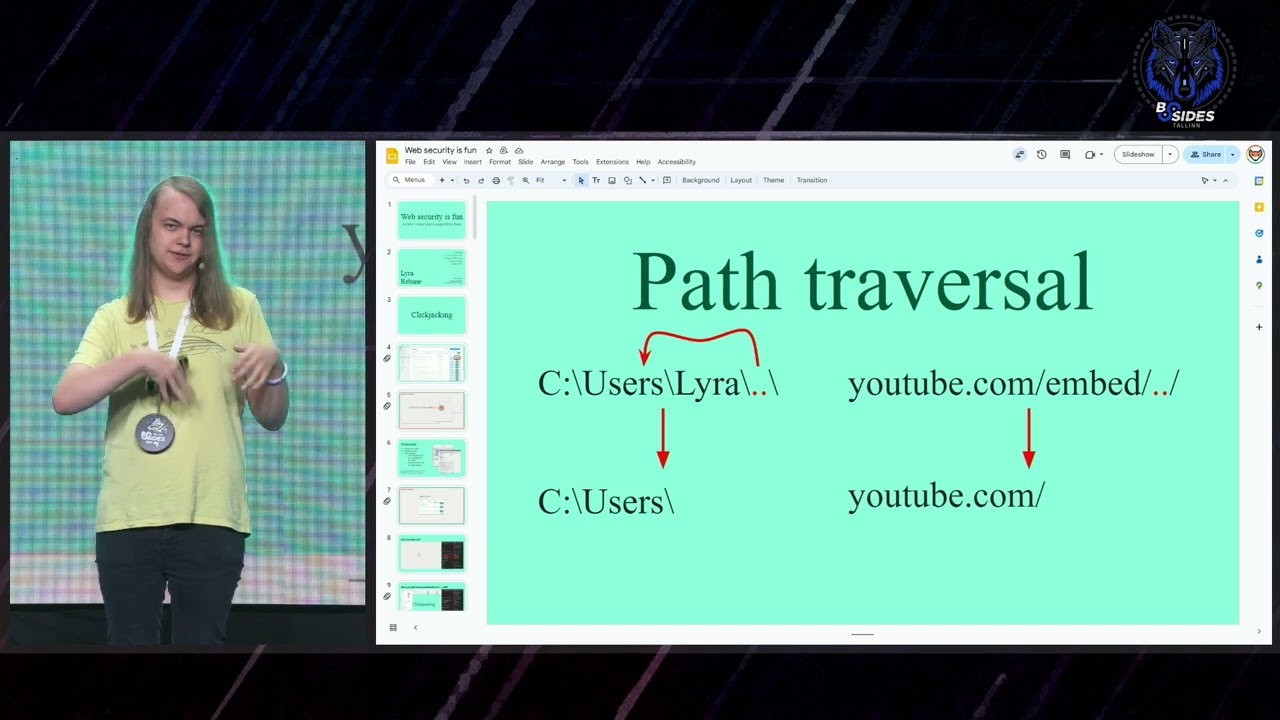
Google Docs the ID of the video which gets put in the embed URL so we cannot control the entire embed URL we can only control this video ID part so can we still do something um well for anyone who's dealt with pth before the first thought might be path reversal uh which is this thing where you can have a folder well in computer systems if you have a folder that's just two dots it's actually just referring to the parent folder so it works on the web the same way if you have a path that's um two dots for example if we set the video ID to that it should just go to the one folder up so the
homepage so does that does it work here let's try it out I used my HTTP proxy to change the request uh and I tried it out and this is what I saw so that is the YouTube homepage right there uh of course YouTube also implements those click checking protections without about earlier so we only see this error page uh but this is already very interesting because we are getting out of the embed URL we're supposed to stay on so are there any interesting pages that we could frame there um so of course most Pages have these click checking protections like the homepage the video pages and so on the embed page we can put there but that
we already had before um and there are a few resources in the S path there's like this error page another error page you can have sound effects emojis like source code and stuff so it's very fun to put all these like weird things in Google slides that are not supposed to be there um but from an attacker perspective it's still not very useful it's just fun um what we really want to do here is somehow break out of like YouTube entirely and what would be really good for that is something called an open redirect so an open redirect is this like type of vulnerability uh where going to this one URL takes you to another one and in most
cases this is not very useful it doesn't really accomplish much so often times it's not even considered to be um an actual vulnerability but in our case here it would be really useful because we could get out of the YouTube domain onto some other pages to do some more interesting stuff uh so I went looking for an open redirect the first place to look on websites is looking at how external links work in like the descriptions and comments and stuff so I took this link from the description um and in fact it did work um with the redirect so that would be good except for the fact that um there's this uh signature token part thing in the URL so
unfortunately that means that that redirect URL it goes through is tied to your current login session so if you go to some other account instead of getting to redirect directly you will get this uh screen uh where you have to click through the go to site button which is uh yeah it's kind of hard to convince people to do that uh and even worse for us uh that page with those buttons um also has those click checking protections so we cannot use that um okay where else could we look for an redirect um maybe the login flow a lot of pages when you log into them take you back to the same page you were on before
logging in and it's the same for YouTube so if we go to this login page um we will get to this massive URL and after we log in we get to this another URL uh and finally we get to the page rer just done so uh um I'm interested in this like URL in the middle here um because that seems interesting so I cleaned it up a little so it's easier to see um you can see we just have this thing and we go to that URL and we are redirected to the page we want to go to so is that an open redirect um let's right with my own website no it's not doesn't work so
maybe we can do some like limited websites let's try Google's homepage no that doesn't work either um but at least earlier we saw that it did work with YouTube right no um so I was confused because this redirects did work earlier but now they're all giving me these error pages and then I realized that I had forgotten something here uh which is the subdomain after I added the subdomain back it worked again um but that got me wondering like why would you have this entire long URL there instead of just like a SL something um and it's and it's like I thought about it and then I realized that uh YouTube actually has some other services too on other
subdomains for example YouTube music so of course I um tried YouTube music and it worked um my next thought was like can we use any subdomain so I tried YouTube's admin admin page that also worked so uh looking at the uh attack surface right now um we started off with this uh embed thing we did path reversal we got access to all these pths we did this other redirect and now we have access to all the YouTube subdomains so you can see how I've found this like all this like little details and one by one I like slowly increasing my tax surface to more and more services um okay so we now have all YouTube
subdomains but what can we do uh with those well I couldn't find anything at first but later on I was just playing around with other Google other Google services for fun and looking at how the authentication works on Google's website not YouTube but while logging in I noticed in the network requests that for some reason there was a network request being made to YouTube's website why is that um well Google wants to make it so that if you log into one Google domain you get logged into every service you use so every time you log in it goes through every service and for example YouTube and also puts your cookies there so um for that it needs to redirect through
all of them uh and that just gave us this uh new redirect URL that we can play around with so is this one an open redirect no it doesn't work with my own website but does it work with like google.com yes so you can see how like with by chaining this redirects we gain more and more attack surface and of course since we are inside of Google Slides can we make it frame Google Docs yes we can have an frame of Google docs inside of Google docs um so you can see how the attack surface has been growing for us um let's write out for real so I take this um make this like video IDE thing that
combines all of these like patch reversals and redirects together into one it uh goes through all the redirects and we get Google ducks inside of Google ducs so that's pretty fun um and it's very fun because you can put presentations recursive inside of each other uh uh but what's interesting from a security perspective is that earlier we saw in the click checking example that due to this x-frame options header uh we couldn't frame the Google Docs homepage uh but in this case we can why is that well it's because our slide is on Google Docs and our iframe is on Google Docs so do the browser that is the same origin um and because the x-frame options is
set to same origin uh we can do this framing so we can frame pages that were never intended to be framed and don't have those like protections that disable the share buttons and stuff uh so what could we do well we are in Google slides we can just be creative You Know cover it up with stuff uh you know make people click like dangerous buttons or something um but uh looking around it this front page uh what can we do on there um well unfortunately there's not much we can do um the most dangerous thing we can do is we can delete someone's documents but even that is like not that useful to anacker and like
requires you to click through dialogue and can be restored from the trash anyways so we need to find something better here um so because we already have the Google Doc if frame inside of Google docs um I just need to find something else on the Google Docs domain that could be a fuse uh first I looked on the Wayback machine so if you didn't know you can put a uh domain in Wayback machine and see every URL that has been archived there so that's very useful for Recon but here I didn't find anything so I went on to Google to do like this Google DS things where you're like put all those key like keyboards and trick
things in the search and find stuff um and I started going through the links uh this one was like a some like open link uh that opens the file but the problem is that if you visit that link it redirects to Google Drive so that's not useful for us take I took a look at the next one it's like some Leaf one that also goes to Google Drive um took a look at some other one this is like file view or something that also went to drive he found some like folder format that also went to drive so are we out of luck or all like this cool links being redirected to drive well no
uh I finally found one that doesn't redirect to drive and stays on the Google Docs domain um and this was a really good find for us because uh this page um is uh framable for us uh because it's on the DOC website and because it doesn't have the click checking protections to other Pages do uh it also has the share button available so uh yeah let's use it um something I noticed real quick uh really quickly is that uh if you have a Google drive folder you can take its ID you can throw it in that URL we just found and you can actually open up a Google drive folder in the same view still with the share
button enabled and everything on the Google dock domain so okay it's getting interesting let's try to put it inside of our slide and see what happens so here you can see I made that like video ID that comines all the attacks we have so far um and when we launch it you can see that it works oh okay um so it doesn't work for some reason okay so um yeah I'm not sure what's up with that um let's investigate with the dev tools so I took the very same link I made that if frame with throw it inside the page and now it works why is that um so confused I looked into the network
requests um and then I noticed that uh the reason for that is that this is the request we send if I do the if frame thing manually with Dev tools and this is the request we send if we use the slide redirect thing so the redirect causes this um value here to go to cross site um and that means that it won't work so we need to bypass this uh but like this is such a weird thing to like have in the first place why is that even a thing on the page so I was confused so I um actually got the opportunity to talk to a couple uh security people from Google um and I
asked them what's up with that uh and I'm still not clear what threat scenario it's meant to address exactly uh but it seems like uh it's meant for like scenarios where you have an if frame inside of a different page um and these are the headers you get um and you want to detect whether the iframe is inside a same origin page or a cross origin page uh and you can't like yeah and you can't uh do this check on the client side if you want to send out like server status codes um so these heads are all you have to go off of so just like a just weird Sidetrack thing um but U
anyways um we need to bypass it how do we do that um here's the like things simplified we can't redirect from YouTube to Google Docs because that causes that whatever mitigation thing to come up um but if instead uh just redirect from Google docss to Google Docs then that would work so what we need here is like a redirect from our YouTube redirect to some like weird Google Docs page that then redirects us to the actual page we after and we need to find this part in the middle so I went back to looking I remembered from my like earlier searches uh that I kept seeing like this weird URLs with like cment and like we domains like
that and if you go on them they just redirect you to the actual page that you were supposed to go to so I'm not sure what that is exactly it seems to be some sort of like Google git SSO thing probably was very useful a long time ago but right now it just disappears from the URL and does the redirect so we don't really care about that we just care about the fact that it lets us do this cool redirect that we are looking after so that's perfect we can now put it into our um chain of stuff and if we try it now there we go we can put the little like file page inside of a
slideshow and then we can start covering it up um uh want toig we want to figure out what steps we want the target to take and then we deign the like things we're covering it up with in a way where we trick someone to doing something
um uh so yeah uh just three steps to win an iPad I'm sure lots of people will fart for that uh but there might be some people were not quite convinced by this yet um especially because you need to type in a full email address into a very suspicious looking text box so we need to do better okay let's get back to work so the current current thing we have has three steps to it we need one click then like typing in an address and then another click can we maybe somehow like skip any of these parts um I remembered that Google Drive has this thing where you can invite uh or you can request access to
files um that other people have put links out for if you don't have access to them so I looked at how that works I send myself a a request got this email with this button uh tried the button and yeah it seems promising we have this dialogue where instead of having to type in the uh full email address we can just click the review button and then after that we just need to click the share button in this other dialogue so not an ideal attack yet but we have skipped the hardest part or like the worst part which is the having to type in someone's email address now we just need to trick someone to making two
clicks first on the review and then on the share so yeah pretty okay um can we actually use this in our thing though because the other thing was like a Google Drive thing um this is the URL from the email seems like it has like parameters for the file ID your email address and the permissions and stuff but it is on Google Drive um but because Google Drive and that like Google Docs page we found are so similar can we maybe just take all this like parameters and stuff and throw them on the Google Docs URL instead maybe that's right and yes it works so um yeah that's cool we can use this and do an attack with just two clicks
but can we do even better than that can we reduce it down to just one click uh for that we are going to have to do some reverse engineering and stuff so I pulled up this page and I opened up my T tools found where the code is located set my break points and started debugging um so to of course with debugging the stuff you want to start off simple so I thought that maybe we can just start off with this URLs to invite parameter um I removed everything else got the breakpoint started looking through the all the data and stuff and stepping through code and so on um but then at one point I just resumed execution uh
and what that's like an entirely different dialogue from what we saw earlier and it's like perfect for our use case how did that happen I like didn't do anything so I closed my D tools I refreshed the page and it was still there so the reason this is such a good dialogue to have um or yeah so first the reason this dialogue even appears in the first place is because uh I had changed the URL parameters by just leaving that one URL parameter in there and that triggers like this different code path that gets us this cool dialogue uh and the reason this dialog is so good is because you can see it autofills the email address it uh
defaults us to the editor permissions it sends the attacker notifications and it has a oneclick button to send out the changes so that's perfect uh we just need to trick someone into clicking this one button and we can disguise it however we want so let's create our attack for real this time uh we start off with this if frame with the dialogue we make up some like Google form or something I don't know uh we then just like creatively You Know cover up the pieces and stuff make it look good um and then all we have to do is just sorry all we have to do is get the uh share link change it to say present
um and this is what it looks like so you can send this to someone looks like a Google form uh but of course once they click on the send button or they fill it in they click on the send button the send button disappears so maybe they get suspicious when they see that but by that time I already have their files so that's the vulnerability chain um yeah uh of course I reported this entire to Google as well um on the 1st of July it's quite a lengthy report uh they got back to me on the same day with the triage and confirmation so that's really cool um and then they also gave me the
Bounty just 10 days later so yay um and what did they give me they gave me the maximum for the category which is uh 31 33.7 uh plus $1,000 bonus for a total of uh for for1
33.7 and I just want to say I'm very happy with this bounty um even though on the exact same day um uh they announced that they are giving up five times more payouts in the future uh okay so before we get down to the questions I just just want to mention that I have written a blog post about this entire thing as well so if you'd like to check it out in written form you can find it on my website my contact information is there as well uh but yeah
questions um no but you can find slideshows on the page if you
look uh um they are like slowly patching out the steps it's like not possible to do this teack anymore but like some of the stuff is still open I'm not sure um yeah I they haven't fully mitigated this chain
yet what do I do with this speak into it oh okay um is it like applicable to the real life scenario because in order to actually deliver the attack you need the file ID of the victim and you have to know it if I understood correctly or uh yes so you do need to find the file ID um but I've seen a lot of real life scenarios where the file ID of a private document is shared in a wayer you can see it there's many way to access that so it is a hurdle uh but it is definitely in the thread model of what Google thinks is the threat model and thanks yes
they can throw a box at you it's great or they can just give it to you I mean they're not going to throw it at you you can still raise your
hand no hands cool okay uh yeah in that case uh thank you for coming to my talk this early and hope you got something uh useful out of this
amazing uh I don't know how to click so I just going to give you a gift amazing oh by the way I was wondering can we at some point get to the part where we don't have to click at all that would be interesting
Related talks
 1:03:19
 33:53
33:53 41:35
41:35 39:37
39:37 31:58
31:58 48:32
48:32