Lightning Talk 4: Splunk Query Fundamentals
Show original YouTube description
Show transcript [en]
my name is Adara uh I'm a senior security analyst I work with uh don on Don um before I bring this up like while I bring this up um I'm gonna have you guys raise a hand if you work with Splunk Splunk is part of your infrastructure like your security infrastructure but you're not so confident in quering it working with it to yeah to get the to get visibility into your data so I'm just gonna uh well the my main point is that documentation is your best route into understanding those things but documentation can sometimes seems very daunting because it's very deep especially in spunk uh case uh but really it applies to every Sim system documentation is super deep
and it's the best route into understanding uh how to work with those systems uh so I'm just gonna take us like give you a few things to focus on so you can work with data better in spunk and um kind of a starting point as uh data analy was blun so let me get to that
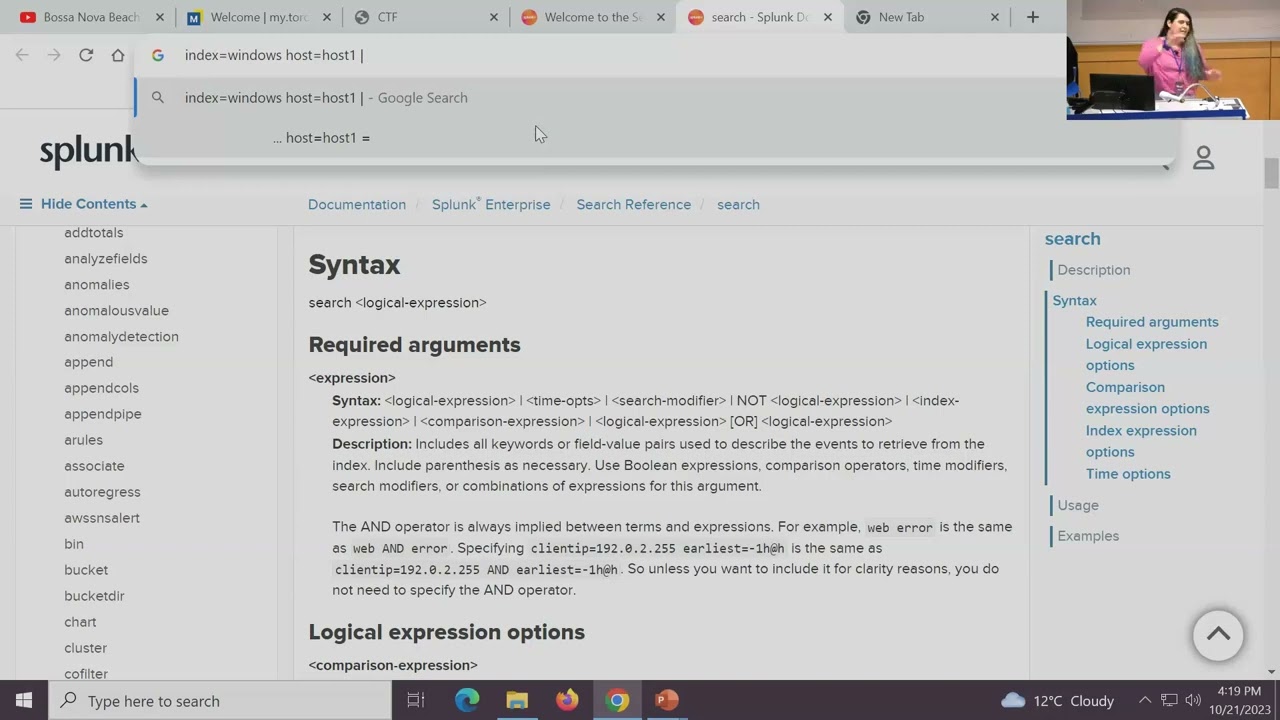
website I'm just gonna leave that on the desk can you hear me yeah okay so um I I would actually say look okay so even if you're not just U specifically working with Splunk if you're working with curar arcite or Sentinel or any of those big data Sim S sim systems quote unquote um the the first thing I would suggest that you start typing in order to work with those system is X search reference so for key radar would be AQL that's what they call their query language there's kql for Cal stuff Microsoft stuff uh yeah so X search reference let's just get into this uh in Splunk search reference the first place I would
suggest you go instead of reading all of this crap is to go because because what they do is they they present you with an introduction page that might be advisable to read right but the the gold mine is this place the search command so Splunk search box and I don't have because I didn't have any materials prepared um spun SE search boox uh allows you to use different commands to process your data in series right so when you type in a word index equals whatever right to get an index of your data uh you can then add a few words and it'll kind of look for those tokens in that index after that you can add more
commands to process that data in series right and transform it into different things so to explain this I have to categorize commands for you there's generating commands those commands are commands that generate data so I'll just open them while I talk commands that generate data mean that they return a table for you that contains the data that you're trying to look at so the most basic one is actually search search is the basic search filter command it's implied in an empty spunk search box so if you want to learn how to use the search command you go to this page in the spunk search reference um it's any version of spunk SL search reference specifically for the
search search command is SL search uh it's the most important command to understand because you can use it also in any other stage of the search like you can search for some data right and return a chunk of data you can then use the search command again pipe into search right so it would be like let's say because search is implied in an in an empty box I'll use the URL bar as a example so it' be index uh equals windows right so I get stuff from the windows index and I want to get it from a specific host host one right and then so I have a bunch of data here and I don't want to apply further filters
within this area let's say I want to have I have like a really Advanced filter that I want to apply let's say a Rex or something right I wouldn't want to apply that to a big data set because the processing would take a long time and my queries would be very resource intensive I would want to pipe that into after the first command finishes the next command is going to work on the data set return from the First Command that's the concept of Splunk basically where commands work on the data sets you pipe into them so you can actually pipe into another Search Command doing some more complicated stuff like using in parameters uh like let's say Source IP
in whatever right and you can also use cidr ranges so that's for that so search is a generating command and it's a uh what's it called a streaming command so generating commands make data streaming commands process the data as it enters them through the pipe so search does both of those things that's an important command to study from within this document the next one I would and I would really from your perspective write down just the names of those commands and go to the search reference and look them up so the next one is stats uh stats is a transforming command what it means is it does nothing with uh retrieving data it does everything with
the data that you pipe into it so if you just put stats in on its own doesn't have any data to work with right you need to have search or from which is another generating command that I'll give an example from later or look up is another example so stats takes that data does some statistical functions to that data and then returns a table containing those statistics so they give some examples here uh where you kind of start out with let's say again I do uh index equals whatever host equals some host one right then I pipe the results from that into stats right and I can give it like a statistical function kind of like count means count the amount of
rows that I receive by uh let's say event type just I'm just throwing around field names not necessarily how it's going to look like in your environment right mapping those fields out is looking at the search panel on the left unfortunately I don't have an example with me but uh yeah so this what this this um stats command would do is count the amount of rows received for each event type in the result that was that existed before and it can go way deeper than this like you can get values presented in that field in a in a list that it kind of D duplicates that list for you so like if you want to know the unique host names
received in a host field you could do values of that field you can return Fields with different names by including an ad parameter uh operator like this so like as new name as a new name for that field you could do averages you could also do functions within functions right stuff like that so that's stats and it leads me into just another short detour um in stats the functions uh there's many many functions to work with so they have a reference a tiny reference for that so so this is a tiny oh it's on the same page okay so this is just a link in that page so these functions aggregate data these functions give you multivalued lists of stuff uh
so stats is extremely useful um if you one more one more um thing because we're running out of time two more sorry it's okay um so let's see what's the third one that I would say uh would be nice for you guys to know so we know just to summarize we know to look at search uh as a kind of a Splunk beginner and to look at Stats because those two commands together would give you huge statistical capabilities um oh t stats is like a whole let's not open that can of word like I have to explain data models to you and never mind not not not now but maybe you can come back next year and give us a whole
maybe maybe do ah there's so much okay so so for those of you who work with SQL uh where actually lets you add a quote unquote wear Clause from from kind of like looking like from SQL uh to your spun query but only as a a uh filter like a streaming command it does not generate data kind of like the wear clause in an SQL query so say you you like search for something index equals whatever what could do where where something uh some field equals field 3 plus Field Four something like that you know uh or you could also use functions within that kind of like you could do with a wear clause in an
SQL query so like uh you could do average of of this field greater than some value right so this that's that's the wear command um and it's only usable is a streaming command so this is all I could do in like five minutes excellent thank you so much Adora but uh there no no really important if you guys before I go if you guys have any questions you can find me on LinkedIn my name is Adara Ramy
Related talks
 24:40
24:40 29:35
29:35 22:10
22:10 26:59
26:59 22:15
22:15 34:56
34:56