YAYA (Yet Another YARA Allocution)
Show transcript [en]
the b-sides DC 2016 videos are brought to you by clear jobs net and cybersex jobs.com tools for your next career move and antietam technologies focusing on advanced cyber detection analysis and mitigation we're gonna give you a little talk about some some basic yarr this is the Yahya talk yet another Yara allocution and my name is John Leacock my co-presenter is Monty st. John and go ahead and flick it over here so this is my background I've been doing computer forensics for a better part of a decade now previous to that I did video forensics I've worked commercial private sector government a little bit of everything currently among the Fidelis threat research team doing systems work
building giant systems of threat research basically Monty you guys hear me do I need the mic am i loud enough for the folks in the back we're good alright so you can't see my face but luckily you can see me up here so I'm doing this for a while a couple decades in uniform you know then lucky in the last ten years have been a part of a lot of really cool Incident Response and threat research teams it's kind of given me a lot of good perspective especially with the are and hopefully we can share some of that with you today all right so I know we're getting getting started a few minutes late here
but would like to give you a bit of a disclaimer this is an introductory introductory level talk if you use yarn your day-to-day workflow probably not to talk for you if you want to walk out and check out one of the other talks right now you're not going to hurt my feelings but I do like to frame expectations so that you know what we're going to do so so what is Yara Yara is basically a tool that allows thread analysts malware analysts to identify and classify different malware samples can be used to dissect files look for patterns inside of files perform your risk to test and it can also help you to look through a
file and see if there's parts of that file that are missing that you're expecting it to be there I know Monty you had a note here one of the things too is people kind of get caught up and using you know looking at files with this you can also look through memory okay and we'll talk about again this is very a very high level talk but we're going to talk about a lot of these these types of things and give you some some of the basics about Yara rules Gibson something yeah I'm just going to add on to that you know so we mentioned researchers and researchers it's a little more than you can use yar anybody
can actually use your you can use it for just about anything it's a file or has structure can pretty much point you are at it and look for things the interesting thing about your is you look at files in a bunch of different ways you can look at the way it is in the wild you can look at the way it is when it's unordered unwrapped unprotected and you can also look for the inverse of what you think should be there and look for the things that are missing kind of what we talked about we're gonna touch on those a little bit but if you have more questions about you can definitely hit us afterwards we'll
go into more detail okay so start the beginning so we you know we want to write a yard rule we need to start with a rule name so there's you'll see we have some tables in here one of the things we've done with this deck is we've actually got a references section in the back with a lot of links to a lot of different online resources that we use to help us write this but also you know just things that we use for reference on a regular basis so starting with the roll name which is one of the keywords next slide you'll see we have a table of some of the yard keywords and then
it's followed by the actual rule name or the identifier just a couple of notes with that the first character of a rule name cannot be a digit okay rule names are case sensitive they can't be longer than 128 characters kind of goes without saying if your rule name is is really that long you're probably getting a little too specific usually I try to keep it to about maybe two or three words and I usually will put a another score in between the different words so you know John's underscore rule underscore Malware underscore sample or something like that you can get crazy with it it's really kind of like anything it's just up to your your
personal preferences and you'll see at the very bottom of the slide there there's a little curly bracket that's where the actual content of the rule will will start go ahead and go to the next slide there make sense they speak to the content or they speak to your perspective and what you're trying to write the rule for you know make sure and employ that when you're naming it don't name it something nonsensical a lot of times the output which you'll see later will give a couple of snapshots the output is often the rule name itself so make it make sense to what you're looking for now you can either output that or it's other elements which I'm
not gonna get ahead of myself no problem you'll see we have this table in here a couple times this is just to point out that these are reserved keywords when you name your rule you don't want to call it rule and then like all or no case or them or that kind of a thing but you could do you know rule underscore all or there's something along those lines if you wanted to use some of these words inside of your rule name itself just don't call it all and or any that kind of thing so the next section and this is an optional section but it's very useful it's the metadata section and this allows you to put some
different information inside of the the rural content itself so that you can kind of use it to classify if you have a particular family of malware you're looking for or things like that or if you just want to you know if you have a team working on and you can author names you can see I have a very basic you know description author nickname is anybody here know who email verb it is just out of curiosity okay I didn't think so old-time baseball player from the 40s so anyhow that's that's the meta section you can use it a lot to do a lot of classification and money I think you're going to talk about that a little bit
further down but just kind of keep in mind it this is an optional section here the reason why you want to use the metadata again you know as you're number of rules increase this is going to help you to kind of categorize and sort them it allows you to describe what's in them because six months later you're not going to remember what you put in there most likely and it just helps you to ideate in case you want to do a you know quick wrap their text files so you can do a quick grep to look for some information for you know you may not have remember the rule name itself but the metadata may tag it for you and and
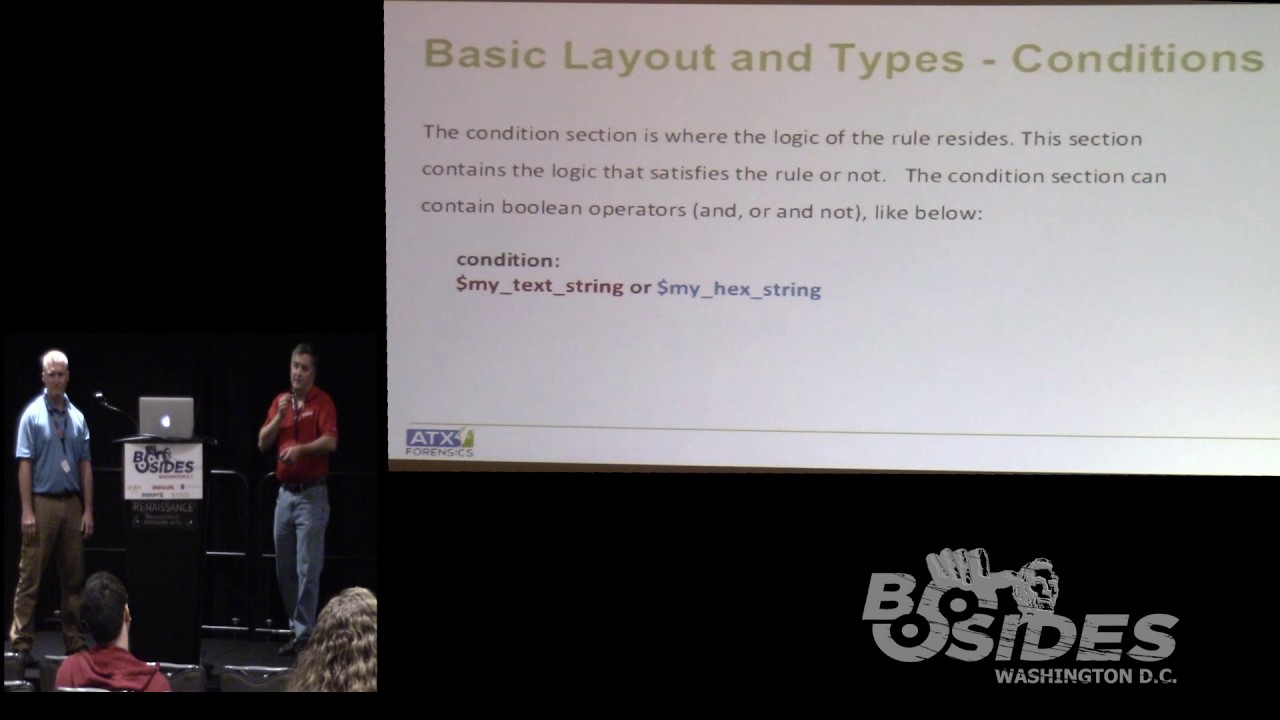
you hit the metrics section I don't remember what exactly you were thinking there with the metrics for the directive stuff metrics if you work for anybody at a company they ask you for metrics at some point and so you need to build that in if you're thinking ahead a little bit when you're writing your yard rules so that you don't have to go back to do it after the fact okay so now this is really the the main portion of the rule itself this is where most of your your-your-your action happens so to speak so you've got the rule name and then you'll see that there's two sections these are the required sections of a yarra rule they are the strings and
the condition section and you'll see for the strings we actually have two strings declared in there we have the my text string which is play ball and then to my hex string which also spells out baseball and then we have the condition a very simple condition if either one of these strings occurs in the sample we'll get a match on this okay so very basic layout this is just to really show you the two different sex so with the string section when you declare a string you start with the identifier of a dollar sign and then you can use a sequence of alphanumeric numbers and characters and underscores and all that kind of stuff and drinks
can be defined in a number of different ways you can do ASCII strings Unicode you know why you can see right there we have the Unicode with the wide keyword so you can do a lot of different types of strings as you're going along and again just to point out the table there you can see we've got oh no case a couple of wide yeah yeah yeah it's just what you're working with really here so go ahead and click over to the next one here so one of the things you can do is use the forward string and that allows you to look for work boundaries so if you're looking for a very specific word
you would you would want to use for word so in case here if we had the example of baseball if you define this for word it won't match on one baseball comm but it would match on baseball - reference comm and baseball comm because they're separated by the period and the - okay but if you can see what the one baseball because I had the word in front of it that would not match on that okay so hexed rings we can get directed a little bit more detailed with you can see they're enclosed by the curly brackets it should go without saying the decimal numbers are not allowed in hex strings you can see we have the heck
string of baseball 23 so we can also allow for wildcards and jumps and different alternatives of wildcard characters the question mark and you can see that the second string down there has the be a wildcard be a wildcard 11:23 so that would match on you know anything with those those wildcard tonight you can also get into variable content at length in this case here you can see we've got some jumps to find in there where the in the middle there we're at the 2-4 that allows us to look for variable number of characters in there from 2 to 4 there unbounded so you can put a jump at the beginning or at the end and mind you have a note there I
see you have a thing their particular jumps ers prefer giving out a lot of things but it will really yell at you if you try to tease it I see people try it that's a horrible idea I mean use different logic using then the center needs something to search forward to find that content to be able to jump around so use common sense when your foot needs together yeah and you'll see that coming you know that will come into play a little bit later when we start talking about the next section here one other thing that we can do we can actually get in there and do some pipe commands so you can see the
example here for the hex string we have BA 5e ba then we also have with the pipe separating the two basically that's like an or so it's either 5e ba or FIVB B and you can see that it would match on either one of those those particular hex strings there now the the other thing that you can do is you can actually define reg exes within your your strings and these you know I have I have one co-worker that really loves his reg axis he puts together these really long intricate strings and kind of like Monty was hinting at before with the jumps you know that sometimes comes at a cost so I'm more of the mindset of simplicity
when I try to do these things not always the case you know sometimes you think get very complex and you know who I'm talking about don't you and you can see in this particular case here we have a string for an md5 and just a very basic type of right check zero nine eight three oh five a three off 32 characters that kind of thing so that would match on an empty five value even though a couple slides really it boils down to a string X or a regex now there are variations to each one of those like you give up for Unicode strings you could with raske strange you to the for combination you get at the regex is all
day long complicated or simple and then of course you can look at accident if it's an ability to either you know substitute an or have jumps so you have to keep that in mind when you're developing what you want to look at content wise or what you want to detect and not find okay part of that will talk about touch on but at this basic level just remember you really have three options there and then that will play into conditions yeah and it really gets down to the I mean there's more than one way to do things and so sometimes you know you you kind of start going down the road because you have it in your head you want to use the
regex and maybe you just need to back up and maybe just use a very simple hex just like anything you know it's it's just matter you just don't want to paint yourself into a corner and you can take you can have some really big performance it's when you do that so the the other the other necessary section we have in addition to strings are the conditions and so you can see here we have the very simple condition of my texturing or my hex string okay and then we can start to get a little bit more complicated from there you can use a lot of your common boolean Z or your hands and ORS etc and
you can see here we can start we're starting to add a little bit more complexity and this the first bullet there you can see we've got a counting example so if the my texturing occurs three times or the my hex string occurs less than or equal to seven and the re is greater than or equal to two then it'll be a match basically and when you're doing a counting operation you're going to use the pound sign therefore the the identifier and you know you can start to start to really develop some complexity with that you can also use other rule names so as you build a corpus of rules you can come in and you
can see in the condition here we're referencing the ghost - rule and my hex string and anytime you reference a rule it has to have been processed before you actually reference it so if I put it down underneath my condition it's not going to not going to see it alright so the conditions also just like with the hex drinks and the the text rings and you know just the different strings we can start to add some more complexity like I said you can see we've got a very basic set of strings here string a Chicago string B cups drink C baseball in this case we're looking for two of those three so if my my sample
has two of those three it's going to fire match on that and again you can you know one of the things you may want to do I think we've got it referenced at the end of the deck but the yarra documentation online has a plethora of different examples that you can use this was just one I thought was kind of I seen this one used quite a bit and it's a pretty useful one and one kind of other thing to kind of mention here is you can actually use include files just like a lot of different languages that are out there in this case you can simply clothing it with the quotes so you can do it include other yard to
include another rule and to get carpal tunnel with that so that you know just just like with anything you know the base path you can do absolute you can do relative paths and you can really start to you know get as specific as you need to so we'll talk a little bit more about this one monitor to get into some of the categorization and some of the monolithic and megalithic and all those other structures but at this point I'd like to take just a quick minute are there any questions so far
Bueller Bueller okay all right okay come on yeah I'm just as long as you can hear me I'm good if you can't let me know well it'd probably be better for the video all right I like to bellow out then this just kind of gets annoying all right so he done mentioned the include directive a little bit ago so rule organization is really key especially as you grow in your rules so when you first start you create a couple of rules it's not a big deal you create a couple hundred it starts becoming kind of a burden start creating a couple thousand and then it really starts to change you start losing track of what you wrote
when you wrote it and what you wrote it for metadata may help but having some organization two things really helps play towards keeping track and understanding why you're using a rule or not using one so I've got a quick kind of snapshot here in a minute but with the include directive its strength is that you can create rules and put them in separate files and then add and subtract them as you need so no one uses all the rules all the time if they do they're probably wasting some of their precious processing time when they're doing so if you organize it and put things in groups just like you would classify and organize against different
pieces of malware are different files it will help you out in the long run they're not clicked on the next slide I've got an example which you can't hardly see I've got the same problem you did Andrew yesterday so this is supposed to show a snapshot it's talking about a threat group called kurosu and it just breaks down how i've started splitting out different directory you know different files with that have been pulled in with the include directive so it's kind of hard to see but there's the main rule in the middle and then off to the side where you see that first large bracket on the right that's a separate rule just for that threat group that has
in it a subset of about 15 rules that I'm going to look each time now underneath that there are other ones for different events for the forbs event where the you know the forbs breach happened and then a second one for the Samsung pay breach and so on everything that's associated with that threat actor that I'm interested in and I want to see when I run it against files if I match on them with the metadata as we talked about earlier you organize your metadata so that when it fires off and you look at your results it not only tells you what it is and where it is and why you did it but also tells you what directives what
file it's sitting in which helps when you have thousands of rules so I thought this whole next couple of slides is all about rule organization in rural order the order of rules is also important a lot of people create one gigantic monolithic file and they throw all the rules in it and they don't really care what order they fire off other than I if I'm gonna reference this I want to make sure that I've pretty you know previously defined it but sometimes you want to know in what order of some rules had fired off you may have slight changes to fifty different rules and you're looking for tiny variations you can create kind of complicated condition
lines or you can actually separate them into different rules and then watch when they fire off so it can be very interesting to player that we have a little example here later go back go back right now the other thing is there are different types of rules we didn't touch on this earlier but there are rules that you write and then there are private rules that you want to match or not match but not really report back to you you just want to use them for as an inclusion in a different rule you also have global rules which you want to apply to everything in your rule file so in this case if you only want to look at
PE files you may define a global rule that says hey only look at PE files you know this rule as long as it matches on P file it's gonna match against everything else that you have included so all global rules will get processed first and a lot of those we use for things like PE files or file size so you only want to look at in this run anything under two megabytes great define it in a global rule so you're not defined in each individual so the concept with a global rule is define it once and it's going to apply to everything private rules you define something you want to match on and then you're gonna use it later but you don't
want it to report back a lot of times you do that for heuristics you may only be interested in some files that only have particular sections or only have particular interesting strings it's really useful if you're doing in brand matching with your er so that you can match on certain exams and look for that in combination but you really don't care if it just match by itself it's kind of a strategy to go with your rules and the next one now you can do some rudimentary if-then logic with rules and I really want to mention this a lot of times people also run your ax once they try to shove everything in one big file run
your once and they want to then process the results it's it's often more optimal to split up your runs and run it multiple times for different reasons hence back to your include Directive run it once get initial results run it again you know if we did this manually you would run one see what you needed change your your includes and then run that separate set and continue to hone and find out what you're looking for it's really good if you have unknown files to run that kind of strategy because then you can parse things out and check and then refine that and then run it again and further get down to finding out what you have in your hands
so just you can use it with an logic any of the boolean logic I kind of broke it out in the next slide a little bit where you can't really see either but in this one I defined a couple of private rules at the top you know is this a P file does it have different P sections you know there's roughly 8 to 12 regular sections you expect to see and there's some oddball sections that show up for different reasons this rule would match on that and then more different cider ranges the things that I'm interested in and then I'm just going down different rules again you can't really see it but it's there the idea is the one that's
got the bracket first next to it at the top is about interesting strings that I'm looking for I don't care which one of those matches but I want it to match with a PE file and one that has an oddball PE structure and the same thing for the second one it does something similar except with a cider range I'm looking for IP addresses embedded in a file in a certain range so just an idea how you might reorganize your your rule files to fire off in a certain order and in a certain way next one this one is just an example of an not it's the same thing as before and here's another snapshot of rule
organization you know again same kind of things private rules at the top you know this is PE different P sections that kind of thing and then going down for it and you can't see it which really it looks at things and says hey I want to find certain rule on rules to fire I want certain things to match inside the core rule but I want other things not to match and so you can kind of get a combination going right so just a side note after the talk I will upload this up on SlideShare and post it out so you'll be able to see much better what we're talking about up here and also from the the references link I mentioned
earlier you'll be able to see all those different ways I'm not expecting you guys to write this stuff down this is just these are talking points for us so anyways Monday that's fine we'll give you some snapshots of what it looks like I mean your itself is not ready it's not meant to be it's very simple very very good structure this is just a snapshot of what it looks like it command Y you'll notice there's a lot of different switches and this is actually visible thankfully where you can run to everything's you can haven't returned the rule name with the right switch you can have return just the metadata with the right switch and you might want to
do that in tandem you might want to do that on different runs you don't have to figure out a good strategy in which to use it and this next one is just a snapshot I've been matching on different rules so from our previous example I ran a file against it recovery got back and I ran my main rule file with a lot of include directives to see what would match on it and it came back with a variety of things in this case a couple zero-day matches and couple other items that you know I would then follow up with them find interesting and pursue with whatever a real strategy I'm using okay and keep in mind too obviously these are
Windows boxes yarra will run on multiple platforms Linux Mac windows etc just I think Monte you just had a Windows box handy when you did these screenshots yeah Louis Louis comment on them yes okay so there are a lot of resources out there you know to kind of help you get started if you if you've been doing it for a while or if you're just getting started she's just getting started yard Jen it's kind of a nice tool I used this one a couple years ago when I did my first rule it's written by Florian Roth who he he's also got a number of great references up on github and pretty active in the community so what is your
gen do it allows you to just create some basic yard rules from strings in an automated fashion and it will use some Bayesian classifiers to help you classify the string to detect useful words and it'll extract also can extract opcode elements from the dot text section of a PE file where I used this actually was to help me identify some strings and you know it returned a giant list of different strings were available to me and I ran it across several samples and that allowed me to find you know in this case I think I was looking at cryptolocker version 1 it allowed me to find a bunch of common string between the different samples to create one good solid master
rule and I was looking for fairly unique strains I think in this case there were some file paths that started like with Z you know : it was some project directory that they had so I that was one of them that I used and I came here who's been a while and now since I've done it but there were a number you know fairly unique dreams I tried to grab probably about 5 or 6 of them to throw in there and there's also binary I think you had to comment on that one Monty you know folks intensity response teams you don't have a lot of time the origin can save you a lot of effort and give you a good
starting point so if you only have so much time to craft rules then you have to look at 100 200 500 thousand files you can run the R 10 against all of them and get a good starting point where the R will to match it looks at things individually and it'll also be grouping and I'll give you a good rule where it can just feed it a couple hundred files it will spit out individual rules as well as rules for each group that it can find which can be useful again if you have it time can be useful but yeah it can also create some noise right it's good like a check so you make craft your
own rule and if you have enough time run that as well and look at the differences between the two because it's selection logic is pretty good and it's constantly being tuned so it can be a good quality check or something you've written or a starting point if you have a lack of time and you need to actually generate real quickly yeah and you'll see in the notes on this slide I actually have the two links 4-yard gen and four by nerely they're also at the end of the deck but you know as you go through definitely you know we do have some real basic crude notes in the in the the presentation but just something to keep in mind yeah binary is
kind of a new ad and it's a tool you can use to search for chunks of code that you can pull out of files can be useful to figure out what what that actually is referring to and also to determine if that's a good match especially useful if you're creating the rules of Jessica memory or if you're just looking at something you want to be very selective and only looking for certain algorithms within vias great thing we use to try to figure that out if you haven't toured with it it's free you can get in there and register let's send you an API key that you can use in language okay so another great resource
this is a invitation-only group it's called the Yarra exchange is there anybody here that the member just out of curiosity it's just you guys thinking great resource you see the contact link there you can contact them they will check you out and all that kind of good stuff and it's actually a really good forum they do some meetups that it's a black hat or deaf comm black hat okay I heard I heard I don't do Vegas so but anyways the the are contains a lot of great information a lot of people really trying to just like with b-sides just a lot of people trying to help each other out and a really good good form I know
they had is it's the slack thing still going or is it you know okay so there's kind of a blend of the email group in and the slack group as well so yeah every day right yeah this is not a not a passive group you know if you if you want to be involved with it they want you contributing they don't want you just sitting there lurking in the background and and not participating so and in the shameless plug category we do have some yarra rules up on my company site Fidelis it's actually hosted up a target we have a github page we also have some some of our reports and things up there as well so just just a more
thing to kind of point out and yes references so we've got about two or three slides I know it's probably a little bit difficult to see the references from here but these are just some of the things we talked about here so you can see the the the yard rules and yargh and etc so I won't belabor that point Monty did you have anything you wanted to add in here okay all right at this point we'll open up the floor - any questions comments thoughts with like a family of malware or versus everything else so your specific rules on that I used the good and bad together I find that's most effective for me there are other folks have you different
strategies but that's the one that I found works best okay any other questions right here in front it really depends on the the corpus of rules that you have you know you know your customers better than than anyone else and those types of customers that you have so if you're looking for you know just kind of lay in my background we have to do a lot of large-scale credit card breaches so if I had a corpus a rule that were very specific towards that I might do that very early if I have a really targeted set of data and just just kind of have it running in the background you know if you're if you're fishing you know it's
probably something that you want to do kind of later on if you're looking for you know some needles in the haystack okay
search using a yarn with a web spanner could be useful to be quick if they have you know issues we have to go through it gigs of email it all I can help you process that really fast for other tools as well but I mean if you've already crafted them and you're trying to respond and look through like continues we know it can be really good for to do that kick off and over to something else additionally a lot of times after you put your hands on files that's when you cracked your that's what my music will it across the network for the pause just depends on what you use yeah I mean it's really just like keyword searching right
you start out with a fairly vague set and then you start to refine it as you learn more about the the incident response so it's not really just a run it here at this part of the investigation and then you know it's it's a continual process yes yeah there's some on the the our exchange site I think Florian Roth has some up on his github page and there's others out there as well you have to understand why they wrote them in the first place and we're not related against the sample that was in the wild or a sample B they already unwrapped and then cleaned up in them that's perfectly voice to match and all
sometimes that's not you guys soon you're going to see how it is in a while that's probably harder than fashion you won't get a match when you expect you know you have a perfectly good rule it's just targeted at the wrong thing right I mean if the Packers encryption you know that all that fun stuff yeah you know you have to know we're in the process they're using it you know to handle that I think I saw a hand over here what's their AES call or try to do as well is there a way to just see if they try to make that call in the file rather than actually having a have a like is there
just look easy true statement maybe those sorts so there are modules ago with Yara and one of us a cuckoo module and you can run it to look for it and we do a DNS call out absolutely and get matching that way yeah if you go to the root yard I'll read the docs it's gonna talk about all the different modules as well their idea was kind of the element we want to touch on here but you can do tell me there's a math module there's a Cooper module there's P model there's a lot of extra mobs the editor functionality so you can look for polarity and looking for especially when it comes to the DNS a lot of different
calls can be tracked without having to go through the process of living of talk out yeah and I can remember having set up cuckoo a couple years ago that was actually where I got introduced to Yarra so I can remember you know through the cuckoo docks that they talked about you know installing yar and setting up your rules in there as well as part of the the cuckoo process so okay anybody else
is there any sort of static analysis unpacker to like to run your samples through before you start flying arrow signal you know there is the PE ID module it's fairly dated at this point right I mean but that I mean that's kind of the first step obviously so you know it would just be the normal you know using whatever tools you know you would want to go in and decrypt your file or unpack it and and starting from there so you know it's really just a literal you know search when you go through some I mean use yarn a lot of ways you could use art to detect different types of hackers like that and then taking taking
action from that point are you looking for a tool that will actually help you unpack yeah okay we can talk afterwards I probably better for this okay so we can stay focused on garbage that's kind of with you are there's that think you've you beforehand and members things we're after and this is one of those things to get beforehand before you execute it to writing a rule but if you unpacked first you can apply your signatures might be useful yes that's what I was saying in the wild it's probably packed stuff you might want to write in your yard just for that and then write a separate one for when it's not generally we write
both so you can match it when it's out in the wild somewhere it's gonna be looking different from after you've unpacked it we cleaned it up then you want to walk in you might want to match on that which might be more representative memory or not it just depends on how it presents itself everyone's a little different yeah there was another question over here
I mean I mean there's a lot of products out there I mean Mike yeah shameless plug my company has an integrated within our product I believe that the the yarra page itself has a list of companies that are using it in commercial products and I'm sure there's obviously going to be a lot of open source stuff out there as well so it's gained a lot of momentum over the last couple of years so it's it's a pretty common tool for for the malware analyst to in threat analyst to use standard uses it I mean there's a lot of panels that do you know and it's like pipe you know we talked about this the other day
it's like Python I mean you know there's you know people are right there Python scripts for 2.7 or 3.0 the same thing with the different versions of yarra that are out there and they have different used not use cases but just different quirks that go along with them so the older versions may use the pcre engine for edge axes and you know the newer versions used what was it again I've been using the yeah that's it so there's different syntaxes with the reg axes and so there's depending on the version of yarra that you're using you have different considerations as you you write your rules so yes there there's a couple ways to use dart one is to do
exact match you want to match exactly this perfect scenario the ones that only share because they're wide variety of files metadata section would be because that's more likely what someone's initially going to run into what they're going to detect first now after you're sharing with other researchers in the parlance or something you could be different you know I might share with you know folks I know that have that capability already a room it's more in there towards matching on that impact version it depends on what the scenario is really it's kind of vary but generally speaking I would go for the in the wild version that they'd agree with you right and then really explain why your
mathematical you might match on script for example and your look using the web scanner to scan different sites you're gonna be careful with what you share is it could be seen a couple different ways that answer your question
and you have article access and you have their intelligence you can always say hosting rules there in just one day but you don't have access it's an awesome thing to have you've never used it take a look at your time it's expensive though it's workable yeah so any more questions okay if you would like to come up we'll be kind of loitering up front here for a few minutes so I think we've got about a couple more minutes here in the room so if you want to come on up and ask some questions one on one we'd be happy to sit and talk with you guys and thank you guys very much for coming and go cob
Related talks
 40:24
40:24 37:59
37:59 38:44
38:44 32:24
32:24 35:42
35:42 55:38
55:38