Armadillo: A layered approach to portable security
Show transcript [en]
first off I just want to thank everyone for meeting here I know you had a lot of choices this morning across the the four tracks it's quite an amazing talk lineup so definitely appreciate you know that you took the time out to come over and listen to Sean and I talked this morning I'll try to razzle-dazzle you like you heard Sean say already our jokes are pretty bad but I do see a lot of friendly faces out there a lot of folks I recognize so so you know worst case scenario if we do bomb up here I'll get the the polite clap like oh yeah go you're really bad but I'm still clapping so I get it I understand that so what
we're talking about today well Sean and I are gonna discuss is what we called armadillo and is a layered layered approach to portable security here's kind of what we're going to talk about right some sweet agenda moves right here I'm gonna give you the silhouette right it's definitely kind of pave up Sean's gonna talk through the picture of why this matters and kind of lead into then the technical portion of it where I'll cover phase one gathering configuring testing employment and of course no no good technical talk is not a not complete without the requisite future work associated with it like we're basically we like to put a positive spin on things and say hey this is where we
should go but really it's this is what we wanted to do we fail to get there but we put a positive positive spin and we roll with it a little bit about ourselves again my name is Josh Rakowski you can see my my Twitter tag up there at right go to one too you know first and foremost I'm a husband father of four I've got my little fan club over here came to see me talk this morning I appreciate that I'm a programmer love all things Python you know I'm one of the admins on the run code ninja programming site I also would like what I like to call a retro technologist right I can I like to fix and work on like
1980s technology because nothing nothing will ever recreate that smell you see or the smell you have and what you see when you get in there let's point I'll hand it off to Sean all right so Sean are for those who haven't met me which i think is most of you so my twitter handle is only 49 if you're looking for me that's pretty much any place that you see something like it's probably me that's not super common username I am a programming enthusiast I have somewhat of a CS background it's been a lot of my time program nowadays in Python because it's just a quick way to prototype whatever random thing that I'm working on at the moment have
somewhat of a background innocent handling innocent response and then forensics is something that very passionate about so if you want to hear me soapbox on it later like come up be like forensics doesn't matter and then we'll fight Olsen is also something I've been doing since basically the topic came up when you know many of us were in high school and and prior you know like most people I got into that by stalking my family members on Facebook figure out how to get access to their accounts when the security poles were all still there that's actually what drives a lot of like my Python projects is I'll be working on some research project be like
I could automate this instead of like doing this fifty thousand times in a row so that's that Runner reader play a lot of board games a lot of card games like real ones not monopoly and stuff and then like to be outside which I know it's terrible for a for a computer person disclaimer at the bottom anything we say does not reflect our employer yeah our employer doesn't really care about this project either so good enough all right next slide please alright so thank you Alex I'm glad you care if at any point we start floundering we're just gonna pass this off to random co-workers of arson definitely so why why do we care why did
we build armadillo so this is a great time to stop and tell the story of how we were working out a completely different projects and grinding away at it and then like one of us looks up from laptop is like hey what if we you know bought this how expensive $10 a little two-port router and turned it into like a portable security solution and we start brainstorming this course completely derail the research project for the day and then we're like hey we can do this at b-sides and like help other people learn how to do this kind of stuff and then talking on a life of its own and this is what we call the
good idea ferry and scope creep and all these other stuff so the problem that we took at solving I'm actually gonna do this slide in kind of a jump around order first and foremost convenience if you've ever gone out on like an incident response or something and wished you had your home PlayBook with you because you didn't print it out and then suddenly you don't have the internet access that you thought you did this project is for you because you probably heard people like Carlos Perez and other guys out there be like I just downloaded my github onto my Raspberry Pi and take it with me and I always have my my playbook with me so one of the first
things we said is what could we do to like take our raspberry pies with us always be able to address it in the same way so that I don't have to like scan the network that I want to be like where did I plug my pie into like is it connected directly to the hotel Wi-Fi to get hacked because I didn't enable I see tables or something and know where my network service is that I depend on at home or with me when I'm traveling so that was the first thing a convenience factor and then a availability factor for the services you want to take with you the other thing is hotel Wi-Fi nowadays is more and more the Wild West
like it's always been but it's getting worse and here's here's why hotels are moving away from you first it was no encryption then we go into WEP and like WEP is terrible right it's basically not encryption and then we finally get a bunch of people using wpa2 you were like yes encryption they're like mmm availability we're gonna get rid of encryption entirely and go to captive portals which there's a lot of reason to say that captive portal is actually weaken your security and aren't a security feature whatsoever it's somewhat of an availability control but they're easily bypassed and whatnot well well hit on that really briefly but that's not the topic of this talk but we
had we did do some research to figure out like some of the techniques that are out there but that's not what we're talking about so hotel Wi-Fi is it's notoriously unsecure and it's notoriously unmanage is basically a home Wi-Fi router it's been like propagated through it you know several floors of a building kind of thing that's a little bit reductive but it's also not that inaccurate and then it turns into a target-rich environment which actually talked about a little bit more but when you're on a hotel Wi-Fi like you were a lot of us are hackers in here or defenders in here like have you ever gone to hotel Wi-Fi just been like I'll just scan it see what's there right like
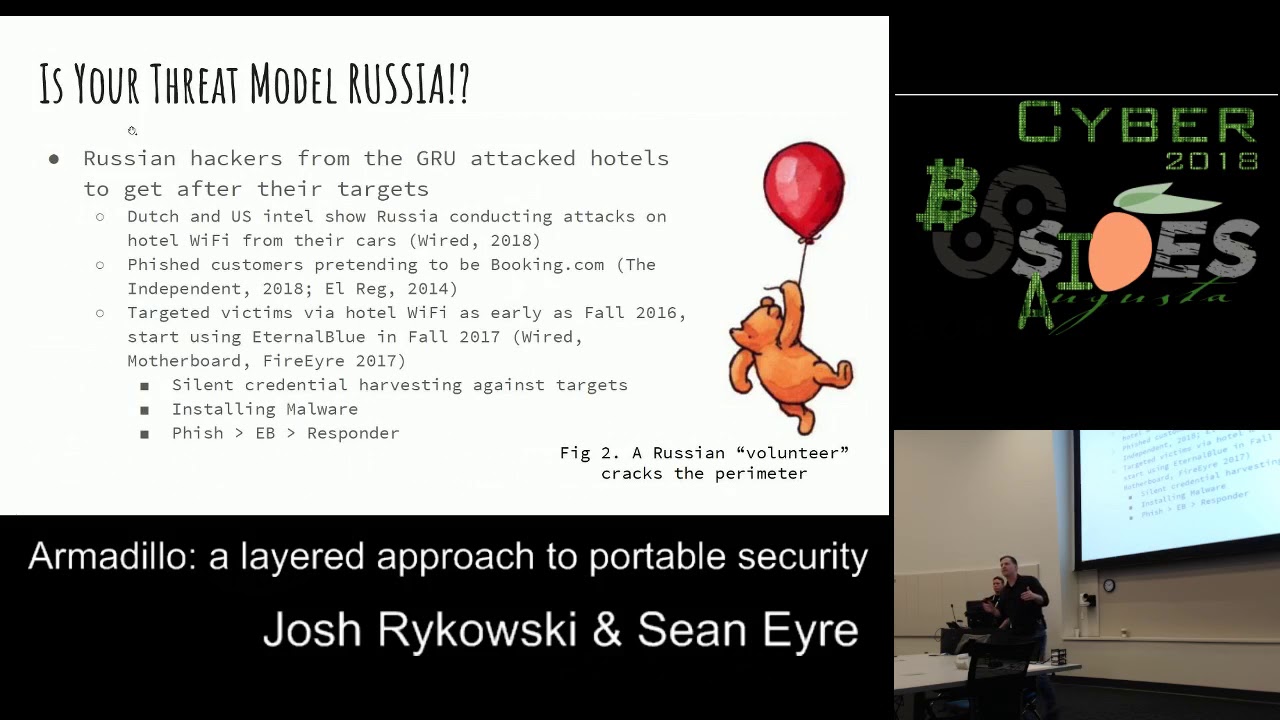
that's a really really common threat case or these kind of environments that you read or I'm connected to this Starbucks Wi-Fi or whatever McDonald's and like someone's in the corner just like I'm gonna see what mischief I can get into so we've got like the script Kitty threat and then we've also got the apt level threat and we will actually justify that statement here in a second next slide please is your threat model actually Russia well in a hotel it very well might be by our product $5.00 all right so recently this has been really popular in the news the Russians got caught by us Intel and Dutch intelliwhite on this and a bunch of other people reported on
this October 4th was the last report that I actually read like in the news from Wired you remember the two Russian guys that have the car full of like tech gear and then roll up to a hotel and they've got you know out of band comms in there with GSM antennas they've got GPS stuff they've got a small portable server and then they've got all their Wi-Fi access gear so they could interact with the Wi-Fi itself and then either crack the perimeter directly or log into it because it's like captive portal Smith in room 350 right and then they've got access to the network and they do whatever they want with those tools and they can immediately do information
gathering use that server to deploy tools or they can use the GSM to do out-of-band deck exploration completely nullify any security that that hotel may have had and they've been according to Wired been doing this all over Eastern Europe any target that a PT 28 is interested in they have these guys go park outside of the hotel or maybe a couple blocks away with their little cantenna crack open the Wi-Fi and do whatever they want want to it they've also apt 28 specifically have been fishing customers pretending to be booking going back as at least as far as 2014 so like they've been taking advantage of the trust of hotels and hotel booking services for a long time
so the way the booking fish actually works as they clone the booking website booking com and then they just spam people like there's a problem with your reservation you happen to have a reservation and you click on or maybe 28 actually popped booking got the customer list and did in more targeted fashion we don't really know from what's reported in the news there so there's this deliberate interest in getting into customers who travel and then we get into what they've been doing this really really fascinating as early as at least 2016 if not prior they've been deliberately targeting hotel networks once they crack them open they infect them and then they go and actually target usually diplomatic targets that
are staying at that hotel so how that looks since it evolved in 2017 with the emergence of eternal blue is they drop onto the network with fishing so they actually send it to the hotel admin you know person the front desk is like what's this PDF what's this excel sheet with the d de Otto in it they open it up and then now that they've hooked inside the network they then smash-and-grab with eternal blue is the TTB that emerged after want to cry you made it really popular and then they go and affect the network with responder other things they're doing when they're on it they're installing malware and hosting it and then they're also doing silent
credential harvesting why please one of one of the ways they do that is basically putting a man in the middle at the gateway and then you you'll see that you know unless you're using a site that does cert pinning it's completely invisible to the regular user if you are using cert pinning on a site let's say you're going to Google or whatnot then whatever your institutional training kicks in you say well I'm trying to get to my own like intranet site and I'm used to clicking through the security warnings so I'm just gonna go there anyways right and then you get fished so where this where this takes us wired has said that basically if you want to be
safe on hotel Wi-Fi don't use it bring your own hotspot the FTC has said the same thing that basically hosts a Wi-Fi is unsafe the FF has made a lot of similar argument see FF is actually really adamant that secure that captive portals are not the way to go because they completely destroy security and then finally we just call out that dark hotel which is probably apt 28 has been doing this stuff for a really long time that does a Better Business Bureau report is pretty decent and the wired ones are pretty solid too next slide please so this gets into what is our little stack do and what does it not do well unfortunately we did not set out to beat
apts when we built this so what it does it does prevent your devices from being scanned because you put a firewall that denies any any inbound right which means it beats NSA eternal blue right well allegedly NSA but it doesn't necessarily beat a p228 save you 28 on your hotel is doing a man of the middle it goes into the second blow we don't stop man in the middle stuff we don't stop your traffic from being sniffed because you're still communicating with the Internet but there are ways we get upgrade this project to do that such as a VPN connection at the edge which the open word on Router actually would support or you could do some sort of filtering where it
doesn't allow you to actually leave your own trusted Enclave unless you're on HTTPS or some similar secure protocol and you could also put some software on the edge that would force you into those tunnels as well all right Sean so now that Sean is a completely dark in the room with the doom and gloom and everyone's thinking oh my goodness how bad is it out there I'm gonna go ahead and pick up the ball and run with thanks for the set of John I appreciate it I was gonna hate you and love me it's perfect it works out right now we're doing bad cop bad cop yeah I know right so so phase zero right so at this point
I'm gonna start talking through the process of you wanted to build one of these stacks how you'd go about it so up here just to highlight how small this is I've got the you know an entire stack built right here all the way from the power supply on my right to the actual router switch and Raspberry Pi so it's tiny fits in your bag very quick very easy to put together so a phase zero for us ended up being just the the gathering of equipment right so we identified hey we needed some way to to connect to the Wi-Fi in the hotel in a fashion that we can also provide some stand off for our
devices behind it so what we did is we were looking out there and we tried to find the smallest router that we could and so here a little bit of a little bit of a scale so these are the actual Wi-Fi routers here to take a look at that the cost we figured out we're about sixteen dollars depending on where you source them from now I will say this what's it yeah well so yeah that definitely I definitely go to aliexpress.com whatever to order them however that being said we didn't use the the original firmware on there right because if you get it it's a very bland firmware kind of hard to use so how many people in here are familiar
with dd-wrt all right enough so the next couple of slides I'll start talking about that a little bit for those you don't know I'll try to give a little background so you understand what that actually is so the actually Wi-Fi router about $16 per router and it provides that that client connection and also the security aspect because we can apply some iptables rules to the router - like what Sean said do that kind of a deny any any inbound and and also if you wanted to add custom rules to it you have that ability the next is okay now that we've got the connection to the Wi-Fi how do I distribute that out to my clients or my
devices and so we look for you know just Google you know small five ports which and just like with a router it brought me back to Aliexpress but I found a dye of five ports which about $9 per switch so this is the network distribution five ports on it and really when it's when it's all said and done and you can you get it set up in this fashion you've got three usable ports because one port is used to connect to the router itself and another port is connected to the PI on the bottom and so you get three usable ports out of it and then finally a Raspberry Pi to round out the the stack now this is kind of an
optional piece right for this to be a security stack you don't need the Raspberry Pi on there however we added it on and we kind of recommend that because it allows you to basically clone or download or have anything anything that you would be local that you don't want to pull across the internet right so if you like what Sean said earlier with the incident response you know maybe I don't have internet access so if I have a local repo I can go and pull from that or if it's something where I don't I don't want to tip my hand and start pulling some of my own tools over the network it allows us to do a local repository next
slide please all right this results in this really super complicated network diagram so what we've actually implemented is all but two of the devices on here so at the very top level you have a router firewall because the DD word is actually letting us run the firewall IP tablespace firewall there's a GUI to interact with it but you could also for your advanced rules you have to actually go in and under state I have two table syntax then we have the layer two dumb switch your file server down at your bottom left and then you know obviously your laptop is plugged into it in the middle the two things we wanted to call it so you can expand it as we put on
this board we have the two next routers here and again this is just for scale that second next router can be put into a Wi-Fi access point mode instead of a client mode and then if you set up your IP scheme correctly you can still access the services on the PI so while we didn't prove it in this this particular stack would make it a little bit bigger you can definitely like connect your hotel Wi-Fi and then host your own Wi-Fi for all of your devices so if you need to share the services you need more than three ports available you can do that finally we wanted to call out like this layer to squish is not simple
it but if you upgrade it to a really simple smart switch which I have a link sees one at home it's it's much bigger and it can't be powered over USB but it's I can do port mirroring on it so if I wanted to install any sort of network security monitor and upgrade switch and then I plug in another PI in rustboro on it which we proved works obviously your main constraint there is going to be the amount of storage that you have and the way that you want to interact with that and like an intelligent way so you can actually pull value out of the data that you're collecting all right and so like
I've already pointed out up here you know just the finished product I mean it's time you fits in the palm of your hand it's very easy to go and throw in your luggage once you have it built and if you notice this is just a simple powered USB hub right here so everything that I have in this stack does not need its own wall board so the the the router and the switch itself pulls about a half amp each so that you can easily plug those in USB to your computer in a pinch now the PI that's a little harder you know the Buddha process you know gets about 2 2.5 amps however it's easy to
make it to find power if you leave your power brick at home next slide please all right then we went on to configuring all the things right so now that we went ahead and bought everything had a big pile you know UPS was my fan at that point because he kept on delivering packages and I got him so what we started with with this particular configuration is we took the router and like I said the the existing firmware on that any excess or any xx router was I won't say it was horrible but it was definitely clunky wasn't a pleasure pleasure to work with so what we did is we went ahead and downloaded open wrt
and went head and flash to the device the good news is there's an existing binary to do that you can go ahead and go find that that binary out there just in fact if you just go to the uddi BRT site you can download that now a little bit of background information so for those of you unfamiliar with dd-wrt it's essentially a custom firmware for routers that gives gives essentially the user back a lot of the power and a lot of the the ability to configure anything you want on it if you've never dealt with DV that wrt before it is complex sometimes it is overwhelming um the good news is once you flash this router
dd-wrt you really don't have to configure much more if you don't want to you it works once you get it flash to boots right up and really the only thing you have to do is go in there and apply a password to protect the actual admin page so once we got the the actual firmware flashed on to the router itself went through the process of configuring like the configuration is as simple as just applying a password now if you wanted to go in and you know go a little deeper than that you can go ahead and set some of your static IP assignments so you know you're gonna have certain devices like say for instance you've got
your Raspberry Pi there and you want to be able to access that file share on the Raspberry Pi you're going to have that that go in static IP assignment in there and then finally if needed kind of which honor I talked about earlier is you can go and update the IP tables rules now who here has actually done IP tables rules updates I've got a few who enjoys updating IP tables rules yes I got one take her in the back fantastic the rest of us we've looked at it and we essentially hit the keyboard 8,000 times until it works right because you never get it right the first time you just keep slapping the keyboard the good news
about dd-wrt is you can update the IP tables rules from the website configuration right so you don't have to actually go to the command line and do that you can actually have your rules and just apply them in a little nice little text box in the configuration page for the router and then have it update for that so it makes it a little easier to get after as far as configuring the switch it was really nothing right just turn I plug the power in make the ethernet connections and it just works again it's a it's an unmanaged switch the dumb switch it just passes all traffic and then finally for the PI again with the optional piece of
the security stack it really depends on what you're trying to do with it at the point you just need to install the packages you want to have available to you local github repo a Plex server file server or anything like that you just need to go and pull down and do that in part of this as part of this configuration phase X line please all right the firewall right so so you've look up there there's one little bullet that jumps out it's red why do you think I put that red yeah I see a few people chuckling it's a lesson learned for us right so it's one of those things and chanson attest to this yeah so what I
did and this is actually how we learned that for sure that if we factory reset the device we wouldn't wipe the new firmware because we had to factory reset it I put that first bullet rule in because I was like I'm gonna secure this firewall right and I didn't specify that it was the way in port that I was talking about there so I locked us out of the entire device in the middle of working on it one day so yeah if you deny everything coming into the device you can't even talk you can SSH into it you can't talk to the HTTP client or start daemon at all so instead what you want to do it actually puts a
specific new IP tables chain in for you to interface with just the win so you want to go in and go to just that spot and drop everything coming in different philosophical discussions on whether or not you want to drop or reset etc I actually am of the camp that you should drop because then nothing is nothing is there as opposed to a filtered port is there so that's what I would recommend to do that you also in the GUI on the tab next to where you can actually type in the IP tables rules there's a whole like checklist of stuff that's on by default and you actually they're all like allow rules go into there if you
decide to do this uncheck all of them except for what allows you to connect to the network that's performing your backbone function and allowed that network to assign you DHCP and that's that's all you really need to get going thanks John yeah so just again it's one of those things where you know if you're knee-deep in the research and your work you're cruising right along and you've got a lot of momentum and all of a sudden you're like hey why is my my console not responding anymore stuff happens you know well Billy first to say that you know trial by error works best because you learn not to do that again however the lesson the the true lesson
we got out of this is once you flash the firmware onto that router if you do a factory reset on the router it just factory resets the dd-wrt it doesn't it doesn't try to pull the old firmware it doesn't do anything like that and so you're able to just go back to a fresh install of dd-wrt so again nice little lesson learned in this in this kind of a the piece we're doing with the configuration and finally at the bottom to explain a little more on that so some of you are probably looking at us like you flash the firmware of course whenever you reset the device it's going to go back to that the reason we were
concerned about it with this device is the next router actually has a small bit of memory of writable memory that is static and on the the chip and that is advertised as basically the way to not accidentally lock yourself out by putting on faulty firmware so essentially it's Nexus persistence on their that they can use to restore their original firmware so we were concerned that if we had to do a complete reset it would actually go all the way back to that stored memory which we've done no forensics to see whether or not that's doing anything malicious so that's on you if you trust it go for it but we did end up testing that on an accident and
that's actually like first time I could say use a lockpick to crack into a you know a router because it's the smallest device we had to push the pin say oh there we go and then just to just a close-up live right here you know at the end though you can you have the ability to add iptables rules to suit so whatever your environment is whatever you are hosting um you know locally you can go and add those rules to it as you see fit and like I said with the dd-wrt configuration page it makes applying iptables rules easy it's literally a little text box you you throw the rule in there you apply it you know it does a
quick soft reboot of the device and then it applies it allows you to do some some checking configuration it's not the command-line and you can you do have access to the command-line if you want to however this makes it a little easier and a little more approachable next side please all right testing right so this at this point you know you can say it's safe you can safe secure all you want but without any sort of actual testing you don't know it works and so at this stage you want to go ahead and conduct robust testing prior to use you want to make sure that that the things you're blocking can't get through you want to
make sure the things you're hosting internally can actually still function right if they're still cause if they still need to get to the client device you need to make sure those iptables rules aren't blocking anything internally as well so like I said you want to start with your connection a validate that you can pass traffic validate you know kind of what John and I did on the fly make sure you can still you know push traffic in and out on the on the the periphery of device second is anyone to validate or check those internal connections you want to make sure that all the PI services can be reached you want to make sure that the
client that you connect to the switch can go and reach those services and back and forth and then finally security testing I mention that already but you want to test your IP tables rules you want to validate that they work you want to make sure they're doing exactly what you think they're doing because I don't know about you but sometimes you know IP tables is a tribal error I think it's doing this well let me validate oh no wait it's not okay because I've either you know flush them before that dumped everything out so it's not chaining properly there's a clot in there but just make sure you know basically there should be a script or
something like I said a screen shot just make sure you can easily script this out to go ahead and test that and that way you can just have a quick little fire and forget for the test as you produce this or as you build these for your own use next slide please finally employment right so at this point at this phase you've done all the fun stuff of ordering it getting in you know putting together configuring everything now it's employment you know connecting to a network it's simple with the dd-wrt firmware on the router but it's still a process because you have to go into the device you've got to dig through the menu like I said if you've
never worked with GWT before it is kind of overwhelming but once you find it you can simply put the the router into a client mode and tell us to connect to a wireless network as a client itself and then once it's connected if it's any sort of a captive portal you know the minute you connect the client to the switch you are then redirected that captive portal so if you need to still sign through that you have that ability next is making sure that the network services are completed configured to start at boot right this is really more of configuration of the pyrite plex server file server whatever your imagination is but really the key that
we're looking out for these network services internal is anything you want locally that you don't want to pull over the internet either you know sensitive files or things that may tip your hand or tools that may you know be caught in any sort of you know firewall or whatnot you know just anything you want to host locally goes there and use your imagination for that looks like please I'm gonna hand off to Sean for the the future work piece all right future work you have no project is complete without recognizing what you didn't do so putting a VPN of some kind on the edge is a great way to step this project forward and make it where you're immune
to sniffing whenever you're on whatever dirty internet that you're on the thing to keep in mind was something like that though is you're transferring the trust so if you've never thought through the trust problem of him I trust the hotel Wi-Fi or am i trusting a VPN provider you want to make sure that you pick a VPN provider one that lets you install a cert on a router and doesn't limit you just client devices but two is is trustworthy not to intercept your traffic and to sell that off to people that you don't want to have your data the answer to that question to just go into a privacy soapbox for like two seconds is on you
to figure out who do you want to have your data and why or who do you not want to have your data and why and that will guide you into who you want to use this VPN provider I personally use P ia because it meets my personal needs private Wi-Fi so you can throw the second X on there configure it as a Wi-Fi hotspot instead of as a client and then you just need to basically like we said earlier make sure that your IP the scheme is correct and it is routing correctly by default they will use the same IP scheme and then it will not work for you to go across one router into the
identical other network basically and then get over to your PI so you need to make sure that you set it up because it is performing as a router and not as a switch when it's in that mode and then finally if you want to build that internal network security monitoring it's a matter of upgrading a little bit of the infrastructure which means you're gonna have to change your power scheme a little bit but then once that's done its what do you want to do and how small do you want to try to keep it in order to to watch what's going on at your level all right so this point I mean we've talked about everything we wanted to
talk about with you we do have the link up there now it's still work-in-progress we plan on hanging our testing scripts on there we plan on on posting our configurations and everything we've done so far to that link so if we also have links to purchase the different pieces of this configuration so if you wanted to go ahead and build one yourself you know hit that up you know give us another day or two to kind of tidy it up though you'll get a gist of it when you go there right now but again there's still a few more things we want to fill it out with so at this point I just want to open up the floor for any questions
you may have for anything we've talked about between the actual silhouette with a threat modeling all the way to our actual implementation of this device yes sir so right now we don't have any NSM installed but the proof-of-concept I did actually on my home network was running bro and that was it obviously bro doesn't really have a GUI so if you don't want to use bro cut or awk and said and all that stuff you've got to do something on top of that and you start pushing the pies computational power like if you want to run Splunk on it or something like that but too easy to set up bro on it I'm pretty sure it's not secured youngin but
snort would work if you wanted to as well sericata all your really simple solutions that can run off a net sniff ng or something similar should work sagen yes three B plus when you're thinking about that NSM piece you know and you think about how the pie is relatively low power for something like I'm thinkin ever thanks out there Pathak that much traffic and so uh you know I think I'm thinking to be it fair fairly well for the the scope that we're looking at for this there that does bring up a good point though the nicks on the when necks on these end up more or less limiting you to if you go over Wi-Fi it's a 100
megabits per second your pi is limited to that as well because of the way that it connects the note the Knicks to the the rest of it basically runs over the USB hub so if you do it for this or for a similar project you want to use a PI as an end of some monitoring device of some kind you cannot expect to not drop packets unless your network is you know there are lower for home use probably going to be okay especially around here where Wiles like you get 60 megabits yeah but for anything bigger it's it's gonna you're gonna need to cluster instead of just running one now for this little device yeah it's gonna get the
job done yes
you could and there are projects out there that have proved that that's possible to use the pie as the pass-through device we chose to put more standoff between where the services are hosted and that but when we were initially doing this that was actually our fallback plan if we can get the next to work something to keep in mind as well when you're doing like that I don't know how the B+ is or the 3b plus because I haven't tested on that but in previous iterations of the pie when you're trying to use it as a wireless router it gets pegged pretty quick as far as resources again I can't talk for this one because I haven't done it but I
know in the two and previous iterations it was it got pegged really quickly so it's good it's a good question no thank you yes sir
potentially so let's let's talk hypotheticals um say we've got a Cody server running and you don't want the way that Cody talks out to fingerprint itself on the network and so you just get your legitimately obtained movie files need a lot of money Cody server and then you at your firewall you say Cody you can't talk to the internet because you already have all the stuff that you need now no one says oh you're running a Cody server you must also be illegally downloading movies so you could do some finagling to do stuff like that if you wanted to the better way if you want that service to also have internet connectivity is to wrap it up
in a VPN so nobody can inspect it all right yes okay yeah yeah I failed to mention that so that the the actual rack itself is 3d printed so if you don't have a 3d printer access to one you need to write either way because I love my 3d printer I like to print stuff just because however if you when you do go to the actual site so that the plans for this are open-source out there on a site called Thingiverse if you've never been there and if you have a printer to check it out but you can download and print these I mean I think this entire stack right here took about an hour and a half
to print on my printer you know very easy to put together again though you know I Sean and I toyed around with the idea of just taking everything out of the rack and just duct taping it together because if there's a day you just want something that's portable and you can plug into you right so really I mean this is just a nice little prettification of of the device but you can really just duct tape things into a ball leave the ports open and just you know plug some power to it you know because it gets the job done right if it looks like garbage but still works is it really garbage I don't think so
what said exactly so and these these 3d printed racks are actually this is a stack of three racks they were printed because the design that we found is actually modular so then you can connect them together and it's got a little slide actually so what you can't yeah it's not that's what made the talk was that slide unfortunately when you actually install it you have your wires are in the way because we it was designed for a Raspberry Pi but once you start putting and it you can see like the raspberry PI's Knicks are forward facing so the slide works you put different devices that were it wasn't designed for the wires promptly start getting in the way but you don't
necessarily need to constantly be using the slides and then the adjustment that Josh actually made to partially and unplug this so people can see actually help pull it out of here as we actually put a bar in there to hold it in place so that you can actually use a Ellen wrench to adjust this bolt and then hold hold things down and then actually I'm the one that holds the pie we don't do that because it's yeah we don't do that because we can actually bolt apply directly in so it already had the mounting spots for the pie itself and we just added longer bolts in the crossbar so that you could hold other devices in
long live open source I love it yes I'm sorry did answer your question okay and then over here so definitely a thought crossed our mind so running the actual switch and the router off for battery pack would probably work extremely well right the max the max pull or max amperage on both of those is about half an amp and so if you if you do that and you do the math on on here you know even a small battery pack with like 1800 milliamp hours I mean you can get a pretty decent runtime off of both of those running the whole time now you had the pie to it all bets are off because you know I mean there's
so much variance in the power pull of a pie depending on if it's under load if it's not under load but if you just want to run the the actual networking devices they'll probably run really well off of a power pack the main thing you want to make sure is that the power pack can actually has the the max pull for it right because you're plugging two devices in so it's gonna have a max pull of like one amp at that at one time so that's a little a low check for the power this good question though it would make it even more portable with the battery yes with with the good battery you could run this on an airplane so you
could get to your movies and whatnot awesome any other questions all right well we want to do four all right so we've got some giveaways here right so so besides it's not exactly yeah they're done I don't know if you're clapping for the giveaways or for us thank you though I appreciate it boosting my confidence here yeah all right so uh let's see here this is a cracking codes with Python who here likes Python yeah awesome right those you didn't raise your hand I'm sorry I'm really sorry you'll be forced to take it fair enough well you know you'll learn to love it if they bludgeon you with it enough exactly right so cracking codes with Python what is
the the Python library that allows me to do hashing so I had a hand up you guys want to fight for it go ahead and knife before it all right cracking codes hash Lube was that so if you want to do to sort of hashing in Python the library is hash Lib this is a personal favorite of mine right here if you've never seen this book and you're learning Python you need to take a look at it it's called automate the boring stuff with Python it's amazing you don't even know what the question yeah he's like if I go to Dad's I'll take it no you know what I like your enthusiasm or you know what this is
yours there you go that way you can go and hit yourself with the book as you're learning Python there it is fantastic all right next up we have the blue team handbook incident response Edition and the blue team handbook with the threat hunting use cases the new version that just came out recently so these are written by if you don't know RIT my Don Murdock and these are both autographed by mr. Murdock himself who is speaking at the conference yes he's speaking if you haven't uh if you haven't seen that on the schedule got any good ideas for trying to come up with an instant response based question but okay what is this is this is a
softball so please somebody get this what is the first thing that you should capture when you're responding to a computer that you think is infected firsthand and oh no sir EPT I'm sorry yep specifically dynamic memory right so if you go straight to the image you're gonna miss a couple things one you can distort the dynamic memory but two you want to like do things like look in the dynamic memory and see if that image is full disk encryption or not and that's going to determine how you're going to go into and actually pull that image because if it's full disk encryption you're logical one right and if it's not you're gonna pull a bit by bit image we've seen
some interesting things when people are like it was affected so I shut it off great no mark Toki's tomorrow that trivia question you guys last year about pac-man oh sweet so it's all my retro technologist right and so I love all things 1980s technology or bust so some of you who heard this question so if you've answered it before or heard me before don't answer fair enough so pac-man everyone knows pac-man right so how many levels are there in pac-man Alex and how do you know it's 256 it's a trick question because you get to 256 does anyone know what happens when you get to level 256 and pac-man it doesn't die yeah you get some weirdness going on
right there's a register overflow and then the screen half the screen blocks out all the actual pellets are in the same location you just can't see them the ghosts are still chasing you and so what's really amazing is the folks that have gotten the perfect scores and pac-man they have memorized the pattern to the point where they know where everything's added so if you ever see someone do a run on pac-man take a look at it's amazing they can do that whole maze without even seeing it so it's kind of a cool little trivia thing but it's simply because someone didn't take into account hey if we hit 256 there's something that happens you know voltage
goes out of one of the chips and nothing's there to catch it and it throws the whole system in chaos so awesome so we hand those out again Shana I'll be up here for any questions you have after the fact we appreciate your time and enjoy the rest of the conference if you want to work on your Python go to run codes workshop this afternoon it's gonna be solid [Music] [Applause]
Related talks
 37:47
37:47 44:49
44:49 47:21
47:21 58:29
58:29 31:52
31:52 48:41
48:41