How Far Can You Push a Static Site?
Show original YouTube description
Show transcript [en]
Hello, this is a talk about pushing the limits of static sites. I hit the point where I ask the question, how far could you do this? And this is a story about converting a whole organization over into static sites and an argument about software architecture. This is not about the specific tools I used. This is about how to go about solving these problems. I'm going to presume that my audience is already generally familiar with the nature of dynamic website generation and is broadly familiar with static sites. I work for Matrix. Matrix is a grant-f funded digital humanities research unit at Michigan State University. We are very small about six FTEEs. To be clear, the opinions expressed here are my own.
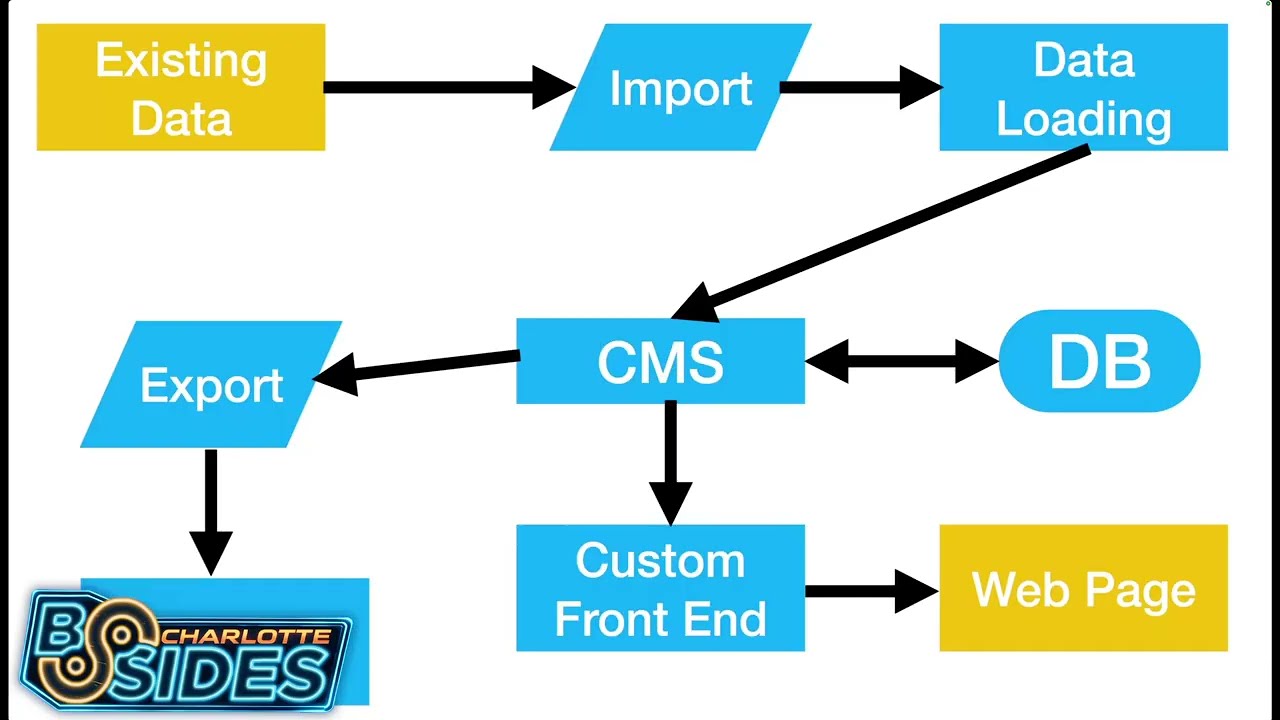
However, the most of what we do is we build collections. We've been building collections since 1998. As was the pattern of the late 1900s, we decided we should build a content management system. Let's wander through it. Uh if you've used Drupal, WordPress, Omecha, you have a rough idea of what I'm talking about. Ours was called Kora. So we said to ourselves, let's build a content management system. And the first course, the first thing you did because it's the late 1900s is you connected it to a database. Databases exist so that you can search things, so you can store things, so that you can retrieve things. They're wonderful, and I'm going to say some not nice things later about them,
but I need to start off by pointing out I think databases are absolutely great. I am literally running a database on my laptop right now just so that I can do data manipulation with it. Anyway, the next thing you do is you realize you have a way to store data, but you have to put it in there somehow. So, you build a data loading system. This is often some form of form interface or editor or something of that sort so you can put data into the CMS and store it in the database. None of this is wild. Then we build and a custom frontend for it because of course the CMS's default way of displaying data that isn't really
as pretty as it could be and we definitely need it to look better than that. So we put a custom front end on it. Sometimes we call this a plugin. Sometimes we call this a theme. Sometimes it pretends to be a completely separate software product. That can that's really an interesting statement. But anyway, you get to this point. You have a very pretty web page. You have very pretty presentation. And then you find out that whoever you're working with actually already has an enormous amount of data, which means that it's now time to generate an import mechanism. We build an import system to take the spreadsheets. It's always spreadsheets. It's very rarely anything except spreadsheets. And you take that
import data, you run it through your or your existing data, you run it through your import process, you drag it into the data loading system, you put it in the CMS, it's stored in the database, you have this custom front end, and then somebody asks, "Hey, what do I have stored there?" And you realize that you now need an export system. So you go about building an export system, which again generates a series of spreadsheets. We'll get back to that. Anyway, great. You've built this industry standard system. This is what most all of it looks like. And let's talk about the path that happens when you actually go to produce the web page. A random
connection from the internet shows up at your custom front end. Thousands of lines of dynamic code get executed in the custom front end calling tens of thousands of lines inside the content management system which then contact the database. probably tens of times through maybe another thousand lines of OM to and after all of that rigma roll it produces a web page and then the user hits reload and you do it all again and you do it again and again and again thousands upon thousands of times as people look at your web pages and if you're lucky it produces the same web page every time. If you're unlucky, it goes down the line of producing a
server error because something is broken at the moment. Okay, fine. Industry accepted solution. Let's keep going. Let's upgrade the CMS. And everything breaks because all of that custom code was necessary. So you sit there and look at it and go, "Okay, this shouldn't have broken, but it is broken." And people are yelling at you, and the first thing that gets yelled at is because the web page is broken. The web page is broken because the custom front end is broken. Fine. Excellent. We will allocate unplanned resources and send some people in to go figure out how to fix your custom front end. And the custom front end is fixed and the web pages are back and
everybody's happy. But several months later, somebody shows up and says, "Hey, none of our reports are working." And at that point, you realize that the custom exporting system isn't functioning correctly. So, you go down the path of more unallocated time, more unplanned work, and you get the exporting system working. And 10 months later, somebody shows up and says, "Hey, we've got more data to add to this, and our custom import scripts aren't working either now." And once again, unplanned resource time, unplanned execution. You finally get all the way back there. And then you're back to this and everything's running again. And you're executing tens of thousands of lines of code every time to produce the same web page that you were
producing back at the beginning. Great. Wonderful. And then your underlying language upgrades and everything's broke again. When you have three projects, this is doable. When you have 250 projects, this is a quagmire. Worse yet, when your custom frontends are functionally closer to being plugins or themes than being independent software projects, you find that the entire system is all locked together in a single upgrade cycle, all dependent on each other. Okay, this is where we were as an organization. You start getting to the point where you start asking why. Your programming staff asks why are we dealing with this again? Your project partners ask why is this breaking again? And then you'll ask yourself, why are we doing it this way?
And then you realize it's going to take a lot more than five W's to figure out how to get yourself out of this quagmire. So let's look at this diagram again. This is not merely about building a bigger, faster, better content management system. To be clear, we did that in the first year I was at Matrix. We rebuilt the content management system and then rebuilt all of the projects to use the new content management system. And I think I cut the latency of it via architectural choices down about 40%. And that was great. That's wonderful. It's a bigger, faster content management system. But look at this diagram and just sit with it for a moment and ask yourself
which parts matter. The only two parts that actually matter here are the web page we produce at the end and the data that we had at the beginning. Everything else we are doing is in service of those two elements. And after watching this I started to reimag how we do these projects. Here's the pitch. First step, let's design for the simplest hosting environment we can come up with. Send file is very fast. It is incredibly low latency and if it has a problem, it's everyone's problem, not your problem. Have you heard about an object store? You can store static sites inside of an object store. Use an object store. Finally, if you have static files at the
end of any given URL, all of the advantages of HTTP caching, all of the advantages of partial reads and offset reads become available. If you have a dynamic file there, none of those are available. Next one is amusing to me because it's a quote uh where somebody else has stumbled over much the same space I have. It turns out static sites have incredibly low latency. Making your site efficient in this form is a better user experience, but it's also a lot less software to run. A lot less software to run means that everything goes faster. And I don't know about anybody else here, but I do not have infinite resources to apply to the problem.
With that in mind, uh we are now at the point where we have waves upon waves of site crawlers rolling across our websites. The dynamic ones consume about a day a week of my time to manage. The static sites just serve the file and move on with life. It's impressive. Finally, design for abandonment. Every project we work on, every project we have built will be abandoned. Sometimes it's by lack of interest. Often it's by death. This is particularly true in my industry where we have a number of latestage academics. design your entire environment with this in mind. It was it is an attempt in my mind to build not just the sites for people to look at but
also the software artifacts for a version of me that will exist in 30 years, pick them up and try to bring the site around again. This seems unreasonable until you realize that I am presently picking up sites that are 25 years old and trying to breathe life back into them. I'm not the first person who's going to be doing this and I'm not the last. Design with that in mind. And then this is just the typical software development side of it. Run as little code as you can. If you can run it privately and not connected to the internet, it's even better. It's not to say you can't run or that you can write terrible code. You can't
write terrible code. But if the thing you're working against is unfortunate inputs and less hostile inputs, it's substantially easier to work with. And build code around the reality that we are working in decades here, not quarters. So this was my pitch to the organization and the organization kind of looked at me funny and said are you sure? Can you make this work? Can we get all the features we need out of this? And we chose a path. Uh I advocated for a minimal path to do this. Run the content management system, but rather than have a custom front end, build the entire internetfacing website as part of the static site generator. People ask, well, where do we do all of
that work at? Somehow you probably have an existing source code management solution. Use it. You probably have existing continuous integration and continuous delivery infrastructure. Use it. Occasionally people have asked me to pick uh tell them which static site generator I use. My answer to that is pick one that matches the development environment of your existing developers. look for what they are comfortable in and pick a static site generator framework that matches that environment. Finally um the structure here is basically go ahead export data out of your CMS. Sometimes it's your full export mechanism, sometimes it's a bunch of lookups into the CMS, feed it to your static site generator and produce websites. And I believe the first one that we did that
did this was Internment Archaeology. Internment archae archaeology is a collection of resources regarding Japanese internment camps during World War II and the entire thing is a static site. It is roughly 20,000 records in the system. It works reasonably well from our perspective particularly given that we have things like in browser 3D renders that are manipulable of 3D scans of some of the artifacts. To this point, I would like to point out that JavaScript in the web browser is fast. Do not bet against JavaScript. Also, all of the interactions that you are going to make that are extremely low latency already have to be JavaScript. So, what's a little bit more? Static site builds are actually
surprisingly fast. Static site builds uh are slow when it comes to gathering the information into memory and they are slow in writing out the web pages, but they are not necessarily particularly slow and in fact are often concerningly fast when it comes to actually rendering all of your pages. The entirety of internment archaeology, sorry, checking my notes here, is 3 minutes front to back, including the exports out of the CMS. And if that's not going to work for you, it's surprising. You can build caches and use your build targets. You do not have to develop with the full data set if that's too slow of a turnaround time. Um, the next thing that really got
everybody was how are we going to do search? The way we ended up doing search was that we did it in the browser. JavaScriptbased search engines now exist where you deliver them an index and they allow you to do all of the searching in the browser. I'm going to pick on one of our sites because it was an interesting one. This is, I believe, our second generation. This is the Willis Bell Photographic Archive. It has 40,000 described images with a full set of metadata about each one of them. The entire search index, without any careful thought put into how it was built, is 120 megabytes of JSON. When compressed across the wire, it comes down at 5 megabytes.
That's fine. The browser handles it without even blinking. It's not that big. Go look how big your search indexes actually are. Can they fit in a browser? Probably. The next thing was how do we do browse? Because while rendering out each artifact is easy, it turns out browse is just an unfiltered search. Use the exact same search index that you use for doing search as a version of browse. Here we go. Go off. Here's the archive of Malian photography. It's 20,000 images. When you hit the browse page, you bring this up, which is actually just the search engine and the search index, which is loading and caching in the background, waiting for you to select down to more
precision about what you're looking for. Now, I'm going to point out that the eagle-eyed individuals in the audience have already decided that I'm lying to them because they saw this in the URL bar and saw PHP and said, "You are running PHP here. This is a dynamic website." That is not PHP executing. That is a URL that we published 15 years ago and preserved because once you publish a URL, you should not change it. I'm just going to point out that it's kind of crazy that as a standard procedure inside the industry, we decided to encode the language that we put that we were running to produce the web page in URLs. And just to be clear,
I'm not joking. There is zero PHP installed on that virtual server. You are looking at the index page. That's all that's there. This is all happening in browser. All right, moving right along. Let's keep designing for abandonment here. Choices we make. Use the native viewers whenever possible. And in fact, choose to give up weird features if you can use native viewers. Video tag, media tag, audio tags exist. The native viewers work really well. Augmenting them marginally gets the job done and will likely work very well into the future. If you are doing media encoding, which we have done a lot of, pick well-known, widely supported, extremely boring codecs because you want this to keep running
and be easy to decode long into the future. Do not worry about maximal encoding efficiency. It's not that relevant. Anyway, we got to remember this diagram. We hit a new project and we had ourselves a question. Do we keep doing it this way? Do we do the static site generator? If the only thing we actually need to have is the web page and the user's initial data, why don't we leave the data in the form that they work with it in, which is again 90 plus% of the time a spreadsheet. Yeah. Okay. Leave it in a spreadsheet. Let's just do this. Let's eliminate all of the content management system. We leave their data in spreadsheets.
uh well okay come separated value files that they export to us all of the media we put it inside of git LFS the project is now fully self-contained people go okay but we're trying to do something that's more narrative driven than purely data driven and our response is great we have markdown I'm going to point out that in any other CMS ours included the users were likely already typing in material that had to be put in some sort of markup language. What and whether it's wiki markup or uh WordPress markup markdown's not a lot different and I do admit this did take a little while for everybody to get comfortable with the idea. It did not take that long. However, this
is the commit heat map from a nonsoftware developer who we pointed at the GitLab edit interface for his project and off he went. We have had a couple of times where the material getting into it was not ideal and it did break the build. Here's the fun part. It's in Git. I can get bisct the data set to go find where it failed. We've had to do a few fixes. Fine. But it turns out we have all of the tools of Git available to us to make it easy to do those fixes and see where they happened. Now, this sounds like a bunch of upsides. There are downsides. Web crawlers cannot see our material because it's pretty much all inside of a
JSON executable and you have to go load the page, etc. The solution we found was reasonably straightforward. We generate a site map with a tree of links to every page on the entire site, make sure it lands on the homepage as a hidden link, and off we go. The web crawlers find it, everything can crawl through the site, and collect up all of the data if they would like to index it. But this one's a fun one. Not all of our users have hot and cold running internet. Turns out you can relative reference all of the resources on a given page and decide that the pages have file names, not just trailing slashes. And all of a
sudden, you have now built a file system viewable version of your website, which can be opened with a web browser without having to run any web server whatsoever. We then mail them on an SD card or a USB stick copies of their web property. Okay. Do you want a comment section? You do not want a comment section. I'm just telling you, you do not want a comment section right now. But sometimes you do want feedback regarding the materials that exist on the site. Assume your users can produce email. Ours are certainly can. The mail to link actually still works and you can absolutely build it up not only just with a destination but also prefill
information in the subject line and in the body which allows you to specify where you were in the file system or in the site so that you can have some idea what somebody is complaining about. Oh, and since it's the mail to link, yeah, it works on the offline versions as well. We will now enter a crazy man section where we go into the maybe we have to do this. Maybe we have to do a dynamic website. I'm going to ask a really weird question. Does your dynamic website need a random connection from the internet connected to a fully empowered arbitrary compute platform that has the ability to both exac and eval code with full access to your file
system and database. When I say it that way, it sounds a little nuts despite the fact that that's the default of what we do. Okay, going to go quick. Try something else. Let's build a message passer. If a client generates a request, they send in a job description. The server uh presumably is a JSON blob. The server looks at it and says, "Here's your job identifier." And then hangs up on the client because there is nothing more that can be done of value there. It then writes down the job description inside of the queue. And then we send it off a series of runners to go pick up and look at the job. They handle the job and do a
partial render of the website when you need it. Cool. Client can pull on job server UI UID and it may or may never show up. That's fine. That happens. Okay. But I need sessions. The client URL tree and the server ul URL trees need not match. Almost every session I have ever run into operates as functionally a session cookie. So what you do is you have the client ask for this. The cookie rides along and you respond with something that is session value of the session cookie my data.json but I need accounts. Fine. Extend the plan. Do it the same way. You do not have to be providing random results there. More broadly, remember how I said
loading stuff into RAM is expensive? Yeah. If you've already got it in RAM, do the partial rendering of the materials once you have them in RAM from some other part of your process and send them to the static site. We're not done. We're real close to done. Quilt index is 100,000 quilts with a extremely complicated data model. That's going to take some time, but is very doable. Enslave.org is a million base data points. It's going to be an awful lot to dig through. I believe it is possible it will be pushing the limits of what I know how to do right now. It is most interesting to me that my non software development staff are
now defaulting to static site generators to the extent where they are willing to turn down things that would require us to do dynamic websites. This is because we can see three years into the future. My name is Gouki. The opinions expressed here are my own. May your object stores be reliable and your services be big O of one.
Related talks
 49:50
49:50 1:04:53
 29:30
29:30 50:56
50:56 1:21:38
 5:57:18