GF - I got an alert, now what?
Show transcript [en]
all right good morning everyone thank you for coming for the first talk good good morning everyone [Applause] there we go oh God I hate when people do that all right so uh I have I I have my little talk I Gotta Give real quick so I'll do this real quick before we introduce uh first good morning everyone okay I did that all right good morning everyone and welcome to besides Las Vegas this is the uh the ground floor look I'm doing so many so welcome to the ground floor track um this talk is I got an alert now what so uh and of course it's given by uh Kellen Benson we're very pleased to have you here
thank you so much for coming and speaking uh a few investments before we begin uh sponsors of course we need you to thank our sponsors the uh they are the uh the companies and the people who make that happen we'd like to thank our Diamond sponsors LastPass and Palo Alto networks of course and our gold sponsors blue cat Google and Intel oh so uh absolutely vital to making all this come down and and working so along with the support staff and the people who have been vital in making the actual b-sides possible so as a reminder uh cell phones these talks are being streamed live and they are being recorded you do not need to record you do not need to take
pictures so please silence your phone uh as a reminder the policy for taking pictures is if you were to even take a picture you were supposed to make sure you have everyone's permission if they're in the background of the picture right we're very sensitive to making sure we're taking being the privacy of people very serious especially within the community we're within so I do ask if you have a question please step up to the mic use the mic it's not so much for us but because it's being recorded that makes sure that question gets on the recording so people who see it later can hear your question as well uh of course Kelly if you always repeat the question
before you answer it that's always nice too so um as a reminder yeah I just talked about that for the policy uh with that let's get started so I'll pass it off to you thank you so much awesome let me here we go okay cool thank you all for being here I really appreciate it um welcome to a talk called I got an alert now what uh before we get started just want to introduce myself very quickly my name is Kellen Benson my pronouns are they them I work at Red Canary as a senior incident Handler um where I put out fires for people it's pretty fun um and there's a little bit about myself
I'm a pop punk Enthusiast if there's karaoke later this week you might see me doing some Paramore so uh look out for that but that's not why you're here you're here to learn about I got an alert now what sorry I want to go back to that if you want to reach out to me Twitter's the best place to do it I have LinkedIn but I don't check it so just find me on Twitter um so I got an alert now what I had some friends that I was talking to and one of them was a newer person who was like Hey I when I get an alert what should I do and my first response
was well you investigate it and then I realized that's a horrible answer um I did the thing that senior people do where they're like I'm gonna shortcut everything that I know and just give you the short answer which isn't very helpful to new people so I went through this process of what actually do I do when I get an alert what's my methodology how do I investigate this thing um and I think that's really helpful to do as people with experience in the industry because not only are you sharing information to someone you get to check yourself for gaps and think like oh did I miss a step or is there something I could do better here
um so that's really what I did here that's what this talk is about to walk through what my methodology is and some people um along the way who help me and it's not really going to jump into tools a whole lot we might touch on some things lightly but it very much is a methodology based thing so let's Dive In we're going to touch on we have an alert um what do you do when you get an alert so we'll we'll dig into that a little bit we need to figure out what the alert is actually telling us just because you have a blinky red light doesn't mean you know what to do with it so we need to
understand why the Blinky red light is on and what we need to look at to understand that blinking red light what is interesting about the data that we have in that alert as well as is it even a threat like do we care and if it is a threat what do we do next and then we're going to do a little bit of what if because the world's not perfect and sometimes we can't answer all of our questions with the data we have so here's our alert we have a high severity alert that says Excel launch a suspicious program and we see the command line here that we see okay we have excel.exe and summer budget 22 xlsx
probably very safe very fine budget spreadsheets are normal um but that that's something we need to take into account here is like what is this alert telling us and do we care on top of that um sorry we don't have a ton of data here sometimes when we get an alert we only get like bits and pieces of data and we really have to dig in um and we don't get to necessarily see the logic behind that alert and we have to come together and come to some conclusions um based on what we have so let's try to understand what this alert is telling us and if it's actually true we need to understand did Excel launch a
program if it launched a program is that program actually suspicious or is it normal do we care and yeah so let's just dig into that all right so if we had a data point if we have like an EDR we had sysmon we had a Sim something like that we have logs of some kind we might be able to grab a processed tree for what happened here um this really depends on your data we're just going to assume we have good data life is good everything's perfect um and because of that we have a full processor stream we can see Excel launched reg svr 32 or red serve 32 we can find about how you want to pronounce that later it's
totally up to you um but it launched red serve 32 and then off of that we have a module load of EF HJ Dot dll um we'll get to that but just take note that's our process tree um we have this Excel file that opens and led to register 32 opening which we should probably grab the hash of that Excel file for investigating we have the name of that file these are important little things just to take note of as we investigate um and then we'll want to dig into register of 32. but we need to understand like I said we're trying to understand is this suspicious or is this normal in order to make a determination if something is
suspicious or normal we need to know what it actually does um you know and so the way to do that to the Google machine or Bing if you're into that um so red serve 32 was launched what is it what it was what is its purpose um a quick search of this you're gonna land at a Microsoft dock of what regserv32 is and it registers dll files as command components in the registry okay if we think back a little bit we saw a module load of EF HJ Dot dll so we're registering that as a command in the registry is that normal I don't know yet we're gonna find out um I see some head shaking in the
audience which is fun um so you're already steps ahead of me um but we don't necessarily know if that's normal or suspicious I mean could that dll be normal efhj could be an abbreviation for something an acronym I don't know or maybe it's just very bad um so we're gonna grab the hash of that we likely have the hash of that when the file was written or when the module was loaded uh depending upon your data source you can grab it from there um so let's move forward here so these are our points of interest we have an Excel file with a hash we have we have a dll with a hash and then we have regserv but
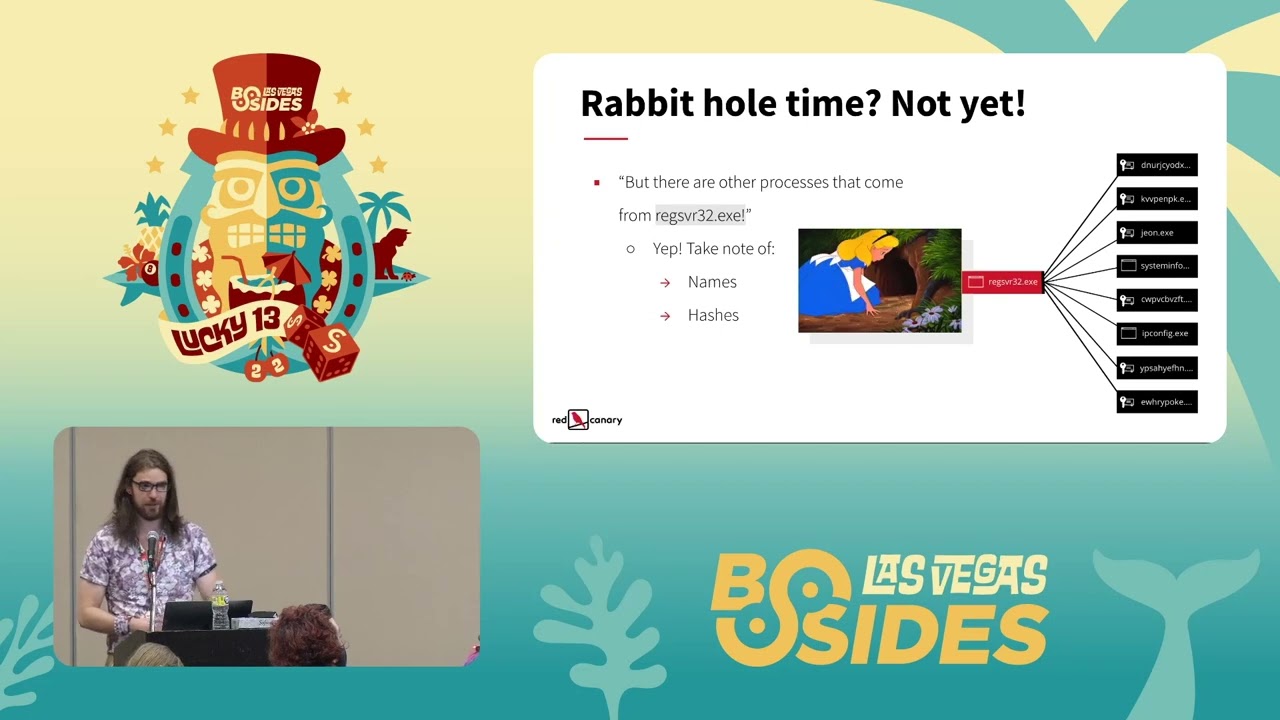
that maybe it's interesting maybe it's not these two things probably the most interesting bits of information we have so far what do we do with that is it the important next question um sorry um but first wait if you're looking at a process tree you might say something like this where you're like hey register of 32 didn't just load that module it did all these other things that's kind of interesting pause don't go down the rabbit hole too early it's really easy to get lost while you're investigating when you're trying to triage things and deal with the alert initially and end up like I'm gonna go dig into jeon.exe been there done that and then I lost
track of what I was originally doing and it's been like 30 45 minutes and I haven't actually triage my alert and made an important decision which well it was fun and maybe I found something neat my alert's still sitting there and we haven't done anything so don't go down the rabbit hole too early at this point what I would probably do is just take note of those names take note of the hashes if you have them and put it off to the side because what we really need to dig into is that initial piece of the alert we know Excel program dll with that we can probably come to a pretty good conclusion so let's let's keep going
let's keep going with those artifacts obligatory pyramid of pain if you're not familiar with the Pyramid of pain we're going to talk about it now um so what we have are artifacts or potential indicators of compromise what is an indicator of compromise I defined it as a thing we can observe in our data that allows us to identify a threat at the moment or going forward in our detections so there's some difficulties that come with getting indicators of compromise some are very easy biohashes IP addresses and domain names if you've ever gotten a report from a three-letter agency or read an Intel report from the internet you probably have those things to go throw into your sim dig into that data look
for it in your environment those are very easy to find and search for um and then detect on in the future but those things can change they rotate quickly and honestly you're not always going to be able to find those things because attackers change what they're doing so we look for network and host artifacts we look for tools and we look for tactics techniques and procedures those become more difficult to identify but also then write detections on and create alerts on if you are a person who writes detections you probably know that writing behavioral detections is a pain um I see nods so yeah so that is that's what an indicator of compromise is and
we're going to leverage those to hopefully come to some conclusions about what we're looking into so what I would do is I'd go virus total what else are we going to do where else are you gonna put a hash but wait I'm gonna take this moment to jump on a little bit of a soapbox here about virustotal um because I've made this mistake and I've seen other people make this mistake and maybe you don't even know it's a mistake and you don't know because you don't know what you don't know um don't submit your files to virus total um because they can end up public facing and that can expose your data your company's data to the internet
um as we all know the internet is a very safe place and it's a great place to store your data right um on top of that depending upon your threat model you might tip off threat actors that you have their tool you've detected it and now they're going to burn that and then switch it up and your indicators of compromise are no longer good that's a little bit secondary but it's still something to keep in mind the main thing is don't upload your files because you don't want your company's data on the internet um if you don't know if you have a policy or procedure around that at the place you work you now have homework
you're welcome I've given you an action item your managers will be thrilled um so take that back find out if you do have a Palestine procedure around that if you don't make one it's easy share it with people let them know what can happen if you do that um all right I'm gonna get off my soapbox now um about that and we're gonna keep moving so is it a threat maybe maybe not we have these hashes we're going to search them um let's move into that we're going to start with regserve 32 though because there's a potential hang up here when we search this on virus total we get the results back that hey this was distributed by Microsoft
it's signed by Microsoft no vendors detect this as malicious so we're good to go right everything's fine no not at all um you can leverage clean binaries to do evil um it happens all the time you've probably heard about a good friend Powershell and all the terrible and wonderful things Powershell can do but when you search that also clean hash signed by Microsoft good binary right maybe not um a little bit of story time I've been at places where the alert was suspicious Powershell okay cool is Powershell suspicious or is it what Powershell did the analysis of that was Powershell clean hash close alert that didn't turn out well um there was I don't remember what it
escalated to but it was not good and it went everywhere so bear that in mind just because you have a clean hash doesn't mean the thing you have is safe um it's like a chainsaw chainsaws are good for cutting up things are they safe maybe depends on how you use it that analogy I'm sorry we're gonna move on all right now let's look at the hashes of our other files and virus total it's evil very clearly a mermaid man has let us know this um unfortunately virus total doesn't show you Mermaid Man when you use it I'm sorry um but when we searched the hash of our Excel file we have 29 vendors that detected this thing as bad
and then with our dll we have 56. the denominator here changes I don't know why some vendors are in some lists and some aren't um talk to virus total not me I apologize
Okay so what have we done so far let's recap we have got an alert we understood our alert we understood that Excel launched a program that's suspicious based on the hashes we have we now know we have suspicious hatches which we can call our indicators of compromise and we can move forward with that information to ask more questions and get more data to help us make an informed decision um the next thing I would do is who is the threat and I'm not saying is this wizard lizard spider is this a nation state like when I say who I mean what is our malware family what but what are we dealing with um we're not going to talk about
attribution if you want to talk about attribution find me later at a bar so we can get information about who our threat is typically from our alert and if we can't get it from our alert we can probably grab it from virus total if our hashes are being detected um because when you search a hash in virusotal you're going to get the names of detections from all these vendors that say Hey this is Fab um in this case we see if you can see it on screen says imotab it's highlighted it was all over the page I only can give you a little bit of that but it was everywhere um so we can say with some decent
confidence we're probably dealing with emotep um if we don't know what that is we're going to pretend we don't and we're going to go to the Google machine but first I want to talk about some other sources that you can go to be on virustotal if virusol doesn't have results highly recommend checking out malware Bazaar or triage um you can search hashes there as well and they tag their malware so you can see like oh is it emotec does it lead to something else it's great uh malware Bazaar is free triage requires a free account so you just have to sign up but it gives you some really good information about the binaries that you're searching as well great resource
for Learning and trying to figure out what you may have um so with this I would feel comfortable saying this is emote um and dig in from there who's that Pokemon emotep all right now we have a Who and the reason I delineate from who and what is are who gets us to the what and the what is what is the threat and when I say what is the threat we need to know what is the behavior what are we looking for what does emotech do what's a demo when it lands in your environment what are its goals and when you can understand those goals you can understand impact which is what we as analysts are here to do is
understand the impact of these threats to our environment and deal with that and that will help us to triage and escalate appropriately so is emotech going to move laterally is it going to dump credentials is it going to just change a background to something silly who knows let's let's dig further we're doing a lot of digging check out a shovel that's what I should have requested it was a shovel um okay so when you search emote you're gonna get a bunch of results uh I'm gonna shamelessly plug red Canary's threat detection report because it's a good resource even before I work there loved it um really good information but if you search emote you're going to get
information um and in the threat detection report we see some important information I've highlighted or folded what I think are the most important bits to answer our question here which is emote is a downloader or a dropper of other malware so with that we know hey more malware which could be fun right um and its goal is to steal user data and banking credentials now it says banking credentials it's probably all your credentials and you're gonna have a bad day um because I have some feelings that emotec isn't gonna say well that doesn't say JP Morgan in the cred file they're gonna take everything um so now you have the ability to understand impact and what your threat
is I do want to highlight one more bit here that it's disseminated through email links or attachments that's important to note for cleanup later um just bear that in mind
yeah um so if threat then what um if we have a threat which I think at this point with the data that we've collected with the questions that we've asked the data points that we've seen we could probably arrive in a place that we probably have a threat on our computer we have Excel suspicious program virus total lights up on the Excel file and the dll and then if we remember back we have all those fun processes that came out of the register 32 that we took note of um we'll get to those but just keep that in mind um so with that my first step here is contain I don't want that endpoint on my
Network anymore I don't want it to talk to anything something bad is happening um you can do that through whatever tools you have if you have an EDR hit the isolate button if you have Network tooling just get it off your network um so with that and then we move to eradicate when well pause we're gonna go back to contain because if we're going to contain we also need to ban those binaries in our environment without it with whatever tooling you have available um that's a little bit more difficult of a conversation if you have application block listing cool you can do it that way if you have that power through your EDR great if you have to push a really
weird GPO do that I mean you know you got to do what you got to do to get the threat contained in your environment um and we're going to take action on that Excel file and that dll and then probably everything else that came off of that register 32 because we don't know what it did it looked sus so we should probably just deal with that now and ask questions later um so with that we've contained that endpoint but is this other places in our Network is it on other endpoints if it was delivered through email which we saw earlier do people typically only fish one person or is it your entire organization do you have email addresses facing on
your website are they pushed from your people to their LinkedIn profiles you're probably getting a lot of phishing emails with some delicious emotat attached um so I would scope I would search for those hashes up that we have see if they're on other endpoints and repeat our contained phase we need to isolate those endpoints and then we need to eradicate our threat now with eradication and Recovery there comes an interesting question of do we go through each of these endpoints and clean up everything manually do we delete all these Excel files do we delete all these binaries do we look for you know was there a registry key that changed was there a scheduled task that
was put into this device that's pretty tedious um you could do that if you wanted to do a full analysis of what happens I would say one box maybe to do that if you want to do the full investigation but I'm more of a re-image type of person when it comes to those situations because you could miss something uh story time uh when hold on we'll think about how to tell this story I've seen situations where people have manually cleaned up malware they thought they killed processes they deleted files they banned binaries few hours later hey your box is reinfected with the same thing how'd that happen I did the thing I cleaned it up
well you missed persistence ah okay so we deleted the scheduled task a few hours later hey your box is infected again what happens well there was more persistence there was a registered fee there was this or that and like it's a problem you play whack-a-mole and it's a waste of time um I'm more of a ramage person um especially if something jumps into memory free image that's scary um if you want to have an argument about reimage versus manual cleanup I gladly have that one too that sounds like fun um but just keep that in mind as you do clean up um reimaging is usually a bit more efficient and faster great we got an alert we investigated it sorry
did the thing again we got indicators of compromise we searched those indicators of compromise on the interwebs through virus total to understand what they are and what we were dealing with we got information that our threat was emotat we dug into what emoted actually is we evaluated what it could do in our environment and then we dealt with it great but sometimes you don't get all that information sometimes you don't have the full picture what if you don't what are the things that you can do to get more information and better understand what's happening we go down the rabbit hole of course um so the first question I would ask if I were in a situation where maybe those hashes
didn't return malicious um or I just didn't fully see something that made me my Spider Sense tingle and go evil um I would start with the process tree and I'd work my way from where that Excel happened down the process tree which is where we see all those other things that came in and we'd investigate those the same way that we investigated the initial thing we would ask the question of what is this file what is it doing is it malicious can we make a determination on that and go through that um and did you know that this song would come into your investigation where did it come from where did it go [Music] um which is on a great question now
you're going to remember it like that and every time you ask that question you're going to hear it as the lyric and you're welcome um so asking how did this get here how did that Excel file land on the device was it can I see it coming from a browser download can I see it coming from email um and where did it go from there which we jump back to the process tree a little bit but don't get caught up in processed trees all the time because things can break from the process tree and there's other things that can happen around that there have been times where I've seen data where I dead end at regsurf
it just I see a mod load and that's it and that's all I got um and then I have to say Okay where did this actually go though and pull in more data look at a timeline and look at like you know five ten minutes around that to see if something else happened and I've been in situations where oh something touched lsas that wasn't supposed to we have credential dumping or a command prompt spawned and it's doing recon those types of things can happen and they cannot be necessarily attached to your process tree so just bear that in mind as you ask the where did it come from where did it go question and don't get tied up in your
process tree if I'm like really stuck and those two things don't give me an answer like I'm not getting is this malicious from virus total I can't figure out exactly where this came from I'm not sure where it's going either like I need to start asking is this normal is this normal in my environment I usually start with the user and then go out from there um because sometimes it is normal for that user if you checked like a 30-day period if you have 30 days of data um very lucky if you do you're you're doing great um but if you don't you can check whatever data you have to see if that happens regularly has it happened over
the last seven days okay maybe not does this happen on the computer holistically um not necessarily relevant for this Excel file thing but generally speaking like does this weird thing happen on this device normally or scoping out to your environment that's an important step too because you might realize oh this is happening across the environment and it's weird we should probably document this and understand why it's happening why we're generating an alert on it and figure out if that alert alert is valid or not and then tune your detectors sorry more homework um the other thing is I want to jump back to the user thing a little bit because I've seen situations where Excel does
some really wonky stuff and it's usually in the finance department and they're usually running macros and they have add-ons and it looks bad like real bad um but if you can understand why that's happening and if it's not bad you can write up some documentation to share with your team to say hey this is normal and then you don't waste time on that alert anymore and you don't have to be sad and you can look at cat pictures on the internet or something instead all right let's recap what do we do here today we evaluated what an alert was saying we took time to understand what the alert actually said which is important because we can end up on a
totally different Trail if we're not paying attention to our original hypothesis which that's kind of how I view alerts is there a hypothesis about a threat that could live in your environment and you're going to prove or disprove them you're like a scientist sort of as long as you take notes it's science um so we evaluated what the alert was saying we were able to identify indicators of compromise with the data we had so we had hashes we had file names with those hashes and file names we were able to Pivot to a search on virus total and understand oh we are dealing with something evil here great now we need to figure out what exactly
that evil thing was um thanks again virustotal we found out it was emotep and because we knew it was emotep we could dig into that further and understand why that was important what the potential impact of emote on our environment was and with that information we knew what he needed yeah we knew we needed to respond because somebody could have stolen credentials somebody could be dropping more malware um and we'd need to understand if that's happening as well so roll back to remediate one sec rotate your credentials on the boxes that were impacted I didn't say that but make sure you do that if you've got that happening that would have been a bad day
good job everybody we did it um we responded we recovered we also tried to understand what we could do if we didn't have all that data what if what if we don't have all the information what are the questions we can ask we can we can dig further into a process tree we can ask where did this specific thing come from where did this specific thing end up on the device and what are the surrounding activity and is that suspicious as well and if it's really not answering we need to understand is this normal um and asking that of for the user the computer and your whole environment uh in about 30 minutes there will be a
Blog on the internet that has all this content and you can go check that out as well if you want some notes uh basically it's my speaker notes put into a Blog format so you can just go grab that it's on red Canary's website um go check that out thank you all so much for coming to this talk um I really appreciate each and every one of you I appreciate everybody who helped me put this talk together all the people who uh listen to me fumble through it uh the first few times and um with that I'll open the floor for questions
[Applause] thank you so much that was a great uh talk um I have one question so you mentioned this under the identification phase or where you ask more questions would it be a good step to go to the YouTube and actually I'll Stand directly where did you get this from is this something you expected as a step to include yeah that's a really good question so the question was in the identification phase would you reach out to the user to get information from them about what they were doing and was this the expected result and I actually think that's a really good step and if you have the ability to do that you could cut down on your ability to
triage very quickly um I really like that step some people don't I'm a fan of it when I work with customers I often say can you reach out to this person just to understand what was happening on their device before this went down like were they on a website did they open an email or were they just doing their normal job because that gives you an understanding as an analyst of what you might be dealing with so yeah I totally think that's valid all right thank you yeah okay
we gotta fight for the mic geez sure battle the the network Giants um question for you is so this is like the most comprehensive how to do an alert I've ever seen now we tend to have tuning processes we have a lot of problems there's lots and lots of alerts like is there any way we can sort of get like a like a like a hack of this like a shorter more streamlined process should we do this yeah like so what we did here was a bit extensive and I want to talk to that but there is a point where you streamline this I think the thing that I typically cut out when I'm evaluating something is the
what is the threat because just with experience I'm I have the ability to say oh this is evil this is bad we need to deal with it and but that's not something everybody has so I wanted to highlight that but as you go through this process more and more and more and you see more data and you deal with more things you can cut that piece out because you have an understanding of what you're probably dealing with and it is a threat um so you're really just hitting the what's my alert say what are my indicators of compromise what can I gather from that okay let's respond thanks very much that was an awesome talk I really appreciated it um so have
you ever run into a dead end where you're investigating it a lot and what did you do the question was when I run into a dead end what do I do um cry is typically the response um throw the computer into a volcano no um seriously I what I do is I ask questions of people that are around me if you have if you have co-workers use that resource like ask questions because even if they don't know you're gonna have them ask different questions that maybe you did and they can see something that you didn't and you're leveling up your co-worker and yourself at the same time great teamwork that's awesome do that um that's my biggest thing is use your team
when you hit a dead end um that's usually where I go um mostly because my team's great uh if you don't have that like I would say take a break like if you can like pass it on to somebody come back to it because sometimes you just need that two minutes to get away and then come back and you see something fresh um the other thing is change how you're looking at your data perhaps change how you're searching it maybe you don't look at the hash maybe you look at the command line maybe you look at um I'd say the command line actually is a great place to go if you're not getting anything on hash because you'll
end up in a threat report that's like oh that's the exact command line for this threat I now know what I'm dealing with this is bad or maybe you'll end up in a GitHub repo for like an administrative tool I've been in both situations um so what is this [Laughter] no no I got it I can do it okay yeah
you know long time caller first time listener what are some resources you have for incident responders who are just starting out that's a really good question and what are resources that I have for incident responders that are just starting okay um I would say this is a really good question oh my god um I think the place that I would go is actually somewhere like malware Bazaar triage or a site that does like analysis of a file and it's going to show you information about a process tree and like really detail what's happening because out of that you can kind of understand what's happening with that binary and get a clear picture of what's happening
there and you'll also get like a fair amount of detail I if I if I could show you I would but just try triage it's really good um and it's a great place to look at binaries and the other thing is play around in a lab environment or search your production data for interesting things like do something on your computer that's normal do something on your computer that's normal and then look in your data to understand why that's normal and understand why what Excel does when it first launches what a word does it what you know any of these things do and what are the norm what does that normal behavior look like because when you
understand normal you then are able to start looking at things and say Spider Sense tingles bad um is it kind of boring to watch Excel open yeah but then you have what that looks like in your data and that's really important um and maybe you spin up a lab and you have it isolated and then you rip malware on it and then you look at the data on that also a great thing to do um and then from the incident response side of like dealing with it um I would I'm trying to think if there's any like free EDR tools out there that you can leverage but if you can't um get in there do an investigation and
do the manual deletion just so you understand where stuff is I said ramage your box but like if you're learning going to manually remediate a box it's tedious it's a pain it kind of sucks but it's good for you eat your vegetables
hi I have a question the same topic so we decided to wipe out a system but you know in the real world people say hey I have a lot of files how do I back them up and that's a good question because you isolate an end point it means internet connection is not it's killed like how do you do it safely because you know you can do you can go to Google Drive and try to save those files but there's no guarantee those files not corrupted you can plug in USB drives the same logic there so that's yeah I guess my question is how to safely back up important files from a corrupted system that's a really good question the
question was when you have a box that's infected and isolated but that box has important files on it and you need those files back what do you do and make sure that those files are clean um yeah that's tough and it really depends upon the value of those files and your appetite for risk um I think that's a really big thing and I've dealt with this with some customers where they're like it's really important like budgeting spreadsheets and they lived on this person's desktop which that's another conversation to have about where you're storing your important files um but if they are there you're gonna have to end up in a spot where you get a USB drive you never use again
probably plug it into a computer that is isolated and do a scan of those things and see is this safe are these infected in some way shape or form um the other thing you can do is if you have the data you can evaluate where those files even touch within the timeline of the malicious thing happening on your device because if they weren't touched you have no evidence of that in your Telemetry and you scan them you're in a pretty good spot to say hey these things are probably safe um generally speaking now we work in cyber security and the answer is always it depends um but that's where I would land with that type of thing it
it can be tough though and sometimes it's you lost that file I'm sorry um you shouldn't have stored that on your desktop we have Enterprise storage for a reason that's a fun conversation too but we won't go there
so I got a question about like time to detection or time to decision so you're trying to get in there you're trying to investigate but time is fleeting and like malware replicates very rapidly so especially transmits between different computers and things like that okay so if you find that you have like a standard or or anything like that in companies that where they they say you know need a decision by here or we're just gonna have to decide one way or another yeah and I think it's good to have guidelines it's like the Pirates Code um be very minimal like I hate putting a number on this but like in previous places that I've been
um like a high pry like very critical thing is like take five minutes do the initial triage try to get it into the response Zone like if you see credential theft if you see something that's a precursor to ransomware like get that moving if you're running into like suspicious encoded Powershell okay you need time to actually like decode your Powershell understand what that script's doing maybe that's 15 to 30 depending upon how complex that is um so it really comes down to what your alerts are your confidence in those alerts and what you actually have to investigate to make a decision I don't think I've seen something where like I'd say like an hour is typically way
too long if you're dealing with something that's generating an alert that's you know medium or high suspicious if you're dealing with like low interesting things then like yeah take your time dig into that because they're not necessarily always going to turn into something that's so tough though uh we have about 10 minutes left uh just to let you all know if anybody has more questions feel free foreign
so I want to know when the Kellen merch line is going to be available for pre-order what do you want to know in my slides uh yeah I want to know when the Kellen merch line will be for pre-order and uh I particularly want fronting tie-dye crop tops uh apparently we have oh my God a serious question though a serious question now how often do you find that you personally have to go back to the alert logic and completely or even minorly reconjigger it because you're finding tools or giving you false positives or completely maybe useless information um just kind of interested about that of the balance of alerts versus coming from your tools versus what your sim or what
you've said this is a proper alert um merch line coming soon but the real question is what how often do you find yourself having to tune your detections basically like when are how often are you getting false positives from your alerts and you have to go back to Junior alert logic um all the time all the time you can't a Sim uh detection that sort of thing is not set it and forget it it is like a garden you have to weed your garden you have to water your garden you have to make sure that your plants are growing in the appropriate places I don't Garden so that's as much as I know sorry um
but that's what it is you have to take care of it you have to go and deal with those false positives it's easy to close your alert and say well don't want to deal with that anymore and then the next morning you come back to 10 more and you're like gonna close those don't want to deal with that anymore you're creating Tech debt for yourself and the people after you that's mean Tech that's bad and you might be missing things if you're not tuning your logic maybe something new happens and you had an incident that spun out of an alert that was okay but there was other behavior in that incident where you could create a good
detection create a new detection then tune your detection that's a lot of work I know some people there's two of you doing your security and tuning your detections and doing everything else you do is hard been there get it but it's important and I would say I'm gonna get out of soapbox here is if you're in that situation communicate the business risk to your management and the people above you of why there's business risk that you can't spend time tuning your detections um so say if we don't have time and people to tune our detections we're going to fall behind and we could be impacted by new threat and that could bring down something in our environment or we could
miss something um anyways that's my business brain going off in that too any other questions if not oop one more what tooling do you use to track your workflow for all of these steps could you get a little bit closer sorry what tooling do you use to track your workflow through all of these steps like when you're going through all of them how do you make the notes and what do you use for that okay um so tooling um I have the very fortunate privilege of digging through EDR data of customers so I have like MD I have Microsoft Defender like crowdstrike or carbon black response which great EDR Telemetry what is EDR telemetry it's kind of glorified event logs in
sisman I don't know if I can say that um but I did and if you have that data use that and then leverage network data and use IP addresses DNS requests all that sort of information like and try to get that in one place I've been in shops where I had five different tools to do all those things you make it work um highly recommend that um tools I have a hard time saying like this tool is the best tool or that Tool's the better tool one worse just know your tools and then in terms of like the methodology of like take notes take notes about what you saw take notes about what you observed what your
thought process was as you looked at that thing and why you thought that thing and take screenshots if you can um because you're not gonna remember everything you did and you're going to come back 10 minutes later and you're going to have 20 different tabs you're gonna be like why do I have those tabs uh take notes um and figure out what works for you too like that's a really big thing like understand how your brain works and the way that you investigate because like I might investigate something different than you investigate something but we're going to come to the same conclusion and if we can both talk through how we did that and how we reach
that conclusion that's really valuable too because I can learn from you you can learn from me sorry I like ranted on that but yeah just whatever tool you have is a good tool learn to use it
so I have a question kind of based off of that I think there's a lot of you you went over a lot of like very keeping track of a lot of data as you're investigating things but I don't necessarily think it all of that has to be communicated like say you're doing a write-up on them alert or you're saying hey this I decide this wasn't bad or I decide this was how do you decide what data is actually important enough to be included in that and what to pass on and what to just accept and say we trust that we looked at this that's a really good question the question was we looked at a lot of data and we had a
lot of data points not all that is necessarily relevant to escalate to somebody who might be remediating if it's not you and how do you determine what's relevant to escalate so somebody can make informed decisions that's a really good question and it comes with practice but for me the things that I would have escalated there in this situation are that Excel file that dll that we had our Command lines and then the fact that we had an additional process tree that spun out of that but not necessary and if I had the hashes that piece and then I would say that's a fairly good piece of information for a tier two person to then go take action on an
endpoint um also like know what endpoint you're dealing with in your user we didn't have that in our alert bad alert we want that data um but that information is important as well um and being able to distill that comes with practice it's more of an art than a science in my opinion because it's easy to overshare but it's easy to undershare when you're communicating that type of information um I typically are on the side of overshare personally and it it's just what I do um but again it's kind of the person
any other questions if not thank you so much I really appreciate the engagement foreign
Related talks
 51:51
51:51 32:48
32:48 33:48
33:48 54:33
54:33 31:06
31:06 20:51
20:51