Detecting and analyzing fileless malware
Show transcript [en]
guys take it away and teach us about detecting and analyzing files malware thank you very much can you hear me okay all right let's go ahead all good to go all right good right here okay oh okay um basically uh i'm going to tell you first tell you a little bit about us we're going to be uh talking about fileless malware um basically uh you know we're ethical hackers um devops partition practitioners we have over 45 years of combined experience and we're affiliated with a couple uh organizations hack nwa for northwest arkansas hack miami south florida issa and our team cyber squirrels beaver lake ctf um you know which we'll talk about if we have a little more time
at the end as well as b-sides so uh first let's define fileless malware if we're going to talk about it we uh we might as well talk a little bit about what it is um uh basically fileless malware is used as an anti-detection technique if there's no traditional file to scan to to look for signatures traditional scanners can't find it because they focus uh very much on disk and looking for basically files that are dropped basically what this technique does is it passes statements directly to a scripting interpreter and may also use dll process injection the payload is often obfuscated or encrypted so how do we catch these critters uh well you can hide from the end point you know
you can you can cloak a process in many ways you know hiding it you know using a rootkit you know basically hiding it inside another process using an injection um basically uh you know running as a service schedule task but regardless you can't hide from the network it has to generate some kind of traffic and so what we look for is command and control also known as c2 beaconing command and control beaconing may use tcp streams utp datagrams it may even use uh dns the domain name system you know where we resolve uh names like microsoft.com and google.com to the ip addresses where the uh the system actually lives and uh basically uh one of the things we'll
look at today is the uh the dns uh tunneling techniques to hide uh command and control traffic and how to detect those now the command and control beaconing will also will stand out to some degree uh versus normal traffic so um there's number of products um that are used uh for what's called anomaly detection and there's a specific one we're going to look at today but it's by no means is it the only option there are other products out there and what we use our anomaly detection software for is to find unusual domains uh to search for tunneling and also to find uh patterns you know and that indicate uh beaconing so our scenario here we've simulated a
compromised environment we have two windows workstations in our lab we have one centos linux system running monitoring and detection software we have one analysis workstation that's running fedora linux and we have one hostile debian linux system running an offensive stack now that by no means am i suggesting any distro is more suited to those roles we're just that's just how we set up our uh our lab our hypothetical users are reporting that their workstations and their network seem unusually slow so uh with that said uh let's uh look a little deeper at our uh our stack and what's going on uh basically uh for uh network intelligence for uh monitoring and security we've set up
zeke and rita zeke formerly known as bro is open source software that is designed to uh monitor what's going on on your network your connections very much if you're familiar with uh uh cisco or or other uh network vendors um it's uh very similar to uh netflow traffic so uh zeke is uh monitoring the network and looking at connections and logging and that's where rita picks up where uh where zeke ends and logs the connections and information uh rita is used for an uh traffic analysis and arita was uh created by our friends at black hills information security uh it's a great uh tool that stands for real intelligence threat analytics and basically what it does is it analyzes that traffic
for detecting exactly what we were talking about uh it detects beacons uh tunneling and more you can use it to look at an omelet for anomalous user agents user agents being the string that browsers identify themselves as in connections and uh in this case rita is injecting z clocks there's other options that you can ingest in other recipes but in this case um we're interfacing rita with the with zeke and both of these are open source applications um and that's why we chose them for uh you know for this presentation because anybody can download them uh install them and uh fiddle with the source code that's the beauty of open source and the the larger free software
movement and isn't that the the barrier to entry is uh very low and you you have the the right to go in and inspect the source code yourself so let's see what uh redefines in the z clogs in our environment zeke in this case is running stand-alone with the default configuration and files going to op zeek so rita will ingest the logs doing rita import dash dash rolling op z logs zeek data and it'll pull it into a uh database now to move the presentation along we're not doing all of these steps live but trust me we've done them and we've taken screenshots so uh basically uh in this screenshot we're showing the uh basically rita going in and showing
beacons and then rita showing user agents and you'll notice there's two hosts that are beaconing out uh are 192.168.100.181 and 1.180. and those are our two windows workstations um so we've confirmed there's some suspicious activity that looks like uh beaconing and then we also see some unusual uh user agents there basically uh one that uh identifies itself as powershell and another one that identifies itself as um uh http request which uh indicates that it's it's likely uh something invoking in activex or or complex object in order to uh reach out it's not a normal web browser but wait there's more mischief going on basically remember we mentioned that rita has the ability to detect dns
tunneling well that clever rita has detected some likely dns tunneling in this case we see 3129 unique subdomains in the domain of evil.lab domain hmm that sounds fishy to me probably sounds fishy doesn't it so basically we've identified a likely uh instance of uh dnl dns tunneling where command and control messages are sent over uh udp datagrams over dns so in order to investigate our endpoints a little bit further we've used an automated approach rather than wait for a memory capture and have some you know have some lead time where somebody has to go obtain access to the system and basically install a memory capture driver and go ahead and capture memory to a file
and then pull it back what we've done is automate the process we've created uh automation where rita's beacon report goes in a cron job its default what i was showing you earlier is the human readable format if you give it the dash capital h option if you don't it actually puts it in comma delimited format which is really great to uh to pass to um awk python said and do all kinds of uh neat automation with so in this case we have the cron job pick up the comma delimited output and we pass it to python which massages the output and resolves the the ip addresses to host names and feeds it into an ansible playbook because in
ansible playbooks we prefer um dns host names uh because that uh basically uh ansible will we'll take those uh we'll take those rules and our variables and our host rules and our settings and process them so we want to resolve it to the host name ansible will connect to our windows host using powershell remoting and in this case we deploy uh winpmem.exe to dump memory uh we obtain the memory image and it copies it to a file share for analysis uh we could do the same for linux endpoints it's actually even easier we could deploy avml or lime in the same fashion and capture memory to a file and send it to a file share
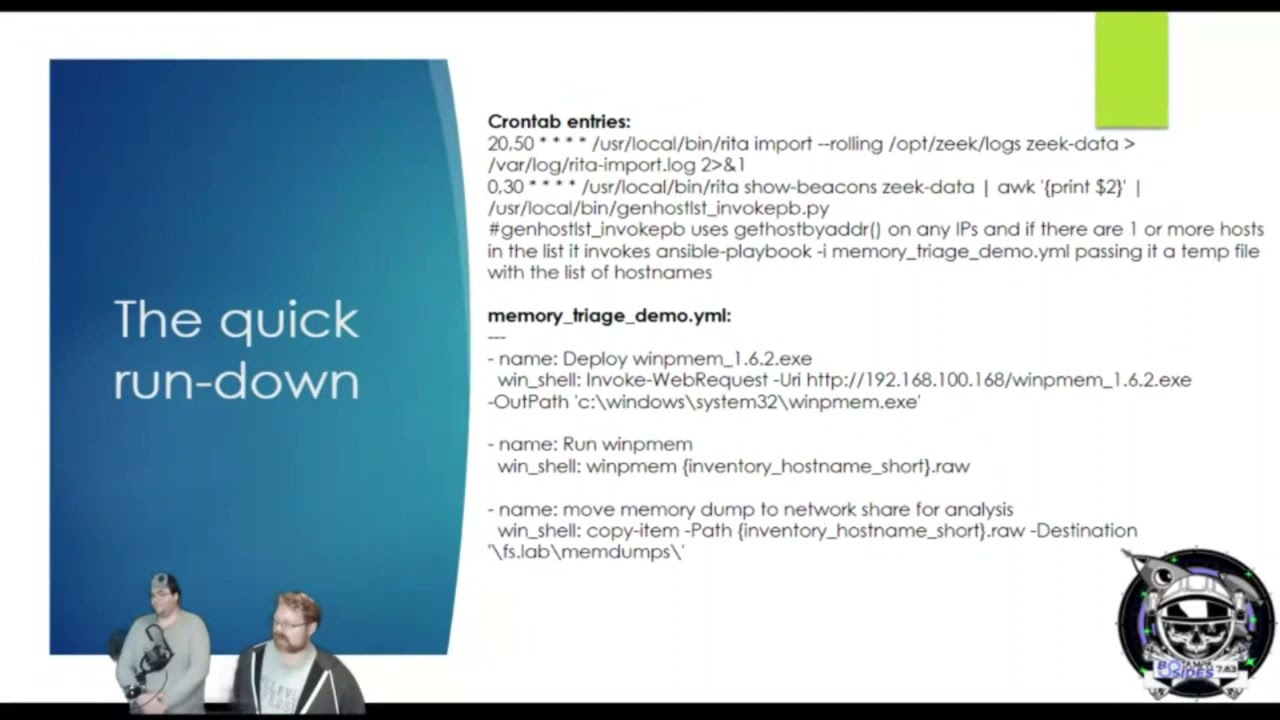
uh we'll we'll do the quick rundown here on some of the technology that we did for our automation we created the cron job that does the rita import it does it uh 20 minutes after the hour and 50 minutes after the hour and then on the hour and 30 minutes after the hour to to give the import sufficient time uh we run uh rita show beacons um on the uh on the same data and then we uh pipe it to awk which basically pulls out the second field and then we run a python script to format it for the ansible so we can feed it as a host list to the ansible playbook and then the
the second half of that slide shows our our gamble for our ansible playbook our memory triage demo and uh what this does is it deploys winpmem it dumps it to a file using the uh the uh just the host name not the fqdn and then it moves the memory dump to a network share so once that's done we're going to uh recovery we're going to recover artifacts from memory in order to investigate this file as malware now uh you know we don't know yet that it's uh fileless if it was if this was a real event you know we'd be going in and looking at it and we'd find that uh that there's a darth of file artifacts here to
investigate so we'd have to dig into this so we're gonna basically recover these uh these artifacts from memory and the way we do that uh is uh when we when we examine it uh with our memory forensic software um we're gonna look for uh uh for artifacts we're gonna look for pieces of information that the malware has loaded into memory for example host names ip addresses files that it's accessing a lot of that you know you can hide it you know from from a user on the running machine but once you have this snapshot of memory uh there's no more hiding um in some cases you know it may take a while to find it
and you know some things maybe may need to be decrypted or de-obfuscated but everything going on in the machine has to be somewhere in memory and in many cases things that are no longer happening in the machine leave residue that you can analyze so we peek at the memory in use uh by the malware and we can feed these artifacts back to our detection rules uh back to our denial lists we're going to look especially for our indicators of compromise uh which are the changes that the malware makes changes registry entries um if it does any kind of persistence you know we'll talk about persistence uh a little bit later but we're going to look for for uh things that the
uh for artifacts that are left as well as the tactics techniques and procedures that our attackers use so that we can uh generate um alerting and uh you know block as many of those as we can alert on others um sometimes it may be difficult to uh to tell an intruder from normal activity so that uh in that in those cases that's where things like our seam and our anomaly detection come in so performing memory forensics we examine our memory image with volatility framework uh volatility is awesome we we use volatility um very often um whether whether at work or in uh hacking challenges uh basically uh uh there's a number of um different uh functions in volatility
that we use pretty often uh ps list ps3 command lines uh ps scan service scan sessions handles netscan consoles proc dump uh memdump and yarascan and uh these are basic options that pull different uh attributes out of the memory snapshot um by looking at um those file structures in memory and we're gonna look at in this case what we're doing is we're drilling down at the suspicious processes and we found a particular one that uh is running um uh through uh remote management and uh it's uh started off a a process so uh we're gonna look uh on the next slide we're gonna look a little deeper at this process but we've identified a particular process
um and we're gonna go ahead and dump the the memory from that process so uh digging deeper into it using the mem dump option um these these slides are basically snapshots of some of our analysis uh you know where we find the dns beaconing out to uh domain of evil.lab that sounds uh very suspicious and this process is talking to it uh making uh requests for uh subdomains that are encoded so this is uh this is encrypted c2 traffic um and uh in this case we're able to confirm that uh you know this is this process is is chatting back and forth making uh hundreds uh thousands of uh dns queries for a unique domain so this is obviously uh
dns uh tunneling confirmed um now uh what we would do um basically is uh you know continuing to analyze um malware you know we would uh basically take this and reverse engineer it but getting into reverse engineering is kind of outside the scope of this talk so we're not going to go too deep into malware reversing uh you know we need another couple hours in order to get really get into the weeds on that so uh basically um uh you know suffice it to say you know we found uh we found all of this uh dns activity you know we can also look at file handles that the the malware is accessing and here's a packet capture of our dns
tunneling while this tracted while this traffic is encrypted many dns c2 frameworks are susceptible to to key observation when the client is invoked um you can catch that initial handshake and that could that will allow the traffic to be decoded very often however like i said we're not going to get too deep into uh you know reversing the ciphers and things like that that's a separate talk and uh basically uh we want to kind of stay within our our uh our time slot so uh let's look at the the other beacon we also saw another beacon from uh workstation two um basically uh rita logged this uh as a suspicious user agent and our simulated malware is a little jscript
uh that's running through cscrip.exe uh in this case you know we can see this uh c2 traffic and uh yeah a lot of the time the malware will use um https uh to encrypt web traffic or or it may use some other cipher and normally we'd catch this with a tls uh interception proxy um but if for some reason you're not doing that you can always uh try and capture the handshake or decrypt it uh try to decrypt it out of the memory on the client side sometimes it's not even encrypted and uh you know if we were to look at the memory we have at least we were able to recover at least um half
of this conversation from the uh the memory of the process so we have enough to to uh to drive some analytics
now the next step once we uh once we see what's going on is um uh finding the persistence and uh what we want to look for is um we want to look for schedule tasks we want to look for uh registry entries we want to look for uh remote re-execution uh we're gonna look for um uh wmi persistence uh we're gonna look for uh ps exact we're gonna look for um uh powershell remoting and uh basically uh any um any methods that the malware might use to uh to remotely re-execute you know or or backdoors or malicious file we're planted and we'll have to identify all of those and remove them so it's important to see
all of the the handles uh that are opened up by our malware which is uh you know your volatility uh plugins can determine what files what file handles were open by which processes so uh basically now we'll go into a little bit more of a of a demonstration um of the of the different uh uh of the different techniques that we used um now um and we'll go into it uh as much as time allows however we also want you to be aware that uh you can do this at home we've uploaded our um our artifacts to uh beaverlake ctf.org file list2021 so you can do this at home uh basically uh you can download the
uh or yaml file uh there's another one i'm gonna upload from the uh server side which will be up there um i wanted to make a you know a few changes to it um and sanitize a few things in it before i upload it but uh the uh the memory dumps um and the packet captures are in there as well as some recipes and the cron job and i'll see if there's any other artifacts that uh might be interesting to you yeah you guys have about 20 minutes if you guys want to take your time on those demos okay sounds good all right let's see uh oh you wanted to talk uh before i do
that i think evan wants to talk a little bit about a a set of yara rules that he's been using um in uh which uh which are very which have been very cool yeah let's go over um some of the information gathered from rita first all right so when you look here you can see user agent streams um you know you have some ip addresses here and some other information available so you if you take these user agent strings you could put those into a yara scan rule in uh volatility i mean you could just take little pieces of it that you know are unique and then you pass that in there and it's going to help you identify
what the process is that has that information and so when you're running a yard scan you want to also make sure that you're you're you know accounting for a one byte and two byte words so you just tack on hyphen hyphen wide um i was going to show this stuff in real time on my uh bm but uh my machine yesterday decided to uh to blow up in volatility to uh the python 2 libraries on the new version of kali just so everybody for everybody's information they you know they're they're no longer supporting python too so you have to use python three which it has all the functions in uh volatility three you'll have to
use volatility three but it doesn't give you some of the super cool output you'll have to tack on more output options and whatnot but we will just basically step forward a little bit here and if we look here also we see domain of evil dot lab so if we search if we make a yar rules hyphen hyphen yar hyphen rules equals you know domain of evil dot you know just put that in there and uh it'll show you the process in the memory dump um if you wanted to follow along and see which process actually had that with the files available but um from there when you have the process then what we're showing here
when we look you'll want to dump the you know once you get the process you'll want to dump the bad pages we should put vad dump on here but uh my bad um so yeah i found a lot of it with memdum yeah yeah but basically you just do a vad dump on the process pit itself and then you can you know run bin walk and other tools against that and then you know grab it if you want to and you know do disassembly and everything um but uh yeah that's definitely part of the process um is there you want me to bring in that screen over there um oh i have to okay extract this first
i forgot i've zipped those these to upload them and i i uh be zipped the original file so i gotta distract them again real quick um because i we put them up on the uh on the web and v-zipped them so you can download them quicker but i realized i uh b-zipped the copies that are on my laptop here um so uh oh the other i think the the other thing we wanted to mention for anybody analyzing these captures the um workstation two was talking to the second domain domain of evil two dot lab so you're not you may not find the artifacts from domain of evil.lab you're gonna find domain of evil 2.lab on that other box that was running the
uh the jscript um versus the uh workstation one which was running the
powershell
okay
so setting up that live demo um there were uh two questions uh will the presentation slides be accessible um and it looks like the details were a little fuzzy um in the display for some of the more smaller um like wire chart pcap captures uh so uh yes the the slides are already up on that uh the uh the site that we're going to mention on the on the last couple slides so uh we'll be giving you a link and the copy of the um the slides as well as the pcaps are already up there so you guys can you guys will be able to load those p caps into wireshark and uh analyze those
um uh and uh analyze the memory dumps uh in um uh volatility yourselves um basically uh so we'll cover that in a second i'm trying to increase my quantity you guys can see this um i just want to make sure it shows up good on the screen before i start presenting it yeah it is a little difficult to see let me try to remove myself
and can the audience just type in the chat if you guys can see the terminal prompt
so guys it looks like the uh the crowd is able to see the screen a lot better now um and they can see your command prompt
can you guys see that i'm trying to get this font to uh to increase a little bit i don't normally do these with my laptop um i think that actually looks good especially if they put it in full screen they'll be able to see it pretty clearly all right
all right my keyboard has stopped working this is this is one of the reasons why we did this beforehand and took screenshots because you never know what's going to happen during the live demo and uh right now my keyboard is is not behaving so i can i can use the mouse but hey haven't you got a um a usb keyboard i can plug in real quick this is a first yeah i just extracted these uh these images here and i'm just gonna go into uh step into them with volatility
now to relaunch that terminal
okay here we go
see
uh windows 8 service pack one
sp1 x86
and
that was in workstation okay so dash app dash app is going to tell us which file we're going to look at workstation one and we'll in this case we'll run pslist here and my my apologies to this laptop is a little bit slower here um than uh than it would be with my desktop but evan has the better um yeah uh the better presentation you know uh area here so we uh you know we're basically uh um doing this with uh you know a little bit slower mobile equipment um so anyway if you're if you can see this hopefully this is large enough i was trying to bring the font up for those of you who may have trouble
uh seeing the smaller font here but uh basically this process um this pid 2508 um this is the process that uh you know if we uh you know if we if we um look through the various processes with uh yara and uh we look at network activity this is the this is the process that uh that was uh beaconing out and where we find the uh the matches for our c2 domain
second one
so uh we're gonna we're gonna dump the um we're gonna go ahead and dump the um the memory uh the the uh the different processes running in the uh the memory inside them to this analysis folder that we made it's going to take a moment here to uh to rip these artifacts out and create them into files and then we can look through them with with yara or with grap or we can run strings on them we can we can take these particular we can take these particular memory images or the binaries and we can even even load them into a debugger and look at them in dedra and some of our reversing utilities um we wanted to avoid getting too deep
into reversing because it's it's easy to uh you know it's easy to talk about reversing for an hour or two and we'll lose we'll lose all track of time we'll go down that rabbit hole and if if anybody's interested we can go into that another time you know i did a there's a talk up on youtube that i did talking about uh 64-bit arm reversing but you know we can uh you know if there's interest you know we can cover that topic for uh um x 86 64 as well at some point you know depending on what people are where the interest is but uh this may take a little while that was uh another reason why we uh
you know we figured we'd uh take screenshots from the analysis earlier um because it you know this is a little bit of a time-consuming process and uh uh running on the laptop it's a little bit slower so i may stop this here evan is is there some stuff that you'd like to show i'll show them uh so when we uh earlier when we saw on rita some outputs uh where we wanted to basically show some domain names and some uh um user agent strings we can go ahead and do a yard scan we'll add a yara rule we say uh domain of evil okay and then that should show up pretty fast if we don't see anything
what we have to do is uh right by default it's gonna search for the uh the one by characters um and you can add you can do tactac wide to get the uh two by characters so this should should find some results quickly enough um oh and for those of you who want to get copies of these to to uh to get your hands dirty you know this does run faster um you know in in my lab you know on the when we run this on the workstation so this may not be something that you want to do with a laptop unless you want to you know go make a sandwich while some of these
things are running um you know basically but you can you can get these artifacts it's beaverlakectf.org slash file list2021 and i enable directory browsing so you can see all the artifacts in there and i'm going to drop a few more things in there tonight and if anybody has any questions or requests i can drop a few more things in there as well too you know so that you can replicate this in uh in your own environment uh specifically there's a playbook for the uh the server side of this exercise that um basically uh i'm i'm turning a few things that i hard coded there into variables to make it easier for you to customize it to run in your
environment so that'll be up there too um and uh uh basically while this is running does anybody does anybody have any questions uh we can probably go to questions uh first so there does appear to be um one question uh and it's actually a common question but it says i think i understand your basic analysis process but what was the trigger that said you need to go do this research and what is your research to purge it i'm sorry are there research to you talking about the the initial vector exactly the initial vector yep so that would be the output of rita so you would take the z clogs and you know run rita on it for
anomaly detection and that's what showed uh suspicious user user agents uh a couple suspicious user agents and uh you know suspicious communication involved with it and then also the uh domain name so those were the indicators that were pivoted on within the memory dump as a yara scan to identify the processes that then uh we're able to dump out and get more information about what that malware might be now normally uh you know your sock is going to have your security operation center you know where your knock is going to have depending on the size of the organization is going to have um some additional telemetry coming in from their antivirus you know they may have some edr products
in there um you know or they might be running os query or velociraptor and um basically they're going to see that um there aren't uh the traditional um you know iocs where we have a um where we have uh you know a particular file that's that's a culprit or a web browser plug-in or anything like that so when you're encountering uh you know fileless malware you know you have to go to these uh you know um you know deeper uh types of detections you know where you capture the memory you know or you you'd capture capture both the memory and the disk within case you know in this case we're using just volatility uh but
uh you know there are some some additional options but whatever your preference is um basically you're going to end up doing a memory analysis because these artifacts are not persisting on disk uh except in the case of uh workstation two if you look in there there is a there is a scheduled uh task that invokes that uh jscript um um payload uh periodically um but it's not um you know it's basically uh you know updating and uh reaching out and uh basically updating itself um it's not uh you know generating uh additional disk artifacts so that's that's the scenario that we're uh that we're simulating now the question was also what brought us to do this
we've had some questions from uh some friends uh basically who were in um from some friends who were in uh who are doing analysis some of them in forensics and some of them in law enforcement who have asked us hey you know we're seeing some of these cases where they're not dropping artifacts on disk where they're just running in memory where they're using uh techniques like wmi or process injection or they're they're creating vbscript or jscript or powershell scripts using the uh you know using the base64 encoding you know and those those are pretty easy to find when you do the uh you know when you do the process list and the command lines in volatility
and you'll see the uh you know you may see the power shell um you know with the obfuscation but a lot of the time those are just base64 encoded and sometimes there's an additional uh level of um of anti-forensics going on in there where they uh they pass it a uh a pre-shared key and uh in in that case they uh they have some other form of encryption uh even sometimes aes 256 in play and then um then you uh you basically have to look at that process and recover that key in many cases they have to pass it initially in order to decrypt the the malware payload into memory um so if you get uh you know good memory
forensics you can um you know recover those artifacts and be able to uh decrypt the payload um but once again some of that is some of that can be time-consuming and you know it can take a while to go down that rabbit hole so that's kind of outside the scope of what we were going to you know talk about today which was the the detection and the basics of memory analysis um so let us know if you'd be interested in an advanced memory analysis and reversing presentation at some point in the future okay and you can see we're getting some results back it's just that the disk on this uh laptop is slow um but basically it's given the process id
and then you would just you would go do a vad dump dump the memory pages out and inspect those uh to find out you know more capabilities and see exactly what it's doing um but like like i was saying the pivot was the data coming out of rita they're not you know the free nominal anomaly detection tool and so that's what's bringing you know that's what's bringing the eyeballs to it to go hey this machine did this okay let's take some of those user agent strings you know just pieces of the user agent strings that you know are unique and see if that returns data and that we have here we put in domain of evil uh and we got our
our process back the process id
see if we can go to that which uh which button is it for that screen oh i want to make sure we cover the uh you know the thank yous uh oh okay uh here's the tools used ansible rita uh volatility framework uh wireshark zeke and uh evan's a fan of this yara idd qd god mode rules yeah if y'all haven't heard about that that's uh from florian roth go check out the god mode yar rules you know you're looking for stuff that's you know when you're when you're hunting on the machine and memory like curl uh wget invoke web request you know any kind of um tool like that that's going to go out and grab
information um another thing that i wanted to say also is um you know the the the tool rita i'm a huge fan my mother her name is is also is also rita but you know she she also she passed of cancer in 2019 so i'm i'm glad that i can use a product you know that looks you know that's looking out for people like this appreciate y'all okay we already went into the questions um give some uh some credits here and some contact info um my name is christopher williams you can reach me at gnulinxadmin gmail.com uh evan is sharing his twitter handle and we also have some additional twitter handles for some organizations uh you
know our our main hacking team that we that we play in uh you've probably seen us in many of the ctfs in florida um hack miami uh besides orlando jacksonville south florida issa hack the flag um you know if you've been there you know us um uh we'd like to thank the developers of zeek uh rita volatility wire shark uh florian ross uh iddqd yara rule set and all the other great open source tools uh we'd also like to thank besides tampa for asking us to submit an rfp and come and speak hopefully you guys enjoyed this you know we appreciate feedback we'd like to uh also thank our colleagues that we work with every day
you know we enjoy that discourse of learning learning from other people teaching other people you know it's a great ebb and flow and it's awesome so shout out to our colleagues and everyone in the uh the cyber security community we love working with you guys we love sharing you know everybody we all learn from each other we all get to teach each other and uh it's just it's an awesome community to uh be part of now the slides are up at that link that i gave you uh uh beaver beaverleg ctf.org um slash uh file list2021 so there's a pdf uh version of the slides up there that has all those links and everything in it
and uh you know if and if there's any additional stuff you that you'd like to find out you have any questions you know you can always reach out to us on social media so we'd like to thank you and uh evan got any uh last words here too i'm sorry i get [Laughter] uh yes this is you know it's been great uh doing a presentation i appreciate the the the south florida or in the florida in general uh cyber security community um you know i had so much fun i feel like you know that really like opened up you know my understanding of what my own skills were being there at the ctfs and understanding whoa i can do this you
know and it's just a whole it's a great experience so the stuff that you guys bring just has a great impact on people appreciate it hey thank you so much christopher and evan this was a fantastic presentation i think all of us are leaving this room a lot smarter so we really appreciate your efforts uh and we will definitely be on the lookout for the additional talks that you guys will have in the future so with that being said i think that this session is good to go we're wrapping up and we're welcome to converse in the networking platform
and so it looks like we have one yep so we have one last question uh what is it what was the website you know uh where the cursor is on my uh screen share it's uh beaverlakectf.org we haven't finished the website yet so it's got an apache it's got a default apache or nginx page up on it but uh if you go to the slash file list malware or i'm sorry file list 2021 um so it's uh beaverlakectf.org file list2021 and we don't have a certificate up there yet so just the http um there's nothing uh secure up there yet it's just we're just sharing files
i went ahead and shared that in the chat for everyone as well okay awesome we'll try and navigate over to that uh speakers uh that speakers uh the network lounge and everything in case anybody has any other questions or or anything so thank you very much it's been an honor thank you
Related talks
 47:39
47:39 47:03
47:03 51:22
51:22 43:03
43:03 41:58
41:58 47:08
47:08