I Own your Cluster - Taking over AWS clusters using Chain Attack
Show original YouTube description
Show transcript [en]
hi everyone I'm so excited to be here today today we will attack kubernetes clusters and we'll dive into a chain attacking kubernetes so let me introduce myself my name is Ken Shiri AKA The Container guy I know no line is a black dock um I have I'm working ACC cental security Israel I'm a gland team we're Consulting Enterprise um uh I'm also I have posted a lot of research about kubernetes lowlevel security and I love o iot devices um my obice are gg2 I'm doing a lot of powerlifting and Nintendo switch a lot of cool things so this is a bit about the agenda for today we're going to learn about uh kubernetes uh chain
attack and the general issues about kubernetes that works almost in every AWS environment talk about design issues uh we'll learn about methodology for attacking kubernetes clusters uh we'll dive into two uh by issues that exist by default and we'll learn how we can utilize it and scenarios for taking over kubernetes clusters and then your favorite topic we'll talk about mitigations by the end so a bit about microservices to get started so container is a vir machine Al like a Docker is a the the engine that runs the containers and kubernetes the orchestration so a little bit more into this um container are eventually a processes that can running the application Ducker has it's orchestrate and managing the storage and every
that's related to the containers and kubernetes runs the the docker containers the docker engine inside several nodes um a bit about the architectural shift before we dive in more to the kubernetes so there's a change right now in the industry more and more application are moving to microservices and why it's relevant because it has a a new risk and new challenges for example if in the past every application ran in its own node today it's running to own process in in a Docker container and for and it can be used in many things today if we for example a generative AI session or any kind of a user session or online game it's usually run in its own
container so if there's a breakout or a exfiltrated container or something like this any attacker can utilize those attacks for to get and to see information about other containers if it's if it got a breakout so why this is why it's becoming more and more critical so as you know the future is all containers and that's because the cicd and H devops and all those things that you hear all day on kubernetes are becoming more more popular and this is also because of Docker containers and also because of Docker container are very so efficient so as you can see here uh we have uh the node the node is eventually a a VM the node is eventually a veral
machine it has a it's a cuet that's managing the pods it has also the docker uh the docker engine inside the node and the Pod is a eventually a logical units that contain containers a in most environments contain just one container so we will talk generally about pods so this is how uh name spaces look like uh name name space basically Aggregates together several uh Parts it should be isolated so as you can see um it's very popular to and very common to give in in a small uh organizations and a name its own Nam space for the production and Nam space for U the for non production and there are many other organization are giving
front end and a whole name space for front end a whole name space for a back end so uh as you can see there's the control plane control plane it Aggregates inside of it uh several Services if it's the main API that is very common to Target the main API but uh by many um by attacks if it's uh D you know service attacks or privileg scalation because it's the central point it's also communicates with it CD database and not everyone can talk or not every API and service account can talk with this it depends on the role based access control that exists on the cluster it's very common in kubernetes to implement uh specific service
accounts inside inside every pod but today it's very common to not Implement them of course privileged ones inside the main pod the front end pod so to get started we'll talk about the research uh in eks as we said it's based on two uh flows that exist by Design and how we can utilize this for scenarios for takeover the cluster and so this is our architecture for today's demo we have two main two main names spaces to main we have first of all the the front end name space that contains uh the attacker in one pod the front end pod it doesn't have the container is not escapable by default it's with the default settings and we
have a another a name space for the back end and it's this architecture is very common and popular we have also the ECR that contain all the images of the containers and we have the instance metad data that we're going to talk about a lot so so these are the most uh common U ways and top and top types of container Breakers exist today we have a Docker cve if it's a zero day in the docker engine or the runc or any component that's relevant to the container containerization platform we have also the Linux Kel what
so we have also Linux Corel abilities because of the sh Corel of kubernetes any Z privilege escalation in the Kel can lead to a container breakout but these two are not very common it's very known today of course with the cicd and the auto automation to update our containers uh and containers are Deployable in seconds it's not a problem to upgrade your containers we also had and still have ports and apis if it's a read only port and many things like that but all of those things are today in kubernetes are not doesn't don't exist by default it's probably by by developers mistakes and something that it's not very common and it tookes 10 years to read a
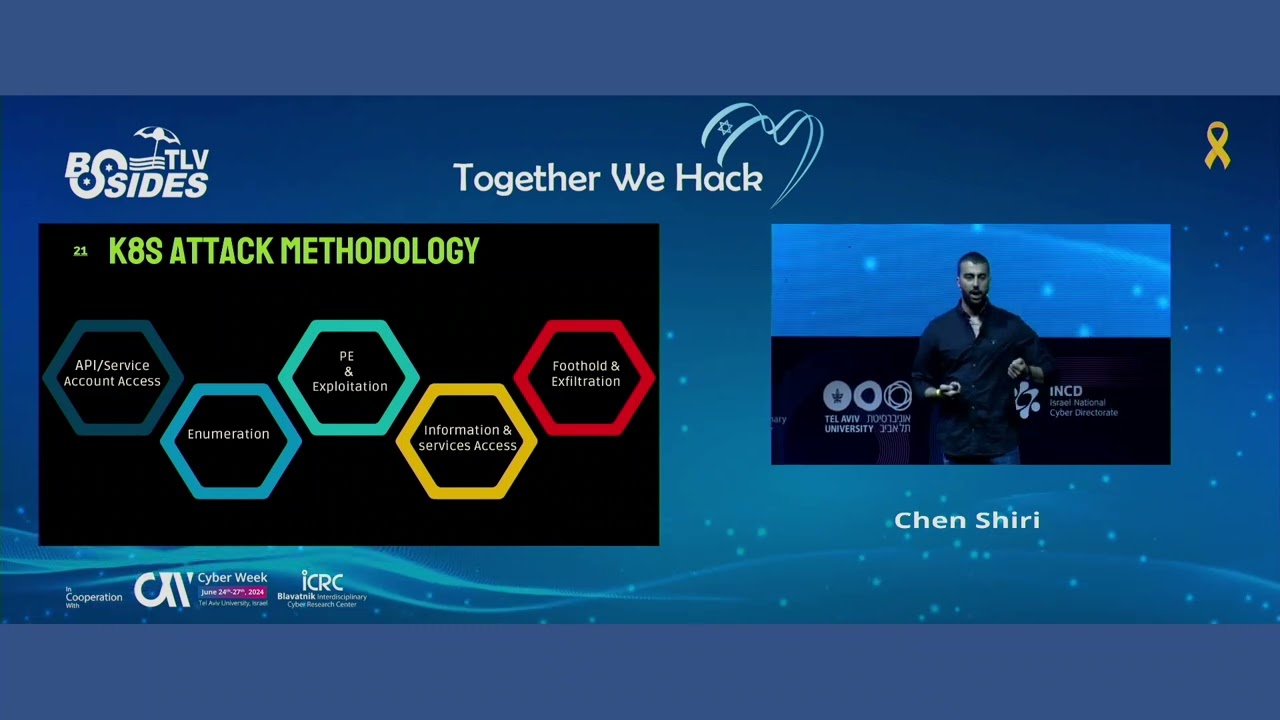
date kubernetes today has 10 years to reach that day but today all those attacks almost secure by default so this is one of the most common um uh attacks methodologies that exist today for kubernetes for being H for practical attacks first we try to get some kind of API access if it's to try some to get some service account or to break out to the node because as we said the node is very um a good uh Target because if you get access to the node you can access to every container and other containers that are not the front end usually contain some kind of service account and it has its own service account of the
cuet after we got a service account we try some techniques that we'll talk about today how we can uh use those privileges to get uh to to get more privileges of course or to get into some Secrets or or or some kind something that we can get into other platforms or customer data or something that that is more interesting so this is um the the attack chain that we're going to talk about uh we're going to break it to phase by phe first of all it start it will start with h access to the node Ro due to the implement ation of the open source kubernetes in uh in the cloud every cloud vendor is has its own way to
authenticate and manage the nodes the ec2 instances for example so in AWS we'll talk about getting access to the node role then we'll have two scenarios first of all in a case that this Ro role is privileged or has some kind of custom roles that you can utilize some techniques to get pivoting to the Cloud we are not going to focus on this today we're going to focus on something that is more common and that's the default IM IM permissions in this case we have several techniques that we can utilize first we'll see how we can by default to get access to every container image uh on on the AWS we can how can generate a new Cube
kubernetes API and dependent on its permissions we'll see how we can see we'll see some techniques to take over the cluster and accessing all the secrets of all the containers so the metad data the metadata is in ac2 in every cloud is providing information from for cloud resources it's called the imds instance metadata service it's became one of the most popular attack vectors in the recent year for and that's because many attackers are utilizing this for SS from ssrf attacks ssrf attacks are very when there's an srf attack it's very hard to get into something that you can use utilize it and to get access to infrastructure but because that imds has its own roles that we're going to talk
about it's became one of the most popular and aggressive attack vectors and AWS came with the idea to invite to create msv2 that it has a put request to get a token and using this token you can get more privileges you can you can authenticate to the metadata and this need needed to mitigate the ssrf attacks but there is a go for protocol that you can utilize it to send put request over HTTP and this is why it's not um it's still a a very good attack Vector from for web applications and the ec2 by default has have two it has two main roles it has a ec2 role that you cannot do a lot with
it by default and you have the IM roles the assume rle that you can do for Integrations but from my research I I got I saw that the default role of the notes that eventually it's an E2 it's not the same role it has more privileges by default for authenticating and with the clust resources the cuet needs some kind of authentication with u with the class resources so as we can see we send a p request to get a token using the to we got the token using the token we can authenticate with the metadata very easily here uh we got a r a script for Network info you'll get it by the end of
the uh the talk and you as you see it's get all the Mac addresses and using every Mac address it can get the default uh the security group and information about every node that exists in the kubernetes and this and all this scenario from one pod of the front end by default it's create a it create the security group which is the name of the cluster and we're going to need this on the next phases uh who we can get also the regions that we'll need and also we can get the credentials the role and that's the first issue guys this is the node of the role of the node and we can get it
from the containers by default and there are many implementation for this in Azure Azure and also uh in Google in gcp but here they chose to use the metad data and not from saving it inside the the node and this is why you can get it from the Pod that as I said in kubernetes by default there is no kind there's no way to get by default without any kind of exploitation to get information about other pods or this kind of API you need to have or read only API on the cluster to authenticate you need to mount some kind of service account and to have some developer best practice H bad practice is forgetting it
and here we got uh the role um as as you can see here when we try to see what kind of uh privileges it has we can see that it belong to um eks nodes system nodes and this is a special kubernetes group that has that it's under the cuet permissions and it has the same permissions and it has read permissions on a lot of components in the cluster if it's ECR if it's um I'm sorry if it's sto cluster storage uh config maps and many more much more but the AWS Ro has a limit very limited permissions in most cases what we can do with it so first of all even if we don't have a lot of
permissions we can get I saw by default it has permissions to get all the the tags of all the AWS environment by default for any component and resource that is related to the kubernetes cluster AWS created by default default tag with the name of the resource so you can you can know from this what kind of resources exist on the cloud what their names and how to continue targeting and Depends of the vulnerabilities and default settings we will not get into this but as you can see here we all this is a second way to discover what is the name of the cluster and here this is uh the as you can see by default we have access to get
uh the container images even of other clust for this we need the ECR token after we got the ECR token we can list uh the repositories even without the token but we from here we need the registry ID it's the repository z i and we are just can use this command to get uh using the token and the register ID to authenticate with Docker from our local machine to the ECR and with this we can pull any image that we want of the Run running containers and today as a security as a practice many developers build their containers and by layers by layer and they save and and any a lot of containers have password inside their
images databases and from this you can understand what and first of all to search for passwords and again you need also from Docker desktop you can search for to see layer Bayer and every command that was executed with Docker uh with the inside the docker build file and even to rebuild the image and this that was the first Vector that you can get information about if it's about customers or about um for the lad Mo inside the cluster the second thing issue that I saw that it says after reviewing the Privileges and what I can do with it so that I can mount using if I if I get the name of the cluster I didn't have any
permissions to list uh the name the classrooms but if I find the cluster I could create a new kubernetes API and this is the API told you that it has in default the system knows privileges as you can see most of its permissions are just uh read the problem here is that by default it has low privileges again and what we can do is it as I said by default you cannot get read access on other components um L we'll talk about kubernetes bypass techniques you can do it and utilize it on every container that you want on every service account that you find if it's limited it's probably one of the Techni is going to
work first of all I didn't have access to list namespaces so but I did I had act the priv services using Services you can see all the port ports of every containers that are open without active scanning and from here you can Target them and try to connect them and to to use those Services if it has it's kubernetes is relies on Integrations and and if it's a like every other system if it's to implement some monitoring H and many times it has Central containers like Kafka and databases that needs connections and here you can find what kind of connections exist on the cluster and you can get also the name space you can use it to Target on the next slides
we need specific as the name of it and it has also privileges to list the name of the pods on different namespaces as you know we started from the front end container but we can see the backhead PO names just a second it stopped
working okay as well if we want to see some kind of Secrets of what used to build the container over the image and to see what kind of data exists there we can we we don't have access to deployment because because it has the same privileges for managing that's needed for managing the containers from the nodes and we don't have access to secrets of course how we can get it so we can see we don't have deployments but we can see the Manifest and the Manifest contains the runtime settings of the container it contains many environment variables it contains all the Integrations of it as you can see any environment variable this is from the lab we can see
uh any integration uh that exists we can use use it with the secrets and we don't have permiss to Secrets but we can get the name of the secret using the Manifest as you can see and using the the name of the secret we can list the value using the option minus o y and here we can see the secrets with the strongest uh encryption of a b64 uh so exploit what we can do so by default we don't have access of course to for creating deployments but and we don't have access to create services but I found it very common that it has a option to create new pods without deployment and this is or to because the
the cuet is man also managing the parts that many containers for services and integration giving options privileges to manage pods and but how we can use it without any option to execution any commands or open a port or something for the container so as you can see first of all it has also another privileges you can use it's very common to to have um up privileges to edit config file and if you have option as you can see we did here we checked if we have those privileges config files have configurations of for managing for implementing some kind of setting additional settings for the containers as as you can see here there's a config file and we can there
by default you can add execution commands to this uh config config maps and you can use it by default to get um when you have uh with those kind of privileges to uh perform code execution by adding here a command on any P that you want and exist in the config mat and the second method that it's to create a vulnerable container and for this I I don't have access to create some kind of a service this is why I've used more Silent Way and it's for using a tunneling and um and without any uh option to to execute some kind of commands how I did it first of all we can create on dockerhub or in our all
local registry uh contor repository we can create a new to build a new image in this image I I I've configured automatically open SSH and I set to this password and username to something that I know and I configured tunneling and on the right you can see that I added the enr token to to the configuration and for the execution I did that in the moment that the container uh will run up you I will be able to it will connect to my tunneling service but I can't get the enr address and this is what but I found that by default we have access to view the container logs and this is why I EV
validated that the enr will save his outputs on the logs in the argument and we'll also need some kind of toiz techniques for breaking out to the node this is why I I chose privilege container you can utilize any other technique that you want I found it the easiest way and additionally for one to breakout to the node so this is why uh if you don't want the default node you need to specify here the node that you want uh to create the Pod and then you will break out to its node as you can see here I've created uh the uh I saw from the logs the nwork address and I locked in using uh the
conf the username and password that I've configured and now I can get into the config after I break out from the container into any configuration that I want on the note that I wanted and you can deploy this on any note that you want that you want want by this you can get access to any node and also using this the node contains the the data of any pod that you want so you can enter the Pod and to search for other service accounts that you can get and even to get more privileges or more secrets to other Integrations or platforms so this is the demo
uh for
first we check in if we are running in a container this is one of the methods um now we can uh authenticate to the to get the token and speak with the metadata there are several ways to do it uh without uh if the metadata is blocked there are several techniques that can can speak with the metadata uh without being monitored or if it's even blocked if it's using IPv6 on arza technique I've used the regular
way we got the log Z ro we're configuring it from our local
machine don't worry those scal don't doesn't work anymore so you can utilize it I got all of the TXS over Cloud you can see it even other VMS that they have on my uh AWS you can also describe instances by default those are the main uh privileges that exist
see the read only
privileges we're listing the pods then we use we'll use the secret name from here to get the actual secret and we can do it for every uh container inside the environment we can get it Secrets need to as you can see we cannot leave Secrets but we can get its value and also many times uh developers are blocking um the get secret option but they don't know that if we you have the option to list the secret names you still can see the value and this is another way but it's not by default but it's also very
common now we see that we have an option to create new pods we at our vulnerable
container by default it's creating the container on the node of the namespace if it's configured if not it's great get on the default with the different default policy that exist
we got access to the node file system to the host here is a cubet config and this is all the data of all containers thank you
Related talks
 33:59
33:59 27:31
27:31 20:25
20:25 37:23
37:23 16:06
16:06 39:30
39:30