Threat Hunting in Kubernetes
Show transcript [en]
hi good morning or good afternoon i hope you and your family are fine and especially in those hard times so the decision will be around like threat hunting in kubernetes and we'll start from what is a container up to the kubernetes cluster i am my name is mutas i'm i'm working in ibm like since around 40 more than four years and worked in different teams as a security researcher security analyst threat hunter um mainly around edr's cloud hybrid cloud containers and many different directions you can reach me or using linkedin or by email because we might have different background so i will try to um to cover like the most uh basics so we'll start from what is a
container and this is really a nice uh whiteboard by julia evans but we'll do it like in a practical a practical way so let us run an ubuntu container directly so we have the container up and running um the container is just like a process so it's not really um it's just like a process running in its own namespace or you can say like an isolated process to see to see that like in a practical way let us run a process so i want to do a bank request but we don't have the bearing command or utility installed in ubuntu container so i will just install it quickly
okay so we are inside the container and if we do like a pink command to edit and the process is running it's running inside the container and if we'll go back to the host system and we'll do like bs grab bank we'll see it running so every container is just like a process but a process can also have a child processes so we we can say like um just as it's here it's just a group of processes or it's just like a process and it might have some chai some children's uh the same like um as it is a process if we want to monitor like any security aspects we can see um like those are different containers in other
words different processes each one running in its own namespace all of them sharing the same kernel and this is like the value of the containers versus virtual machines we don't we don't have to copy the operating system kernel for each container so all of them sharing the same kernel and the added because all of them having the same kernel then if we'll monitor or if we'll have our security visibility at the kernel level then we will see everything happening in those containers because for any container if this container wants to create a process creating a process is a system call so it it it will be passed to the kernel if if this container wants to create a
network connection it's another system called so having the current having the visibility at the kernel level will see everything that will be executed in every container every network connection every process creation every file modification every file creation every system call activity will go through the kernel and for that we we have like an open source solution called flow it's a lightweight container aware solution to to get this kernel visibility to see every process execution every file modifications and so on and using it we can achieve the containers on time security we can detect several attack tactics and techniques or miter tactics and techniques we can do some for it will help us to do some
foreign sex and threat hunting so it will expand the um the security team visibility to [Music] into this new uh container and container landscape okay so we know what is a container it's just simply a process isolated process a process running it's in its own namespace we know about the container runtime security we need to have the visibility into what's happening in the container during its run time and we can achieve that by having our or by having visibility at the kernel level and all of that so far it's just like a container running or running container um but um we need something to orchestrate the containers or to manage the containers and for for that one of the most
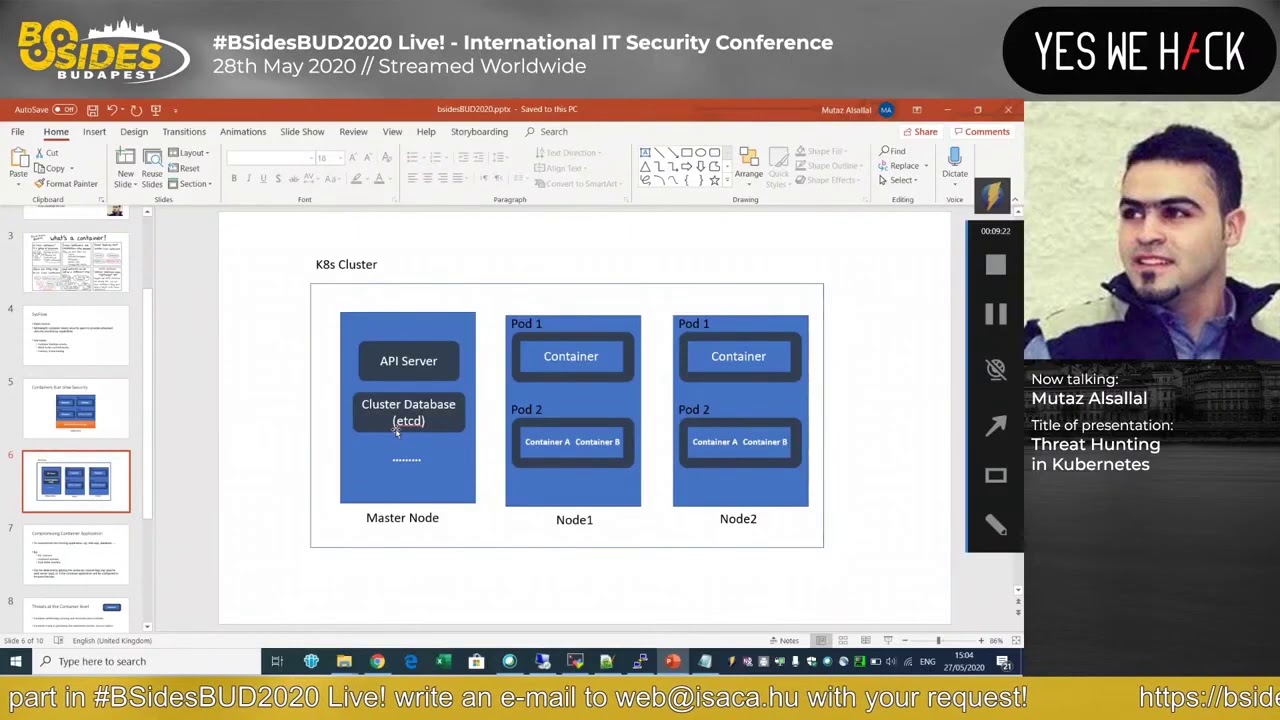
successful platforms is kubernetes so in kubernetes you can have a a cluster like one master node and two worker nodes just like as an example the master node will um will do the management like if you want to to run a new container it will do the scheduling that con and to distribute the containers across the worker nodes you okay and there is also centralized database and so it will handle all the management or the cluster management aspects so it it will be um really orchestrated in a nice way but all of those different technologies provides or it's um the security analyst needs really to shift or to to add to address this new landscape to cover like um
if someone wants to compromise a container how can we detect it and if he will already compromise if he already compromised a container what can he do next like can he escalate his privileges or escape the container isolation and control the underlying operating system and if so can can can he like um move laterally to the other containers or and control the whole cluster so we'll see like um one scenario starting from compromising a container and doing the privilege escalation i hope so far so good it's really hard to do it like online not on site but i think um we'll also have like uh a question and the answer session at the end so
feel free to [Music] to ask like any question i i don't want to continue in the slides so i will jump to um a live demo to see how how the attack or the initial stage of the one attack vector to a kubernetes cluster or to a container and then to escalate it to the whole cluster and we'll also see how we can detect it as we are going through the attack phases this is my master node i have one worker node here and let me exit from this container so i'm in node 1 i will go to the master node let's do cube city i'll get pots and i need to just to change to an unroot user
cube cdl get ports
and and this one i should have removed that before our session i will just remove it quickly
still removing it yep let's do it again get pots so we we have one one pot or a container is running in in the cluster to see it's running in which worker node we can see it's running in worker node node one which is this one and i've also created a service for it so you can see we have a node board service running and this is the port from where we can access that container if we'll go to to our browser we can access it here so like in simple words we just i just have the theme and vulnerable web up with up running as a container so we we have a vulnerable container in the cluster
and it's just like an easy example where we have several vulnerabilities or several weaknesses in this container but the same example can be in any other container so if we'll go to command injection and we'll do like um we'll inject the ls command we can see the bank request succeeded and then we have the results of the list command so if we are able to execute any commands in that container some people might say like it's already an isolated container so it's not that big risk let's say and the container will be isolated from the underlying operating system but in kubernetes every container will have an automatically assigned token using this token it can like communicate
with the api server or with the cubelet so we and that token it's automatically mounted to like a local file in that container so the attacker just need to read that local file inside the container to get the container specific token and then letter based on that container privileges or permissions he will be able to do other things so if we'll go to here we can just print the content of that file and we'll get the the token that's assigned to that container and this this one so this is like an automatically assigned token there's the the devops or the deployment engineers can also assign different tokens for different containers but there's also a default one so if we'll
use this token and we'll use it to call the kubernetes apis so we have in the cluster and api server we'll use this token to call different apis from this server i will copy it and i already have some initial configuration to to save like the token in a config file and if we'll here i have like a kali machine i will just press them and they already have the cube ctl commands here so if i will do get pots we can we can see the results so we are able to send api requests from our kali machine to the to the kubernetes api server and using the container token uh this one it's really a nice one
to detect like we have the different symptoms the first one someone calling the api server using the container token so it's a leaked container token and he's calling it from outside the cluster so full if for my demo you will be using uh curadar it's just um like um a security uh same solution and there are many same solutions that if you want to to try cured there's a community edition i'm also using it in my home to secure my home network uh it's free and you you can try it or you can try elasticsearch or other solutions so if we'll go to here we can see the kubernetes auditing so what i what i have done is
i'm forwarding the api logs from the cluster to my lock management solution and you can do that from the confi the the master node configuration i can just highlight it quickly from here
and you need to add some flags so i added those three flags the first one to define the audit policy which looks to lock or not the second one were to save the locks in this lock file and the format i choose json and that's most of the config configuration uh i've also shared my audit policy on online so if you want the audit policy so i have shared my audit policy here you can see it here with this policy.tml and i've also shared my syslog ng demon set configuration and if you want to use fluentd you can also use the config from here the other thing is so we are getting the kubernetes api logs here let me
filter them like um
in the last five minutes we did that uh lest pots from here to get pots or less spots and we can see the kubernetes event this is the json event that was locked and we can detect that it's this listing or container listing command was done using a container user or the container specific user and we can see the source ibs and ib outside the cluster range so someone using the container token to to call the kubernetes apis and um no the next thing is based on this token the attacker can do other things like um he can try to execute commands in other containers or he can try to create another container or another privileged container
so what we'll do here i already have um let me print it currently we already have um a caliphate here to use like would launch a kali container and as kali has different attacking tools or utilities and we don't need to install them again and again so we can use just this container i'm going to set the privileged flag and to mount this um to mount the host file system cube ctl apply minus f kali so calibrate created cube cdl get pots container it's still creating it it's running now and we can also detect um several symptoms um one like based on this one the first one someone creating a container that we usually don't agree
yet so in production we don't expect a dev op engineer or ss admin to create a kali container and the other one it's a privileged container it's really ready flag because privileged container can access anything in the host system the other the third symptom is a container mounting this the slash from the host system so it will this container will have access to the whole host file system and we can detect all of that using um
i need to deposit i just so once a board will be created the kubernetes api logs will create this event clear about has been created or create a pot if you will go to the json event we can check it from here or we can check some details like it's already here privileged container let's see true it's mounting the slash from the host file system and the name of the container is kali container and the authorization decision was allowed so we can detect all of those different symptoms like someone used a container token to create another container or also the same container it's mounting a sensitive or the host root file system and that's also a privileged
container and also it's a kali container so all those different symptoms does not indicate a normal dev op activity uh we have a privileged we have a container a privileged container and let's try to access it
we are inside our kali container let's check here as we mounted the host root file system under slash host root we can like modify it like anything and like one of the different threads is like do we expect the container to modify a file like etc bus wd so do you expect a container to modify such a file or the shadow file so we don't expect that the container to modify such a critical files in the underlying operating system and the attacker can just modify it using any text editor or we can just uh change the process root directory to [Music] host root
and if we'll add the user now it will the user will be added in the underlying operating system because we will modify the atc bus wg and then the line compressing system so let's add mic one
so we we've added mic one this user um we are already we are inside the container but the user has been added to the underlying um operating system and using this in recently added user we can ssh to the worker node using it and we can see what we can access uh let me ssh to it so 192.168.0191
and the user is mic 1 the password and we successfully logged into the node one using this added user and then this activity will also introduce different symptoms like container adding a user in intended underlying operating system or container modifying a critical or sensitive file like etc bus wd in the underlying cost and sometimes the tackle might ssh to that container while he's inside to that worker node while he's inside this container so we can see a container doing some ssh activities or other symptoms like we don't expect really someone to add a new user to a worker node those worker nodes will are managed only by the master node so no one should really create a new
user in this worker node or even to ssh to the worker nodes and we can detect also those activities using um the standard we can also utilize the standard linux locks so if we'll check the last five minutes we should see some also stand let me see so we can see here in the node one a user account has been added so if we'll go to it this is the standard linux authentication logs we can see a user account has been added the username is mic1 this is the user id and this is the home directory and so on and also the attacker can make it as a privileged user he just need to [Music]
to change the user id to zero we will change
sorry let me exit from here i will do it from here slash host root btc bus wt we don't have them here we can
because the containers will have just the minimal needed utilities i'm installing nano and let's s so to make it a privileged user we just need to change the uid to 0 and it will be effectively root user
so now we the user that we have created it's also a privileged user um and if we go back to here um so we we compromised a container using of a command injection vulnerability we can inject even a reverse shell here but we we just echoed the container token then we can use the container token to call different kubernetes apis based on the token privileges we can do different things maybe if this token does not allow us to create um a port directly maybe using this token will be able to access something else and then maybe a database or another container and then from there we'll have another path to escalate our privileges but using this container we were able to
to create another port and we created a privileged one and the one that shares or that mounted the host root file system into the container and then we used that while we are inside the container we added a user in the underlying operating system then we assessed to the worker node using the recently added user and you can really do anything you want at this stage in this in this worker node you can access even the other containers and so on um if you want to achieve persistence you need to run like a reverse shell so um and to run reverse shell it can be done in linux in a single command like this one so let's see
um let's make it this one so here we have the worker node and we have the kali machine here the attacker machine will be listening for 444 port and if we'll manage to run this command in the worker node it will connect back to the attacker machine so this is the kali box is listening and we have the reverse connection arrived from here we can do anything host name [Music] f config and we can see we we have reverse channel here and it's really also easy to to detect such kind of uh reverse or bond shells because we'll see um there are there are multiple symptoms one can be like a network connection created out of
a bashing process another one can be like a process and the process file descriptors for input and output will be a network socket and
yeah so i think and if we want to detect it we can use also um the open source cc flow because we will have a visibility into the process and network and file activities so we'll search for this is flow events we can see [Music] you can see a process connecting to a remote host and this process is the washer process and it's connecting to this destination port this is the cc flow event that will be locked in that case and um there are really different visibility levels because if we want to to do the same from inside the container we'll have the container details the container name the container image id and so on another example can be if
we do like well i think so far so good and so we we we have seen different symptoms how we can do more most of or the different attack or techniques and at the cluster level um what the attacker can do is he can each kubernetes cluster has um like or at the beginning the kubernetes clusters have a unsecured port without using it you can call any apis without any authentication without any authorization but then this entry or this port is disabled now by default but if the attacker already compromised the cluster then he can just re-enable this unsecured port to in a way to achieve persistence or as a backdoor because it can be
really re-enabled so the attacker can just re-enable that option and we can do many other um like we can hunt for different things like successful api requests from different geographies for the same user or we can even baseline which users are usually calling which apis we can see like unusual api requests from unusual user agents or from unusual countries so we we can do different api security analysis or the traditional api security analysis use cases and so i think this is most of the things that i really wanted to to show and i think it's really um like powerful to see like how we can detect different threats in this new landscape at the container level at the worker
level and at the whole cluster level and how we can combine different data sources so we can get the kubernetes api logs we can get decisive law logs to see what's happening in every container and it's an open source solution you can check it um this is the github link for cc flow and
we can also get the standard linux logs so the more data sources the more evidence that we will have and all different data sources will complement each other so you can correlate from different sources and yeah i think that's most of the points i'm ready for any questions i hope you enjoyed it i'm sorry it's really hard to to do like um an online session but it's out of um our control i hope next year will get back to this not to the normal security conferences so thank you all and stay safe
Related talks
 25:00
25:00 30:07
30:07 38:30
38:30 40:23
40:23 27:38
27:38 23:03
23:03