A Tale of Two Powershells
Show original YouTube description
Show transcript [en]
okay so I'm getting a yes all right so I'm gonna go ahead and start so welcome to a tale of two power shows I'm Fernando Tomlinson of course this is V sides Greenville and I just want to pause real quick and say thanks to the the people that put this event on this is amazing this is my second year being a part of it and I look forward to many many more of these we need much more of these in our community of sorts to help the next generation so I'll start by kind of introducing myself I'm with the Department of Defense namely the army army bill did for 18 years right now I do forensics and malware analysis
previous to that I was a technical director of an operation center in which we did cyber operations of all variants I also AM a adjunct professor where I teach Python and digital forensics so I do that as an effort to kind of give back if you will I developed a number of red and blue team tools all namely in PowerShell you can tell that I really enjoyed the language and I wrote a chapter in the PowerShell conference both volume 2 and what's interesting about that book is we make no money from the proceeds all proceeds go to underrepresented under privileged individuals so they can get a start in cybersecurity and I think back to my initial start in cybersecurity a
really IT in general and I felt like I I fit that same mode so I just want to do something for the next generation of sorts and this was a great way to do it there's a number of platforms that I kind of helped built and then you see a number of sites where I met on on the web so if you want to connect or you've already been connecting that's great alright so here's our agenda as we get into it all right well well kind of highlight some some blue uses of the language some red uses of the language of sorts and no matter what side of the fence you feel like you're on it
definitely could be of use to you all right so let's talk about the language PowerShell was developed in 2006 originally called monad it was later renamed to PowerShell um the language itself is implemented as an engine that could be from the perspective of command line or a GUI variant and generally when we think of PowerShell we think of how our show exe PowerShell underscore is see but really that's the host and engine in the actual power show language itself is really a compiled dotnet executable that is system system that management that automation that DLL of sorts so as long as we can take that DLL and apply it to any other writing area or any other
process we can leverage PowerShell and the commands that go with it so it's always interesting when organizations are trying to limit the use of PowerShell in the first thing they want to do is block the executable when really we should be concentrating on that DLL of sorts so it's an interactive command shell so very useful scripting language much like a simplified c-sharp if if you're familiar with the language it also has a built-in capability for remoting which is powershell remoting gives us the ability to do it through HTTP HTTP so we have a SSH like capability within the language which also speaks to what makes it great as I mentioned before PowerShell itself there's nothing more than cacao net so
because it is that it gives us access to the dotnet framework which then further just opens up our abilities within the language and it is full of objects everything we do in PowerShell is an object so if we found ourselves and let's say a traditional command shell or bash and we're trying to slice and dice and get a particular piece of data we may find ourselves specifically from bash we may find ourselves setting ocking and cutting and in all man what if we're off a little bit we find ourselves of doing it all over again but with PowerShell we can select the very property that we care about and it will return that because everything is an
object force now the functionalities are largely broken down into four aspects we have commandlets which are pre compiled net items that allow us to do certain functionality within the language we have functions that we build ourselves and/or come with the language reusable chunks of code we can then turn those into individual scripts that we can leverage as need be and then guess what we can still utilize the native commands that are already inherent to the operating system so we don't really lose out by utilizing power so we really just gain more so from a blue team perspective you know right off the bat what makes it great well when we look at Windows 7 in 2008 r2 in above it's
already there I don't know about you but whenever I go to a get-together at a friend's house I like being able to come over and they say Fernando don't worry about bringing anything just just bring yourself and when we look at jumping on it specifically a Windows machine when seven and above we find ourselves with PowerShell already there so from a blue team perspective we're not adding anything else to that operating system we're just leveraging what's there the same could be said to the windows api's all right PowerShell has the ability to interact with them so we can take advantage of those pre-compiled things we have the ability to just import DLL and then utilize those functions that
are made available we can encrypt that traffic so I spoke briefly about PowerShell remoting all right well we could either have an actual certificate published or we have a self signed certificate but we have that SSH light capability where we can do one to one machine or we can do one to many and this is all inherent to the operating system or rather excuse me the the language itself now it also gives us the ability to monitor and track people trying to abuse it this has gotten better over the years namely once we really got into light PowerShell version 5 giving us the ability to truly track what a person is doing now because we're
in a cat-and-mouse type field as we as blue teamers gained another way to track a red teamers actions they have certainly increased their tactics as well and and started trying to bypass it but it has made it much more difficult for them than what it was in the past of sorts and guess what from a blue team perspective it your organization can't afford the latest EDR then we can make something within power show either from an agent perspective or agent list and I'll talk about one of the agent list variants that I end up making to kind of satisfy this thing now from a red team perspective guess what the first three bullets are the same there's a red
teamer if I don't have to bring anything that's even better if I can blend in and live off the land why wouldn't I do that especially in a large organization where they may already struggle with what Norma see is and add arena again same thing with the api's and the divider can encrypt mine traffic absolutely I want to do that I want to make it much more difficult for the defender now we have the ability to bypass or really avoid detection so I kind of talked about briefly with the new advances with PowerShell v5 and newer we from a Red Team perspective can still bypass and navigate our way through them but it is much more difficult now we're lucky
enough we find ourselves in an arena where somebody's using a legacy version of PowerShell specifically like PowerShell version 2 which has no security features built in and then it just makes it much more difficult for that blue team to be able to find us later on all right so why Artie why would it be running the old stuff well maybe it's due to the infrastructure maybe it's due to lack of skill set or knowledge or understanding of how to actually upgrade right and even if organizations are on the latest and greatest version of PowerShell they may not even have it optimally configured to be able to highlight a number of things that we would be able to do now one of the
things that are largely great that I thoroughly enjoy is the ability to do things without touching disk all right arguably a red teamers either gonna execute things that are touching discs or they're going to execute in the context of memory if somebody's touching disk should be much more easier in theory to find when we get into executing purely in memory now I kind of need something to lead me to that system in order for me to focus on a memory aspect so with PowerShell being able to when leveraging that matter that is great and because it is a true scripting language it starts to make signatures really really difficult right it's not like a particularly compiled
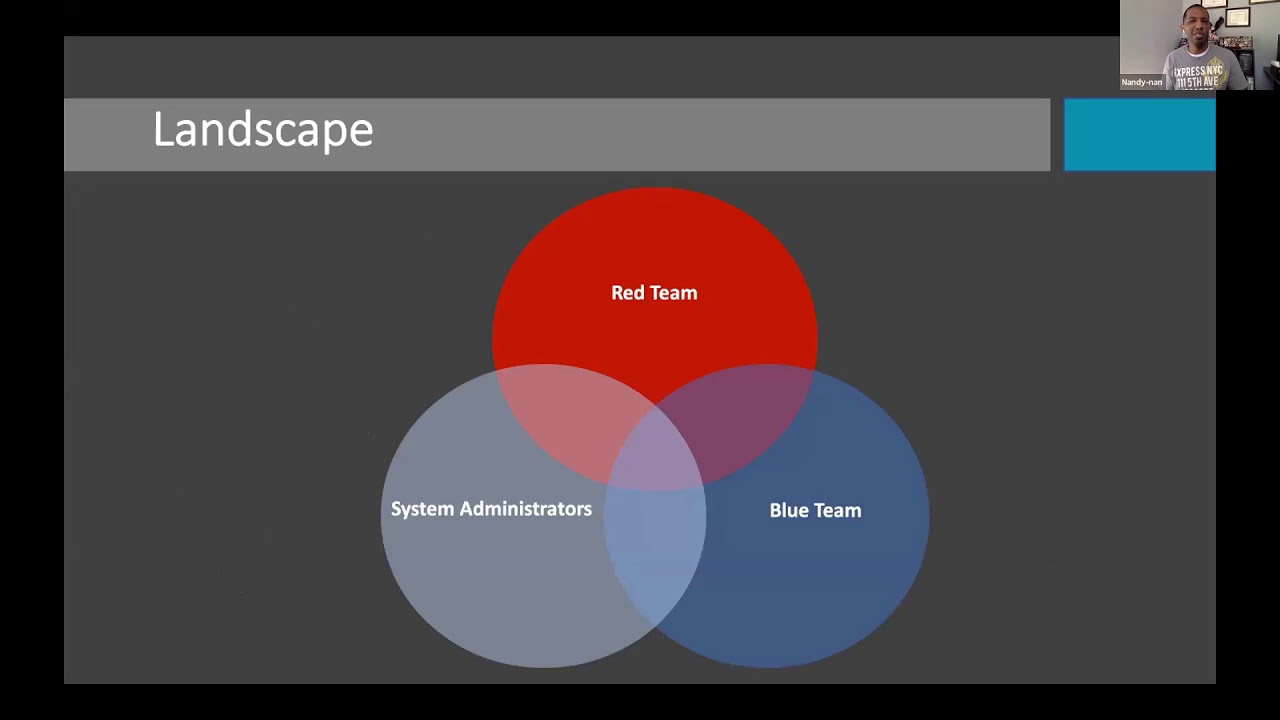
binary of sorts where it's kind of static in nature unless you recompile it it's truly a cat-and-mouse thing with this script because you have the ability to continuously reshape the arrangement of the data and really how it's being called upon so we really start to just briefly touch some of the good and bad of it all if you will or really what makes it great for either side and when you look at this and really listen to it you're like oh maybe that shoots before the other side or what have you and that's really true and when we look at it I kind of see it like this where there's a large subset of what
PowerShell can do that's useful for not just one side it's really a triad of sorts that bleeds into other areas it's really the focus and what you're trying to do in leveraging what you're trying to do that really depicts what side you're doing it from so it's not a one-size-fits-all type thing now outside of Red Team Blue Team adjust system administrators our show also has the ability to be a little bit more granular so for example this young man ended up using some PowerShell so he can control his Tesla right I'm all about that had the ability to leverage the language leverage a subset of api's and whatever connection excesses he has into his system and he's using PowerShell to
control this test that is awesome now that may not be the only case or use cases of PowerShell it's really an endless possibility of sorts and no this is not a dope right literally you could Google that and you'll be able to see his github of sorts and if I had a Tesla I would test it unfortunately I don't have one so and the take is word that it actually works the way he said so from a blue team perspective will start to just kind of highlight a couple of things that we can do with it of sorts and then we'll transition over to the red things that we can do again not all-inclusive varying levels of degrees
if you will but nonetheless giving some exposure to it so when we look at just hashing period right this is something we typically do when we're we're hunting or we have some type of indicator of compromise whether we're using some other framework like Yarra or some other reputation-based thing hashes could arguably be part of how we do things so from the perspective of hatching we have an input whether it's some form of binary file what-have-you we have a process in which a undergoes the algorithm function and then we get this one-way computation that comes out and gives us a high confidence that when we see this it is that system now there are collisions but again based upon the
algorithm in which we're doing those are a little bit far and few but when we get these hashes and we want to be able to utilize them to look at systems or look at items we can utilize some power show so there's a command lit get file hash and we can specify the individual file binary whatever it is and by default it's gonna come back at sha-256 but as you can see in the second example we can give it the parameter algorithm and then we can specify what algorithm we wouldn't want to actually do it in so md5 sha-1 sha-256 Triple DES is that adventure thing right now when it comes to actually doing more than one file
well we can we have a couple options to do it one way we can do it is we can get a listing of the directory and then we could pipe it to the next command so as you recall I talked about power show being object-oriented so when we get a listing of our directory those are objects and then when we utilize pipe we're sending all those objects to another command for them to actually do something with it and in that case we're able to get a directory of files and actually return hashes against them now when we look at cool I want to do this a little bit larger in scale how would I go about doing it well you
probably want to start with a list of well-known hashes NSR row publishes those things once a quarter that's a good starting point or if you have some other type of reputation based subscription service that you can pull up from that's great too now you would probably want to do the whole disk depending on your infrastructure your architecture that may be very taxing and not something that you want to tackle instead a compromise would be well let's just hash every process that runs and then if it's unique add it to our list if it's something we've already seen just pull from our list and then we continuously build like that that becomes to be a little less processor intensive so from
a PowerShell perspective we can utilize the eight or nine lines that we have in that red box there so essentially we're gonna retrieve every process we're gonna sort them based upon unique and then we're gonna loop through each one of them and we're gonna get the foul hash there are some protecting processes that my privilege level or the privilege level which are executing may not have access to so I want to be able to highlight those and that's where in our if else statement we see that were than ascended to a log file so again we're being a little bit directed and now how we're doing this as opposed to doing the whole disk again my architecture really
depicts which method I could actually use now once I have these I still need to actually validate that these are good or not maybe I have some in-house subscription service maybe I want to send it out somewhere so if you want to send it out somewhere what are those things is virustotal wrong right indifferent all right and virustotal has a free api so we can do this from the command line perspective now there's limitations the limitations for requests for a minute 5700 and some change requests a day and we see the monthly quota so being able to use some power shown here we're able to grab the hashes that we have already seen if we have it
Randle's against virustotal then we're gonna send them out the virus or no need for us to send the same you know SVC host with the same hash out the virus total of 500 times right and because we know we can do for a minute automatically go ahead and split it up into every 15 seconds submitting all right so we see in this case I'm submitting to hashes the estimate at runtime that's 30 seconds and it doesn't matter of this md5 sha-1 ever right of sorts and I'm returning that data back out now when we submit this the virustotal we get roughly 50 AVS or so that come back and and really highlight to us whether
they believe it's malicious or they haven't seen it yet now just because they don't render it malicious doesn't mean that it's not but you know we take everything we have with a grain of salt as far as a indication now when it comes back to list it comes back to us in an object with a number of properties and we see that first column which is really a property you see the AV the second column we see what version of AV that third column which is another property we see whether it returned true or false false being that it doesn't think that it's malicious true being that it deems it malicious and then that fourth column
we start to see what they know that malware family or variant is right and that's gonna vary between a vs all right we see what the actual engine is and we see the actual hatch now from that perspective I am now able to kind of quickly see like hey this thing's running in my environment out of 50 AVS a couple of them think it's bad let me put this in a bucket where I now go and pull that binary and/or do a little bit more analysis on it and then largely if I start to group my processes across my infrastructure from my architecture how many other instances of this binary is actually running right and we're
applicable we start to whitelist it so that becomes a technique that we can use utilizing straight powershell across our infrastructure well something else we can do a PowerShell we can get processes we can get net TCP connections which is essentially our next step right and our processes is essentially our task list and when we look at that we get something like this the top figure shows the process and how it returns the bottom one shows the net TCP connection and how it returns and as an animal I may find myself looking at netstat seeing something with an established connection seeing a binary or appeared tied to it and I won't have to transition back to my processes and then
get a little bit more information they're like okay cool what time this kick off what kick it off like what's the parent whether any command-line arguments with it and as an analyst I get a little confused some time right was that Pitts 1920 or was that 90 120 right so from the perspective of putting it together I started thinking about this all right we got Reese's Cups we get Reese's Pieces somebody decided to put it together and I tell you that genius right so end up taking that same concept and coming up with get verbose process they're really what this starts to do is reduce him in it oversight gives us a clearer picture from an
analyst perspective and then oh by the way if you have some other saying that you'd like to import this data into we can get it out as a CSV XML and make it already in a possible manner because again we're talking about objects here so we have properties that we can tag those fields with and when we get that back we have something like this now this is actually showing two individual items if you will so now right upfront for each one I get the IPS associated with it in the forks I also get whatever the processes is or are rather in the process I'd be along with any command-line arguments we also get the
hash associated with the item right we get the same thing for the parent as well so from an analyst perspective I'm starting to take some of my human nature or possible human oversight out of it and I'm starting to get this in one clear thing and oh by the way if I'm gonna import this into some log aggregation server now I've already manipulated the data and made it a little bit more readable as opposed to have to try to pull them back together later on from a forensics standpoint if there's anybody out there doing dead box forensics largely speaking regardless of the case we find ourselves getting a large subset of the same data every time and then we start
branching off based upon whatever knowledge we have about the hard drive or the case of which we're working so quema would automate a profiler this is gonna parse the drive looking for a typical data that we're looking for I've only really worked with 500 gigs or so and in doing so it's about four or five minutes to do that and when we get that back we get that back as a report so now when we're talking about initial triage I'm able to get this done fairly quickly get some huge data points about the drive and characterization give that to my management to allowed them to feed it to whoever they need to for the time
being which allows me to then go a little bit deeper all right all too many times we got this hot case going on and somebody's over you like did you find anything yet did you find anything what's taking so long we're cool let me give you this initial assessment very quickly right in an automated fashion and then I'm gonna go a little bit deeper based upon whether every case is so here's my name's that we're we're treatment again largely things that we're gonna do every time from a perspective of dead box forensics and how do we end up executing this well whatever you use to mount the drive whether it's ftk or something else right
does it matter to automate a profiler as long as the drive is mounted you run the script you're gonna analyze the results again it's gonna come out as a flat text file all right and I say relax but largely you're gonna go back and do some deep dive forensics right but because you're doing this is such a quick amount of time you couldn't go in you know do some yoga or whatever the case before going back to you the next part of it so the UI of sorts there's nothing special but it gives us four centage all right because it could take a little bit of a minute outside of that 500 gigs depending on how big it is and then when
we get it back we see it's gonna be a flat textile of sorts and again I'm looking for the same generic data that I look for every time right I want to automate the boring stuff so I can get to the one-off or the deep dive stuff and automated profiler allows us to do that now well we look at DNS right DNS a really sinkhole in becomes a mitigation tech meek that we could use when we have beaconing domains or infrastructure that's beginning out to malicious domains right so let's explain the DNS process largely speaking we have a user starting in the bottom left we have a user that navigates to Google right and the first thing is gonna do is it's
gonna search there localhost file and then the media's gonna check their local DNS an intermedia is gonna query their DNS server that supply they'd have needed that DNS server will check its cache you've needed their DNS server we'll see if it's authoritative and then it will utilize for tour routes however it's configured so when we look at how do we implement some type of mitigation when we have systems beginning out two domains there's really two spots that we can do that and we see those areas which are now highlighted into we could either affect the localhost file because we see in that process that it checks the host file but when I have a domain worth of
stuff I'm not gonna go out there and do this on every system maybe one offs yes well how do I do it from a larger scale well then I'm gonna do it at my DNS server and what I'm gonna do is I'm gonna create a Thor tative records to say whatever that domain is I'm authoritative for and when I'm returning the IP back to the system that's looking for the IP I'm gonna say that it's gonna be quad zeros right essentially rendering that as a sinkhole domain now and that doesn't make sense let's look at this mural here is a little picture we have a person that's starting on the left in a car which we
see all we don't see Cody's off-screen and he's trying to get to the other side where those buildings are at there's a gigantic hole in the ground essentially he can't get to the other side because that whole sinkhole is preventing him to do it now listen engage the fact there's a little bit on the side in which he could drive around largely speaking that's what we're doing when we sinkhole a domain so from the perspective of this we would execute invoke same codomain right it's gonna download a blacklist of domain if we have it configured for that or we could input one-off domains that we want to blacklist it's gonna create for look up zones for those domains and
we're gonna create a pointer record that's gonna be pointed at quad zeros and again this is all automated in fashion we start to see those domains or those records out to the side and then if we look in the middle there we see our a records pointing back to quad zeros and that's what we give back to the system and the system does it make it there now this is a method and technique we can use as part of the overall mitigation strategy especially when we start looking at we should be doing things from a defense-in-depth perspective but again we're utilizing PowerShell to be able to do that PowerShell event logs write event logs and PowerShell we have two different
ways to parse those get win event get event log get event log is really XP 2003 that's deprecated but it still works for things like security application system logs get one event is more modern in nature so we get the event tracing logs and a number of other things both of them allow us to do them local and remotely also get one event allows us to take exported logs and import them in and parse them this is largely important to write because I could be struggling with a system in one location I could export those logs give them to you you can utilize some PowerShell and parse them or we could write parsers in PowerShell and then running against our
log set all right this is interesting so looking at event logs we largely get something like this right off the bed I'm looking at security log we're looking at 46 88 that's gonna be processed creation that's an important log in my opinion it is not enabled by default but what does this screen really telling me it's telling me your time in which a process started and essentially that's it right so if I want to open that up and go a little bit deeper well I can utilize select object and I only did that on one but I selected every property that's available and this is returning to me in a format list now we see properties like message version
level right the meat and potatoes of what I really am looking for is in the message field in the message field but guess what there's not a clear out the box method for me to just select those very things in the message field right so stuff like the account name the process name the parent process those are the things that I would want so how do we do that well there's another property called properties in which we can go deeper and parse that message field this is one of those things that we do at once and then we use it many times we wouldn't need to do this with every log that we're curious or interested in so once I'm
utilizing the properties within the property field I can now pull out the Buried things that I care about so we see the process the command line the account the creator we see all those things that were normally in the message mill that I have now pulled out now I've renamed them to make them make a little bit more sense for me but guess what once I built it once I can take any event log with 46 88 and I can run it through that parser and it will present that data for me right I build it once I use it many times and now I see things that may pop out to me in this case a
guy using netcat going out of the quad force and what kicked it off well it was a command prompt right maybe benign maybe not but now I'm trying to make it a little bit clearer for me as an analyst alright and we're doing this again in PowerShell now there's also out grid view how grid view isn't it is in excel like view within powershell alright and if we don't care for that we can also export them as CSV XML and then put it in our log aggregation system of choice so admission having an agent or EDR end up coming up with PowerShell Rapid Response enterprise-wide capability enables me to find some anomalies right now we're doing 20 items
of interest it's extendable in a sense of modulars modules rather so it's modular that somebody else can make a module it just imported into the framework it utilizes the pool capability so it's not going to be a near-real-time thing it's gonna be a matter of how often do I exercise it where I go out there and pull so there is a chance I may miss something it retrieves data puts it in a sequel database so now I can look historical data and I'm not only confined to that one individual pool it utilizes a network logon so I don't have to worry about spraying creds all over the place and somebody trying to take advantage of it with many cats so here
are those things we talked about that it grabs right out the gate and again module is gonna be built and just added to this framework all right so let's demo this
ah I know what it's call it now oh the straight-up party alright so what I was thinking this is another machine that I have that's what I'm gonna run it against
all right so once we get it running we have the ability to utilize systems within a domain just Auto pool we can import a list based upon a file we can feed it cider we can do the local system or we can do IPs individually I'm gonna do individually and that system that other one it's gonna be dyed 200 all right so if I gave it a larger subset of systems it's gonna be multi-threaded in the sense that it's gonna go out and get this information come back to a general little general collection point and then get added into the actual files in which I'll then go back and look at if necessary so while
it's going out and doing that let's look at the structure so as the data comes back the dates are each a folder is created for each date and time that I actually ran it right so you can call those actual pools so today this is the one that we're running now and these are starting to come in again we're only doing it against one machine but from a historical perspective I can go back and grab a pool from a specific day and if I don't want to do the CVS CSV thing well it also gets added to a sequel database all right and within that database I can go back and I can link it to some other
front-end of sorts or I can come in here and just look at it from a GUI perspective or do sequel commands from a command line perspective but I have a few options and how I actually parks and really look at that data right and once it comes back like I said it goes to a landing zone and then it goes into the next part where it starts to add things to the actual sequel database of sorts and at that point it's no longer connected to another machine right but fact that we have them as CSVs allows us to really get as granular with them as we choose right so we're not just limited well it only comes back in this
format so I'm stuck looking at it there alright no we can really do a little bit more with it from that perspective so that's gonna be part two again we can do straight-up pull from a domain that I'm already a part of I can feed it a text file for the IPS I can do an individual IP I get options alright so invoke suspend process this essentially attaches a big bugger to a process so let's say I'm trying to better understand a process running in my environment maybe you're trying to do some reverse engineering we can attach a bugger to a process to suspend it this allows us to maybe dump the process maybe it starts real quick starts a
another process injects itself and then terminates before we can do anything with it well we can go ahead and suspend that process so then we can dump it and get a little bit more with it or if it's one of those things where anytime we terminate the process it has some type of evasion in which it monitors for that and then starts responding the process of itself well rather than continuously fight that game while we try to figure out what's going on let's just suspend it alright so then we're still getting after some mitigation of sorts while we try to better understand it now let's demo what this looks like alright so from this perspective I'm
gonna have this binary run and large the only thing is gonna do is it's going to spit out whatever number NSA is beaming at home it's benign in nature all right and I'm gonna stop this because it's starting to import alright so we're gonna go in actually we got to get the process or the pit so we'll come in we'll get the pit and this pit is 86 56 so then I'll come in I'll run this code I just need to feed it to I be 86 56 it's gonna attach a debugger now I need to have sed debug privileges right to be able to do this but we see now that I've attached a
debugger to that process it's in a suspended state and off to the left we no longer have it saying it's beginning home it is stopped now we've dumped the process we've done whatever analysis we want to do or we're at the next point where we want to better understand it we can go ahead and we could resume it so essentially we're going to resume process we're gonna feed it whatever ID and then we're gonna go in and remove that debugger and we see off to the left it continues with beginning home if you will all right so that's actually invoke suspend process again just really highlighting how we can do some analysis reverse engineering better understanding buying areas of
sorts if you've ever been on a linux machine or you have a forward-facing internet-capable machine you might have installed it failed to ban well I wanted to do something like this for a Windows perspective and everything that I seen didn't really get after everything I wanted to so I ended up making this so we have a configurable based upon thresholds or how long we want it to actually be timed out the blocks actually go to the Windows Event log and the firewall but also a sequel database and then we have the ability of maybe to remove all IPs in a very quick manner so we'll go through we'll demoed this so I'm gonna do invoke cell tube and I'll
come here I can write out the gate start monitoring I can list banned IPS and our statuses I can list all white listed IPS or if I'm in a disarray on my network I can just unbanned them all very quickly I'm gonna come in and I'm gonna start monitoring let's get rid of my beacon thing over here I'm gonna come in I'm gonna start monitoring and it says hey your IPS will be a whitelist it do you want to add any more no I don't want to add any all right so it comes through and it tells me all the IPS associated with my current system so I'm gonna let it go I have it running rather aggressively
where it checks every 20 seconds for a system and I have it I think for they log on to four attempts those sorts so I'm gonna come in and I'm gonna do this a couple of times to try to get forward to catch here all right so I have it at 20 seconds so at 20 seconds it'll come back to say it's monitoring still or whatever the case and if I have caught it within the specific time frame it will go ahead and block or invoke that ban on that system which we see it has right it is banned one 55.2 hundred I hear in my event I'm sorry my firewall and when i refresh here in a second I
should be able to see that's
you
right so there's that ban and because I have it 20 seconds to only ban it it deleted it so if i refresh again it will be gone now I needed it to actually log something so what I did was I actually voted to the event log as well so we see to provider is PS bill to ban we have an event ID that I just made up and then I have pertinent information that it was blocked here's when it expired it was the firewall rule associated with it and now if I needed to I could take that sequel database I could somewhere else to a front-end or I can just take the event log and pipe that straight to
my log aggregation service and when we look at it from the perspective of listing our band IPS it will tell me that I only had one that I've ever been since the Declaration or creation of that sequel database I see that IP I see what it was at it I see when it expired it tells me it was removed so it will continuously build onto that sequel database of sorts each coming up with their own unique band item beep so that's invoke build a band again windows let's pick a perspective powershell public facing systems that are just getting beat up all day every day all right and really I missed this aspect of it why is this a thing well public
facing I have somebody out there that's trying to access it all day and they're probably out there just brute forcing so the red signifies failed logins and then big it to the end we got a green logon meaning that it was successful well with a VOC bill to ban I say hey if I get rebuilt log on or three authentication attempts within this period of time then that IP for this period of time maybe it's three months maybe it's four months or whatever the case so at three fellow gongs within that period of time and both bill to ban kicked in and now that machine is not able to talk to my machine anymore so we can lessen that
but we also start to gain and tell the far as who's out there trying to do what to us all right so cool so that really how I did the the blue aspect some of the things we can do with PowerShell let's get into the red aspect fairly quickly here all right so we have data storage and when we look at data storage this is typically like stages so how would that work well we would take the data that binary we would convert it to bytes Somerton base64 and story or maybe we do hex and then basics before or whatever you just look through that process a number of times well if we're talking about storing it
where will we store it well really anywhere that we can put data on a Windows machine and we could also retrieve it the registry active directory we got access there event logs awesome data stream kikyo's you name it right and we're talking about stage right like I gain access I'd then have it stored somewhere and then on some predetermined time I have myself or this system reach out grab this one line stage of that probably is nothing more than an IP address and a file to download and then execute now there's somebody catches this stager what do I lose maybe a domain maybe an IP address but that's it right it's not like I've already got on this system and just
brought the whole tooth tool set at one time I get on the system surveyed it and now we're going to the next aspect of it well Active Directory from a enterprise perspective these are containers largely driven in organizational units users computers groups all these objects this is the nucleus of sorts when we talk about authentication for a Windows environment Enterprise what's interesting is that these objects have properties and the properties are the sum of roughly 50 or so for every user some of them are shown by default when we're in Active Directory users and computers others we have to pull out because they're not by default now domain users by default can read these properties and requires elevator rights
to alter them so from the perspective of utilizing PowerShell there's a commandment get a V user with in Active Directory module that allows us to interact with Active Directory like to utilize the division property to be able to put my code in for storage why because it's not shown by default and largely organizations don't use it nor do they know it even exists and if it's not the division property there's also probably easily ten or some other properties that are useful as well what's interesting about the division property is that it starts to give us or each property gives a gives us a set amount of characters that you can put in so if I'm trying to do an actual binary
for whatever reason well maybe I don't want to do the employee number property maybe I want to stick to division or something else if I'm trying to do a short one or maybe an employee number but nonetheless it's in a place in which you have to be looking to actually see it now we can do the same thing with the registry we know the registry is a mounting of stuff really data within the Windows machine from this perspective we can create a key value and then put in our base 64 encode is a value data now the nav name comes across this and they see it you're probably like wow that data looks weird what is this
so in order for us to hide this a little bit more right we notice right above my basically four code there's a value not set what we can do is as we implement or really store this data we could Pat it with a subset of characters and what I'm doing is putting value not set in the data field and then I'm patting it a hundred and sixty no characters and then I'm putting my base 64 there so from the aspect of an admin who just happens to see this they may not think twice about it oh it's a key I mean I'm sorry about you and there's no value set all right I'll keep going
now they double-click and interact with a value they'll see it but again in a mountain of keys with no insight into key creation or alteration um this is a good thing I can let it sit there for ever this becomes a good space for persistence as well now from the perspective of port scanning we can do that with proxy I don't be used in math or some other type right this allows me to see massage a port see if it's actually open from powershell v5 and newer we have get net connection this is going to do a full scan with an auto close it also pings to target beforehand so early careful here just a little bit slower we could
utilize the net sockets client class from dot next this works with version 2 or newer because we have the dotnet framework about 3.5 this is no do a full scan but it leaves it open so we actually need to go in there and close it when we're done with it we can also do some banner grafts alright so this is great because maybe I don't have telnet on my machine you know that becomes a method in which I've used to do some banner grabs or in math or whatever the case I can just take down show that's already there and start banner grabbing across right and then it's somebody who's doing feet men what does that look like could you be even
able to tell so that look for nine in nature right I don't know that's something that's of interest because again we're able to do so much with PowerShell so let's look at what this looks like for us all right so when we look at the port scan one I'm talking like twenty six lines all right now can probably get this down a little bit more and really it's 18 lines that I get some parameter stuff up here of sorts so I'm gonna do invoke port scan I'm gonna specify the system now I can do more than one system but I'm only going one right now and I'm not going to do all 65,000 UDP and TCP ports I'm gonna be
very targeting what I'm looking for I'm gonna do 2281 35 4 4 3 4 5 right it we're specifically looking for those things now this is gonna take a quick minute and we see that the first property is our IP we see the port and we see if it was successful or not so on that system that I was just scanning we see all those ports are open except 443 now I've I had no indication because I get eighty and four four five back I might start to think I'm sorry not 81 thirty-five been four four five back I might start to think that this is the Windows machine right as I'm taking notes and really try
characterizing now from a better grab perspective right a little bit more we're talking roughly 60 lines but I'm gonna do the same ones all right and this time I'm gonna see if I can get a banner on any of those services so I can further characterize the system all right so we got too bad all right we got the TTL as well so if I'm interested in trying to understand TTL for Windows versus a mix box maybe I start to use that too I'm also strengthen my case but nonetheless I see you on 22 we got ssh 2.0 flow ssh bit buys ssh win SS when sshd now that starts to tell me this is the
Windows machine if I was unfamiliar with that I'd go out and um look on the web and look at that software to see if there's different variants of it now that's not enough for me port 80 actually returned a banner for me as well and I'm getting Microsoft is and I see the Virgin right so I'm utilizing PowerShell to be able to move this right nothing special just whatever is built-in to be able to do this and airy target of sorts living off the land so this is good alright and we have a simple HTTP server so if you're coming from a mixed background or typically do your thing on mix from Red Team perspective you know we have the Python
simple HTTP server ended up coming up with the PowerShell theory of it as well so very little configuration you can stand up very quickly small amount of code of sorts and we want to HTTP it you can't you can bring are also typical signed certificate whatever we can customize the listening port if it's not a well-known port right at this is an ephemeral port we don't need elevator rights to be able to do that right so me as a regular user I can stand this up as long as I have access to the classes that I'm actually used of source right so this is a method where maybe I get to a place and now I'm trying to bring
something else mine kid or some other type of capability of sorts and I can utilize this very quick dirty but useful survey all right so I'll come over to my server machine I'm gonna host on all IPs of this machine but on 9000 and we see that we're talking roughly eighty six lines of code and by default I'm gonna host data that's gonna be on my desktop of this machine I'll come back over here and now we'll go out to that machine on 9000 right and I see what's on the desktop as I go into the folders of sorts I could interact with these things or if I wanted to I could just download right so
we see I just downloaded this netcat or what-have-you from this other machine and then when I'm done with that machine I need that server I could do something like get job job right and then I could shut that server down very hasty I stand it up I get what I need I tear it right back down and I keep going with my mission or my objective all right so this brings us to the summer all right power shows a very powerful language built in very specific to system administrators but useful to a lot of other variants and people you see what we can do from a blue team perspective just barely scratch the surface you see
what we could do from a red team perspective again just barely scratch the surface so if you think PowerShell is something that you want to get a little bit more into then I want to give you something to put in your toolkit I kind of like one of those infomercials where it's like what wait you know there's more right I'm gonna sweeten the deal for media to other people ended up coming up with under the wire if you've heard of over the wire under the wire is a play on those words but specific to Windows specifically to parachute so what we do is allow you to SSH into our game servers we provide you with a subset of
objectives and from an interactive perspective you will learn the language because we're giving you challenges call it exploratory learning of sorts there's 75 language I'm sorry 75 challenges that are there today we've had over a hundred and forty thousand unique people play from roughly eighty four of the 193 countries right so again it is free we make nothing off of it it is to help people get comfortable with the language and learning now once you get over under the wire because we're focused on basic core aspects of the language and you want to start using the language from a true red team or blue team perspective well then I am for you to use Pacha develop this in 2017 there is 90
challenges or so and there's an actual virtual machine that you would download an arab army it is whittled with artifacts of sorts so I may present you a question telling you from a booting perspective there is something beaconing out based upon the event log go find it and you'll utilize your PowerShell snap to find it and then submit it to the game sir also from a Red Team perspective we may tell you that the persons using some vulnerable version of a particular software utilize power show to query the system to understand if it's there was less time accused or a time stopping or whatever you kick now one of the other core differences between the two is that under the wire
is linear in nature posh hunter is nonlinear so you can skip your way around and do any question of your choosing at any time alright again this is another free resource that's outfit so at this point I'm like literally two minutes before finishing my time so I won't take questions here I'll move over to this court and I'll hang out there I'll be there all day because I'll be partaking in two other talks that are going on as well this presentation and about 10 minutes will be up at that link so if you want to go download that also be interested in any of the code I talked about or just name my code period
there's my github and if you want to connect and you want to have conversations about this where maybe I can learn something from you and you learn something from me again iron sharpens iron that's why I'm mad on the Twitter's so again I appreciate these sides of Glenville for putting this on amazing event I also appreciate each and every one of you for taking the time to listen to what I had to say and I hope to interact with you another factor Thanks
Related talks
 40:55
40:55 55:44
55:44 34:38
34:38 49:41
49:41 1:05:41
 36:58
36:58