Placeholder for Dayzzz
Show transcript [en]
we're delighted to have Rajan to talk about placeholder for days awesome um hello everyone so welcome to the talk placeholder for days uh at this besides conference my name is Rojan uh for this specific talk we're going to look at abuse cases or exploit cases where uh if a company is designing custom support portal on top of on like off the self kind of solutions how you can abuse certain integration types and then steal or extract customer information through that a quick introduction if you want to reach out to me after this presentation you can reach out to me via my Twitter account uh it is uranium hacker a quick info about me I currently do security at
opium security where we basically do security assessments burn management and Bug Bounty program management but also on the side I do occasional bug bounties which you'll see examples of today most of the bug boundaries that I focus on are kind of related to the research to understand how many companies are impacted mainly because of the responsible disclosure policy that most of these companies have that said let's get started with this um basically the focus of this presentation kind of started as an accident when I was looking at GitHub we will see example of that later on when I showcase the vulnerabilities impacting GitHub itself but the idea behind it was to look for any kind of customer support
portals that are running on top of existing on of the self Solutions basically companies can sometimes create their own UI and their own application to work with customers to help respond to customers via their support agents but instead of using existing solutions they will write their own one with the back end with the existing one this kind of helps them to use their current user account informations to help pre-fill ticket information and whatnot but at the same time when you integrate and create your own application it already has the regular web vulnerabilities associated with it but what I wanted to take a look at was is there any integration specific vulnerability that I can focus on now with Integrations
there are risks with how the apis can be used and that's where most of the exploits throughout this presentation will come when I specifically talk about off the self chosens I'm directly talking about products like zendex Salesforce servicenow and zero service desk however it is important to highlight that whatever you see in this presentation is not a vulnerability directly in zendesk or Salesforce or any of this service it's more on the integration side of how companies are using these features and in this specific presentation I'm mainly going to focus on genders and Salesforce the reasoning behind that is when we think of zendesk or Salesforce they are more publicly accessible for customer uses but then comparing it to servicenow or
zero service desk it's more focused on internal and corporate environments there are off the chance cases where servicenow or service their service desk could be used for customer facing environments but it is pretty minimal versus genesk where most of us in the room probably have interacted with a company that is using zendesk or probably work for a company that uses centesk so that's where the vulnerabilities there arise and in this case all of these support system have one common feature that I looked at which is placeholders now when we think of placeholders including the talk title it seems like it's just a text or string that we're putting which we'll replace later on uh if we are
doing software engineering we can think of things like localhost example.com and whatnot as placeholders but when we look into support systems it's kind of a bit different these are more of like automated rendering designs where you can put a key there and it will automatically feel the value on it later on when you're responding to that ticket and it will pre-fill with specific information that it has access to so placeholder for a support system may have access to things like the ticket title ticket information the user who created the ticket and the agent responding to it but also the goals behind it is to make it easier for support agents to respond to these kind
of tickets now if you're a support agent handling about 10 000 tickets a month you don't really want to type the first stem last name email of every ticket that you're getting when you're responding and that's where the use case of placeholder really comes in and we'll see examples and how those can be abused throughout the slides we'll start that first with zendesk as I mentioned before Genesis is heavily used a lot of companies tend to use it my specific Focus was finding companies where they will have their own support system or like support portal but in the back end or storing uh you information stories wise they'll be using SanDisk now zendes does support placeholders so
for example it provides placeholder for agents to directly respond whether it's via tickets whether it's via email so kind of making the life easy there but at the same time since we are thinking also of unsafe user inputs it also will suppress placeholder in certain cases specifically focusing on end user and then if we were to kind of get an idea of how zendesk's system design works when we look at placeholder it's more through liquid templates and liquid template is something that Shopify built which is kind of programmable you can do some kind of programming with it which helps later on when we're trying to extract information of other users through placeholders in affected companies
now I mentioned suppression so it only works in certain cases but when we look at activations there's three scenarios where a placeholder would actually be used the first one being the agent response this kind of makes sense if an agent is responding to a ticket they're more likely going to use the placeholder so it'll make sense to give them access to that it can work both in the email and portal features but then you also have automations and this is something we as end user oftentimes see so if you create a gender stick it or if you create a support ticket on a system that's using zendisk you're more likely going to see an automated email which
will say hey we got your ticket here's your case ID or ticket ID and we'll get back to you soon and usually those are results of automation triggers that are already available in zendesk last but not least the admin endpoints have access to it which when we think about it kind of makes sense admin endpoints or API endpoints in this case are pretty much authenticated either as an agent or an admin in which cases if a agent is responding whether it's through an internal portal or external one they probably are going to authenticate as them so it'll make sense for them to have access to placeholders there but when we look at the end user
perspective there is a certain suppression rules that gets kicked in so for example in ticket creation when you create a ticket or when you update a ticket the placeholders are suppressed just as a way to prevent end users from abusing the access to placeholders there now I mentioned about admin API endpoints there's uh two different API endpoints when we look at zendisk and this is where a lot of the vulnerabilities that I looked at came into fruition is because of the kind of a confusion of what a tickets API is and what a request API is so tickets API in a sense is pretty much for admins to use or for an agent to use so it does
require authentication there you have to pass in a admin system token or an admin API key or an agent API key but then compared to request API which is more accessible it is accessible both by guest which is logged in users in your support instance Anonymous users who are just trying to create without logging in and then you have agent and admin access so from a developer point of view if you're trying to build your own integration around zendesk and you want people to create a ticket you most likely want to use the request API endpoint other than or more compared to like tickets API endpoint tickets API should more likely be used for management or operation stuff like
updating a ticket as an agent and whatnot however that was not always usually the case so we'll see those exploits there later on as well now if we were to focus directly on placeholders for zendes the syntax one is mainly focused on the liquid design so you'll see curly curly brackets being used with an object in it object are kind of like class materials if we think from a programming point of view it can be referenced by different variables and those variables can then access Fields Associated to that class it is auto rendered so what that kind of means here is when you input a placeholder it doesn't fill it there but when you save the input it will replace
it with the value if it exists if a value doesn't exist or if you misspell the placeholder key value there then you're just going to see the simple string or you're going to see a null string depending on situations and then finally the accessible objects for Genesis specifically there are three specific objects which is users tickets and organizations each of them kind of link to each other so as a ticket you can't necessarily access ticket number two if you're in ticket number one but you can access the user related to ticket number one from ticket one and if we look at specific user object there are certain fields some of them are kind of like a common sense field so for
example first name last name and email these are kind of known easy to guess of what it that is going to be when we're targeting a user but there's also things like phone notes and custom Fields Now notes are in a sense an array of strings in gen disk what this will contain will be anything from agent notes so for example if you are a Enterprise customer we are frequently reached out for support to company a and agent may take note on your account of like these are the accents that we have taken these are fast cases these are the solutions that we came up with so that future raisins can easily respond and help you when
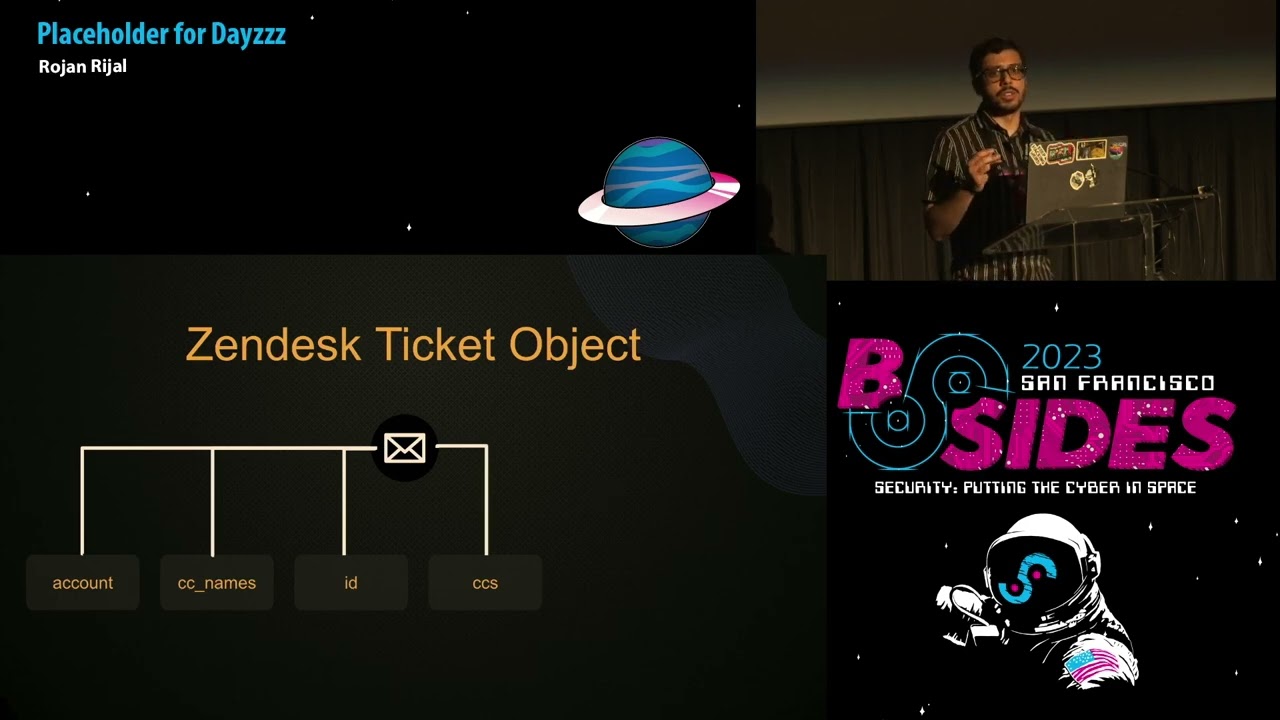
needed custom Fields will vary a lot depending on an organization so these are customizable by an orc if we think of an e-commerce company it is more likely going to have your most recent order your billing address your phone number and then any other important information they need in order to help your account versus if you compare it to a bank they might have it completely different such as your credit card balance or what is your credit card limit and more information there now if we compare that to ticket object it has similar kind of access the first one you can access is account field which is similar just like the current organization that's hosting zendes so
you will not be getting a lot of sensitive info there but it is still some information and then you have CC names which is an array of strings of all users that are secondary to that ticket so think of it as like carbon copy and emails or if you CC a user and if that user already exists in zendisk for that specific org it will include the first and the last name for that versus if it is and just an email address and an account doesn't exist it will just fill it with that email now if we look at ID it's the regular ticket ID not much going on there but there's also CC's now cc's are more of
an array of user objects so if we go back to what we looked at if we're able to access a list of all users the best way to do that would be by ceasing or adding a secondary email of a user that already exists in the system and then using CC's field to actually pull their information versus if you just use CC names you're just going to get their first and last name next is comments which is going to be both internal and external comments so if a company is using automated systems where they will have like monitoring Pages help Pages or whatnot and they Auto responded to the uh to the ticket it is going to be listed they're under
the comments and then finally the requester object or requester field uh ticket requester is a user object as well and it is going to be a user that already exists so if you're creating a ticket you are going to be marked as a requester not necessarily the Creator it will depend on cases in some cases you may be the Creator may not but in most cases you will definitely be a requester account granted now that we have done a little bit of high level of how zendis placeholders work if we actually put it in place this is how you will ideally use a placeholder in zendes with the curly brackets being taken.id to get the
current ticket then you can use ticket.ccs to get an array of all user objects that are linked to that ticket all secondary users there and then you can use ticket Commons to pull all internal and external comments and then current user uh to pull the current existing user now current user is pretty interesting it can be dynamic in a sense where if a company is burnable you can constantly pull information about the agent that's responding to your ticket so let's say if a company doesn't really disclose you information like email address or custom fields of an agent you can use the current user with the placeholder injection to actually pull their information it is dynamic as I
mentioned and it is also linked back to a user object so so far ticket requester current user and and then tickets CC's our user objects which allows us to pull user information now if we go back a little bit where I was talking about zendesk using sofifi's liquid template this actually helps us to program it a little bit so if we're accessing something like custom fields we can actually write a quick for Loop within zendes to kind of go through the key value pair and pull both the fields and its answers there same thing also goes if we're pulling for Ticket CC's so as I mentioned before cc's is basically an array so if you
want to pull all key values for a user at index 0 if you have added secondary users you can then actually use a for Loop for that as well if we were to take a look at an example of what a zendes placeholder example would be from an admin point of view this is what a automation trigger would look like so this is by default available on gendesk and it is the placeholder or the email trigger that gets kicked in whenever you create a ticket in sendisk once you do it it will fill the ticket ID with the ID of that specific ticket send you an email and you'll see that information there if we were to see more in detail of how
a agent response this is what it will look like from an agent's point of view so on the left hand side we have some of the custom fields that you can specify as a zendesk admin so for this the customer customer we have things like a phone number their address and then also their account number and you can also see the flag custom field I usually add that when I'm testing so that's where it is being used and this is how you'll have the custom field so if we look at how a agent will respond if they're responding to a ticket they can then use the placeholders for it from the UI side zendes makes it really easy where you
can just fill the information and it will tell you which one you want to select so you can actually select specific placeholders and it will autofill that as needed but if you have custom Fields it doesn't usually do it mainly because custom fields are something you are creating on the go kind of thing so it won't autofill it but you can change it and have it be different things so in this case this specific agent is using ticket Dot request her to get the user object for the current ticket which is the customer filling it with their name and their account number asking them to verify their account number once you submit the ticket info or submit a response it'll
auto fill that so that's what it will look like at the end of it but this is just an example of how a placeholder uses will look like hopefully fix that
all right so now moving more once we have looked at the regular design of how placeholder works we can actually jump into an exploit with the first one being patient zero AKA GitHub so as I mentioned before GitHub was kind of an accident of how I ended up into this whole uh looking at customer support vulnerabilities and all the placeholder injections with it basically GitHub has this really nice support portal at support.github.com and this is now kind of brand design it has been about two years since the new one has come in previously it used to be ran purely via vanilla zendesk uh vanilla zendes being something you whenever you sign up to send us the regular portal that's and
this provides you but now GitHub has transitioned more into integrating it directly with their user accounts uh you can create a ticket on behalf of an organization you can get a ticket on behalf of yourself when I was looking at that I wanted to see how it would actually work so what I did was I pulled GitHub Enterprise server code and I wanted to see where the code and the support light if you look at GitHub Enterprise server code it kind of mirrors the real github.com code as well except for some of the beta features or like new features that GitHub is working on so with support one since it had been two years it was more likely to be there
and looking at the request specifically I noticed it was using the tickets API which if we go back to early on tickets API is more of an admin endpoint so there are chances that we could abuse this to do some kind of a damage there so what I did was started looking at how tickets API Works versus requis API so if we were to actually try to visualize on this request we are sending a request on behalf of an agent to the tickets API endpoint if I try to send it on off it will give me authorization error because this does require agent and admin now if we look at the specific request the subject has a placeholder attached to it
versus when we look at the response the raw subject Still Remains with whatever input I provided but the subject input has now changed to the current user's email address comparing that to the request API endpoint it is more just Anonymous access so it limits what kind of requests you can send for example the placeholder gets sanitized or curly brackets get removed and it won't actually render the placeholder attempts there with this the goal was to see if GitHub was vulnerable so the first attempt I did was sending error filling out the support request with ticket.requister DOT email what this does is it's basically pulling my current user's email address so ideally if GitHub is vulnerable it should create a ticket
with the subject being my email address which actually ended up working indicating that the spurnability exists forward on GitHub so next thing was to just figure out what am I doing like what kind of situation is this what are they using in as user account so I tried pulling internal user info which is current user in this case current user being the user that's actually creating the ticket and we can pretty much guarantee at that point that it's running as an admin account uh through a bot account so it kind of confirmed that okay GitHub is using tickets API would send us in the back because the zendes placeholders are working and I'm able to
pull the information there next was to see if there's any kind of interesting info on internal comments so when you actually dump ticket comments for GitHub it had both external and internal comments internal comments in this case was mainly just internal links that GitHub will provide to their support agents to say hey like if you want to check is this user spamming go to this link and check for that if you want to check their most recent activity you can go to our Enterprise Center instance pull this username and it will give you details of that as well but this didn't really feel the void of what impact can I actually sow to GitHub uh so far I can pull internal URLs
internal user email address of the bot user and then also agent information whenever agents are responding but I was looking more towards pulling the user information such as any user in GitHub and that's where adding CC's come to use so when I was looking throughout the portal features that are there one of them was you can add secondary emails that will then be able to access your tickets so ideally if you're an organization it will make sense to add secondary emails to your ticket so they can respond to your tickets or organizes and tickets there but going back knowing that their species available and looking specifically at the tickets object we know that CC's Fields exist which
contains an array of future objects so I'm not just limited to Gathering first name last name I can gather more than that with that I basically created a ticket with the secondary user being my test account and then use CC's as a way to pull information regarding that specific account granted with GitHub there wasn't a lot of exciting stuff there it was still able to pull the basics that GitHub had on zendest regarding my Victim account you can then use like a for Loop to go through every single CC's user so in github's case since the UI already has it you can add multiple email address full user information all at once making it kind
of easier to extract or mass extract user data you can also specifically call Custom Fields just with the direct call to it or by using a for Loop now that was GitHub there but there were other more companies this one is redacted I cannot directly mention the company that was vulnerable but they also had moved away from zendesk to a support system or their own support system that requires their authentication and then create a ticket which ends up going to zendesk when I noticed they had recently changed I gave it a shot and see if they were vulnerable so the first test was to create a subject with the messes and then put together ID so ideally if it is
vulnerable this one should be pulling the current ID and sending me an email and that's exactly what happened so kind of breaking it down in the back of what had happened is this specific form would send a request in the back end to zendes tickets API which would then as we noticed before there will be two fields to it which will be subject and raw subject the subject value will change from ticket.id to actually three one nine two eight nine eight one which then gets added to an email trigger in zendesk which will say re-placeholder ticket.subject we got our ticket thank you for letting us know we'll get back to you soon and that's where the automated filling came into
place there as well next thing was when I was going through the request I wanted to pull user information to it and I basically noticed that it was sending a graphql request and if we look at the mutation calls the variables had a cc variable that it could pass in with an array of email addresses and these are necessarily all secondary users we're adding in further down where basically if I added a victim email address it would pull the information of that user and then send me that so in this case I specifically called custom fields and it only gave me the fields Associated to that user account which is a little bit more than
what the subject header could fill in so you could also use a for Loop there to only pull a specific key value or only list all the keys and then based on that access that specific key and see what information it had one thing I noticed here is not just for regular users but for agents you could pull more information than just their first name last name and email for example with custom Fields they already had employee ID their start date end date all of that their last login and more informations there finally for send us the last example this one actually ended up having more impact than was uh like kind of what I thought it
would be so basically I was looking at this company and they had created a business partner portal kind of pace it was being hosted in Salesforce so I was looking mainly for Salesforce vulnerabilities there but during that time I noticed it was also using zendesk because every time I will make a ticket on Salesforce it will end up emailing me via send this so there was something weird going on which later on I identified that it was using a third-party integration so they hadn't actually written their own API calls they were directly using a third-party product to link Salesforce to their zendas as well as their chat models uh they also had like Facebook and Twitter
messages and all of that and everything was being linked to one place through this integration you could do at that point is create a ticket and basically pull the current user information and the Agency information so for this one I couldn't really pull other user information but I could put like agents activity uh agent notes and all of that for different agents but then also dumping the email address of the current user gave away that it was using an integration which uh when looking at the impact it ended up roughly impacting more than 100 companies so this third party integration specifically uh it has about 6 000 customers however when directly looking at how minis were linking to
things like Salesforce to zendus and whatnot there were only 100 250 companies that were vulnerable to this specific case um and then kind of looking at the root cause it basically turned out to be the same case where it was calling zenda's tickets API you'll pass in an API key to it so it will create a ticket based on that uh put the user information and then any company that had their own customer support pay so you could see that information Auto filled in now that said that kind of wraps the zendes case we'll move to Salesforce but before that a quick flag again is this is not a vulnerability in zendus it's more of how these Integrations worked
and same thing happens with Salesforce does the caveat with Salesforce being that it's kind of harder to exploit uh versus when we compare it to zendesk so Salesforce does have a case where you can do placeholder kind of attacks or placeholder injections it has placeholders support but it also has some limitations on how it can actually be used so for example it has suppressants in place that are more restrictive than set desk so in zenda's cases we had separations on this end user ticket creation uh or ticket updates but in this case it was also impacting or it was limiting uh uses of placeholders unless they're being directly used through the Salesforce UI or to a specific API calls
the one good thing about Salesforce though is it has access to way more information than sendisk when we think of zendesk it's purely support system there isn't much going on else there versus if we compare it to Salesforce it has access to marketing leads user information support bases health information what not depending on what the company is using it for so the level of information that can be accessed with this was pretty exponential there it is as I mentioned before kind of hard to exploit so it kind of works via forms like we saw examples with GitHub or other cases in zendesk but for Salesforce it's kind of hard to exploit there and it requires a specific use
case via email addresses or directly via sending email and then also most of the automations are sanitized so with zendesk exploit was pretty instantaneous you don't even need a user agent or customer agent to get back to you you can just see that email with the exploit run it right in place and you don't have to necessarily do anything there but in Salesforce cases it was more sanitized and it requires a level of social engineering now the social engineering part here is not necessarily things where I had to tell a support person like hey put this placeholder and send me an email but more of kind of sneaking in the placeholder in your email body and then waiting for the
customer reason to respond to you which will then autofill the placeholder information there um similar to zendesk Salesforce also has quite a bit of objects in this presentation I'm going to cover specifically two objects user and tickets or user and cases but there is about 25 different objects that you can access via placeholders and they are kind of linked between each other so if you're interested on that Salesforce has a visual Force Base where you can learn about their templating design their placeholders and how they can be used if we directly look at user objects in Salesforce even just the limited access there's name email address Mobile account ID and contact ID while I have
seven here there's about 15 other fields that you can access as a user so there's more sensitive information those could be accessed but name and email address are pretty giveaway address in itself it's kind of new right now so previously you could access street address city state and then the country of the associated user but now it has moved more into the Beta access to Beta access where you can just use address to autofill all of that information at once now if we look at case object it is kind of similar to zendesk you have a case ID you have owner contact ID priority and thread token as well as description the thing to highlight about the owner is
specific the reason I put underscore there is because there's other information you could access with owner so for example you could do case.owner email case.owner address so it's kind of like accessing user object but it's already linked so you don't necessarily have to do that now if we were to see examples of placeholder wise there is things like case ID it kind of changes if you notice on the design for zendes versus Salesforce so it required a little bit of resource there as well and then there's user email case owner emails and account billing address so if you'll notice as I mentioned before user and case are couple objects example but there's like 25 other objects account
being a one so what happens similar to zendesk is if you create a case your user account if it already exists can have other information associated with it and that are the objects that you can access separately and those could have more sensitive informations to it uh if we look at it from a agent point of view if you create a ticket so in this case let's say O'Reilly has created a ticket their account can have more information than just their regular info like phone number email and whatnot they can also have an account associated with them which is what account dot billing address later is used so in this case Riley has an account called trial render
which if we look at has its own billing address and phone number associated to it in addition to that an account can also then have access to other contacts so from ryler's account you can move into the specific account they're linked to or the business account they're linked to and that business account has its own contacts information which can then be autofilled as well so if we look at from a example similar to how we looked at with zendesk you can basically uh respond to a user via sales versus own UI feature where there you can have a placeholder be used which then gets auto field so you can see for O'Reilly's we can then pull their
account information autofill that on the email response um this kind of is a design of how Salesforce Works looking for vulnerabilities specifically I tried about five different cases both ranging from automation to workflow automations automated response users and response and whatnot and one that is quite common and is always going to be vulnerable is whenever there's a email header being used called quick action email this kind of identifies where the email originated from in Salesforce which is pretty much the same place that we are seeing here which is the email body response that Salesforce has pre-built into the service Cloud if you are testing against things that could be using things like workflow automations or any kind of
other alerts they're most likely not going to be vulnerable and that is where like it's kind of gets hard to impact a Salesforce instance versus a zendesk where for zendeska test most likely will work if they're using a custom portal now the first exploit for Salesforce itself uh kind of comes from the social engineering point of view so this is where I mentioned before is it kind of requires uh you to wait for the agent to respond and sneak in a placeholder and the kind of a clever way to do that is by using white space fonts so if we look at in an email address you can change the font spellings font colors whatnot
uh doing that it's also reflected directly in Salesforce so from a attacker point of view you can sneak in placeholders wait for the easing to respond and then pull agents information so this one specifically only works if we're trying to pull the Asian information not other users information for Asians itself it kind of gets impactful because you can then pull their addresses their information accounts that are linked to them and then also contacts info so kind of spread from there what it will look like from a agent point of view is when you respond to a ticket you will have this responded directly from email it's pretty identical to just doing a reply all in a
Gmail instance or Yahoo it will append the previous email of the user and then that information gets sent to the user which if you retrieve your email and look at the highlighted person it automatically Fields it so in my case I just ran a test with case ID to see if I can actually pull certain informations and what not there um the other one is a more redacted case again of a company that was furnival and similar to zendesk or similar to other Orcs that were vulnerable they had also created a custom support base where you could email experts uh and ask for a question regarding your account and account help and what not there but it
basically if you look at the email response it was indicating it was using something like an email reply that Salesforce had looking at the header it had the same thing which was the quick action email knowing that I wanted to see if I could test it so this is where again the social engineering kind of comes in is I send a ticket in with just saying how do I resend my account info uh provided user.email which then when they responded included their email address of the agent even though that's not by default available on Salesforce or I can't see the agent email this actually ended up working there as well this could then be leveraged to pull
their address the final exploit case for Salesforce would be the CC with the twist in a sense uh so in genesk we exploited cc to pull the secondary user information here instead we want to be the user that's getting cc'd and then link a victim user as the main account when we are creating a ticket so in this case this specific company you could create a ticket with an email address and then also add a list of cc'd users who should be getting updates so in our case we ideally want to link our account as cc'd and then the main user account or the victim account in the email address what happens here is every time they're emailed we get a
copy of it and if we are using a certain placeholder in description or other cases it will autofill their information rather than ours so we're extracting those info without them directly having an interaction there this again requires the agent to respond so in general for Salesforce you need a agent response for the exploit to fully work this is what the regular exploit will look like in that case that said that was pretty much the two specific cases however there are more support systems worth taking a look at um I did spend some time looking at zero service desk it does have placeholders in place but it is way more sanitized and harder to exploit uh for example if
you just send an email with placeholders even though you are already a user in that jira instance and it is a internal system it doesn't automatically fill that details there same thing kind of a servicenow you can do the agent exploit technique similar to how Salesforce would work but it won't automatically fill the information there either so not uh not much of these systems were as easy as the cases for Gen disks where we could directly pull user data there even for Salesforce it has a lot of API calls there are places where you can directly design a form to access the API and then pull user information based on that so those could still be vulnerable I didn't have the
time to directly look at it so it is potential future places towards spending efforts there that also there are other support systems so there's like help Scout rest desk and others that are maybe still vulnerable it depends on how they are used what kind of apis they have for example I know freshdesk is kind of identical to how zendesk works so maybe that also supports placeholder that could be exploited there's also marketing things that are available that use similar technique and in the end also chat Services where you can automatically chat with an agent tend to usually have placeholders there so if you are extracting your ticket history or chat history you most likely can't
pull those informations there too um that said this wraps up the presentation if anyone has any questions I'm happy to answer them you can also send me a message on Twitter asking for any questions you may have or feedbacks that if you have any as well
do we have questions from the audience nope
thank you hey thanks for the talk uh I was curious for the customers that use zendesk as a backend how are you finding kind of their custom Integrations like fingerprinting them some way or yeah so for most of the ones that I looked at it was with prior experience so for example GitHub was I already knew they used zendes before since I had to utilize the feature uh for a couple of them fingerprinting did work for example looking for a zendex subdomain so I'll as an example like let's say if you go to help.company.com if it already redirects to in the path slash HC slash en US which is the vanilla zendes design those are usually just plain Genesis
there's in any customization done to it so I'll just like leave them alone but let's say if I go to a help page there's login create tickets all of that but it doesn't indicate it's using zendes or Salesforce directly there it is more fingerprinting like let's see if I can find a Zenda subdomen with that company name if it exists there's a chance they may be vulnerable and then finally uh creating a test ticket or something to see what email response I get so for example for zendesk if you look at the email address it use easily has a footer that says this was sent by this company via zendesk same thing with Salesforce if you saw the picture previously it has
a thread token slash like ref colon on it it kind of identifies that it's coming from Salesforce it also has like email headers so that kind of also helps to fingerprint that information there great thank you no worries thank you any more questions once twice sold sweet a quick note we'll also have a Blog on this out but that was probably going to be end of this week so there will be a couple of days delay on that on that thank you awesome set 2023 when I thank you with this token of appreciation and uh thank you to our sponsorian SEC thank you thank you thank you everyone
Related talks
 28:29
28:29 29:24
29:24 32:13
32:13 30:17
30:17 38:53
38:53 32:39
32:39