Active Directory Enumeration with LDAP
Show transcript [en]
all right welcome back uh from the break uh today we have with us Steven Bradshaw who is going to be sharing with us active directory enumeration with elder uh welcome Steven thank you thank [Music] you thanks everyone for coming can you hear me all right yep today I'm going to be talking about active directory imtion using elap so who am I my name is Steven Bradshaw I'm currently a principal security consultant in the offensive security team at seek I do a bunch of different internally focused offensive security work so I do pentesting vulnerability hunting red teaming purple teaming and I build and maintain systems for use in offensive security work so this is an overview of what I'm
going to be talking about today I'll talk about how active directory and ldap are interrelated I'll talk about the types of information you can get from elap from using from Act and the security relevance I'll talk about the technical details of this data collection and I'll talk about some of the enumeration tools that can be used for this purpose for the purpose of attack information getting attack information how the tools work and what their limitations are so what is elap how does it relate to active directory and why should you care elap stands for lightweight directory access protocol and it is essentially a vendor neutral standard that allows you to query information about Network objects from a directory
service such as active directory active directory actually uses elap as a mechanism by which clients can query information about Network objects and as such each domain controller by default includes an ldap server listening the relevance for attackers is that under the default settings any authenticated user can quickly gather a large amount of information that's useful for identifying or facilitating attacks in one place so the information you can collect includes information such as permission relationships between objects so what objects can act in which ways on what other objects you can get lists of domain users and their details you can get list of domain groups and their memberships you can get list of the computers that are a member of a
domain you can get information about Which object Group Policy objects apply to you can get information about trust relationships with other domains and the nature of that trust relationship and you can get information about the configuration of active directory certificate services so this information can be used to identify the opportunity to perform a number of different types of attacks that are useful for lateral movement and privilege escalation so some of these attacks include CB roasting and as rep roasting gold and silver ticket creation active directory ACL abuse so that's basically identifying opportunities for abuse based on active directory ACLs DC sync domain and Forest trust abuse constrained and unconstrained delegation certificate Services attacks and you can
use ldap to actually directly recover certain alternate password types if you have the right permissions this includes passwords such as laps so the process of actually collecting a lot of this information particularly if you're specifically considering it for the purpose of attacking active directory um can be quite complex in certain ways and it's best to use custom tools for the purpose however while these tools are really great and they do a lot of work for us there are cases in which they can fail in unfortunate ways and due to the value of the information we can get it's really good to understand how the collection works so we can troubleshoot any issues and so we can pursue
alternate collection strategies where they might be appropriate and whether they available so that being said let's dive into the detail of how this collection actually works so I've outlined here a four-step process for actually performing this collection the first step involves discovering the domain controls that you actually want to enumerate second step is connecting and authenticating to a particular domain controller third step is quering and paing the data so it's a useful format that you can use then finally you want to be able to interpret and present it in a format that useful so you can actually identify useful attack opportunities so in the following slides I'm going to talk about each of these steps in
detail we'll start off with talking about how to actually discover domain controls on an unfamiliar Network so a concept that's useful to be aware of in this case when we're talking about identifying a divain control that we want to enumerate from is the concept of the global catalog so this is essentially a server role that's associated with domain controllers in an active directory domain servers that have this role basically can return information on any object within the forest so if you're looking for a particular server to enumerate from these are the best types of servers to preference the global catalog servers the first discovery method I'm going to be talking about is Port scanning so each domain controller
basically exposes a very unique set of ports to the network that that's required to basically perform its regular operations and the combination of these ports makes it really likely that the that any server that exposes all these ports is a domain controller so those ports include ones such as TCP UDP 53 which is DNS TCP 88 keros TCP 309 which is the plain text L that Port TCP 445 which is the Cs file sharing port TCP 636 which is the secure elap variant secure as in TLS protected and you'll often also see a number of different Remote Management Services such as RDP which is TCP 3389 Windows Remote Management TCP 5985 and the secure version of the same TCP
5986 so if you identify a single domain controller by this approach the port scanning approach there is a way by which you can determine it is a global catalog server uh it's not the easiest approach and I'm going to be talking about an easier approach to this later on but what you can do to determine if a particular domain controller is a global catalog server which you can per an anonymous bind well with L app using tools that allow you to do this and check for a particular property that is the info other is global catalog ready property so this is present in the L server settings under domain controller that server is a Global catalog
server so this General method of Port scanning is a good way to start a discovery process on an unfamiliar Network because basically all you need is just some Network range information that you can actually hit with a scan now let's look at the second Discovery method so this is DNS so if you know the DNS domain name associated with an active directory domain and you can perform DNS resolutions against that domain's DNS database then you can actually identify domain controllers and Global catalog servers using two different DNS enumeration approaches so if we take an example DNS name of example.com if we do an a lookup of example.com that'll give us a list of all the IP addresses of the domain
controllers within that domain secondly if we look up a record with the name of gc. mdcs example.com that will list the IP addresses of the global catalog servers within that domain so this approach is good for identifying all of the domain controllers quickly however you need some information you need a domain name and you need some access you need to be able to do DNS queries now the question you might have at this point is if you don't know the domain name how can you actually go about identifying it if you've gotten access to a network via compromising a Windows machine that's a member of the domain then you can obviously get that locally from that
particular machine but if you haven't gotten access in that way there's a couple of different approaches you can use so basically starts by finding at least one Windows machine within that domain via port scan or other method and then using one of these three methods to actually pull back information about the server name of that machine from which you can infer the domain name of the DNS the active directory domain so this can be looking at certificates PRS presented by PS services so some examples on the slid there are elaps RDP htps and windows Remote Management so basically if you um connect with something like the um open ssls client you can actually get back the
certificate and look at the details of it you can also do one of those ldap Anonymous binds that I mentioned earlier and that server information will have information about the domain name of that particular system the best approach the one I like the best is using this tool nlm Challenger which is actually linked on the slide so what you can do with this this tool supports a number of different approaches of enumeration um my favorite of which is the sifs enumeration technique if you find an open sifts port like a file sharing Port Port 445 open on a Windows box it's a member of a domain you hit it with this tool remotely without authentication it will
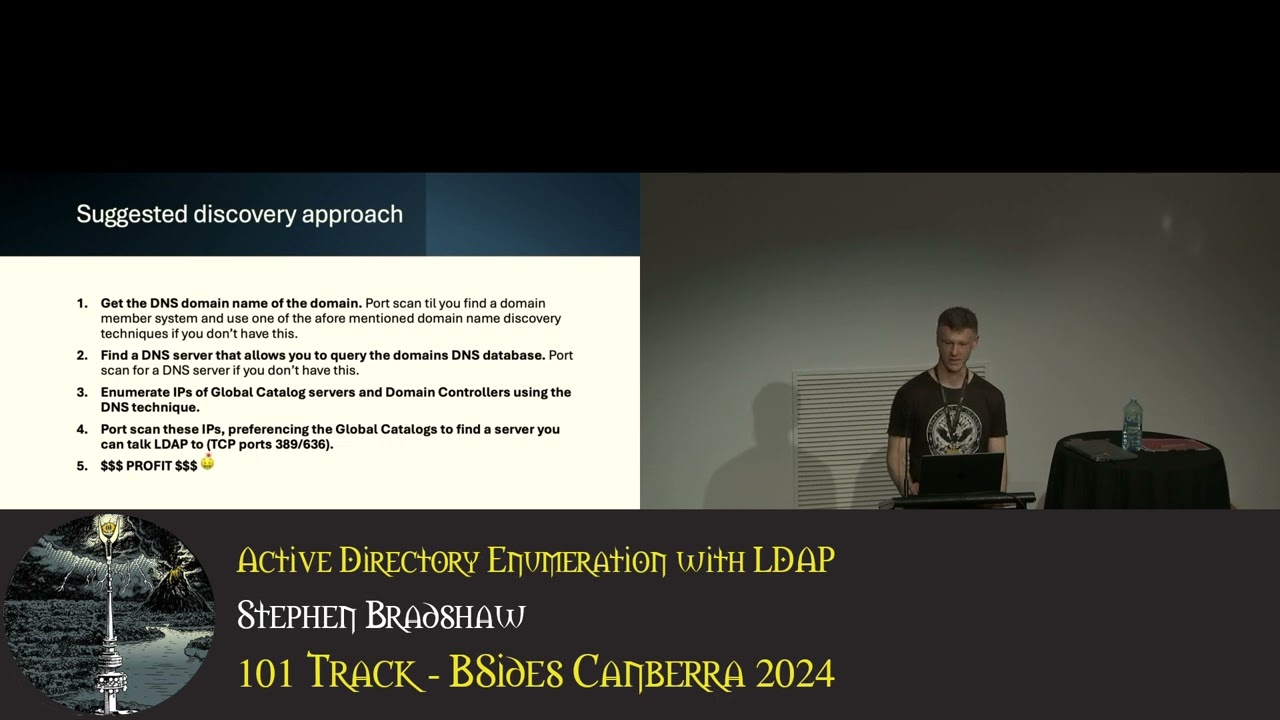
actually give you a bunch of information about the domain membership of that machine and that will tell you the DNS domain name associated with its domain controller now the best approach to actually do this type of enumeration is to combine the techniques together so my suggested Discovery approach is as follow first you get the DNS domain name of the associated domain Port scanning use one of those techniques I mentioned earlier then find a DNS server that you can use to do queries against so ideally you'll find a domain controller by Port scanning and use that because that has an exposed DNS server that you can use directly but sometimes you can find cases where other DNS
servers will recursively resolve to that server and you can use that instead so find a DNS server by scanning for Port 53 then use the DNS enumeration technique to enumerate the IP addresses of the global catalog service and the domain controllers using the DNS technique I me mentioned earlier finally port scan all those IP addresses with a preference for the global catalog service to confirm that you can actually talk to them so just because you can see them in DNS enumeration you can get the IP addresses does not mean you'll be able to talk to them from wherever you are on the network and the specific ports you want to be able to talk to are
generally 389 or 636 for ldap so we've talked about how to discover domain controllers now let's talk about how to connect to them so we want to connect to one particular domain controller pick one that you can talk to and that is hopefully a global catalog server then for the purposes of the enumeration that we're talking about the basic communication only requires that You' be able to talk to one of those two ports ldap which is TCP 389 or secure ldap which is TCP 636 you've got a number of different authentication options you can actually use so you can use anous authentication an anonymous bind you can use ntlm either a plain text password or you can
use pass the hash if you're familiar with that technique you can use Simple authentication which is a username and an unencrypted password it's Unique to elap that particular specific approach and Coss so there are some additional caveats for Cur Ross you need to perform the bind using the DNS name of the server and not its IP address and you will need to be able to talk to TCP Port 888 on a domain controller if you don't have the appropriate service ticket already cached now in terms of the access provided by these different authentication methods um the anonymous bind will generally only give you information about the elap service itself it will not give you any
information about any directory objects there can be cases where the active director domain is misconfigured and you will get more information back but this is kind of rare by default you'll need some form of valid credentials to actually get back most of the data that we're going to be talking about in this presentation so now at this point it might seem like I'm really kind of belaboring simple details but this amount of detail or these particulars really become relevant if we're connecting to the domain controller under some form of restricted circumstances so if we need to talk talk to it by port forwarding if we need to Tunnel through a C2 implant or if there
are restrictive traffic rules in place in a firewall or something similar to that there's a couple of other caveats that apply to ldap S as well so this is basically listening on TCP Port 636 and it requires a TS negotiation to be created before you can communicate on this port now you can have cases where port 636 will appear to be listening on a domain controller so a port scan will show it open but there is no certificate configured associated with the ldap service and in these cases you're not going to be able to talk to it via ldaps um you generally see this on new or underc configured domain controllers hopefully you won't see it too often but
I've seen it a few times in addition there can be restrictions on certain authentication methods in such that they will only work using secure ldap so you'll be able to tell if this is the case if you try and log on with what you believe are valid credentials to the plain text L app and you get an access denied so if you see this it's worth trying again with secure ldap to see if that is the problem so we've talked about discovering domain controllers and connecting to them now let's have a look at querying so this here shows a diagram of what an ldap hierarchy looks like so it's a hierarchical structure set up like a
tree and when you perform queries you can perform the query at any level of the tree and the query can be recursive or not ldap also has its own very very unique query language that we're going to have a look at in a moment takes a bit of getting used to and it works by filtering objects to return based on attribute values so this here is a very simple example of an ldap query so each ldap query is comprised of one or more query conditions which are grouped together with sets of brackets and in this case what we're looking for we're looking for the object class attribute of the object to be equal to the value of group so as you
might expect this is looking for group objects so the queries can also get a lot more complex so you can have multiple query conditions you can have value wild cards which is an asterisk you can group queries in various different ways logical ands and ores those are ampers ands and pipes respectively and you can negate query conditions an exclamation point so when we consider the ands ores and negations these actually go within their own query condition so they need to be surrounded by their own set of brackets which basically group together the the condition that the negation or the grouping applies to so this here is an example of a query that is anding two
different query conditions so we're going to have a look at it in a bit more detail on this slide here so essentially we open bra up bracket app is and for and we have our first query condition immediately following it we have our second query Condition it's one of the unusual things about this syntax and then we close it at the end with a set of brackets so to break it down we've got an end and then that condition and then that condition so the and can have two or more conditions in it and they just basically go directly after each other like this so no commas no separators they're just directly after each other it's one of the unusual
things about this we also have a concept of special comparators so a lot of the other examples we've looked at so far have used a simple equal as a comparator in the query condition we can use these operators to do more complex types of comparisons so we have four different types that are supported within the active directory elap standard these include a bitwise and a bitwise or a transitive eval and DN with data uh the last two are very rarely used I don't think I've ever seen examples of in life um transitive eval is basically quering across links and that's out of scope for this talk DN with data is basically matching on a portion of a binary
value so this particular example that we have here shows an example of bitwise anding so let's explore it to see how it works so this query is basically looking for Kerber roastable users so these are basically user accounts for which you can capture a Kerberos ticket and you can subject that ticket to password cracking and then you can get that user's password back it's a MTH isn't it um so this query is anding a bunch of different conditions we're anding object class equals user service principal name equals asterisk this just means a service principal name of some value must be set then we're negating a condition cnal krbtgt CN stands for a common name of an
object and here we're basically looking to exclude the object with common name KBT G GT which is the ceros ticket granting ticket account um essentially it's got a long randomly chosen password so we're not even going to bother trying to crack it then we have a final condition which is also negated the exclamation point and we're looking at the user account control attribute and we're using a bitwise and and we're looking for the value two so what is this doing exactly so user account control actually stores an integer that represents a number of different properties that relate to user account security so basically if you want to find out if any of the individual properties stored by this is present
what you need to do is you need to know its Associated integer value in this case we're looking for two and you need to perform a bitwise operation to extract and see if that property is set or not so in this case two relates to disabled users so what we're doing here we want users with a service principal name that are not named that and are not disabled so this example comes from that link down the bottom there and that has a bunch of other similar examples of queries that are attack specific and there's two more here from Spectre Ops so we've talked about finding domain controllers connecting to them and how to actually query data
now let's look at how we actually interpret what we get back so this here is a screenshot of a number of different attributes associated with a user object in my test active directory tree so if you look at some of the values you will note there's a wide variety of types we've got integers we've got dates we've got strings we've got Boolean values we've got binary data and then we have values like our user account control which is comprised of a number of other properties that we have to extract via bitwise operations so in terms of interpreting this data the difficulty obviously ranges from quite easy to relatively hard so if it's a simple straightforward string or
number that's pretty straightforward if it requires bitwise operations and for you to know the values of various different Flags that's a bit more challenging then you've got binary attributes which require very specific passing that's challenging again and then you need to find a way to establish relationships between a lot of these objects and sometimes those relationships are based on paing one of these other difficult attributes so this is really the point where if we're looking for a tap specific use cases that we need to use tools so for the rest of this I'm going to be explaining how the process works bya the medium of a tool the tool is blood hound which some of you may have heard of so this is a
tool created by spectr Ops a few years ago the purpose is basically to identify attack paths and hidden relationships within active directory domains uh it does do Azure now as well I won't be covering that in this talk so the tool works by basically collecting a bunch of network information it puts it in in a database and it uses graph Theory to identify relationships between objects and then it presents it in a helpful way so you can actually actively use the information to find attack opportunities this here is a screenshot of The Blood Hound Community Edition so we've got a few different components in this user interface in the center here we have a yellow
object that is surrounded by a number of different green objects there are links between these objects to indicate that a relationship exists between the objects each of these links is labeled to indicate the nature of the relationship so in this case the central object is a group the surrounding objects are members of that group and all the lines and descriptions indicate this over on the right here we basically have a number of different properties associated with a central object that we can look at if we want to top left here we've got a search field which allows us to search for the object that we want to appear here by name then we have a very interesting
option path found finding what this allows us to do is try and determine if there are relationships between some object we have control over say we've compromised a user account and some other object that we might want control over such as the domain admin groups pathf finding will tell us if there are relationships between that object and other objects in between potentially that indicate an attack path exists to go from one object to another to go from simple access to maybe domain admin to actually populate this information Blood Hound has a set of tools known as collectors and what these basically do is they query the active directory environment in various different ways take the data specially format it
PA it put it in Json data files and then those files can then be uploaded directly into the blown user interface to basically populate the data that we're going to be looking at so what is the relevance of all this to ldap so when we look at the way the collectors actually work we find that the majority of the information that they get at least specifically for active directory is available to low privileged users comes from elap and can be collected rapidly from a single source source one domain controller uh there are other categories of information as well other collection approaches that the tools use they often require more time more connections to more systems higher privileges and they
can be more likely to actually fail so they can be you can increase the opportunity that you might get caught without actually getting value back blood hand also has a concept of collection categories which largely align with these collection approaches and we can actually look at these to determine what components of the collection are done using ldap so what we have here is a screenshot from the source code of sharp Hound which is basically the C what I call the reference collector for blood hound active directory specifically so in this this is a listing of all the different collection approaches that are supported by the tool so we've got a number of different individual approaches here which have numbers
associated with them and then at the bottom we have groups of these different collection approaches and the groups are basically kind of put together based on either the Target that they're going after or the collection approach or technique that they're actually using I've got one category highlighter that we're going to have a look at in more detail but first I'm also going to mention that there is some stuff that shound doeses that it collects that is not associated with a collection category this is basically stuff that it just needs for every operation it's the the kind of Baseline for what it uses what it considers to be the standard and this is collecting information from elap again on users
computers and the domain and Forest objects so the associated elap um names of those different objects are included on the slide now let's jump over and have a look at this category of collection approaches known as DC only so as you might guess the category is named this because it is collection that can be done from a single domain controller and when we look in detail how each of these work we find that the majority of them only use ldap there is one exception which I've crossed out right here GPO local group this requires that you connect to the file system of the domain controller pull back its Group Policy objects and pass them for
local group membership information let's have a look at these in detail and see how they Rel light to elap so these four categories of collection basically just involve getting particular types of EP objects so we've got containers which is getting container and organizational unit objects from EP we have groups which is getting groups and they're members we have trusts which is basically information about trust relationships with other domains that is the trusted domain objects and we have seert Services which is about the configuration of certificate services and those are these three objects next we have the object object props category so essentially when sharp Hound or other Bloodhound collectors actually pull back information on network objects
they only get a limited set of information if we have object props turned on more information is collected and in the case of users and computers for example this is stuff like the last log on time and the password last set time now even with this turned on it doesn't mean everything is collected there is still a bunch of default values that are not particularly useful that it excludes um there is an option to actually pull back all attributes um in most cases this will not be useful but there can be cases where there are custom attributes in an active directory domain which can have useful information and you're basically only going to know about it if you try
and pull back all the attri values or if you look in the schema so so far so good all of those are pretty simple however there's one category that I've left for last and that's the ACL category so the ACL category is relating to object security relationships and it basically describes the ability to access or control that the object that it's assigned to so basically when we're looking at a lot of those different relationships in The Blood Hound interface a lot of these are actually filled in by this category so this basically has the information about what can do what to what what can and from that we get information about abuse potential so the required info for this
comes from one attribute on each securable object it is known as the NT security descriptor it's a binary field that has multiple components in it and it requires specific paing to make sense of it contains four different main components it's got an owner user and an owner group both of these are referenced by Sid so Sid is a security ID which is assigned to all security principles with an active directory domain and it's Unique within the domain if you want to turn the Sid into a friendly name we've got to do a look up to identify it then we have the discretionary access control list shorten to daal and this defines permissions individual permission sets for principles accessing
the object then we have the system Access Control list shorten to sackle and this defines the auditing configuration in place on each active directory object the last one the cycle is not used when we actually do this AC interpretation for finding abusable permissions this here is what the structure of that particular object looks like there's more problems though so as I mentioned this particular attribute has multiple different components three of which we need one of which we don't but not all of the components are actually readable by all users so the bits we need the owner user the owner group and the deal are actually readable by all authenticated users by default the CLE component however needs a
privilege permission to actually get or set it's known as the access system security permission most users don't have it and the presence of that one attribute or that one component of this attribute can prevent us from getting those bits we're actually interested in so how do we work around this well elap actually provides us a query control that we can use the elap server SD flags oid and what this allows us to do is provide a mask value for the comp components of this security descriptor we actually want to return so if we set this on every query that we perform where we want to get back this attribute and we use the value seven this will
mask in the owner user and group and the deckle and it will mask out the sackle so what we will get back essentially is this structure but the sackle component will be all zeros then there's more paing to do so the daa list has a list of Access Control entries and basically each one of these links a security principle with a set of permissions that they have to that particular object and it makes up the majority of the information of these abusable ACL permissions Aces have two main high level tapes uh they can be allow or deny Blood Hound when it's considering abusable permissions is only looking at allows so the denies a completely ignored in addition The Blood Hound
collectors also simplify the interpretation of a lot of these Aces down to abusable permission sets only so in some cases certain Aces will be completely ignored if they don't contain an abusable permission in other cases they will be simplified down to the abusable component now when we're passing this there are two different types of these types of aces of the allow Aces that we need to know about to pass they are the access allowed Ace and the access allowed object Ace let's have a look at what they look like so both of those two different types of allow Aces is a standard header which looks like that then the access allowed Ace the simpler type in particular looks like
this so it has a mask which stores an integer value and then it has a Sid which is a uh security ID as previously mentioned and again this needs to be resolve to a friendly name via a lookup process now on this next slide we'll see what we see when we actually pass one of these Aces so we have our Sid here then we've done a lookup to resolve this to a friendly name in this case it happens to be a group object then down here we have our mask integer value and the mask is actually used to determine these privileges the way this is done you need to know the full list of privileges you
need to know numbers associated with them then you need to perform bitwise operations against the mask to determine which of the Privileges are actually present so that's what this particular ped Ace looks like now let's have a look at how Blood Hound The Blood Hound collector actually simplifies it so it comes down to this basically so it's a lot simpler we have the seed still instead of resolving the seed to a friendly name in this type we've resolved it to a type of object so in this case it was a group then this right name here basically describes the abusable permission component so if we go back to to the previous full version of this Ace you
will see we've got a number of different permissions generic all happens to be there and in this case this is basically the highest level privilege in the list it's basically like the full control of active directory so it's simplified just down to one permission set now let's have a look at the other type of this this type of um Ace so it's quite similar in a lot of ways to the simpler version except we have a few additional Fields we've got flags we've got an object type which is a guid value then we have an inherited object type another guid value now as I mentioned both of these are guids they need to be resolved back to a friendly
value by a lookup of that guid in the ldap schema and then you need to look at the flags value to determine whether you actually pay attention to either of these as part of the passing of the ace so here is an example of a p one of these Aces so the additional fields of Interest are the ace data Flags in this case it has Ace object type present and that means we need to pay attention to the control object type and we resolve that to a friendly value by a goid lookup now let's have a look at The Blood Hound representation of same so in this case the other components are pretty similar to the
previous one we looked at but the right name in this case has been deduced from two things at once and I think in this case even it's from two entirely different access allowed object a objects so we' basically combined two into one so why did I subject you to all that information exactly what's really just to drive home a point the ACL stuff is really really useful when we're looking for attack opportunities but it's a real pain in the ass to actually get it unless you have some sort of tool to do it for you or to put it another simpler way just use a
to there's a problem though um as I've shown sharp Hound does a lot of work for us but there's cases in which it doesn't operate as you would want it to so let's have a look at some of the limitations of the tool to see how this might happen so one of the biggest issues that you might have in using sharp hand is that it's basically designed with a particular premise in mind it's designed to run on a compromised Windows machine usually a workstation that is part of an active directory domain that you want to actually enumerate so as such it has access to a lot of information about the domain it's a member of it can generally
talk to all the right things it needs to talk to and it has access to an active authentication session that it can abuse to actually make the connection that it needs to make and query the information that it needs to query if you try and run the tool in other circumstances you can have difficulty so if you need to specify credentials in a really particular format that can be difficult if you're trying to run from a location where you don't have free and easy access to the domain controller that can be difficult if you don't know where the domain controller is can also be difficult so that's one big problem the second problem is it's very
heavily targeted by lots of different security tools it's pretty well known and there's a decent chance you're going to get detected or blocked if you just run it blindly without thought
so in the cases where that tool doesn't work there are two different Alternatives I'm actually aware of the first is the python version of Blood Hound so as you might guess it's basically a python implementation of a lound collector and it uses a lot of the same collection approaches that are supported by shound so it's not just elap uh it does work on machines other than Windows machines and it gives you a lot of flexibility in terms of what authentication approaches that you want to use and how you want to specify those credentials which is nice um it is still reliant on good network access and DNS for it to actually work and can fail if
you don't have this and it's also in some ways an older implementation so um the current Fork of the tool doesn't support the new blood hound user interface there is an alternate Fork that does however I don't think either one of them actually supports some new features such as collection of information about some of the certificate Services attacks then the other option which I'm slightly biased towards uh is mying uh it's named ad elap dumper so have a great imagination when it comes to naming tools um it's elap only and it's very very configurable but it's a lot harder to actually make use of so bit more detail about my thing um I wrote it in Python it runs on multiple
platforms again uh it Sports a number of different authentication options so you can do Anonymous binds you can do user and password uh it does ent pass the hash you can use keros tickets so if you're familiar with how some of the impacket examples uses Kerberos um this does the same approach basically pulls from a local C file one of the best features I think about this tool is the fact that it's basically designed to work with a minimum required access so if you can talk to the right Port so TCP 389 or 636 and you have some form of valid credentials it's probably going to work and it's going to pull back all that
good information you want um it also tells you when you're connecting and when you're enumerating whether the server you're talking to is a global catalog server or not and it enables you to do some of that Anonymous bind collection information collection approaches I was talking about earlier there's also a number of different options I've added to it to allow you to avoid detection of various different kind of service side detection methods and about 6 months ago I added an option to actually produce Blood Hound output files so normal people other than me can actually use it so the tool previously used to dump all the information into Json and um no one else I showed it to was able to make sense of
it so I decided to add blood hand output so that normal Mortals could use the tool as well um why did I write this thing um basically because I needed something that worked under those restricted circumstances uh and there's some options about avoiding detection that were very useful to me at one point um not So Much Anymore um basically um there's options in there to allow you to avoid tools like Defender for identity and probably about a year year ago they actually removed a certain requirement for ldap query logging and once they did that my tool was no longer detected anyway so some of the detection approaches um that I've trying to avoid um I don't really need to anymore and
also um I think it's good for other people to use this now that I've actually added Blood Hound support um so that's that's it [Music] [Applause] uh thank you Steven uh we have plenty of time for
questions good day um the only question I had was actually for the thing that you mentioned near the end where you said that they removed a lot of the protections that you literally built your program to evade did you find out a reason as to why they would do something like that cuz it just sounds like they didn't check in with me um but um I think the reason was that um basically the collection requirement so it was basically the requirement to collect lout career logs this actually can pose a pretty significant performance and storage implications on domain controllers so I think it's probably because of that reason why they actually did it yeah so more like
availability over a security concept to some extent maybe they didn't think you know that they really needed to focus on elap detection or something like that I don't know yeah cheers thank you no worries any other questions uh Steven here's a gift from bides cber thank you for helping make the conference what it is [Applause]
Related talks
 54:52
54:52 43:36
43:36 23:50
23:50 36:47
36:47 51:35
51:35 48:21
48:21