Tomb Raider: Automating Data Recovery and Digital Forensics
Show original YouTube description
Show transcript [en]
good afternoon everyone thank you for attending uh this afternoon's presentation uh blue will be presenting today on tomb raider automating data recovery and digital forensics so i'm the absolute honor in uh going ahead and starting this presentation of course what presentation would be complete without a few prior announcements such as going ahead and thanking you for being here we do like to take a moment thank our sponsors whom with this would be absolutely impossible to be here with you and present in particular we would like to thank our diamond sponsors uh which are lastpass and palo alto networks uh we do have a couple of gold sponsors too that we would like to go ahead and say thank you
to and that includes amazon intel and google today it's their support along with other sponsors donors and volunteers that make this event possible so a quick reminder please do keep your masks up during the presentation uh we are trying to keep everyone safe so we appreciate your support uh cell phones uh go ahead and please make sure your cell phones are not only uh turned into like a vibrate mode but also please try and keep them in your pockets if possible we are recording this going ahead so we'll get we'll get it posted online uh there's really no need for you to go ahead and take photos or videos you'll have the ability to see all this
afterwards uh and just a reminder of blue uh b-sides uh not blues sorry uh b-sides uh policies we do request that you do not take photographs without explicit permission of everybody in the photo of course we are trying to be sensitive to those who are in unique situations that prefer not to be photographed so please try not to take photos uh here without explicit permission of everybody in the photograph so uh also as a reminder um well i was ahead of myself i got all of that all right so without further ado i will go ahead and turn it over to blue blue thank you so much for being here and uh have a nice afternoon
thank you very much glad to be here man what did you do i knew i forgot something okay so um please if you go if you're going to go ahead and ask a question there is a microphone in the middle of the room it's not that we can't hear you it's because it's being recorded those who watch the recording afterwards will not be able to hear the question so we do request if you're going to ask a question uh towards the i guess the end of the you know q a session please come up and use the microphone in the middle of the room so we can capture that of course blue it's always nice if you can
repeat the question when they say it just so that we go ahead and capture it as well so thank you yeah i'll repeat it no problem this is still good for mike right you guys can hear me back of the room you guys can hear me too okay great uh cool without further further ado's i'm really glad to be here and uh thank you guys all for coming so i'm gonna be talking about a tool i made today called tomb raider much like the game there will be a few jokes about that but overall uh i hope the naming of it becomes obvious soon enough uh automating data recovery and a little bit of digital forensics as well
so first obligatory introduction my name is blue yes i like the color if i were green i would die this guy he gets it his difficult life pronouns are she her whatever but uh yeah and that's the problem you get the bad kermit we don't want to see that otherwise we're good to go so thank you all i like hard drives and data recovery that's the topic of today i started on my own broken hard drives i think many of us have these and uh we just had it laying around and i figured i'll figure out how to do this and work from there since then i've started doing all manner of other ones the uh ones i could find at local hacker
spaces in the dump in the trash anything really and uh yeah let's talk about how you do what i do so first we're going to talk about an overview of everything that this tool does we're going to talk about the steps of data recovery and a little bit of the background of that and then walk you through how we're going to automate those tools those steps and improve them with tomb raider so we start with hardware prep you have a broken hard drive how do you go from that to an interface you can work with afterwards how do you image the drive we'll talk about what that means and how to do it then how do you possibly recover a file
system if you've lost it and if that doesn't work or if it does work how can you also get extra deleted files determine what a random piece of memory is something known as file carbon which i'll go into in a minute and then afterwards some stuff where to write tomb raider really shines is uh post-processing so handling all of this data that you get from a given hard drive you might have terabytes of data from even a small like 500 gigabyte hard drive how do we deal with that how do we sort it out and actually find out what's ours what's not or if you're dealing with a random dumpster drive hard drive how do
you figure out what's interesting and what's not how do you figure out what's actual user data and not just microsoft system files additionally if you're looking for it you can also crypto salvage and look for if there's any evidence of cryptocurrency on that hardware so
first again why would blue do this well there's lots and lots of reasons you are already here so i i kind of succeeded congratulations you've now you're now trapped you can now have to learn about data recovery uh just kidding you can leave if you want but whatever point is i usually don't like asking why because i mean i mean i'm already here i'm already trying to learn it i digress a lot of us don't want to pay tons of money just when we could do it ourselves we have a lot of broken hard drives i did i didn't want to have to shell out 500 bucks for them to maybe not even get anything
or especially if i have my own private data on there i don't want to just give it to someone and be like hey try and get this the only way to know if you've actually gotten it is to get your data so that is a privacy concern there's lots of reasons you might also just want to explore like i've done where you find random hard drives that otherwise would have been disposed entirely and figure out what was on them what is the story there additionally if you are interested in digital forensics i am happy to announce that you cannot do forensics if you don't have a hard drive with data on it if you can't get the data off of it how
are you going to do forensics on it you can determine oh this hard drive got hit with a sledgehammer and that's about it but if you can't recover the actual data from it it's a bit of a bummer so i consider this a stepping stone additionally a better programmer and a better hacker so first what you can do here's what you can do with data recovery more than 90 of the problems with hard drives with minimal effort you can just solve them really easily from my experience with ones that are literally e-waste thrown away and i have no reason to believe that most of them were i have no reason to believe that they were
function functional or rather i should say many of the hard drives i found i found little errors on them that were really easily fixed but i presume people threw them away because they didn't know how to fix them and now with this tool i was just automating it and going through it and finding all this stuff that people didn't realize was still there they thought it was just oh it's not booting this is happening why is that there are of course the other 10 though 5 which are harder software problems or hardware itself like if you did hit it with a sledgehammer you might have this problem where you damaged the board on top of it
or in case of even worse cases you really destroyed it in which case well i can't cover that in this talk the other five percent as well unfortunately i only have so much time so ask me about it later or in the q a if you like that other other five percent the five percent that we cannot really recover we've actually seen some death gun talks about them if it's properly encrypted if it's completely overridden with zeros and or random data or just new files it's gonna be gone if it's blown up and the platters are broken if it's melted into slag well we don't really yet have the ability to do that unless maybe you have
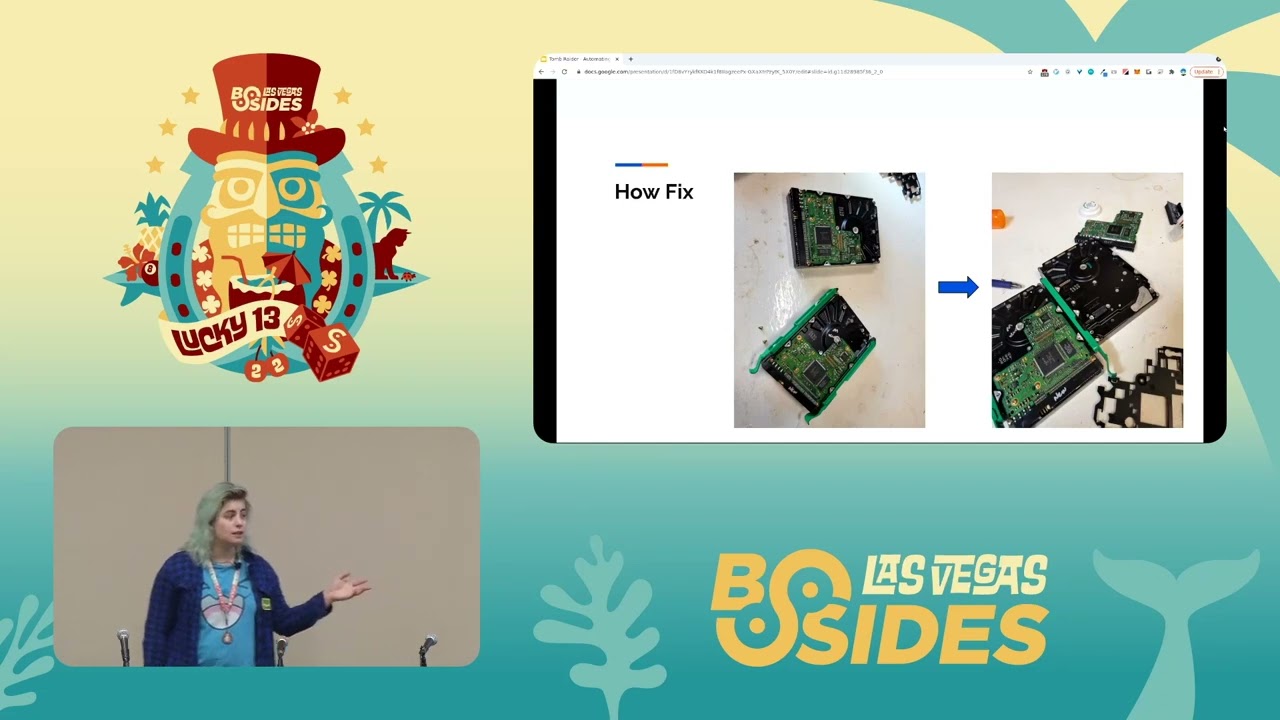
a really serious microscope like in crazy resources and patients additionally some stuff with solid state drives i will cover that later if you guys want to ask questions and talk about it um anyways intentionally destroyed drives this was a hard drive that i found in the san francisco uh dump and um you'll notice a lot of things about this first off all the pins are really weirdly bent and the ribbon cables on the left are cut the there's cables that are directly cut without much damage to the rest of it which is a little unusual you would expect if this just got dropped on the stairs it wouldn't really look like this and that's because it i have reason to
believe this was intentionally destroyed um and they well they intentionally tried to destroy it because in reality all i had to do was find another hard drive with the same model replace the board and then i could read off of it just fine because the underlying thing the underlying data storage device that had all the files was still there it was a little beaten up they presumably threw it against the wall or something but it was working just fine and on that interesting things this hard drive contained data from the san francisco water this guy who's on the san francisco water transit authority we had some information on boat requirements and specifics for vessel voyages and
all manner of things that had to be ready for additionally random stuff like this presentation which has wingdings in the title i'm not entirely sure and uh making fairies a viable transit option this guy's article on feet of fairies which is a little bit of a weird name but i'm not going to judge so steve here feels very strongly about fairies he would choose berries if one day the day came down to it so good for him um other stuff you might find interesting account info first name last name home addresses phone numbers this is a massive address book it keeps going and these are just random names of somebody who presumably was an accountant or
secretary or just a home just a normal person and they left this there thinking it would be gone it was not gone there are a scary amount of data on these things if you're interested in finding stuff like that i don't encourage using it for bad but if you're interested and you just like finding stuff like this like i do give it a shot uh oh yeah psychiatric records of this guy's medical history that was pretty rough that was quite a story i blurted out but yeah that's a thing on a brighter note i also found copies of the room by tommy wiseau and other wonderful movies and films like that where you can just get
for free because why not it's on someone's hard drive if you've already got stuff on your hard drive and someone else got it congratulations now they can get it using this tool you also find glitched images like this which can be uh which can have little stories of their own like i like the soccer guys who are like really upset about their image getting glitched out and they're trying to argue it back i have no idea what happened with the aol image on the left or the ducks or whatever that is curious things like this interesting and foreboding ones like this and the terrifying monstrosity on the top left that looks into your soul uh
little darla has a treat for you is what that one in the middle says which is let's continue to something less scary oh god no anyways this guy i have no idea where he came from but he was also on a hard drive his name is craig and at first i was terrified of craig because i was like i mean no offense craig but look at him um but he actually just has a little spatula and a little skillet on the left there and i realized he's just making a little breaky and he's misunderstood and now i love him anyways you can also find dogecoin at bitcoin whatever um slightly less valuable now sorry guys
but i have found a few of those and made money but i'm not sure if that or craig made me happier all this from these intentionally destroyed drops you may have one like this you may have one that's less damaged so with that said let's get back into how to do this how tomb raider can automate it how you can find your own little treasures how you can recover your own personal data stuff that is important to you we'll give a brief description of each bid and how it works because i sure didn't know all these steps beforehand and then we'll cover how tomb raider automates it we'll cover how we can make that faster optimize things speed things
up and uh walk through it to do that i'm going to employ what i call the library analogy and to explain that first imagine you have a big library this library is your storage device your hard drive it has all of your documents all your downloads all your pictures somewhere in it you have it organized in your own specific way using a catalog an index just like you might go to a library and look up where is the fiction or non-fiction where are the uh books by jules verne or uh edgar allan poes poetry you have documents downloads desktop pictures media music everything like that somewhere in your library of your hard drive this is your file system and without it
it becomes uh really really hard to find stuff there's a lot of books in there so this is how we're going to represent it and with that said talk about deleting files no data cut recovery talk would be complete without deleted files right so library storage device books the data and our catalog is our file system what happens when you actually delete a file in your file system the normal way throw in the recycle bin empty the recycle bin throw in the trash into the crash whatever whatever yada yada well unfortunately for those who really want it gone that is not going to actually delete anything that is going to remove it from the file system
but not off of the hard drive itself it's never deleted it's only overwritten this is as if you remove something from your catalog from the system that stores it and lets you find it but not from the shelf like that that never happens unless you really really try hard to get it to do that sometimes it's easier but by default that's not the behavior and default behavior is uh what most people end up using most people who i've read these drives from are using specifically and if it's still there well let's just you know take the bookshelf and handle that later so let's get your device ready for tomb raider to run on i usually just plug it in to my desktop
i recommend not plugging in random drives into your work desktop because that is basically just as bad as plugging in random flash drives into your desktop and we know that's a bad let's not do that i usually just use a normal motherboard connection on my desktop to do this you can use a lot of adapters however that work just fine on most computers and you may not be able to recognize it in your file system itself but once you find the identifier for it which i described on the github page and at the end of this presentation you can see the link to that page where you can download the software and deploy it in everything
that's all documented along with the software it's got usage instructions and even if your file system doesn't recognize it that's how you can find it it works best on linux i did develop it on linux so yes sorry maybe future development in the future it's so much easier in linux i can just download all this stuff and there's only a handful of commands to set it up if i have the time i'd love to deploy it for other os's but uh you can also just help me make code requests on the github repository please anyways imaging once we've got it plugged in once we've got it recognized using tomb raider and instructions on the repository
we want to image the drive what is that well basically we take the entire library why would we do that because it's pretty big and we don't really want to just have a big disk that we have to plug in all the time just to read it it might get damaged it might get like it might get damaged it might actually get worse over time the more we mess with it and that's no good at all we wanted to produce the same results every time we want to be able to copy it if we can so we don't lose anything else so tomb raider uses a tool called safe copy to incrementally get as much data as
possible from the drive it uses this incrementally makes a bunch of passes through it tries to get as much as possible even from areas that get damaged or corrupted safeguard is a wonderful tool so thanks to that it's the only part that requires the physical drive after this you can unplug it throw it in a blender maybe don't but you know you can anyways now that we've got the entire library in a file on our computer we want to try and get the catalog for it file system recovery we want to find our way to recognize where our documents are to find out if we still have pictures what are the audio files it's pretty helpful to have our catalog
we've likely spent a lot of time organizing it it's not explicitly necessary because the books are all still there we can still take the bookshelves but it's very very helpful and we want to find it if we can so we start with that it yeah metadata we use testdisk to get a set of these files yes this is another lovely tool we make use of a lot of them to get all of the files that it can from a variety of supported file systems and uh recover those if at all possible because that of course if we don't have to go through those bookshelves on our own those bookshelves on our own let's not because we'll see later that we'll see
in just a second on that topic it's not too fun so start with test disk afterwards we do file carbon this is if we did have to go through it manually this is if we don't have a file system and we did take the bookshelves if we do that we want to look through them for stuff that still looks like books we want to discard the catalog entirely and say screw that i don't trust anything i'm just going to look through all of my bookshelves even if it looks empty and see what i can find and that's what we call file carbon you are carving out unallocated space you're carving out of this empty space
this randomized data maybe actual meaningful data we use headers footers there's a lot of different mechanisms to possibly get this data from it it's super fun let's go through an example just to show how fun it is so jpeg this is uh some of the markers for jpeg from wikipedia i don't know if you can see this but it's okay if you can't there's just a lot of uh different indicators of uh hexadecimal encodings whatever stuff that represents the start of the image at the end of the image and here's an example image in this example image you can see all sorts of different jumbles of hexadecimal characters and uh if anyone can spot the start of
the image in this on the right here let me know and uh raise your hand i'd love to see it as an exercise yo what's up crap i i can't hear you okay wow they found it it's in the top left good eye um there's this random octet right here this random set that is the beginning of it obviously it starts with that and then there's another code the way later down in the list that goes right next to that and that's another indicator that this is a jpeg very helpful not very easy to spot we do have to go through all this list checking for these things and then at the end of the image
we have to look around for the code that indicates it's over because we not only have to know if we're carving something out where it starts but to know where it ends we don't know how big the image is without this so you look for a go that indicates that and you can find that right there now let's do that for every extension ever let's find wikipedia pages if they even exist for stuff like rar files and uh dot aaa files and whatever else this is a list of like just the ones that start with a and just the ones that are the very beginning of this tool we'll cover in a minute that'd be great
except it wouldn't it would suck so we instead make use of and use our own tools as well in combination with this to recover all extensions that are supported from that uncataloged space the space without an index this tool is awesome it covers 480 file extensions and file families those are like audio music uh videos archives and as you might expect from something that's just looking through random data for anything that looks like important data it's going to make a lot of resulting data if i gave you a ton of specifications even if i gave you random noise you are going to find stuff that looks like it there's likely that we will find something that looks like a jpeg even in
random noise eventually and don't worry about the interface on the right it's uh this stuff is very thin small text let's just emphasize that there's a lot of extensions here and that's the interface that photorec provides unfortunately a lot of the data that's produced isn't always meaningful you get a lot you get false positives you get data that is microsoft system files you get random log files corrupted data so that's not useful also your computer's out of storage space sorry about that it this is a lot of data that's getting downloaded from onedrive you are getting the disk image the file system and now these car files and that's a lot of that's a lot of
storage space there are of course options in tomb raider so you don't have to worry about any storage space or as little as possible you don't have to make a disk image you can just read from it directly if you're limited by space you can skip the carving entirely you can just get file system you can literally run it with everything disabled then it will say great well i don't know why you did that but great so let's condense everything let's make this a little bit smaller and let the raid finally begin we have our disk image we have our file system well we might not have our file system that's the one we might not have just
because it might not be there and we have our carved files first thing we can do we can get rid of the disk image now we already got an image of it and if we are low on storage space we are going to get rid of the disk image so that we don't have to worry about it because the disk image is the entire size of the drive if you have a terabyte drive and you only have 200 gigabytes on it it's going to be a one terabyte file if you have a library that's full of that's full of books and a library that's empty they're going to still be a library we don't want that so we get rid of it
if we can't fit a library in our other library i guess um and then we have our file system and carb files that we want to combine with something better a tomb file system which we can raid get it yeah uh and then we can continue with a more efficient representation so we're going to make a lot of upgrades and changes for this for making it more readable we're going to start with flattening everything into one directory instead of having this massive tree structure we're going to represent each location of a file with its directories it'll end up with a big file name but this will also represent where it's from without us having to go through every
single subfolder in every single folder and so on trying to figure out where something is you'll just get a big list of everything we'll also sanitize the file names remove stuff that would break the program because unicode is god it's a nightmare we'll create an index and uh that will contain the file name and the hash of the file name no the hash of the content sorry about that this should help make things a lot easier but why do we need to get a hash of the file contents for this index well first a quick overview of hashing hashing is a one-way operation if i have a hash function it's going to generate a unique
identifier on the right so if i have box on the left it's going to produce that weird string of digits on the right i hope you can see this in the back sorry if you can't i'll narrate um and second we may have something like the red fox jumps over the blue dog which would also produce a different operation even if we change a tiny bit of it it is going to produce an entirely different result now i know some of you are very fond of cryptography i'll say hashing is not encryption there please don't kill me anyways hard to find collisions in this function these are the properties of a hashing function there are pretty much two the third
one's kind of a repeat whatever i digress we use a hashing function to get identifiers the hashing function has several properties firstly it's hard to find collisions it's hard to find one piece of data that produces the same output as another piece of data it would be hard very very hard for me to find another sentence that will produce the same output as the red fox jumps over the blue dog i'm sure if i tried very very hard and used a lot of resources on something that's not very secure i could and people have but for our purposes we don't really care about that it's also hard to reverse so if i just give you this random data
on the right you can't really go back and especially since these things tend to be very very random or very very different you can't really determine much about the input from the output or really anything at all so even if i have one modification like a typo on the second line we're going to get an entirely different output why is this relevant at all so what we're doing now and why is that useful it seems like we would want to know the input well this produces a lot of very small and for our purposes unique identifiers for each of our books for each of our files these bot these books or files are just data at this point they don't really
have file names we only have an extension so how do we name them in a way that we can compare them to each other compare them to stuff we already have we use hashing and specifically we use md5 which is a fast small and widely supported one we use this to remove duplicates as well as some other functions we'll get through later and well why else would we do this well to do that we'll cover about hash sets on the top right on the top right just for the record i usually keep the small stuff not the stuff that's really small that you might not be able to read it that's because it's not that important
don't stress it in the top right there's a bunch of hashes of random files and in the bottom right we have a bunch of different sets of hashes of those of uh known files because some books are boring some books are windows systems files some books are log files some of these files are not interesting if you want them you can enable tomb raider and it'll get them but most of us don't really care about that if we're trying to just get our own data back we don't want to be saying oh my finally my uh collection of metallica and it's just that tendon done from windows booting up so all these things really care about
but how does hashing come in that bottom right picture is of what is known as the mist in irl it is a wonderful online repository with tons of known file files so these windows system files they exist on everyone's windows system there have been lots of operating systems and we know what files they have on them so what do you do you get them all together you collect them and you provide them for anyone to use by doing this you end up with a ton of hashes of known boring files stuff that we don't care about stuff that we can ignore and save us some time defining what we do care about we use these sets to considerably reduce
the noise get rid of all that garbo and get us some more important stuff to continue onwards any ideas for some pitfalls for this where this might not exactly succeed really ideas questions
well earlier we saw we saw what happened with typos even small modifications can produce entirely different hashes and unfortunately if you're recovering data you're going to end up with a lot of productive data so that's going to be entirely different even if there's just one bite flipped and it's not going to be in the hashtag so while this has been great it's basically taken this massive library and removed one of the bookshelves from it we still have quite a lot so what do we do from then well we sort it as best we can so that we can comb through it and figure out what we want to figure out based on a better categories like music and videos
and stuff that might have been on the desktop or other stuff that was created later in the computer's time span if you can we already know how to classify and find what type of extension a file is using file classification using photorec from earlier and we can also create subclasses of those specific using those specific extensions like let's say we have a uh what's a good example you might have a png or jpg file and you might have gifs these are all subclasses of an image these are all lower on that hierarchy so we would want to sort them into different things just so we can more better look better and more easily look through them
this is just extension classification we're simply taking the extensions and we can organize them into categories based on what type of extension they are it's nothing crazy it is however very tedious which is why tomb raider doesn't we can also use content classification we can open up the books we can look through them and figure out if it's a fiction a non-fiction book if it's a image if it's a piece of media if it is random noise and it doesn't actually seem like an image at all or rather a file at all and there's a lot of different ways of doing this for hours we use lid magic uh those who are familiar with linux
will know this thing called the file command but it's not super relevant the point is that there's a lot of methods to determine the data type based on the data of the file determining what type of book this might be based on the pages we use both of them and afterwards we end up with something that is that represents our images our audio our video our document files our program files system files and so on we end up with an organized representation of data that was on the drive from this random massive assortment of images we end up with keep on calling your files images with this random assortment of files we end up with something that is our own
directory structure our own better file system it also flags is for anomalies the best it can so if you have something that looks like a jpeg at first but then has a bunch of plain text in it well that's a little weird you should probably look into that it's not an extremely data forensics heavy approach but it can help save you some time if you're just looking for a quick scan over things after you've done data recovery so from then we have all this data what do we do with it well we can still add some other stuff to trim it down we can blacklist we can say hey i don't actually really care about
program files at all i want to be really judicious about it and just get rid of all of them or i didn't have any music on this computer so let's just get rid of all of that too or uh let's say instead you're you're a photographer and you've lost your uh your hard drive got damaged and it has all your photos on it you don't care about program files you don't care about music all you want is to whitelist the images all you want is to get the images back from this drive additionally you could probably skip a lot of other steps you could skip the file carving if you can find the file system because you don't care about your
deleted images you can skip the imaging process of the drive if you really want and you can skip every single every other thing too tomb raider allows you to do that and lastly it runs entirely on its own so once you start it running this operation which can take hours or even days to do all of this it will just go automatically i like to just start running uh the night before and then check on it for breakfast and find other uh craigs or other such content on there and uh be very confused so that is the walkthrough of what tomb raider does at the moment what is it going to do in the future
a lot of this stuff i'm going to add as soon as i possibly can i've been a lot of my time recently has been focused on this presentation but first thing i'm going to do is rebuild a better version of the original file system this would be essentially a better library so instead of one that might be not very well kept a library or hard drive that is very disorganized we can make our own we can get rid of duplicate data we can have a better way of looking for what we want faster a lot of times computers seem to have a very hard time finding files in massive massive sets which frankly doesn't really make sense
to me because we can always do other stuff like uh what's it create an index yeah but anyways we can replace duplicates of files with links to those files we can get rid of these long file paths these things that are under a ton of different folders we can include the files that we otherwise would have had deleted and we cannot compress stuff this is all just lovely nice to have afterwards i'm working on this now it works just fine already i promise and these are features that i'm planning on adding back so if you had a system that was damaged or destroyed you could plug and play and it would be exactly like you remembered it rather
than just being something for exploration
otherwise i'm thinking of adding an entropy classification this is uh entropy is a measure of how random a file or set of data is so a random number very high entropy but a shakespeare's works low entropy this is useful to us because we can compute a number zero to eight that actually measures the entropy and use that number to maybe determine if something is noise or not noise which is great right that sounds very useful why didn't we use this earlier well there's a bit of a problem with that unfortunately that uh a lot of file formats like encryption encrypted file formats are very good at encrypting they produce things that have very high entropy
very high seemingly random data so you might have eight for completely random noise which is actually kind of hard to get because nothing is ever completely random and you might have 7.99997 for an encrypted file or a compressed file because of course it wants to try and take this long organized data and compress it into a very compact unique representation additionally on another note the file formats we use for images and uh audio mp3 and jpg are also very good at compressing so they're basically the same so i didn't use this in tomb raider because i kept on finding that there was just uh too many false positives but i'm still working on it and i am
hoping i can use it to filter out the signal-to-noise ratio a little bit better so uh yeah that's it everybody that is uh now uh i guess it's time for the qa and resources we use a ton of software for this for uh tomb raider and i special thanks to all of these amazing places for the wonderful software and wonderful data sets i got to use to make this thing work and put together a lot of pieces that would have taken me ages to do otherwise additionally uh special thanks to everyone who throws away hard drives without destroying them scott moulton noise bridge the hackerspace and lastly lowercroft thank you tomb raider uh so yeah i guess i said that was it
and then i had some more to say but uh any questions yo can you come up to the microphone so they can hear you if you have like if you have questions can you guys come up to that microphone and ask i'd love to answer them what's up so big files with the high entropy are probably compressed wait no i'm sorry can you big files with high entropy are probably compressed small files with high entry might be interesting things like ssh keys i agree so they said uh big files might be something that's compressed uh and have high entropy small files might be something like ssh keys or stuff that's important i agree thank you and
at the moment that's actually covered by the tools that we already use for classifying so the content classification and extension classification that would look for dot key or dot pem files works really well and i find those all the time they're like one of the most common things i find uh along with shadow files which are fun to test out on another note but yes i agree and uh that's part of the reason i want to implement it so i can use that sort of stuff to shorten things down or at least provide an option saying i for those who want to use it and say really really really crank down on the noise in which case they could just remove all
of the uh um files with a higher entropy anyways yeah what's up so uh i first i just want to say that this is awesome this is so cool thanks so much i really appreciate it it's i i i i really love it and it's been a lot of fun making it so thank you so much and my question is uh when when did you start approaching this as a signal to noise ratio problem and what did you use to kind of get yourself there when did i start treating this as a signal-to-noise ratio problem and what did i do after that to like work from it okay um basically i would recover data and there
would just be so much there would just be tons of tons of files and even on stuff where i knew more or less what it was or what would be there because i would find the file system and i could look and see what were actually documents or downloads it would just be some office computer uh there would still be like a massive amount of windows files that would just dwarf any of the user data um at that point i was looking through it and i was spending all my time trying to find actual relevant data and stuff that was added by the user not by the computer um that i was like i gotta work on
improving this so i spent a lot of time a lot yeah there was a lot of time spent on tomb raider just doing that and uh working on shortening it down making it so that you can actually process it because there are a lot of tools the tomb raider uses these problems are not you know unsolved for recovering data and the problem is that people don't know how to use them and they produce so much noise that they can't really use them and that's why i made this i wanted people i want to do all to have a tool that you can use where you can just plug and play and run it on any sort of hardware
i am so looking forward to using this thanks again for the presentation i really appreciate it so i looked up your tool before the the conference when the description for the talk was posted it looks super great it looks like a really awesome wrapper around a lot of other tools that we all use very frequently and so i'm excited not to have to do it all manually anymore um but i couldn't find any good descriptions on how to use the tool or how to set it up especially where it uses so many different tools you probably got it set up just right kind of what's the process you're looking at and creating that kind of
documentation so we can actually go and use this absolutely so they brought up a very good point and it is that when they looked up the tool like a few weeks ago a few weeks ago it didn't have as good documentation uh you're totally right it's because i was making these slides and uh i am i have updated the readme since then to and other documentation to make that better and support more stuff now when i'm done with this presentation i'm going to be improving that even further and continuing my development on that uh in my free time so you're totally right and i'm sorry i wasn't there earlier but thank you for looking i'm glad you checked it out um
i guess i didn't expect anyone to be looking at it much earlier so it caught me off guard but i will uh i'll be improving it a lot more i've already added some documentation on these steps and some usage and installation instructions thank you my pleasure thank you um any other questions does anyone else want to add we have a lot of we still actually have a lot of time i'm a little bit early so if anyone wants to know about uh stuff that wasn't very clear uh any possible future features bring it i'd love to hear about it hiya hi so for some of the maybe more interesting things you found like the diagrams
sure the like the diagrams you found the architectural diagrams for the uh the water system have you done any reporting to the owner of that data or thought about how you might do some haven't been able to try i haven't been able to find the owner of the data also fortunately those diagrams were they seemed to be yeah they weren't they didn't seem there wasn't any actual compromising data for their systems on there just interesting stuff regarding the technical specifications of how ferries worked and how the san francisco water transit authority ran their system that's a very good question though i have reached out to a lot of owners of these drives um when i found like
when i'll find all their data on them and i'll just be like oh wow there's like an entire this is this person's life these are family pictures and so on um oh yeah now to clarify the question you asked was have i contacted the water transit authority about this data anyways sorry i didn't say that earlier there have been a lot of people that i've found their hard drive and i have been able to find contact info tried reaching out um unfortunately usually they don't respond or they or it's out of date information because it's been in the dump for years and i just randomly dug it up but um yeah i also run a side business doing this so
i can more like directly help people and help get them get their data back without it being any like problems with other big problems uh what's up do you have a question i actually do have a question i was interested to know only because you're so intimate with the topic uh what is the current state of backlog in like organizations who are trying to get through these petabytes of data using these kind of tools and are you finding the tools have been effective and trying to help them or it's been a few years since i've looked at the numbers as to the backlog the backlog for for example uh when uh they're trying to uh uh government agencies or uh local
law enforcement are trying to go ahead and create a case against somebody using the digital forensics and there's usually these backlogs of years sometimes to try and get out a hard drive through for analysis because it's so manual in many say in many ways that's a really good question thank you um so they asked what does it look like for existing enterprise implementations of data recovery and digital forensics i can only give an approximate representation because i do not i have not worked as a digital forensics person this has just been my fun learner to do data recovery thing um however i do i did get familiar with that because my roommate works says does digital forensics
and i was like hey what do you think of this and they were like oh [ __ ] that's great and um and uh so i guess my answer take this with a grain of salt um i think they just pay for the time they just spend a lot of time going through stuff they have to do some stuff in the manual fashion because they have to keep because it's just such a strict legal process so like full disclosure you couldn't just be like uh your honor here's my here's my rated tune a rest that man like that's not really how it works exactly you have to use like the original image you can use all
this stuff but you also have resources and you're still gonna have to look through tons of files and you're still going to have to try and recover all this old data why not save yourself some time and automate the hell out of it and find as much of it as you can immediately using this that's what i made it for not as a first as a very good first step for that and a final full solution for anyone else so thank you for the question it's very good uh what's up so when the when the hackers all go back home and everyone's in their local municipality yes where do you suggest we look for busted hard drives
that's an amazing question oh i love that question okay so when hackers go home okay i have two minutes uh when hackers go home how do they find hard drives it's a great great question so it depends what there are some places where you for the dump specifically you usually have to know people to be able to like look in the dump and find them i know people uh and made friends with the friends of people who look at the dog which is great um however that's awesome there's tons of ways so i only have so much time so i'll go through some of them ebay tons of stuff you just look for the ones
that are like broken or for parts and then you just can buy like a stack of 20 of them that are from laptops for like 50 bucks it's the best um you can go to garage sales you can go to um old offices they're always throwing away computers you can go to places that have e-waste which is also old offices and other companies and if they have public access to their e-waste which sometimes they actually do and it's a little bit annoying if you work at a place that has e-waste just go there and then you can find a lot of hard drives and other such things in there if you find any anywhere you might find
broken computers broken computers usually have hard drives um so i went to noisebridge special thanks to them which is a hackerspace to translate that just means that it is a big workshop for anyone who wants to build stuff hack stuff and people donate stuff to it all the time they have they had tons of just broken computers and shelves of them and i would just be like all right time to go get some hard drives and they used to have a lot of hard drives in those dead computers now they're all mine and i am uh using them for practicing and for testing this and practicing this um don't worry i'm i'm i'm not i'm not actually taking all of
them because people should have on them and do their own stuff with it um so yeah
oh cool okay all right i'll take an hour to explain the rest of this question then um so yeah hacker spaces are basically workshops where you can do that yadda yadda and uh people just donate spare computer parts to those you can go through those find hard drives garage sales people just throw away old computers because they don't work and it's because the hardware is broken or you know broken um you can go to what's it what was it uh craigslist lots of old stuff there crisis is like i swear craigslist is like the black market but it's like not the black market you can find everything there um what was it going to say about garage
sales just um you can go through the literal trash of places that are near um corporations that's not very fun though because you can usually find them in a lot more convenient places anywhere where there are people gathering to do a lot of tech there will probably be broken computers somewhere around there and you can just say hey can i try and fix your hard drive and a lot of time it's like what do they have to lose if they just have a broken computer that they've given up on and you could fix it even if you don't fix it they're gonna be totally fine with that um a lot of the time so just
uh ask around look for places where there are tons of leftover computers something else i'm thinking of i can't really remember at the moment um
Related talks
 54:05
54:05 27:37
27:37 8:26:49
 38:25
38:25 43:12
43:12 47:45
47:45