Phishing in 2022: Google Calendars and noVNC Dockers
Show transcript [en]
hey everyone thanks for coming back after lunch i'd like to introduce phil holbrook he's a pen tester and he's gonna be talking about some really interesting modern fishing techniques involving calendaring and other cool stuff so please give a warm welcome to phil
thank you good afternoon everybody um so as we uh said i'm going to be going over fishing with google calendars google docs at in no vnc basically weird fishing techniques for 2022. so a little bit about me hi i'm phil holbrook thank you for attending you can find me on twitter at flip zero you can find my blog at flipster.io i make no promises on updates on that blog or consistency or quality i make no promises on any of those um you can sign you find all the uh slides i have some bits of code some little tidbits and the github repo for this thing i posted it last night it should be up um so there will be bits of code
on the screen don't stress about them i'm going to get a repo grab them later um yeah i'm a senior penetration tester for a company called shellman doing a variety of engagements anything from internals to web apps to mobile so we get into a bunch of stuff so what i'm focusing on today is fishing so let's dive right into google calendars so i started doing these campaigns after a co-worker had followed a run through the bhis had posted on setting up the google api account setting up a google api account to send calendar events as a form of phishing and you're just assuming you know you have to know that the client is going to be using google
calendars to accept those events obviously but um i'm not going to do much of a deep dive into what that setup process looks like to getting the calendar invite running but i'm going to more focus on you the pretext and how we're kind of coercing people into doing things they should not be doing quick run through of what that setup looks like you're in a google account you're in gcp i'm going to fly right through this thing the video is in the github repo basically you're just setting up an account you're setting up an application within gcp i'm going to screw up scrubbing through the window as you do you're setting up an oauth client on it
and then you're getting into oauth playground where you're authorizing the oauth playground to access your google calendar for the event for the account that you set up here so the end goal here once you scrub on through is getting to the end where we can pull an access token for another application to access your google calendar and send events as it so that's where uh ba bhis is tool mail sniper comes in and i'm gonna flip over to an attacker box for a little bit of a demonstration of what i was doing here so basically i've got mail sniper already loaded right into powershell and i've got a templated out command here which i'm going to put a big a bit
big on the screen here in a second basically what we're doing is we're sending a calendar invite to myself and i'm just filling in that access token and a placeholder i had sitting in the in the command string and let that play out it'll just spit out one little line saying it and inject it into that that target calendar cool it should be on my target's calendar now flip over to my calendar sometimes it takes a refresh to show up we got a test meeting so cool we just sent a calendar invite from myself to myself not super interesting let's break down what exactly we just did here so this command for mail sniper basically what we're
doing on parameters is you're sending the primary email that is the email you're sending as your token token we just pulled out of out of gcp targets this is just double quotes comma separated targets you can throw a ton of them in there i've done 100 or so at a time you can you can blow that thing out start time and time for the event uh title description location super simple so let's look at this calendar event that dropped onto my targets calendar here test meeting zoom link to follow it's sent from me to me this thing sucks there's nothing fun about this at all it's not spicy at all nobody's gonna click it let's add a little more fun to it i did
want to note too by design of this whole thing that calendar event's already accepted it's going to alert 10 minutes before so no matter what you drop on somebody's calendar they're going to get notified of it so if there's there's a higher chance that somebody's going to notice that especially if they are living out of their google calendar day to day so here's a second iteration of this whole whole calendar event drop um for this one we register bsidespgh.ctf.com that is my domain now i will happily lose that one once we are done here but for the moment that is mine i need it um set up uh set up a google set it up set
that domain up through a google account so that you can send us that domain and set up a junk email address for human resources or hr at besides pgh.ctf.com that's a mouthful i need to trim that at some point here so the the context here we're putting is we're just gonna drop a random calendar event on somebody's calendar saying hey you have an hr meeting it starts at nine o'clock in the morning join immediately discuss an incident that's all leave it nice and bland because then you're just like brimming with details what happened what's going on what did i do i'm going to click the zoom link because it's a zoom link not a zoom link it's an easy trick it's an
easy trick to do people will look over it though you're all you see is your company at the beginning it's got the it's got the us and the thing you expect at the end so whatever so that's just a simple one that you can do um so the event now looks pretty good as opposed to what we started as the the downside of this one is if they click the link we can kick them to you know a super basic app that's just going to capture creds we can kick them to an evil engine x link something out of modlishka little little you know man in the middle it might get a session token to
a one login session an octa session something interesting that may have more access you may also get somebody's like burner home zoom creds that they just gave you and now you have nothing so what would be really fun is if we could shell an endpoint using this whole this whole technique and transfer method of dropping events on people's calendars so that's what this second ver this now third iteration of this thing is changes the highlight so we're still we're still sending from hr at b sides same target start time end time i love doing nine in the morning nine in the morning to their their standard time wherever they're at you're kind of woozy you might be
hungover you're not as likely to second-guess a weird link this time we targeted out where we're saying there's federal compliance requirement that required next steps and we give them some links to some google docs you need to review these steps to get these steps completed so now we're pushing them off to some further instructions to to give them something more more malicious to do so what we run for this campaign is something like these two google docs i've got up here again full credit to a previous colleague who set up this kind of format and worked in some of the really legal easy kind of scary language um basically what this google doc is stating and we're just telling the user
a story right now of um there's an upcoming fedramp audit for the b-sides pgh ctf federal offering that's a lot so we're telling them that there's bad stuff going they think that there's compliance audit coming up um we give them a call to action saying that failure to complete these steps could result in high finding on the audit an appropriate action may be taken against you nobody wants to be that person that doesn't do something then causes a high finding on an audit but you also don't want to be the one that does too much and then you cause the high finding on the audit so it's a tough one uh the mac example here extremes instructs the user
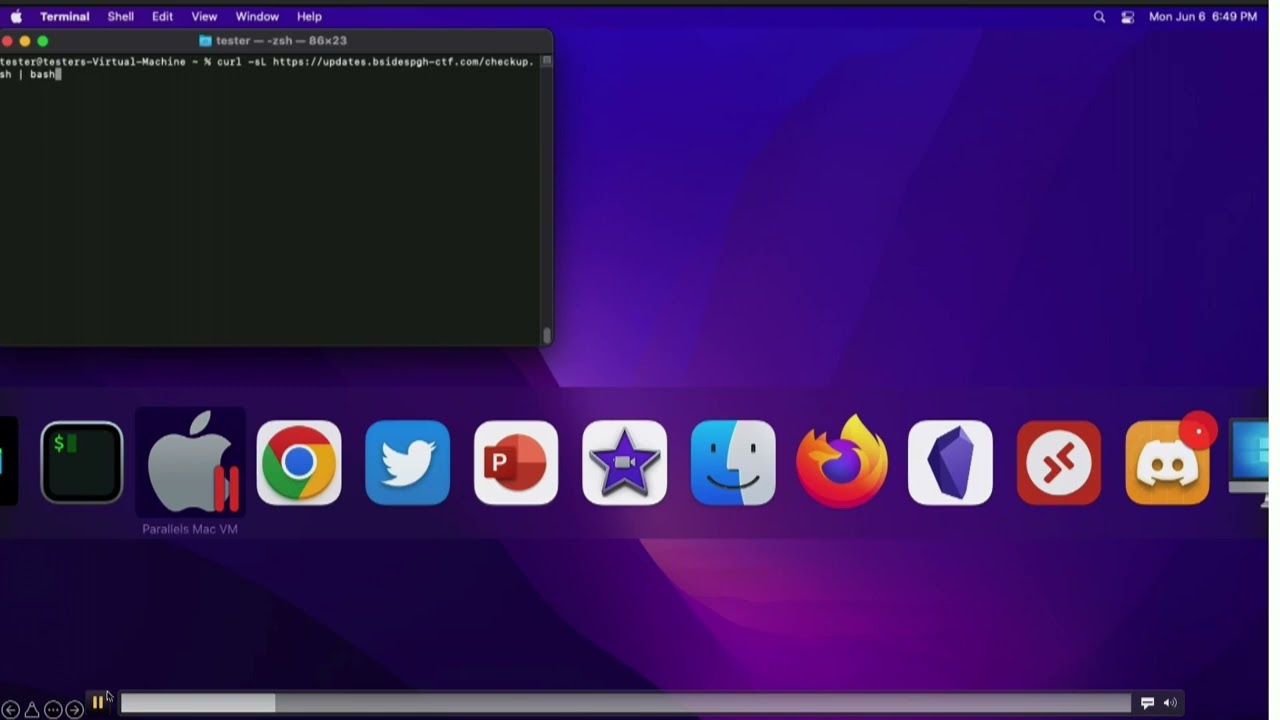
on how to open terminal via spotlight then tells them to copy and paste this curl command into their terminal and run it the curl command runs a uh all it does is pulls it pulls a remote script from my attacker box sitting out you know in like ec2 or wherever you want to host the thing it isn't readily malicious just looking at it if you've ever installed like home brew on a mac homebrews homepage has you install it just the same way it's one big gross curl command that then pipes into bash and it takes care of an install everything that is homebrew on your mac so it's not super malicious um i also always giggle at the the
powershell encoded command example because that thing looks like hell that's terrifying but apparently that's just me that thinks that because people still run the thing so here's what that campaign actually looks like live so just to break down what we're looking at here top right terminal up yonder that is my ec2 box that's got just an apache web server sitting on it i'm just tailing the access logs right now so we can see any traffic coming back because we oh go back round two we're back to the attacker box on the left side you have my victim machine where the victim just ran that curl command it's a little small i'm going to put up
a next next slide that kind of breaks it out more but all the script does right now is says hey i see you're a mac i'm configuring the environment we're gonna start doing some checks and whatever and we put on you know the song and dance of normal things are happening here you get a keychain access pop-up box saying it wants your admin password right now that's pretty standard for a mac user it's you know a lot of mac users are going to be local admins on this machine because it's just about miserable to not be an admin on your mac so um that's a pretty common thing you're gonna get so they'll probably just chuck
their password right into it if you do notice it's not you know starring out the password there's a reason for that um that script will then run it says it runs its configs it's on a sleep right now for uh 10 seconds and then it just completes and says that everything's fine go ahead and close the window so i pulled the attacker box back up right at the end of that clip where we have this big gross blob of base64 that got posted back to my apache server so what just happened here what did this user just do code on screens this is gonna be great i'm sure it looks wonderful the left script is the very first script
that this user called this script is total bs except for one line of it that's highlighted in bold right in the dead middle where it's basically just giving all of the song and dance it's saying that you're setting up the environment you're doing this and that everything's fine thank you for running this curl script dead center of it it's calling a secondary script so that's what's on the right side um on this one we give up the campaign at this point we'll be a little nice about it if there's blue team chase on the chasing us around um we'll say outright that if the this if you've landed on this page it's a an approved campaign please contact phil
it won't always be phil it'll usually be like a point of contact for the company someone we're working with on the pen test a little more trustworthy not phil and then below i have a whole string of variables that are getting run on this user's machine right now so basically we're just stacking up any command i want to run on this machine i'm gathering the input for it stacking it into some variables and then bringing it all back and that that big gross post message you saw here number four this dialogue text osa script box that is just a big chunk of applescript that all it's doing is drawing that box it's drawing a text box
in it it's telling it to have no uh character sitting in it already and then that last little bit for this system applications utilities keychain part is just pulling the icon for the actual keychain application it's in the same place on every mac so let's use it it looks all the better excuse me and finally in number five all those variables that we just pulled from that machine are all getting gathered into a single string variable and base 64 encoded and then the whole thing gets curl posted back to my apache server so this is just a pile of x fill that we just got a user to run so what that looks like once we take it out
and decode it again that's the blob that we got cyber chef in the background nothing fancy do a base64 double the code paste that blob in there and now we got all this beautiful information out of this user's machine we know the username that ran it we know the name of the hostname in the machine we know the build and various different little details will be nice and unique we also grabbed the b-side rules password that was put into that box into the keychain access box as well as some aws keys so this user just gave us a wonderful foothold into a potential environment so that's just a real slimmed down example also of what we can
pull back i've done fancier versions of that where you do i did a third script one time where you fork it and have it do clipboard dumping basically and every five minutes it was just pasting the clipboard into a variable and then kicking it back to me with an identifier so i knew which machine it came from so you're basically key logging at that point and that thing was just forked and set to run for i think it's about to run for an hour and i got a ton of stuff back of that so i mean it's all about what the client's comfortable with obviously we're not going to go too aggressive without their approval but yeah that's just an example
of what kind of data you can get back from people for the windows version of that whole script i cheaped out you get a screenshot of a powershell window all it does is it just says checking pc configuration it says it's complete close the window whatever and then the string you get back once it's decoded is just a hostname and who am i which was redundant in this case because the the who am i had the host name and machine in it that's what you get there from windows um points made though you're uh you're executing code at this point we're getting code execution on remote endpoints some people would say this is not that
malicious you're not really emulating an active attack my edr av x-amount solution would detect it if it were malicious i disagree i would say that an active persistent attacker is going to scope out your environment to death and they will get this thing right and evade whatever control you got in place and they're still going to get that code execution so now they're still going to potentially land on an end user's machine and then go wherever they can from there so moving on to a little more fancy version of this this whole campaign i decided at some point that the curl command was too suspicious that's a little too weird let's over complicate it to death and
say we're going to backdoor firefox and have users download that so let's make up a campaign here for this doc i'm telling the users that we're rolling out a federally optimized version of firefox the binary that they're clicking here i i reworked if you've ever used mythic c2 there's a dev out there i know his name's doom fist i have no idea who that person actually is um he made the super cool connector into mythic c2 where basically it just ties right in yanks a payload packages it up beautifully in a dmg a pdf he's got a whole ton of containers in there that do wonderful things it's all super cool it's a little aggressive for my use case here you know
for what i really need to get out of people i just need to know whether they ran the command shelling all these boxes is super fun and all but clients don't usually appreciate it and it makes cleanup a little messy so trying to take a bit of a softer touch here so that's what this app fisher repo at the bottom top right is i wrote up that i just basically took his project ripped it pieces and pulled it down to where all it does is look for your applications folder if firefox is installed yanks it into a build directory it replaces the main firefox executable with my own uh crypt with my own shell script which all it is doing is
just the same curl command it's all just nestled inside firefox and then at the end of it it also calls the actual firefox binary so as far as the user is concerned they just ran firefox they don't know all the nastiness that just happened background a downside of this whole situation is in doing so we broke signing on firefox and it's now going to have an unidentified developer pop-up come up as you know it normally wouldn't do that because it's firefox um it's worth saying too i stuck with using the dmg method of transfer just because i know like isos are kind of hot right now for evading av as far as macs go mac users download
dmgs all the time it's pretty standard it's pretty normal it's pretty it's pretty safe it's going to get their fine so you just know it's going to land on the user's machine without any trouble back to the instructions so this is the google doc heavily cropped to try to make all this madness fit on one slide all we're doing is we're telling the user to download firefox from this link firefox fed from this link i have a github repo that is bsidespgh.ctf that is also mine can have that as well i want it for right now though that one's a really great idea that whenever you download that that firefox dmg you don't get you know a
pop-up saying that this dmg is coming from sketchy domains with sketchydmgs.com it's coming from github it's fine it's trusted you run it just run the code from github it'll be okay and people do so it adds adds a level of trust to the whole thing further down through the steps that i gave them here i tell them not to copy firefox fed out to their applications folder like dmgs commonly tell you to do i do that for two reasons one i'm trying to be a little nice about the campaign that's aggressive and downloading malware on people's computers and make cleanup a little bit easier so that way all they should have to do is just kill firefox eject the dmg
and chuck it in the trash done you're clean after that a second part of that is also just you know to avoid further detections if possible yeah that's a bit of a two-parter um the fun part of this campaign too since we broke the signing and verification i tell them right in the steps click cancel whenever you get the pop-up that says hey the developer is uh not you know we don't know who the developer is they're in parentheses you know it's apple's fault we're waiting on them to approve our certificate it'll be taken care of in a future release don't worry about it you're just setting expectations and as long as everything goes as you're telling them they're like
yeah this is normal the sketchy google doc told me that was fine so it's probably fine so then you just tell them to right click open it they'll get the open thing skip past the developers unknown so for this one for the keychain prompt i tweaked it up a little bit and i say so i want your keychain password because we need admin for reasons then with no spaces i want you to add in your mfa token at the end from your one login app that one came out of a campaign where a client was using yubi keys everywhere and it took a minute for me to like dial it back and go well i mean ubi keys get lost they get
broken they've got to have a backup method here one login they're using one login as a backup method so everybody's got one login and they're yubikey so just tell them not to use the yubikey i want your one login token again you're telling the user what to do they'll probably just do it it all seems normal kind of so then finally for the last step down here i give them something to do at the end to kind of close the loop we tell them that the application should launch if it doesn't make sure you hit that it failed button the relevant information will be gathered and sent to the development team again that's a two-parter we're trying to a
give the user closure on the whole campaign it's done they're happy they feel like they did what they were told to do by sketchy google doc but also they're not going to open up a help desk ticket or report it to a sock saying hey what's this thing we were supposed to i did it and it's not working what are we doing here so hopefully keep it from getting burned too early too so again it's just a big pile of uh tell the users what to expect and they'll they'll usually follow you right along what that campaign looks like live is like this so here we got my target he's got lots of fun calendar events up because i
didn't clear any of them before i took the video so he's got all stack of them here he's going to flip over to the google doc this is what the actual google doc looks like when it's not all blown out and cropped and i think i second-guess it like crazy i don't think it looks terrible but also it looks terrible so it's it's a tough one to justify but then user follows the steps he's downloading firefox fed hits allow on it to download it it did say it was coming from github.com so not somewhere sketchy weird run it should be able to right click and open it as soon as i previous me quit screwing
around there you go get going me right click and open it pops up gatekeeper does say it's just got the mark of the web on it proceed as normal i want your i want your admin password i want your mfa token firefox opens nothing the sketchier so as far as users know it's it's it's there's nothing super malicious going on here just because we set all those expectations we kind of built the story and i i think it's a it's it's a weird campaign to do too where you're almost like if somebody trusts this thing it's got to be a really hacky i.t department or something that does weird stuff because like this is not a normal
way to deploy an application and that's usually what i kind of much more professionally say as a remediation effort you know obviously user training don't run random code from random places think about these three things you know where'd this calendar event come from do i know this domain do i know this person you know the application is it is it expected have you been told about this at all has there been any internal communication that a federally optimized version of firefox is coming out sounds suspicious but you know people people do it so that's just a really weird way to to attack max max specifically and uh you can use the google calendar way to
do it you can technically just send them the doc i've done that way too since google docs go through email perfectly fine i mean what's going to flag on a google doc link in an email so at least it's not just an evil engine x link that's going to get scanned to hell and then burned and then your campaign's torched in no time it's a google doc and it's one of those things that i know like bhis has reported the thing to death google don't care it's a feature they love it so that campaign's hanging around for a while i'm gonna keep running it until it gets until it gets boring in some way so
i'll i'll pause there for a hot sec before i go into the second the second phishing vector i'ma talk about questions at all thoughts go for it have i tried this attack with microsoft specifically i did go down that road actually after uh the previous co-worker had set this whole thing up and i went there's got to be a way to send these things through calendar through you know 0365 in some way i went a couple rabbit holes deep on it i couldn't find a way to do it it's so no i'm not saying there's not a way but it'd be it'd be interesting to see for sure um so cool we're gonna go straight to the
next one no vnc docker fishing this one's this one's a weird one this one it kind of leans more towards a hyper-targeted technical exercise at the end of the day and the first attempt i had at actually running this on a live client was meant with intense lag over the no bnc session i'm pretty sure that was an issue on their side because they had a lot of web filtering going on they were also not geographically really close at all to the region the ec2 box was sitting in so i haven't lost full hope on it yet especially after setting everything up for these slides and whatnot i kind of revisited and pruned it a little bit and
i got it fancied up a little more so i don't know i might have to run this thing again in the future just to see see if i can get someone to do it but this whole setup is based off this article by uh mr doc's link to the bottom of the slide over here basically what he went through doing is he described how you would set up a single burner box with uh no vnc server setup on it and he would then hide as much in no bnc as possible so you don't really know you're looking in a vnc session and then uh you'd put a login page of whatever you want the target to log into up full
screen in kiosk mode in firefox that way it's just looking it looks nice and clean there's no secondary url bars that you're like nested because you're in a vnc session in my random linux docker container so it's a really weird campaign to set up but basically the intended use case here is is you're going to send a user a link to your own browser kind of they're going to log into that browser once they've logged in you we have a bunch of options i can either just cut access the new vnc no longer let them externally access it i've still got it though so now i'm logged in as them and i can just take
over their session on that docker container because they've logged in on it we can dump cookies out of that browser session i've played with a couple different ways to dump just dump cookies at disk i mean you can just throw a chrome extension in that'll take care of that for you no problem too or you can just filter them all through an hp proxy just log all the traffic grab the session tokens right out of that off you go go plug them into your own browser from there there's there's a bunch of different end games you can go with here um but this is all just kind of going over the the the transportation mechanism that is this this weird no vnc
setup so let's uh what i'm going to talk about more on my side of this thing is is my efforts to take his idea scale it and then secure it and lock it down a little bit inside docker because whenever i first set his up i did it on a burner ec2 and got out of the the kiosk mode in firefox and i was all sudden root in a random youtube ubuntu box and i know that's not good because i'm in like our pentest lab right now no i don't like this at all so we're gonna we're gonna contain this monster a little bit so here's what this thing looks like when it's deployed this is bone stock
you pull down this ubuntu vnc xfce container and this is what you look at you navigate to the local listening port go to vnc.html you're looking at a login page users are supposed to click connect they'll get a password prompt if you set a password on it it's kind of basic it kind of sucks it's a little underwhelming so we go through a bunch of mr doc's steps here spruce it up a little more as we go so he did a cool thing just just a super obvious thing at the end of the day of doing the parameters right in the url bar for the auto connect the resize the password so that way whenever you give somebody
the control link for this vnc session they click it they drop right into the window they're not going to click anything they don't even know it's a vnc session um we still have uh toolbars and what not popping up here and a little status bar up here so that's kind of a big giveaway so let's fix that so inside movie nc you can go through and you can do the title bar and the favicon through under that directory um there is the vnc.html and a ui.js they control all these things that are shown to the users so after tearing through those modify them so the toolbars are gone you get rid of status bar renamed the
vnc.html to besides.html at least it's something expected at that point um if you want to try to replicate this madness i do have the ui.js and the inside of html that i've already got modified in the github repo for this whole thing so those are ready to go you can tinker with them still obviously but i just wanted to save somebody else that pain because this is the final product that i end up coming up with here which doesn't actually look bad full screen here um so we added a domain now let's put we tucked this thing back behind mimecast dash one dot b-sides pgh.ctf.com um also made the password at the very end of it more complex instead
of just password so it looks a little str it's just a big blown out url in a bar so you may look over it what this thing looks like live is like this this is just my machine accessing this control link right away and it's super fast because i've already got the google sign in page set up in the docker container already ready to go so that way as soon as the user clicks it they're looking at that login page so it's super fast um whenever you're typing there's a noticeable lag it's a little bit it feels off there's a there's a there's there's a twitch of something feels wrong here there's also not a paste for some reason which is a
problem because then now like people have you know their password managers they want to autofill and it's not going to work for some reason that i didn't notice till this morning when i did my run through that save login box that's on my docker container that's not my local firefox to stay logging box so that's a problem so that needs to stable too just in the final one i've got sitting out on docker hub right now but that's basically what that container looks like whenever we send it to a person uh nuts and bolts if you want to do this i commend you first of all because it's insane and i hope somebody follows this
thing up and improves it and does something better than what i did here because i'm a mess but what i've got set up so far is you can pull that image off off a docker hub right now um to do this whole thing with multiple clients you got to set up an hd proxy at the front in front of it so that's what the second chunker down here is where you're just building a ubuntu box but you just got to put apache on it i've got an example of a vhost config that makes this madness work all proxy pretty well finally you're spinning up that actual no bnc container it's if you're not comfortable with
docker i know i'm sure not um i got this much down where you're doing the you're exposing 6901 externally piping it to 6901 internally name it user one this is the container that we're running after that's spun up you're then running firefox inside that container so we're telling you docker user one run for display one run firefox to this url in kiosk mode fork it exit so that sets up that docker container to be ready for a user to access it trying to give a little more visual to what this disgusting final product ends up being so the way i've got it set up right now for the b-sides pghctf.com domain i have three a records
on it right now for mimecast one two and three all of those point to the the main domain they hit my http proxy and then they go down to docker user one it's user one also in the second one that should be user two and user three and then six nine oh one six ninety two scanner three so we're just routing all of this traffic and trying to coordinate it so we can have multiple of these instances running at one time so that's i wanted to at least show the the v host on the right side here where it's the same deal you just run a bunch of these in one big site configuration for apache
where you're doing minecast one knows it needs to go to websocket 6901 it's important because no vnc works out of web sockets and then 6901 for the localhost hp connection so all you would do is for then mimecast2 change it modcast 2 6902 6902 however many more times you want to run this thing or how many people you want to try and get at one time so writing all of those docker commands the spin up let's say you want to attack 30 clients that's all really gross i i before i started doing i started refining some of these slides earlier this week and i was going to commit some time to building a rapper script building some
kind of little application something to make this deployment a little easier um i went with excel when i went with excel we now have excel which i'll show this disgusting pile of madness where this is the best idea i got cooked up right now so again i welcome anybody else's ideas or inputs on this thing where that looks horrible but basically all it's doing is just big old concatenate commands where i'm taking the variables that are going to change like the port number for 6901 down to six nine god i think that's a three four that's that's a little pixelated um you naming the container one through thirty four you join the whole thing at the end and
then you just copy that whole pile of dockers paste values back into your working sheet so now we can at least prep this campaign for like a go live day that way you don't got to sit here and build these things manually i have separate sheets set up right now for them running the firefox command in all of these containers so then that way at least it's not too too terrible where day of you're trying to run this thing all you got to do is go grab your big pile of docker builds it'll make all of your containers and get them up and running give it a second for him to spin up go hammer all your docker firefoxes now
firefox is open on whatever your login page is it's ready to go for clients to access them final sheet is the phishing urls um all i'm doing there is mimecast 1 through 34 and then just joining them and there's all your fishing urls so however you want to get those to your users through a script through a go fish however you want to send send the links to people that's the links you can just dropped off to your users and they'll just be able to hit it hop right into the vnc session that we're looking at here that's a lot of madness let's get my mouse back over here final wrap up so uh issues with this whole thing
obviously you can break out of that kiosk mode that one scared me after i first set it up and i was running as rude on that on that first machine and i went okay so we're going to do i'll dockerize it i'll make it kick the kick the default user down to i think it's like name is headless by default in that docker container he's just a low level nothing user all he can run is firefox so i've tried to lock him down a little bit i'll did some other steps to like you white out the background inside the vnc session hide the icons try to tuck it away as best you can i had
played with theming the ubuntu a little bit based on whether you know they have macs or windows because i remember a client staying saying specifically that the mouse cursor looked weird as soon as she went to like go put in the login creds and i went all right that can be worked with okay that's a little weird but it's something that could be improved here resources this thing actually is not that resource intensive i did a t3a and ec2 and it ran 20-ish containers without issue and we had a whole team of us hammering it at one time chucking in creds it seemed to work okay but that was also with all of us with like a
direct vpn connection to our own lab so it was a little a little bit of variable there um future improvements some logical form of automation because this is horrible this is not automated well and i i don't know i'm just maybe being overly critical on self but also it's not that clean so i i want to work in some way to do some kind of a helper script or something that makes spinning this campaign a little more friendly because it's about less than friendly right now um password manager compatibility like i said for whatever reason no vnc does copy and paste you can copy and paste in and out of that thing i don't know if i broke it in modifying
the uijs or html file that's entirely possible i got to troubleshoot that i want to figure out why the copy and paste isn't working that i thought of it this morning too when i did it dry run of these slides where i know the hack the box virtual machines whatever they're using i mean i want to go see what they're using now because i know theirs are stellar and like the latency is like zero and you can copy and paste in and out of them and they work great so that may be like a logical next step in just you know basing this whole container around whatever fanciness they got going on and they may just have a
lot of bandwidth go in the machines and that's why they run good i don't know gonna chase that one um finally just some firmly documented way of dumping cookies i had a couple hair brand ideas of doing you know just a chrome or firefox extension or something that would then you know just dump to like a big bind mount share for all the docker containers and you could just watch like hp log no one need to go look for fresh cookies so you can just go plug them into your own computer your own uh session or something i'm not sure i don't know i keep talking myself in different directions on that one and half the time you can just you
know throw evil gen x running on the same machine push them all to that instead of playing with like trying to capture anything weird and then that worked perfectly fine because now your evil gen x link is not exposed and it's stuck in this weird pile of darker madness and it it'll still work though so at least your your link is protected at that point and you're not you know too much of a risk to get burned from there um that's basically what i had for you guys today i have been phil i thank you all very much for attending my talk and i appreciate besides for letting me ramble for 40 minutes very much
thank you very much everyone have a good rest of your day [Applause] got 10 minutes for questions got 10 minutes for questions oh god please please let me free nah anybody have any questions about either of these uh mildly ridiculous campaigns how successful were they for the novi and c1 or the for the google calendar stuff or i guess either so the google calendar one's super successful that one runs really good uh it seems i know for the for the firefox fed version of it i got i got a lower hit rate on that but i haven't batted zero so i'll take it it hits a hit so yeah that one's kind of fun no vnc
one i gotta see yet i bailed out of that one after the first client test with it it was super laggy and i went okay this is two beta i'm just gonna reel back to something i know works and that's the way i went with it instead so again after after doing this prep for these slides and everything it kind of it kind of reignited a little bit and i went okay this isn't that terrible i was able to get spun back up and improved a little bit i thought i thought getting ssl working on the proxy like crazy for some reason and then i did it again and it just worked and i went okay so i was
just in a rabbit hole somewhere and it worked the second time so i don't know i'm gonna revisit that one again i'm curious to run it and see if see if people fall for it or not it's a weird one for sure but uh yeah
so question being if if so like a company has a relatively sketchy way of deploying things but then we're coming in with an equally sketchy way of deploying a malicious app or something how do you best give them you know feedback on what to improve is that basically
i mean you just have to set expectations really it's the same deal with the with the firefox fed one where you're telling them it's going to say it's untrusted hey this is malware but it's not malware go ahead and run it they might run it
so that one comes down to i mean it all started at the google calendar invite or this random google doc that they got where'd that google doc come from do you know this account is b sides pgh ctf.com a domain you expect to receive i.t deployment instructions from probably not unless you're the b-sides pgh ctf maybe they'll fall for it let's give it a try question mark there's a bunch of indicators stuff like that i mean the the one i always fall back on too is you're deploying an app in a federal environment do you don't question that at all because you got an event on your calendar wouldn't you like hit a hit an
i.t person hit a co-worker hit a is any of this expected if you had a training regarding this when you were accessing the federal environment you're showing how to do it for that company because everyone does it you know their own interesting way this should be well out of the ordinary as to what they were showing to do this so i would say it's just a lot of there's a lot of indications indicators of sketchy here and if it's all way out of the ordinary then you should probably stop and go maybe i'll ask somebody before i do this yeah maybe i'll ask somebody so that's basically where i would probably go with that and any one of those options there
any other questions go ahead
uh so does the calendar event evade a i'm not sure what uh company said co-fence uh so it just like throws an alert on it or something this is from an external sender or something sketchy
so the question is basically you know will will that calendar invite whole setup get past you know an email defense of some kind and then what is your supposed to do with that thing once they got it did they how do they report it how did they acknowledge they saw it it's bad i didn't do the bad thing that's a tough one because it's it's possible no matter what through google right now through the api it's not something a spam builder is going to see there's not a report button on there i do have a script that i cooked up after uh we had done i don't know maybe a hundred or so people and then the question was
asked after of well i want all those gone now and i went yeah we should probably do that hang on let me do that real quick and it took a little tinker with the api but i got it and he just does a quick run through and it gets rid of all of them so we can clean up the environment we're not messing people's stuff up but yeah don't there's not a good defense on that from a product standpoint as far as i know i mean it's i think i've the only mitigation i've seen is people stop using the google calendar they use google workspace for email and whatnot still but i guess they i don't know if
those people specifically had identified an issue in the google calendar they had something better they were using but they just didn't use the google counter they locked it out through the g suite admin or google workspace admin yeah any other questions cool shutting it down thank you very much everybody
Related talks
 58:30
58:30 45:12
45:12 47:43
47:43 31:06
31:06 40:17
40:17 28:20
28:20