Offensive Azure Security
Show original YouTube description
Show transcript [en]
so what the session is all about this session is called offensive azure security um of course and uh in here i'm gonna show you what if you're using cloud like either what possible misconfigurations you might you may have that may lead to compromise um so that is going to be very you know session that i i take the the content from from fields uh because i work with customers and they take that from i see those cases in the environment and so i made sessions from that so a few words about myself first and then i'm going to talk about the content my name is sergey i'm from russia what i usually do i do penetration tests
and implementation of different security services um microsoft mvp in microsoft azure area also security iscp and some many others so certifications um i speak at different conferences this year my session was a defcon for example [Music] wild west hack and fast and many others and then of course here besides um and so um if you want to contact me later on here's the links in where you can find me um what what before i just start my preference is to show live demos i am very big fan of live demos i and i don't use slides a lot so what you may expect from this session live demos most of them i will i'll have some slides but
most of them but most of the content will be based on live demos so let's get started um what i've been said uh by the way i hear some uh noises if you don't mind can you please know to yourself um we'll have q a in the end of the session but before that make let's make sure that i will not hear anyone else um would be very nice thank you so uh that's my agenda that's my agenda of my session and you may say that is agenda like this three figures is agenda um yeah so that's the environment i'm going to compromise during this session and so yeah that's that's the agenda in the
first in the first part i'm going to show you how we can compromise hybrid active directory because when we're using cloud we don't move the cloud completely we usually use hybrid and the first hybrid thing that we always have if we we're using azure is active directory so we synchronize ad to the cloud and so i'm going to show you what may be not configured properly not configured securely in that case after i'm going to show you virtual machines in the cloud what we can do to have access to them and finally the the longest scenario when we use past services so i have application in the cloud with sql server um also in the
cloud nothing virtual machines and pas fast services what we can do to compromise them as well all right so let's get started to be fair i have a lot of content so i'm trying to be pretty quick um [Music] let's start um and the first scenario once again we have active directory on premises and we have ad connect which is the tool that we use to synchronize our identity from on-premises to the cloud uh let me as i promise you let me jump to demo and quickly show you first ad connect and ad connect let me quickly show your ad connect and then i'm gonna then you will see what may go wrong with hd connect
uh so when you configure ad connect if you did that before um there's a step that says that says connect your directories you click add directory and add your domain so you you when you add your domain name here your first name and when you do that they ask ask you to create special account that will be able to read directories because if you want to synchronize you of course you need to have access to your local id to synchronize so you must have an account that will be able to read from your local id uh you make recreate your account yourself or which is a bit better and more commended to allow ad connect
create account for you so um in my case uh i create account i mean um 80 can accurate account for me so let me show you where you can find this account if you if you allow a concrete account for you so here is an account msoil underscore something something else um if i open this account um let's see member of and it's just the main user so looks like regular account but that was pre-created and i don't know the password for this account all right so um that's the first thing you should keep in mind um and but the problem with what we may have with this account one interesting thing we have to check out when you
configure ad connect you enable number of features you want to have uh like you want to synchronize passwords you want to synchronize passwords back you want to enable hybrid exchange and the more feature you enable during this configuration the more permissions this account will have and the most uh most important and most well-known and most popular feature called password hash sync that means that you will not only synchronize accounts but also their respective password hashes um that would allow you to have uh like resilient environment between cloud and on-premises and it's highly recommended by microsoft as well uh password hashing but if you enable this feature what will happen account will have this permission uh maybe you don't know what this
permission is all about maybe yes maybe now uh i will show you this permission later how we can use that but just a fact when you enable the password hash sync which is highly recommended and you may find in any uh best practice of microsoft enable password hashing this permission will be added to the account let me show you this real quick go to properties um security of my domain here's my msl and here is permission that was added automatically to this account all right now uh we have some ideas that this permission uh we have this permission how we can use that you'll see later maybe you already know um but let's first find how we can com
how we can compromise the account cell because i don't know passport of this account and now we need to we need to find if we own a pentas one we need to find access to account so i'm going to jump back to adconnect educate server and let me go to two program files and here we have folder azure ad sync open this folder data and here's database so your account will be stored in the end the password that second from this account will be stored in database uh ad connect database so if i connect to this sql instance expand databases and open table let me just select top thousand rows remove columns i don't need
and run again and let's take a look uh here we go look at this so we have this username and here's the here's the value called password and this value is encrypted so i cannot just take password uh in a plain text but it's somewhere here it's over here it's encrypted but somewhere here all right now the question who can decrypt this password and the answer will be a local admin of 80 connect and now that that's the big mistake i see from different customers from different companies the the logic they have is like alright eight uh ad connect the server ad connect is not the main controller so it will be managed by middle level administrators by server
administrators sometimes even by helpdesk and so they promote different users like middle level administrators to local admins of this server so if you are a local administrator on ad connect you may decrypt this passport so you may be local admin or you may be adsim kadman which is which is similar which which will be the same you will be able to decrypt password so let me open powershell and show you how we can decrease password uh you can do it manually but it it takes a while so i'll not be i don't have enough time to do it to show that on the session uh but there's a script um and there is a tool called hd connect dump
you may find it free on github just just google about that um and here we go so here is this username and create a loan password now let me take this passport copy that and go to client machine and now let me open on client machine cmd as administrator and open another cmd as a different user [Music] so like a msl so now let's let's take a look what we can do with that so we have user account uh maybe you already know what those permissions means certificate or and how how they can be abused but let me quickly show you um so first let me show you one one cmd who am i use your jdo
this user is local admin and general this user was on on a server a local admin uh let's see my permissions accident i don't have access to the main controller so that's the main controller no no access all right let's try something else let's see who am i on a different command from msrl let's check the same no permissions so uh permissions to demand control are not allowed but what they can do with those with my soil account i can run mimikats um i think you know that on security uh conference you know that mimikatz might may be obfuscated to bypass antivirus um and so if and i can run command called dc sync so that means if i have permissions to
replicate directory and i do i can get information i can get hash of any user including the main administrator so that trainer he's the main admin and let me take password hash of this user now you know what to do password about the hash so let me open mimiccast again um [Music] and let's run by the hash with this hash all right and let's check my permissions and yes i do i do have permissions to list the main controller so now very big mistake that i see from on the customer's side they allow regular admins to become the administrators on adconnect server which is very bad idea so that leads to compromise um i will in the end of the
session i will give some recommendations uh very very quickly but i think you you get the first idea uh be careful with ad connect and who is administrator and only domain admin should become administrators on ad connect all right and from here um i said that we'll have this next scenario with virtual machines um now let's test if we have virtual machines in the cloud um how we can get uh get into them but before we start to work with virtual machines i need to get to the cloud in general because at this moment i'm just a local uh sorry the main administrator which is pretty good but that's local that's on premises how can i get to the cloud so jump back
to demo and show you so if i'm domain administrator i can connect to literally any workstation right so that's that's not a problem to connect to workstation um so what i can do i can connect the workout but just close that i can connect to any to any workstation and i can connect the workstation of administrators of the cloud let me quickly before i connect let me quickly show you one of the cases so let me open one cmd on one machine and run command like this a z vm list and output as a table and look at this this user can list virtual machines can list those virtual machines that i have in the cloud let me do the same on a
different machine um and it should fail here hopefully it will yeah so look at this it says you must log in first so i was able to log in on one machine i just opened cmd and and i i didn't type in any easy login i just typed the command and i got the access but here i have to log in so the reason why why what i was successful in the first on the first machine is because token to to so login token that was i mean well after i log in the token will be cached locally on the machine um so we have num so in azure we have in azure id we have so many tokens
and we the token called a refresh token will be cached um and x token as well the tax token is fired and a refresh token uh not expired and will be stored in this folder that azure in my user profile so if i'm a administrator of of the domain i can connect to any workstation right so i can connect the workstation of administrator or the or developer of the cloud that's working with the cloud and steal this token so let's see if we can reuse this token so first of all i can just take all of those files let me just remove config and let's say zip to just speed things up copy this and paste in the different machine
users um trainer [Music] here and extract here now let's try again fingers crossed should work this time yep that's working so now uh i'm in the cloud from on-premises i'm in the cloud and so um let's continue our journey uh not from the cloud i wanna uh try to work with virtual machines i wanna i wanna get into virtual machines i have linux and i have windows and in general jenkins is installed on those machines so let's jump back to portal and first show you um what those machines are all about so let me go to virtual machines and here are two machines jenkins master jenkins slave which is windows and linux machines so um i want to get uh get inside
uh let's say connect rdp i'm just showing you that um oh another db um i just want to show you that the the problem first and then i'm going to switch back to the real demo um so here's the ip address let me copy that let's say i want to connect the rdp and i must know password so even if i'm uh if i get into the cloud i cannot connect the virtual machine itself because i don't know the password right so i need to get a password as well which will not either but i don't know the password in my case so how can i get into the machine and bypass the password prompt as well
so we can do that if i go to two virtual machine properties here is command that's called run command so what is that let me click here so if you have if you have permissions to work with virtual machines what you can do you may run uh commands inside of the virtual machine with highest privileges so in in windows that's run powershell script and on linux that is around batch script around shell script so now what i can do i can run scripts to establish reverse shell right so here i have two listeners laptop listeners um and now let's let's try to get a show so first on linux on linux second one on windows
um that'll that takes some time that takes some time that but i think you got an idea what i'm going to do so um look at this linux show and similar i should get on on windows slightly later so um have you seen any oh here we go on linux have you seen any um prompts for password no just just just release around the command and that gave me that gave me the reverse shell and of course let me just windows my primary node my master node so let's check error locks error lock on jenkins [Music] it should be should be initial password here i didn't change that so it's still the same password um
so i reached my goal to be fair because i just wanted to i just wanted to show you how we can cover my search machines but also let me like look at the jenkins just just for fun so let's copy that [Music] word 8080
um wake up oh here signing user name admin i think and the password was here password was here um um doesn't really matter if i log in or not um just just just just just just an idea i compromise virtual machines because run command allows me to get into to run any command and i can just just run reverse shell all right so we finished two first scenarios we have one scenario left which is web application and azure sql database and in this scenario this one is a bit more complicated so now i don't i'm not using virtual machines i have web app which is observer pass service i have sql server which is also splash and when
web app connects to sql server it must have credentials right uh and i don't store credentials on actual application i'm using keyboard um key management system for that i mean secret the secret will be stored there um so i'll use key vault to store credentials and credentials will be also rotated by special uh function that so that will change if periodically it will change uh credential here and an actual database let me quickly show you how it looks like so we have special function which will automatically change secrets stored in the keyboard um and the say and this secret the value of the secret will be also updated in the sql server database as the password
so passport of the sql server will be periodically or rotated and so nobody will should know what what the password is and that password will be used by web application to connect to sql server so let me show you all of this on the portal first here is my keyboard i have secrets here but i should not have permissions to list them let me quickly give permission to myself to show you that they exist um let me just quickly give permissions oh i don't get let's say at least and let's um let's do it all right let's say add and save now if i go to secrets look at this so there are two secrets here username and
password and pass so two secrets here let me remove permissions from from here and let's click save click ok now that's my keyboard let's take a look at the function i'm using for rotation um i'm going to go to functions and here is function called atv storage rotation http by the way this function from microsoft i that's that that's not something i create myself completely um and so let's go to code and test and so that was the original function so when you trigger the function it just it changes the secrets in the keyboard and change the seeker and change the value of the secret in a target as well like a database so you may find those options
if you if you want azure uh key bolt rotation you may find the function here and that's for for storage and here's for database and you may just deploy it from from to azure from github so uh that's what i did now um let's let's take a look where maybe the problem the problem what they found um is when customers it's not that often like 80k cannabis but they but but but also so probably problem with all i also saw a few times um is when keyboard configured much more secure but when configuring with permissions on the keyboard are more restrictive than the function in this case i can get access to keyboard through this function so for
example in into keyboard i don't have permissions to access keyboard but function function is available like for example uh if i compromise token of developer um like developer may have access to this function but not have access to key vault what i can do in this case i can take my access to function and run my old code from this function and get access to keyboard get secrets from this keyboard so let's see that let's see that i'm going to jump back to demo um um let me show you a few problems with this function um problem number one is i was primary problem um let's go to for no no here congrat configuration primary problem
by default by default ftp is allowed to access this function application so um that that's that's just that's the default configuration nobody use that so nobody use xp nowadays right i mean for for for deployment for application deployment we use the the companies they they use like a continuous continuous integration and deployment process at the same time ftp is enabled by default and most most companies they do not disable ftp and so what i can do i can connect through ftp um and let's see what they can do so let me jump to another workstation uh because here i have filezilla i'm gonna use it right away now um now for from for ftp first i wanna i'm gonna find ftp url for
this function so here is ftp url let's copy that [Music] and then i need credentials credentials they may be found as well so let me go to deployment center ftp credentials and credentials are here you can even show them but because i'm i'm doing pen tasks let me connect from command prompt um so let's get credentials yep um paste this and paste this password as well all right and look at this now there is a function here and what i did so by default it was three files so j function json uh ps1 i mean around ps1 and sample so what i did i renamed existing function to to this name from one ps1 um and i place my own script place my
own script and when i run function now it will run my script not the original one but my script let's see that i'm gonna open powershell here we have http http triggers so if i just do something like this it will start to execute function by the way it might take some time before function will be executed i don't know for how long um but soon i should get a username and password to connect to sql database so uh in parallel for the sake of time let me jump back to slides um and start to talk about what's next um so um we let's say we got credentials from key vault using this function and we'll be able to connect the sql
server um [Music] hopefully we will but there are it may be some problems with sql because usually sql is backend and we cannot just easily connect to it but let's first get credentials and see if we can connect a physical server um let's go back to powershell not yet come on function show me the result [Music] so i i know credentials anyway so i'm gonna i can use them for the sake of time um it usually takes like a minute before it can extract that that stuff sometimes longer all right let me just continue and let me continue now uh let me connect to try to connect to the sql server and connect from multiple machines let me
copy this paste here change the sequel authentication web app sort and it and look the credentials work correct uh but i can't sign in because firewall so uh when when you have the sql server in azure there's a firewall that blocks any connections so you cannot just easily connect to the sql server because it's a backend service um and the firewall will block that connection anyway uh but at the same time just quickly quickly show the firewall on the sql server firewall um by the way what about still taking that um
and now let's go to to set firewall and and look at this so uh i must whitelist an ip address if i want to connect from this ip address um and that's that's good so by default everything is blocked but what i can usually what i usually see on the customer environment is this configuration so it says allow azure services and the resources to access this server and companies they they really think like um so if they enable this if they enable uh this configuration um on um let me first tell you what's that so if you enable this configuration resources you have in azure will have access to the sql server will bypass this fireball
and cust and some companies they really think if they enable this configuration they say yes here it only it will work only for their resources only for their only for their resources they have in their subscription uh no it's not correct so uh in reality if you enable this it means that any ip address belongs to azure will be able to bypass so uh for example i have i have sql server in my subscription you have virtual machines in your subscription and you will be able to bypass firewall if i if i say yes if i say yes here so this configuration is not ideal and unfortunately it's very popular but uh let me show you let me show you this so
i have my virtual machine from different subscription let me type password um and yeah i was able to connect let me just disconnect quick real quick and let me show the better solution so what we usually recommend to our customers is to really max make this database back end so deny public access that means that means access will bail out only from virtual network only internally inside azure from via virtual network but not from outside let's let's try that again let's see connect um and yeah so that is not allowed so let's jump back to slides uh but can we do anything in this case so we know that uh ig sql backend is truly backend
and we can't connect to sql backup just from outside what's what the only thing we can do is to connect the sql from virtual network and we know that web application is also connected to this virtual network so with what we can try to do we can connect to up service first and connect to back and from up service all right we are almost finished by the way this scenario and we'll be able to to discuss with q a so um so so so let me go to app service um open my application first
by the way by the way in in sql database i'm using what's called um serverless tier so when i when i don't use database it will not charge me at the same time it needs some time before it will be resumed so we need to wait so i when i just i just took you to work look at this start to resume now the my application doesn't work but soon it will be so soon it will be it will be active and my application will start to work with database now let me quickly show you what may go wrong with with app service uh here's my application it's just a simple form with name and email address
for registration um let me click refresh maybe start to work if not we'll do it again so it soon will be uh yeah so it's working let's let's try something like um visa let's try to register besides cyprus will be named and let's call that besides at cyprus uh cyprus cyprus like that let's click submit and you are registered so i add one entry to the database so what make your own well publication the same thing with the same as functions so we have ftp enabled by default
[Music] so ftp is is enabled um and let me do the same let me let me connect through ftp and let's connect to up web application through ftp uh so i have ftp a url let's click let's say new tab and let's get credentials as well um so it's called offset [Music] and [Music] there all right now look at this i can see that this application is just one pager so index.php and i can see it's php so oh i can see some messaging in the chat uh between okay um well we'll say that later um so probably you know what to do here um like we're on security security conference you know that we can upload
um our own php file you know the php execute on the server and if we upload our own php it should be executed on the server so i upload my page my php page my shop called my shell of course and if i navigate to this page my shell type php and look at this so i was able to get um to actual server b um underline server so let's see um id um i'm an i'm not a privileged user i'm that dubbed the data but i'm on server let's see what the server is all about you name linux ena minus a so ubuntu and that's that's the server where app service is running so
uh this web shell is not very uh very effective so let me break this show the break shoulder but let me establish the new shell netcat show real quick [Music] now let's try to get access to sql server the only issue i have is um if i want to connect the sql server i must have tool for that like a cms sql cli but those tools may be installed if you have root permissions i don't i don't have permissions here and to be fair it's not possible here to escalate or i didn't find a way to escalate because manage service so what i can do instead um what i can do instead um i can use tools that
may connect to sql server without installation and this tool called usql so you may find it on the on on the under on the internet if you wish use equal uh by the way if you're if you want to do that in azure for other services uh take the older version because um newer version work only with ubuntu 19 and 20 but the older version may work with ubuntu 6018 sorry and this app service is currently based on ubuntu 18. so now tools connect tools there yeah uc goes there now i can use i can connect with credentials and now let's say let's use databases uh where they are let's see list tables oh sorry
g go and here we go we have registration table all right let's try um get content from this table and look at this b cyprus so we have access to this database all right so let me jump back to slides and now we uh effectively compromised um the web application and an ir back end as well we also have vaf in front by the way this waf is very very nice and and if i run um pfizer against this buff above ninja and so every time it said no for every attempt to to bypass the application firewall it said no but in this case so vaf is quite nice idea but it's only protect from from
music from outside but if someone get access to first internal environment then waff will not be super effective here uh all right so the last slide with mitigations that's going to be no demos here just i will just talk about this and then we'll we'll have some time for q a so first of all when we compromise uh active directory force account um primary idea here primary idea ad connect must be what's called tier zero so tier zero that means that it must administered by the main admins and accessed by the main admins so the logic um of many customers and many companies is like uh ad connect is regular server right not the main not
the main controller so we will allow access so we'll administer this the server um by someone else by server admins uh no bad idea here one tier zero so on the domain administrator should be able to administer ageconnect server because yes it's not the main controller but it's highly privileged servers so you may easily escalate to the main admins if you if you are admin on at connect next one after i compromise cd connect i stole credentials so there are a few ideas here first of all use separate workstation for administration that's quite nice idea paws you know paul and what you can also implement is azure ad token policies because by default talking not expires but you may force
expiration first first of all you may force inspiration with commandlet with powershell uh or you may just implement the policy that will um will run expiration after some period of time so token will not be valid after some period of time next one running commands against privilege or run commands so the thing you can do here not allow permission to do it because that's the permission contributor permission on virtual machine and if you don't allow this permission then you will not be able to run commands next one uh shell upload function modification disable ftp uh you don't need ftp right so you don't use that um disable this um sql server make it really really
through the backend so disable um allow access from from from from azure and use private links means that server will be will be able to so you'll be able to access server only through internal internal network and don't forget europe application um attackers from all over the world constantly try to do it around their sql maps and and other scanners um and so if your application uh is faced to internet they will try to they'll try to compromise that they'll try to run different attacks so quite nice idea is to have buff or application firewall that will block those attempts and the last there's a managed service in azure so think about it or maybe you have some existing
using well-known app like but by the way microsoft use mod security which is open source but you may also of course use barracuda and other other services as well all right so from here let me jump to the last slide with uh q a and we have three minutes and 18 seconds for that let me check what do we have here in the chat boom oh our slides for awesome talk thank you blog prop um um [Music] i can share slides no no problem uh [Music] okay no problem uh slide second share no problem but i don't think that those lights are good format if my goal was to um show like um in the the the to visualize this scenario
but the most important was uh in demos but of course you may contact me anytime and ask whatever you want after this session as well all right so we now any questions [Music]
while we're waiting for i think as well um i can see q a as well i just look at the chat so there's a question from q a um um so regarding misconfigurations are all azure id accounts interconnected in such way that misconfigurations allow for example anyone with azure id account to hack yours those anyone with an azure id can compromise others so you mean um if i have access to azure id can i compromise a different company if that was a question then no because um azure id is multi-tenant environment and of course all tenants they are isolated and i will not be able to hack others from other tenants but if you're asking about
um if i have access to other accounts in this tenant some sort of yes it depends on my permissions at least i can i can i can enumerate other accounts and permissions that's what i can do if i have account an azure id uh but everything anything else is dependent on my permission so in my case in my demo um i was able to find an account of token of privileged user and that's why i had some some naughty things i can connect to different services um but uh azure you may think about this like like active directory um if you have user account yes you may in the narratix directory you may check what users they are there you may check
some permissions but you will not be able to you know elevate to the administrator immediately the same thing in azure id so if you have azure account yes you may enumerate you may read from the from directory but of course to make some actions you need to have permissions um so that was one question thanks you're welcome so thanks for your for your oh i can see some commentaries great talk good talk thanks um let me just first read everything and i will thank you again on the first demo what guarantees that the main admin password will be cached on 80 connect servers so we can escort from there um the main admin password not cached so um
it will not be cached um so don't worry about that yeah when you when you configure ad connect they ask you to provide password to uh and so with this password those credentials you will be uh agnes will be able to create new user and and delegate permissions to this user but the password will not be cached um of the administrators um they only say um and and if you try to create to create a account uh yourself it will not allow you to use um domain admin account for ad connect uh so the main ad in itself not not cached there but uh replication replication permissions that was the problem because with replication information you may
just easily use mimic ads and get access both and get information about any account on the network so can uh can those violation be found on security compliance sender uh no most of them not so some of them yes for example for sql uh you may find the recommendation to make it to make that um private uh but most of them not most of them not it doesn't mean that that it's useless uh the uh security center is useless because it it because if you configure that according to the security center um it will give you many many good recommendations but that's something additional that it's something that is unpredictable by security center uh do you need to be inside of the
organization local network to achieve initial steps yes so that the idea here the logic was there that i got access to to tune um the administrator through ad connect so yes it must be inside of course there are some different ways to achieve the same steps maybe i get credentials of users of cloud users and login to the cloud environment but in my scenario yes i was inside i wasn't safe is there a policy or custom policy if you have ftp disabled so good question good question
so if you go to policies policies come on so and go to policy and i haven't seen the braille policy um uh that's like uh disable it but look at this ftps only should be required in your function application https should be required in your application and your web up so they say uh about you know ftpf so what you can do um what you can do um um upload services should have a local authentication method disabled for ftp deployment um maybe that's the policy that may help you but in general what you can do you may take this policy like this one and say that ftp should should have the state disabled um and so
and you may audit um your your environment and find out where everything is enabled or and and and fix it so yes you may use policy for that to audit ftp [Music] um you're welcome and thanks for your feedback i think i answered all of the questions and now um i read through your commentaries again thank you very much appreciate that the good words you said and i think i'm a bit over my time um so and it's time for you to have lunch so for me as well by the way um so uh i want now i want to let's go back to slides um um so oh another does the free azure account
count as azure service yes so if you mean if it can bypass firewall yes it can uh if if this ip address from azure yes so virtual machine that you deploy in any free account paid account whatever if if that's in azure it will be azure it will be ip address belongs to azure then yes it will count and so yes you can connect if you can bypass firewall of course you must know credentials for sql server but firewall may be bypassed even from from free account from trial account from free account yes um all right so now now now thank you very much for your participation and um i hope that was looks like it was informative and i hope
you will not only just know new things but also start to use that and if you have if you have some of those misconfigurations um then consider to at least find is find them in your company and maybe fix um or as much as you can so of course not some of them may cannot be fixed because you because you need to have you need you need to be in they have configuration like this but try to uh remove most of them if it's possible because they can lead to some sort of problems so um thank you very much and enjoy the conference enjoy you enjoy enjoy your lunch first and enjoy the conference as well
[Music]
Related talks
 39:40
39:40 19:36
19:36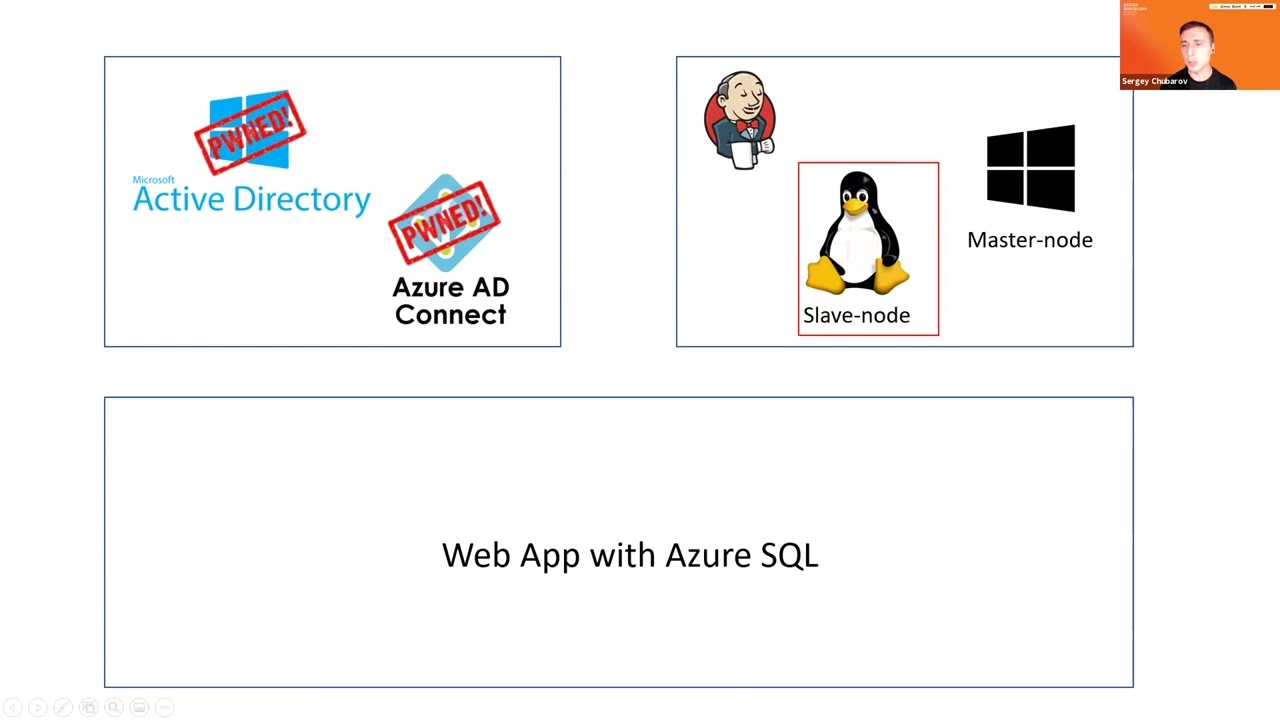 45:40
45:40 29:50
29:50 23:15
23:15 46:38
46:38